mirror controls VOLVO C70 2008 Owners Manual
[x] Cancel search | Manufacturer: VOLVO, Model Year: 2008, Model line: C70, Model: VOLVO C70 2008Pages: 246, PDF Size: 5.14 MB
Page 2 of 246
In Canada: Volvo Cars of Canada Corp.
National Customer Service
175 Gordon Baker Road
North York, Ontario M2H 2N7
1-800-663-8255
www.volvocanada.com
2007 © Volvo Car Corporation. All rights reserved.
2 Contents
00 Introduction
General information 6
Volvo and the environment7
Important warnings8
01 Safety
Occupant safety 12
Seat belts14
Supplemental Restraint System17
Front airbags18
Occupant Weight Sensor21
Side impact protection airbags24
Door mounted inflatable curtains25
Whiplash Protection System26
Roll-over Protection System28
Crash mode29
Child safety30
Child restraint systems33
Infant seats35
Convertible seats37
Booster cushions39
ISOFIX lower anchors40
Child restraint registration and
recalls41
02 Instruments and controls
Instrument overview
44
Instrument panel47
Symbols - instrument panel50
Information display53
Lighting panel55
Left-side steering wheel lever57
Trip computer58
Right-side steering wheel lever60
Cruise control62
Steering wheel adjustment, Hazard
warning flashers64
Parking brake
65
12-volt sockets66
Power windows67
Mirrors68
Personal settings71
HomeLink® Universal Transceiver
(option)73
ProCarManuals.com
Page 38 of 246

2 0 0 8
VOLVO C70
42 02 Instruments and controls
Instrument overview 44
Instrument panel47
Symbols - instrument panel50
Information display53
Lighting panel55
Left-side steering wheel lever57
Trip computer58
Right-side steering wheel lever60
Cruise control62
Steering wheel adjustment, Hazard warning flashers64
Parking brake65
12-volt sockets66
Power windows67
Mirrors68
Personal settings71
HomeLink® Universal Transceiver (option)73
43 02 Instruments and controls
44 02 Instruments and controls
Instrument overview
ProCarManuals.com
Page 39 of 246

45 02 Instruments and controls
Instrument overview
1. Steering wheel adjustment64
2. Hood opener207
3. Controls in driver's door(see inset illustration on the next page)
4. Left steering wheel lever57
5. Lighting panel, fuel filler door opener55
6. Door open handle, and locking button123
7. Lock indicator light123
8. Climate system air vent81
9. Side window air vent
10. Cruise control62
11. Horn, airbag18
12. Main instrument panel47
13. Audio controls234
14. Right steering wheel lever60
15. Ignition switch139
16. Rear-view mirror68
17. Seat belt reminder and Occupant Weight Sensor indicator16
18. Driver's side reading light100
19. Movement detector (option), alarm sensor127
20. Courtesy lighting switch100
21. Position for accessory switch
22. Passenger's side reading light100
23. Display for climate control, personal settings, and audio system
24. Controls for personal settings and audio system71
/234
ProCarManuals.com
Page 40 of 246
25. Controls for climate system82
26. Hazard warning flashers.64
27. Door open handle, and locking button123
28. Glove compartment103
29. Gear selector, manual143
Gear selector, automatic144
30. Parking brake65
31. 12-volt socket66
32. Switches for raising/lowering the power retractable hard top96
46 02 Instruments and controls
Instrument overview
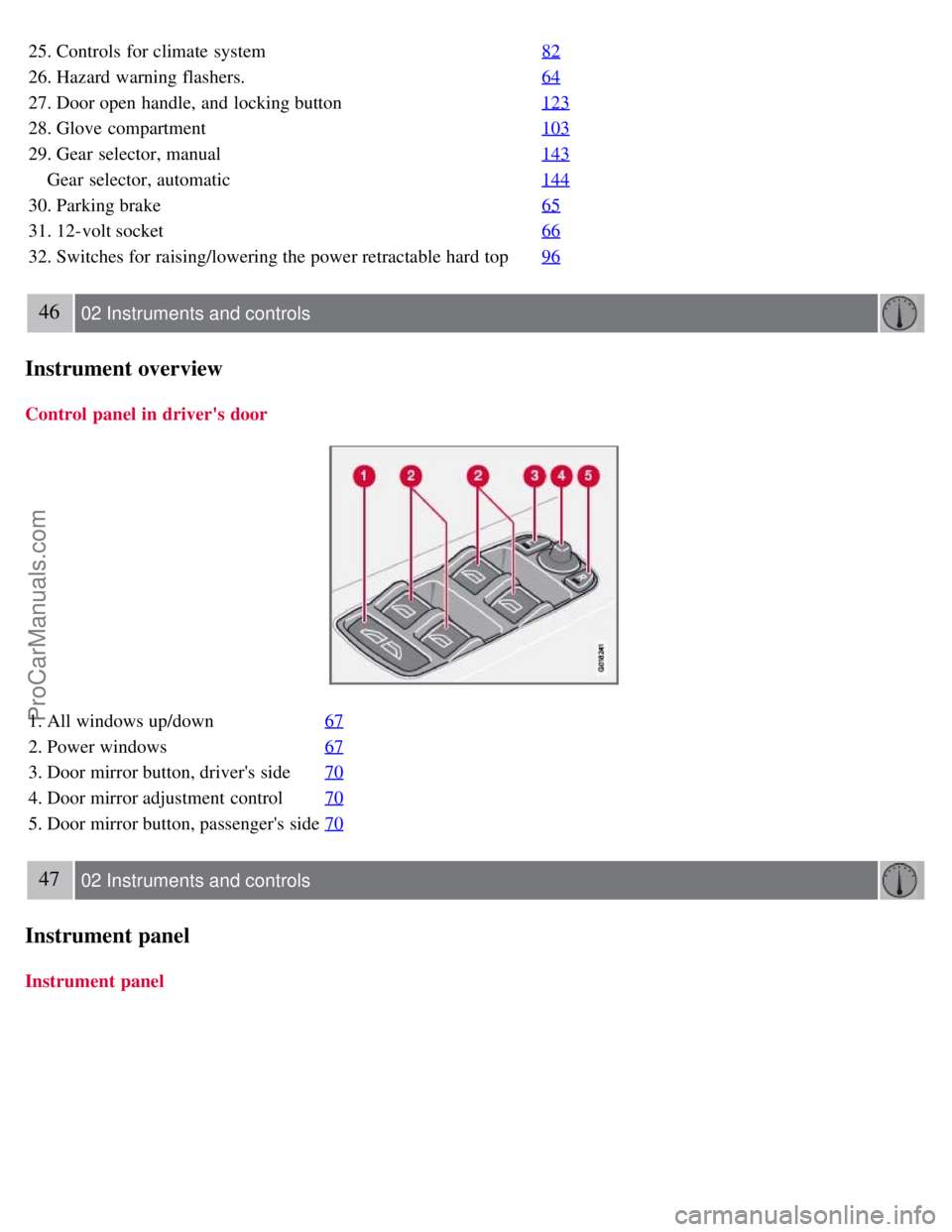
Control panel in driver's door
1. All windows up/down67
2. Power windows67
3. Door mirror button, driver's side70
4. Door mirror adjustment control70
5. Door mirror button, passenger's side70
47 02 Instruments and controls
Instrument panel
Instrument panel
ProCarManuals.com
Page 62 of 246

WARNING
Always remove the ignition key when the vehicle is unattended.
Never leave children unattended in the vehicle.
Make sure that the windows are completely unobstructed before they are operated.
Press down the front part of one or both buttons 3 as far as possible and release to automatically open the front
window(s) completely.
To stop the window at any time, pull the button up.
NOTE
To reduce buffeting wind noise if the rear windows are opened, also open the front windows slightly.
Closing a window
Lightly pull up the front edge of any of the buttons (2 or 3) to the first detent ("stop") to close a window to the
position of your choice.
Pull up the front part of one or both buttons 3 as far as possible and release to automatically close the front
window(s) completely.
All windows
Button 1 can be used to open or close all of the windows at the same time.
Briefly press the right side of the button to automatically open all of the windows.
Press and hold down the left side of the button to close all of the windows.
68 02 Instruments and controls
Mirrors
Rearview mirror
Auto-dim function
An optional integrated sensor reacts to headlights from following traffic and automatically reduces glare.
Rearview mirror with compass (option)
ProCarManuals.com
Page 63 of 246

The upper right-hand corner of the rearview mirror has an integrated display that shows the compass direction toward
which the car is pointing. Eight different directions can be displayed: N, NE, E, SE, S, SW, W and NW. The display
shows your car's orientation with respect to true north.
Calibrating the compass
The compass may need to be calibrated in certain cases. If calibration is required, the character C appears in the
mirror's display.
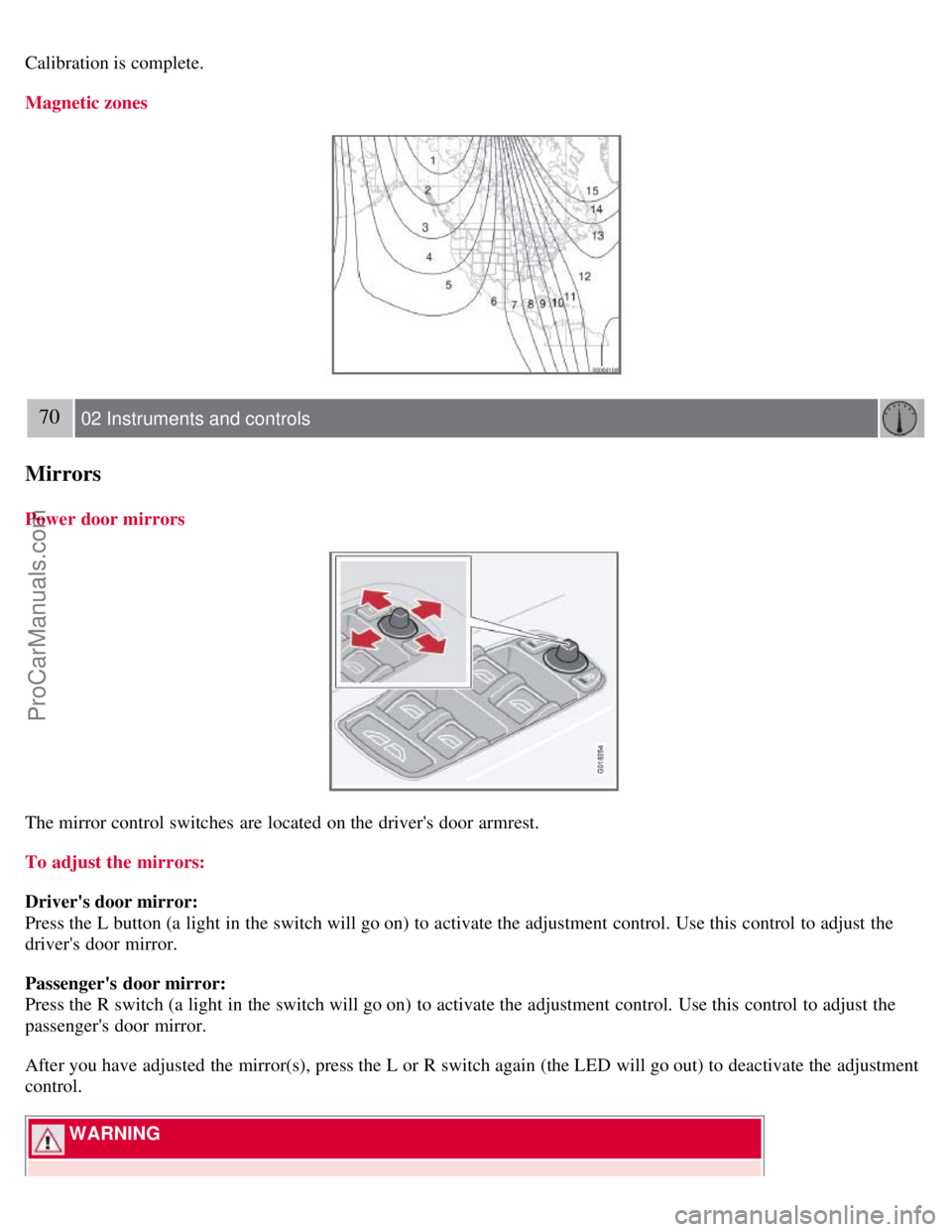
The earth is divided into 15 magnetic zones. The compass is initially set for the zone to which the car was delivered,
and should always be adjusted if the car is driven to a new magnetic zone. A "C" will be displayed if calibration
becomes necessary.
69 02 Instruments and controls
Mirrors
To calibrate the compass:
1. Stop the car in a large, open area, away from traffic.
2. Using a pen or similar object, hold the button (1) depressed for at least 6 seconds. "C" will be displayed.
3. Press button (1) for at least 3 seconds to display the number of the current magnetic zone.
4. Press button (1) repeatedly until the number for the required geographical area (1-15) is displayed. "C" will be
displayed again.
5. Drive slowly in a circle at a maximum speed of 6 m.p.h. (10 km/h) until a compass direction is displayed.
ProCarManuals.com
Page 64 of 246
Calibration is complete.
Magnetic zones
70 02 Instruments and controls
Mirrors
Power door mirrors
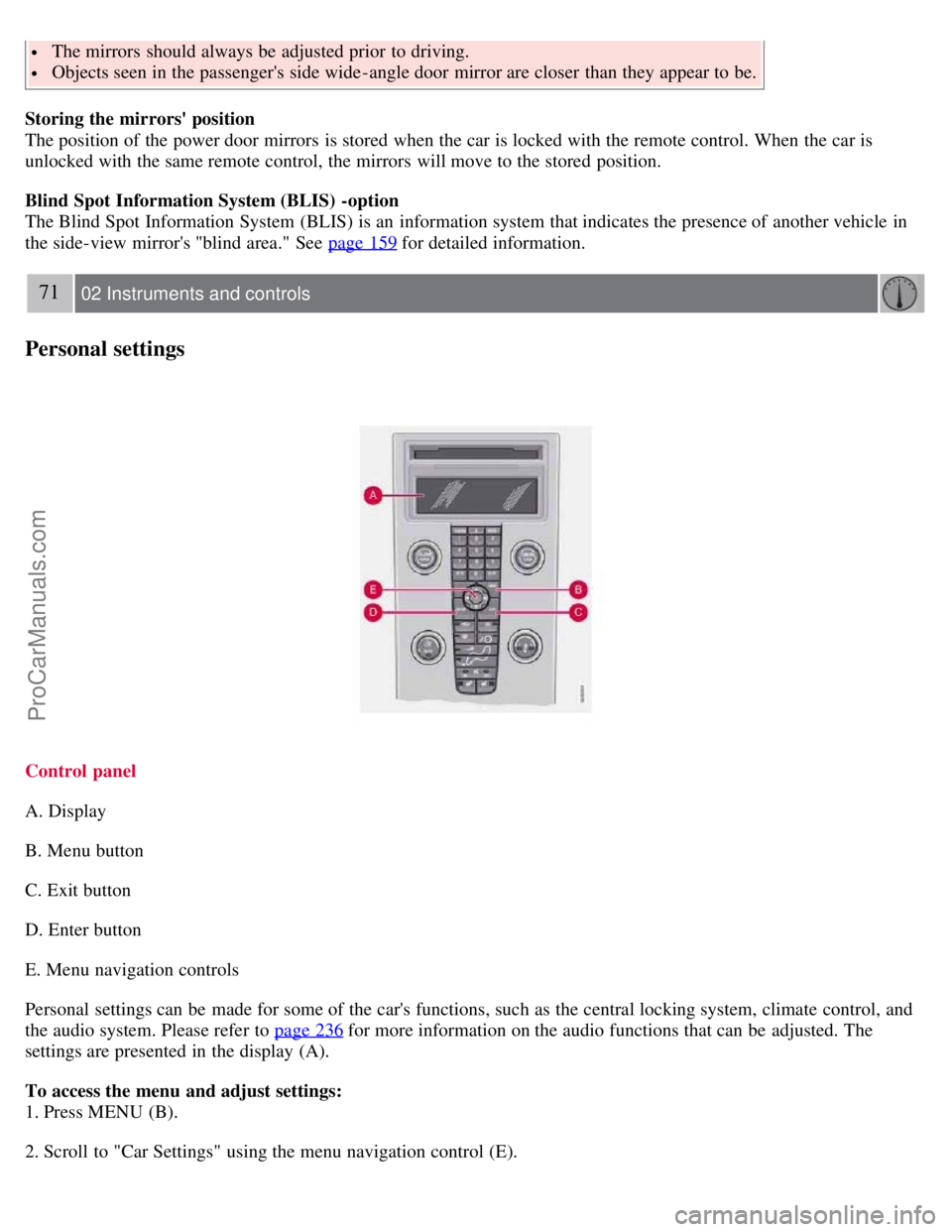
The mirror control switches are located on the driver's door armrest.
To adjust the mirrors:
Driver's door mirror:
Press the L button (a light in the switch will go on) to activate the adjustment control. Use this control to adjust the
driver's door mirror.
Passenger's door mirror:
Press the R switch (a light in the switch will go on) to activate the adjustment control. Use this control to adjust the
passenger's door mirror.
After you have adjusted the mirror(s), press the L or R switch again (the LED will go out) to deactivate the adjustment
control.
WARNING
ProCarManuals.com
Page 65 of 246
The mirrors should always be adjusted prior to driving.
Objects seen in the passenger's side wide -angle door mirror are closer than they appear to be.
Storing the mirrors' position
The position of the power door mirrors is stored when the car is locked with the remote control. When the car is
unlocked with the same remote control, the mirrors will move to the stored position.
Blind Spot Information System (BLIS) -option
The Blind Spot Information System (BLIS) is an information system that indicates the presence of another vehicle in
the side-view mirror's "blind area." See page 159
for detailed information.
71 02 Instruments and controls
Personal settings
Control panel
A. Display
B. Menu button
C. Exit button
D. Enter button
E. Menu navigation controls
Personal settings can be made for some of the car's functions, such as the central locking system, climate control, and
the audio system. Please refer to page 236
for more information on the audio functions that can be adjusted. The
settings are presented in the display (A).
To access the menu and adjust settings:
1. Press MENU (B).
2. Scroll to "Car Settings" using the menu navigation control (E).
ProCarManuals.com
Page 76 of 246

8. Heated front passenger's seat
9. Rear window and door mirror defrosters
10. Temperature selector
NOTE
The sunlight sensor on the upper side of the dashboard and the passenger compartment temperature sensor, located
behind the climate system control panel, should not be obstructed.
The air conditioning system is temporarily switched off during full throttle acceleration.
ECC functions
1. Auto - On/Off
The AUTO function automatically regulates climate control to maintain the desired temperature. The automatic
function controls heating, air conditioning, blower speed, recirculation, and air distribution.
If you select one or more manual functions, the remaining functions continue to be controlled automatically. All
manual settings are
83 03 Climate
Electronic Climate Control (ECC)
switched off when AUTO is switched on. AUTO CLIMATE is shown in the display.
2. Blower speed
The blower speed can be increased or decreased by turning the knob. The blower speed is regulated automatically if
AUTO is selected. The previously set blower speed is disconnected.
NOTE
If the knob is turned counterclockwise and the blower indication in the display goes out, the blower and the air
conditioning are switched off. The display shows the blower symbol and OFF.
3. Recirculation
This function can be used to shut out exhaust fumes, smoke, etc from the passenger compartment. The air in the
passenger compartment is then recirculated, i.e. no air from outside the car is taken into the car when this function is
activated.
If the air in the car recirculates for too long, there is a risk of condensation forming on the insides of the windows,
ProCarManuals.com
Page 83 of 246

adjusted or during a period of 40 seconds. The power passenger's seat can only be adjusted if the ignition key is in
position I or II, or if the engine is running.
Adjusting the seat
Seat adjustment controls 1, 2, 3, and 4 on the side of the seat can be used to move the seat to the position of your
choice.
1. Move this section of the control up or down to raise/lower the front section of the seat cushion.
2. Move the control forward/rearward to move the seat forward or rearward.
3. Move this section of the control up or down to raise/lower the rear section of the seat cushion.
4. Backrest tilt.
NOTE
The power seats have an overload protector that activates if a seat is blocked by any object. If this occurs, switch off
the ignition (key in position 0) and wait for approximately 20 seconds before operating the seat again.
Emergency stop
If the seat inadvertently begins to move, press any of the buttons to stop the seat.
Programming the seat memory, driver's seat only (option)
Three different seating positions (and the position of the door mirrors) can be stored in the seat's memory. The
memory buttons are located on the outboard side of the driver's seat (see the illustration).
The following example explains how memory button 1 can be programmed. Buttons 2 and 3 can be programmed in the
same way.
To program (store) a seat position in memory button 1:
1. Adjust the seat (and door mirrors) to the desired position (see the instructions under "Adjusting the seat").
93 04 Interior
Front seats
2. Press and hold down the "M" (Memory) button.
ProCarManuals.com