airbag off VOLVO C70 2013 Owner´s Manual
[x] Cancel search | Manufacturer: VOLVO, Model Year: 2013, Model line: C70, Model: VOLVO C70 2013Pages: 296, PDF Size: 7.18 MB
Page 125 of 296
05 Locks and alarm
Remote key and key blade
05
123 Remote key functions
G019402
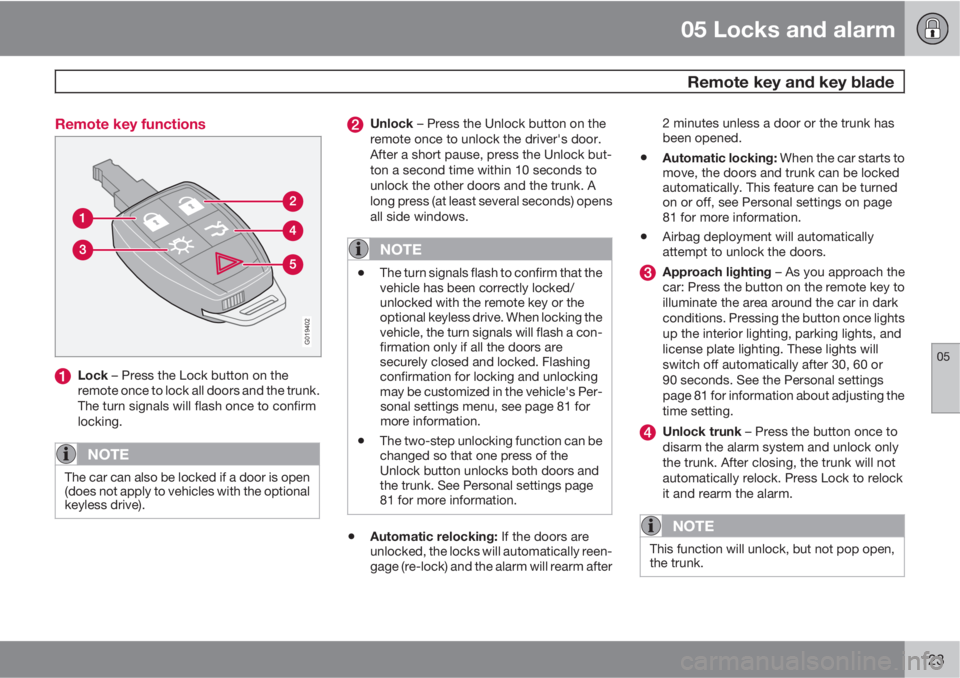
Lock – Press the Lock button on the
remote once to lock all doors and the trunk.
The turn signals will flash once to confirm
locking.
NOTE
The car can also be locked if a door is open
(does not apply to vehicles with the optional
keyless drive).
Unlock – Press the Unlock button on the
remote once to unlock the driver's door.
After a short pause, press the Unlock but-
ton a second time within 10 seconds to
unlock the other doors and the trunk. A
long press (at least several seconds) opens
all side windows.
NOTE
•The turn signals flash to confirm that the
vehicle has been correctly locked/
unlocked with the remote key or the
optional keyless drive. When locking the
vehicle, the turn signals will flash a con-
firmation only if all the doors are
securely closed and locked. Flashing
confirmation for locking and unlocking
may be customized in the vehicle's Per-
sonal settings menu, see page 81 for
more information.
•The two-step unlocking function can be
changed so that one press of the
Unlock button unlocks both doors and
the trunk. See Personal settings page
81 for more information.
•Automatic relocking: If the doors are
unlocked, the locks will automatically reen-
gage (re-lock) and the alarm will rearm after2 minutes unless a door or the trunk has
been opened.
•Automatic locking: When the car starts to
move, the doors and trunk can be locked
automatically. This feature can be turned
on or off, see Personal settings on page
81 for more information.
•Airbag deployment will automatically
attempt to unlock the doors.
Approach lighting – As you approach the
car: Press the button on the remote key to
illuminate the area around the car in dark
conditions. Pressing the button once lights
up the interior lighting, parking lights, and
license plate lighting. These lights will
switch off automatically after 30, 60 or
90 seconds. See the Personal settings
page 81 for information about adjusting the
time setting.
Unlock trunk – Press the button once to
disarm the alarm system and unlock only
the trunk. After closing, the trunk will not
automatically relock. Press Lock to relock
it and rearm the alarm.
NOTE
This function will unlock, but not pop open,
the trunk.
Page 288 of 296
12 Index
12
286
1, 2, 3 ...
12-volt sockets..................................63, 117
A
A/C (air conditioning)................................. 88
ABS (anti-lock brake system).................. 155
Accessory installation warning.................. 14
Adaptive brake lights............................... 154
Airbags
front...................................................... 25
inflatable curtain................................... 34
side impact........................................... 32
Airbag system............................................ 25
Air conditioning.......................................... 88
Air distribution table................................... 95
Air vents..................................................... 90
Alarm system........................................... 135
turning off sensors.............................. 136
Anti-lock Brake System (ABS)................. 155
Approach lighting...................................... 82
Audio files................................................ 259Audio system
audio functions................................... 245
automatic sound control..................... 249
AUX port............................................. 246
Bluetooth streaming audio................. 247
compact disc care.............................. 260
Dolby Surround Pro Logic II............... 248
equalizer............................................. 249
HD digital radio................................... 253
menu settings..................................... 262
radio functions.................................... 251
selecting a sound source.................... 245
SiriusXM
E satellite radio.................... 255
sound settings.................................... 248
steering wheel keypad........................ 245
storing radio stations.......................... 251
subwoofer........................................... 248
USB/iPodŸ connector........................ 246
Auto-dim rearview mirror........................... 78
Autolock..................................................... 81
Automatic locking retractor....................... 40
Automatic sound control.........................249
Automatic transmission........................... 151
kickdown............................................ 152
oil........................................................ 275
shiftlock override................................ 153
Automatic transmission - Geartronic....... 152AUX port.................................................. 246
Axle weight......................................185, 273
B
Bass......................................................... 248
Battery
maintenance....................................... 224
remote key, replacing......................... 124
specifications...................................... 280
warning symbols................................. 224
Battery – replacing................................... 225
Blind Spot Information System (BLIS)..... 168
Bluetooth cell phone connection............. 263
Booster cushion
accessory............................................. 47
Brake fluid........................................ 222, 275
Brake lights........................................ 66, 154
Brake system
anti-lock brakes (ABS)........................ 155
Brake pad inspection.......................... 154
emergency brake assistance.............. 156
fluid..................................................... 222
general information............................. 154