mirror VOLVO C70 2013 Owner´s Manual
[x] Cancel search | Manufacturer: VOLVO, Model Year: 2013, Model line: C70, Model: VOLVO C70 2013Pages: 296, PDF Size: 7.18 MB
Page 82 of 296
02 Instruments and controls
Mirrors
02
80* Option/accessory, for more information, see Introduction.
Folding the mirrors outFold out the mirrors by pressing down the L
and R buttons at the same time. The mirrors
automatically fold out to the fully extended
position.
Automatic foldingWhen the vehicle is locked/unlocked with the
remote key or with the optional keyless drive
system (see page 128), the power door mirrors
with automatically fold in or out.
NOTE
The door mirrors will not fold out automati-
cally when the vehicle is unlocked if they
were folded in using the buttons on the driv-
er's door control panel.
This function can be activated/deactivated in
Personal settings (see page 81). In the menu
system, go to Car settings…
Mirror fold
on locking.
Return to "neutral" positionIf a mirror has been inadvertently moved (bum-
ped in a parking lot, etc.) from its original (neu-
tral) position, it must be moved back to this
position before automatic folding will function
again.
To do so:1.
Fold in the mirrors by pressing the L and
R mirror control buttons on the driver's
door at the same time.
2.
Fold them out again by pressing the L and
R mirror control buttons.
This returns the mirrors to their original (neutral)
positions.
Blind Spot Information System (BLIS)*The Blind Spot Information System (BLIS) is an
information system that indicates the presence
of another vehicle in the side-view mirror's
"blind area." See page 168 for detailed infor-
mation.
Page 84 of 296
02 Instruments and controls
Personal settings
02
82* Option/accessory, for more information, see Introduction.
•Global (All doors) – unlocks all doors and
the trunk with one press on the remote key.
•Two Step (Two-stage unlocking) – This
alternative unlocks the driver's door with
one press on the remote key. A second
press unlocks the passenger's door and
the trunk
Automatically folding the door mirrorsThe setting makes it possible to automatically
fold the door mirrors in or out when the vehicle
is locked or unlocked. See page 79.
Operating side windowsThe following alternative can be selected for
opening all side windows at the same time by
pressing and holding the Unlock button on the
central locking system’s remote key, (see
page 132 for additional information).
•Auto open all windows On/Off
Temporarily turning off the double
locking function and alarm sensor(s)
The double locking function and the alarm sen-
sors can be temporarily turned off (if, for exam-
ple, a person or a pet remains in the vehicle
when the doors are locked from outside with
the remote key, and the power retractable hard
top is down. There are two alternatives:
Activate once and Ask on exit, see
page 136 for additional information.
Approach lightingThis alternative determines the length of time
for which the car's lights will remain on when
the Approach light button on the central lock-
ing system's remote key is pressed. Intervals
of 30/60/90 seconds may be selected, see the
section "Remote key functions" for more infor-
mation.
Home safe lightingThis alternative determines the length of time
for which the car's lights will remain on when
the high beam lever on the steering column is
pulled toward the wheel with the ignition
switched off. Intervals of 30/60/90 seconds
may be selected, see page 68 for information
on using this function.
Information
•VIN number – The VIN (Vehicle Identifica-
tion Number) is the car's unique identity
number.
•Number of Keys – the number of keys reg-
istered for the car is displayed here.
Climate functions
•Blower speed in AUTO mode – the blower
speed can be set to AUTO mode in modelsequipped with ECC. Choose between
"Low", "Normal" and "High".
•Timer for recirculation – when the timer is
active, the air recirculates in the car for
3–12 minutes depending on the ambient
temperature. Select On/Off depending on
whether the recirculation timer is to be
active or not.
Keyless locking and unlocking*The following alternatives can be selected for
locking and unlocking the doors and trunk:
•All doors – all doors are locked or unlocked
at the same time.
•Doors on the same side – front and rear
doors on the same side are unlocked
together.
•Both front doors – both front doors are
unlocked together.
•One front door – either of the front doors
can be unlocked separately1.
Reset to factory settingsUse this alternative to return to the default cli-
mate system settings.
1Factory default.
Page 91 of 296
03 Climate
General information
03
89
For information about how to make these set-
tings, see the Personal settings section on
page 81.
Electronic Climate Control (ECC)
sensors
•The sunlight sensor is on the upper side of
the dashboard.
•The passenger compartment temperature
sensor is located behind the climate sys-
tem control panel.
•The ambient temperature sensor is in the
driver's side door mirror.
•The humidity sensor is in the rearview mir-
ror.
NOTE
The sunlight sensor monitors the side of the
vehicle from which the sun shines into the
passenger compartment. This means that
the temperature may differ slightly between
the left and right air vents, even if the climate
system temperature is set to be the same
for both sides of the passenger compart-
ment.
These sensors should never be obstructed.
Side windows and power retractable
hardtop
The electronic climate control system will func-
tion best if the windows and power retractable
hardtop are closed. If you drive with the win-
dows or hardtop open, it may be preferable to
manually adjust the temperature and blower
control (the LED in the AUTO switch should be
off).
AccelerationThe air conditioning system is temporarily
switched off during full throttle acceleration.
Page 93 of 296
03 Climate
Electronic Climate Control (ECC)
03
91
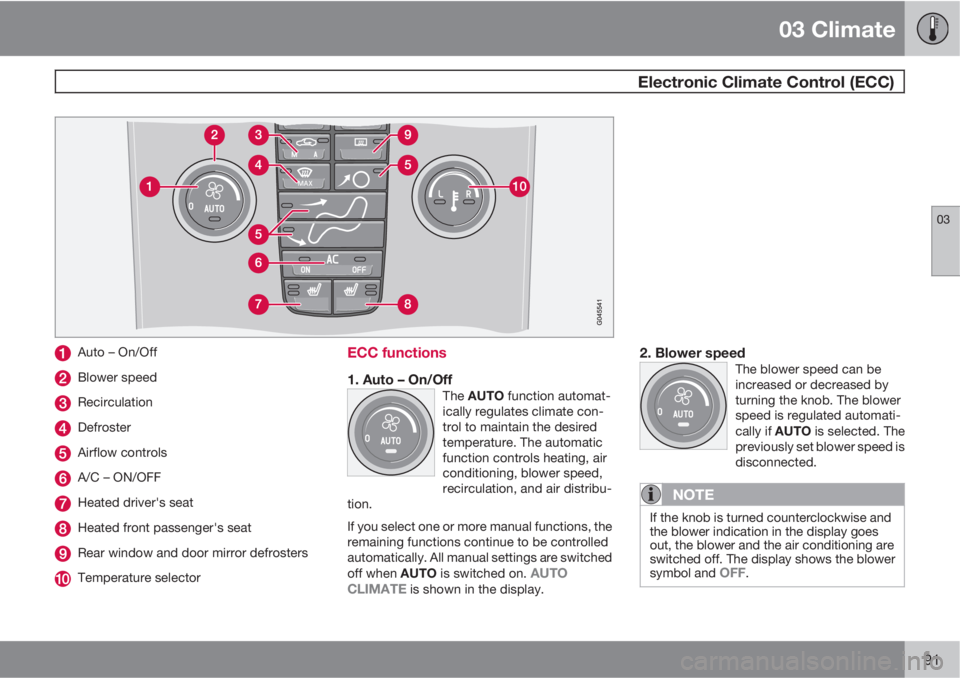
Auto – On/Off
Blower speed
Recirculation
Defroster
Airflow controls
A/C – ON/OFF
Heated driver's seat
Heated front passenger's seat
Rear window and door mirror defrosters
Temperature selector
ECC functions
1. Auto – On/OffThe AUTO function automat-
ically regulates climate con-
trol to maintain the desired
temperature. The automatic
function controls heating, air
conditioning, blower speed,
recirculation, and air distribu-
tion.
If you select one or more manual functions, the
remaining functions continue to be controlled
automatically. All manual settings are switched
off when AUTO is switched on.
AUTO
CLIMATE is shown in the display.
2. Blower speedThe blower speed can be
increased or decreased by
turning the knob. The blower
speed is regulated automati-
cally if AUTO is selected. The
previously set blower speed is
disconnected.
NOTE
If the knob is turned counterclockwise and
the blower indication in the display goes
out, the blower and the air conditioning are
switched off. The display shows the blower
symbol and
OFF.
Page 95 of 296
03 Climate
Electronic Climate Control (ECC)
03
* Option/accessory, for more information, see Introduction.93
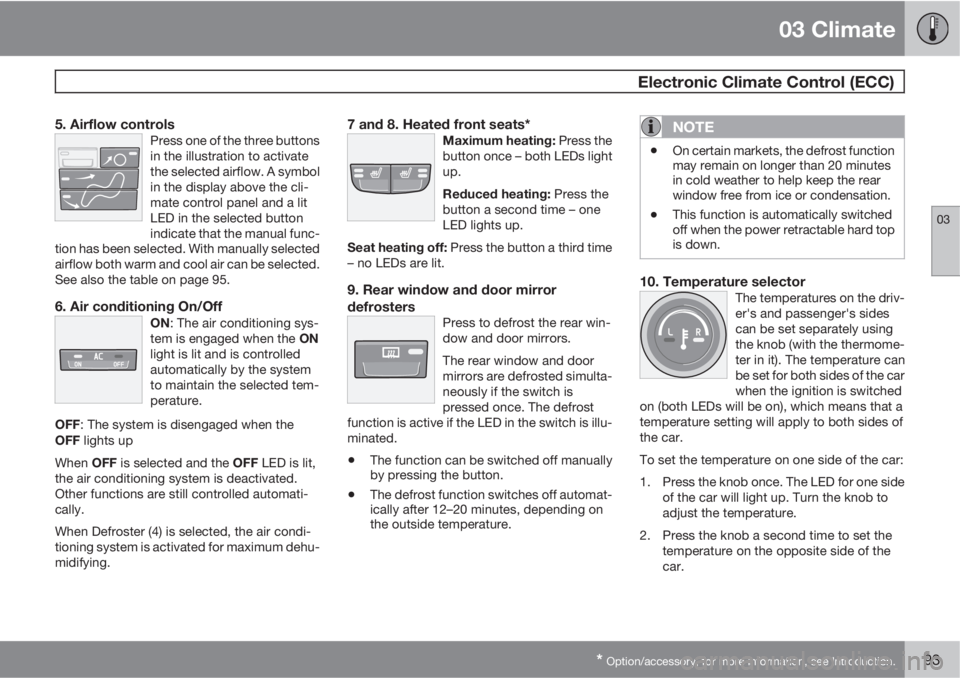
5. Airflow controlsPress one of the three buttons
in the illustration to activate
the selected airflow. A symbol
in the display above the cli-
mate control panel and a lit
LED in the selected button
indicate that the manual func-
tion has been selected. With manually selected
airflow both warm and cool air can be selected.
See also the table on page 95.
6. Air conditioning On/OffON: The air conditioning sys-
tem is engaged when the ON
light is lit and is controlled
automatically by the system
to maintain the selected tem-
perature.
OFF: The system is disengaged when the
OFF lights up
When OFF is selected and the OFF LED is lit,
the air conditioning system is deactivated.
Other functions are still controlled automati-
cally.
When Defroster (4) is selected, the air condi-
tioning system is activated for maximum dehu-
midifying.
7 and 8. Heated front seats*Maximum heating: Press the
button once – both LEDs light
up.
Reduced heating: Press the
button a second time – one
LED lights up.
Seat heating off: Press the button a third time
– no LEDs are lit.
9. Rear window and door mirror
defrosters
Press to defrost the rear win-
dow and door mirrors.
The rear window and door
mirrors are defrosted simulta-
neously if the switch is
pressed once. The defrost
function is active if the LED in the switch is illu-
minated.
•The function can be switched off manually
by pressing the button.
•The defrost function switches off automat-
ically after 12–20 minutes, depending on
the outside temperature.
NOTE
•On certain markets, the defrost function
may remain on longer than 20 minutes
in cold weather to help keep the rear
window free from ice or condensation.
•This function is automatically switched
off when the power retractable hard top
is down.
10. Temperature selectorThe temperatures on the driv-
er's and passenger's sides
can be set separately using
the knob (with the thermome-
ter in it). The temperature can
be set for both sides of the car
when the ignition is switched
on (both LEDs will be on), which means that a
temperature setting will apply to both sides of
the car.
To set the temperature on one side of the car:
1. Press the knob once. The LED for one side
of the car will light up. Turn the knob to
adjust the temperature.
2. Press the knob a second time to set the
temperature on the opposite side of the
car.
Page 96 of 296
03 Climate
Electronic Climate Control (ECC)
03
94
3. Press the knob a third time to set the tem-
perature on both sides of the car at the
same time.
NOTE
Selecting a temperature that is higher or
lower than necessary will not heat or cool
the passenger compartment faster.
Sensors
•The sunlight sensor is on the upper side of
the dashboard
•The passenger compartment temperature
sensor is located behind the climate sys-
tem control panel.
•The ambient temperature sensor is in the
driver's side door mirror.
•The humidity sensor is in the rearview mir-
ror.
These sensors should never be obstructed.
NOTE
The sunlight sensor monitors the side of the
vehicle from which the sun shines into the
passenger compartment. This means that
the temperature may differ slightly between
the left and right air vents, even if the climate
system temperature is set to be the same
for both sides of the passenger compart-
ment.
AccelerationThe air conditioning system is temporarily
switched off during full throttle acceleration.
Page 104 of 296
04 Interior
Front seats
04
102* Option/accessory, for more information, see Introduction.
Move this section of the control up or down
to raise/lower the front section of the seat
cushion.
Move the control forward/rearward to
move the seat forward or rearward.
Move this section of the control up or down
to raise/lower the rear section of the seat
cushion.
Backrest tilt.
NOTE
Both front seats are equipped with head
restraints that can be adjusted vertically to
suit the height of the passenger. The upper
edge of the head restraint should be at least
on a level with the upper-most point of the
seat occupant's ear (see the section
"Adjusting the front seat head restraints" on
page 103).
NOTE
The power seats have an overload protector
that activates if a seat is blocked by any
object. If this occurs, switch off the ignition
(key in position 0) and wait for approxi-
mately 20 seconds before operating the
seat again.
Emergency stopIf the seat inadvertently begins to move, press
any of the buttons to stop the seat.
Programming the seat memory, driver's
seat only*
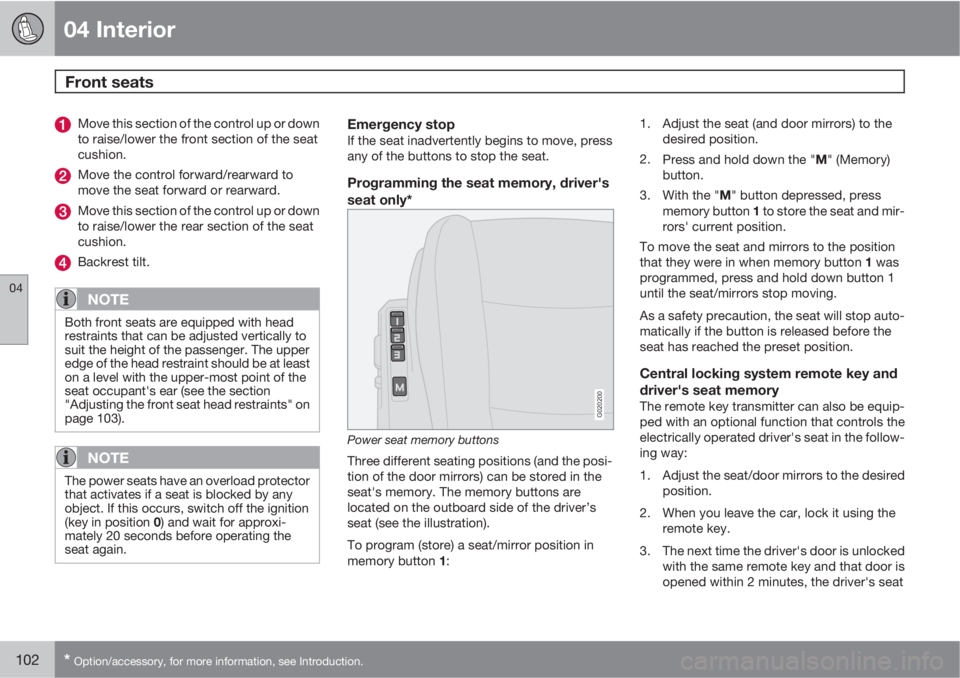
G020200
Power seat memory buttons
Three different seating positions (and the posi-
tion of the door mirrors) can be stored in the
seat's memory. The memory buttons are
located on the outboard side of the driver’s
seat (see the illustration).
To program (store) a seat/mirror position in
memory button 1:1. Adjust the seat (and door mirrors) to the
desired position.
2.
Press and hold down the "M" (Memory)
button.
3.
With the "M" button depressed, press
memory button 1 to store the seat and mir-
rors' current position.
To move the seat and mirrors to the position
that they were in when memory button 1 was
programmed, press and hold down button 1
until the seat/mirrors stop moving.
As a safety precaution, the seat will stop auto-
matically if the button is released before the
seat has reached the preset position.
Central locking system remote key and
driver's seat memory
The remote key transmitter can also be equip-
ped with an optional function that controls the
electrically operated driver's seat in the follow-
ing way:
1. Adjust the seat/door mirrors to the desired
position.
2. When you leave the car, lock it using the
remote key.
3. The next time the driver's door is unlocked
with the same remote key and that door is
opened within 2 minutes, the driver's seat
Page 105 of 296
04 Interior
Front seats
04
103
and door mirrors will automatically move to
the position that they were in when the
doors were most recently locked with the
same remote key.
NOTE
The memory function in the remote key
operates independently the memory func-
tion in the seat.
WARNING
•Because the driver's seat can be
adjusted with the ignition off, children
should never be left unattended in the
car.
•Movement of the seat can be STOPPED
at any time by pressing any button on
the power seat control panel.
•Do not adjust the seat while driving. The
seat should be adjusted so that the
brake pedal can be depressed fully. In
addition, position the seat as far rear-
ward as comfort and control allow.
•The seat rails on the floor must not be
obstructed in any way when the seat is
in motion.
Adjusting the front seat head restraints
The front seat head restraints are designed so
that they can be adjusted to two different
height positions.
NOTE
•When the vehicle leaves the factory, the
front seat head restraints will be in the
lower position.
•Due to the low roofline of the Volvo C70,
it is necessary to have the front seat
head restraints in the lowest position if
you wish to fold the seat's backrest for-
ward or operate the power retractable
hard top.
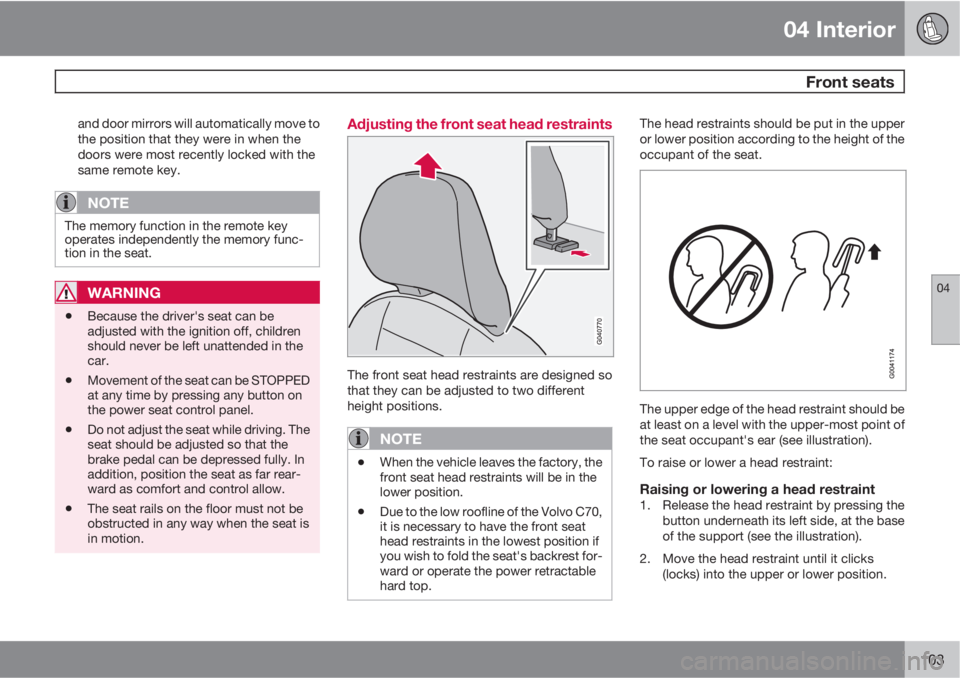
The head restraints should be put in the upper
or lower position according to the height of the
occupant of the seat.
The upper edge of the head restraint should be
at least on a level with the upper-most point of
the seat occupant's ear (see illustration).
To raise or lower a head restraint:
Raising or lowering a head restraint1. Release the head restraint by pressing the
button underneath its left side, at the base
of the support (see the illustration).
2. Move the head restraint until it clicks
(locks) into the upper or lower position.
Page 113 of 296
04 Interior
Interior lighting
04
111
switched off, or after a door has been opened
or closed.
These lights switch off automatically 5 minutes
after the engine has been switched off.
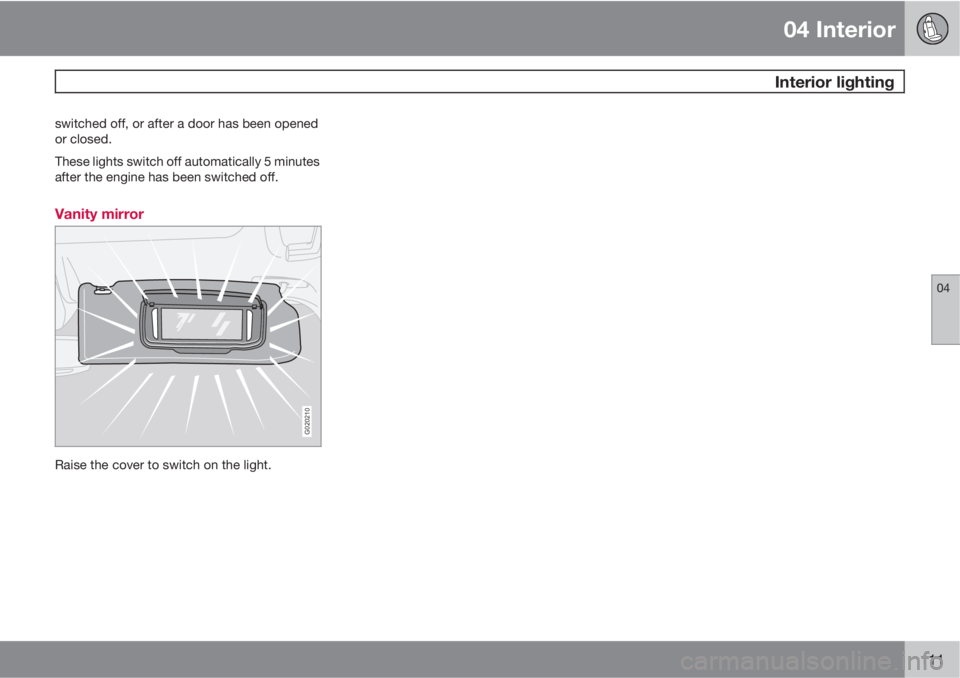
Vanity mirror
G020210
Raise the cover to switch on the light.
Page 149 of 296
06 Starting and driving
Starting the vehicle
06
147 To start the engine
WARNING
Before starting, check that the seat, steering
wheel and mirrors are adjusted properly.
Make sure the brake pedal can be
depressed completely. Adjust the seat if
necessary.
1. Fasten the seat belt.
2. Apply the parking brake if not already set.
The gear selector should be locked in the
Park (P) position (Shiftlock). See also page
153.
NOTE
After a cold start, idle speed may be notice-
ably higher than normal for a short period.
This is done to help bring components in the
emission control system to their normal
operating temperature as quickly as possi-
ble, which enables them to control emis-
sions and help reduce the vehicle's impact
on the environment.
3. The vehicle is equipped with an autostart
feature. Without touching the throttle
pedal, turn the key to position III andrelease it. The starter motor will then oper-
ate automatically (for up to ten seconds)
until the engine starts. If the engine fails to
start, repeat this step.
CAUTION
If the engine does not start after the third try,
wait for approximately 3 minutes before try-
ing to start it again to give the battery time
to recover its starting capacity.
4. To release the gear selector from the Park
(P) position, the engine must be running (or
the ignition key must be in position II) and
the brake pedal must be depressed.
5. Select the desired gear. The gear engages
after a very slight delay, which is especially
noticeable when selecting R.
WARNING
•Never use more than one floor mat at a
time on the driver's floor. An extra mat
on the driver's floor can cause the
accelerator and/or brake pedal to
catch. Check that the movement of
these pedals is not impeded.
•Volvo's floor mats are specially manu-
factured for your car. They must be
firmly secured in the clips on the floor so
that they cannot slide and become trap-
ped under the pedals on the driver's
side.