top VOLVO C70 2013 Owner´s Manual
[x] Cancel search | Manufacturer: VOLVO, Model Year: 2013, Model line: C70, Model: VOLVO C70 2013Pages: 296, PDF Size: 7.18 MB
Page 218 of 296
09 Maintenance and servicing
Maintaining your car 09
216
How Do States Use OBD II for Emission
Inspections?
Many states connect a computer directly to a
vehicle's OBD II system. The inspector can
then read "faults." In some states, this type of
inspection has replaced the tailpipe emission
test.
How Can My Vehicle Fail OBD II Emission
Inspection?
Your vehicle can fail OBD II emission inspec-
tion for any of the following reasons.
•If your Check Engine (MIL) light is lit, your
vehicle may fail inspection.
•If your vehicle's Check Engine light was lit,
but went out without any action on your
part, OBD II will still have a recorded fault.
Your vehicle may pass or fail, depending
on the inspection practices in your area.
•If you had recent service that required dis-
connecting the battery, OBD II diagnostic
information may be incomplete and "not
ready" for inspection. A vehicle that is not
ready may fail inspection.
How Can I Prepare for My Next OBD II
Emission Inspection?
•If your Check Engine (MIL) light is lit – or
was lit but went out without service, haveyour vehicle diagnosed and, if necessary,
serviced by a qualified Volvo technician.
•If you recently had service for a lit Check
Engine light, or if you had service that
required disconnecting the battery, a
period of driving is necessary to bring the
OBD II system to "ready" for inspection. A
half-hour trip of mixed stop-and-go/high-
way driving is typically needed to allow
OBD II to reach readiness. Your Volvo
retailer can provide you with more infor-
mation on planning a trip.
•Maintain your vehicle in accordance with
your vehicle's maintenance schedule.
Page 223 of 296
09 Maintenance and servicing
Fluids09
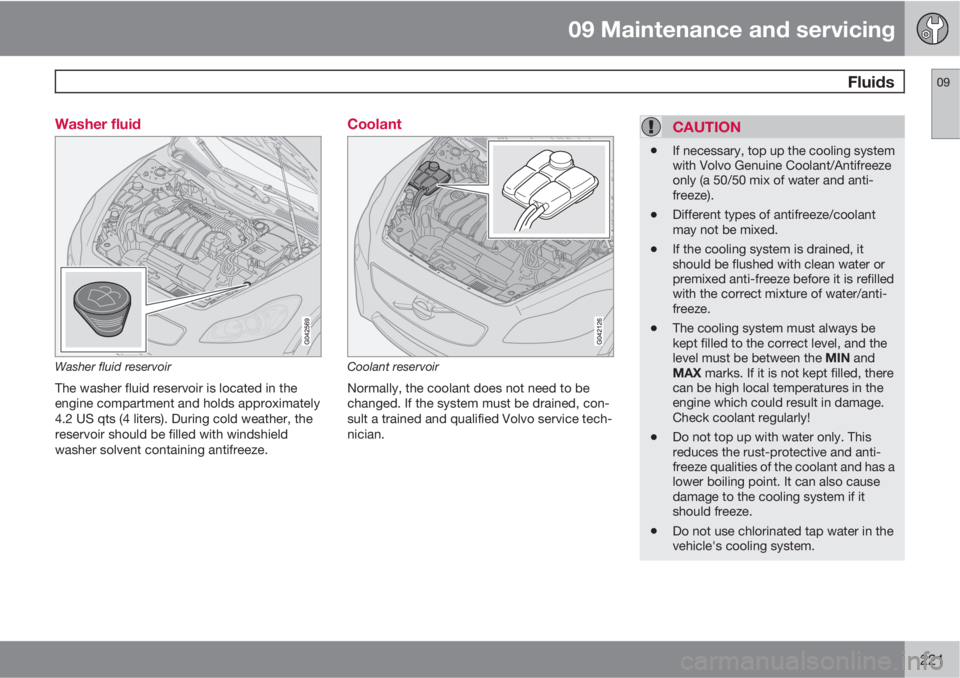
221 Washer fluid
Washer fluid reservoir
The washer fluid reservoir is located in the
engine compartment and holds approximately
4.2 US qts (4 liters). During cold weather, the
reservoir should be filled with windshield
washer solvent containing antifreeze.
Coolant
Coolant reservoir
Normally, the coolant does not need to be
changed. If the system must be drained, con-
sult a trained and qualified Volvo service tech-
nician.
CAUTION
•If necessary, top up the cooling system
with Volvo Genuine Coolant/Antifreeze
only (a 50/50 mix of water and anti-
freeze).
•Different types of antifreeze/coolant
may not be mixed.
•If the cooling system is drained, it
should be flushed with clean water or
premixed anti-freeze before it is refilled
with the correct mixture of water/anti-
freeze.
•The cooling system must always be
kept filled to the correct level, and the
level must be between the MIN and
MAX marks. If it is not kept filled, there
can be high local temperatures in the
engine which could result in damage.
Check coolant regularly!
•Do not top up with water only. This
reduces the rust-protective and anti-
freeze qualities of the coolant and has a
lower boiling point. It can also cause
damage to the cooling system if it
should freeze.
•Do not use chlorinated tap water in the
vehicle's cooling system.
Page 224 of 296
09 Maintenance and servicing
Fluids 09
222
WARNING
•Never remove the expansion tank cap
while the engine is warm. Wait until the
engine cools.
•If it is necessary to top off the coolant
when the engine is warm, unscrew the
expansion tank cap slowly so that the
overpressure dissipates.
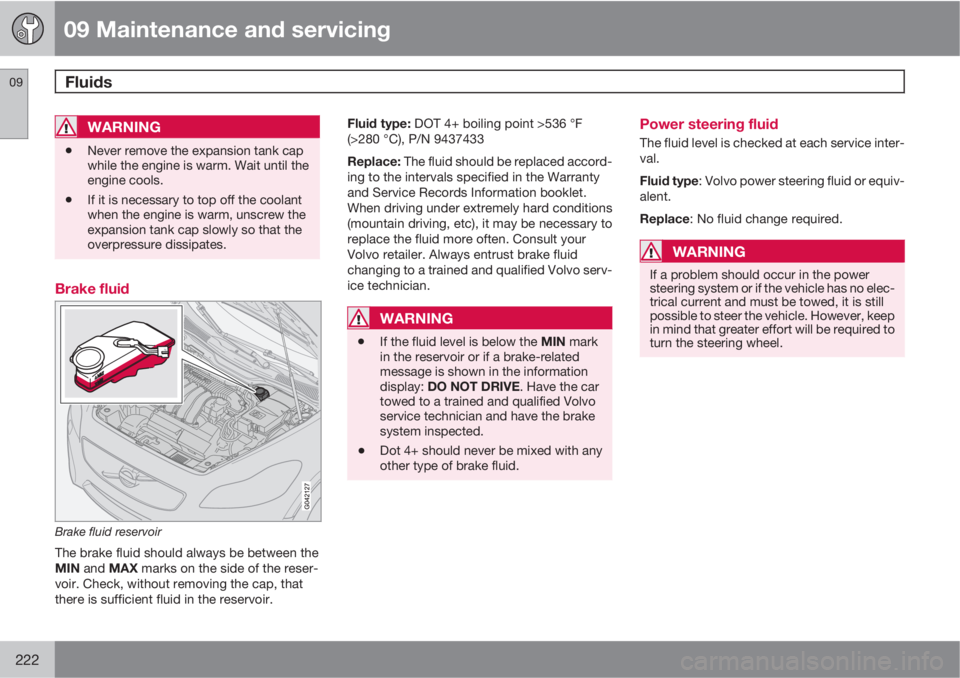
Brake fluid
Brake fluid reservoir
The brake fluid should always be between the
MIN and MAX marks on the side of the reser-
voir. Check, without removing the cap, that
there is sufficient fluid in the reservoir.Fluid type: DOT 4+ boiling point >536 °F
(>280 °C), P/N 9437433
Replace: The fluid should be replaced accord-
ing to the intervals specified in the Warranty
and Service Records Information booklet.
When driving under extremely hard conditions
(mountain driving, etc), it may be necessary to
replace the fluid more often. Consult your
Volvo retailer. Always entrust brake fluid
changing to a trained and qualified Volvo serv-
ice technician.
WARNING
•If the fluid level is below the MIN mark
in the reservoir or if a brake-related
message is shown in the information
display: DO NOT DRIVE. Have the car
towed to a trained and qualified Volvo
service technician and have the brake
system inspected.
•Dot 4+ should never be mixed with any
other type of brake fluid.
Power steering fluid
The fluid level is checked at each service inter-
val.
Fluid type: Volvo power steering fluid or equiv-
alent.
Replace: No fluid change required.
WARNING
If a problem should occur in the power
steering system or if the vehicle has no elec-
trical current and must be towed, it is still
possible to steer the vehicle. However, keep
in mind that greater effort will be required to
turn the steering wheel.
Page 232 of 296
09 Maintenance and servicing
Replacing bulbs 09
230
6. Press a new bulb into place and turn it
clockwise.
7.
Reinsert the bulb holder. The mark TOP
should be upward.
8. Secure the fog light housing with the
retaining screw and press the panel back
into place.
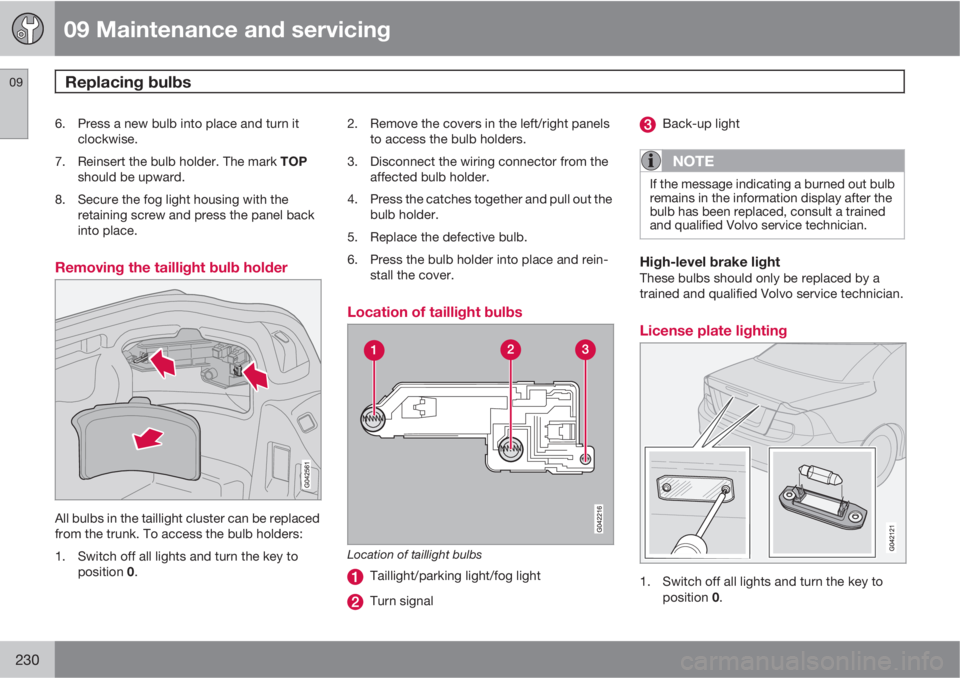
Removing the taillight bulb holder
All bulbs in the taillight cluster can be replaced
from the trunk. To access the bulb holders:
1. Switch off all lights and turn the key to
position 0.2. Remove the covers in the left/right panels
to access the bulb holders.
3. Disconnect the wiring connector from the
affected bulb holder.
4. Press the catches together and pull out the
bulb holder.
5. Replace the defective bulb.
6. Press the bulb holder into place and rein-
stall the cover.
Location of taillight bulbs
Location of taillight bulbs
Taillight/parking light/fog light
Turn signal
Back-up light
NOTE
If the message indicating a burned out bulb
remains in the information display after the
bulb has been replaced, consult a trained
and qualified Volvo service technician.
High-level brake lightThese bulbs should only be replaced by a
trained and qualified Volvo service technician.
License plate lighting
1. Switch off all lights and turn the key to
position 0.
Page 238 of 296
09 Maintenance and servicing
Fuses 09
236
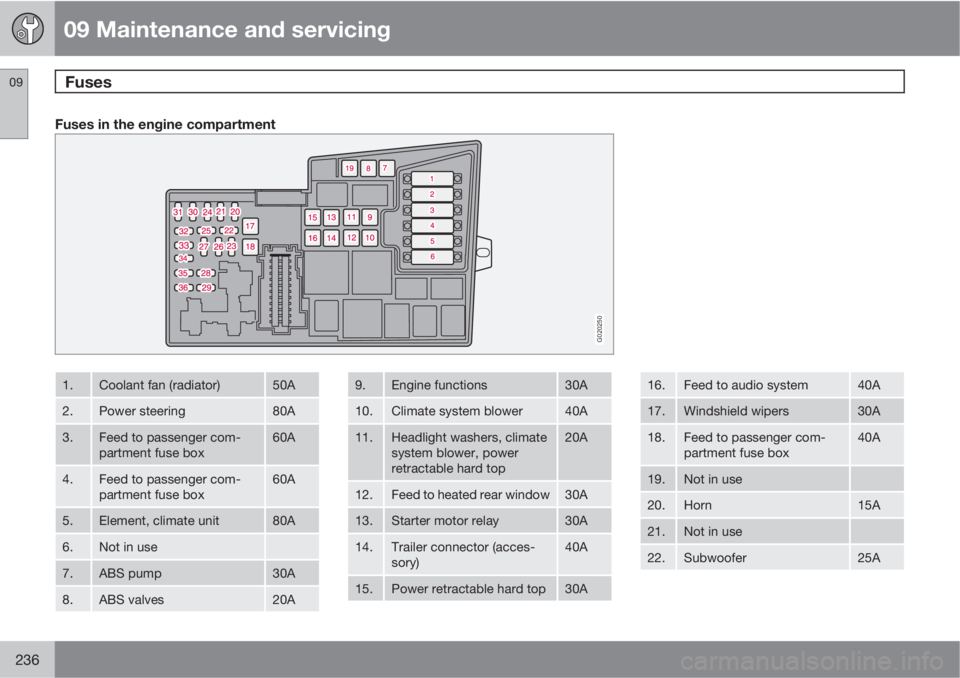
Fuses in the engine compartment
G020250
1.Coolant fan (radiator)50A
2.Power steering80A
3.Feed to passenger com-
partment fuse box60A
4.Feed to passenger com-
partment fuse box60A
5.Element, climate unit80A
6.Not in use
7.ABS pump30A
8.ABS valves20A
9.Engine functions30A
10.Climate system blower40A
11.Headlight washers, climate
system blower, power
retractable hard top20A
12.Feed to heated rear window30A
13.Starter motor relay30A
14.Trailer connector (acces-
sory)40A
15.Power retractable hard top30A
16.Feed to audio system40A
17.Windshield wipers30A
18.Feed to passenger com-
partment fuse box40A
19.Not in use
20.Horn15A
21.Not in use
22.Subwoofer25A
Page 240 of 296
09 Maintenance and servicing
Fuses 09
238
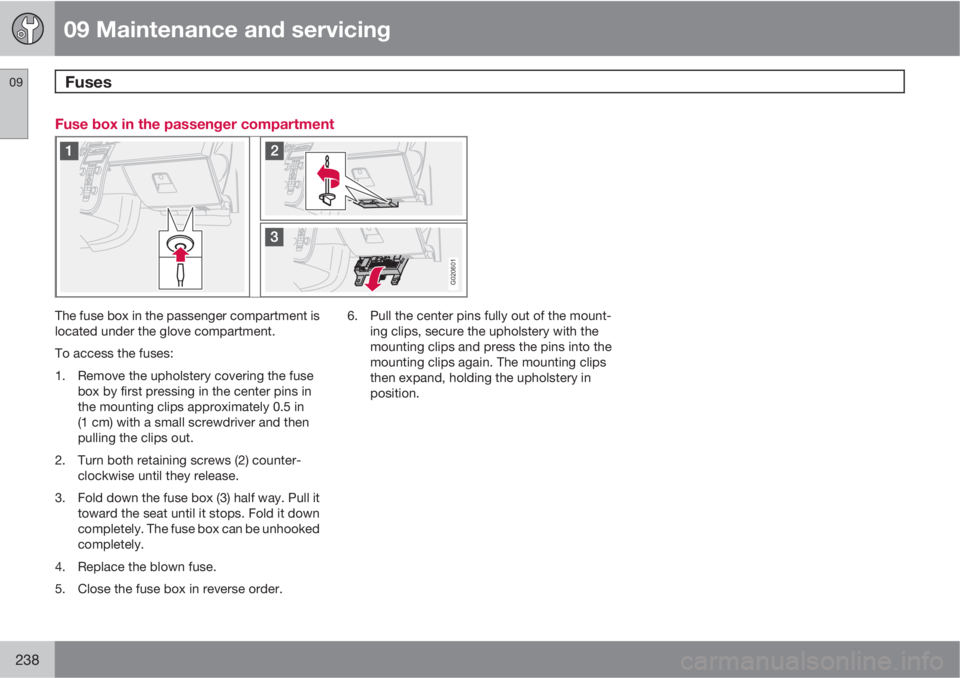
Fuse box in the passenger compartment
G020601
The fuse box in the passenger compartment is
located under the glove compartment.
To access the fuses:
1. Remove the upholstery covering the fuse
box by first pressing in the center pins in
the mounting clips approximately 0.5 in
(1 cm) with a small screwdriver and then
pulling the clips out.
2. Turn both retaining screws (2) counter-
clockwise until they release.
3. Fold down the fuse box (3) half way. Pull it
toward the seat until it stops. Fold it down
completely. The fuse box can be unhooked
completely.
4. Replace the blown fuse.
5. Close the fuse box in reverse order.6. Pull the center pins fully out of the mount-
ing clips, secure the upholstery with the
mounting clips and press the pins into the
mounting clips again. The mounting clips
then expand, holding the upholstery in
position.
Page 259 of 296
10 Audio
Radio functions
10
257
to the preset satellite channel stored on
that button, regardless of the currently
selected channel category.
Song Seek and Song Memory
The Song Seek and Song Memory functions
provide both audio and visual notification when
SiriusXM
E is broadcasting your favorite
songs. Song Seek enables you to store the
name of the song for future advance notifica-
tion when that song is being played. The Song
Memory feature makes it possible to view all of
the current songs that are stored in memory.
Song memoryUp to ten songs can be saved in the system's
memory.
1.
Press MENU.
2.
Scroll to "
Add song to song memory"
and follow the instructions shown in the
display.
If a new song is selected when the memory is
full, you will be prompted to press ENTER to
delete the last song on the list.
NOTE
The remaining songs in the list will move
down one position, and the newly added
song will be placed at the top of the list.
Song seekWhen a satellite radio channel plays one of the
songs stored in the song memory, the listener
will be alerted by a text message and an audi-
ble signal.
–
Press ENTER to listen to the song or
EXIT to cancel.
To activate/deactivate the song seek function:
1.
Press MENU
2.
Scroll to "
Song seek"
3.
Press ENTER to activate or deactivate the
function.
NOTE
When the song has ended, the radio will
remain tuned to the channel on which the
song was played.
Radio textThe text that is displayed about the song that
is currently playing can be changed. Use the
AUTO button or the menu to display
Artist,Track title: or Composer, or switch off radio
text using Sirius radio text….
Advanced settings
This menu function enables you to make set-
tings on certain SiriusXM
E satellite radio func-
tions. To access this menu:
1.
Press MENU.
2.
Scroll to SiriusXM
E menu.
3.
Select
ADVANCED SIRIUS SETTINGS.
WARNING
Settings should be made when the vehicle
is at a standstill.
The following settings can be made in the Sir-
iusXM
Emenu.
•Songs can be added to the song list
•Channel skip settings can be made
•Channel lock settings can be made
•The channel access code can be displayed
or changed
•Your SiriusXM
E ID can be displayed
Skip optionsThis function is used to remove a channel from
the list of available channels.
Skip current
1.
Select
Channel skip list and press
ENTER.
Page 262 of 296
10 Audio
CD player
10
260
NOTE
The TUNING dial (6) (turn clockwise to go to
the next track/file, or counterclockwise to
go to the previous track/file) or the steering
wheel keypad can also be used for this pur-
pose.
Fast forward/back–Press and hold down the left or right arrows
keys in the menu navigation control (or the
corresponding keys on the steering wheel
keypad) to search within a track/file or the
whole disc. The search continues for as
long as the buttons are held down.
Random playThis function plays the tracks/files on a CD in
random order (shuffle).
Activating/deactivating the random
function
If a normal CD is being played:
1.
Press MENU followed by ENTER.
2.
Select Random and press ENTER.
If a CD with audio files is being played:1.
Press MENU followed by ENTER.
2.
Select
Random and press ENTER.
3.
Select
Disc or Folder and press ENTER.
ScanThis function plays the first 10 seconds of each
track/file on the CD.
–
Press SCAN.
–
Press EXIT or SCAN to stop the scan func-
tion and listen to an entire track/file.
CD ejectPress the eject button (3) to eject the disc.
NOTE
•The Eject all function can only be used
while the vehicle is at a standstill and will
be cancelled if the vehicle begins to
move.
•For reasons of traffic safety, the ejected
CD must be removed within 12 seconds
or it will be automatically drawn back
into the slot and the CD player will enter
pause mode. Press the CD button to
restart the disc.
Compact disc care
Keep the following in mind when playing/han-
dling compact discs
•Do not put tape or labels on the disc itself.
They could become stuck in the player.
•CDR discs can cause listening problems
due to the quality of the disc or recording
equipment used.
•DualDisc: The audio side of a DualDisc
(combined CD/DVD) does not meet CD
specifications and may not play in your
audio system.
•Keep the discs clean. Wipe them with a
soft, clean, lint-free cloth, working from the
center outward. If necessary, dampen the
cloth with a neutral soap solution. Dry thor-
oughly before using.
•Never use cleaning spray or antistatic liq-
uid. Use only cleaners specifically made for
CDs.
•Use discs of the correct size only
(3.5" discs should never be used).
•Volvo does not recommend the use of
plastic outer rings on the disc.
•Condensation may occur on discs/optical
components of the CD player in cold winter
weather. The disc can be dried with a
clean, lint-free cloth. Optical components
in the CD player may, however, take up to
one hour to dry off.
Page 265 of 296
10 Audio
Bluetooth® hands-free connection
10
263 Introduction
G029503
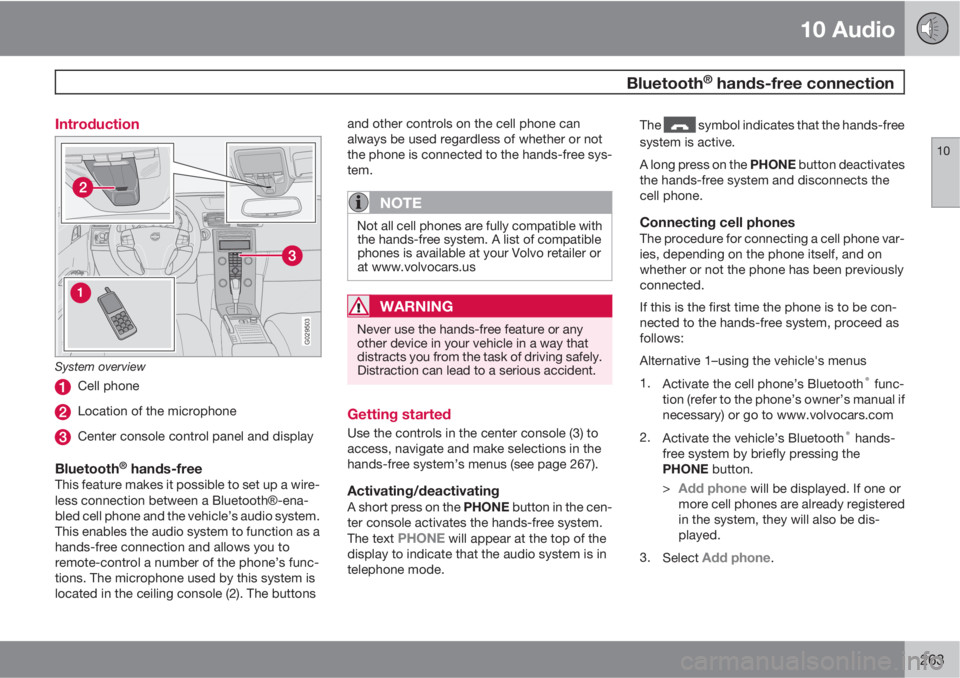
System overview
Cell phone
Location of the microphone
Center console control panel and display
Bluetooth® hands-freeThis feature makes it possible to set up a wire-
less connection between a BluetoothŸ-ena-
bled cell phone and the vehicle’s audio system.
This enables the audio system to function as a
hands-free connection and allows you to
remote-control a number of the phone’s func-
tions. The microphone used by this system is
located in the ceiling console (2). The buttonsand other controls on the cell phone can
always be used regardless of whether or not
the phone is connected to the hands-free sys-
tem.
NOTE
Not all cell phones are fully compatible with
the hands-free system. A list of compatible
phones is available at your Volvo retailer or
at www.volvocars.us
WARNING
Never use the hands-free feature or any
other device in your vehicle in a way that
distracts you from the task of driving safely.
Distraction can lead to a serious accident.
Getting started
Use the controls in the center console (3) to
access, navigate and make selections in the
hands-free system’s menus (see page 267).
Activating/deactivatingA short press on the PHONE button in the cen-
ter console activates the hands-free system.
The text
PHONE will appear at the top of the
display to indicate that the audio system is in
telephone mode.The
symbol indicates that the hands-free
system is active.
A long press on the PHONE button deactivates
the hands-free system and disconnects the
cell phone.
Connecting cell phonesThe procedure for connecting a cell phone var-
ies, depending on the phone itself, and on
whether or not the phone has been previously
connected.
If this is the first time the phone is to be con-
nected to the hands-free system, proceed as
follows:
Alternative 1–using the vehicle's menus
1.
Activate the cell phone’s Bluetooth
® func-
tion (refer to the phone’s owner’s manual if
necessary) or go to www.volvocars.com
2.
Activate the vehicle’s Bluetooth
® hands-
free system by briefly pressing the
PHONE button.
>
Add phone will be displayed. If one or
more cell phones are already registered
in the system, they will also be dis-
played.
3.
Select
Add phone.
Page 266 of 296
10 Audio
Bluetooth® hands-free connection
10
264
> The audio system will search for cell
phones that are in range. This search
takes approximately 30 seconds. Any
phones detected will be displayed with
their Bluetooth
® names. The hands-free
system’s Bluetooth® name will appear
in the cell phone’s display as My Volvo
Car.
4. Select one of the cell phones shown in the
audio system’s (center console) display.
5. Using the cell phone’s keypad, enter the
digits shown in the audio system’s display.
Alternative 2–using the cell phone’s menus
1. Activate the hands-free system by briefly
pressing the PHONE button in the center
console. If there is a cell phone connected,
disconnect it from the hands-free system.
2. Perform a search using the cell phone’s
Bluetooth
® function (consult the cell
phone’s owner’s manual if necessary).
3.
Select
My Volvo Car in the list of devices
shown in the cell phone’s display.
4. When prompted, enter the PIN code 1234
in the cell phone.
5.
Connect to
My Volvo Car from the cell
phone.The cell phone will be registered and will be
connected automatically to the audio system
while the text
Synchronizing is displayed. For
more information on synchronizing a cell
phone, see page 266.
When a connection has been established, the
symbol and the cell phone’s Bluetooth®
name will be displayed. The cell phone can
now be controlled from the audio system.
Making a call1.
Ensure that PHONE is shown at the top of
the center console display and that the
symbol is visible (by pressing briefly on
PHONE on the center console).
2. Dial the desired phone number or use the
phone book (see page 266).
3.
Press ENTER.
End the call by pressing EXIT.
Disconnecting the cell phoneThe cell phone is automatically disconnected
from the audio system if it is moved out of
range. For more information about connec-
tions, see page 263.
The cell phone can be manually disconnected
from the hands-free system by pressing
PHONE. The hands-free system is also deac-
tivated when the ignition is switched off (or ifthe driver’s door is opened on vehicles equip-
ped with the optional keyless drive).
When the cell phone is disconnected from the
hands-free system, a call in progress can be
continued using the cell phone’s own speaker
and microphone.
NOTE
Certain cell phones may require confirma-
tion from the phone’s keypad when a call is
transferred from hands-free to the cell
phone.
Handling calls
Incoming calls–
Press ENTER to answer a call, even if the
audio system is currently in e.g., CD or FM
mode.
–
Press EXIT to defer a call.
Automatic answerThis function means that incoming calls will be
answered automatically. Activate or deactivate
the function in the menu system under Phone
Menu…
Call options…Automatic
answer.