taillight VOLVO C70 2013 Owner´s Manual
[x] Cancel search | Manufacturer: VOLVO, Model Year: 2013, Model line: C70, Model: VOLVO C70 2013Pages: 296, PDF Size: 7.18 MB
Page 60 of 296
02 Instruments and controls
Symbols – instrument panel
02
58
Symbols – left side
G026439
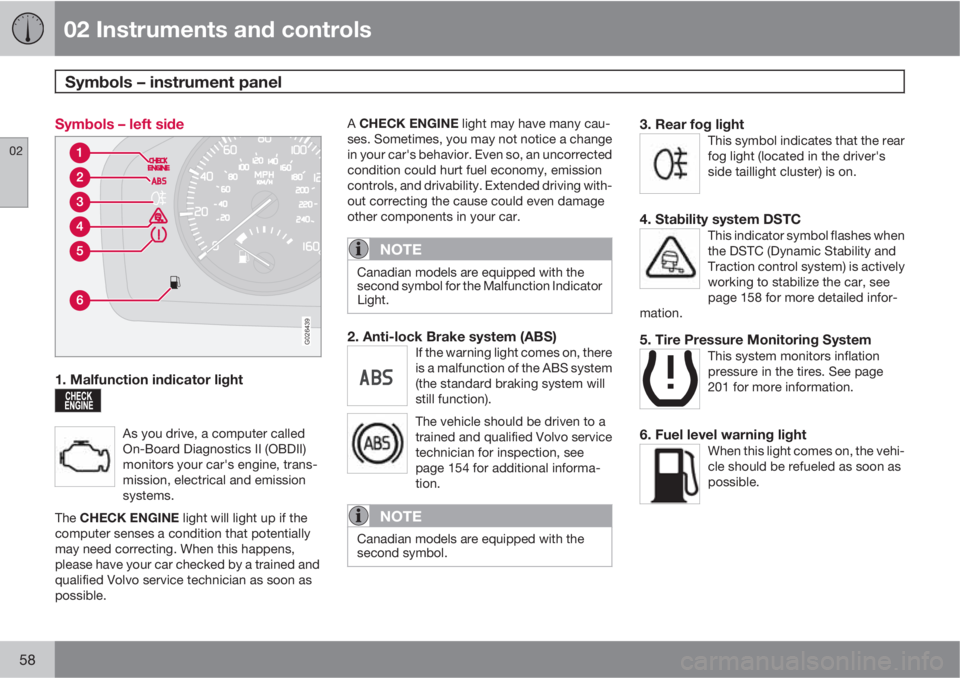
1. Malfunction indicator light
As you drive, a computer called
On-Board Diagnostics II (OBDII)
monitors your car's engine, trans-
mission, electrical and emission
systems.
The CHECK ENGINE light will light up if the
computer senses a condition that potentially
may need correcting. When this happens,
please have your car checked by a trained and
qualified Volvo service technician as soon as
possible.
A CHECK ENGINE light may have many cau-
ses. Sometimes, you may not notice a change
in your car's behavior. Even so, an uncorrected
condition could hurt fuel economy, emission
controls, and drivability. Extended driving with-
out correcting the cause could even damage
other components in your car.
NOTE
Canadian models are equipped with the
second symbol for the Malfunction Indicator
Light.
2. Anti-lock Brake system (ABS)If the warning light comes on, there
is a malfunction of the ABS system
(the standard braking system will
still function).
The vehicle should be driven to a
trained and qualified Volvo service
technician for inspection, see
page 154 for additional informa-
tion.
NOTE
Canadian models are equipped with the
second symbol.
3. Rear fog lightThis symbol indicates that the rear
fog light (located in the driver's
side taillight cluster) is on.
4. Stability system DSTCThis indicator symbol flashes when
the DSTC (Dynamic Stability and
Traction control system) is actively
working to stabilize the car, see
page 158 for more detailed infor-
mation.
5. Tire Pressure Monitoring SystemThis system monitors inflation
pressure in the tires. See page
201 for more information.
6. Fuel level warning lightWhen this light comes on, the vehi-
cle should be refueled as soon as
possible.
Page 68 of 296
02 Instruments and controls
Lighting panel
02
66* Option/accessory, for more information, see Introduction.
tions. A light sensor then monitors the ambient
lighting conditions and automatically switches
from LED DRL to the low beam headlights in
weaker ambient light (and will switch back to
DRL when the ambient light becomes brighter).
The LED DRLs will also switch off automatically
(and the low beams will switch on) if:
•The rear fog light is switched on
•The windshield wipers are switched on for
more than 10 seconds
WARNING
•DRL is a driving aid designed to help
conserve electrical current. This system
cannot always determine if the ambient
lighting conditions are sufficient for
switching from low beams to DRL (or
vice versa). It is always the driver's
responsibility to visually determine if the
low beam headlights should be used.
•As the driver, you have full responsibility
for operating the vehicle in a safe man-
ner.
Parking lights
The front and rear parking lights can be turned
on even when the ignition is switched off.
–Turn the light switch (1) to the parking light
position.
The license plate lights also illuminate when the
parking lights are switched on.
Brake lights
The brake lights come on automatically when
the brakes are applied.
Fog lights
Front fog lights*2
The front fog lights can be used in combination
with either the headlights or the parking lights.
1.
Turn the ignition key to position II.
2. Press button (3) to turn on the front fog
lights.
An indicator light in the button illuminates when
the front fog lights are on.
Rear fog lightsThe rear fog lights are located in both taillight
clusters.The rear fogs light will only function in combi-
nation with the high/low beam headlights or the
optional front fog lights.
1.
Turn the ignition key to position II.
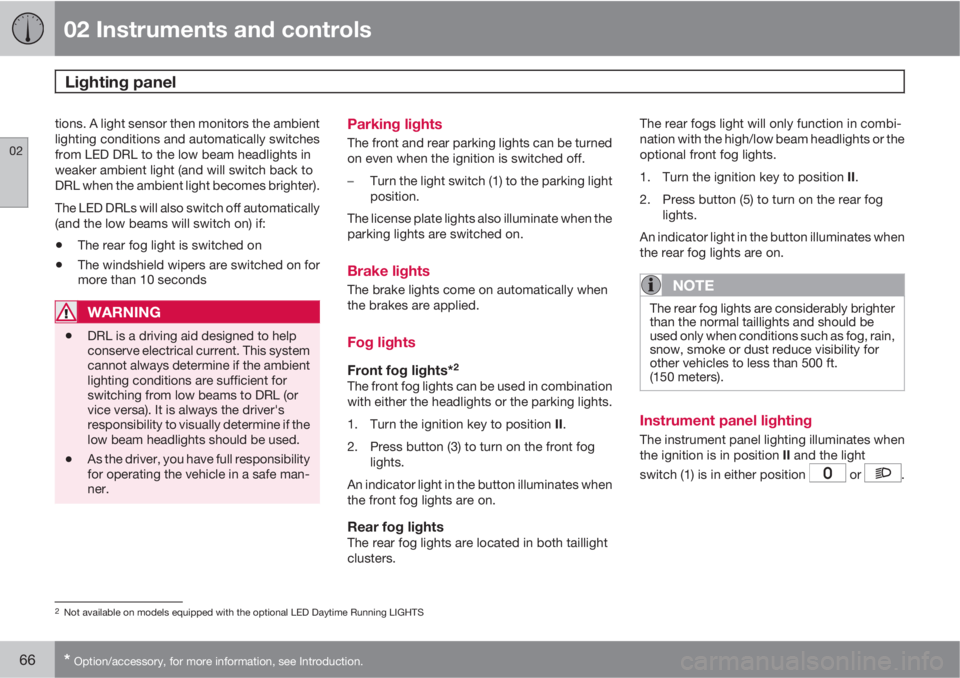
2. Press button (5) to turn on the rear fog
lights.
An indicator light in the button illuminates when
the rear fog lights are on.
NOTE
The rear fog lights are considerably brighter
than the normal taillights and should be
used only when conditions such as fog, rain,
snow, smoke or dust reduce visibility for
other vehicles to less than 500 ft.
(150 meters).
Instrument panel lighting
The instrument panel lighting illuminates when
the ignition is in position II and the light
switch (1) is in either position
or .
2Not available on models equipped with the optional LED Daytime Running LIGHTS
Page 69 of 296
02 Instruments and controls
Lighting panel
02
67
NOTE
To make it easier to read the odometer, trip
odometer, clock, and ambient temperature,
these gauges illuminate when the vehicle is
unlocked and when the key has been
removed from the ignition switch. The light-
ing will go out when the vehicle is locked.
Move the thumb wheel (2) up to increase
brightness or down to decrease brightness.
Unlocking the fuel filler door
With the ignition switched off, press button (4)
to unlock the fuel filler door. Please note that
the fuel filler door will remain unlocked until the
car begins to move forward.
An audible click will be heard when the fuel filler
door re-locks.
Manually unlocking the fuel filler door
G020951
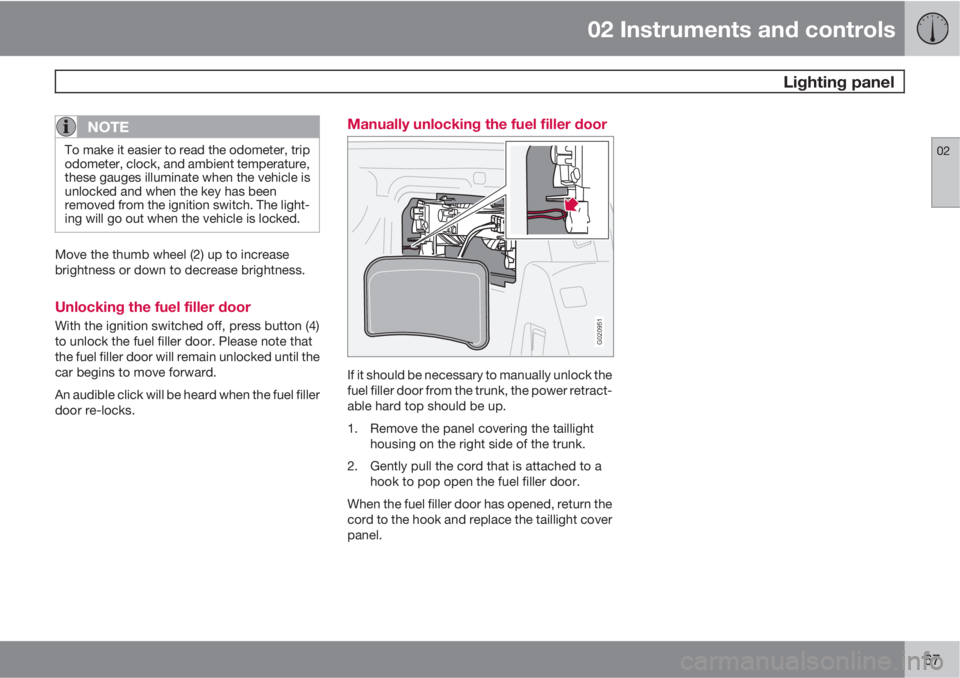
If it should be necessary to manually unlock the
fuel filler door from the trunk, the power retract-
able hard top should be up.
1. Remove the panel covering the taillight
housing on the right side of the trunk.
2. Gently pull the cord that is attached to a
hook to pop open the fuel filler door.
When the fuel filler door has opened, return the
cord to the hook and replace the taillight cover
panel.
Page 156 of 296
06 Starting and driving
Brake system
06
154* Option/accessory, for more information, see Introduction.
Brake lights
The brake lights come on automatically when
the brakes are applied.
Adaptive brake lightsThe adaptive brake lights activate in the event
of sudden braking or if the ABS system is acti-
vated. This function causes an additional tail-
light on each side of the vehicle to illuminate to
help alert vehicles traveling behind.
The adaptive brake lights activate if:
•The ABS system activates for more than
approximately a half second
•In the event of sudden braking while the
vehicle is moving at speeds above approx-
imately 6 mph (10 km/h)
When the vehicle has come to a stop, the brake
lights and additional taillights remain on for as
long as the brake pedal is depressed or until
braking force on the vehicle is reduced.
Brake pad inspection
On vehicles equipped with a jack*, the condi-
tion of the brake pads can be checked by rais-
ing the vehicle (see page 199 for information
about using the jack and removing a wheel)
and performing a visual inspection of the brake
pads.
WARNING
•If the vehicle has been driven immedi-
ately prior to a brake pad inspection, the
wheel hub, brake components, etc., will
be very hot. Allow time for these com-
ponents to cool before carrying out the
inspection.
•Apply the parking brake and put the
gear selector in the Park (P) position.
•Block the wheels standing on the
ground, use rigid wooden blocks or
large stones.
WARNING
•Use the jack intended for the vehicle
when changing a tire. For any other job,
use stands to support the vehicle.
•The jack should be kept well-greased
and clean, and should not be damaged.
•Be sure the jack is on a firm, level, non-
slippery surface.
•No objects should be placed between
the base of jack and the ground, or
between the jack and the attachment
bar on the vehicle.
•The jack must correctly engage the jack
attachment.
•Never allow any part of your body to be
extended under a vehicle supported by
a jack.
Brake circuit malfunction
The brake system is a hydraulic system con-
sisting of two separate brake circuits. If a prob-
lem should occur in one of these circuits, it is
still possible to stop the vehicle with the other
brake circuit.
If the brake pedal must be depressed farther
than normal and requires greater foot pressure,
the stopping distance will be longer.
Page 209 of 296
08 Car care
Washing and cleaning the car
08
207
tant, especially in the winter. Some automatic
washers do not have facilities for washing the
underbody.
CAUTION
•Remove the antenna on the right rear
fender. This antenna should never be
bent in any way. Doing so could result
in damage or malfunction. When the
antenna is put back in position, turn it
carefully to help avoid damaging the
threads on the antenna's mount.
•Before driving into an automatic car
wash, turn off the optional rain sensor to
avoid damaging the windshield wipers.
•Make sure that side view mirrors, auxil-
iary lamps, etc, are secure.
•Chromed wheels: Clean chrome-
plated wheels using the same deter-
gents used for the body of the vehicle.
Aggressive wheel-cleaning agents can
permanently stain chrome-plated
wheels.
WARNING
•When the car is driven immediately after
being washed, apply the brakes several
times in order to remove any moisture
from the brake linings.
•Engine cleaning agents should not be
used when the engine is warm. This
constitutes a fire risk.
Exterior lightingCondensation may form temporarily on the
inside of the lenses of exterior lights such as
headlights, fog lights, or taillights. This is nor-
mal and the lights are designed to withstand
moisture. Normally, condensation will dissi-
pate after the lights have been on for a short
time.
Polishing and Waxing
•Normally, polishing is not required during
the first year after delivery, however, wax-
ing may be beneficial.
•Before applying polish or wax the vehicle
must be washed and dried. Tar spots can
be removed with kerosene or tar remover.
Difficult spots may require a fine rubbing
compound.
•After polishing use liquid or paste wax.
•Several commercially available products
contain both polish and wax.
•Waxing alone does not substitute for pol-
ishing a dull surface.
•A wide range of polymer-based waxes can
be purchased today. These waxes are easy
to use and produce a long-lasting, high-
gloss finish that protects the bodywork
against oxidation, road dirt and fading.
•Do not polish or wax your vehicle in direct
sunlight (the surface of the vehicle should
not be warmer than 113 °F (45 °C).
CAUTION
Volvo does not recommend the use of long-
life or durable paint protection coatings,
some of which may claim to prevent pitting,
fading, oxidation, etc. These coatings have
not been tested by Volvo for compatibility
with your vehicle's clear coat. Some of them
may cause the clear coat to soften, crack,
or cloud. Damage caused by application of
paint protection coatings may not be cov-
ered under your vehicle's paint warranty.
Page 217 of 296
09 Maintenance and servicing
Maintaining your car09
215 Owner maintenance
Periodic maintenance requirements and inter-
vals are described in your vehicle's Warranty
and Service Records Information booklet.
The following points can be carried out
between the normally scheduled maintenance
services.
Each time the car is refueled:
•Check the engine oil level.
•Clean the windshield, windshield wipers,
headlights, and taillights.
Monthly:
•Check cold tire pressure in all tires. Inspect
the tires for wear.
•Check that engine coolant and other fluid
levels are between the indicated "min" and
"max" markings.
•Clean interior glass surfaces with a glass
cleaner and soft paper towels.
•Wipe driver information displays with a soft
cloth.
•Visually inspect battery terminals for cor-
rosion. Corrosion may indicate a loose ter-
minal connector, or a battery near the end
of its useful service life. Consult a trained
and qualified Volvo service technician for
additional information.
As needed:
•Wash the car, including the undercarriage,
to reduce wear that can be caused by a
buildup of dirt, and corrosion that can be
caused by salt residues.
•Clean leaves and twigs from air intake
vents at the base of the windshield, and
from other places where they may collect.
NOTE
Complete service information for qualified
technicians is available online for purchase
or subscription at www.volvotechinfo.com.
Hoisting the vehicle
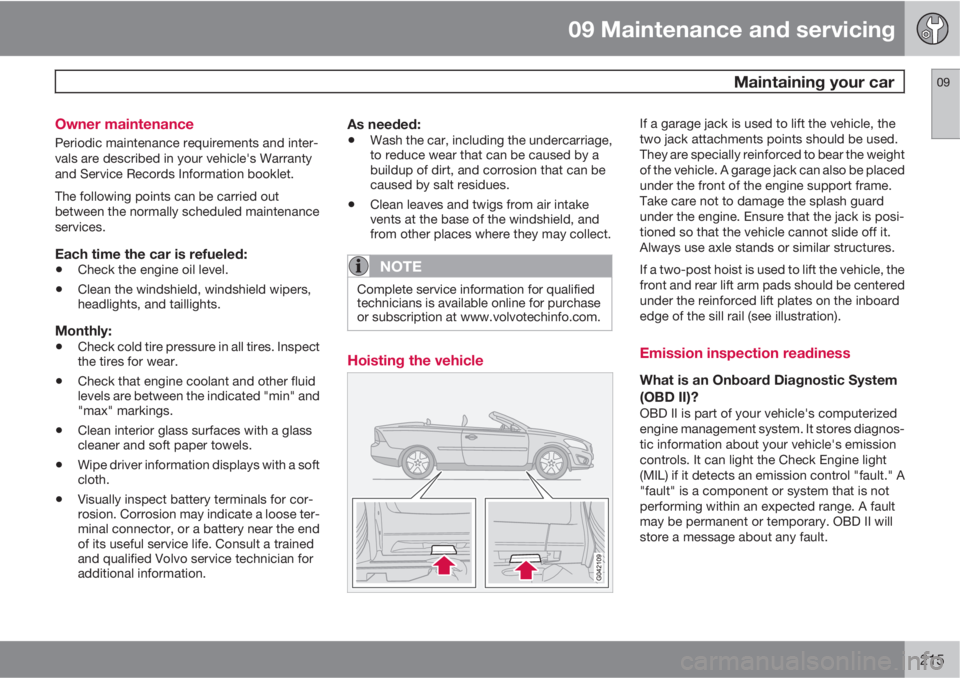
If a garage jack is used to lift the vehicle, the
two jack attachments points should be used.
They are specially reinforced to bear the weight
of the vehicle. A garage jack can also be placed
under the front of the engine support frame.
Take care not to damage the splash guard
under the engine. Ensure that the jack is posi-
tioned so that the vehicle cannot slide off it.
Always use axle stands or similar structures.
If a two-post hoist is used to lift the vehicle, the
front and rear lift arm pads should be centered
under the reinforced lift plates on the inboard
edge of the sill rail (see illustration).
Emission inspection readiness
What is an Onboard Diagnostic System
(OBD II)?
OBD II is part of your vehicle's computerized
engine management system. It stores diagnos-
tic information about your vehicle's emission
controls. It can light the Check Engine light
(MIL) if it detects an emission control "fault." A
"fault" is a component or system that is not
performing within an expected range. A fault
may be permanent or temporary. OBD II will
store a message about any fault.
Page 232 of 296
09 Maintenance and servicing
Replacing bulbs 09
230
6. Press a new bulb into place and turn it
clockwise.
7.
Reinsert the bulb holder. The mark TOP
should be upward.
8. Secure the fog light housing with the
retaining screw and press the panel back
into place.
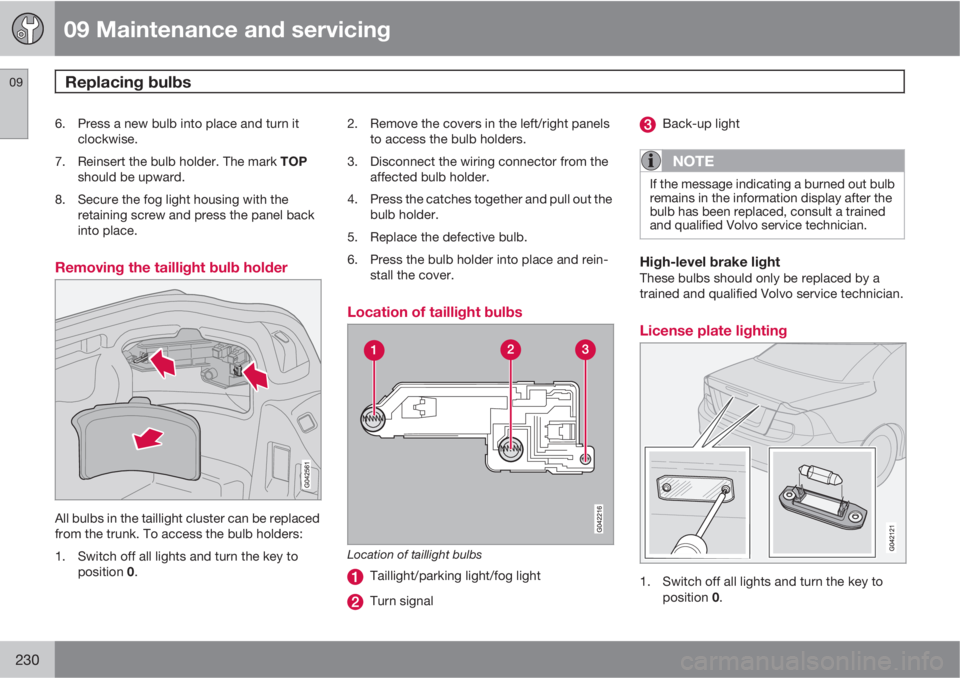
Removing the taillight bulb holder
All bulbs in the taillight cluster can be replaced
from the trunk. To access the bulb holders:
1. Switch off all lights and turn the key to
position 0.2. Remove the covers in the left/right panels
to access the bulb holders.
3. Disconnect the wiring connector from the
affected bulb holder.
4. Press the catches together and pull out the
bulb holder.
5. Replace the defective bulb.
6. Press the bulb holder into place and rein-
stall the cover.
Location of taillight bulbs
Location of taillight bulbs
Taillight/parking light/fog light
Turn signal
Back-up light
NOTE
If the message indicating a burned out bulb
remains in the information display after the
bulb has been replaced, consult a trained
and qualified Volvo service technician.
High-level brake lightThese bulbs should only be replaced by a
trained and qualified Volvo service technician.
License plate lighting
1. Switch off all lights and turn the key to
position 0.