light VOLVO S40 2005 User Guide
[x] Cancel search | Manufacturer: VOLVO, Model Year: 2005, Model line: S40, Model: VOLVO S40 2005Pages: 127, PDF Size: 2.32 MB
Page 19 of 127
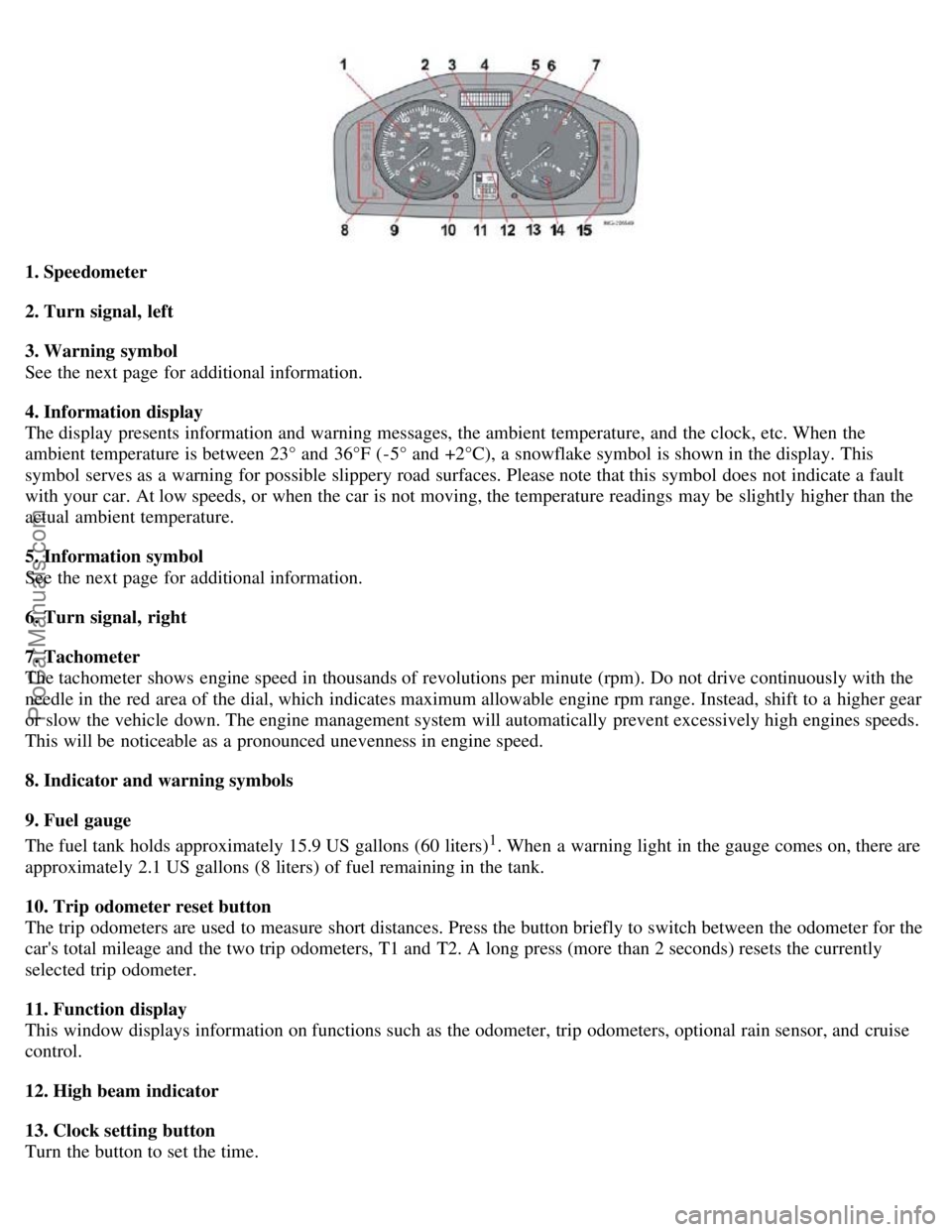
1. Speedometer
2. Turn signal, left
3. Warning symbol
See the next page for additional information.
4. Information display
The display presents information and warning messages, the ambient temperature, and the clock, etc. When the
ambient temperature is between 23° and 36°F (-5° and +2°C), a snowflake symbol is shown in the display. This
symbol serves as a warning for possible slippery road surfaces. Please note that this symbol does not indicate a fault
with your car. At low speeds, or when the car is not moving, the temperature readings may be slightly higher than the
actual ambient temperature.
5. Information symbol
See the next page for additional information.
6. Turn signal, right
7. Tachometer
The tachometer shows engine speed in thousands of revolutions per minute (rpm). Do not drive continuously with the
needle in the red area of the dial, which indicates maximum allowable engine rpm range. Instead, shift to a higher gear
or slow the vehicle down. The engine management system will automatically prevent excessively high engines speeds.
This will be noticeable as a pronounced unevenness in engine speed.
8. Indicator and warning symbols
9. Fuel gauge
The fuel tank holds approximately 15.9 US gallons (60 liters)
1. When a warning light in the gauge comes on, there are
approximately 2.1 US gallons (8 liters) of fuel remaining in the tank.
10. Trip odometer reset button
The trip odometers are used to measure short distances. Press the button briefly to switch between the odometer for the
car's total mileage and the two trip odometers, T1 and T2. A long press (more than 2 seconds) resets the currently
selected trip odometer.
11. Function display
This window displays information on functions such as the odometer, trip odometers, optional rain sensor, and cruise
control.
12. High beam indicator
13. Clock setting button
Turn the button to set the time.
ProCarManuals.com
Page 20 of 127
14. Temperature gauge
The gauge indicates the temperature of the engine cooling system. If the temperature is abnormally high and the needle
enters the red zone, a message is shown in the display. Bear in mind that extra lamps in front of the air intake reduce
the cooling capacity at high outside temperatures and high engine loads.
15. Indicator and warning symbols
1. Models with All Wheel Drive have a tank volume of 15 US gallons (57 liters).
Models with engine code 39 have a fuel tank capacity of 14.5 US gallons (55 liters). This code is the 6th and 7th digits
from the left in your vehicle's VIN number. See page 184
for the location of the VIN plate.
pg. 39 Indicator and warning symbols
Function check
The indicator and warning symbols light up when you turn the ignition key to the driving position (position II) before
starting. This shows that the symbols are functioning. When the engine starts, all symbols go out. If the engine is not
started within 5 seconds, all of the symbols except CHECK ENGINE and
will go out. Certain symbols may not
have their functions illustrated, depending on the car's equipment. The PARK BRAKE symbol will not go out until the
parking brake has been released.
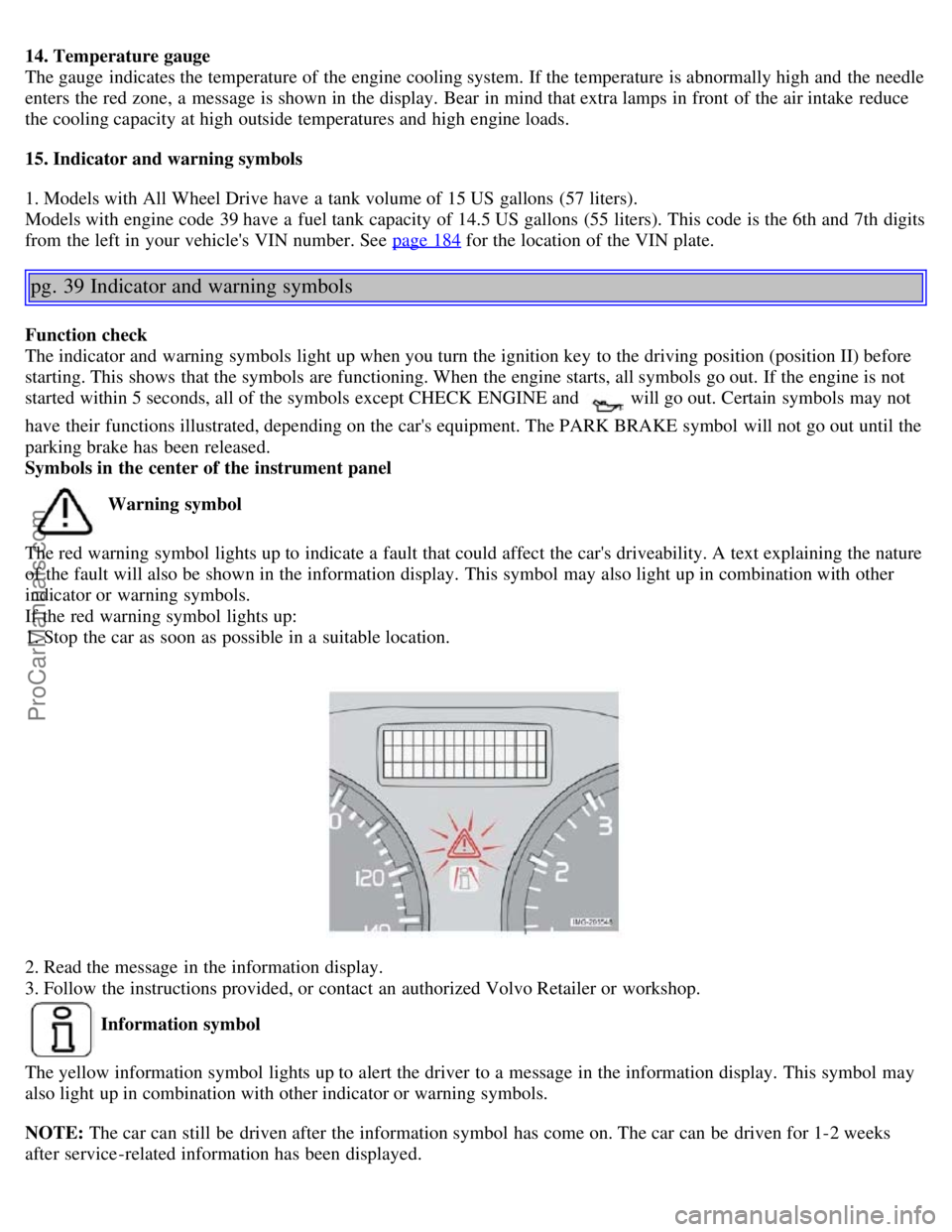
Symbols in the center of the instrument panel
Warning symbol
The red warning symbol lights up to indicate a fault that could affect the car's driveability. A text explaining the nature
of the fault will also be shown in the information display. This symbol may also light up in combination with other
indicator or warning symbols.
If the red warning symbol lights up:
1. Stop the car as soon as possible in a suitable location.
2. Read the message in the information display.
3. Follow the instructions provided, or contact an authorized Volvo Retailer or workshop.
Information symbol
The yellow information symbol lights up to alert the driver to a message in the information display. This symbol may
also light up in combination with other indicator or warning symbols.
NOTE: The car can still be driven after the information symbol has come on. The car can be driven for 1-2 weeks
after service-related information has been displayed.
ProCarManuals.com
Page 21 of 127
pg. 40 Symbols on the left side of the instrument panel
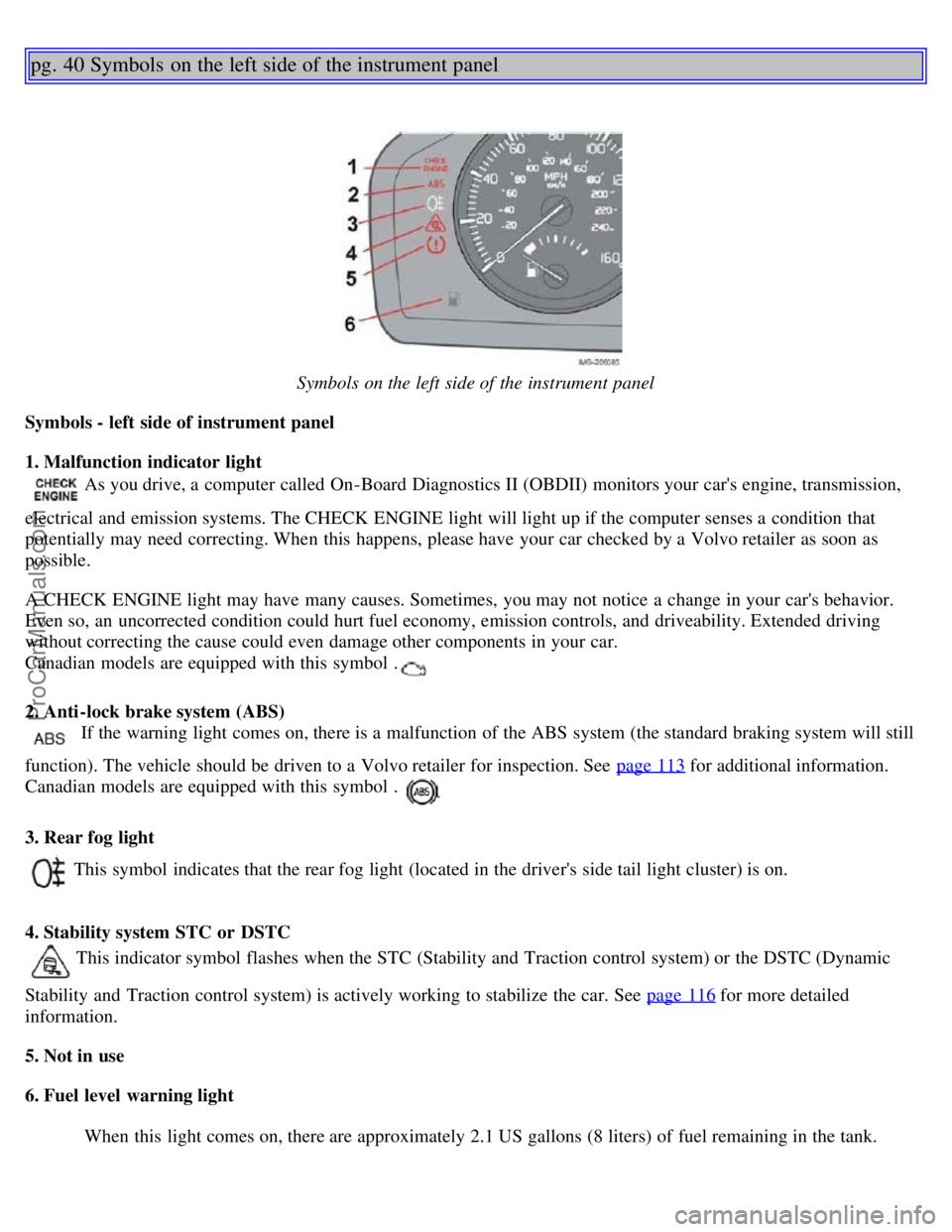
Symbols on the left side of the instrument panel
Symbols - left side of instrument panel
1. Malfunction indicator light
As you drive, a computer called On-Board Diagnostics II (OBDII) monitors your car's engine, transmission,
electrical and emission systems. The CHECK ENGINE light will light up if the computer senses a condition that
potentially may need correcting. When this happens, please have your car checked by a Volvo retailer as soon as
possible.
A CHECK ENGINE light may have many causes. Sometimes, you may not notice a change in your car's behavior.
Even so, an uncorrected condition could hurt fuel economy, emission controls, and driveability. Extended driving
without correcting the cause could even damage other components in your car.
Canadian models are equipped with this symbol .
2. Anti-lock brake system (ABS)
If the warning light comes on, there is a malfunction of the ABS system (the standard braking system will still
function). The vehicle should be driven to a Volvo retailer for inspection. See page 113
for additional information.
Canadian models are equipped with this symbol .
3. Rear fog light
This symbol indicates that the rear fog light (located in the driver's side tail light cluster) is on.
4. Stability system STC or DSTC
This indicator symbol flashes when the STC (Stability and Traction control system) or the DSTC (Dynamic
Stability and Traction control system) is actively working to stabilize the car. See page 116
for more detailed
information.
5. Not in use
6. Fuel level warning light
When this light comes on, there are approximately 2.1 US gallons (8 liters) of fuel remaining in the tank.
ProCarManuals.com
Page 22 of 127
pg. 41 Symbols on the right side of the instrument panel
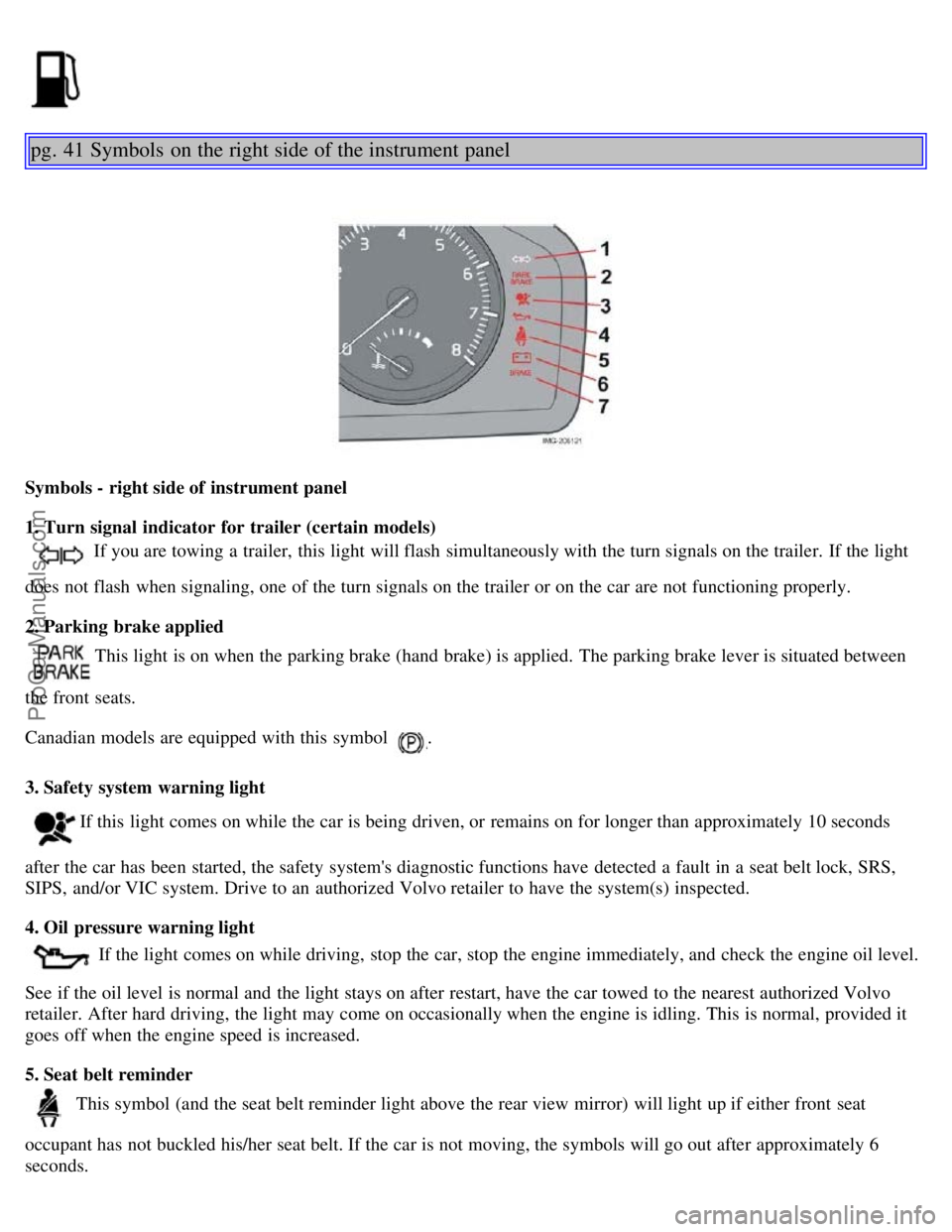
Symbols - right side of instrument panel
1. Turn signal indicator for trailer (certain models)
If you are towing a trailer, this light will flash simultaneously with the turn signals on the trailer. If the light
does not flash when signaling, one of the turn signals on the trailer or on the car are not functioning properly.
2. Parking brake applied
This light is on when the parking brake (hand brake) is applied. The parking brake lever is situated between
the front seats.
Canadian models are equipped with this symbol
.
3. Safety system warning light
If this light comes on while the car is being driven, or remains on for longer than approximately 10 seconds
after the car has been started, the safety system's diagnostic functions have detected a fault in a seat belt lock, SRS,
SIPS, and/or VIC system. Drive to an authorized Volvo retailer to have the system(s) inspected.
4. Oil pressure warning light
If the light comes on while driving, stop the car, stop the engine immediately, and check the engine oil level.
See if the oil level is normal and the light stays on after restart, have the car towed to the nearest authorized Volvo
retailer. After hard driving, the light may come on occasionally when the engine is idling. This is normal, provided it
goes off when the engine speed is increased.
5. Seat belt reminder
This symbol (and the seat belt reminder light above the rear view mirror) will light up if either front seat
occupant has not buckled his/her seat belt. If the car is not moving, the symbols will go out after approximately 6
seconds.
ProCarManuals.com
Page 23 of 127

6. Generator warning light
If the light comes on while the engine is running, have the charging system checked by an authorized Volvo
workshop.
7. Brake failure warning light
If this light comes on while driving or braking, stop the car as quickly as possible in a safe place, open the
hood, and check the brake fluid level in the reservoir. See page 148
for the location of the reservoir.
Canadian models are equipped with this symbol .
WARNING!
If the fluid level is below the MIN mark in the reservoir or if a "Brake failure - Service urgent" message is displayed
in the information display: DO NOT DRIVE. Have the car towed to an authorized Volvo retailer and have the brake
system inspected.
pg. 42 Symbols on the right side of the instrument panel
If the BRAKE and ABS warning lights come on at the same time, this could indicate a fault in the brake system.
In this case:
1. Stop the car in a suitable place and switch off the engine.
2. Restart the engine.
3. If both warning lights go off, no further action is required and the car can be driven.
4. If both lights remain on after the engine has been restarted, switch off the engine again and check the brake fluid
level. See page 148
for the location of the reservoir.
Door open warning
The driver will be alerted if one of the doors, the hood, or the trunk lid are open or ajar.
At low speeds
If the car is moving at a speed of less than approximately 4 m.p.h. (7 km/h), the Information symbol in the
instrument panel will light up and a message will be shown in the information display indicating which door(s), etc is
not completely closed.
At higher speeds
If the car is moving at a speed above approximately 4 m.p.h. (7 km/h), the Warning symbol in the
instrument panel will light up and a message will be shown in the information display indicating which door(s), etc is
not completely closed.
Hood and trunk
If the hood and/or trunk lid is not completely closed, the Information symbol in the instrument panel will
light up and a message will be displayed, regardless of the vehicle's speed.
pg. 43 Information display
ProCarManuals.com
Page 24 of 127
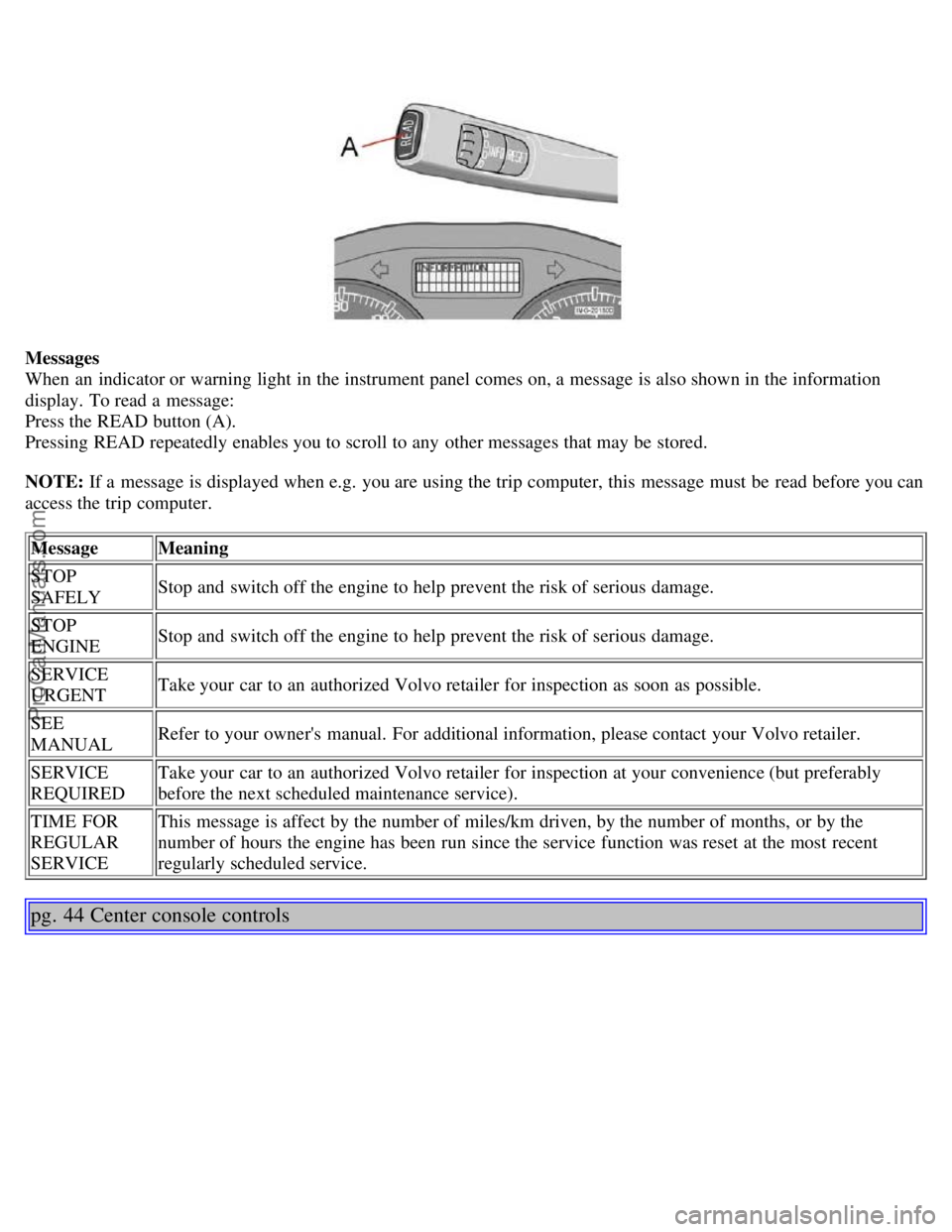
Messages
When an indicator or warning light in the instrument panel comes on, a message is also shown in the information
display. To read a message:
Press the READ button (A).
Pressing READ repeatedly enables you to scroll to any other messages that may be stored.
NOTE: If a message is displayed when e.g. you are using the trip computer, this message must be read before you can
access the trip computer.Message Meaning
STOP
SAFELY Stop and switch off the engine to help prevent the risk of serious damage.
STOP
ENGINE Stop and switch off the engine to help prevent the risk of serious damage.
SERVICE
URGENT Take your car to an authorized Volvo retailer for inspection as soon as possible.
SEE
MANUAL Refer to your owner's manual. For additional information, please contact your Volvo retailer.
SERVICE
REQUIRED Take your car to an authorized Volvo retailer for inspection at your convenience (but preferably
before the next scheduled maintenance service).
TIME FOR
REGULAR
SERVICE This message is affect by the number of miles/km driven, by the number of months, or by the
number of hours the engine has been run since the service function was reset at the most recent
regularly scheduled service.
pg. 44 Center console controls
ProCarManuals.com
Page 25 of 127
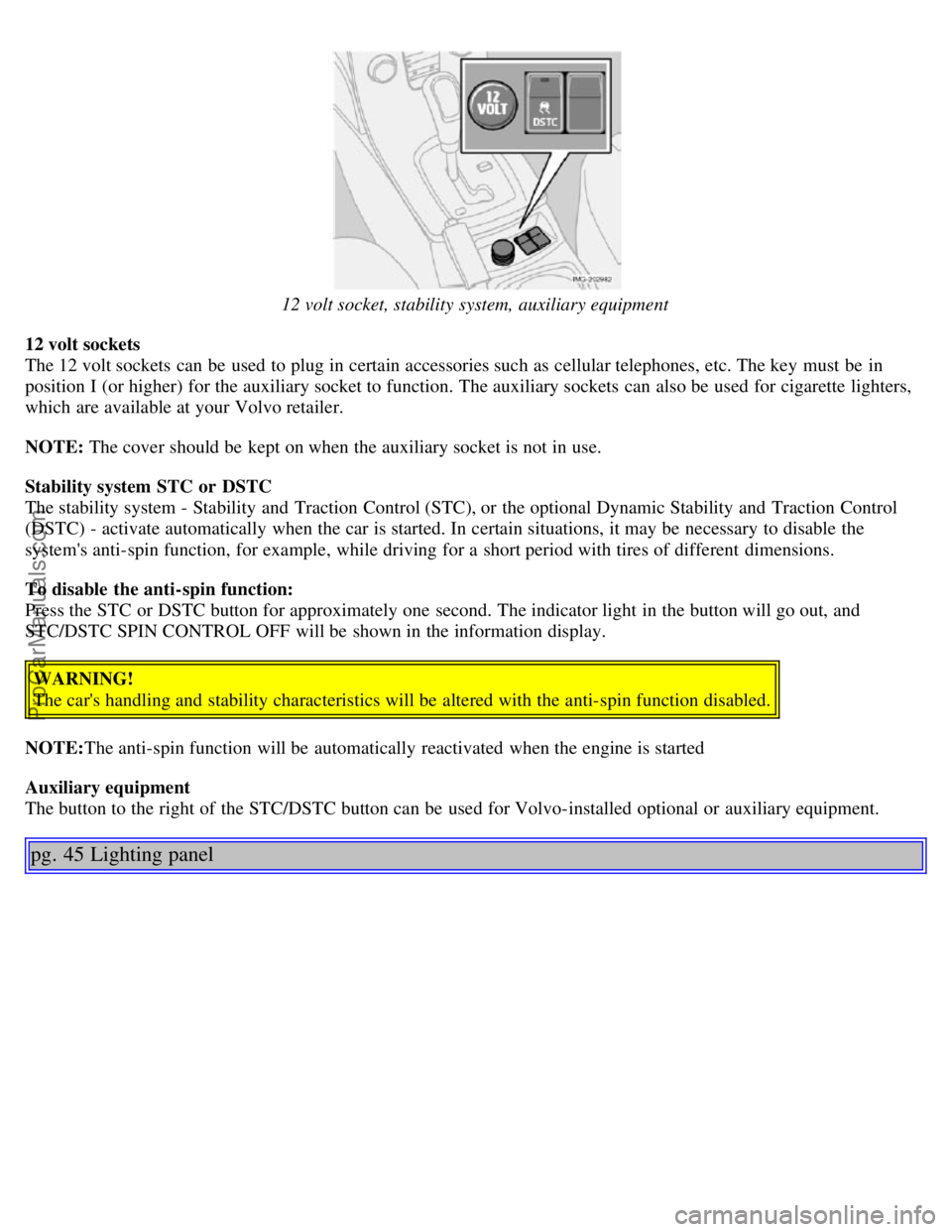
12 volt socket, stability system, auxiliary equipment
12 volt sockets
The 12 volt sockets can be used to plug in certain accessories such as cellular telephones, etc. The key must be in
position I (or higher) for the auxiliary socket to function. The auxiliary sockets can also be used for cigarette lighters,
which are available at your Volvo retailer.
NOTE: The cover should be kept on when the auxiliary socket is not in use.
Stability system STC or DSTC
The stability system - Stability and Traction Control (STC), or the optional Dynamic Stability and Traction Control
(DSTC) - activate automatically when the car is started. In certain situations, it may be necessary to disable the
system's anti-spin function, for example, while driving for a short period with tires of different dimensions.
To disable the anti-spin function:
Press the STC or DSTC button for approximately one second. The indicator light in the button will go out, and
STC/DSTC SPIN CONTROL OFF will be shown in the information display.
WARNING!
The car's handling and stability characteristics will be altered with the anti-spin function disabled.
NOTE: The anti-spin function will be automatically reactivated when the engine is started
Auxiliary equipment
The button to the right of the STC/DSTC button can be used for Volvo-installed optional or auxiliary equipment.
pg. 45 Lighting panel
ProCarManuals.com
Page 26 of 127
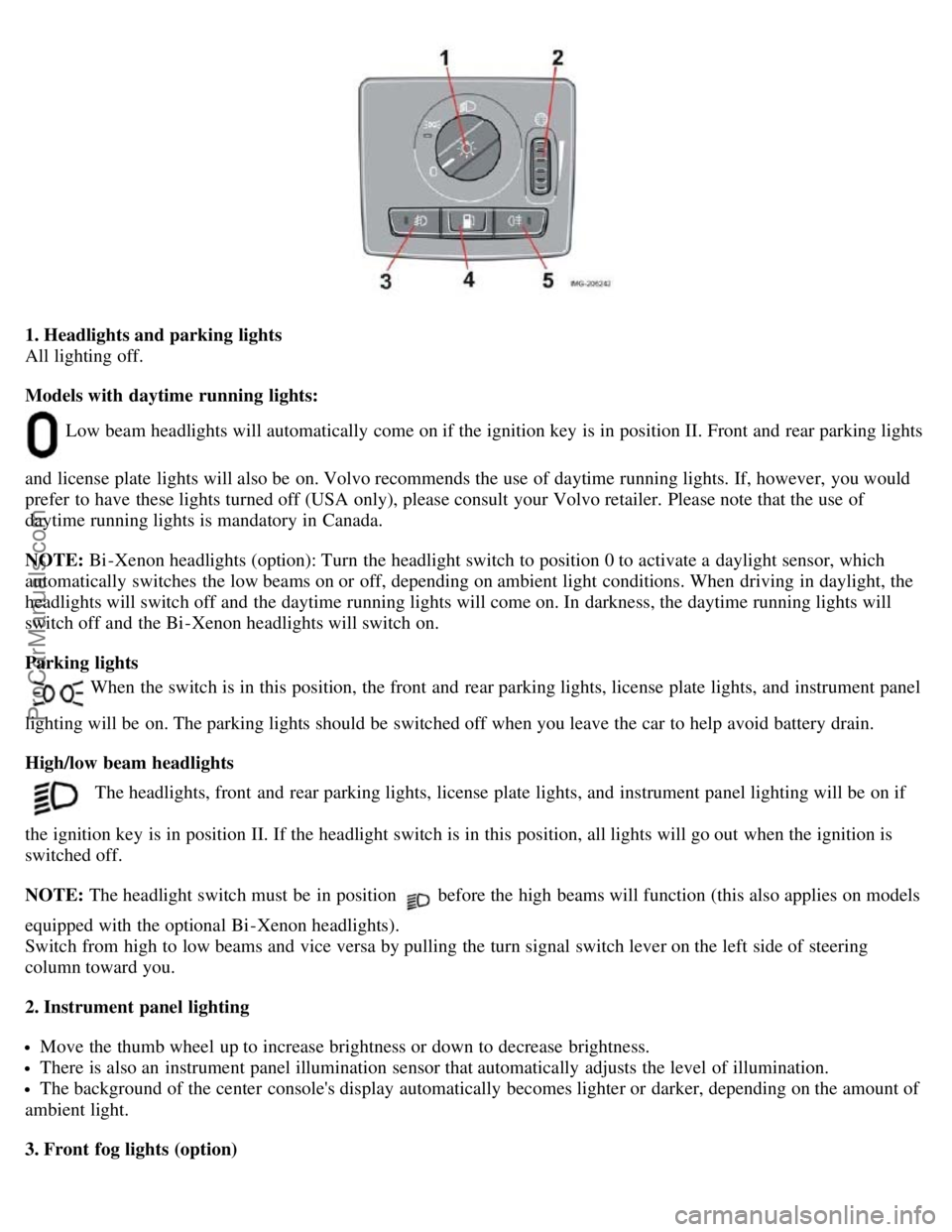
1. Headlights and parking lights
All lighting off.
Models with daytime running lights:
Low beam headlights will automatically come on if the ignition key is in position II. Front and rear parking lights
and license plate lights will also be on. Volvo recommends the use of daytime running lights. If, however, you would
prefer to have these lights turned off (USA only), please consult your Volvo retailer. Please note that the use of
daytime running lights is mandatory in Canada.
NOTE: Bi -Xenon headlights (option): Turn the headlight switch to position 0 to activate a daylight sensor, which
automatically switches the low beams on or off, depending on ambient light conditions. When driving in daylight, the
headlights will switch off and the daytime running lights will come on. In darkness, the daytime running lights will
switch off and the Bi -Xenon headlights will switch on.
Parking lights
When the switch is in this position, the front and rear parking lights, license plate lights, and instrument panel
lighting will be on. The parking lights should be switched off when you leave the car to help avoid battery drain.
High/low beam headlights
The headlights, front and rear parking lights, license plate lights, and instrument panel lighting will be on if
the ignition key is in position II. If the headlight switch is in this position, all lights will go out when the ignition is
switched off.
NOTE: The headlight switch must be in position
before the high beams will function (this also applies on models
equipped with the optional Bi -Xenon headlights).
Switch from high to low beams and vice versa by pulling the turn signal switch lever on the left side of steering
column toward you.
2. Instrument panel lighting
Move the thumb wheel up to increase brightness or down to decrease brightness.
There is also an instrument panel illumination sensor that automatically adjusts the level of illumination.
The background of the center console's display automatically becomes lighter or darker, depending on the amount of
ambient light.
3. Front fog lights (option)
ProCarManuals.com
Page 27 of 127
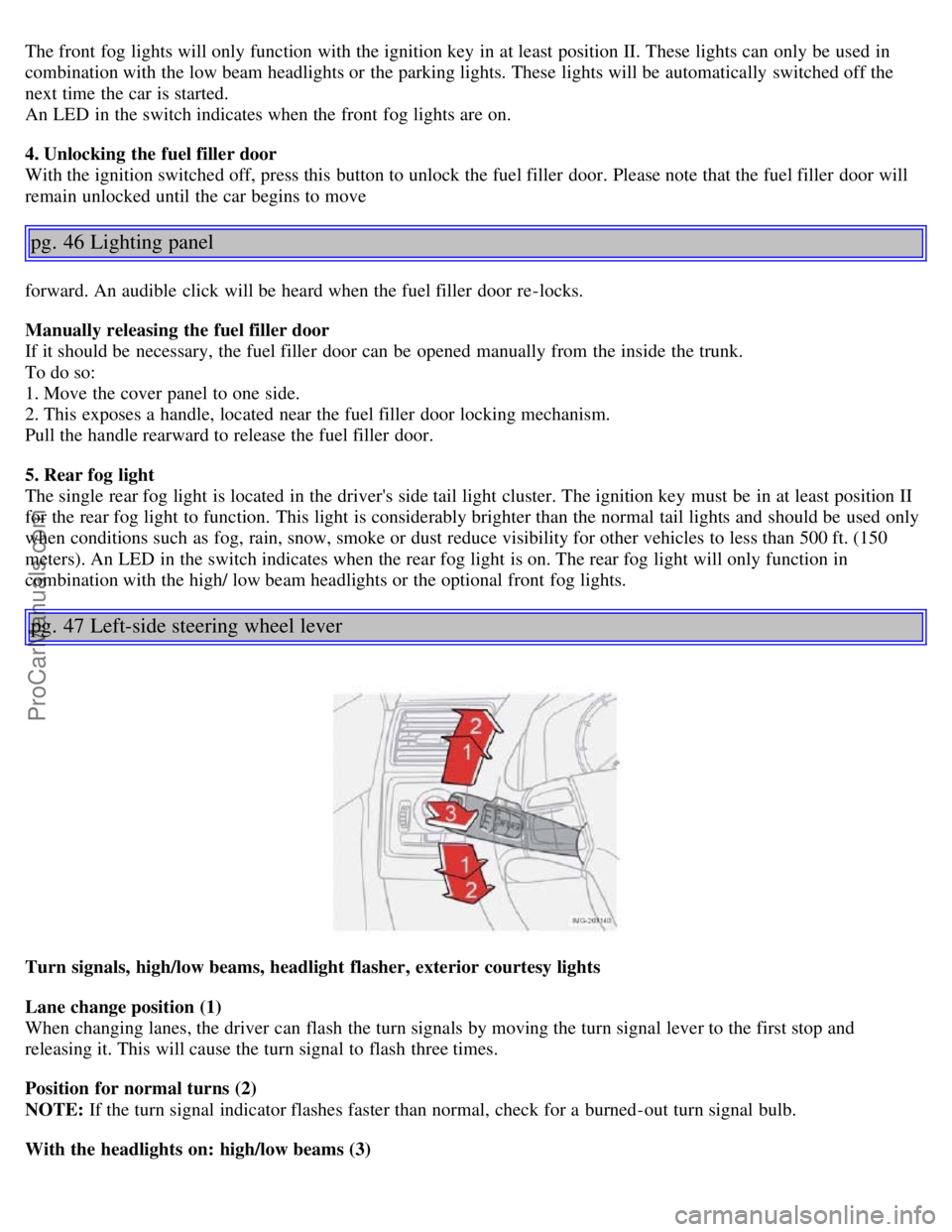
The front fog lights will only function with the ignition key in at least position II. These lights can only be used in
combination with the low beam headlights or the parking lights. These lights will be automatically switched off the
next time the car is started.
An LED in the switch indicates when the front fog lights are on.
4. Unlocking the fuel filler door
With the ignition switched off, press this button to unlock the fuel filler door. Please note that the fuel filler door will
remain unlocked until the car begins to move
pg. 46 Lighting panel
forward. An audible click will be heard when the fuel filler door re-locks.
Manually releasing the fuel filler door
If it should be necessary, the fuel filler door can be opened manually from the inside the trunk.
To do so:
1. Move the cover panel to one side.
2. This exposes a handle, located near the fuel filler door locking mechanism.
Pull the handle rearward to release the fuel filler door.
5. Rear fog light
The single rear fog light is located in the driver's side tail light cluster. The ignition key must be in at least position II
for the rear fog light to function. This light is considerably brighter than the normal tail lights and should be used only
when conditions such as fog, rain, snow, smoke or dust reduce visibility for other vehicles to less than 500 ft. (150
meters). An LED in the switch indicates when the rear fog light is on. The rear fog light will only function in
combination with the high/ low beam headlights or the optional front fog lights.
pg. 47 Left-side steering wheel lever
Turn signals, high/low beams, headlight flasher, exterior courtesy lights
Lane change position (1)
When changing lanes, the driver can flash the turn signals by moving the turn signal lever to the first stop and
releasing it. This will cause the turn signal to flash three times.
Position for normal turns (2)
NOTE: If the turn signal indicator flashes faster than normal, check for a burned-out turn signal bulb.
With the headlights on: high/low beams (3)
ProCarManuals.com
Page 28 of 127
Move the lever toward the steering wheel and release it to switch between high and low beams.
With the headlights off: headlight flasher (3)
With the headlights switched off (the switch on the lighting panel in position 0), move the lever toward the steering
wheel. The high beams will remain on until the lever is released.
Home safe lighting (3)
When you leave your car at night, you can make use of the home safe lighting function to illuminate the area in front
of the car:
1. Remove the key from the ignition switch.
2. Pull the direction indicator lever towards the steering wheel (as when using the headlight flasher function).
3. Exit the car and lock the doors.
The headlights, parking lights, license plate lights will now come on and remain on for 30, 60 or 90 seconds. The time
interval can be changed according to your preferences by using the Personal Settings function, described at the end of
this chapter.
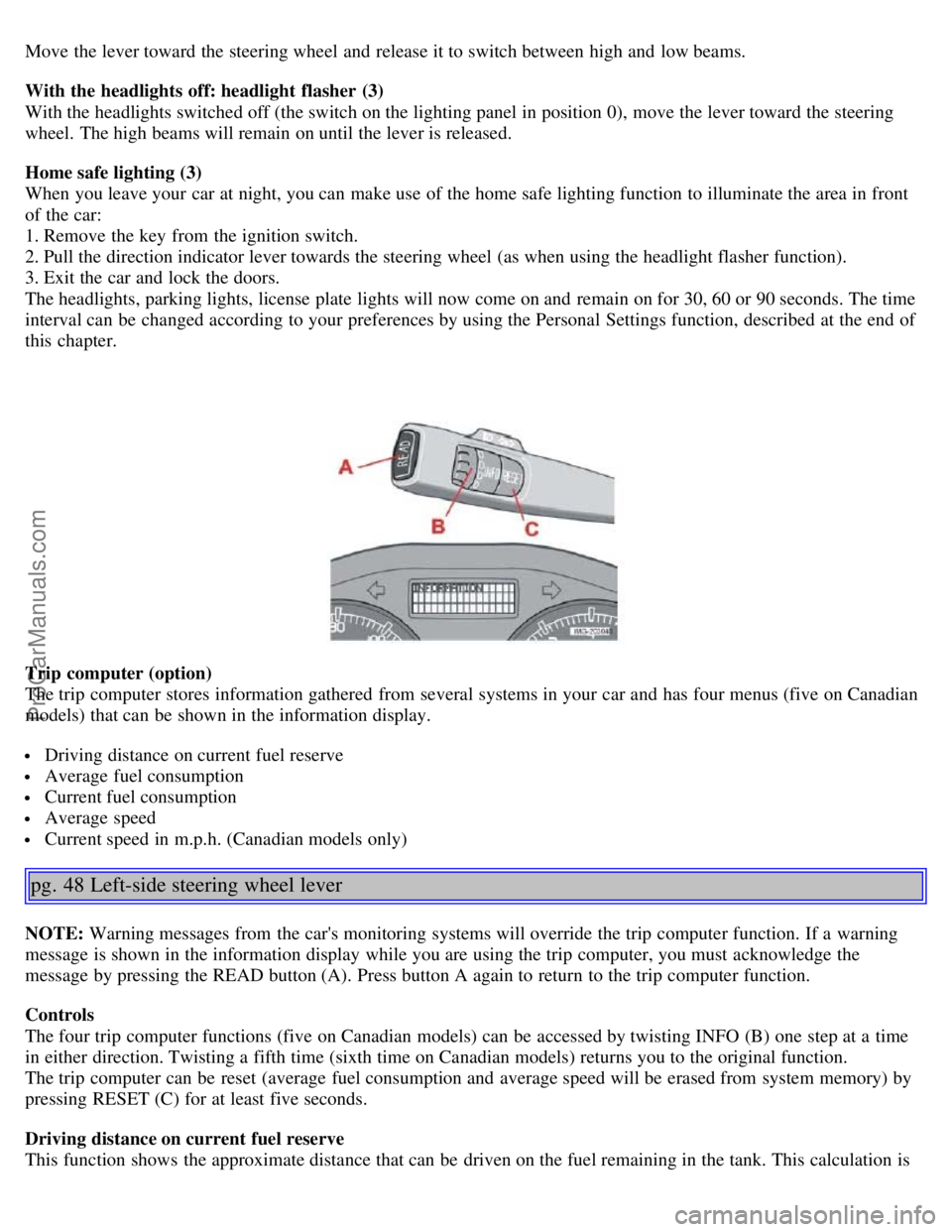
Trip computer (option)
The trip computer stores information gathered from several systems in your car and has four menus (five on Canadian
models) that can be shown in the information display.
Driving distance on current fuel reserve
Average fuel consumption
Current fuel consumption
Average speed
Current speed in m.p.h. (Canadian models only)
pg. 48 Left-side steering wheel lever
NOTE: Warning messages from the car's monitoring systems will override the trip computer function. If a warning
message is shown in the information display while you are using the trip computer, you must acknowledge the
message by pressing the READ button (A). Press button A again to return to the trip computer function.
Controls
The four trip computer functions (five on Canadian models) can be accessed by twisting INFO (B) one step at a time
in either direction. Twisting a fifth time (sixth time on Canadian models) returns you to the original function.
The trip computer can be reset (average fuel consumption and average speed will be erased from system memory) by
pressing RESET (C) for at least five seconds.
Driving distance on current fuel reserve
This function shows the approximate distance that can be driven on the fuel remaining in the tank. This calculation is
ProCarManuals.com