service VOLVO S40 2006 User Guide
[x] Cancel search | Manufacturer: VOLVO, Model Year: 2006, Model line: S40, Model: VOLVO S40 2006Pages: 127, PDF Size: 2.26 MB
Page 20 of 127
14. Temperature gauge
The gauge indicates the temperature of the engine cooling system. If the temperature is abnormally high and the needle
enters the red zone, a message is shown in the display. Bear in mind that auxiliary lamps in front of the air intake
reduce the cooling capacity at high outside temperatures and high engine loads.
15. Indicator and warning symbols
1. Models with All Wheel Drive have a tank volume of 15 US gallons (57 liters).
Models with engine code 39 have a fuel tank capacity of 14 US gallons (53 liters). This code is the 6th and 7th digits
from the left in your vehicle's VIN number. See page 176
for the location of the VIN plate.
pg. 35 Indicator and warning symbols
Function check
The indicator and warning symbols light up when you turn the ignition key to the driving position (position II) before
starting. This shows that the symbols are functioning. When the engine starts, all symbols go out. If the engine is not
started within 5 seconds, all of the symbols except CHECK ENGINE and
will go out. Certain symbols may not
have their functions illustrated, depending on the car's equipment. The PARK BRAKE symbol will not go out until the
parking brake has been released.
Symbols in the center of the instrument panel
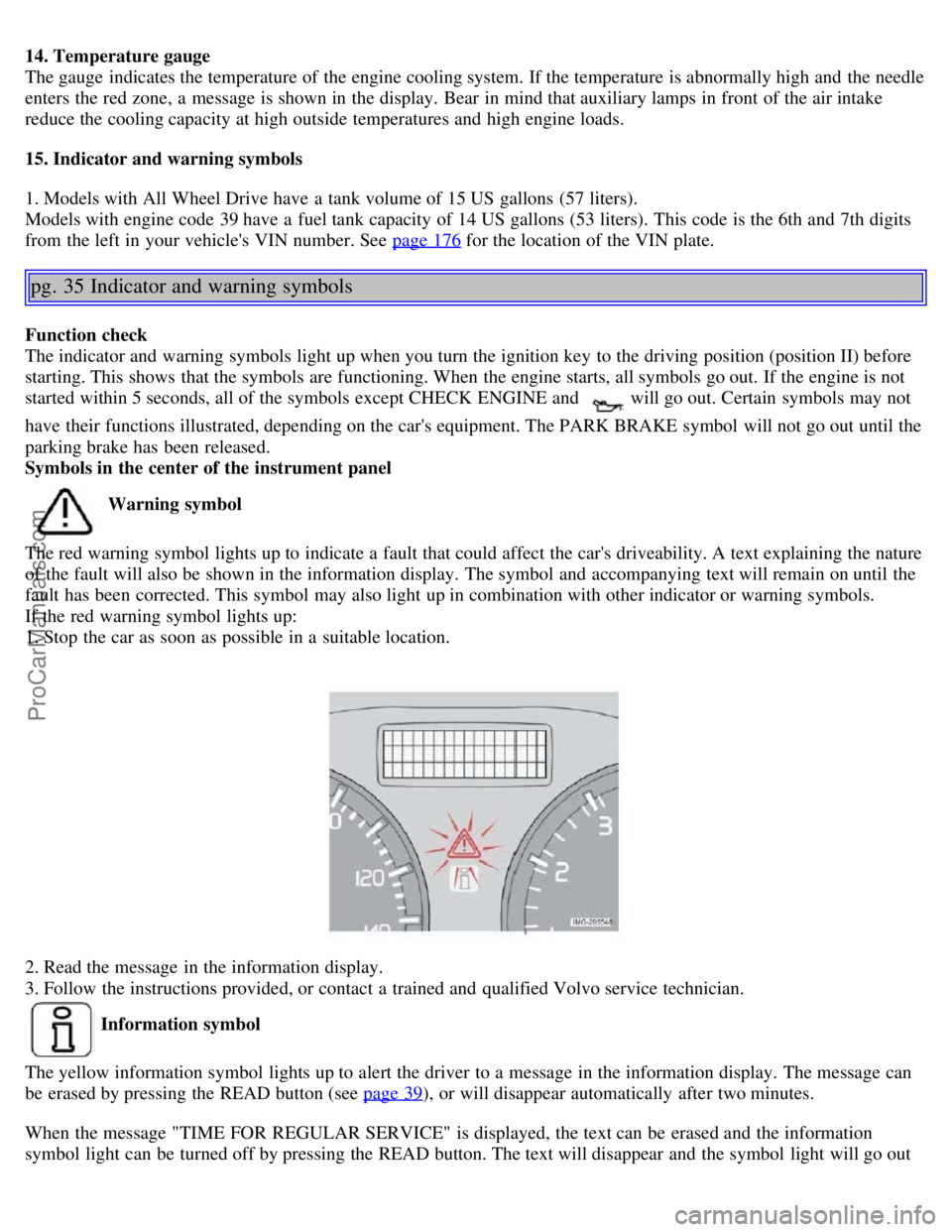
Warning symbol
The red warning symbol lights up to indicate a fault that could affect the car's driveability. A text explaining the nature
of the fault will also be shown in the information display. The symbol and accompanying text will remain on until the
fault has been corrected. This symbol may also light up in combination with other indicator or warning symbols.
If the red warning symbol lights up:
1. Stop the car as soon as possible in a suitable location.
2. Read the message in the information display.
3. Follow the instructions provided, or contact a trained and qualified Volvo service technician.
Information symbol
The yellow information symbol lights up to alert the driver to a message in the information display. The message can
be erased by pressing the READ button (see page 39
), or will disappear automatically after two minutes.
When the message "TIME FOR REGULAR SERVICE" is displayed, the text can be erased and the information
symbol light can be turned off by pressing the READ button. The text will disappear and the symbol light will go out
ProCarManuals.com
Page 21 of 127
automatically after two minutes. This symbol may also light up in combination with other indicator or warning
symbols.
NOTE: The car can still be driven after the information symbol has come on. The car can be driven for 1-2 weeks
after service-related information has been displayed.
pg. 36 Symbols on the left side of the instrument panel
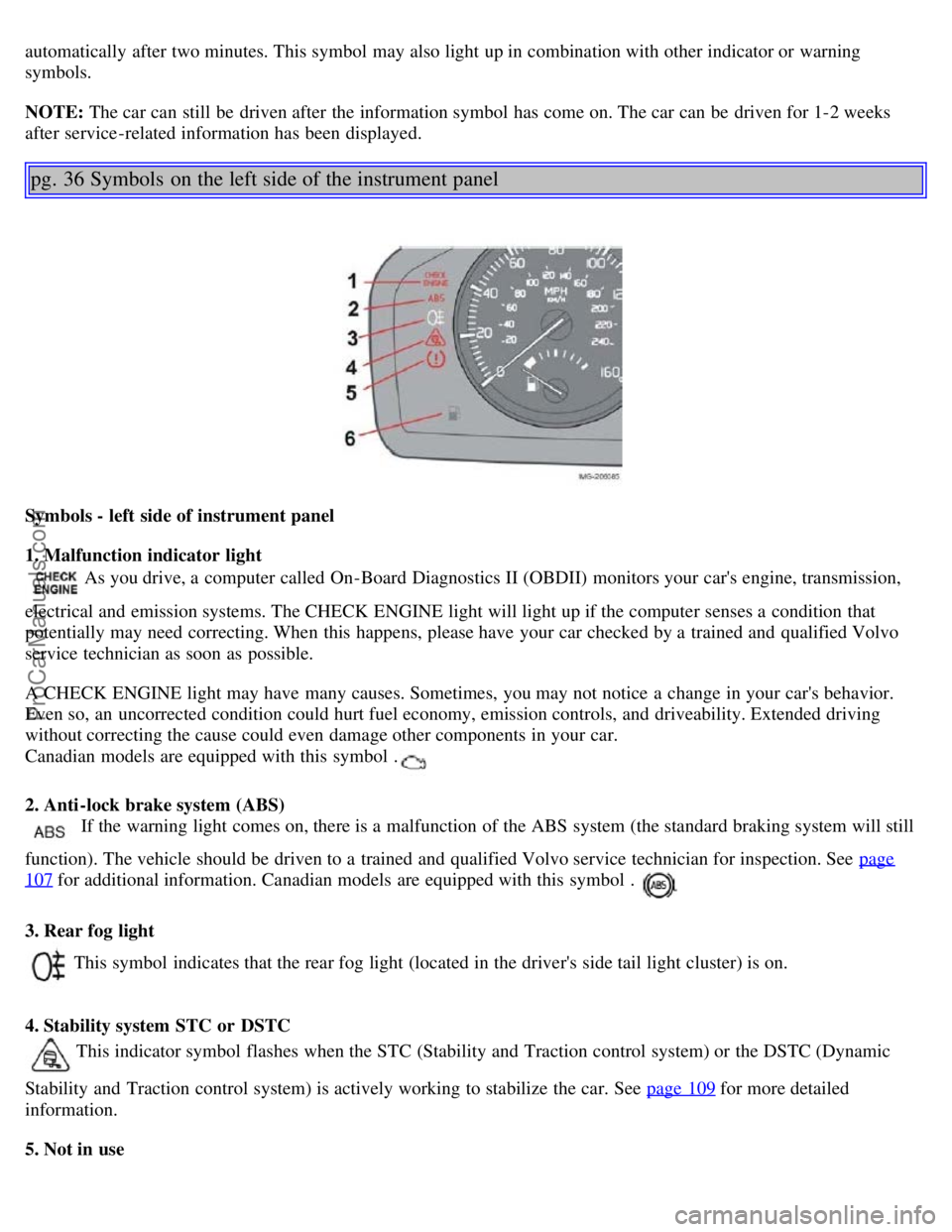
Symbols - left side of instrument panel
1. Malfunction indicator light
As you drive, a computer called On-Board Diagnostics II (OBDII) monitors your car's engine, transmission,
electrical and emission systems. The CHECK ENGINE light will light up if the computer senses a condition that
potentially may need correcting. When this happens, please have your car checked by a trained and qualified Volvo
service technician as soon as possible.
A CHECK ENGINE light may have many causes. Sometimes, you may not notice a change in your car's behavior.
Even so, an uncorrected condition could hurt fuel economy, emission controls, and driveability. Extended driving
without correcting the cause could even damage other components in your car.
Canadian models are equipped with this symbol .
2. Anti-lock brake system (ABS)
If the warning light comes on, there is a malfunction of the ABS system (the standard braking system will still
function). The vehicle should be driven to a trained and qualified Volvo service technician for inspection. See page
107 for additional information. Canadian models are equipped with this symbol .
3. Rear fog light
This symbol indicates that the rear fog light (located in the driver's side tail light cluster) is on.
4. Stability system STC or DSTC
This indicator symbol flashes when the STC (Stability and Traction control system) or the DSTC (Dynamic
Stability and Traction control system) is actively working to stabilize the car. See page 109
for more detailed
information.
5. Not in use
ProCarManuals.com
Page 22 of 127
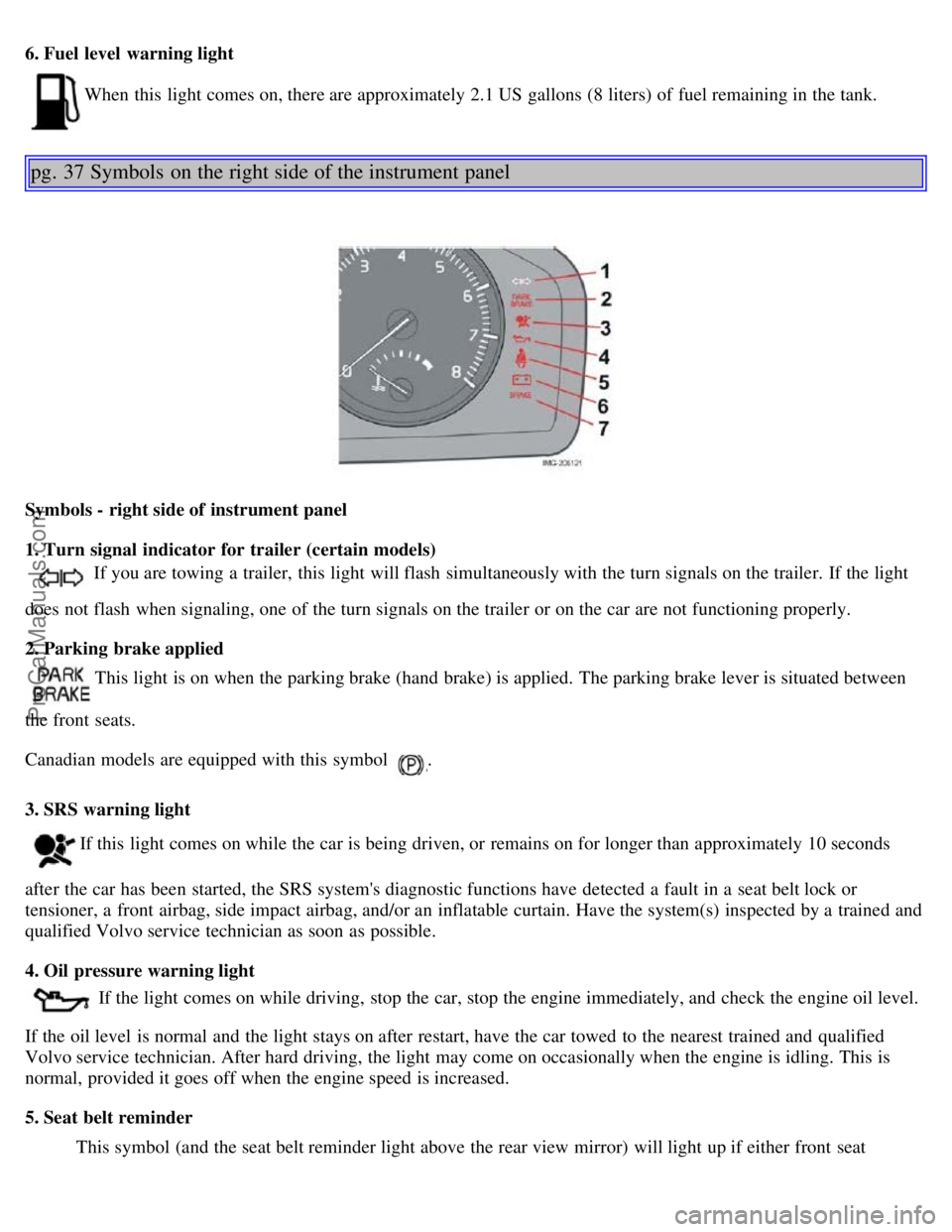
6. Fuel level warning light
When this light comes on, there are approximately 2.1 US gallons (8 liters) of fuel remaining in the tank.
pg. 37 Symbols on the right side of the instrument panel
Symbols - right side of instrument panel
1. Turn signal indicator for trailer (certain models)
If you are towing a trailer, this light will flash simultaneously with the turn signals on the trailer. If the light
does not flash when signaling, one of the turn signals on the trailer or on the car are not functioning properly.
2. Parking brake applied
This light is on when the parking brake (hand brake) is applied. The parking brake lever is situated between
the front seats.
Canadian models are equipped with this symbol
.
3. SRS warning light
If this light comes on while the car is being driven, or remains on for longer than approximately 10 seconds
after the car has been started, the SRS system's diagnostic functions have detected a fault in a seat belt lock or
tensioner, a front airbag, side impact airbag, and/or an inflatable curtain. Have the system(s) inspected by a trained and
qualified Volvo service technician as soon as possible.
4. Oil pressure warning light
If the light comes on while driving, stop the car, stop the engine immediately, and check the engine oil level.
If the oil level is normal and the light stays on after restart, have the car towed to the nearest trained and qualified
Volvo service technician. After hard driving, the light may come on occasionally when the engine is idling. This is
normal, provided it goes off when the engine speed is increased.
5. Seat belt reminder This symbol (and the seat belt reminder light above the rear view mirror) will light up if either front seat
ProCarManuals.com
Page 23 of 127
occupant has not buckled his/her seat belt. If the car is not moving, the symbols will go out after approximately 6
seconds.
6. Generator warning light
If the light comes on while the engine is running, have the charging system checked by a trained and qualified
Volvo service technician.
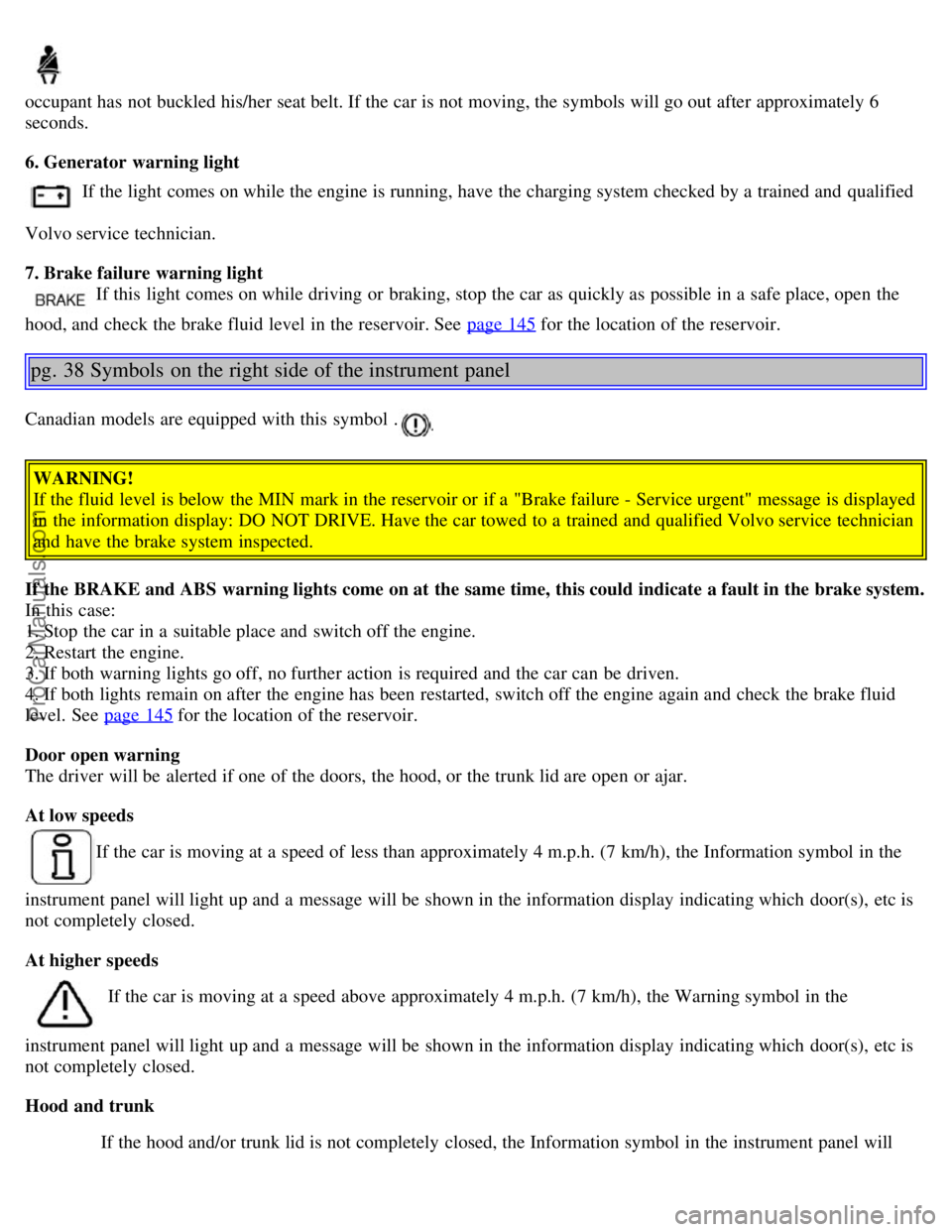
7. Brake failure warning light
If this light comes on while driving or braking, stop the car as quickly as possible in a safe place, open the
hood, and check the brake fluid level in the reservoir. See page 145
for the location of the reservoir.
pg. 38 Symbols on the right side of the instrument panel
Canadian models are equipped with this symbol .
WARNING!
If the fluid level is below the MIN mark in the reservoir or if a "Brake failure - Service urgent" message is displayed
in the information display: DO NOT DRIVE. Have the car towed to a trained and qualified Volvo service technician
and have the brake system inspected.
If the BRAKE and ABS warning lights come on at the same time, this could indicate a fault in the brake system.
In this case:
1. Stop the car in a suitable place and switch off the engine.
2. Restart the engine.
3. If both warning lights go off, no further action is required and the car can be driven.
4. If both lights remain on after the engine has been restarted, switch off the engine again and check the brake fluid
level. See page 145
for the location of the reservoir.
Door open warning
The driver will be alerted if one of the doors, the hood, or the trunk lid are open or ajar.
At low speeds
If the car is moving at a speed of less than approximately 4 m.p.h. (7 km/h), the Information symbol in the
instrument panel will light up and a message will be shown in the information display indicating which door(s), etc is
not completely closed.
At higher speeds
If the car is moving at a speed above approximately 4 m.p.h. (7 km/h), the Warning symbol in the
instrument panel will light up and a message will be shown in the information display indicating which door(s), etc is
not completely closed.
Hood and trunk If the hood and/or trunk lid is not completely closed, the Information symbol in the instrument panel will
ProCarManuals.com
Page 24 of 127
light up and a message will be displayed, regardless of the vehicle's speed.
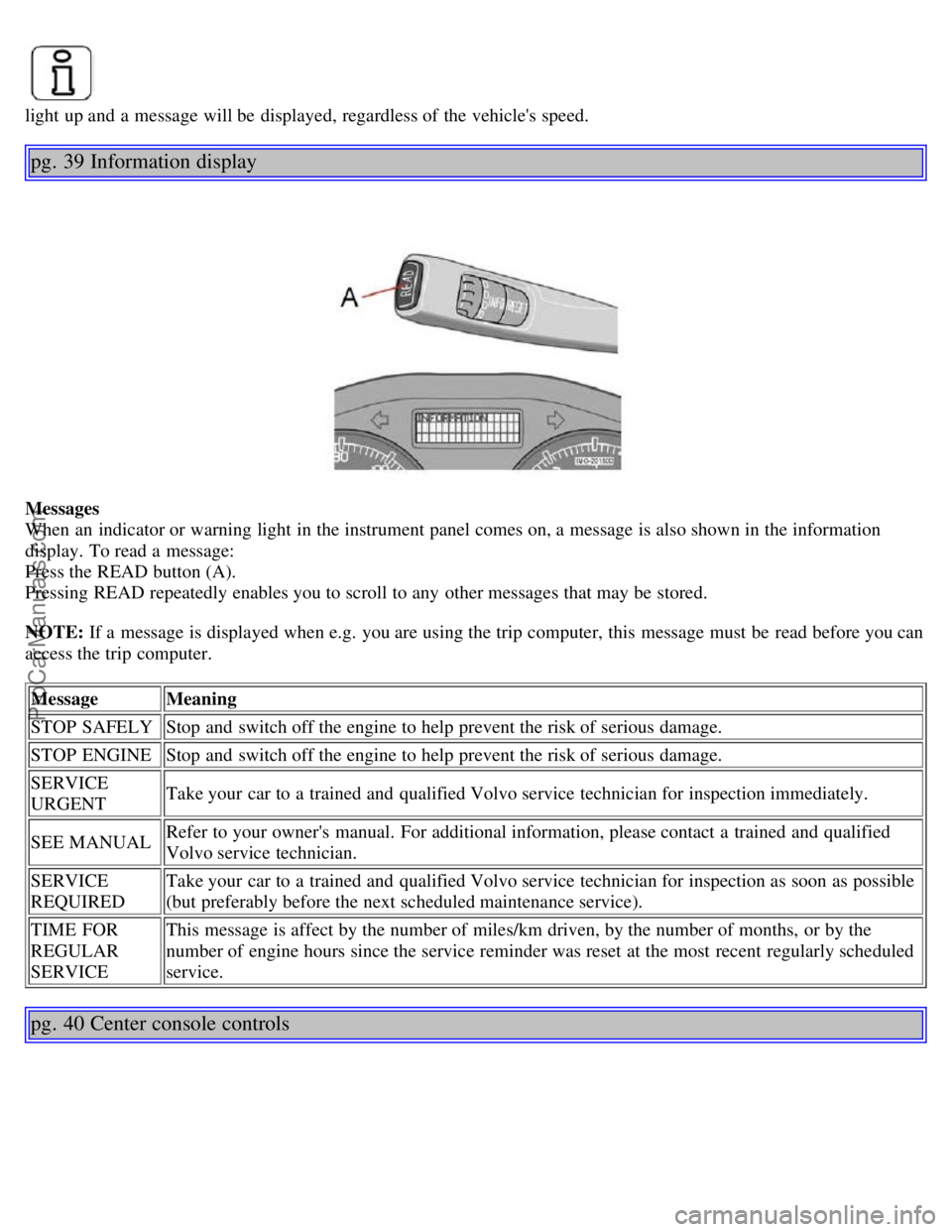
pg. 39 Information display
Messages
When an indicator or warning light in the instrument panel comes on, a message is also shown in the information
display. To read a message:
Press the READ button (A).
Pressing READ repeatedly enables you to scroll to any other messages that may be stored.
NOTE: If a message is displayed when e.g. you are using the trip computer, this message must be read before you can
access the trip computer.Message Meaning
STOP SAFELY Stop and switch off the engine to help prevent the risk of serious damage.
STOP ENGINE Stop and switch off the engine to help prevent the risk of serious damage.
SERVICE
URGENT Take your car to a trained and qualified Volvo service technician for inspection immediately.
SEE MANUAL Refer to your owner's manual. For additional information, please contact a trained and qualified
Volvo service technician.
SERVICE
REQUIRED Take your car to a trained and qualified Volvo service technician for inspection as soon as possible
(but preferably before the next scheduled maintenance service).
TIME FOR
REGULAR
SERVICE This message is affect by the number of miles/km driven, by the number of months, or by the
number of engine hours since the service reminder was reset at the most recent regularly scheduled
service.
pg. 40 Center console controls
ProCarManuals.com
Page 34 of 127
2 0 0 6
VOLVO S40
Chapter 4 - Climate
pg. 61 Climate
General information62
Manual climate control64
Electronic climate control (ECC) - option66
Air distribution69
pg. 62 General information
Air conditioning - A/C
Your car is equipped with a climate control system that includes either manually adjustable air conditioning or optional
Electronic Climate Control (ECC).
The air conditioning system can be switched off, but for optimal air quality in the passenger compartment and to
prevent the windows from fogging, the air conditioning should be left on - even in cool weather.
NOTE: In warm weather, a small amount of water may accumulate under the car when it has been parked. This water
is condensation from the A/C system and is normal.
Ice and snow
Always keep the air intake grille at the base of the windshield free of snow.
Climate control maintenance
Special tools and equipment are required to maintain and carry out repairs on the climate system. Work of this type
should only be done by a trained and qualified Volvo service technician.
Refrigerant
Volvo cares about the environment. The air conditioning system in your car contains a CFC-free refrigerant - R134a.
This substance will not deplete the ozone layer. The system contains 1.2 lbs (530 g) R134a (HFC 134a), and uses PAG
oil.
Passenger compartment filter
Replace the cabin air filter with a new one at the recommended intervals. Please refer to your Warranty and Service
Records Information booklet, or consult a trained and qualified Volvo service technician for these intervals. The filter
should be replaced more often when driving under dirty and dusty conditions. The filter cannot be cleaned and
therefore should always be replaced with a new one.
NOTE: There are different types of cabin air filters. Ensure that the correct type is installed.
Display
The display above the climate control panel shows the climate settings that have been made.
ProCarManuals.com
Page 51 of 127
2 0 0 6
VOLVO S40
Chapter 6 - Locks and alarm
pg. 81 Locks and alarm
Remote control and key blade82
Valet locking85
Remote control battery86
Locking and unlocking87
Locking the glove compartment, Child safety locks88
Alarm89
pg. 82 Remote control and key blade
Remote controls
Two remote controls that also function as ignition keys are provided with your car. The remote controls contain
detachable metal key blades for manually locking or unlocking the driver's door and the glove compartment.
USA - FCC ID: LTQVO315TX
This device complies with part 15 of the FCC rules. Operation is subject to the following conditions: (1) This device
may not cause harmful interference, and (2) this device must accept any interference received, including interference
that may cause undesired operation.
Canada - IC: 3659AVO315TX
Operation is subject to the following conditions: (1) this device may not cause interference, and (2) this device must
accept any interference, including interference that may cause undesired operation of the device.
Loss of a remote control
If either of the remote controls is lost, the other must be taken with the car to a trained and qualified Volvo service
technician. As an anti-theft measure, the code of the lost remote control must be erased from the system.
Each key blade has a unique code, which is used if new key blades are required. A maximum of six remote
controls/key blades can be programmed and used for one car.
Immobilizer (start inhibitor)
Each of the keys supplied with your car contains a coded transponder. The code in the key is transmitted to an antenna
in the ignition switch where it is compared to the code stored in the start inhibitor module. The car will start only with
ProCarManuals.com
Page 52 of 127
a properly coded key. If you misplace a key, take the other keys to a trained and qualified Volvo service technician for
reprogramming as an antitheft measure.USA - FCC ID: LTQWFS 125VO
This device complies with part 15 of the FCC rules. Operation is subject to the following condition: (1) This device
may not cause harmful interference, and (2) this device must accept any interference received, including interference
that may cause undesired operation.
Canada - IC: 3659A-WFS125VO
Operation is subject to the following conditions: (1) this device may not cause interference, and (2) this device must
accept any interference, including interference that may cause undesired operation of the device.
CAUTION!
Never use force on the narrow section of the remote control - this is where the transponder is located. The car cannot
be started if the transponder is damaged.
pg. 83 Remote control and key blade
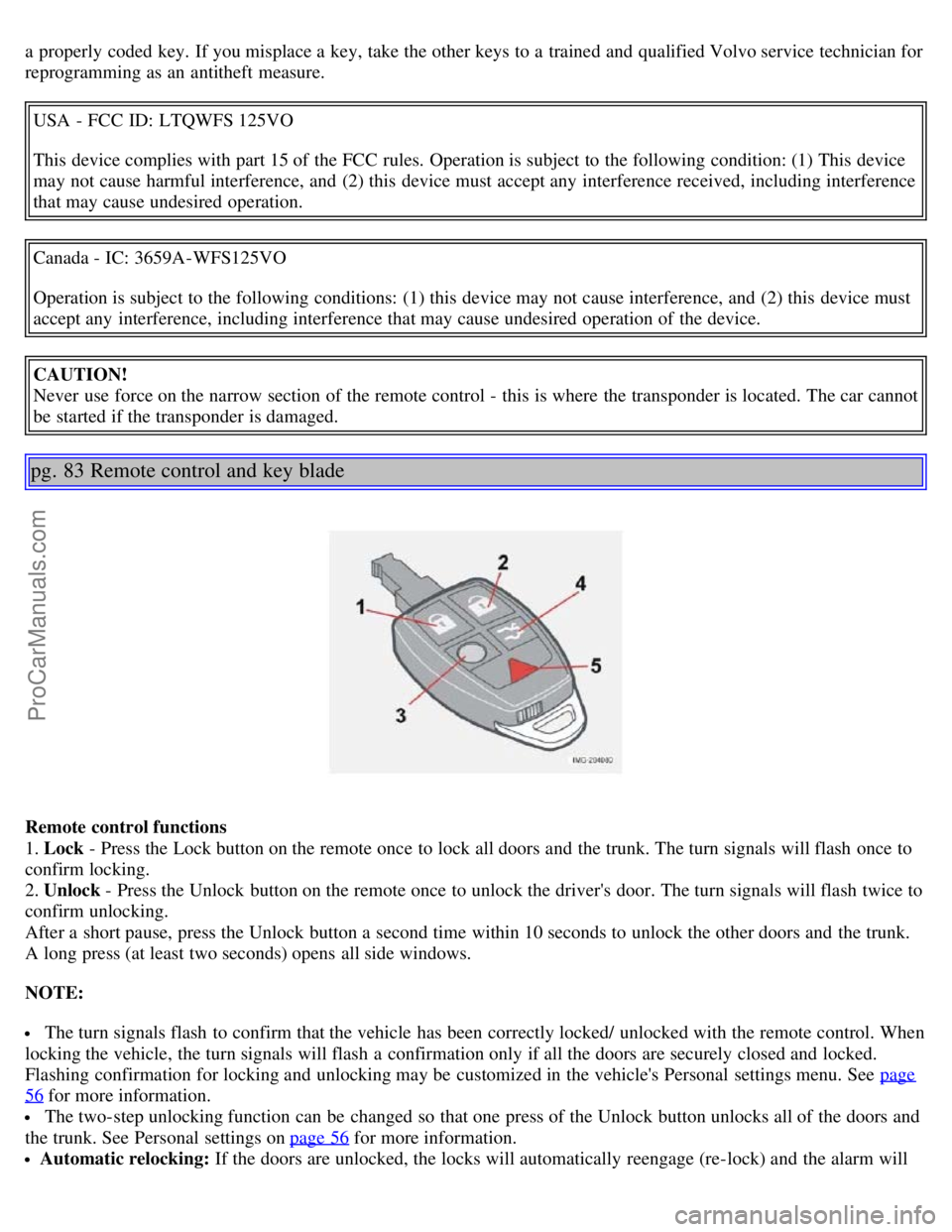
Remote control functions
1. Lock - Press the Lock button on the remote once to lock all doors and the trunk. The turn signals will flash once to
confirm locking.
2. Unlock - Press the Unlock button on the remote once to unlock the driver's door. The turn signals will flash twice to
confirm unlocking.
After a short pause, press the Unlock button a second time within 10 seconds to unlock the other doors and the trunk.
A long press (at least two seconds) opens all side windows.
NOTE:
The turn signals flash to confirm that the vehicle has been correctly locked/ unlocked with the remote control. When
locking the vehicle, the turn signals will flash a confirmation only if all the doors are securely closed and locked.
Flashing confirmation for locking and unlocking may be customized in the vehicle's Personal settings menu. See page
56 for more information.
The two-step unlocking function can be changed so that one press of the Unlock button unlocks all of the doors and
the trunk. See Personal settings on page 56
for more information.
Automatic relocking: If the doors are unlocked, the locks will automatically reengage (re-lock) and the alarm will
ProCarManuals.com
Page 54 of 127
quarter turn to unlock the driver's door only.
NOTE:
After unlocking the driver's door with the key blade, opening the door will trigger the alarm. To disable the alarm:
Press the Unlock button on the remote control, or insert the key in the ignition switch.
Locking the doors with the detached key blade
Lock the rear doors and the front passenger's door by pressing the lock button on each door.
Turn the key blade one -quarter turn counter-clockwise to lock the driver's door.
NOTE: This does not arm the alarm or lock the trunk.
pg. 85 Valet locking
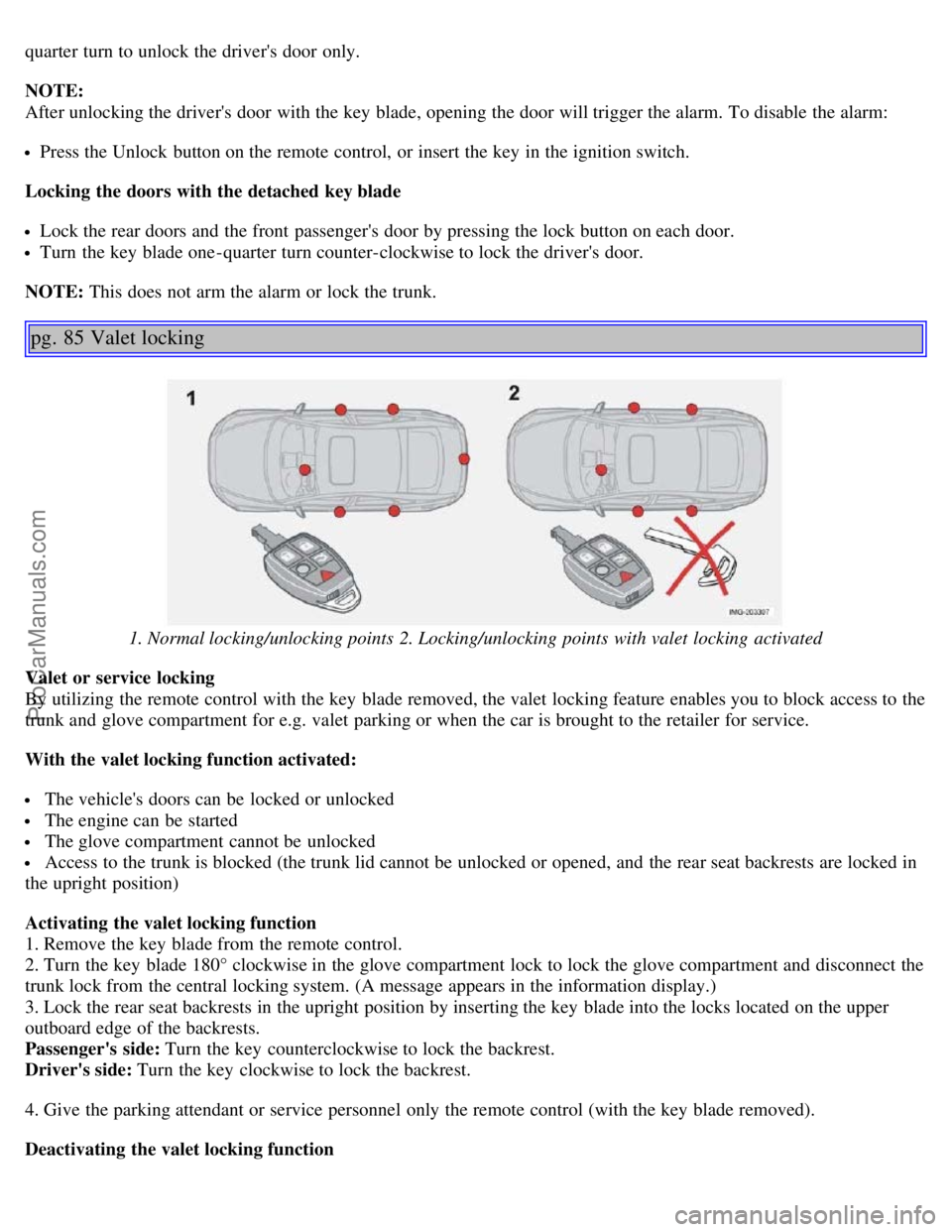
1. Normal locking/unlocking points 2. Locking/unlocking points with valet locking activated
Valet or service locking
By utilizing the remote control with the key blade removed, the valet locking feature enables you to block access to the
trunk and glove compartment for e.g. valet parking or when the car is brought to the retailer for service.
With the valet locking function activated:
The vehicle's doors can be locked or unlocked
The engine can be started
The glove compartment cannot be unlocked
Access to the trunk is blocked (the trunk lid cannot be unlocked or opened, and the rear seat backrests are locked in
the upright position)
Activating the valet locking function
1. Remove the key blade from the remote control.
2. Turn the key blade 180° clockwise in the glove compartment lock to lock the glove compartment and disconnect the
trunk lock from the central locking system. (A message appears in the information display.)
3. Lock the rear seat backrests in the upright position by inserting the key blade into the locks located on the upper
outboard edge of the backrests.
Passenger's side: Turn the key counterclockwise to lock the backrest.
Driver's side: Turn the key clockwise to lock the backrest.
4. Give the parking attendant or service personnel only the remote control (with the key blade removed).
Deactivating the valet locking function
ProCarManuals.com
Page 55 of 127
Turn the key blade 180° counterclockwise in the glove compartment lock to deactivate valet locking, and use the key
blade to unlock the rear seat backrests.
pg. 86 Remote control battery
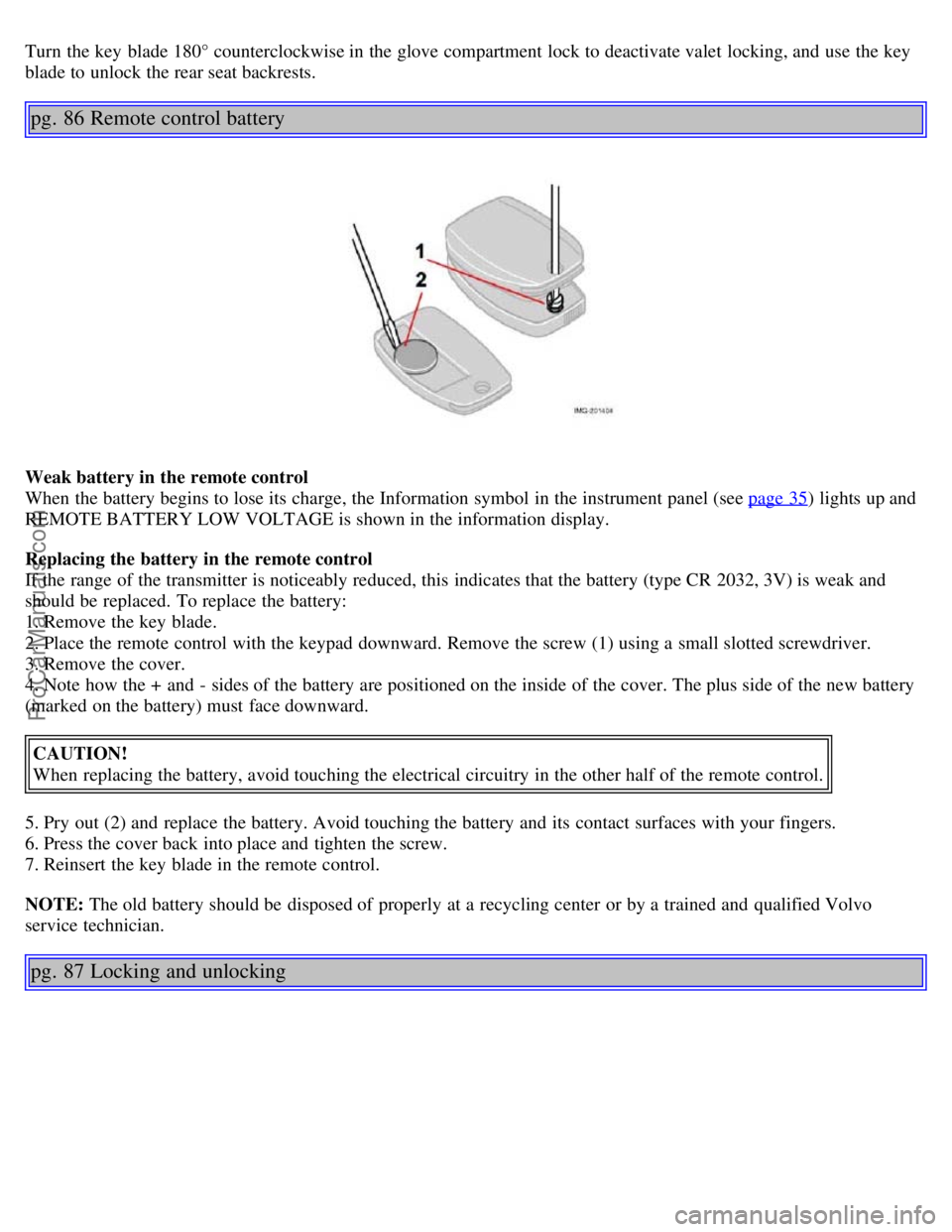
Weak battery in the remote control
When the battery begins to lose its charge, the Information symbol in the instrument panel (see page 35
) lights up and
REMOTE BATTERY LOW VOLTAGE is shown in the information display.
Replacing the battery in the remote control
If the range of the transmitter is noticeably reduced, this indicates that the battery (type CR 2032, 3V) is weak and
should be replaced. To replace the battery:
1. Remove the key blade.
2. Place the remote control with the keypad downward. Remove the screw (1) using a small slotted screwdriver.
3. Remove the cover.
4. Note how the + and - sides of the battery are positioned on the inside of the cover. The plus side of the new battery
(marked on the battery) must face downward.
CAUTION!
When replacing the battery, avoid touching the electrical circuitry in the other half of the remote control.
5. Pry out (2) and replace the battery. Avoid touching the battery and its contact surfaces with your fingers.
6. Press the cover back into place and tighten the screw.
7. Reinsert the key blade in the remote control.
NOTE: The old battery should be disposed of properly at a recycling center or by a trained and qualified Volvo
service technician.
pg. 87 Locking and unlocking
ProCarManuals.com