display VOLVO S40 2006 Owner's Guide
[x] Cancel search | Manufacturer: VOLVO, Model Year: 2006, Model line: S40, Model: VOLVO S40 2006Pages: 127, PDF Size: 2.26 MB
Page 106 of 127
NOTE: A total of 30 stations can be stored; 10 stations each in AM, FM1 and FM2.
Automatically storing a station
Pressing AUTO (7) automatically searches for and stores up to ten strong AM or FM stations in a separate memory. If
more than ten stations are found, the ten strongest ones are stored. This function is especially useful in areas in which
you are not familiar with radio stations or their frequencies.
To use the AUTO function:
Select a waveband using the AM/FM button (1).
Start the search by pressing AUTO until AUTO STORING appears in the display.
When the search is completed, AUTO STORING will no longer be displayed. If there are no stations with sufficient
signal strength, NO AST FOUND is displayed.
The auto-stored stations can be selected using the preset buttons (2).
Press EXIT (6) to terminate the automatic storing function.
When the radio is in auto-store mode, AUTO is shown in the display. AUTO disappears when you return to normal
radio mode, which can be done by briefly pressing AM/FM (1), EXIT (6), or AUTO (7).
pg. 167 Radio functions
To return to the Auto-store mode, press the AUTO button briefly and select a stored station by pressing one of the
preset buttons (2).
Saving auto-stored stations in the preset memory
An auto-stored station can be saved in the memory for manually preset stations.
Press AUTO (7) briefly.
Auto is displayed.
Press one of the preset buttons (2) under which the station is to be stored. Hold down the button until STATION
STORED is displayed.
The radio will then exit auto-store mode and the stored station can be selected by pressing the preset button.
Scanning
SCAN (4) automatically searches through the selected waveband for strong AM or FM stations. When the radio finds a
station, that station will be played for approximately 8 seconds, after which scanning resumes.
Activating/deactivating SCAN
Select radio mode using the AM/FM button (2).
Press SCAN to activate the function. SCAN is shown in the display.
Press the SCAN or EXIT button to deactivate the scan function and listen to the selected station.
Storing a station found with SCAN
A station can be stored as a preset while the SCAN function is activated.
Press one of the preset buttons (2) under which the station is to be stored. Hold down the button until STATION
STORED is displayed.
ProCarManuals.com
Page 107 of 127
The SCAN function will be deactivated and the station can be selected by pressing the preset button.
Radio Broadcast Data System - RBDS
This feature, which may not be available in your area, functions only with FM broadcasts. The radio in your car is
equipped with an advanced system allowing information from broadcasters to be transmitted visually, as text, together
with the audio signal. This information is then decoded by the radio and made available for several new and unique
features.
The RBDS or Radio Broadcast Data System operates in the FM band only, and the information transmitted is
supplied exclusively by participating broadcasters.
Volvo has no control over the accuracy of the data or information.
Coverage by local broadcasters may be limited at this time, but as the technology and benefits grow, you will find the
radio in your car is equipped to take advantage of this system.
PI (Program Information) seek
When an FM station has been stored as a preset, the radio also stores RBDS program information if it is available.
When the preset is selected at a later time, the radio tries to access updated program information. In weak signal areas,
there may be a delay before the station becomes audible. During this delay, there will be no sound.
PI seek can be interrupted by pressing EXIT.
Radio text
Certain RBDS stations broadcast program information, which can be shown in the display.
To start this function:
1. Select FM1 or FM2 and press the MENU button.
2. Press ENTER.
3. Select RADIOTEXT in the menu and press ENTER.
pg. 168 Radio functions
To deactivate this function, select RADIOTEXT again and press ENTER.
Alarm
Alarms bulletins are transmitted automatically by certain RBDS stations. The function cannot be deactivated.
"Alarm!" is shown in the radio display when an alarm message is sent. The function is used to warn motorists of
serious accidents, etc.
Program type/station format - PTY
The PTY function allows you to find stations whose programs suit your taste. Use the PTY function to select among
the different station formats shown in the list.
To show the format of the current station:
Select FM1 or FM2 and press the MENU button.
Press ENTER.
Select PTY from the menu and press ENTER.
Select SHOW PTY and press ENTER. The PTY (program type) of the selected station is now shown in the display.
NOTE: Not all RBDS radio stations have PTY designations.
Station formats
ProCarManuals.com
Page 109 of 127
Resetting RBDS functions
This function restores all radio settings to the original factory settings.
Select FM1 or FM2 and press the MENU button.
Press ENTER.
Select ADVANCED RADIO SETTINGS in the menu and press ENTER.
Select RESET ALL in the menu and press ENTER.
Press ENTER again to confirm your selection.
pg. 170 CD player/CD changer (option)
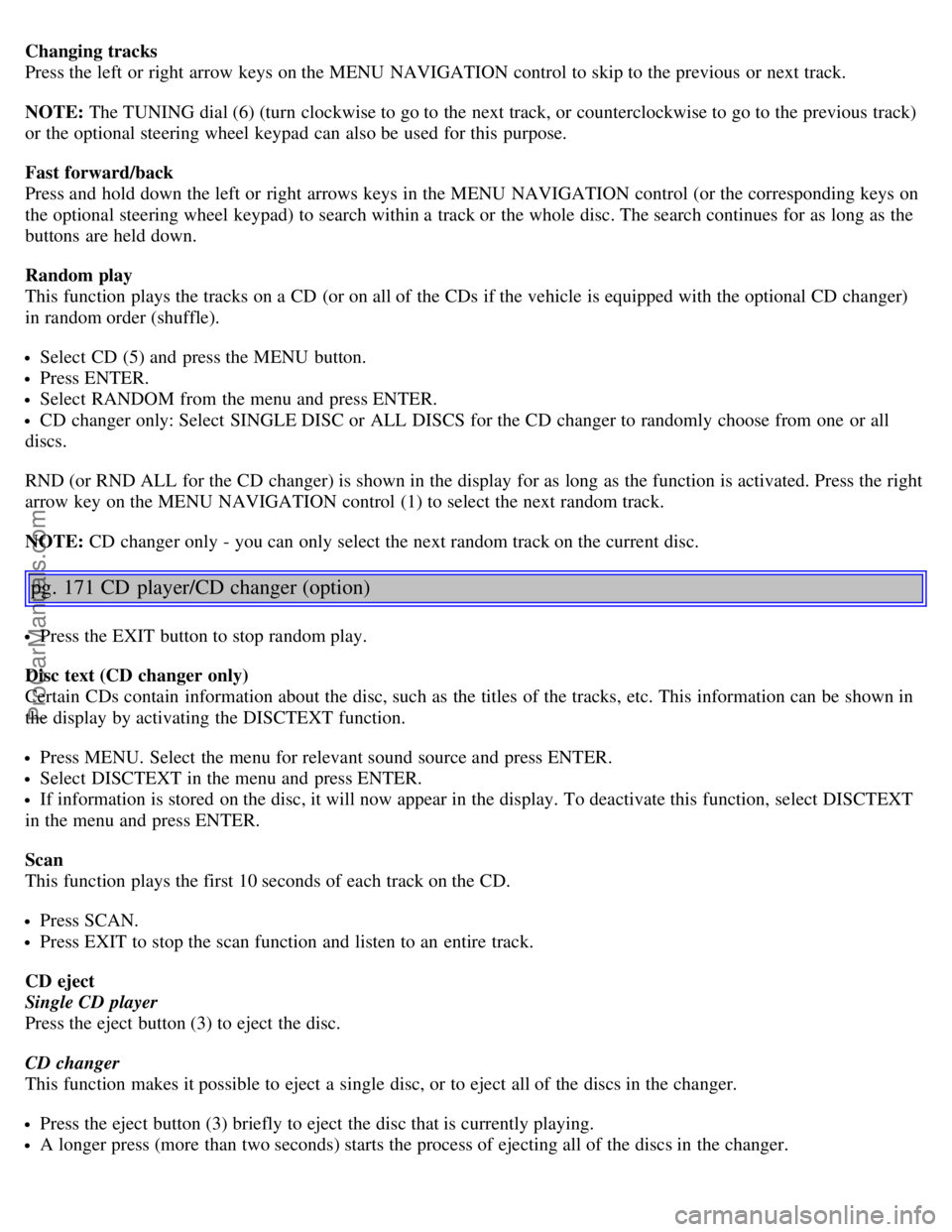
CD function controls
1. MENU NAVIGATION CONTROL - press the up or down arrow keys to scroll in a menu, or the keys on the
left/right sides of the control to change CD tracks/fast forward/back
2. Buttons for selecting a disc in the optional CD changer
3. CD eject button
4. CD slot
5. CD player button
6. TUNING dial for selecting tracks on a CD
Playing a CD
Single CD player
Start the CD player by pressing the CD button (5) and inserting a disc in the slot (4). If there is already a disc inserted,
it will begin to play.
CD changer
The CD changer can hold up to six discs.
Press the CD button.
Select an empty position using the 1-6 buttons or the up/down keys on the MENU NAVIGATION control. The
display shows which positions are empty.
Insert a disc into the slot (4).
NOTE: Ensure that INSERT DISC is displayed before inserting a disc.
ProCarManuals.com
Page 110 of 127
Changing tracks
Press the left or right arrow keys on the MENU NAVIGATION control to skip to the previous or next track.
NOTE: The TUNING dial (6) (turn clockwise to go to the next track, or counterclockwise to go to the previous track)
or the optional steering wheel keypad can also be used for this purpose.
Fast forward/back
Press and hold down the left or right arrows keys in the MENU NAVIGATION control (or the corresponding keys on
the optional steering wheel keypad) to search within a track or the whole disc. The search continues for as long as the
buttons are held down.
Random play
This function plays the tracks on a CD (or on all of the CDs if the vehicle is equipped with the optional CD changer)
in random order (shuffle).
Select CD (5) and press the MENU button.
Press ENTER.
Select RANDOM from the menu and press ENTER.
CD changer only: Select SINGLE DISC or ALL DISCS for the CD changer to randomly choose from one or all
discs.
RND (or RND ALL for the CD changer) is shown in the display for as long as the function is activated. Press the right
arrow key on the MENU NAVIGATION control (1) to select the next random track.
NOTE: CD changer only - you can only select the next random track on the current disc.
pg. 171 CD player/CD changer (option)
Press the EXIT button to stop random play.
Disc text (CD changer only)
Certain CDs contain information about the disc, such as the titles of the tracks, etc. This information can be shown in
the display by activating the DISCTEXT function.
Press MENU. Select the menu for relevant sound source and press ENTER.
Select DISCTEXT in the menu and press ENTER.
If information is stored on the disc, it will now appear in the display. To deactivate this function, select DISCTEXT
in the menu and press ENTER.
Scan
This function plays the first 10 seconds of each track on the CD.
Press SCAN.
Press EXIT to stop the scan function and listen to an entire track.
CD eject
Single CD player
Press the eject button (3) to eject the disc.
CD changer
This function makes it possible to eject a single disc, or to eject all of the discs in the changer.
Press the eject button (3) briefly to eject the disc that is currently playing.
A longer press (more than two seconds) starts the process of ejecting all of the discs in the changer.
ProCarManuals.com
Page 122 of 127
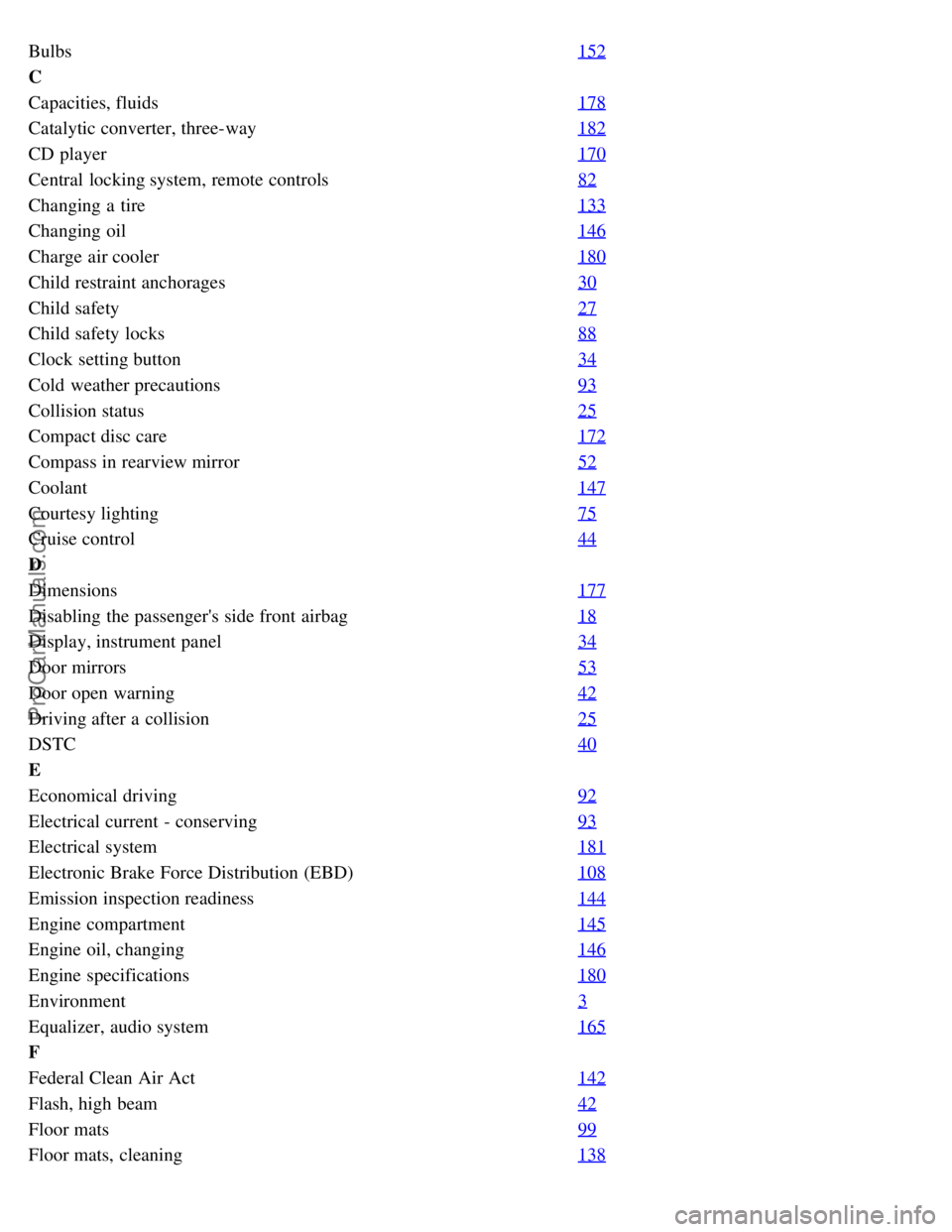
Bulbs152
C
Capacities, fluids178
Catalytic converter, three-way182
CD player170
Central locking system, remote controls82
Changing a tire133
Changing oil146
Charge air cooler180
Child restraint anchorages30
Child safety27
Child safety locks88
Clock setting button34
Cold weather precautions93
Collision status25
Compact disc care172
Compass in rearview mirror52
Coolant147
Courtesy lighting75
Cruise control44
D
Dimensions177
Disabling the passenger's side front airbag18
Display, instrument panel34
Door mirrors53
Door open warning42
Driving after a collision25
DSTC40
E
Economical driving92
Electrical current - conserving93
Electrical system181
Electronic Brake Force Distribution (EBD)108
Emission inspection readiness144
Engine compartment145
Engine oil, changing146
Engine specifications180
Environment3
Equalizer, audio system165
F
Federal Clean Air Act142
Flash, high beam42
Floor mats99
Floor mats, cleaning138
ProCarManuals.com
Page 123 of 127
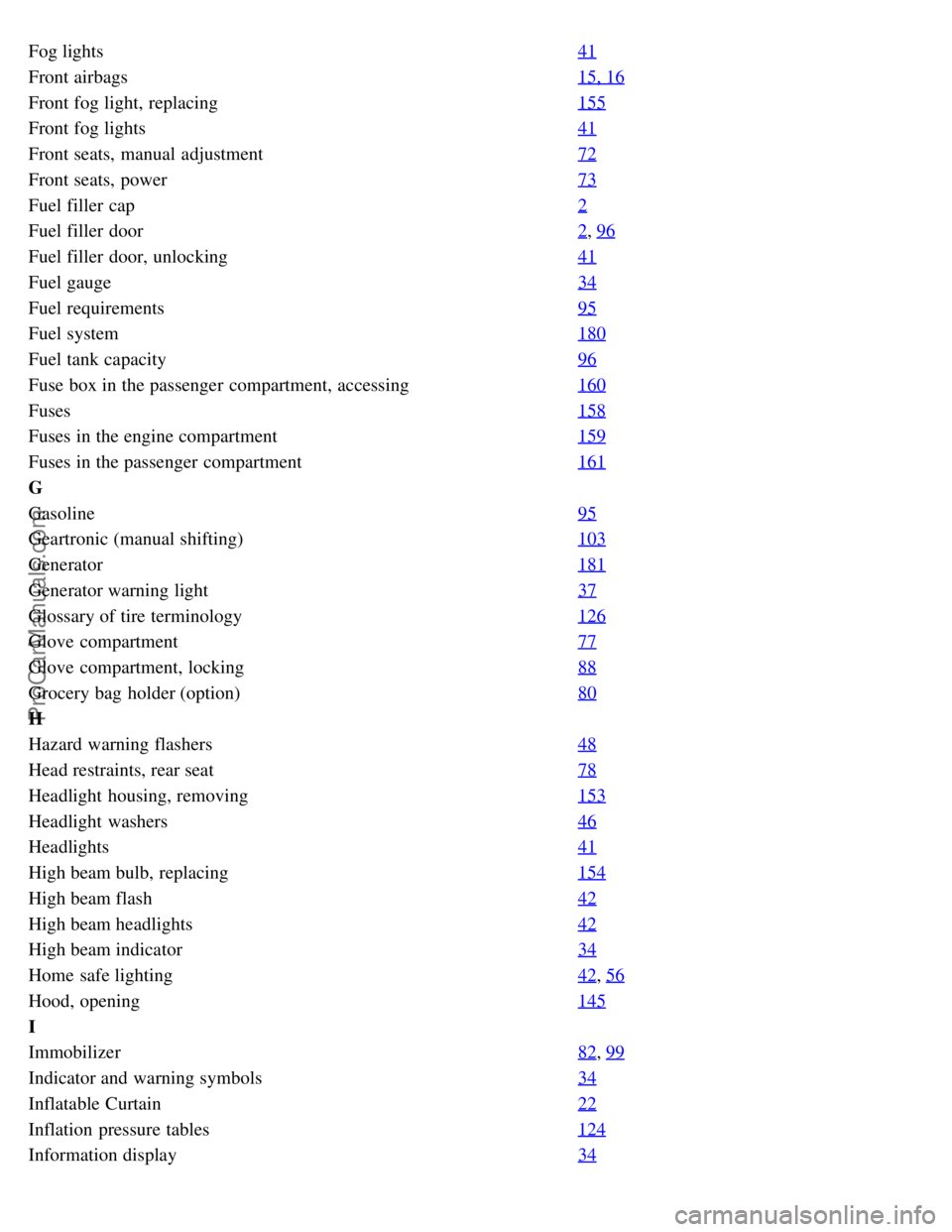
Fog lights41
Front airbags15, 16
Front fog light, replacing155
Front fog lights41
Front seats, manual adjustment72
Front seats, power73
Fuel filler cap2
Fuel filler door2, 96
Fuel filler door, unlocking41
Fuel gauge34
Fuel requirements95
Fuel system180
Fuel tank capacity96
Fuse box in the passenger compartment, accessing160
Fuses158
Fuses in the engine compartment159
Fuses in the passenger compartment161
G
Gasoline95
Geartronic (manual shifting)103
Generator181
Generator warning light37
Glossary of tire terminology126
Glove compartment77
Glove compartment, locking88
Grocery bag holder (option)80
H
Hazard warning flashers48
Head restraints, rear seat78
Headlight housing, removing153
Headlight washers46
Headlights41
High beam bulb, replacing154
High beam flash42
High beam headlights42
High beam indicator34
Home safe lighting42, 56
Hood, opening145
I
Immobilizer82
, 99
Indicator and warning symbols34
Inflatable Curtain22
Inflation pressure tables124
Information display34
ProCarManuals.com
Page 124 of 127
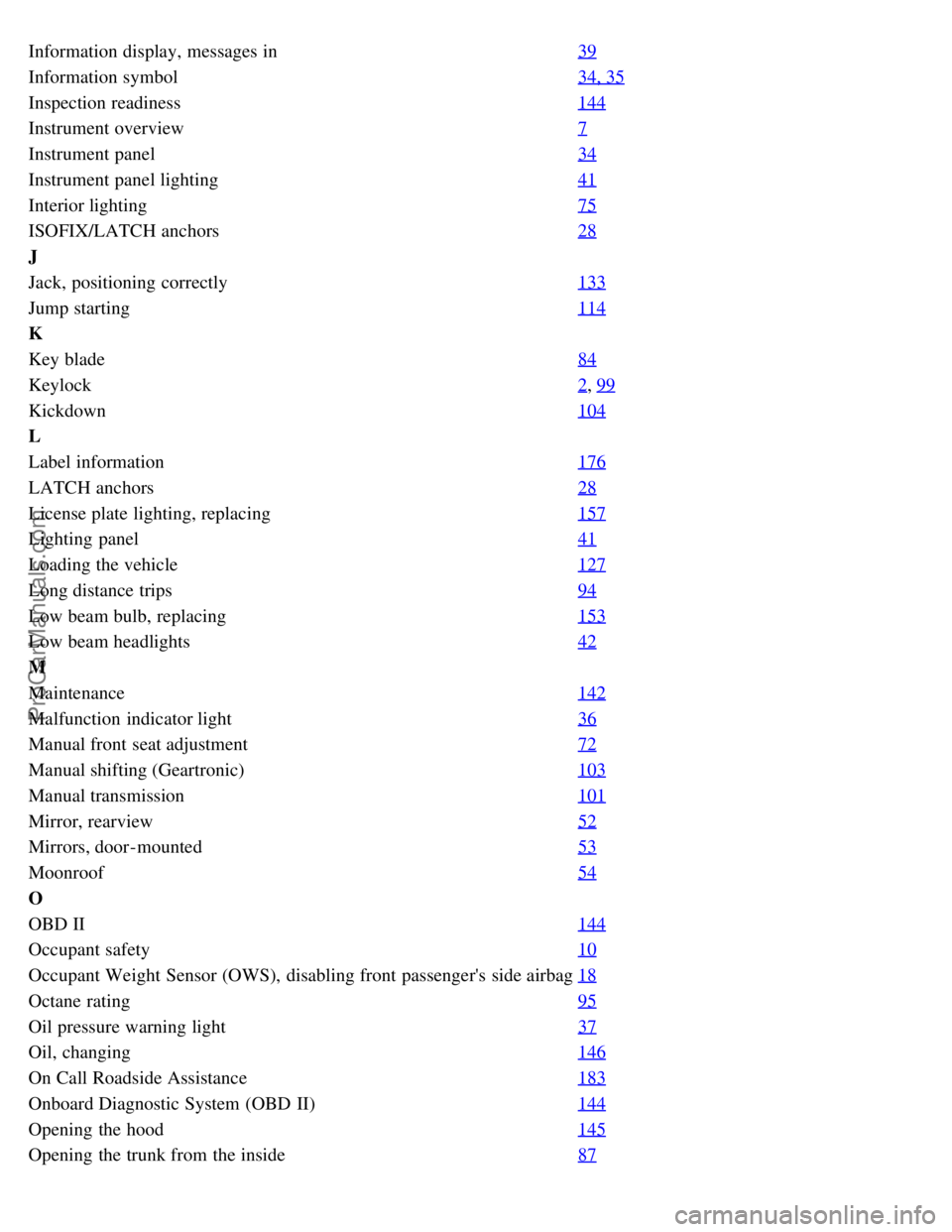
Information display, messages in39
Information symbol34, 35
Inspection readiness144
Instrument overview7
Instrument panel34
Instrument panel lighting41
Interior lighting75
ISOFIX/LATCH anchors28
J
Jack, positioning correctly133
Jump starting114
K
Key blade84
Keylock2, 99
Kickdown104
L
Label information176
LATCH anchors28
License plate lighting, replacing157
Lighting panel41
Loading the vehicle127
Long distance trips94
Low beam bulb, replacing153
Low beam headlights42
M
Maintenance142
Malfunction indicator light36
Manual front seat adjustment72
Manual shifting (Geartronic)103
Manual transmission101
Mirror, rearview52
Mirrors, door-mounted53
Moonroof54
O
OBD II144
Occupant safety10
Occupant Weight Sensor (OWS), disabling front passenger's side airbag18
Octane rating95
Oil pressure warning light37
Oil, changing146
On Call Roadside Assistance183
Onboard Diagnostic System (OBD II)144
Opening the hood145
Opening the trunk from the inside87
ProCarManuals.com