instrument panel VOLVO S40 2007 User Guide
[x] Cancel search | Manufacturer: VOLVO, Model Year: 2007, Model line: S40, Model: VOLVO S40 2007Pages: 208, PDF Size: 5.99 MB
Page 45 of 208
1. Stop the car as soon as possible in a suitable location.
2. Read the message in the information display.
3. Follow the instructions provided, or contact a trained and qualified Volvo service technician.
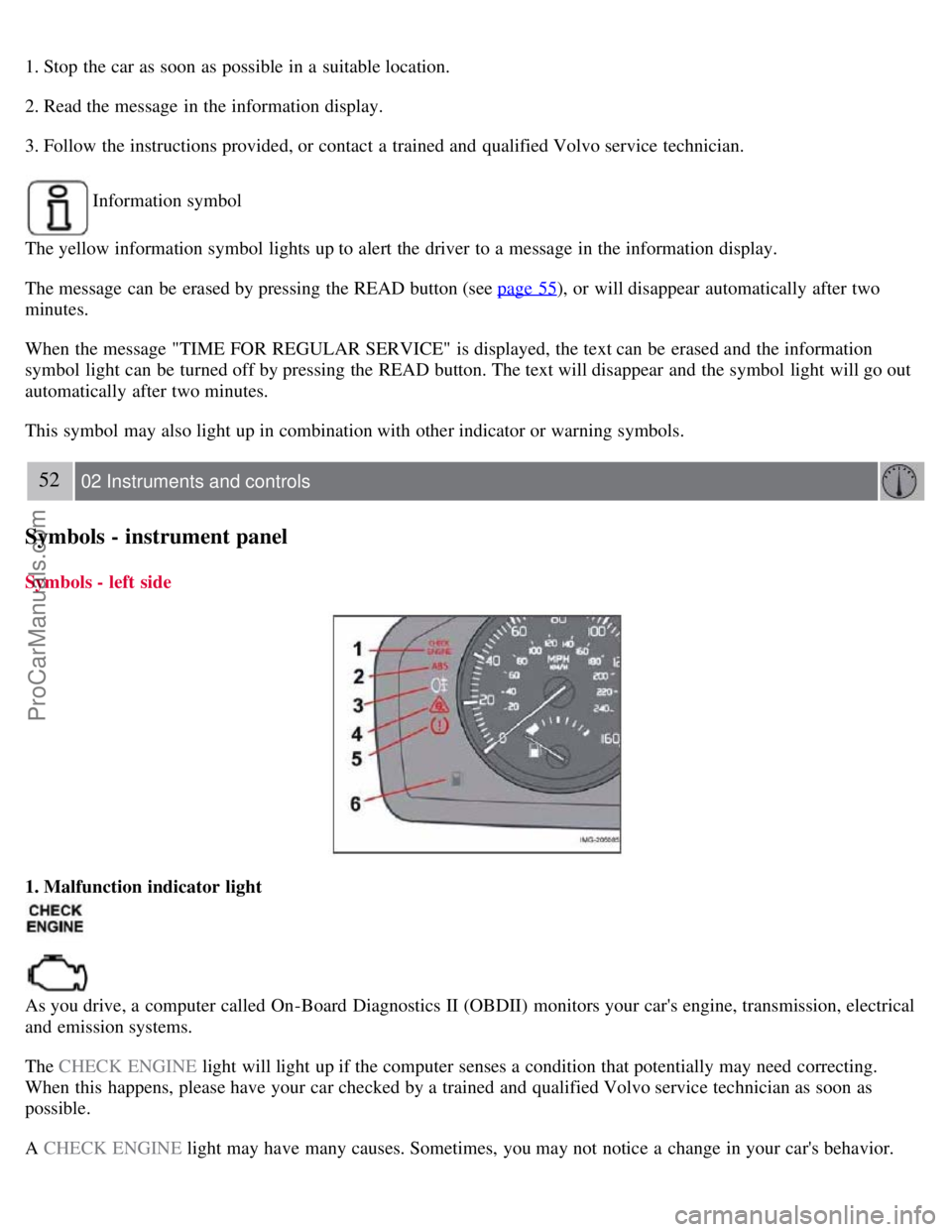
Information symbol
The yellow information symbol lights up to alert the driver to a message in the information display.
The message can be erased by pressing the READ button (see page 55
), or will disappear automatically after two
minutes.
When the message "TIME FOR REGULAR SERVICE" is displayed, the text can be erased and the information
symbol light can be turned off by pressing the READ button. The text will disappear and the symbol light will go out
automatically after two minutes.
This symbol may also light up in combination with other indicator or warning symbols.
52 02 Instruments and controls
Symbols - instrument panel
Symbols - left side
1. Malfunction indicator light
As you drive, a computer called On-Board Diagnostics II (OBDII) monitors your car's engine, transmission, electrical
and emission systems.
The CHECK ENGINE light will light up if the computer senses a condition that potentially may need correcting.
When this happens, please have your car checked by a trained and qualified Volvo service technician as soon as
possible.
A CHECK ENGINE light may have many causes. Sometimes, you may not notice a change in your car's behavior.
ProCarManuals.com
Page 46 of 208
Even so, an uncorrected condition could hurt fuel economy, emission controls, and drivability. Extended driving
without correcting the cause could even damage other components in your car.
NOTE
Canadian models are equipped with the second symbol.
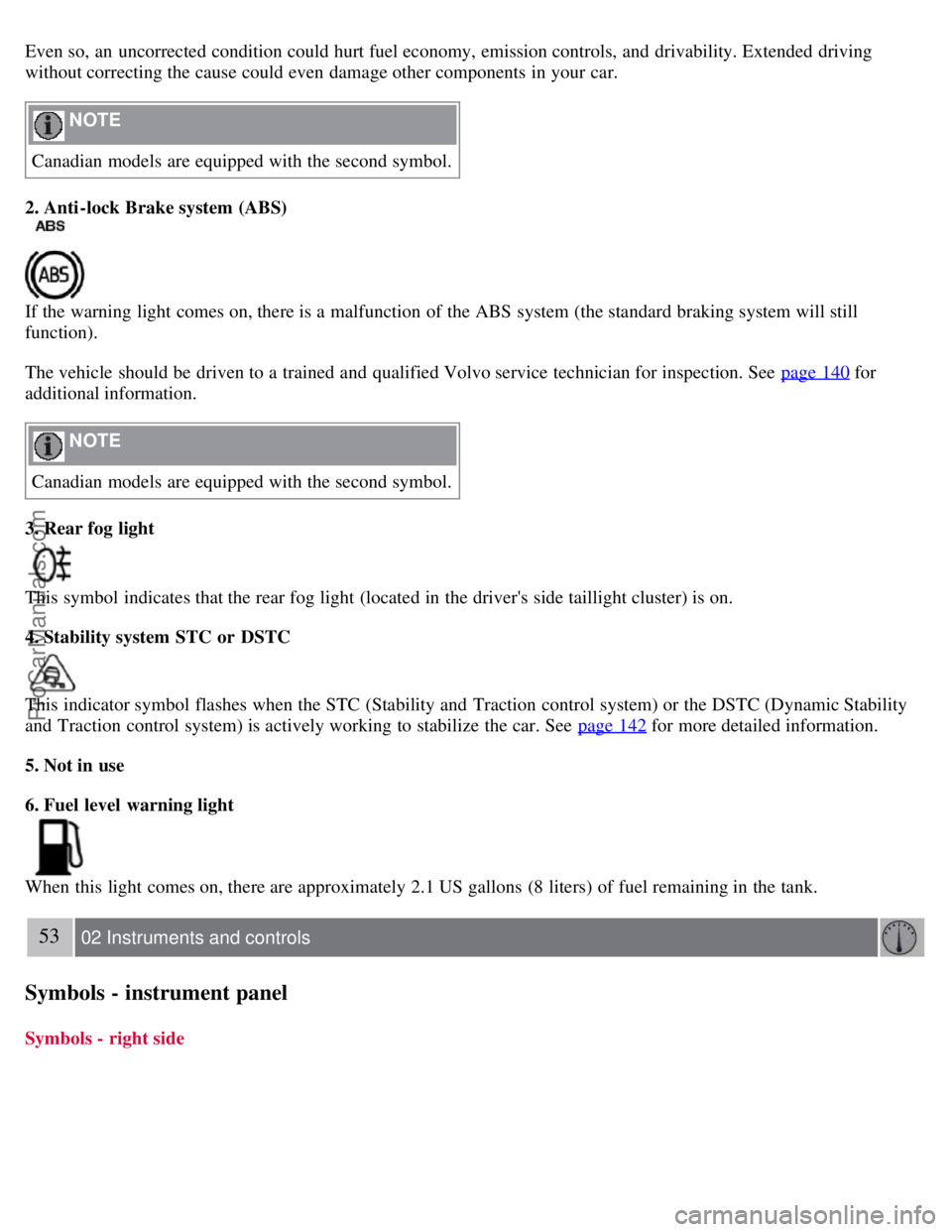
2. Anti-lock Brake system (ABS)
If the warning light comes on, there is a malfunction of the ABS system (the standard braking system will still
function).
The vehicle should be driven to a trained and qualified Volvo service technician for inspection. See page 140
for
additional information.
NOTE
Canadian models are equipped with the second symbol.
3. Rear fog light
This symbol indicates that the rear fog light (located in the driver's side taillight cluster) is on.
4. Stability system STC or DSTC
This indicator symbol flashes when the STC (Stability and Traction control system) or the DSTC (Dynamic Stability
and Traction control system) is actively working to stabilize the car. See page 142
for more detailed information.
5. Not in use
6. Fuel level warning light
When this light comes on, there are approximately 2.1 US gallons (8 liters) of fuel remaining in the tank.
53 02 Instruments and controls
Symbols - instrument panel
Symbols - right side
ProCarManuals.com
Page 48 of 208
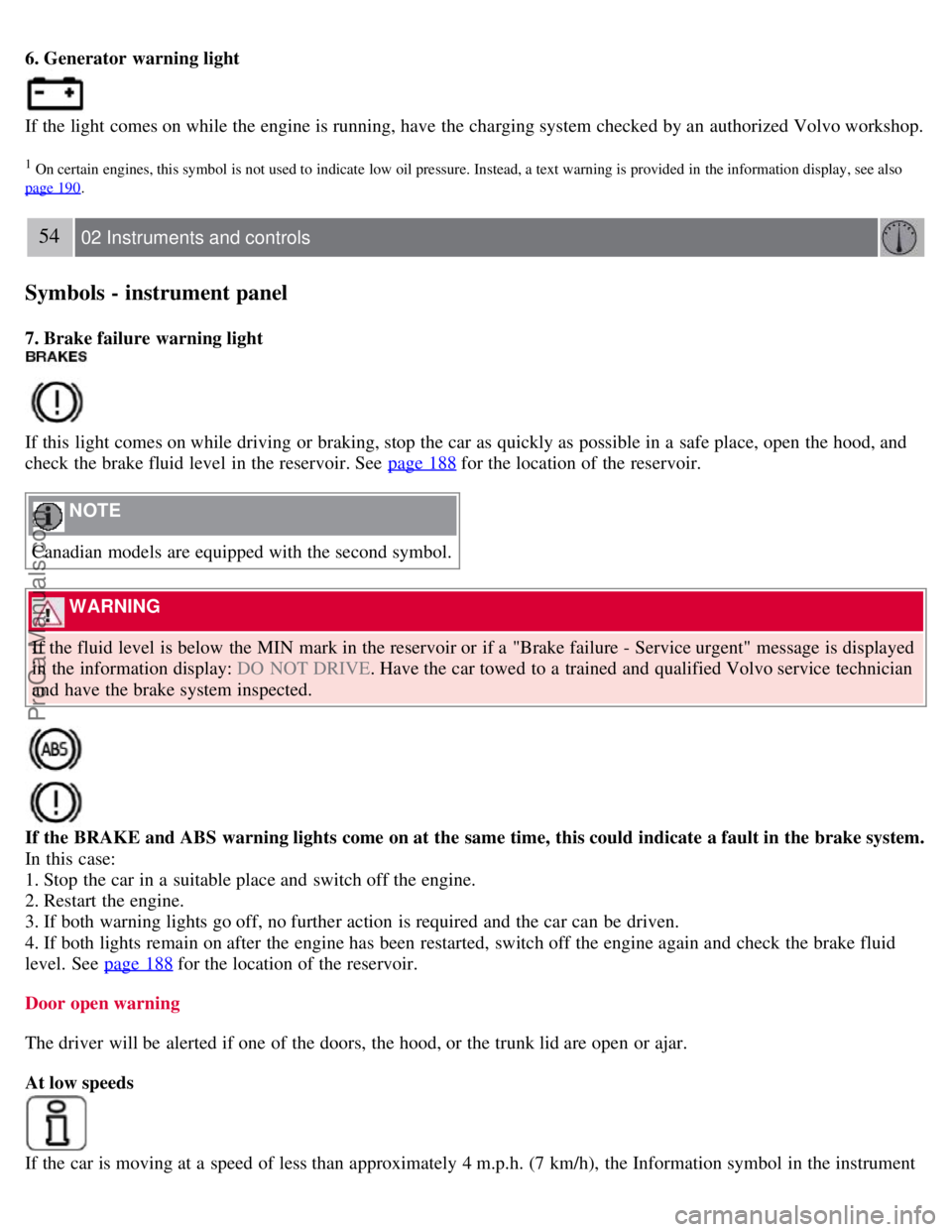
6. Generator warning light
If the light comes on while the engine is running, have the charging system checked by an authorized Volvo workshop.
1 On certain engines, this symbol is not used to indicate low oil pressure. Instead, a text warning is provided in the information display, see also
page 190
.
54 02 Instruments and controls
Symbols - instrument panel
7. Brake failure warning light
If this light comes on while driving or braking, stop the car as quickly as possible in a safe place, open the hood, and
check the brake fluid level in the reservoir. See page 188
for the location of the reservoir.
NOTE
Canadian models are equipped with the second symbol.
WARNING
If the fluid level is below the MIN mark in the reservoir or if a "Brake failure - Service urgent" message is displayed
in the information display: DO NOT DRIVE . Have the car towed to a trained and qualified Volvo service technician
and have the brake system inspected.
If the BRAKE and ABS warning lights come on at the same time, this could indicate a fault in the brake system.
In this case:
1. Stop the car in a suitable place and switch off the engine.
2. Restart the engine.
3. If both warning lights go off, no further action is required and the car can be driven.
4. If both lights remain on after the engine has been restarted, switch off the engine again and check the brake fluid
level. See page 188
for the location of the reservoir.
Door open warning
The driver will be alerted if one of the doors, the hood, or the trunk lid are open or ajar.
At low speeds
If the car is moving at a speed of less than approximately 4 m.p.h. (7 km/h), the Information symbol in the instrument
ProCarManuals.com
Page 49 of 208
panel will light up and a message will be shown in the information display indicating which door(s), etc is not
completely closed.
At higher speeds
If the car is moving at a speed above approximately 4 m.p.h. (7 km/h), the Warning symbol in the instrument panel
will light up and a message will be shown in the information display indicating which door(s), etc is not completely
closed.
Hood and trunk
If the hood and/or trunk lid is not completely closed, the Information symbol in the instrument panel will light up and a
message will be displayed, regardless of the vehicle's speed.
55 02 Instruments and controls
Information display
Messages
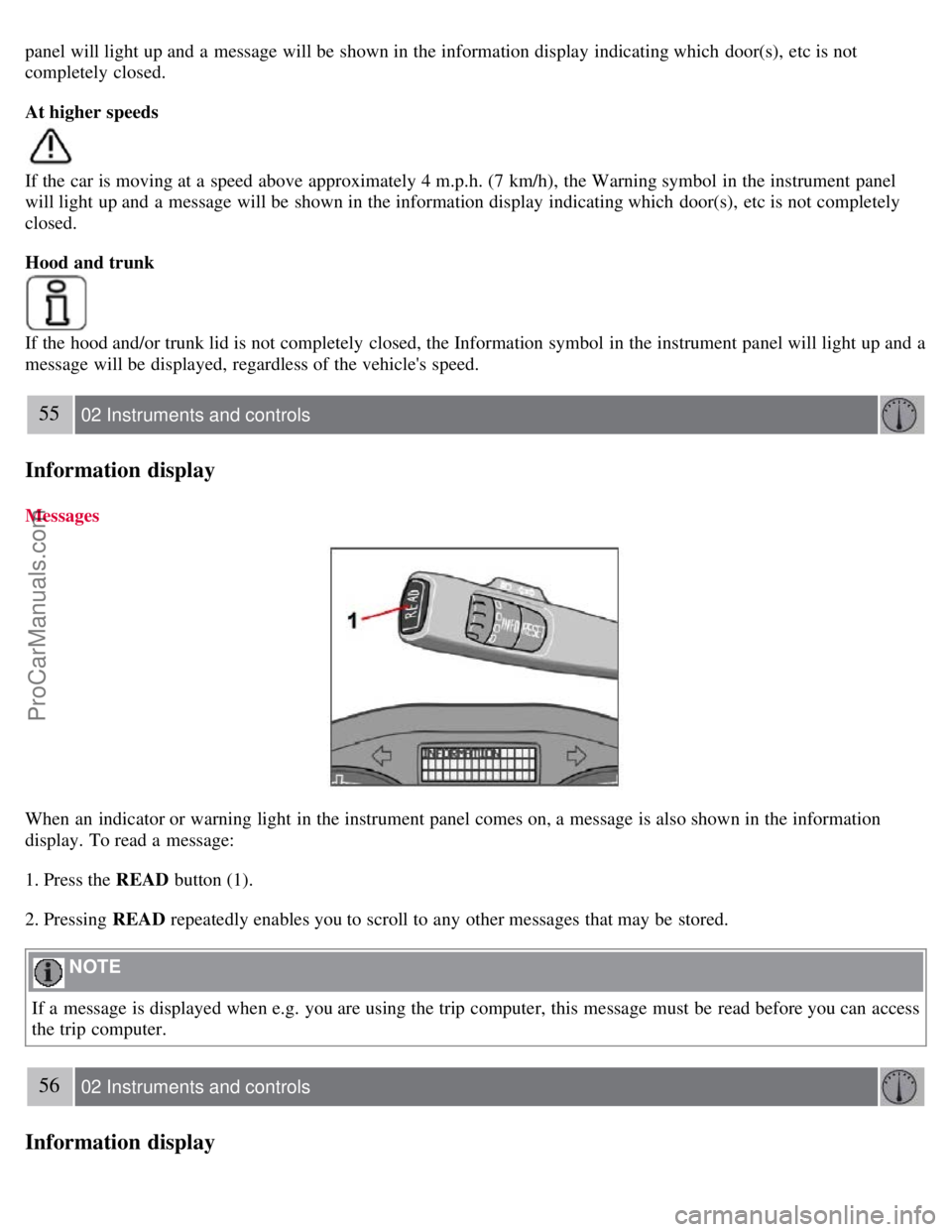
When an indicator or warning light in the instrument panel comes on, a message is also shown in the information
display. To read a message:
1. Press the READ button (1).
2. Pressing READ repeatedly enables you to scroll to any other messages that may be stored.
NOTE
If a message is displayed when e.g. you are using the trip computer, this message must be read before you can access
the trip computer.
56 02 Instruments and controls
Information display
ProCarManuals.com
Page 50 of 208
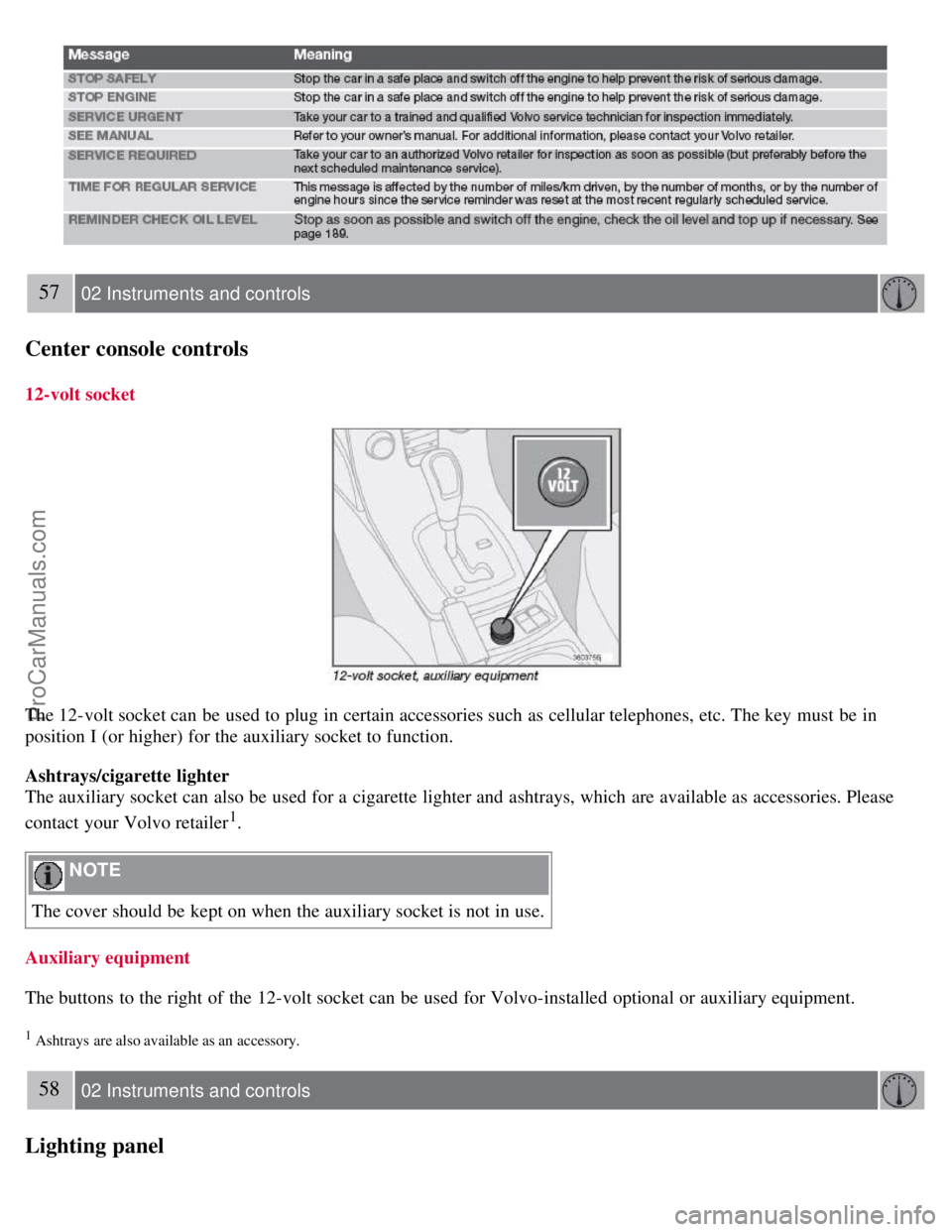
57 02 Instruments and controls
Center console controls
12-volt socket
The 12-volt socket can be used to plug in certain accessories such as cellular telephones, etc. The key must be in
position I (or higher) for the auxiliary socket to function.
Ashtrays/cigarette lighter
The auxiliary socket can also be used for a cigarette lighter and ashtrays, which are available as accessories. Please
contact your Volvo retailer
1.
NOTE
The cover should be kept on when the auxiliary socket is not in use.
Auxiliary equipment
The buttons to the right of the 12-volt socket can be used for Volvo-installed optional or auxiliary equipment.
1 Ashtrays are also available as an accessory.
58 02 Instruments and controls
Lighting panel
ProCarManuals.com
Page 52 of 208
The single rear fog light is located in the driver's side taillight cluster.
The rear fog light will only function in combination with the high/low beam headlights or the optional front fog lights.
1. Turn the ignition key to position II.
2. Press button 5 to turn on the rear fog light.
An indicator light in the button illuminates when the rear fog light is on.
NOTE
The rear fog light is considerably brighter than the normal taillights and should be used only when conditions such as
fog, rain, snow, smoke or dust reduce visibility for other vehicles to less than 500 ft. (150 meters).
59 02 Instruments and controls
Lighting panel
Instrument panel lighting
The instrument panel lighting illuminates when the ignition is in position II and the light switch (1) is in either position
or .
NOTE
To make it easier to read the odometer, trip odometer, clock, and ambient temperature, these gauges illuminate when
the vehicle is unlocked and when the key has been removed from the ignition switch. The lighting will go out when
the vehicle is locked.
Move the thumb wheel (2) up to increase brightness or down to decrease brightness.
Unlocking the fuel filler door
With the ignition switched off, press button 4 to unlock the fuel filler door. Please note that the fuel filler door will
remain unlocked until the car begins to move forward.
An audible click will be heard when the fuel filler door re-locks.
60 02 Instruments and controls
Left-side steering wheel lever
Lever positions
ProCarManuals.com
Page 56 of 208
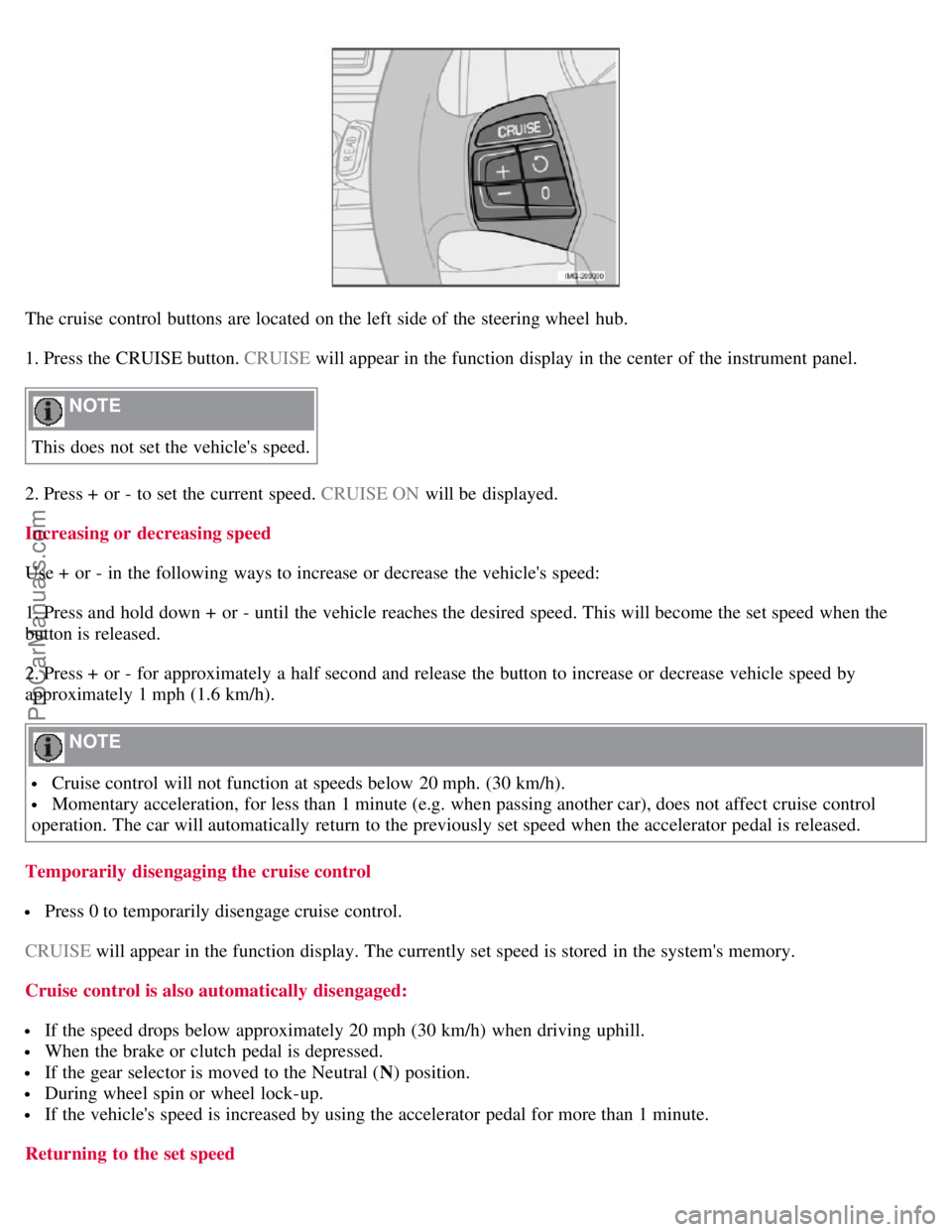
The cruise control buttons are located on the left side of the steering wheel hub.
1. Press the CRUISE button. CRUISE will appear in the function display in the center of the instrument panel.
NOTE
This does not set the vehicle's speed.
2. Press + or - to set the current speed. CRUISE ON will be displayed.
Increasing or decreasing speed
Use + or - in the following ways to increase or decrease the vehicle's speed:
1. Press and hold down + or - until the vehicle reaches the desired speed. This will become the set speed when the
button is released.
2. Press + or - for approximately a half second and release the button to increase or decrease vehicle speed by
approximately 1 mph (1.6 km/h).
NOTE
Cruise control will not function at speeds below 20 mph. (30 km/h).
Momentary acceleration, for less than 1 minute (e.g. when passing another car), does not affect cruise control
operation. The car will automatically return to the previously set speed when the accelerator pedal is released.
Temporarily disengaging the cruise control
Press 0 to temporarily disengage cruise control.
CRUISE will appear in the function display. The currently set speed is stored in the system's memory.
Cruise control is also automatically disengaged:
If the speed drops below approximately 20 mph (30 km/h) when driving uphill.
When the brake or clutch pedal is depressed.
If the gear selector is moved to the Neutral ( N) position.
During wheel spin or wheel lock-up.
If the vehicle's speed is increased by using the accelerator pedal for more than 1 minute.
Returning to the set speed
ProCarManuals.com
Page 69 of 208
Do not operate the moonroof if it is frozen closed.
Never place heavy objects on the moonroof.
Visor
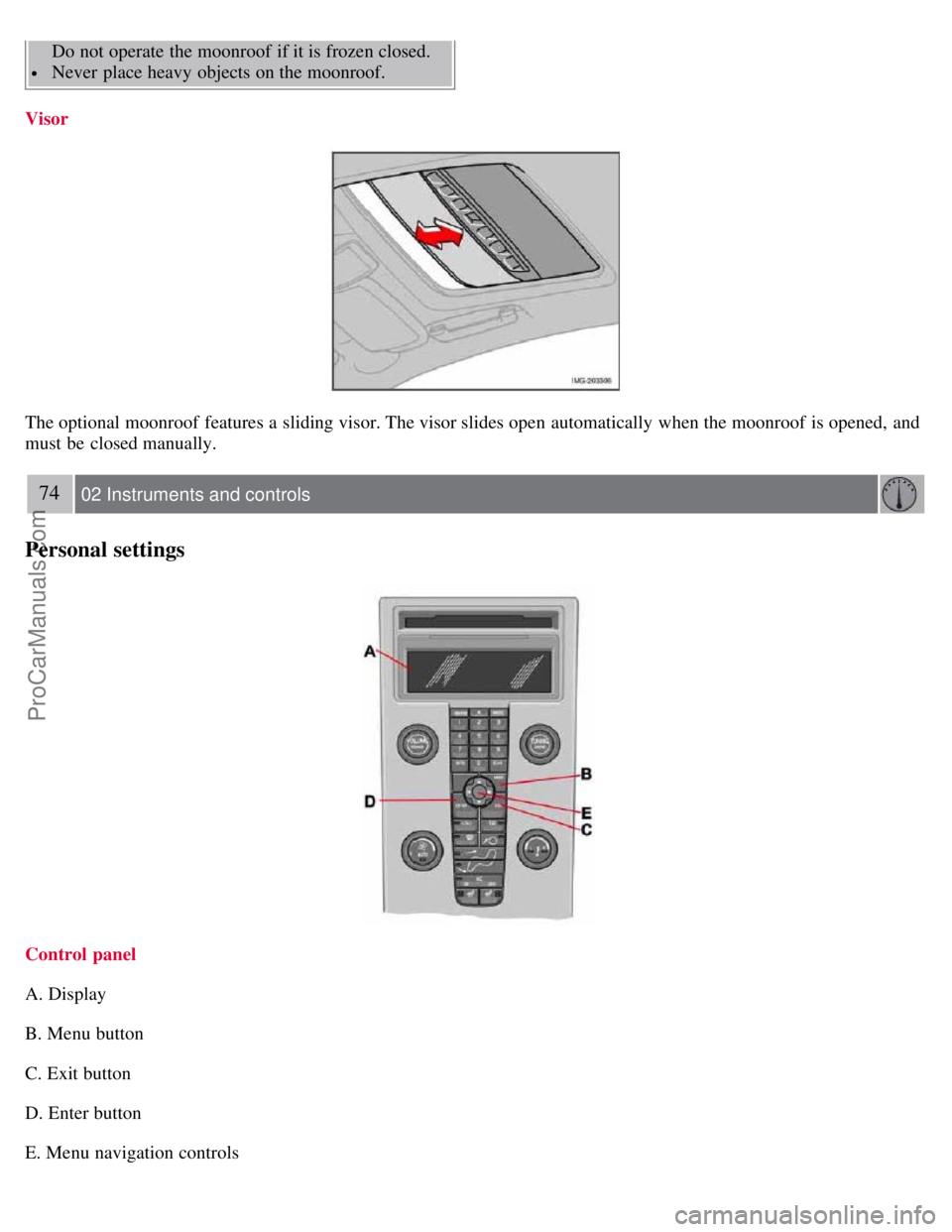
The optional moonroof features a sliding visor. The visor slides open automatically when the moonroof is opened, and
must be closed manually.
74 02 Instruments and controls
Personal settings
Control panel
A. Display
B. Menu button
C. Exit button
D. Enter button
E. Menu navigation controls
ProCarManuals.com
Page 91 of 208
Raise the cover to switch on the light.
99 04 Interior
Storage compartments
100 04 Interior
Storage compartments
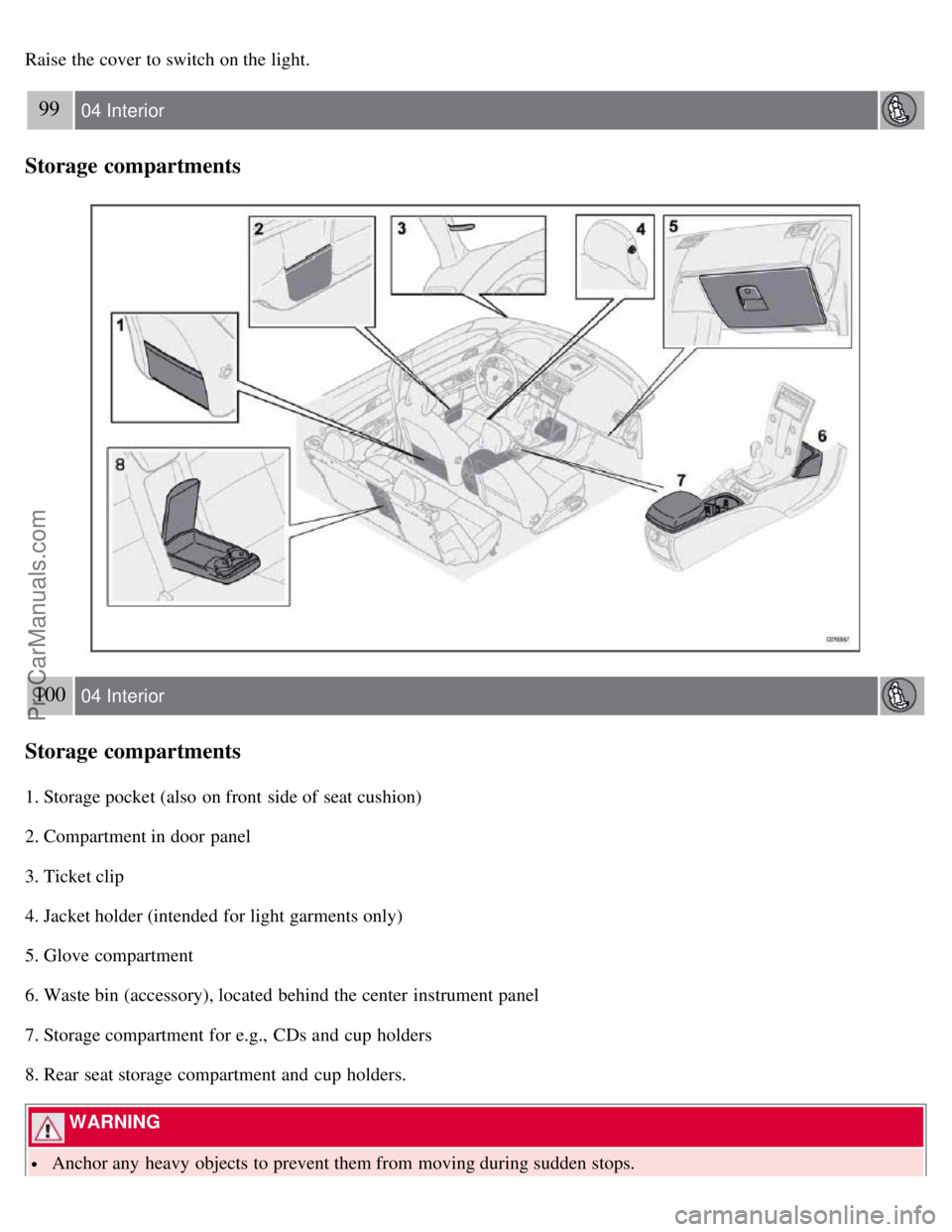
1. Storage pocket (also on front side of seat cushion)
2. Compartment in door panel
3. Ticket clip
4. Jacket holder (intended for light garments only)
5. Glove compartment
6. Waste bin (accessory), located behind the center instrument panel
7. Storage compartment for e.g., CDs and cup holders
8. Rear seat storage compartment and cup holders.
WARNING
Anchor any heavy objects to prevent them from moving during sudden stops.
ProCarManuals.com
Page 98 of 208
When the battery begins to lose its charge, the Information symbol in the instrument panel (see page 51) lights up and
REMOTE BATTERY LOW VOLTAGE is shown in the information display.
Replacing the battery in the remote control
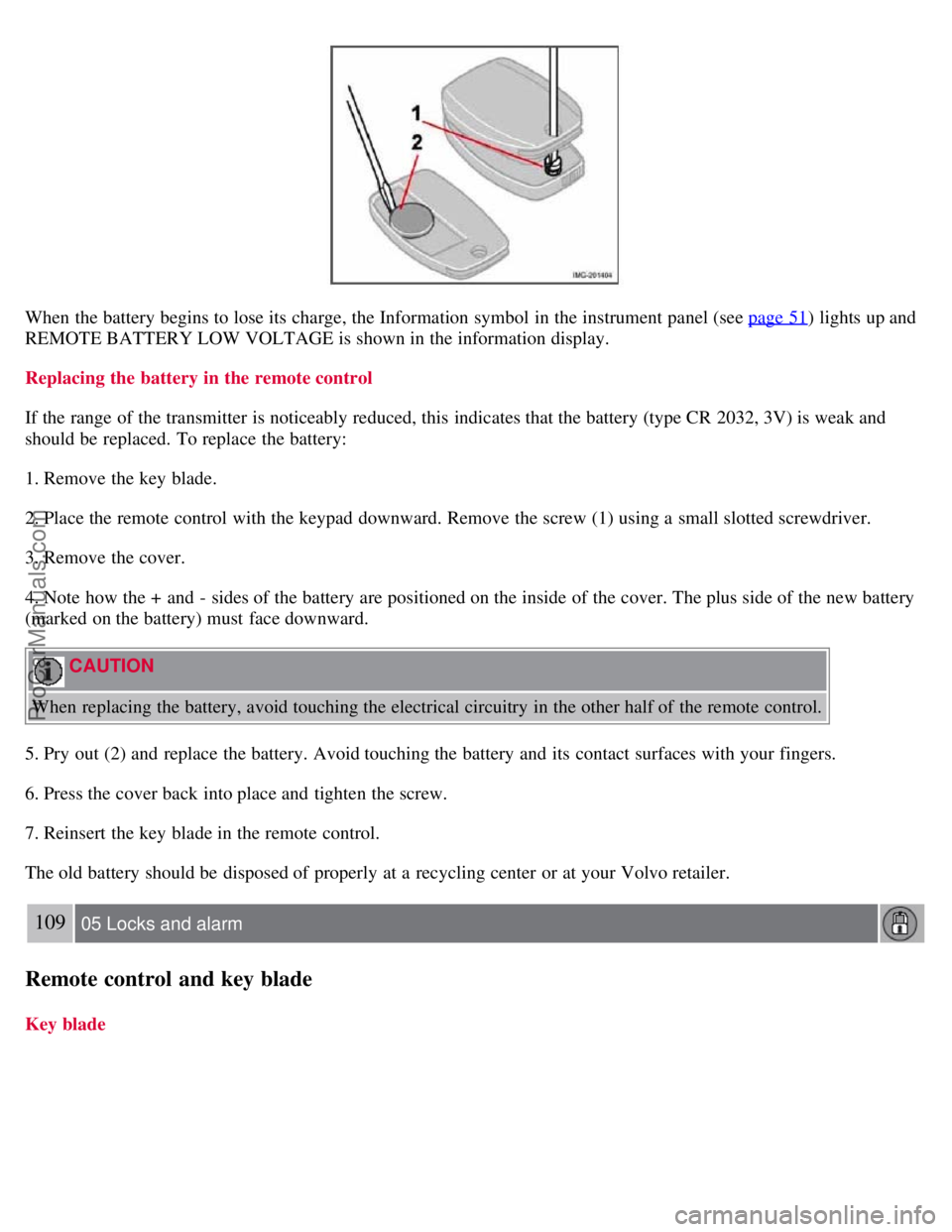
If the range of the transmitter is noticeably reduced, this indicates that the battery (type CR 2032, 3V) is weak and
should be replaced. To replace the battery:
1. Remove the key blade.
2. Place the remote control with the keypad downward. Remove the screw (1) using a small slotted screwdriver.
3. Remove the cover.
4. Note how the + and - sides of the battery are positioned on the inside of the cover. The plus side of the new battery
(marked on the battery) must face downward.
CAUTION
When replacing the battery, avoid touching the electrical circuitry in the other half of the remote control.
5. Pry out (2) and replace the battery. Avoid touching the battery and its contact surfaces with your fingers.
6. Press the cover back into place and tighten the screw.
7. Reinsert the key blade in the remote control.
The old battery should be disposed of properly at a recycling center or at your Volvo retailer.
109 05 Locks and alarm
Remote control and key blade
Key blade
ProCarManuals.com