ignition VOLVO S40 2007 Owner's Manual
[x] Cancel search | Manufacturer: VOLVO, Model Year: 2007, Model line: S40, Model: VOLVO S40 2007Pages: 208, PDF Size: 5.99 MB
Page 89 of 208
Because the driver's seat can be adjusted with the ignition off, children should never be left unattended in the car.
Movement of the seat can be STOPPED at any time by pressing any button on the power seat control panel.
Do not adjust the seat while driving. The seat should be adjusted so that the brake pedal can be depressed fully. In
addition, position the seat as far rearward as comfort and control allow.
The seat rails on the floor must not be obstructed in any way when the seat is in motion.
97 04 Interior
Interior lighting
Interior lighting
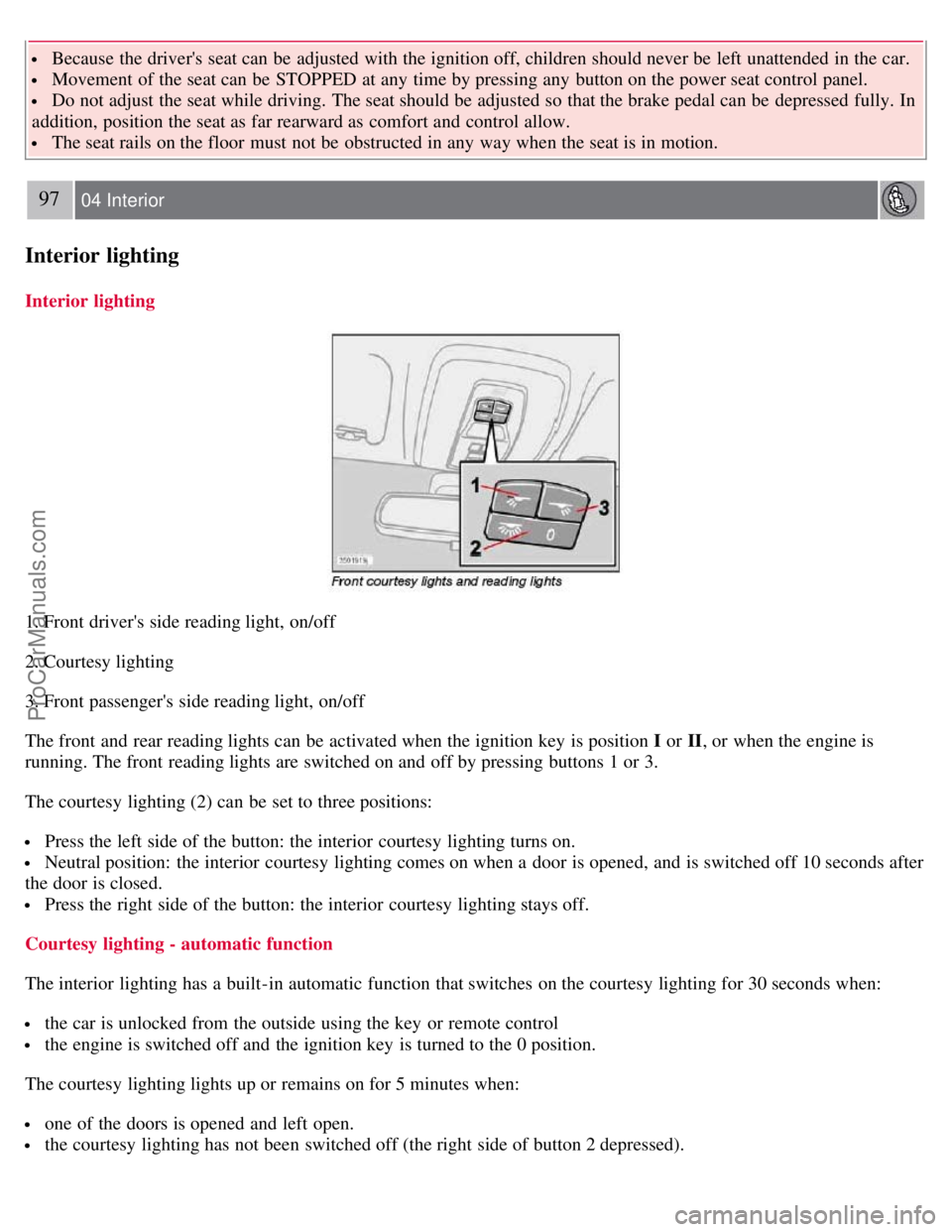
1. Front driver's side reading light, on/off
2. Courtesy lighting
3. Front passenger's side reading light, on/off
The front and rear reading lights can be activated when the ignition key is position I or II, or when the engine is
running. The front reading lights are switched on and off by pressing buttons 1 or 3.
The courtesy lighting (2) can be set to three positions:
Press the left side of the button: the interior courtesy lighting turns on.
Neutral position: the interior courtesy lighting comes on when a door is opened, and is switched off 10 seconds after
the door is closed.
Press the right side of the button: the interior courtesy lighting stays off.
Courtesy lighting - automatic function
The interior lighting has a built-in automatic function that switches on the courtesy lighting for 30 seconds when:
the car is unlocked from the outside using the key or remote control
the engine is switched off and the ignition key is turned to the 0 position.
The courtesy lighting lights up or remains on for 5 minutes when:
one of the doors is opened and left open.
the courtesy lighting has not been switched off (the right side of button 2 depressed).
ProCarManuals.com
Page 90 of 208
The automatic lighting goes out when:
the engine is started
the car is locked from the outside using the key or remote control.
If the courtesy lighting is not switched off manually, it will be turned off automatically 5 minutes after the engine has
been switched off.
Rear reading lights
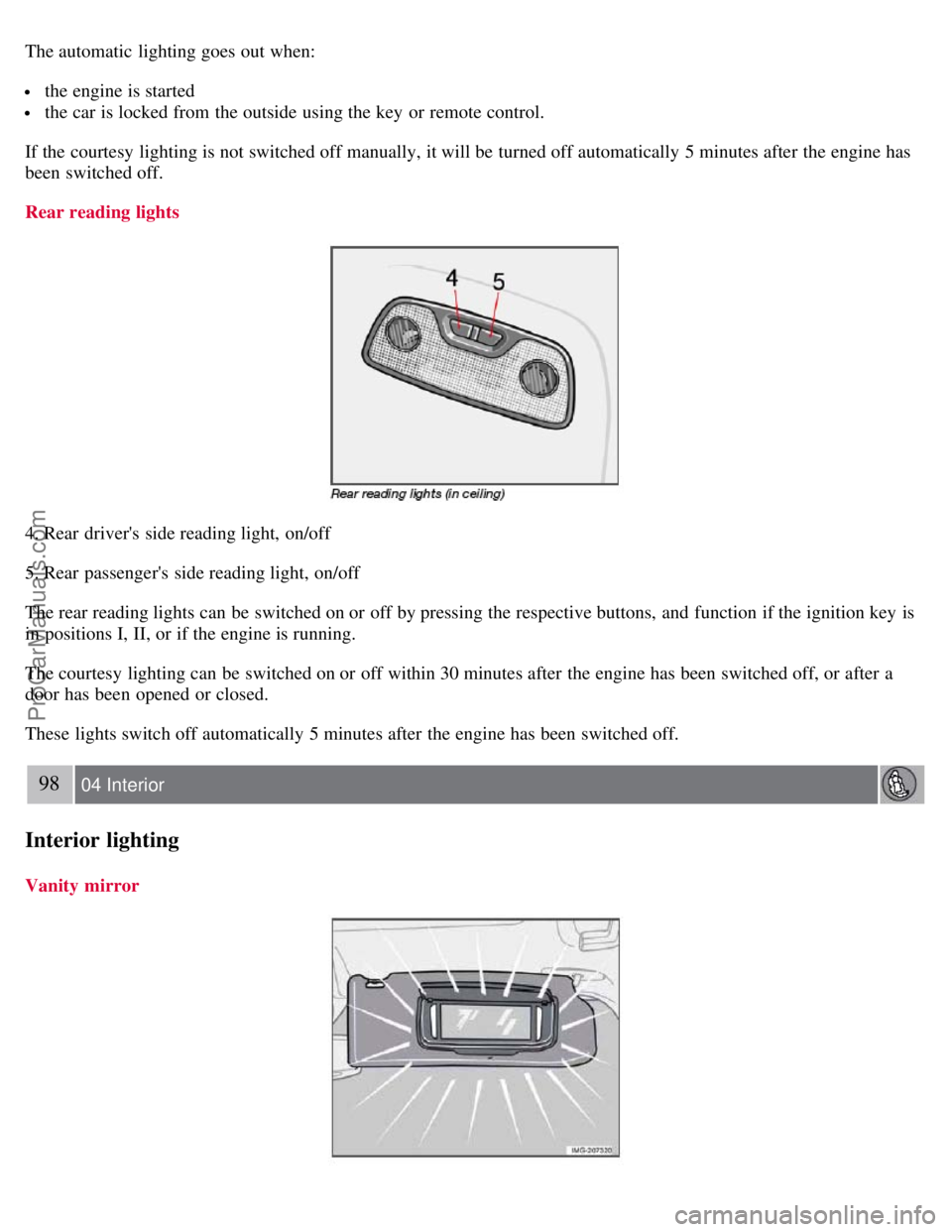
4. Rear driver's side reading light, on/off
5. Rear passenger's side reading light, on/off
The rear reading lights can be switched on or off by pressing the respective buttons, and function if the ignition key is
in positions I, II, or if the engine is running.
The courtesy lighting can be switched on or off within 30 minutes after the engine has been switched off, or after a
door has been opened or closed.
These lights switch off automatically 5 minutes after the engine has been switched off.
98 04 Interior
Interior lighting
Vanity mirror
ProCarManuals.com
Page 95 of 208
2 0 0 7
VOLVO S40
104 05 Locks and alarm
Remote control and key blade 106
Valet locking110
Keyless drive (option as available)112
Locking and unlocking115
Locking the glove compartment, Child safety locks116
Alarm117
105 05 Locks and alarm
106 05 Locks and alarm
Remote control and key blade
Remote controls
Two remote controls that also function as ignition keys are provided with your car. The remote controls contain
detachable metal key blades for manually locking or unlocking the driver's door and the glove compartment.
USA - FCC ID: LTQVO315TX
This device complies with part 15 of the FCC rules. Operation is subject to the following conditions: (1) This device
may not cause harmful interference, and (2) this device must accept any interference received, including interference
that may cause undesired operation.
Canada - IC: 3659AVO315TX
Operation is subject to the following conditions: (1) this device may not cause interference, and (2) this device must
accept any interference, including interference that may cause undesired operation of the device.
Loss of a remote control
ProCarManuals.com
Page 96 of 208
If either of the remote controls is lost, the other must be taken with the car to a Volvo retailer. As an anti-theft
measure, the code of the lost remote control must be erased from the system.
Each key blade has a unique code, which is used if new key blades are required. A maximum of six remote
controls/key blades can be programmed and used for one car.
Immobilizer (start inhibitor)
Each of the keys supplied with your car contains a coded transponder. The code in the key is transmitted to an antenna
in the ignition switch where it is compared to the code stored in the start inhibitor module. The car will start only with
a properly coded key. If you misplace a key, take the other keys to an authorized Volvo retailer for reprogramming as
an antitheft measure.USA - FCC ID: LTQWFS 125VO
This device complies with part 15 of the FCC rules. Operation is subject to the following condition: (1) This device
may not cause harmful interference, and (2) this device must accept any interference received, including interference
that may cause undesired operation.
Canada - IC: 3659A-WFS125VO
Operation is subject to the following conditions: (1) this device may not cause interference, and (2) this device must
accept any interference, including interference that may cause undesired operation of the device.
CAUTION
Never use force on the narrow section of the remote control - this is where the transponder is located. The car cannot
be started if the transponder is damaged.
107 05 Locks and alarm
Remote control and key blade
Remote control functions
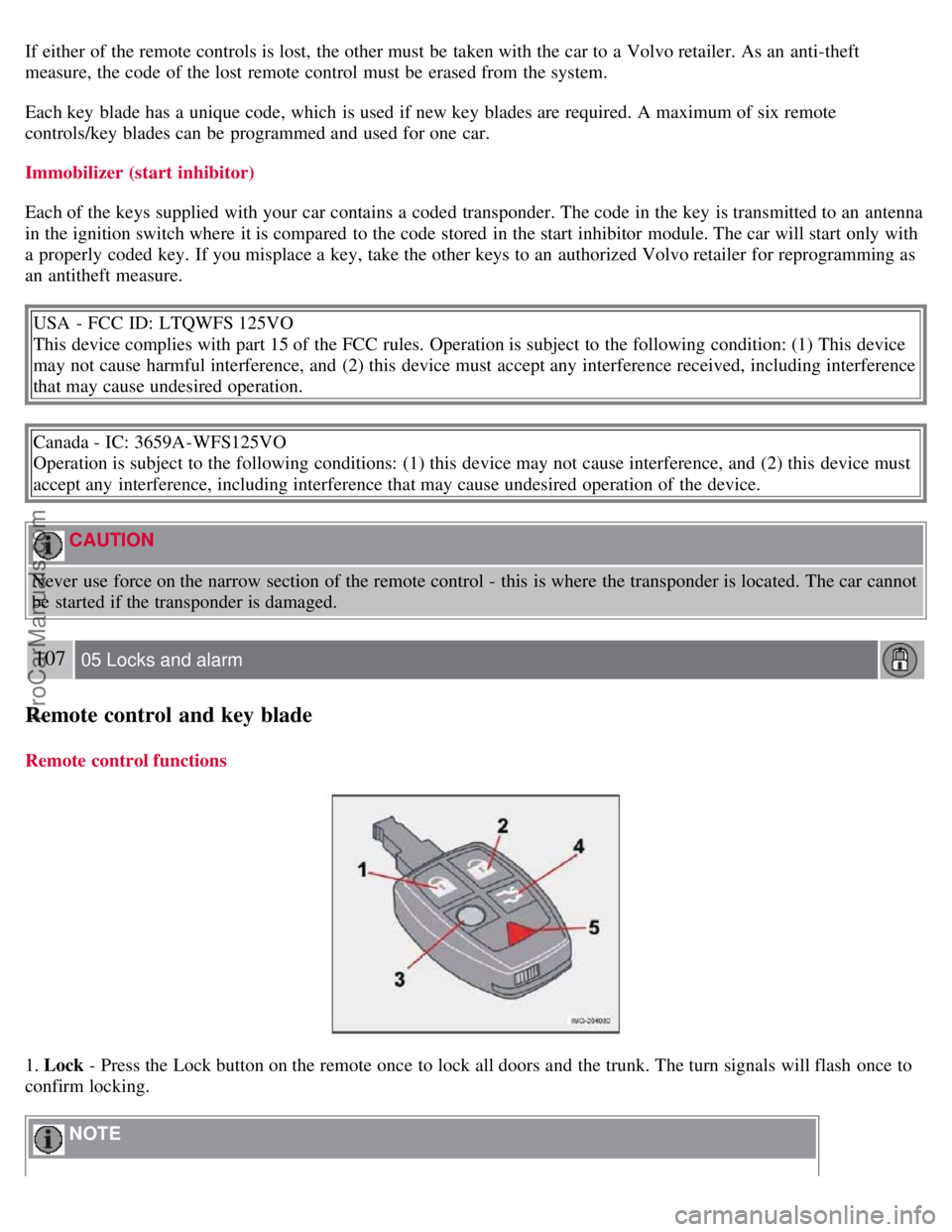
1. Lock - Press the Lock button on the remote once to lock all doors and the trunk. The turn signals will flash once to
confirm locking.
NOTE
ProCarManuals.com
Page 99 of 208
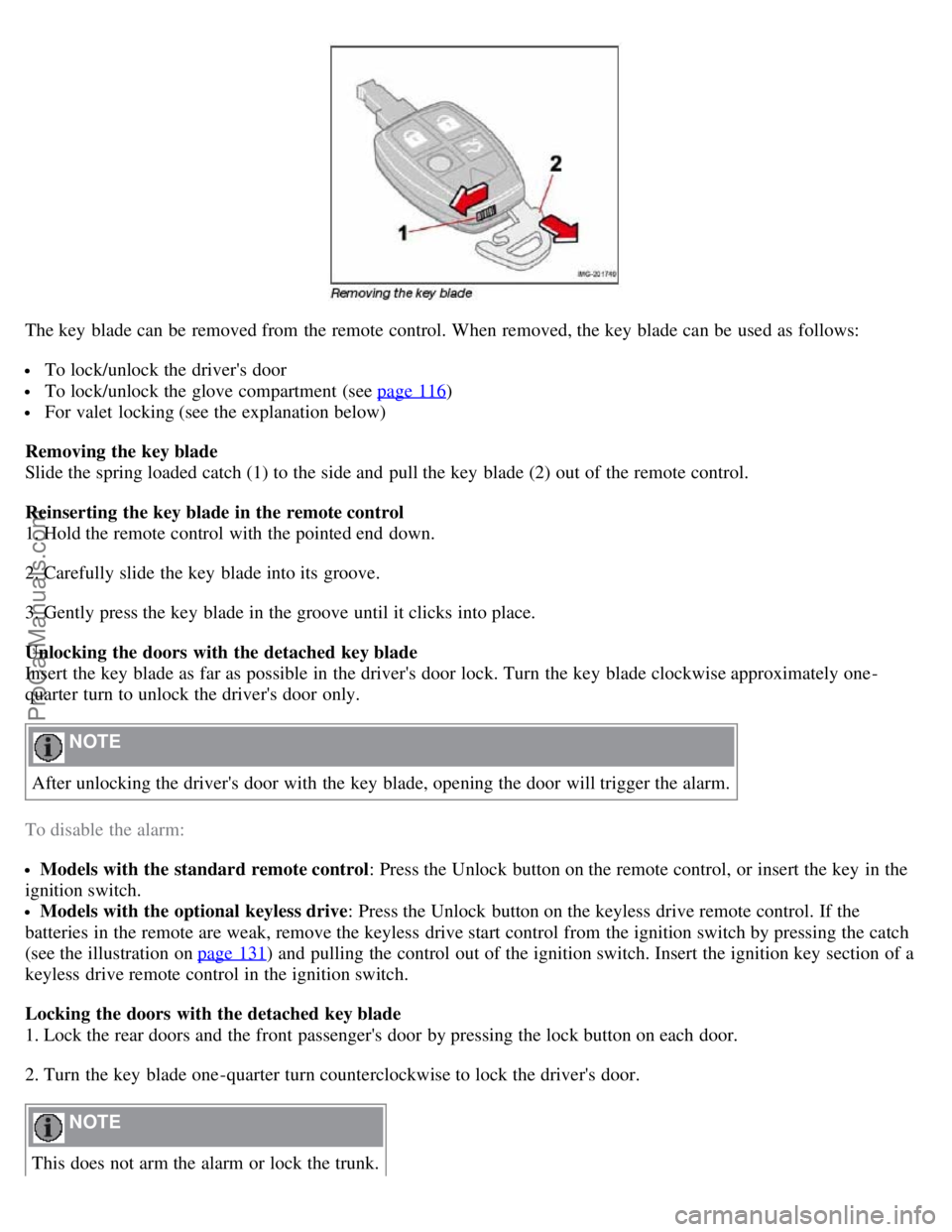
The key blade can be removed from the remote control. When removed, the key blade can be used as follows:
To lock/unlock the driver's door
To lock/unlock the glove compartment (see page 116)
For valet locking (see the explanation below)
Removing the key blade
Slide the spring loaded catch (1) to the side and pull the key blade (2) out of the remote control.
Reinserting the key blade in the remote control
1. Hold the remote control with the pointed end down.
2. Carefully slide the key blade into its groove.
3. Gently press the key blade in the groove until it clicks into place.
Unlocking the doors with the detached key blade
Insert the key blade as far as possible in the driver's door lock. Turn the key blade clockwise approximately one -
quarter turn to unlock the driver's door only.
NOTE
After unlocking the driver's door with the key blade, opening the door will trigger the alarm.
To disable the alarm:
Models with the standard remote control : Press the Unlock button on the remote control, or insert the key in the
ignition switch.
Models with the optional keyless drive : Press the Unlock button on the keyless drive remote control. If the
batteries in the remote are weak, remove the keyless drive start control from the ignition switch by pressing the catch
(see the illustration on page 131
) and pulling the control out of the ignition switch. Insert the ignition key section of a
keyless drive remote control in the ignition switch.
Locking the doors with the detached key blade
1. Lock the rear doors and the front passenger's door by pressing the lock button on each door.
2. Turn the key blade one -quarter turn counterclockwise to lock the driver's door.
NOTE
This does not arm the alarm or lock the trunk.
ProCarManuals.com
Page 102 of 208
additional information.
Unlocking the vehicle
1. A keyless drive remote control must be on the same side of the vehicle as the door to be opened, and be within 5
feet (1.5 meters) of the lock or the trunk opening control (see the shaded areas in the illustration).
2. Pull a door handle to unlock and open the door or press the trunk opening control on the trunk lid.
Locking the vehicle
The doors and the trunk can be locked by pressing the lock button in any of the outside door handles.
NOTE
If one or more doors and/or the trunk is not fully closed when the lock button is pressed, the door(s) or trunk will not
be locked.
Locking or unlocking the vehicle with the key blade
The driver's door on vehicles equipped with keyless drive can be locked or unlocked with the remote control's
detachable key blade if necessary. See page 109
for information on removing the key blade from the remote control.
To access the keyhole in the driver's door:
113 05 Locks and alarm
Keyless drive (option as available)
1. Pry off the keyhole cover by inserting the key blade or a small screwdriver in the hole on the underside of the cover
(indicated by the arrow in the inset illustration in page above).
2. Insert the key blade as far as possible in the driver's door lock. Turn the key blade clockwise approximately one
quarter turn to unlock the driver's door only. This will trigger the alarm.
Disabling the alarm : Press the Unlock button on the keyless drive remote control. If the batteries in the remote are
weak, remove the keyless drive start control from the ignition switch by pressing the catch (see the illustration on page
131) and pulling the control out of the ignition switch. Insert the ignition key section of a keyless drive remote control
in the ignition switch.
Keyless drive remote control and driver's seat memory
This function is only available on vehicles equipped with the optional power driver's seat.
When you leave the car with a keyless drive remote control in your possession and lock any door, the position of
the driver's seat will be stored in the seat's memory.
The next time a door is opened by a person with the same remote control in his/her possession, the driver's seat will
automatically move to the position that it was in when the door was most recently locked.
NOTE
If several people carrying keyless drive remote controls approach the vehicle at the same time, the driver's seat will
assume the position it was in for the person who opens a door first.
Keyless drive information messages
If anyone leaves the vehicle with the only keyless drive remote control in his or her possession while the ignition is
switched on, a message will be shown in the information display and an audible signal will sound.
ProCarManuals.com
Page 105 of 208
Locking the glove compartment, Child safety locks
Locking the glove compartment
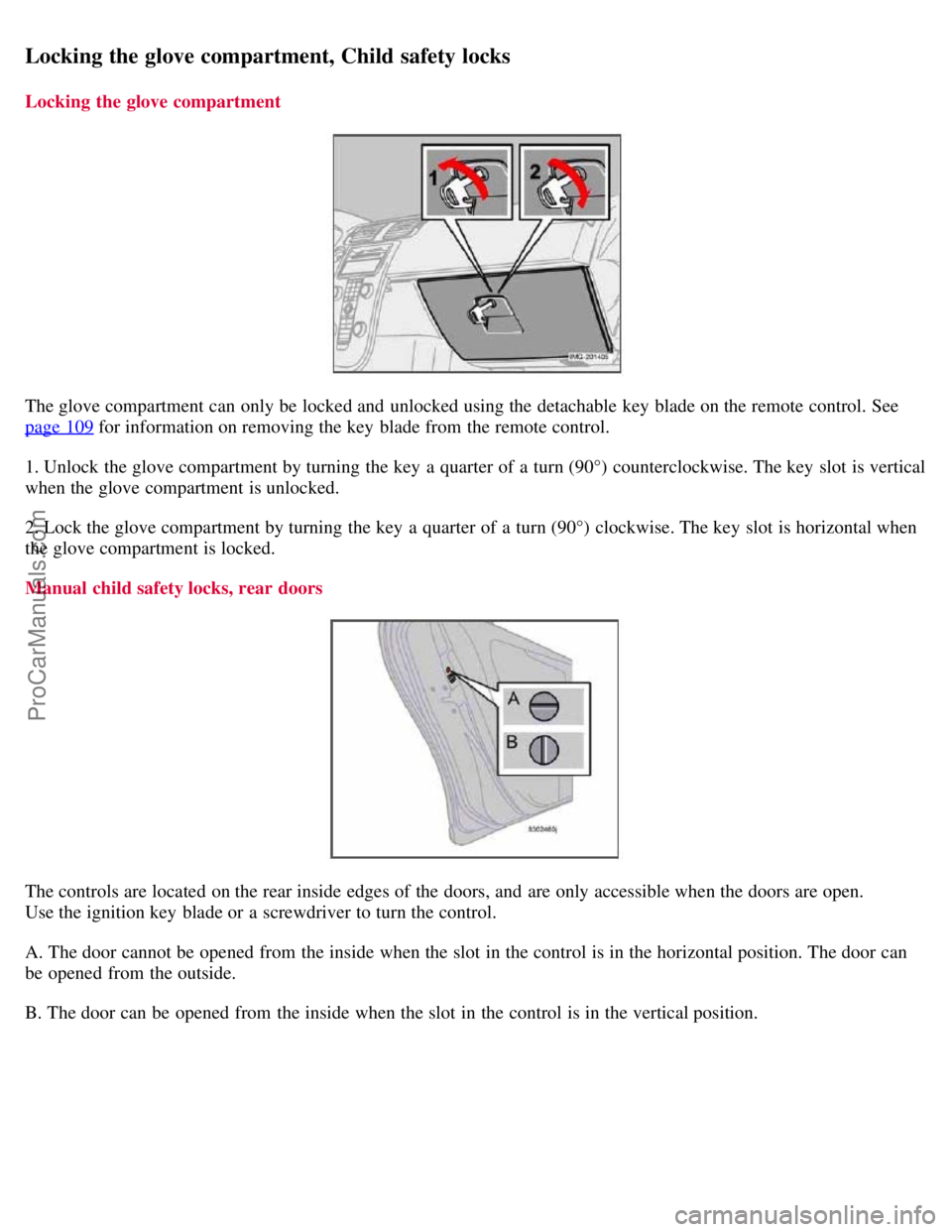
The glove compartment can only be locked and unlocked using the detachable key blade on the remote control. See
page 109
for information on removing the key blade from the remote control.
1. Unlock the glove compartment by turning the key a quarter of a turn (90°) counterclockwise. The key slot is vertical
when the glove compartment is unlocked.
2. Lock the glove compartment by turning the key a quarter of a turn (90°) clockwise. The key slot is horizontal when
the glove compartment is locked.
Manual child safety locks, rear doors
The controls are located on the rear inside edges of the doors, and are only accessible when the doors are open.
Use the ignition key blade or a screwdriver to turn the control.
A. The door cannot be opened from the inside when the slot in the control is in the horizontal position. The door can
be opened from the outside.
B. The door can be opened from the inside when the slot in the control is in the vertical position.
ProCarManuals.com
Page 106 of 208
117 05 Locks and alarm
Alarm
The alarm system
The alarm is automatically armed whenever the car is locked with the remote control, or if a front lock button is
depressed.
When armed, the alarm continuously monitors a number of points on the car. The following conditions will trigger the
alarm:
The hood is forced open.
The trunk is forced open.
A door is forced open.
The ignition switch is tampered with
An attempt is made to start the car with a non-approved key (a key not coded to the car's ignition).
If there is movement in the passenger compartment (if the car is equipped with the optional movement sensor).
The car is lifted or towed (if the car is equipped with the optional inclination sensor)
The battery is disconnected (while the alarm is armed).
The siren is disconnected when the alarm is disarmed.
The alarm indicator light
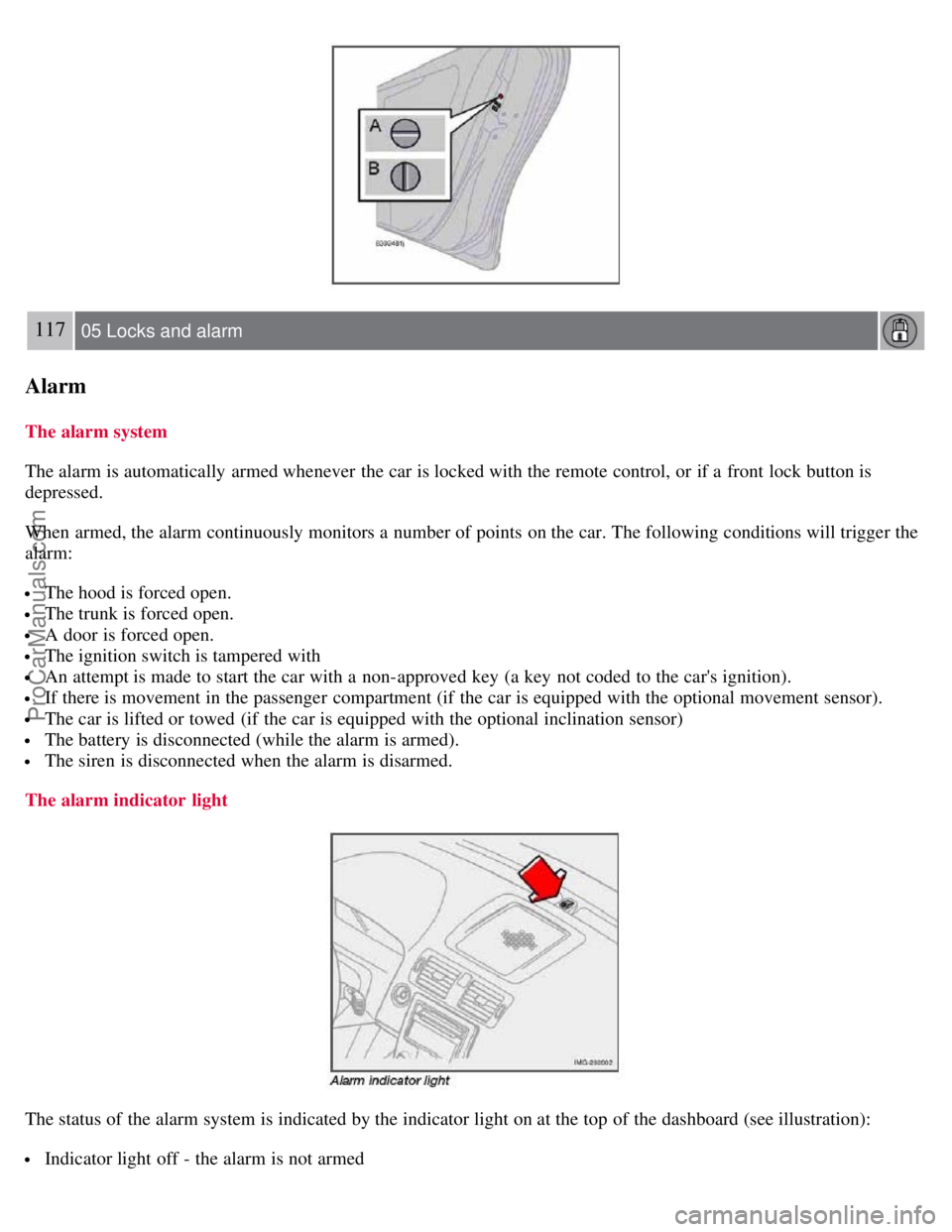
The status of the alarm system is indicated by the indicator light on at the top of the dashboard (see illustration):
Indicator light off - the alarm is not armed
ProCarManuals.com
Page 107 of 208
The indicator light flashes every two seconds - the alarm is armed
The indicator light flashes rapidly before the ignition is switched on - the alarm has been triggered. The message
"ALARM TRIGGERED, CHECK CAR" will also be displayed.
Fault in the alarm system : If a fault has been detected in the alarm system, a message will be shown in the
information display. Contact your Volvo retailer to have the alarm system inspected and repaired if necessary.
Arming the alarm
Press the LOCK button on the remote control, or press the central lock button on one of the front doors with the door
open. One long flash of the turn signals will confirm that the alarm is armed.
Disarming the alarm
Press the UNLOCK button on the remote control or insert the key in the ignition
1 to disarm the alarm. Two short
flashes from the car's direction indicators confirm that the alarm has been deactivated and that all doors are unlocked.
Turning off (stopping) the alarm
If the alarm is sounding, it can be stopped by pressing the UNLOCK button on the remote control or by inserting the
key in the ignition
1 On vehicles with the optional keyless drive, press in the start control in the ignition switch.
118 05 Locks and alarm
Alarm
switch. The driver's door must first be unlocked with the key blade.
NOTE
On vehicles equipped with the optional keyless drive, the start control must be removed from the ignition switch
before the key can be inserted. See page 131
for instructions.
Audible/visual alarm signal
An audible alarm signal is given by a battery powered siren. The alarm cycle lasts for 30 seconds.
NOTE
The visual alarm signal is given by flashing all turn signals and turning on the interior lighting for approximately 5
minutes.
Temporarily turning off the accessory alarm sensor(s)
ProCarManuals.com
Page 108 of 208
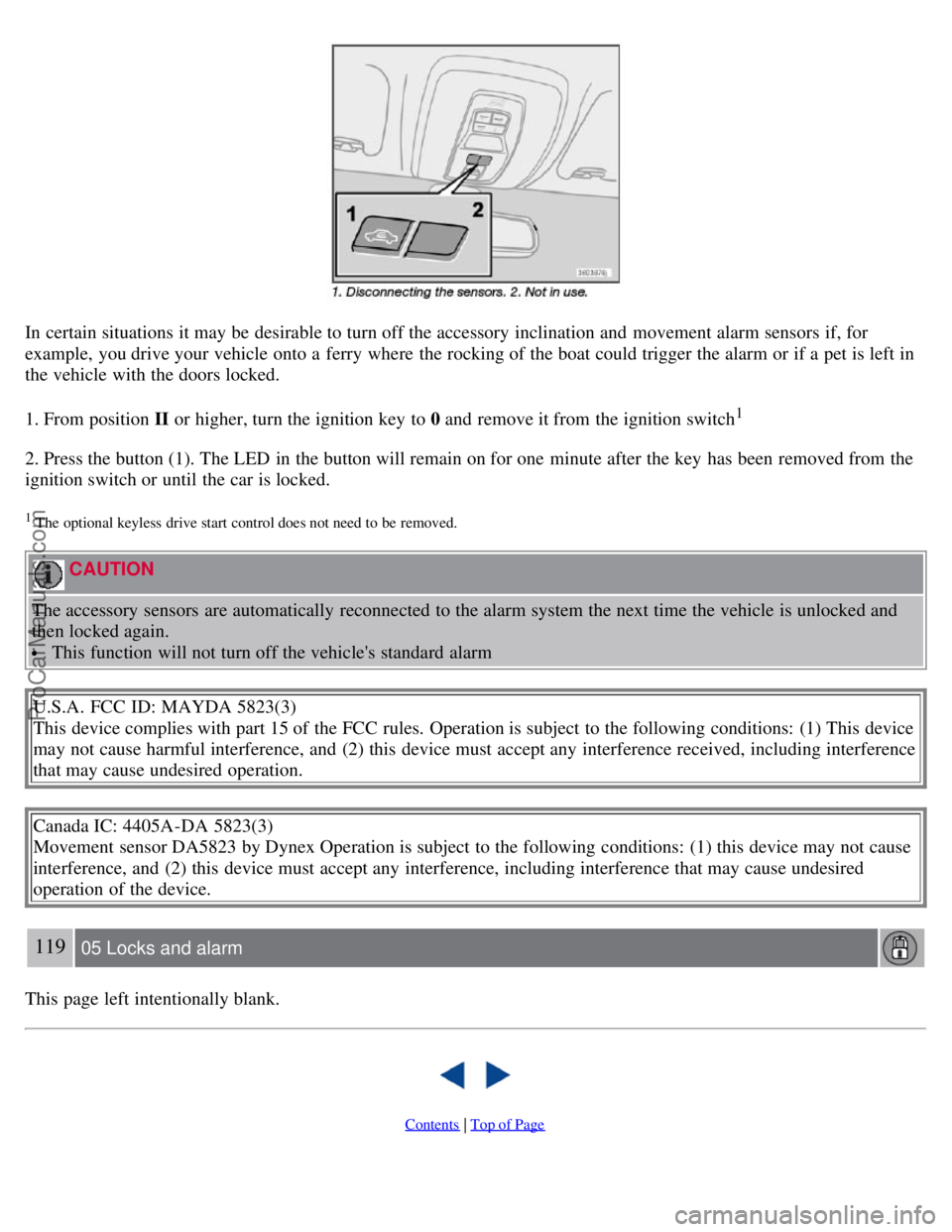
In certain situations it may be desirable to turn off the accessory inclination and movement alarm sensors if, for
example, you drive your vehicle onto a ferry where the rocking of the boat could trigger the alarm or if a pet is left in
the vehicle with the doors locked.
1. From position II or higher, turn the ignition key to 0 and remove it from the ignition switch
1
2. Press the button (1). The LED in the button will remain on for one minute after the key has been removed from the
ignition switch or until the car is locked.
1 The optional keyless drive start control does not need to be removed.
CAUTION
The accessory sensors are automatically reconnected to the alarm system the next time the vehicle is unlocked and
then locked again.
This function will not turn off the vehicle's standard alarm
U.S.A. FCC ID: MAYDA 5823(3)
This device complies with part 15 of the FCC rules. Operation is subject to the following conditions: (1) This device
may not cause harmful interference, and (2) this device must accept any interference received, including interference
that may cause undesired operation.
Canada IC: 4405A-DA 5823(3)
Movement sensor DA5823 by Dynex Operation is subject to the following conditions: (1) this device may not cause
interference, and (2) this device must accept any interference, including interference that may cause undesired
operation of the device.
119 05 Locks and alarm
This page left intentionally blank.
Contents | Top of Page
ProCarManuals.com