lock VOLVO S40 2007 Repair Manual
[x] Cancel search | Manufacturer: VOLVO, Model Year: 2007, Model line: S40, Model: VOLVO S40 2007Pages: 208, PDF Size: 5.99 MB
Page 121 of 208
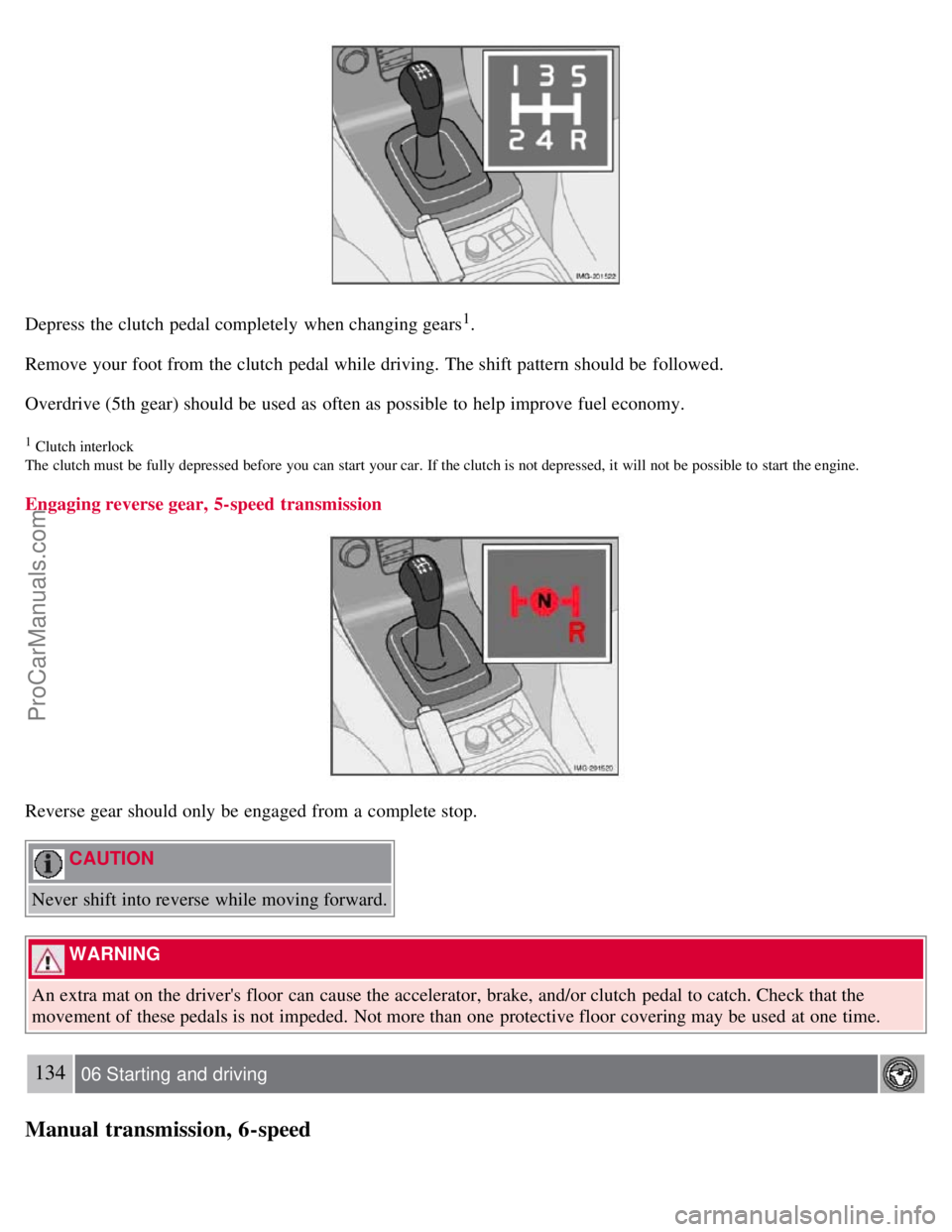
Depress the clutch pedal completely when changing gears1.
Remove your foot from the clutch pedal while driving. The shift pattern should be followed.
Overdrive (5th gear) should be used as often as possible to help improve fuel economy.
1 Clutch interlock
The clutch must be fully depressed before you can start your car. If the clutch is not depressed, it will not be possible to start the engine.
Engaging reverse gear, 5-speed transmission
Reverse gear should only be engaged from a complete stop.
CAUTION
Never shift into reverse while moving forward.
WARNING
An extra mat on the driver's floor can cause the accelerator, brake, and/or clutch pedal to catch. Check that the
movement of these pedals is not impeded. Not more than one protective floor covering may be used at one time.
134 06 Starting and driving
Manual transmission, 6-speed
ProCarManuals.com
Page 122 of 208
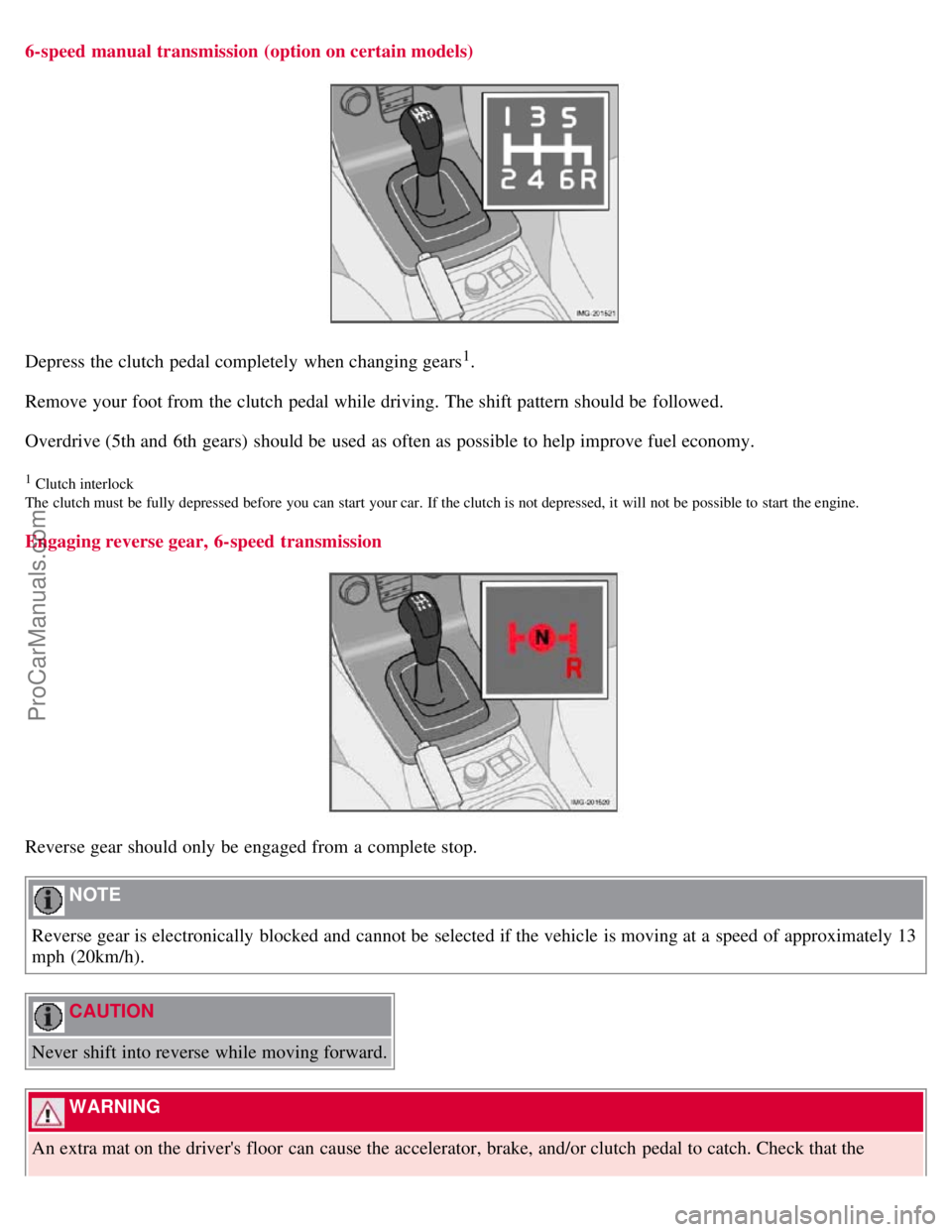
6-speed manual transmission (option on certain models)
Depress the clutch pedal completely when changing gears1.
Remove your foot from the clutch pedal while driving. The shift pattern should be followed.
Overdrive (5th and 6th gears) should be used as often as possible to help improve fuel economy.
1 Clutch interlock
The clutch must be fully depressed before you can start your car. If the clutch is not depressed, it will not be possible to start the engine.
Engaging reverse gear, 6-speed transmission
Reverse gear should only be engaged from a complete stop.
NOTE
Reverse gear is electronically blocked and cannot be selected if the vehicle is moving at a speed of approximately 13
mph (20km/h).
CAUTION
Never shift into reverse while moving forward.
WARNING
An extra mat on the driver's floor can cause the accelerator, brake, and/or clutch pedal to catch. Check that the
ProCarManuals.com
Page 123 of 208
movement of these pedals is not impeded. Not more than one protective floor covering may be used at one time.
135 06 Starting and driving
Automatic transmission
Shiftgate positions
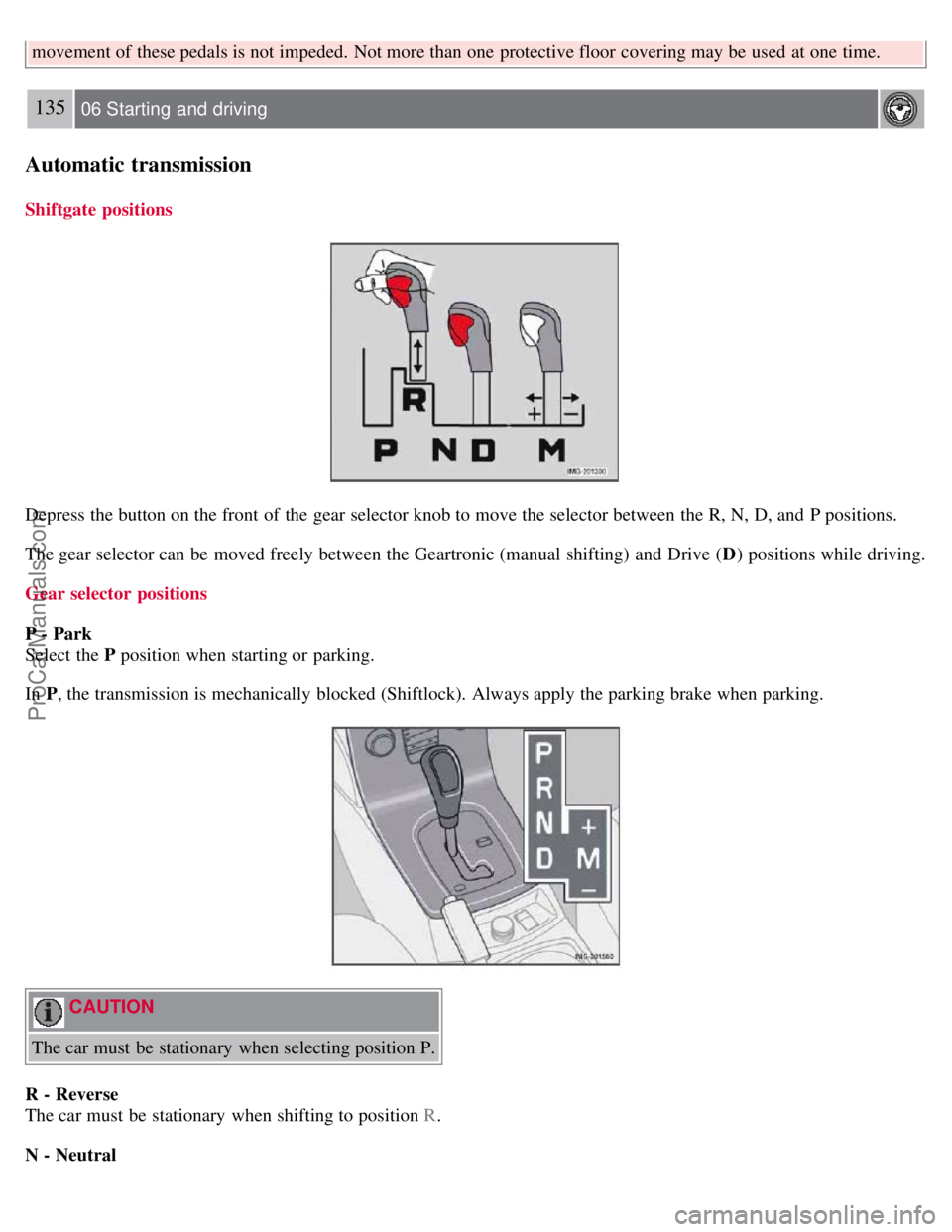
Depress the button on the front of the gear selector knob to move the selector between the R, N, D, and P positions.
The gear selector can be moved freely between the Geartronic (manual shifting) and Drive (D) positions while driving.
Gear selector positions
P - Park
Select the P position when starting or parking.
In P , the transmission is mechanically blocked (Shiftlock). Always apply the parking brake when parking.
CAUTION
The car must be stationary when selecting position P.
R - Reverse
The car must be stationary when shifting to position R .
N - Neutral
ProCarManuals.com
Page 124 of 208
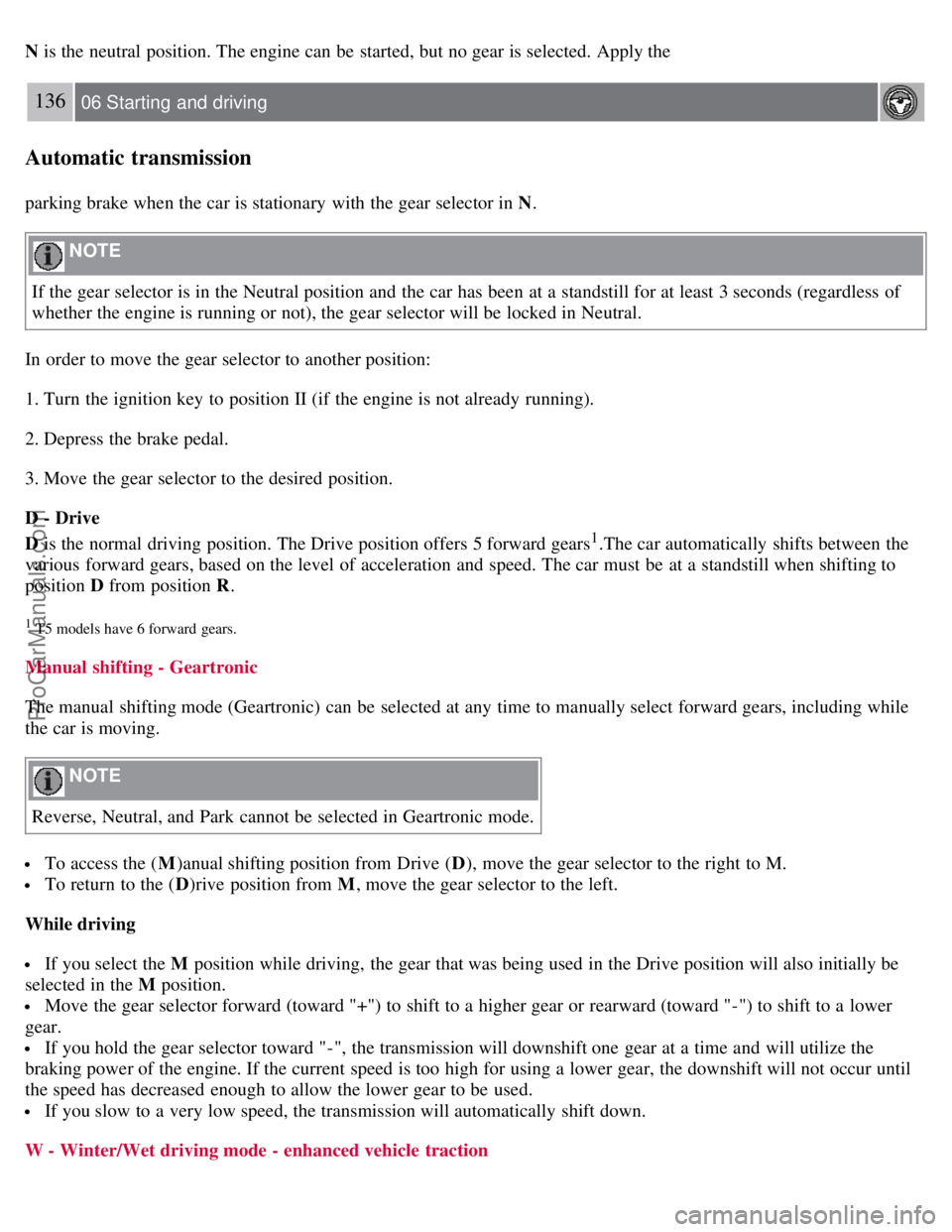
N is the neutral position. The engine can be started, but no gear is selected. Apply the
136 06 Starting and driving
Automatic transmission
parking brake when the car is stationary with the gear selector in N .
NOTE
If the gear selector is in the Neutral position and the car has been at a standstill for at least 3 seconds (regardless of
whether the engine is running or not), the gear selector will be locked in Neutral.
In order to move the gear selector to another position:
1. Turn the ignition key to position II (if the engine is not already running).
2. Depress the brake pedal.
3. Move the gear selector to the desired position.
D - Drive
D is the normal driving position. The Drive position offers 5 forward gears
1.The car automatically shifts between the
various forward gears, based on the level of acceleration and speed. The car must be at a standstill when shifting to
position D from position R .
1 T5 models have 6 forward gears.
Manual shifting - Geartronic
The manual shifting mode (Geartronic) can be selected at any time to manually select forward gears, including while
the car is moving.
NOTE
Reverse, Neutral, and Park cannot be selected in Geartronic mode.
To access the ( M)anual shifting position from Drive ( D), move the gear selector to the right to M.
To return to the ( D)rive position from M , move the gear selector to the left.
While driving
If you select the M position while driving, the gear that was being used in the Drive position will also initially be
selected in the M position.
Move the gear selector forward (toward "+") to shift to a higher gear or rearward (toward "-") to shift to a lower
gear.
If you hold the gear selector toward "-", the transmission will downshift one gear at a time and will utilize the
braking power of the engine. If the current speed is too high for using a lower gear, the downshift will not occur until
the speed has decreased enough to allow the lower gear to be used.
If you slow to a very low speed, the transmission will automatically shift down.
W - Winter/Wet driving mode - enhanced vehicle traction
ProCarManuals.com
Page 125 of 208
Mode W reduces torque at the wheels, which helps improve traction when starting off on a slippery surface.
Press the button near the base of the gear selector to engage/disengage this driving mode.
A "W" will be displayed in the instrument panel when Winter/Wet driving mode is engaged.
Mode W will only function if the gear selector is in the Drive (D) position.
Once underway, turn off mode W to improve vehicle performance and fuel economy.
Cold starts (turbo engines)
When driving before the engine has reached its normal operating temperature, the transmission will shift up at slightly
higher engine speeds to heat the three-way catalytic converter as quickly as possible.
137 06 Starting and driving
Automatic transmission
Kickdown
Automatic shift to a lower gear (kickdown) is achieved by depressing the accelerator pedal fully and briskly. An
upshift will occur when approaching the top speed for a particular gear or by releasing the accelerator pedal slightly.
Kickdown can be used for maximum acceleration or when passing at highway speeds.
NOTE
The gear selector must be in the D (Drive) position for kickdown to function.
138 06 Starting and driving
Shiftlock override
Overriding the shiftlock system
Shiftlock prevents the gear selector from being moved out of Park unless the ignition key is in position II and the
brake pedal is depressed.
In certain cases it may be necessary to move the gear selector from the Park position manually.
ProCarManuals.com
Page 126 of 208
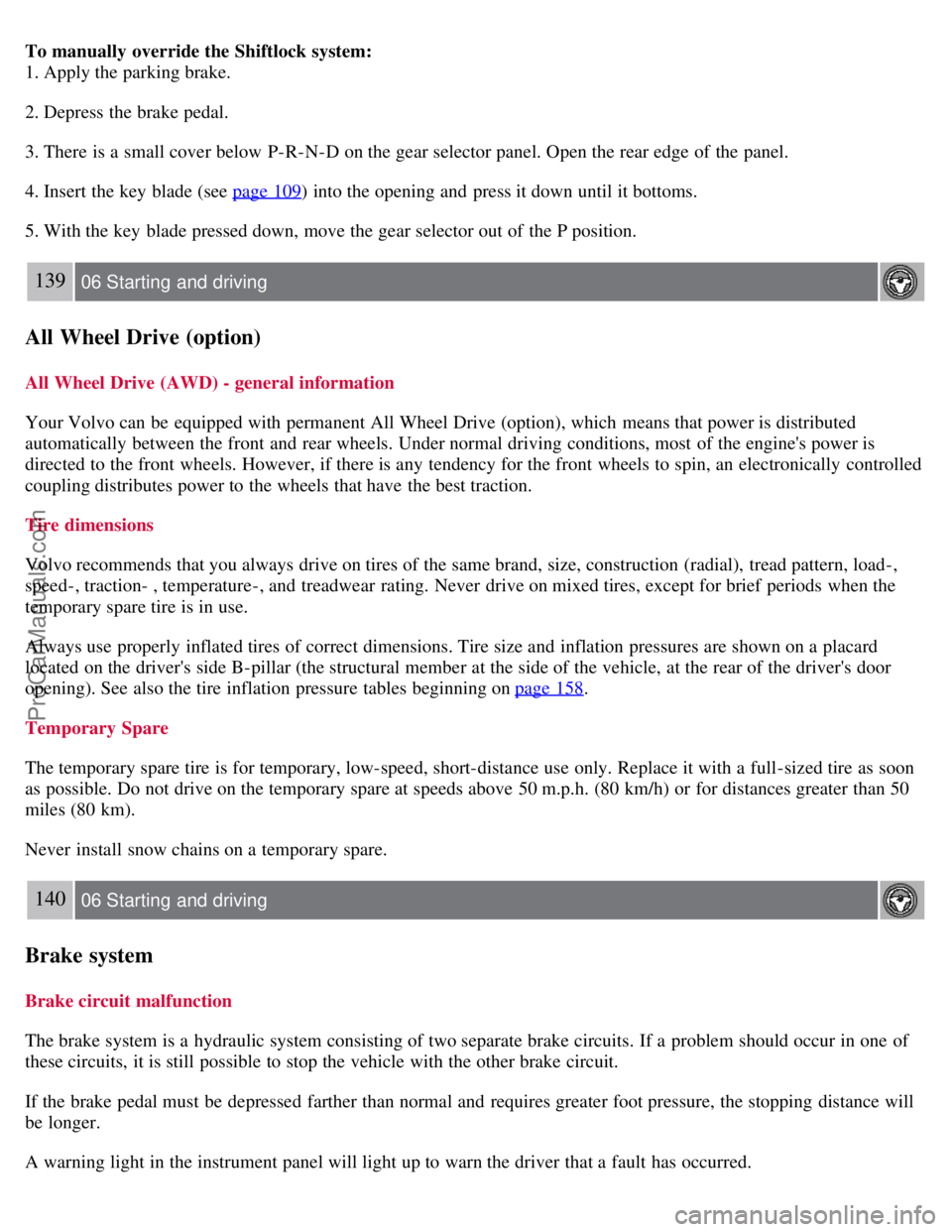
To manually override the Shiftlock system:
1. Apply the parking brake.
2. Depress the brake pedal.
3. There is a small cover below P-R-N-D on the gear selector panel. Open the rear edge of the panel.
4. Insert the key blade (see page 109
) into the opening and press it down until it bottoms.
5. With the key blade pressed down, move the gear selector out of the P position.
139 06 Starting and driving
All Wheel Drive (option)
All Wheel Drive (AWD) - general information
Your Volvo can be equipped with permanent All Wheel Drive (option), which means that power is distributed
automatically between the front and rear wheels. Under normal driving conditions, most of the engine's power is
directed to the front wheels. However, if there is any tendency for the front wheels to spin, an electronically controlled
coupling distributes power to the wheels that have the best traction.
Tire dimensions
Volvo recommends that you always drive on tires of the same brand, size, construction (radial), tread pattern, load-,
speed-, traction- , temperature-, and treadwear rating. Never drive on mixed tires, except for brief periods when the
temporary spare tire is in use.
Always use properly inflated tires of correct dimensions. Tire size and inflation pressures are shown on a placard
located on the driver's side B-pillar (the structural member at the side of the vehicle, at the rear of the driver's door
opening). See also the tire inflation pressure tables beginning on page 158
.
Temporary Spare
The temporary spare tire is for temporary, low-speed, short-distance use only. Replace it with a full-sized tire as soon
as possible. Do not drive on the temporary spare at speeds above 50 m.p.h. (80 km/h) or for distances greater than 50
miles (80 km).
Never install snow chains on a temporary spare.
140 06 Starting and driving
Brake system
Brake circuit malfunction
The brake system is a hydraulic system consisting of two separate brake circuits. If a problem should occur in one of
these circuits, it is still possible to stop the vehicle with the other brake circuit.
If the brake pedal must be depressed farther than normal and requires greater foot pressure, the stopping distance will
be longer.
A warning light in the instrument panel will light up to warn the driver that a fault has occurred.
ProCarManuals.com
Page 127 of 208
If this light comes on while driving or braking, stop immediately and check the brake fluid level in the reservoir.
NOTE
Press the brake pedal hard and maintain pressure on the pedal - do not pump the brakes.
WARNING
If the fluid level is below the MIN mark in the reservoir or if a brake system message is shown in the information
display: DO NOT DRIVE. Have the vehicle towed to a Volvo retailer and have the brake system inspected.
Power brakes function only when the engine is running
The power brakes utilize vacuum pressure which is only created when the engine is running. Never let the vehicle roll
to a stop with the engine switched off.
If the power brakes are not working, the brake pedal must be pressed approximately five times harder than usual to
make up for the lack of power assistance. This can happen for example when towing your vehicle or if the engine is
switched off when the vehicle is rolling. The brake pedal feels harder than usual.
Water on brake discs and brake pads affects braking
Driving in rain and slush or passing through an automatic car wash can cause water to collect on the brake discs and
pads. This will cause a delay in braking effect when the pedal is depressed. To avoid such a delay when the brakes are
needed, depress the pedal occasionally when driving through rain, slush, etc. This will remove the water from the
brakes. Check that brake application feels normal. This should also be done after washing or starting in very damp or
cold weather.
Severe strain on the brake system
The brakes will be subject to severe strain when driving in mountains or hilly areas, or when towing a trailer. Vehicle
speed is usually slower, which means that the cooling of the brakes is less efficient than when driving on level roads.
To reduce the strain on the brakes, shift into a lower gear and let the engine help with the braking. Do not forget that if
you are towing a trailer, the brakes will be subjected to a greater than normal load.
Anti-lock brakes (ABS)
The Anti-lock Braking System (ABS) helps to improve vehicle control (stopping and steering) during severe braking
conditions by limiting brake lockup. When the system "senses" impending lockup, braking pressure is automatically
modulated in order to help prevent lockup that could lead to a skid.
The system performs a self -diagnostic test when the engine is started and when the vehicle first reaches a speed
of approximately 12 m.p.h. (20 km/h) . The brake pedal will pulsate several times and a sound may be audible from
the ABS control module. This is normal.
141 06 Starting and driving
Brake system
For optimal ABS braking effect:
1. Press down on the brake pedal with full force. The pedal will pulsate.
ProCarManuals.com
Page 131 of 208
The system has been temporarily switched off due to high brake temperature. "TRACTION CONTROL
TEMPORARILY OFF" will be displayed. The system will automatically switch on again when the brakes have cooled.
WARNING
The stability system is intended to help improve driving safety. It supplements, but can never replace, the driver's
judgement and responsibility when operating the vehicle. Speed and driving style should always be adapted to traffic
and road conditions.
144 06 Starting and driving
Towing
Emergency towing
The towing eyelet is located under the floor of the cargo area. This eyelet must be screwed into the positions provided
on the right sides of either the front or rear bumper (see illustrations).
To attach the towing eyelet:
1. Use a coin or screwdriver to pry open the lower edge of the cover.
2. Screw the towing eyelet in place first by hand and then using the tire iron until it is securely in place.
After the vehicle has been towed, the eyelet should be removed and returned to the tool bag. Press the cover back into
position.
Towing a vehicle with all four wheels on the ground
WARNING
Volvo does not recommend towing a disabled vehicle behind another vehicle. Significant difficulty in steering and
braking, combined with unfavorable weather, traffic, and road conditions may make it impossible to maintain vehicle
control.
1. Apply the parking brake.
2. Insert the key into the ignition to unlock the steering wheel. The steering wheel must be unlocked. With the engine
off and the vehicle at a standstill, great effort will be required to turn the steering wheel.
ProCarManuals.com
Page 132 of 208
WARNING
Towing a vehicle with a locked steering wheel will make the vehicle impossible to steer.
3. Turn the ignition key to position II.
4. Place the gear selector in neutral. For vehicles with automatic transmissions, follow instruction on page 138
,
"Shiftlock override" to allow the gear selector to be moved from the Park position.
5. Keep firm pressure on the brake pedal while releasing the parking brake.
6. When towing has been completed, return the gear selector to Park (automatic) or Reverse (manual) and apply the
parking brake.
The following points should also be observed:
Never exceed 50 mph (80 km/h) . Never exceed local towing speed limits and heed all local towing restrictions.
Never tow farther than 50 miles (80 km) .
Keep the tow rope taut at all times while the vehicle is in motion.
The disabled vehicle should be towed in the forward direction only.
145 06 Starting and driving
Towing
WARNING
Never allow a vehicle to be towed without a driver behind the wheel of the disabled vehicle.
Never remove the key from the ignition while the vehicle is moving. The steering wheel could lock, making it
impossible to steer the vehicle.
When the engine is not running, steering resistance and the effort needed to apply the brakes will be great.
Never attempt to tow a vehicle with a dead battery at night.
CAUTION
Check with state and local authorities before attempting this type of towing, as vehicles being towed are subject to
regulations regarding maximum towing speed, length and type of towing device, lighting, marker flags, etc.
Never attempt to push- or tow-start a vehicle with a dead battery. This would inject unburned fuel into the three-
way catalytic converter(s), causing overheating, backfiring, and damage. See page 146
for instructions on jump
starting the vehicle.
Towing vehicles with front wheel drive
ProCarManuals.com
Page 136 of 208
149 06 Starting and driving
Detachable trailer hitch
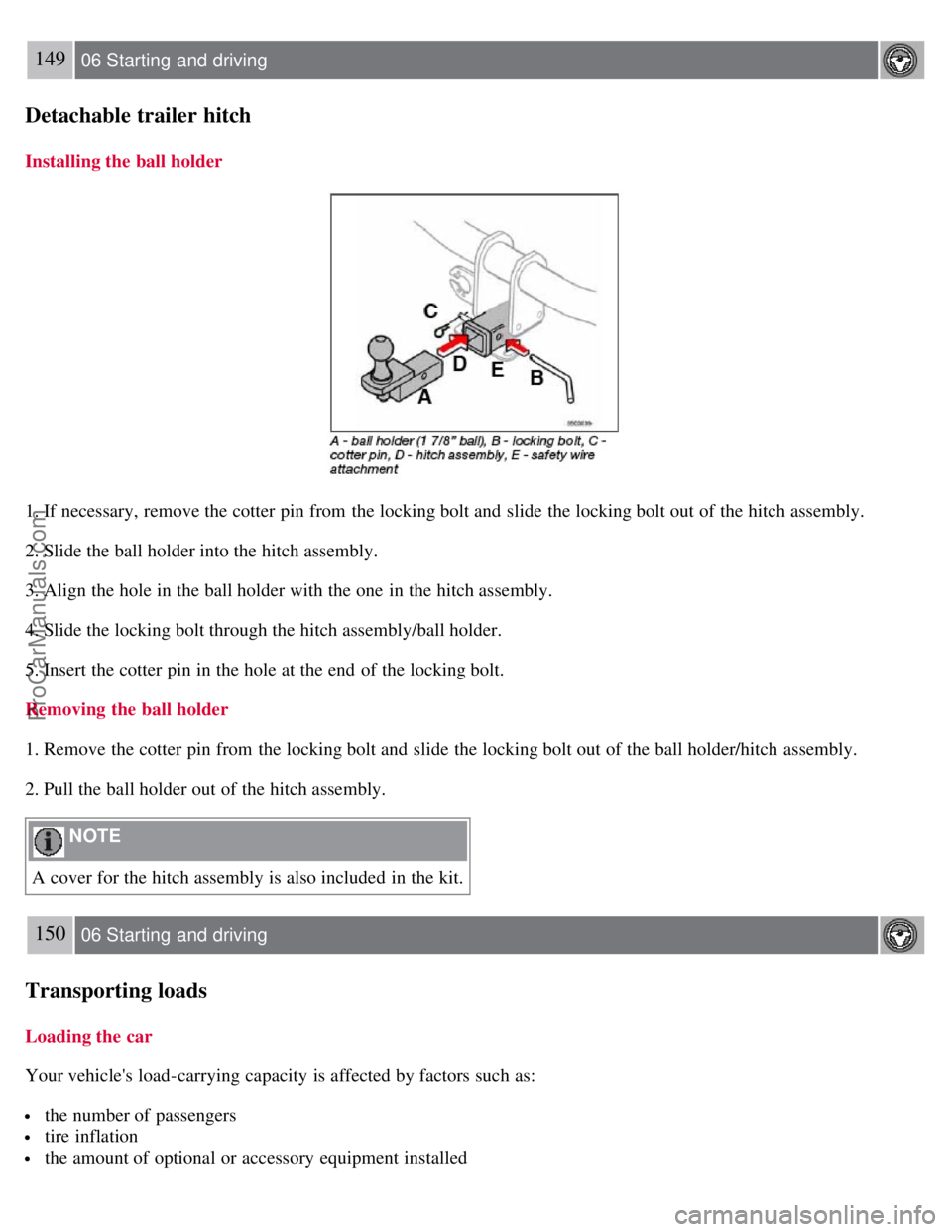
Installing the ball holder
1. If necessary, remove the cotter pin from the locking bolt and slide the locking bolt out of the hitch assembly.
2. Slide the ball holder into the hitch assembly.
3. Align the hole in the ball holder with the one in the hitch assembly.
4. Slide the locking bolt through the hitch assembly/ball holder.
5. Insert the cotter pin in the hole at the end of the locking bolt.
Removing the ball holder
1. Remove the cotter pin from the locking bolt and slide the locking bolt out of the ball holder/hitch assembly.
2. Pull the ball holder out of the hitch assembly.
NOTE
A cover for the hitch assembly is also included in the kit.
150 06 Starting and driving
Transporting loads
Loading the car
Your vehicle's load-carrying capacity is affected by factors such as:
the number of passengers
tire inflation
the amount of optional or accessory equipment installed
ProCarManuals.com