trunk VOLVO S40 2008 User Guide
[x] Cancel search | Manufacturer: VOLVO, Model Year: 2008, Model line: S40, Model: VOLVO S40 2008Pages: 239, PDF Size: 5.94 MB
Page 106 of 239
NOTE
This does not arm the alarm or lock the trunk.
116 05 Locks and alarm
Valet locking
Valet locking function
By utilizing the remote control with the key blade removed, the valet locking feature enables you to block access to the
trunk and glove compartment for e.g., valet parking or when the car is brought to the retailer for service.
With the valet locking function activated:
The vehicle's doors can be locked or unlocked
The engine can be started
The glove compartment and trunk cannot be unlocked
Access to the trunk is blocked (the trunk lid cannot be unlocked or opened, and the rear seat backrests are locked in the
upright position)
Activating the valet locking function
Begin by removing the key blade from the remote control (see page 115
).
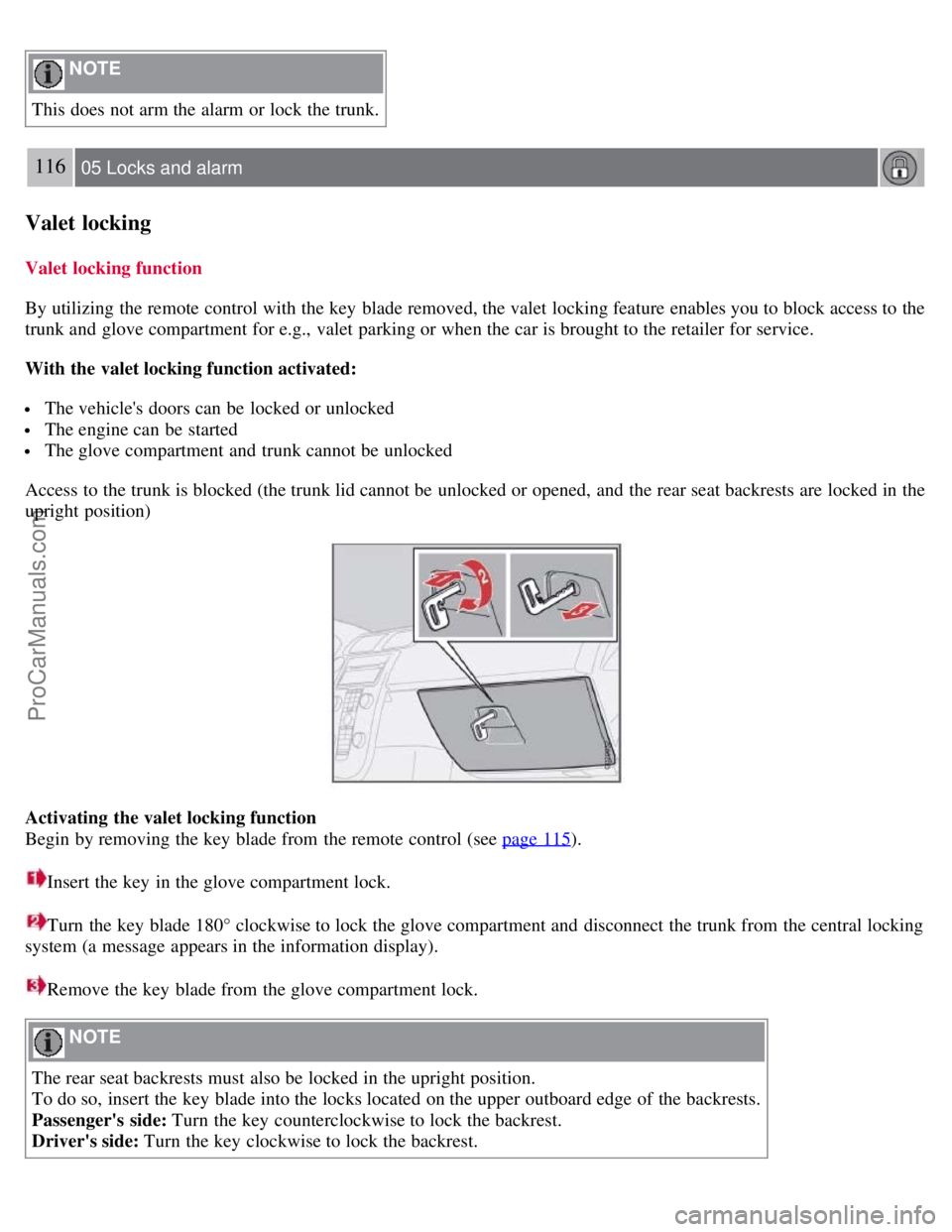
Insert the key in the glove compartment lock.
Turn the key blade 180° clockwise to lock the glove compartment and disconnect the trunk from the central locking
system (a message appears in the information display).
Remove the key blade from the glove compartment lock.
NOTE
The rear seat backrests must also be locked in the upright position.
To do so, insert the key blade into the locks located on the upper outboard edge of the backrests.
Passenger's side: Turn the key counterclockwise to lock the backrest.
Driver's side: Turn the key clockwise to lock the backrest.
ProCarManuals.com
Page 107 of 239
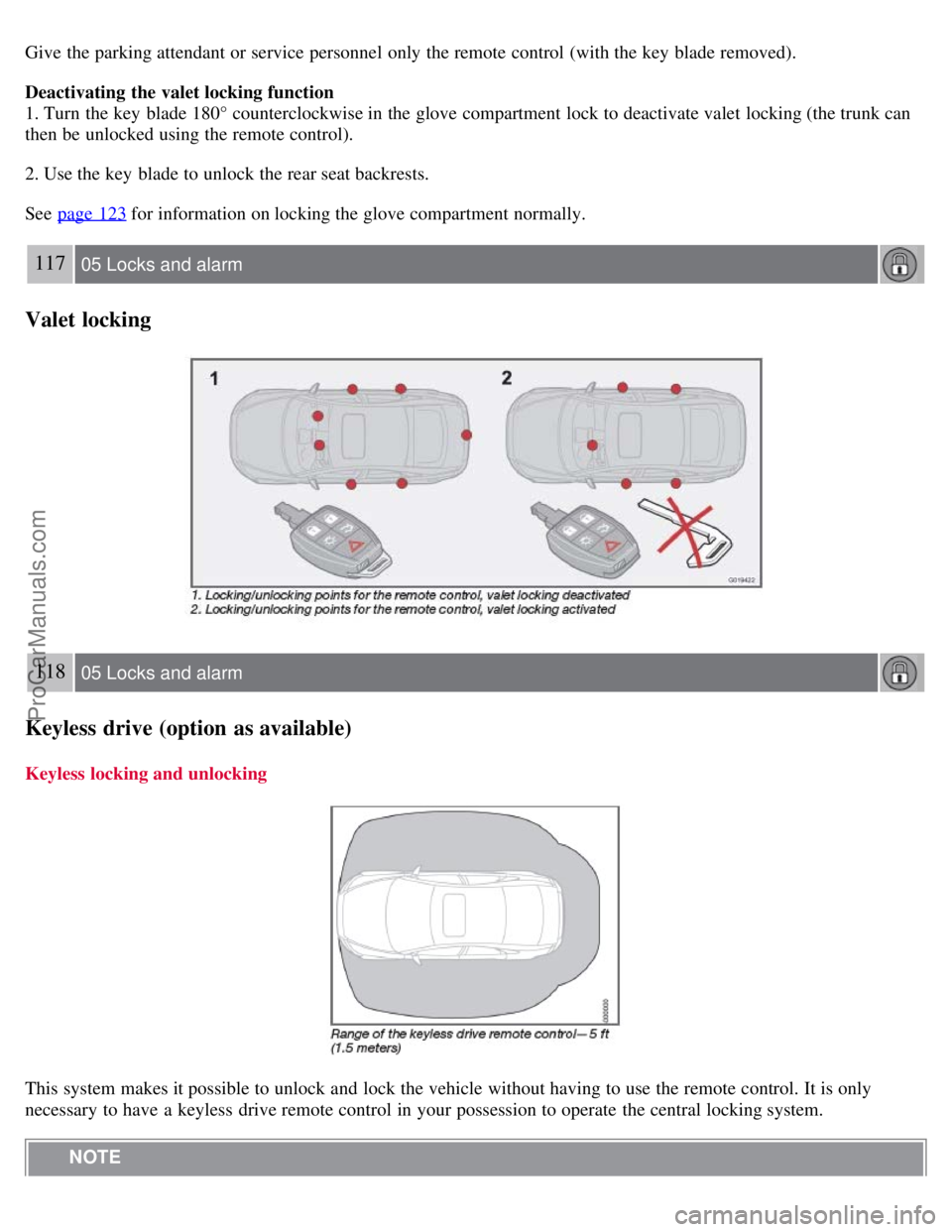
Give the parking attendant or service personnel only the remote control (with the key blade removed).
Deactivating the valet locking function
1. Turn the key blade 180° counterclockwise in the glove compartment lock to deactivate valet locking (the trunk can
then be unlocked using the remote control).
2. Use the key blade to unlock the rear seat backrests.
See page 123
for information on locking the glove compartment normally.
117 05 Locks and alarm
Valet locking
118 05 Locks and alarm
Keyless drive (option as available)
Keyless locking and unlocking
This system makes it possible to unlock and lock the vehicle without having to use the remote control. It is only
necessary to have a keyless drive remote control in your possession to operate the central locking system. NOTE
ProCarManuals.com
Page 108 of 239
The buttons on the keyless drive remote control can also be used to lock and unlock the vehicle. See page 113 for
more information.
Both of the remote controls provided with the vehicle have the keyless function, and additional remotes can be
ordered. The system can accommodate up to six keyless drive remote controls.
NOTE
The number of doors that are unlocked at the same time can be set in the Personal settings menu. See page 77
for
additional information.
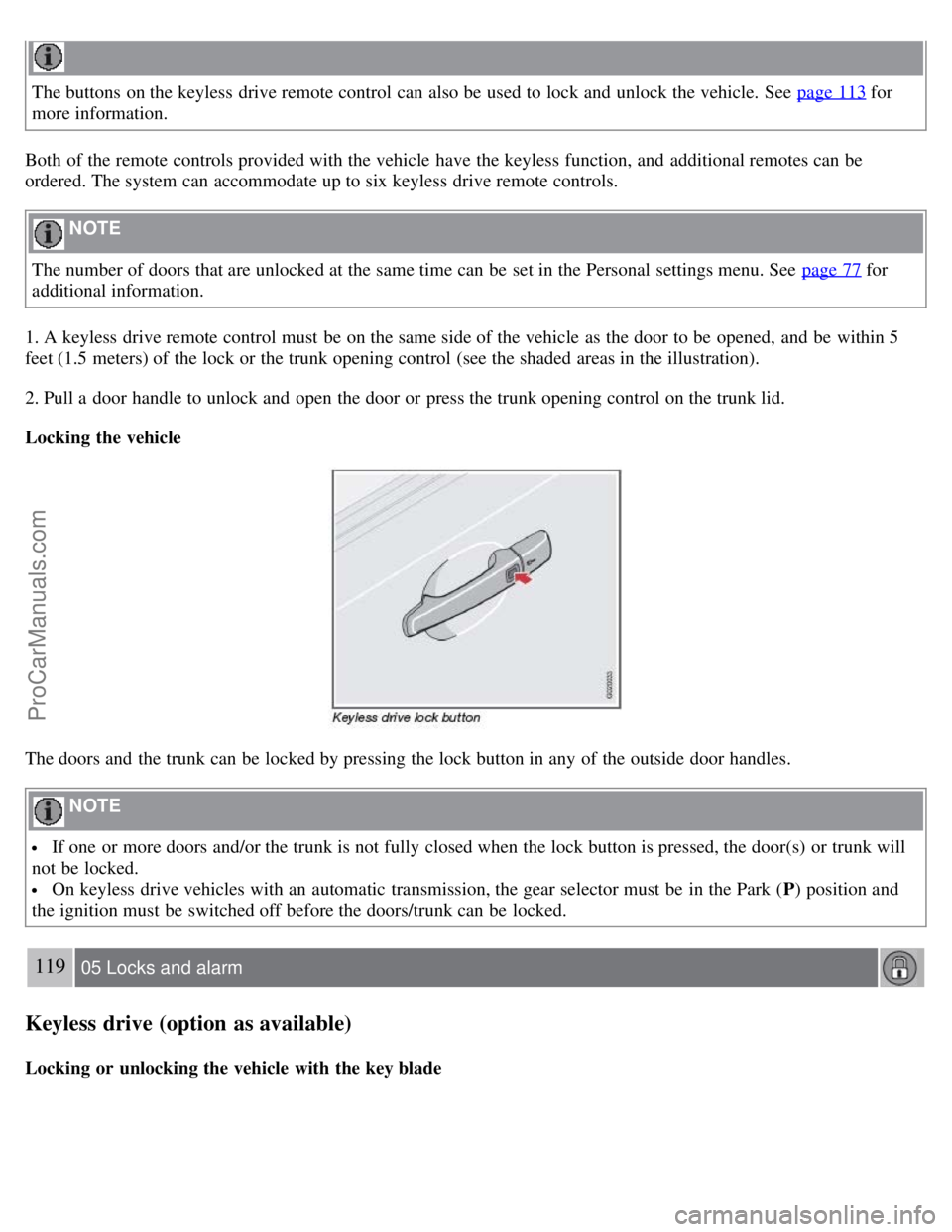
1. A keyless drive remote control must be on the same side of the vehicle as the door to be opened, and be within 5
feet (1.5 meters) of the lock or the trunk opening control (see the shaded areas in the illustration).
2. Pull a door handle to unlock and open the door or press the trunk opening control on the trunk lid.
Locking the vehicle
The doors and the trunk can be locked by pressing the lock button in any of the outside door handles.
NOTE
If one or more doors and/or the trunk is not fully closed when the lock button is pressed, the door(s) or trunk will
not be locked.
On keyless drive vehicles with an automatic transmission, the gear selector must be in the Park ( P) position and
the ignition must be switched off before the doors/trunk can be locked.
119 05 Locks and alarm
Keyless drive (option as available)
Locking or unlocking the vehicle with the key blade
ProCarManuals.com
Page 111 of 239
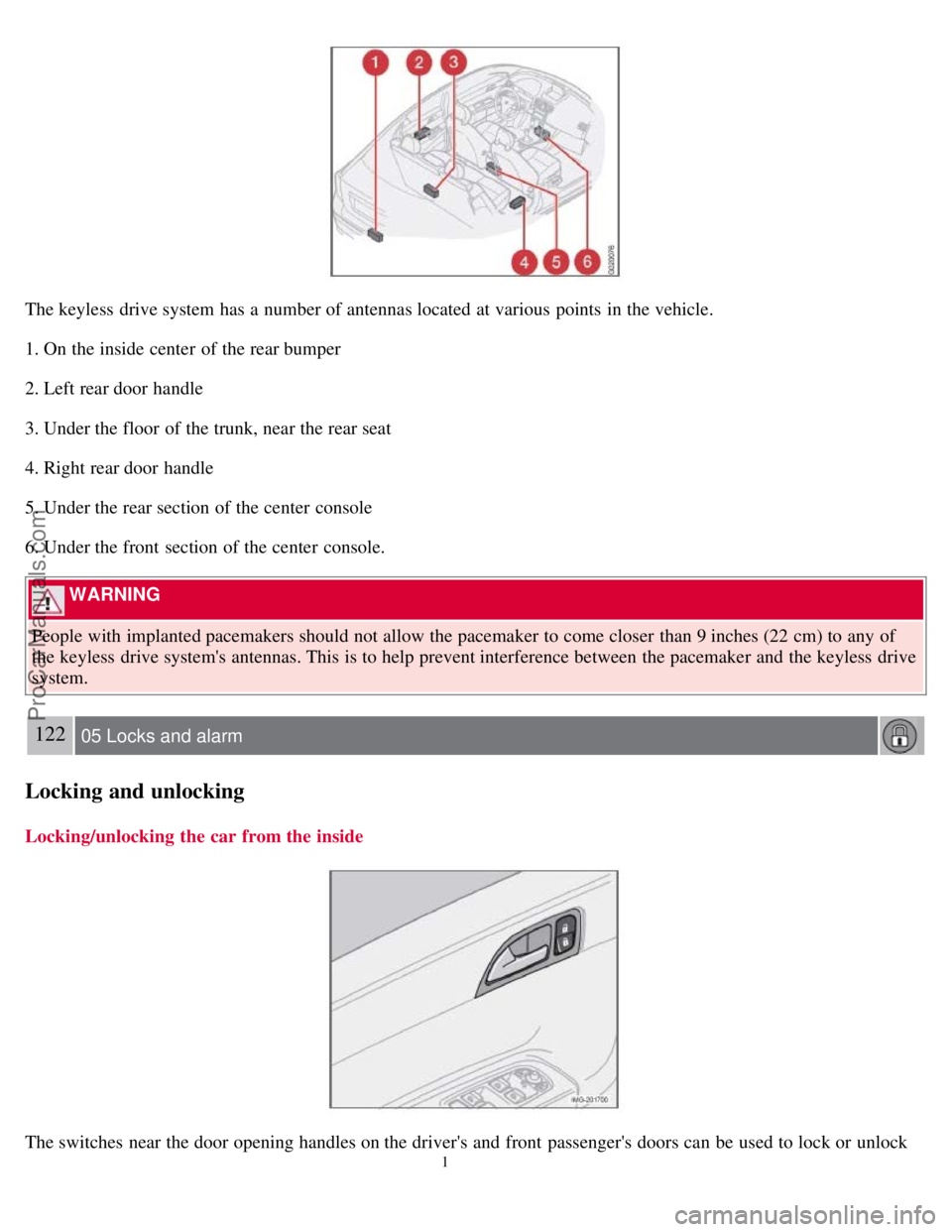
The keyless drive system has a number of antennas located at various points in the vehicle.
1. On the inside center of the rear bumper
2. Left rear door handle
3. Under the floor of the trunk, near the rear seat
4. Right rear door handle
5. Under the rear section of the center console
6. Under the front section of the center console.
WARNING
People with implanted pacemakers should not allow the pacemaker to come closer than 9 inches (22 cm) to any of
the keyless drive system's antennas. This is to help prevent interference between the pacemaker and the keyless drive
system.
122 05 Locks and alarm
Locking and unlocking
Locking/unlocking the car from the inside
The switches near the door opening handles on the driver's and front passenger's doors can be used to lock or unlock
1
ProCarManuals.com
Page 112 of 239
all doors and the trunk, open or close the side windows, and to set the alarm.
Unlocking:
Press in the upper section in the lock switch. A long press (for several seconds) also opens all the side windows.
Locking:
Press in the lower section of the lock switch.
1This function must be set to On in the Personal settings menu. See page 78.
A long press (for several seconds) also closes all the side windows.
NOTE
The ignition key must be in position I or higher (see page 135) before all side windows can be opened/closed using
the switches in the front doors.
The doors cannot be opened by pulling up the lock button.
Each door can also be locked manually using the lock button on that particular door. This applies only if the car
has not been locked from the outside.
The doors can also be unlocked (and the door opened) by pulling the handle in the door twice.
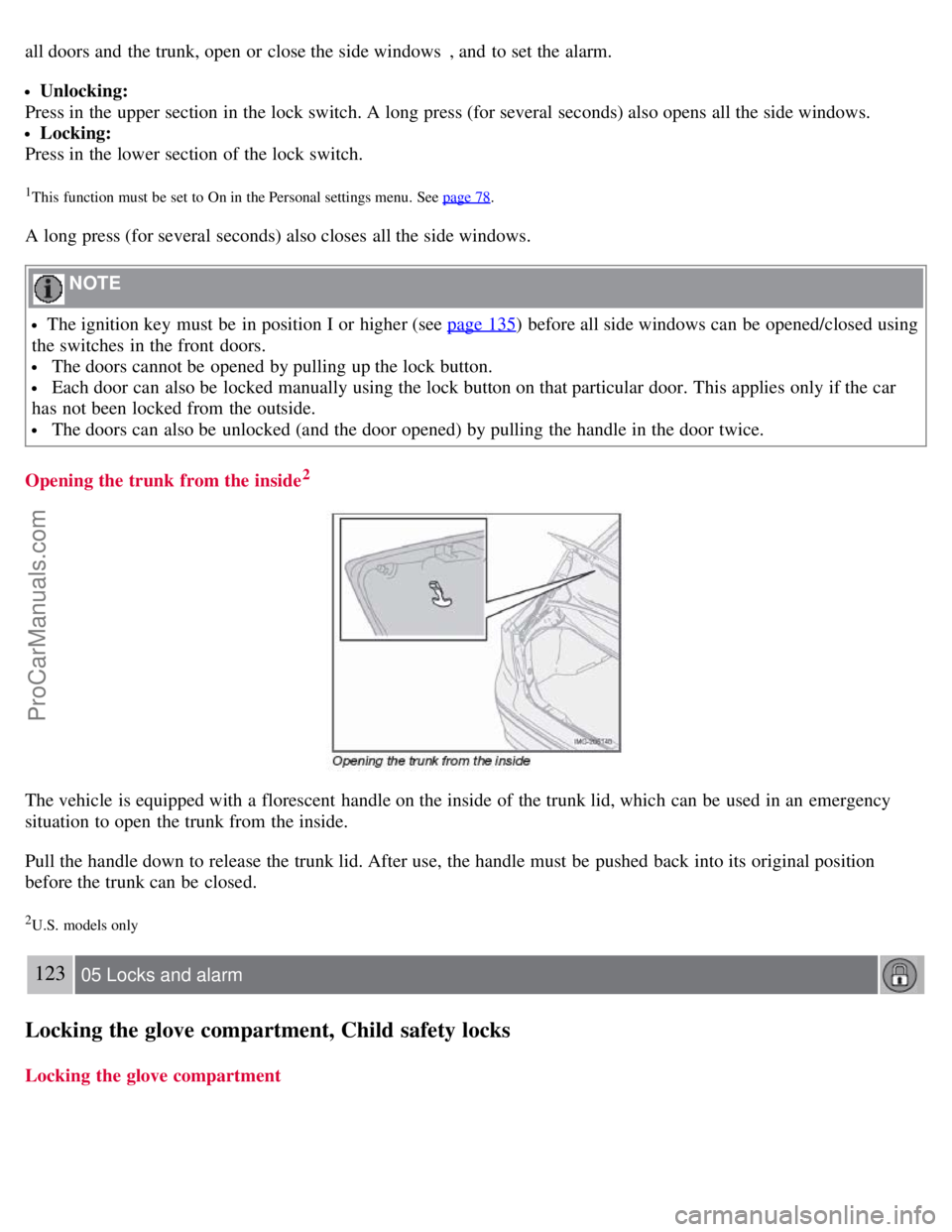
Opening the trunk from the inside
2
The vehicle is equipped with a florescent handle on the inside of the trunk lid, which can be used in an emergency
situation to open the trunk from the inside.
Pull the handle down to release the trunk lid. After use, the handle must be pushed back into its original position
before the trunk can be closed.
2U.S. models only
123 05 Locks and alarm
Locking the glove compartment, Child safety locks
Locking the glove compartment
ProCarManuals.com
Page 114 of 239
The alarm system
The alarm is automatically armed whenever the car is locked with the remote control, or if a front lock button is
depressed.
When armed, the alarm continuously monitors a number of points on the car. The following conditions will trigger the
alarm:
The hood is forced open.
The trunk is forced open.
A door is forced open.
The ignition switch is tampered with
An attempt is made to start the car with a non-approved key (a key not coded to the car's ignition).
If there is movement in the passenger compartment (if the car is equipped with the optional movement sensor).
The car is lifted or towed (if the car is equipped with the optional inclination sensor)
The battery is disconnected (while the alarm is armed).
The siren is disconnected when the alarm is disarmed.
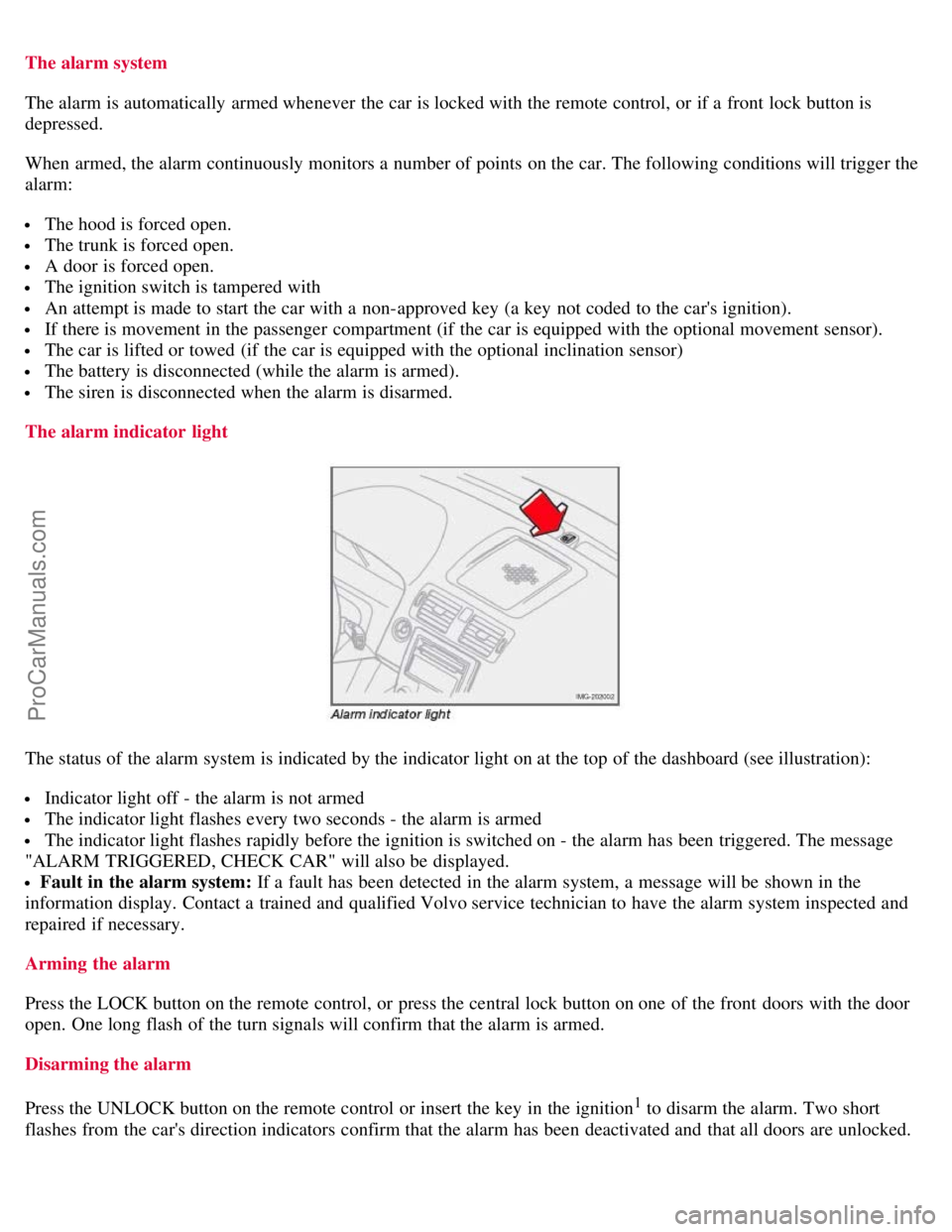
The alarm indicator light
The status of the alarm system is indicated by the indicator light on at the top of the dashboard (see illustration):
Indicator light off - the alarm is not armed
The indicator light flashes every two seconds - the alarm is armed
The indicator light flashes rapidly before the ignition is switched on - the alarm has been triggered. The message
"ALARM TRIGGERED, CHECK CAR" will also be displayed.
Fault in the alarm system: If a fault has been detected in the alarm system, a message will be shown in the
information display. Contact a trained and qualified Volvo service technician to have the alarm system inspected and
repaired if necessary.
Arming the alarm
Press the LOCK button on the remote control, or press the central lock button on one of the front doors with the door
open. One long flash of the turn signals will confirm that the alarm is armed.
Disarming the alarm
Press the UNLOCK button on the remote control or insert the key in the ignition
1 to disarm the alarm. Two short
flashes from the car's direction indicators confirm that the alarm has been deactivated and that all doors are unlocked.
ProCarManuals.com
Page 118 of 239
Better driving economy may be obtained by thinking ahead, avoiding rapid starts and stops and adjusting the speed of
your vehicle to immediate traffic conditions.
Observe the following rules:
Bring the engine to normal operating temperature as soon as possible by driving with a light foot on the accelerator
pedal for the first few minutes of operation. A cold engine uses more fuel and is subject to increased wear.
Whenever possible, avoid using the vehicle for driving short distances. This does not allow the engine to reach
normal operating temperature.
Drive carefully and avoid rapid acceleration and hard braking.
Use the transmission's Drive ( D) position as often as possible and avoid using kickdown.
Do not exceed posted speed limits.
Avoid carrying unnecessary items (extra load) in the vehicle.
Maintain correct tire pressure. Check tire pressure regularly (when tires are cold).
Remove snow tires when threat of snow or ice has ended.
Note that roof racks, ski racks, etc, increase air resistance and also fuel consumption.
At highway driving speeds, fuel consumption will be lower with the air conditioning on and the windows closed
than with the air conditioning off and the windows open.
Using the onboard trip computer's fuel consumption modes can help you learn how to drive more economically.
Other factors that decrease gas mileage are:
Dirty air cleaner
Dirty engine oil and clogged oil filter
Dragging brakes
Incorrect front end alignment
Some of the above mentioned items and others are checked at the standard maintenance intervals.
Weight distribution affects handling
WARNING
Driving with the trunk open: Driving with the trunk open could lead to poisonous exhaust gases entering the
passenger compartment. If the trunk must be kept open for any reason, proceed as follows:
Close the windows
Set the ventilation system control to air flow to floor, windshield and side windows and the blower control to its
highest setting.
At the specified curb weight your vehicle has a tendency to understeer, which means that the steering wheel has to be
turned more than might seem appropriate for the curvature of a bend. This ensures good stability and reduces the risk
of rear wheel skid. Remember that these properties can alter with the vehicle load. The heavier the load in the cargo
area, the less the tendency to understeer.
Handling, roadholding
Vehicle load, tire design and inflation pressure all affect vehicle handling. Therefore, check that the tires are inflated to
the recommended pressure according to the vehicle load. See the "Tire pressure" section. Loads should be distributed
so that capacity weight
129 06 Starting and driving
General information
ProCarManuals.com
Page 124 of 239
If you intend to leave your vehicle while it is being refueled, this feature enables you to lock the doors/trunk while
leaving the fuel filler door unlocked.
You can also keep the vehicle locked if you remain inside it during refueling. The central locking button does not lock
the fuel filler door.
Be sure the fuel filler door is not obstructed and is completely closed after refueling.
Open the fuel filler cap slowly during hot weather.
Refueling
The fuel tank is designed to accommodate possible expansion of the fuel in hot weather. See page 252
for fuel tank
volume. Be aware that the "usable" tank capacity will be somewhat less than the specified maximum. When the fuel
level is low, such factors as ambient temperature, the fuel's "Reid vapor pressure" characteristics, and terrain can affect
the fuel pump's ability to supply the engine with an adequate supply of fuel. Therefore, it is advisable to refuel as soon
as possible when the needle nears the red zone, or when the fuel warning light comes on.
CAUTION
Do not refuel with the engine running1. Turn the ignition off or to position I. If the ignition is on, an incorrect
reading could occur in the fuel gauge
After refueling, close the fuel filler cap by turning it clockwise until it clicks into place.
Avoid overfilling the fuel tank. Do not press the handle on the filler nozzle more than one extra time. Too much
fuel in the tank in hot weather conditions can cause the fuel to overflow. Overfilling could also cause damage to the
emission control systems.
Avoid spilling gasoline during refueling. In addition to causing damage to the environment, gasolines containing
alcohol can cause damage to painted surfaces, which may not be covered under the New Vehicle Limited Warranty.
Do not use gasolines containing methanol (methyl alcohol, wood alcohol). This practice can result in vehicle
performance deterioration and can damage critical parts in the fuel system. Such damage may not be covered under
the New Vehicle Limited Warranty.
1If the fuel filler cap is not closed tightly or if the engine is running when the vehicle is refueled, the Check Engine Light (malfunction indicator
lamp) may indicate a fault. However, your vehicle's performance will not be affected. Use only Volvo original or approved fuel filler caps.
135 06 Starting and driving
Ignition switch/Steering wheel lock
Ignition switch and steering wheel lock
0 - Locked position
Remove the key to lock the steering wheel
1. Never turn the key to position 0 while driving or when the vehicle is
being towed.
NOTE
A ticking sound may be audible if the key is turned to a position between 0 and I. To stop this sound, turn the key to
position II and back to position 0.
ProCarManuals.com
Page 128 of 239
Keyless drive makes it possible to unlock, start and lock the vehicle without using a remote control.
A start control is fitted in the ignition switch on vehicles equipped with the optional keyless drive. This control is used
in the same way as the ignition key to start the engine. See also page 136
for general information on starting the
engine.
NOTE
A keyless drive remote control must be in the passenger's compartment or in the trunk/cargo area in order to start the
engine.
1. Press the brake pedal (the clutch pedal must also be fully depressed on models with a manual transmission).
2. Press in the keyless drive start control and turn it to position III.
NOTE
The vehicle is equipped with an autostart function that makes it possible to start the engine without holding the start
control in position III. Turn the start control to position III and release it. The starter motor will then operate
automatically (for up to ten seconds) until the engine starts.
Starting the vehicle with the ignition key (remote control)
A vehicle with keyless drive can also be started with the ignition key (if, for example, the battery in the keyless drive
remote control is weak). To do so:
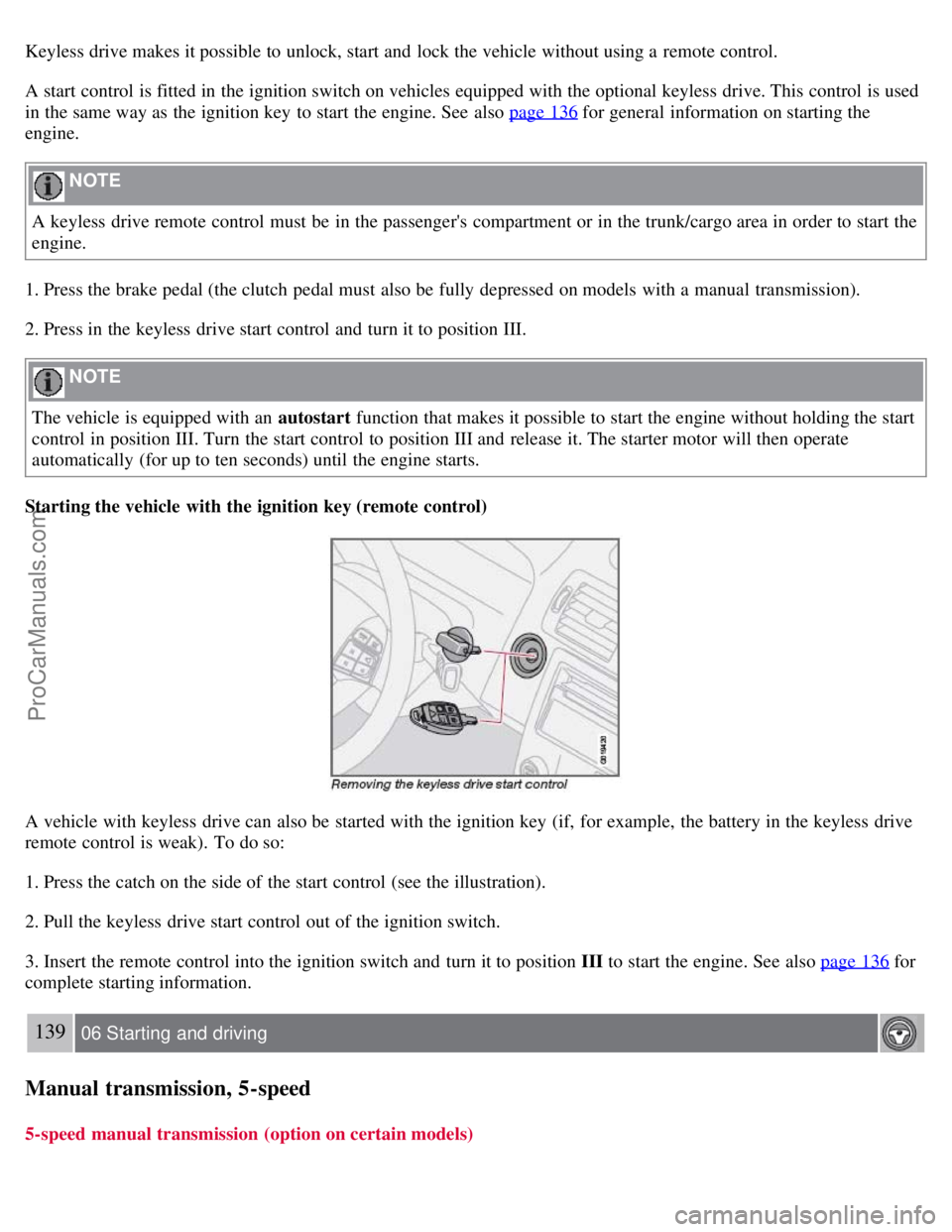
1. Press the catch on the side of the start control (see the illustration).
2. Pull the keyless drive start control out of the ignition switch.
3. Insert the remote control into the ignition switch and turn it to position III to start the engine. See also page 136
for
complete starting information.
139 06 Starting and driving
Manual transmission, 5-speed
5-speed manual transmission (option on certain models)
ProCarManuals.com
Page 236 of 239
using118
Keylock6, 136
Kickdown143
L
Label information249
License plate lighting, replacing218
Lighting panel59
Locking
from the inside122
valet116
Long distance trips131
Low beam bulb, replacing213
Low beam headlight62
M
Maintenance200
Malfunction indicator light53
Manual climate control89
Manual front seat adjustment98
Manual shifting (Geartronic)142
Mirrors, rearview mirror73
Moonroof75
MP3 files, CDs containing242
MP3 player, connecting230
O
OBD II202
Occupant safety12
Octane rating132
Oil pressure warning light54
Oil, changing205
On Call Roadside Assistance259
Onboard Diagnostic System (OBD II)202
Opening the hood203
Opening the trunk from the inside122
P
Pacemaker (keyless drive warning)121
Panel lighting, instrument60
Panic alarm, central locking system remote control113
Park assist162-164
Parking brake54, 70
Parking light bulb, replacing214
Parking lights59
Passenger's side front airbag, disabling21
Personal settings77
Power door mirrors74
ProCarManuals.com