door lock VOLVO S40 2009 Owner´s Manual
[x] Cancel search | Manufacturer: VOLVO, Model Year: 2009, Model line: S40, Model: VOLVO S40 2009Pages: 286, PDF Size: 7.08 MB
Page 84 of 286
02 Instruments and controlsPersonal settings
0284
•
Global (All doors) – unlocks all doors and
the trunk with one press on the remote
control.
•
Two Step (Two-stage unlocking) – This
alternative unlocks the driver's door with
one press on the remote control. A second
press unlocks the passenger's door and
the trunk
Automatically folding the door mirrorsThe setting makes it possible to automatically
fold the door mirrors in or out when the vehicle
is locked or unlocked. See page 79.Operating side windowsThe following alternative can be selected for
opening all side windows at the same time by
pressing and holding the Unlock switch in
either of the front doors (see page 127 for
additional information)
1
NOTE
The ignition key must be in position I or
higher (see page 143) before all side win-
dows can be opened using the switches in
the front doors.•
Auto open all windows On/Off
Temporarily turning off the alarm
sensor(s)The alarm sensors can be temporarily turned
off (if, for example, a person or a pet remains
in the vehicle when the doors are locked from
outside with the remote control). There are two
alternatives:
Activate once
and
Ask on exit
,
see page 118 and 130 .
Approach lightingThis alternative determines the length of time
for which the car's lights will remain on when
the Approach light button on the central lock-
ing system's remote control is pressed. Inter-
vals of 30/60/90 seconds may be selected, see
teh section "Remote control functions" for
more information.Home safe lightingThis alternative determines the length of time
for which the car's lights will remain on when
the high beam lever on the steering column is
pulled toward the wheel with the ignition
switched off. Intervals of 30/60/90 seconds
may be selected, see page 66 for information
on using this function.
Information•
VIN number – The VIN (Vehicle Identifica-
tion Number) is the car's unique identity
number.
•
Number of Keys – the number of keys reg-
istered for the car is displayed here.
Climate functions•
Blower speed in AUTO mode – the blower
speed can be set to AUTO mode in models
equipped with ECC. Choose between
"Low", "Normal" and "High".
•
Timer for recirculation – when the timer is
active, the air recirculates in the car for 3–
12 minutes depending on the ambient tem-
perature. Select On/Off depending on
whether the recirculation timer is to be
active or not.
Keyless locking and unlocking (option as
available)The following alternatives can be selected for
locking and unlocking the doors and trunk:•
All doors – all doors are locked or unlocked
at the same time.
•
Doors on the same side – front and rear
doors on the same side are unlocked
together.
1This menu alternative also makes it possible to open all side windows by pressing and holding the Unlock button on the remote control for several seconds.
Page 85 of 286
02 Instruments and controls
Personal settings
0285
•
Both front doors – both front doors are
unlocked together.
•
One front door – either of the front doors
can be unlocked separately
2.
Reset to factory settingsUse this alternative to return to the default cli-
mate system settings.2Factory default.
Page 86 of 286
02 Instruments and controlsHomeLink® Wireless Control System (option)
0286
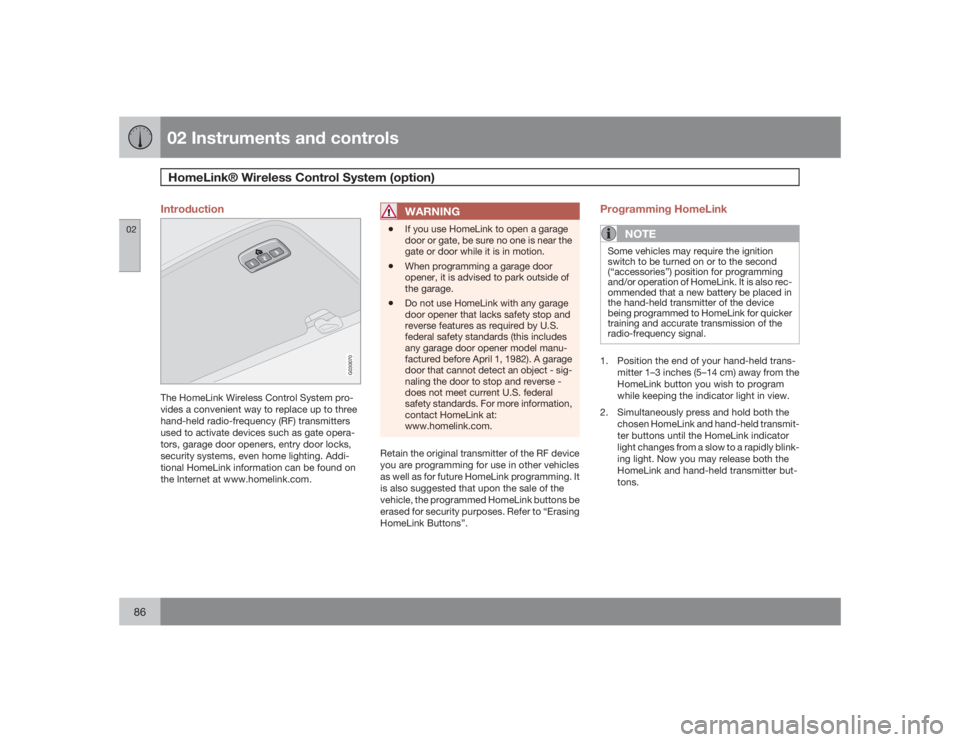
Introduction
G030070
The HomeLink Wireless Control System pro-
vides a convenient way to replace up to three
hand-held radio-frequency (RF) transmitters
used to activate devices such as gate opera-
tors, garage door openers, entry door locks,
security systems, even home lighting. Addi-
tional HomeLink information can be found on
the Internet at www.homelink.com.
WARNING
•
If you use HomeLink to open a garage
door or gate, be sure no one is near the
gate or door while it is in motion.
•
When programming a garage door
opener, it is advised to park outside of
the garage.
•
Do not use HomeLink with any garage
door opener that lacks safety stop and
reverse features as required by U.S.
federal safety standards (this includes
any garage door opener model manu-
factured before April 1, 1982). A garage
door that cannot detect an object - sig-
naling the door to stop and reverse -
does not meet current U.S. federal
safety standards. For more information,
contact HomeLink at:
www.homelink.com.
Retain the original transmitter of the RF device
you are programming for use in other vehicles
as well as for future HomeLink programming. It
is also suggested that upon the sale of the
vehicle, the programmed HomeLink buttons be
erased for security purposes. Refer to “Erasing
HomeLink Buttons”.
Programming HomeLink
NOTE
Some vehicles may require the ignition
switch to be turned on or to the second
(“accessories”) position for programming
and/or operation of HomeLink. It is also rec-
ommended that a new battery be placed in
the hand-held transmitter of the device
being programmed to HomeLink for quicker
training and accurate transmission of the
radio-frequency signal.1. Position the end of your hand-held trans-
mitter 1–3 inches (5–14 cm) away from the
HomeLink button you wish to program
while keeping the indicator light in view.
2. Simultaneously press and hold both the
chosen HomeLink and hand-held transmit-
ter buttons until the HomeLink indicator
light changes from a slow to a rapidly blink-
ing light. Now you may release both the
HomeLink and hand-held transmitter but-
tons.
Page 87 of 286
02 Instruments and controls
HomeLink® Wireless Control System (option)
02``87
NOTE
Some devices may require you to replace
this Programming Step 2 with procedures
noted in the “Gate Operator / Canadian Pro-
gramming” section. If the HomeLink indica-
tor light does not change to a rapidly
blinking light after performing these steps,
contact HomeLink at www.homelink.com.3.
Firmlypress, hold for five seconds and
release the programmed HomeLink but-
ton up to two separate times to activate the
door. If the door does not activate, press
and hold the just-trained HomeLink button
and observe the indicator light.
•If the indicator light stays on con-
stantly, programming is complete
and your device should activate when
the HomeLink button is pressed and
released.•If the indicator light blinks rapidly for
two seconds and then turns to a con-
stant light continue with “Program-
ming” steps 4-6 to complete the pro-
gramming of a rolling code equipped
device (most commonly a garage door
opener).
4. At the garage door opener receiver (motor-
head unit) in the garage, locate the “learn”
or “smart” button. This can usually befound where the hanging antenna wire is
attached to the motor-head unit.
5. Firmly press and release the “learn” or
“smart” button. (The name and color of the
button may vary by manufacturer.) There
are 30 seconds to initiate step 6.
6. Return to the vehicle and firmly press, hold
for two seconds and release the pro-
grammed HomeLink button. Repeat the
“press/hold/release” sequence a second
time, and, depending on the brand of the
garage door opener (or other rolling code
equipped device), repeat this sequence a
third time to complete the programming
process.
HomeLink should now activate your rolling
code equipped device.
Gate Operator/Canadian ProgrammingCanadian radio-frequency laws require trans-
mitter signals to “time-out” (or quit) after sev-
eral seconds of transmission – which may not
be long enough for HomeLink to pick up the
signal during programming. Similar to this
Canadian law, some U.S. gate operators are
designed to “time-out” in the same manner.
If you live in Canada or you are having difficul-
ties programming a gate operator or garage
door opener by using the “Programming” pro-cedures,replace “Programming HomeLink”
step 2 with the following:
•
Continue to press and hold the HomeLink
button while you press and release -
every two seconds (“cycle”) your hand-
held transmitter until the HomeLink indica-
tor light changes from a slow to a rapidly
blinking light. Now you may release both
the HomeLink and hand-held transmitter
buttons.
Proceed with “Programming” step 3 to com-
plete.
Using HomeLinkTo operate, simply press and release the pro-
grammed HomeLink button. Activation will
now occur for the trained device (i.e., garage
door opener, gate operator, security system,
entry door lock, home/office lighting, etc.). For
convenience, the hand-held transmitter of the
device may also be used at any time. In the
event that there are still programming difficul-
ties or questions, contact HomeLink at:
www.homelink.com.
Page 95 of 286
03 Climate
Manual climate control
03``95
G019515
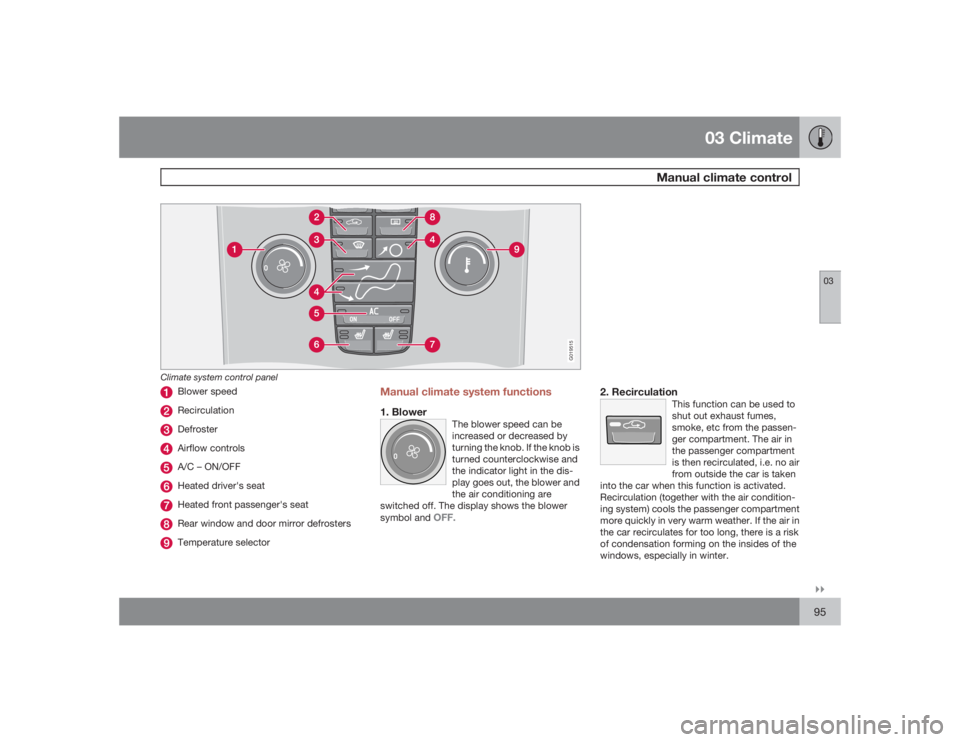
Climate system control panel
Blower speedRecirculationDefrosterAirflow controlsA/C – ON/OFFHeated driver's seatHeated front passenger's seatRear window and door mirror defrostersTemperature selector
Manual climate system functions1. Blower
The blower speed can be
increased or decreased by
turning the knob. If the knob is
turned counterclockwise and
the indicator light in the dis-
play goes out, the blower and
the air conditioning are
switched off. The display shows the blower
symbol and
OFF.
2. Recirculation
This function can be used to
shut out exhaust fumes,
smoke, etc from the passen-
ger compartment. The air in
the passenger compartment
is then recirculated, i.e. no air
from outside the car is taken
into the car when this function is activated.
Recirculation (together with the air condition-
ing system) cools the passenger compartment
more quickly in very warm weather. If the air in
the car recirculates for too long, there is a risk
of condensation forming on the insides of the
windows, especially in winter.
Page 98 of 286
03 ClimateElectronic Climate Control (ECC) – option
0398
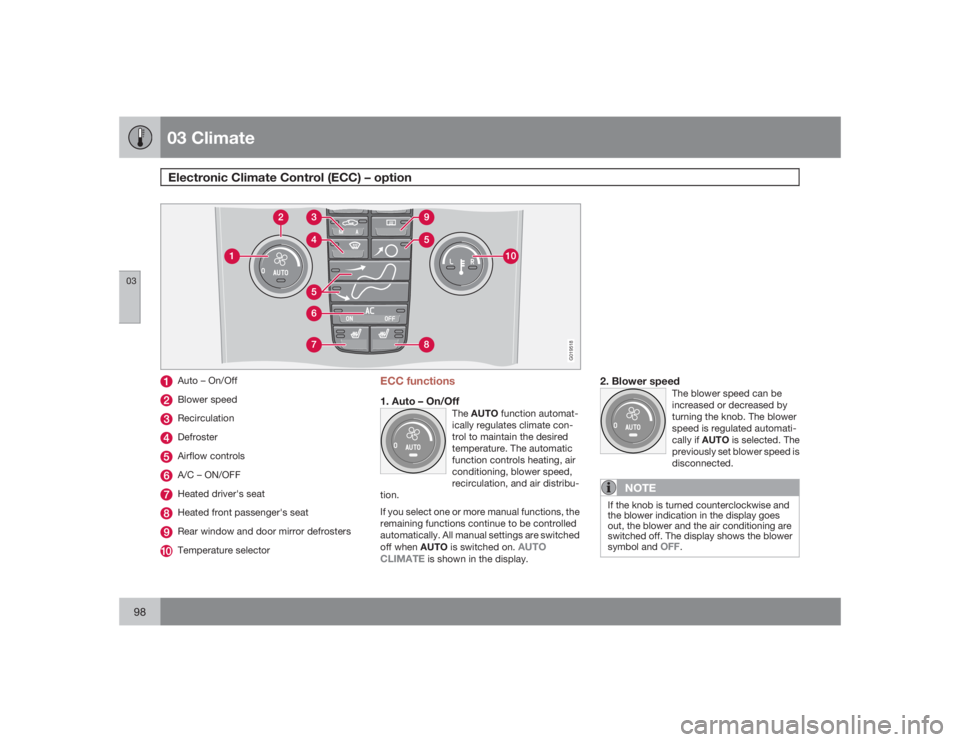
G019518
Auto – On/OffBlower speedRecirculationDefrosterAirflow controlsA/C – ON/OFFHeated driver's seatHeated front passenger's seatRear window and door mirror defrostersTemperature selector
ECC functions1. Auto – On/Off
TheAUTO function automat-
ically regulates climate con-
trol to maintain the desired
temperature. The automatic
function controls heating, air
conditioning, blower speed,
recirculation, and air distribu-
tion.
If you select one or more manual functions, the
remaining functions continue to be controlled
automatically. All manual settings are switched
off when AUTO is switched on.
AUTO
CLIMATE
is shown in the display.
2. Blower speed
The blower speed can be
increased or decreased by
turning the knob. The blower
speed is regulated automati-
cally if AUTO is selected. The
previously set blower speed is
disconnected.
NOTE
If the knob is turned counterclockwise and
the blower indication in the display goes
out, the blower and the air conditioning are
switched off. The display shows the blower
symbol and
OFF
.
Page 105 of 286
04 Interior
Front seats
04``105
WARNING
Cover sharp edges on the load to help pre-
vent injury to occupants. Secure the load to
help prevent shifting during sudden stops.Power seats (option)The power driver's seat can be adjusted:•
If the ignition key is in position I or II.
•
During a 10 minute period after the doors
have been unlocked if the door remains
open.
•
If the door is closed and the ignition key is
not yet in the ignition, or if the key is in
position0, the seat can be adjusted or dur-
ing a period of 40 seconds. The power
passenger's seat can only be adjusted if
the ignition key is in position I or II, or if the
engine is running.
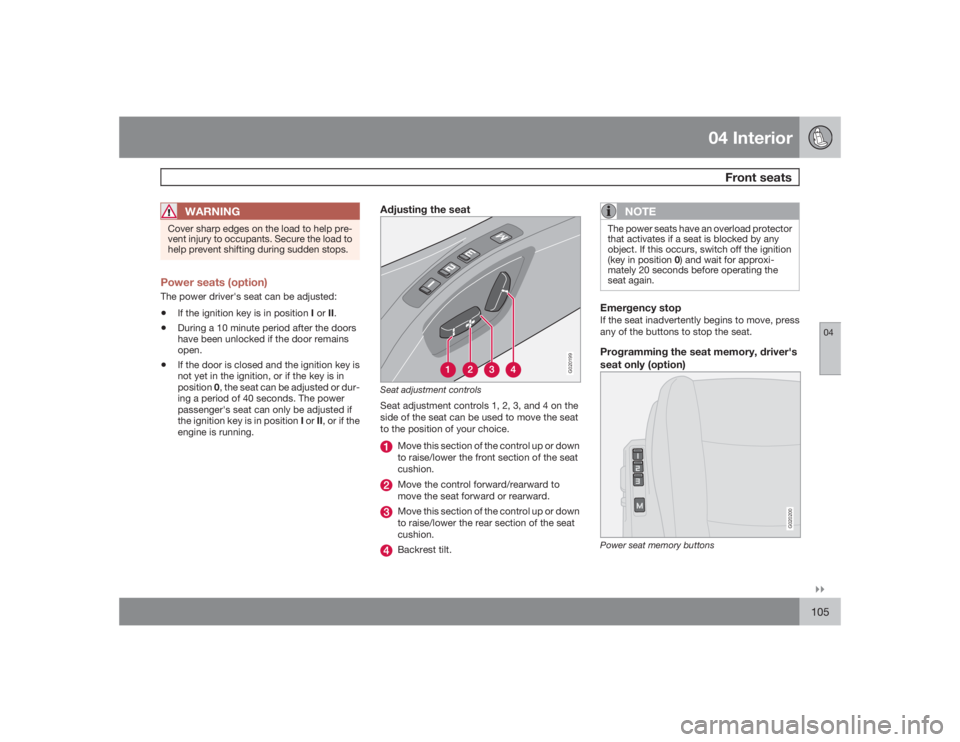
Adjusting the seat
G020199
Seat adjustment controlsSeat adjustment controls 1, 2, 3, and 4 on the
side of the seat can be used to move the seat
to the position of your choice.
Move this section of the control up or down
to raise/lower the front section of the seat
cushion.Move the control forward/rearward to
move the seat forward or rearward.Move this section of the control up or down
to raise/lower the rear section of the seat
cushion.Backrest tilt.
NOTE
The power seats have an overload protector
that activates if a seat is blocked by any
object. If this occurs, switch off the ignition
(key in position 0) and wait for approxi-
mately 20 seconds before operating the
seat again.Emergency stopIf the seat inadvertently begins to move, press
any of the buttons to stop the seat.Programming the seat memory, driver's
seat only (option)
G020200
Power seat memory buttons
Page 106 of 286
04 InteriorFront seats
04106
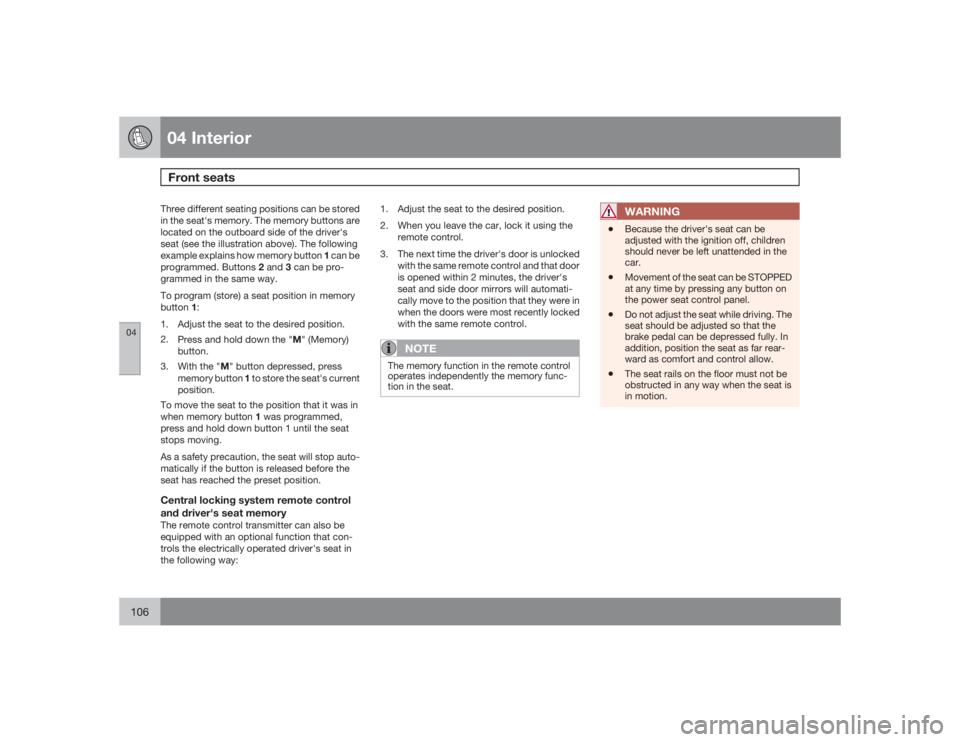
Three different seating positions can be stored
in the seat's memory. The memory buttons are
located on the outboard side of the driver's
seat (see the illustration above). The following
example explains how memory button 1 can be
programmed. Buttons 2 and 3 can be pro-
grammed in the same way.
To program (store) a seat position in memory
button1:
1. Adjust the seat to the desired position.
2.
Press and hold down the "M" (Memory)
button.
3.
With the "M" button depressed, press
memory button 1 to store the seat's current
position.
To move the seat to the position that it was in
when memory button 1 was programmed,
press and hold down button 1 until the seat
stops moving.
As a safety precaution, the seat will stop auto-
matically if the button is released before the
seat has reached the preset position.Central locking system remote control
and driver's seat memoryThe remote control transmitter can also be
equipped with an optional function that con-
trols the electrically operated driver's seat in
the following way:1. Adjust the seat to the desired position.
2. When you leave the car, lock it using the
remote control.
3. The next time the driver's door is unlocked
with the same remote control and that door
is opened within 2 minutes, the driver's
seat and side door mirrors will automati-
cally move to the position that they were in
when the doors were most recently locked
with the same remote control.
NOTE
The memory function in the remote control
operates independently the memory func-
tion in the seat.
WARNING
•
Because the driver's seat can be
adjusted with the ignition off, children
should never be left unattended in the
car.
•
Movement of the seat can be STOPPED
at any time by pressing any button on
the power seat control panel.
•
Do not adjust the seat while driving. The
seat should be adjusted so that the
brake pedal can be depressed fully. In
addition, position the seat as far rear-
ward as comfort and control allow.
•
The seat rails on the floor must not be
obstructed in any way when the seat is
in motion.
Page 107 of 286
04 InteriorInterior lighting
04``107 Interior lighting
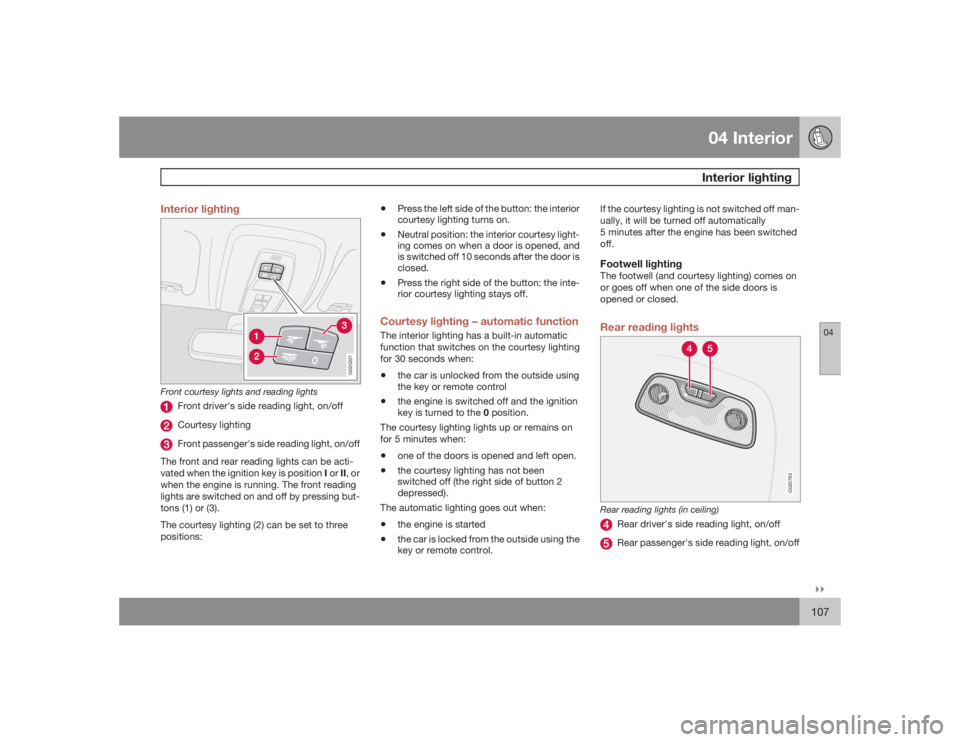
G020201
Front courtesy lights and reading lights
Front driver's side reading light, on/offCourtesy lightingFront passenger's side reading light, on/off
The front and rear reading lights can be acti-
vated when the ignition key is position I or II, or
when the engine is running. The front reading
lights are switched on and off by pressing but-
tons (1) or (3).
The courtesy lighting (2) can be set to three
positions:
•
Press the left side of the button: the interior
courtesy lighting turns on.
•
Neutral position: the interior courtesy light-
ing comes on when a door is opened, and
is switched off 10 seconds after the door is
closed.
•
Press the right side of the button: the inte-
rior courtesy lighting stays off.
Courtesy lighting – automatic functionThe interior lighting has a built-in automatic
function that switches on the courtesy lighting
for 30 seconds when:•
the car is unlocked from the outside using
the key or remote control
•
the engine is switched off and the ignition
key is turned to the 0 position.
The courtesy lighting lights up or remains on
for 5 minutes when:
•
one of the doors is opened and left open.
•
the courtesy lighting has not been
switched off (the right side of button 2
depressed).
The automatic lighting goes out when:
•
the engine is started
•
the car is locked from the outside using the
key or remote control.If the courtesy lighting is not switched off man-
ually, it will be turned off automatically
5 minutes after the engine has been switched
off.
Footwell lightingThe footwell (and courtesy lighting) comes on
or goes off when one of the side doors is
opened or closed.Rear reading lights
G020763
Rear reading lights (in ceiling)
Rear driver's side reading light, on/offRear passenger's side reading light, on/off
Page 110 of 286
04 InteriorStorage compartments
04110
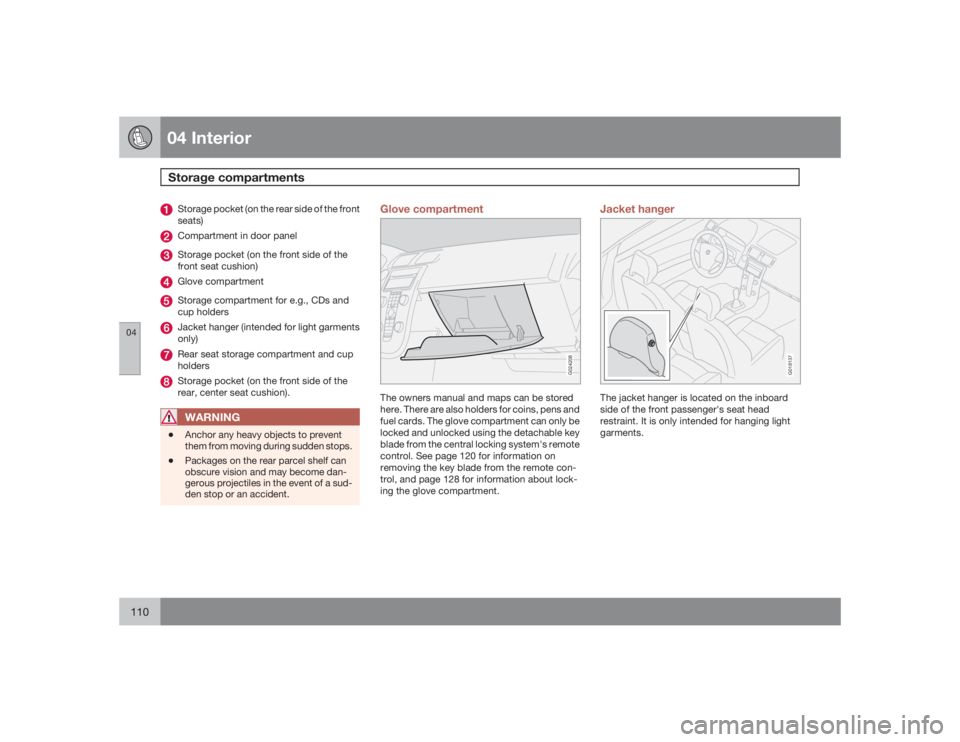
Storage pocket (on the rear side of the front
seats)Compartment in door panelStorage pocket (on the front side of the
front seat cushion)Glove compartmentStorage compartment for e.g., CDs and
cup holdersJacket hanger (intended for light garments
only)Rear seat storage compartment and cup
holdersStorage pocket (on the front side of the
rear, center seat cushion).WARNING
•
Anchor any heavy objects to prevent
them from moving during sudden stops.
•
Packages on the rear parcel shelf can
obscure vision and may become dan-
gerous projectiles in the event of a sud-
den stop or an accident.
Glove compartment
G024208
The owners manual and maps can be stored
here. There are also holders for coins, pens and
fuel cards. The glove compartment can only be
locked and unlocked using the detachable key
blade from the central locking system's remote
control. See page 120 for information on
removing the key blade from the remote con-
trol, and page 128 for information about lock-
ing the glove compartment.
Jacket hanger
G018137
The jacket hanger is located on the inboard
side of the front passenger's seat head
restraint. It is only intended for hanging light
garments.