lock VOLVO S40 2009 Owner´s Manual
[x] Cancel search | Manufacturer: VOLVO, Model Year: 2009, Model line: S40, Model: VOLVO S40 2009Pages: 286, PDF Size: 7.08 MB
Page 65 of 286
02 Instruments and controls
Lighting panel
0265 Unlocking the fuel filler door
With the ignition switched off, press button (4)
to unlock the fuel filler door. Please note that
the fuel filler door will remain unlocked until the
car begins to move forward.
An audible click will be heard when the fuel filler
door re-locks.
Page 66 of 286
02 Instruments and controlsLeft-side steering wheel lever
0266
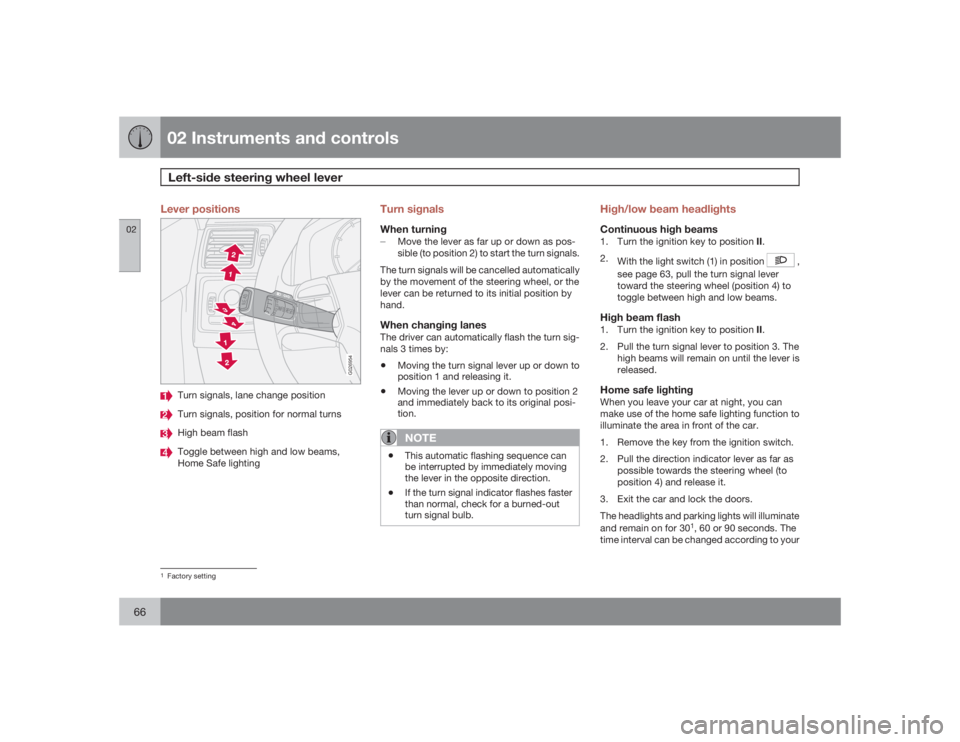
Lever positions
G026954
Turn signals, lane change positionTurn signals, position for normal turnsHigh beam flashToggle between high and low beams,
Home Safe lighting
Turn signalsWhen turning±
Move the lever as far up or down as pos-
sible (to position 2) to start the turn signals.
The turn signals will be cancelled automatically
by the movement of the steering wheel, or the
lever can be returned to its initial position by
hand.When changing lanesThe driver can automatically flash the turn sig-
nals 3 times by:•
Moving the turn signal lever up or down to
position 1 and releasing it.
•
Moving the lever up or down to position 2
and immediately back to its original posi-
tion.NOTE
•
This automatic flashing sequence can
be interrupted by immediately moving
the lever in the opposite direction.
•
If the turn signal indicator flashes faster
than normal, check for a burned-out
turn signal bulb.
High/low beam headlightsContinuous high beams1.
Turn the ignition key to position II.
2.
With the light switch (1) in position
,
see page 63, pull the turn signal lever
toward the steering wheel (position 4) to
toggle between high and low beams.
High beam flash1.
Turn the ignition key to position II.
2. Pull the turn signal lever to position 3. The
high beams will remain on until the lever is
released.Home safe lightingWhen you leave your car at night, you can
make use of the home safe lighting function to
illuminate the area in front of the car.
1. Remove the key from the ignition switch.
2. Pull the direction indicator lever as far as
possible towards the steering wheel (to
position 4) and release it.
3. Exit the car and lock the doors.
The headlights and parking lights will illuminate
and remain on for 30
1, 60 or 90 seconds. The
time interval can be changed according to your
1Factory setting
Page 71 of 286
02 Instruments and controls
Cruise control (option)
0271
•
During wheel spin or wheel lock-up.
•
If the vehicle's speed is increased by using
the accelerator pedal for more than 1
minute.
Returning to the set speed
Press the button to resume the
previously set speed.
CRUISE
ON
will be displayed.
Disengaging cruise controlCruise control can also be disengaged by:•
Pressing the
CRUISE
button (
CRUISE
ON
will no longer be shown in the function
display).
•
Putting the gear selector in Neutral (N).WARNING
Cruise control should not be used in heavy
traffic or when driving on wet or slippery
roads. Cruise control may not maintain set
speed on steep downgrades.
Page 74 of 286
02 Instruments and controlsSteering wheel adjustment, Hazard warning flashers
0274
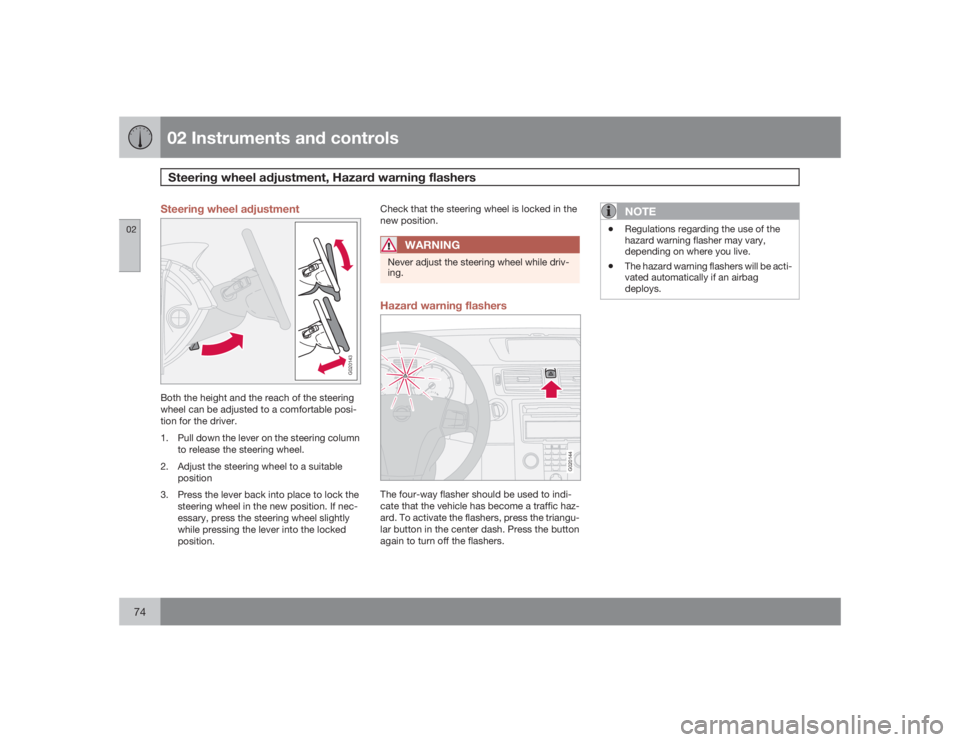
Steering wheel adjustment
G020143
Both the height and the reach of the steering
wheel can be adjusted to a comfortable posi-
tion for the driver.
1. Pull down the lever on the steering column
to release the steering wheel.
2. Adjust the steering wheel to a suitable
position
3. Press the lever back into place to lock the
steering wheel in the new position. If nec-
essary, press the steering wheel slightly
while pressing the lever into the locked
position.Check that the steering wheel is locked in the
new position.
WARNING
Never adjust the steering wheel while driv-
ing.Hazard warning flashers
G020144
The four-way flasher should be used to indi-
cate that the vehicle has become a traffic haz-
ard. To activate the flashers, press the triangu-
lar button in the center dash. Press the button
again to turn off the flashers.
NOTE
•
Regulations regarding the use of the
hazard warning flasher may vary,
depending on where you live.
•
The hazard warning flashers will be acti-
vated automatically if an airbag
deploys.
Page 76 of 286
02 Instruments and controlsPower windows
0276
Operation
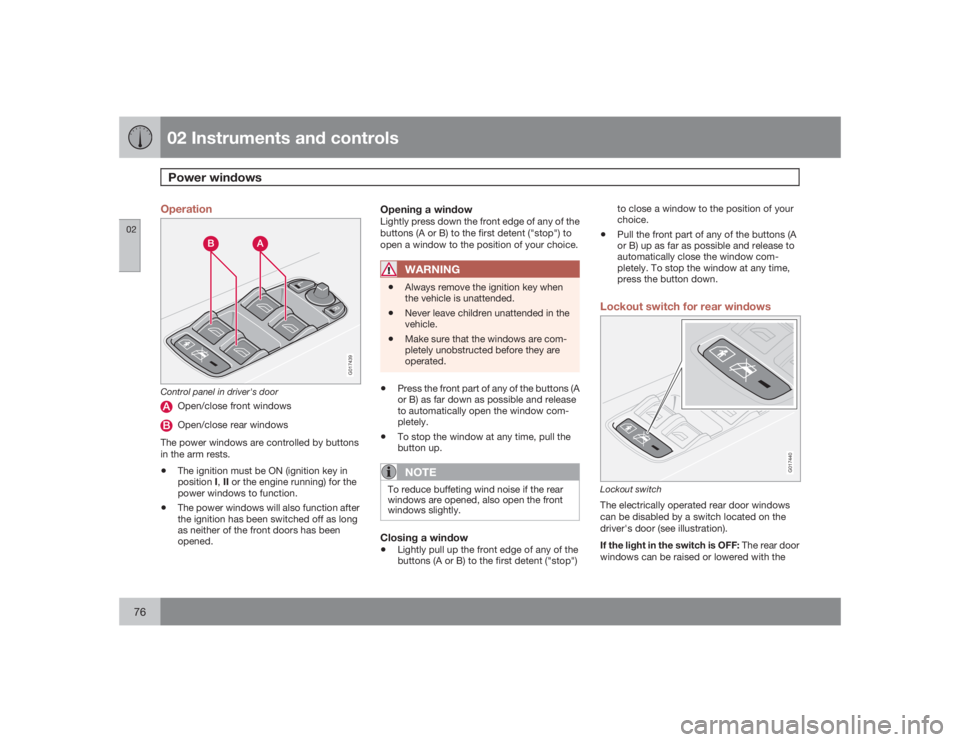
G017439
Control panel in driver's door
Open/close front windowsOpen/close rear windows
The power windows are controlled by buttons
in the arm rests.
•
The ignition must be ON (ignition key in
positionI,II or the engine running) for the
power windows to function.
•
The power windows will also function after
the ignition has been switched off as long
as neither of the front doors has been
opened.
Opening a windowLightly press down the front edge of any of the
buttons (A or B) to the first detent ("stop") to
open a window to the position of your choice.
WARNING
•
Always remove the ignition key when
the vehicle is unattended.
•
Never leave children unattended in the
vehicle.
•
Make sure that the windows are com-
pletely unobstructed before they are
operated.
•
Press the front part of any of the buttons (A
or B) as far down as possible and release
to automatically open the window com-
pletely.
•
To stop the window at any time, pull the
button up.NOTE
To reduce buffeting wind noise if the rear
windows are opened, also open the front
windows slightly.Closing a window•
Lightly pull up the front edge of any of the
buttons (A or B) to the first detent ("stop")to close a window to the position of your
choice.
•
Pull the front part of any of the buttons (A
or B) up as far as possible and release to
automatically close the window com-
pletely. To stop the window at any time,
press the button down.
Lockout switch for rear windows
G017440
Lockout switchThe electrically operated rear door windows
can be disabled by a switch located on the
driver's door (see illustration).
If the light in the switch is OFF: The rear door
windows can be raised or lowered with the
Page 79 of 286
02 Instruments and controls
Mirrors
02``79
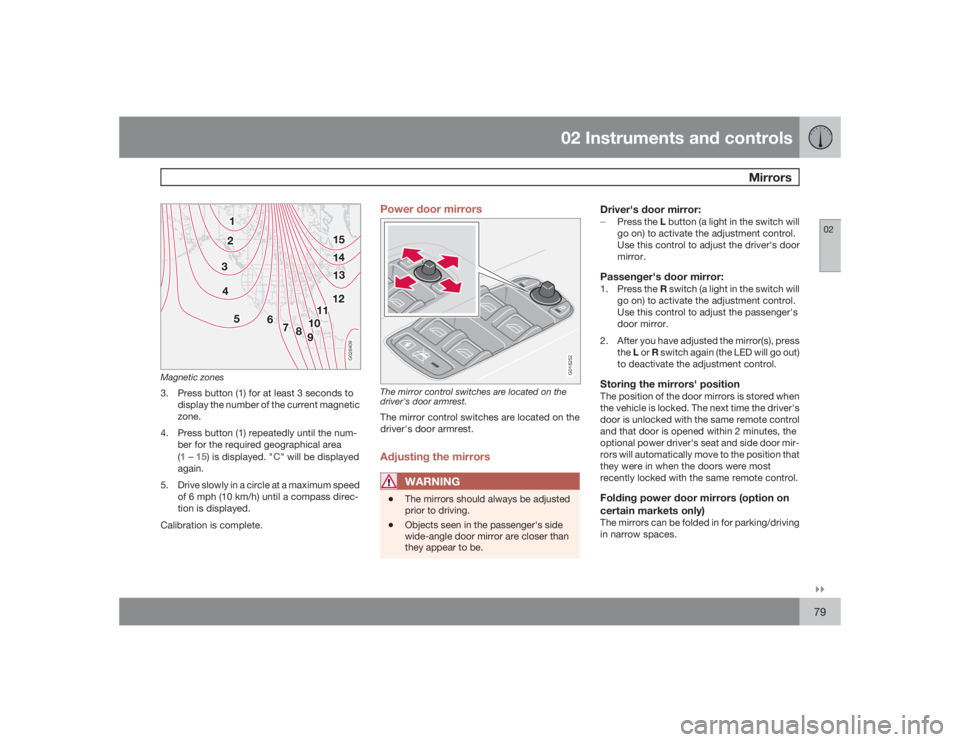
G026409
Magnetic zones3. Press button (1) for at least 3 seconds to
display the number of the current magnetic
zone.
4. Press button (1) repeatedly until the num-
ber for the required geographical area
(
1 – 15) is displayed. "
C" will be displayed
again.
5. Drive slowly in a circle at a maximum speed
of 6 mph (10 km/h) until a compass direc-
tion is displayed.
Calibration is complete.
Power door mirrors
G018252
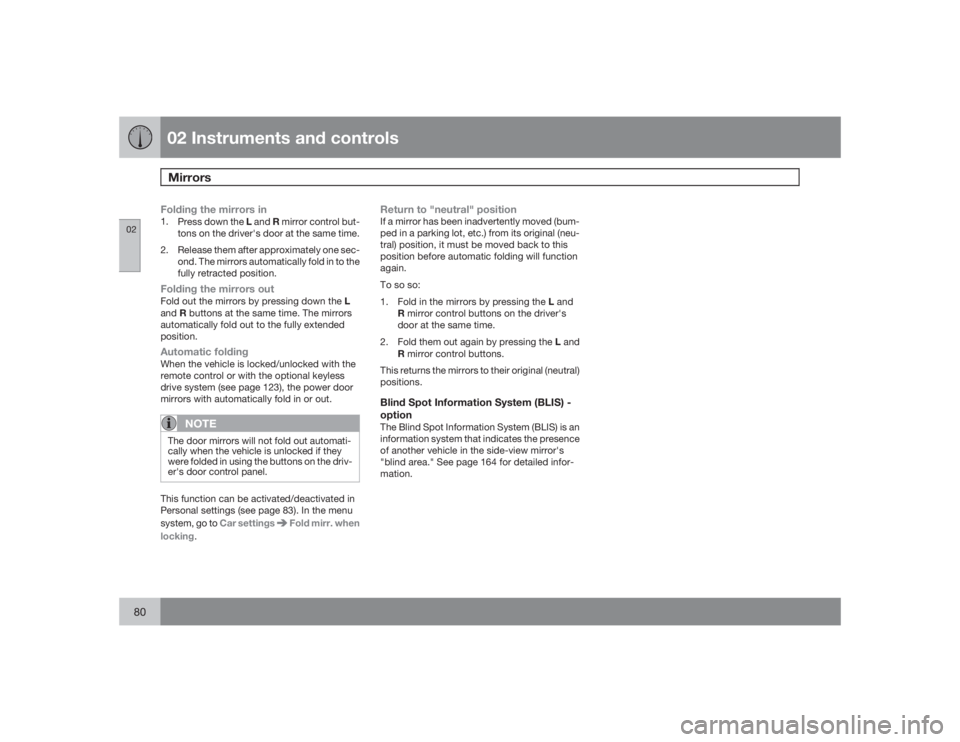
The mirror control switches are located on the
driver's door armrest.The mirror control switches are located on the
driver's door armrest.Adjusting the mirrors
WARNING
•
The mirrors should always be adjusted
prior to driving.
•
Objects seen in the passenger's side
wide-angle door mirror are closer than
they appear to be.
Driver's door mirror:±
Press the L button (a light in the switch will
go on) to activate the adjustment control.
Use this control to adjust the driver's door
mirror.Passenger's door mirror:1.
Press the R switch (a light in the switch will
go on) to activate the adjustment control.
Use this control to adjust the passenger's
door mirror.
2. After you have adjusted the mirror(s), press
theL or R switch again (the LED will go out)
to deactivate the adjustment control.Storing the mirrors' positionThe position of the door mirrors is stored when
the vehicle is locked. The next time the driver's
door is unlocked with the same remote control
and that door is opened within 2 minutes, the
optional power driver's seat and side door mir-
rors will automatically move to the position that
they were in when the doors were most
recently locked with the same remote control.Folding power door mirrors (option on
certain markets only)The mirrors can be folded in for parking/driving
in narrow spaces.
Page 80 of 286
02 Instruments and controlsMirrors
0280
Folding the mirrors in1.
Press down the L and R mirror control but-
tons on the driver's door at the same time.
2. Release them after approximately one sec-
ond. The mirrors automatically fold in to the
fully retracted position.Folding the mirrors outFold out the mirrors by pressing down the L
andR buttons at the same time. The mirrors
automatically fold out to the fully extended
position.Automatic foldingWhen the vehicle is locked/unlocked with the
remote control or with the optional keyless
drive system (see page 123), the power door
mirrors with automatically fold in or out.
NOTE
The door mirrors will not fold out automati-
cally when the vehicle is unlocked if they
were folded in using the buttons on the driv-
er's door control panel.This function can be activated/deactivated in
Personal settings (see page 83). In the menu
system, go to Car settings
Fold mirr. when
locking.
Return to "neutral" positionIf a mirror has been inadvertently moved (bum-
ped in a parking lot, etc.) from its original (neu-
tral) position, it must be moved back to this
position before automatic folding will function
again.
To so so:
1.
Fold in the mirrors by pressing the L and
R mirror control buttons on the driver's
door at the same time.
2.
Fold them out again by pressing the L and
R mirror control buttons.
This returns the mirrors to their original (neutral)
positions.Blind Spot Information System (BLIS) -
optionThe Blind Spot Information System (BLIS) is an
information system that indicates the presence
of another vehicle in the side-view mirror's
"blind area." See page 164 for detailed infor-
mation.
Page 83 of 286
02 Instruments and controls
Personal settings
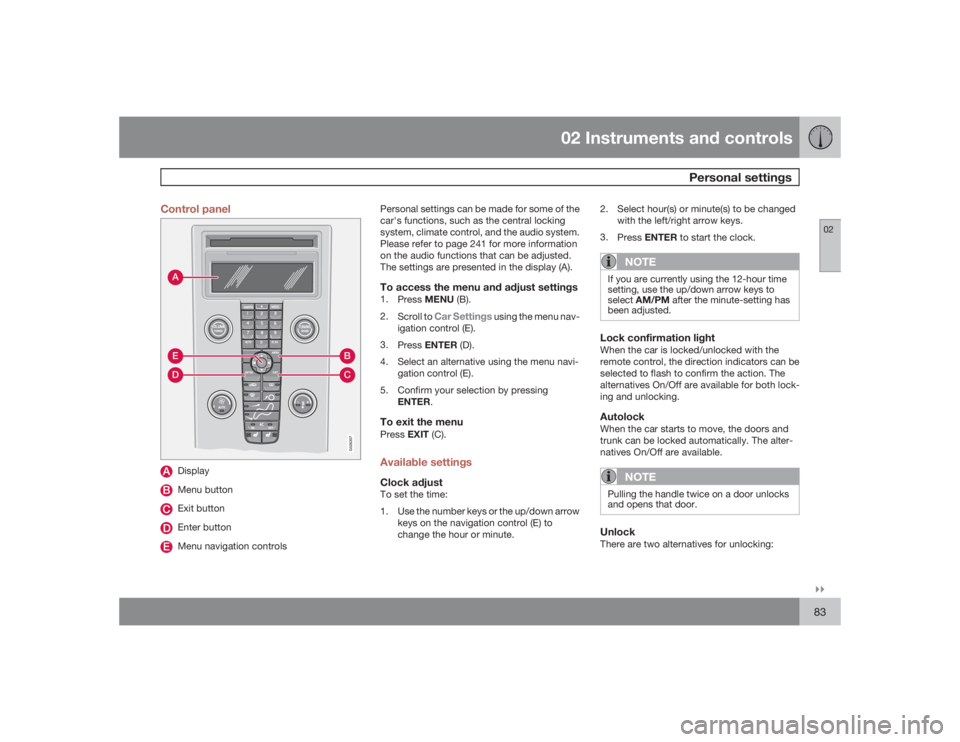
02``83 Control panel
AD
BC
E
G026307
DisplayMenu buttonExit buttonEnter buttonMenu navigation controlsPersonal settings can be made for some of the
car's functions, such as the central locking
system, climate control, and the audio system.
Please refer to page 241 for more information
on the audio functions that can be adjusted.
The settings are presented in the display (A).
To access the menu and adjust settings1.
PressMENU (B).
2.
Scroll to
Car Settings
using the menu nav-
igation control (E).
3.
PressENTER (D).
4. Select an alternative using the menu navi-
gation control (E).
5. Confirm your selection by pressing
ENTER.
To exit the menuPressEXIT (C).Available settingsClock adjustTo set the time:
1. Use the number keys or the up/down arrow
keys on the navigation control (E) to
change the hour or minute.2. Select hour(s) or minute(s) to be changed
with the left/right arrow keys.
3.
PressENTER to start the clock.
NOTE
If you are currently using the 12-hour time
setting, use the up/down arrow keys to
selectAM/PM after the minute-setting has
been adjusted.Lock confirmation lightWhen the car is locked/unlocked with the
remote control, the direction indicators can be
selected to flash to confirm the action. The
alternatives On/Off are available for both lock-
ing and unlocking.AutolockWhen the car starts to move, the doors and
trunk can be locked automatically. The alter-
natives On/Off are available.
NOTE
Pulling the handle twice on a door unlocks
and opens that door.UnlockThere are two alternatives for unlocking:
Page 84 of 286
02 Instruments and controlsPersonal settings
0284
•
Global (All doors) – unlocks all doors and
the trunk with one press on the remote
control.
•
Two Step (Two-stage unlocking) – This
alternative unlocks the driver's door with
one press on the remote control. A second
press unlocks the passenger's door and
the trunk
Automatically folding the door mirrorsThe setting makes it possible to automatically
fold the door mirrors in or out when the vehicle
is locked or unlocked. See page 79.Operating side windowsThe following alternative can be selected for
opening all side windows at the same time by
pressing and holding the Unlock switch in
either of the front doors (see page 127 for
additional information)
1
NOTE
The ignition key must be in position I or
higher (see page 143) before all side win-
dows can be opened using the switches in
the front doors.•
Auto open all windows On/Off
Temporarily turning off the alarm
sensor(s)The alarm sensors can be temporarily turned
off (if, for example, a person or a pet remains
in the vehicle when the doors are locked from
outside with the remote control). There are two
alternatives:
Activate once
and
Ask on exit
,
see page 118 and 130 .
Approach lightingThis alternative determines the length of time
for which the car's lights will remain on when
the Approach light button on the central lock-
ing system's remote control is pressed. Inter-
vals of 30/60/90 seconds may be selected, see
teh section "Remote control functions" for
more information.Home safe lightingThis alternative determines the length of time
for which the car's lights will remain on when
the high beam lever on the steering column is
pulled toward the wheel with the ignition
switched off. Intervals of 30/60/90 seconds
may be selected, see page 66 for information
on using this function.
Information•
VIN number – The VIN (Vehicle Identifica-
tion Number) is the car's unique identity
number.
•
Number of Keys – the number of keys reg-
istered for the car is displayed here.
Climate functions•
Blower speed in AUTO mode – the blower
speed can be set to AUTO mode in models
equipped with ECC. Choose between
"Low", "Normal" and "High".
•
Timer for recirculation – when the timer is
active, the air recirculates in the car for 3–
12 minutes depending on the ambient tem-
perature. Select On/Off depending on
whether the recirculation timer is to be
active or not.
Keyless locking and unlocking (option as
available)The following alternatives can be selected for
locking and unlocking the doors and trunk:•
All doors – all doors are locked or unlocked
at the same time.
•
Doors on the same side – front and rear
doors on the same side are unlocked
together.
1This menu alternative also makes it possible to open all side windows by pressing and holding the Unlock button on the remote control for several seconds.
Page 85 of 286
02 Instruments and controls
Personal settings
0285
•
Both front doors – both front doors are
unlocked together.
•
One front door – either of the front doors
can be unlocked separately
2.
Reset to factory settingsUse this alternative to return to the default cli-
mate system settings.2Factory default.