radio VOLVO S40 2009 Owner´s Manual
[x] Cancel search | Manufacturer: VOLVO, Model Year: 2009, Model line: S40, Model: VOLVO S40 2009Pages: 286, PDF Size: 7.08 MB
Page 7 of 286
Contents
7
09
09 Maintenance and servicingVolvo maintenance.................................. 210
Maintaining your car............................... 212
Hood.......................................................214
Engine compartment............................... 215
Engine oil................................................ 216
Fluids....................................................... 218
Wiper blades........................................... 220
Battery..................................................... 221
Replacing bulbs...................................... 223
Fuses....................................................... 230
10
10 AudioAudio functions....................................... 240
Radio functions....................................... 244
CD player/CD changer............................ 249
Audio menu............................................. 253
BluetoothŸ hands-free connection......... 254
11
11 SpecificationsLabel information.................................... 262
Dimensions and weights......................... 264
Fuel, oils, and fluids................................ 267
Engine oil................................................ 269
Engine specifications.............................. 270
Electrical system..................................... 272
Three-way catalytic converter................. 274
Volvo programs....................................... 275
Page 13 of 286
Introduction
Important warnings
13 Accessory Installation
•
We strongly recommend that Volvo owners
install only genuine, Volvo-approved
accessories, and that accessory installa-
tions be performed only by a trained and
qualified Volvo service technician.
•
Genuine Volvo accessories are tested to
ensure compatibility with the performance,
safety, and emission systems in your vehi-
cle. Additionally, a trained and qualified
Volvo service technician knows where
accessories may and may not be safely
installed in your Volvo. In all cases, please
consult a trained and qualified Volvo serv-
ice technician before installing any acces-
sory in or on your vehicle.
•
Accessories that have not been approved
by Volvo may or may not be specifically
tested for compatibility with your vehicle.
Additionally, an inexperienced installer
may not be familiar with some of your vehi-
cle's systems.
•
Any of your vehicle's performance and
safety systems could be adversely affec-
ted if you install accessories that Volvo has
not tested, or if you allow accessories to be
installed by someone unfamiliar with your
vehicle.
•
Damage caused by unapproved or
improperly installed accessories may not
be covered by your new vehicle warranty.
See your Warranty and Service RecordsInformation booklet for more warranty
information. Volvo assumes no responsi-
bility for death, injury, or expenses that
may result from the installation of nonge-
nuine accessories.
Driver distraction•
Driver distraction results from driver activ-
ities that are not directly related to control-
ling the vehicle in the driving environment.
Your new Volvo is, or can be, equipped
with many feature-rich entertainment and
communication systems. These include
hands-free cellular telephones, navigation
systems, and multipurpose audio systems.
You may also own other portable elec-
tronic devices for your own convenience.
When used properly and safely, they enrich
the driving experience. Improperly used,
any of these could cause a distraction.
•
For all of these systems, we want to pro-
vide the following warning that reflects the
strong Volvo concern for your safety:
•
Never use these devices or any feature of
your vehicle in a way that distracts you
from the task of driving safely. Distraction
can lead to a serious accident. In addition
to this general warning, we offer the fol-
lowing guidance regarding specific newer
features that may be found in your vehicle:
•
Never use a hand-held cellular telephone
while driving. Some jurisdictions prohibitcellular telephone use by a driver while the
vehicle is moving.
•
If your vehicle is equipped with a naviga-
tion system, set and make changes to your
travel itinerary only with the vehicle parked.
•
Never program your audio system while
the vehicle is moving. Program radio pre-
sets with the vehicle parked, and use your
programmed presets to make radio use
quicker and simpler.
•
Never use portable computers or personal
digital assistants while the vehicle is mov-
ing.
A driver has a responsibility to do everything
possible to ensure his or her own safety and
the safety of passengers in the vehicle and oth-
ers sharing the roadway. Avoiding distractions
is part of that responsibility.
Page 86 of 286
02 Instruments and controlsHomeLink® Wireless Control System (option)
0286
Introduction
G030070
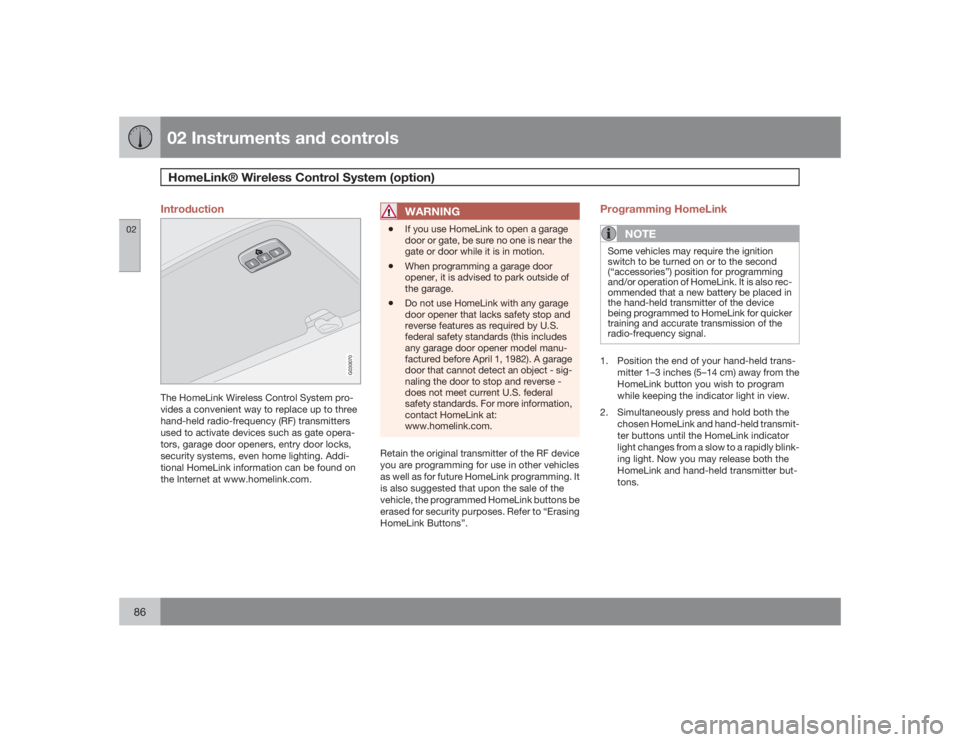
The HomeLink Wireless Control System pro-
vides a convenient way to replace up to three
hand-held radio-frequency (RF) transmitters
used to activate devices such as gate opera-
tors, garage door openers, entry door locks,
security systems, even home lighting. Addi-
tional HomeLink information can be found on
the Internet at www.homelink.com.
WARNING
•
If you use HomeLink to open a garage
door or gate, be sure no one is near the
gate or door while it is in motion.
•
When programming a garage door
opener, it is advised to park outside of
the garage.
•
Do not use HomeLink with any garage
door opener that lacks safety stop and
reverse features as required by U.S.
federal safety standards (this includes
any garage door opener model manu-
factured before April 1, 1982). A garage
door that cannot detect an object - sig-
naling the door to stop and reverse -
does not meet current U.S. federal
safety standards. For more information,
contact HomeLink at:
www.homelink.com.
Retain the original transmitter of the RF device
you are programming for use in other vehicles
as well as for future HomeLink programming. It
is also suggested that upon the sale of the
vehicle, the programmed HomeLink buttons be
erased for security purposes. Refer to “Erasing
HomeLink Buttons”.
Programming HomeLink
NOTE
Some vehicles may require the ignition
switch to be turned on or to the second
(“accessories”) position for programming
and/or operation of HomeLink. It is also rec-
ommended that a new battery be placed in
the hand-held transmitter of the device
being programmed to HomeLink for quicker
training and accurate transmission of the
radio-frequency signal.1. Position the end of your hand-held trans-
mitter 1–3 inches (5–14 cm) away from the
HomeLink button you wish to program
while keeping the indicator light in view.
2. Simultaneously press and hold both the
chosen HomeLink and hand-held transmit-
ter buttons until the HomeLink indicator
light changes from a slow to a rapidly blink-
ing light. Now you may release both the
HomeLink and hand-held transmitter but-
tons.
Page 87 of 286
02 Instruments and controls
HomeLink® Wireless Control System (option)
02``87
NOTE
Some devices may require you to replace
this Programming Step 2 with procedures
noted in the “Gate Operator / Canadian Pro-
gramming” section. If the HomeLink indica-
tor light does not change to a rapidly
blinking light after performing these steps,
contact HomeLink at www.homelink.com.3.
Firmlypress, hold for five seconds and
release the programmed HomeLink but-
ton up to two separate times to activate the
door. If the door does not activate, press
and hold the just-trained HomeLink button
and observe the indicator light.
•If the indicator light stays on con-
stantly, programming is complete
and your device should activate when
the HomeLink button is pressed and
released.•If the indicator light blinks rapidly for
two seconds and then turns to a con-
stant light continue with “Program-
ming” steps 4-6 to complete the pro-
gramming of a rolling code equipped
device (most commonly a garage door
opener).
4. At the garage door opener receiver (motor-
head unit) in the garage, locate the “learn”
or “smart” button. This can usually befound where the hanging antenna wire is
attached to the motor-head unit.
5. Firmly press and release the “learn” or
“smart” button. (The name and color of the
button may vary by manufacturer.) There
are 30 seconds to initiate step 6.
6. Return to the vehicle and firmly press, hold
for two seconds and release the pro-
grammed HomeLink button. Repeat the
“press/hold/release” sequence a second
time, and, depending on the brand of the
garage door opener (or other rolling code
equipped device), repeat this sequence a
third time to complete the programming
process.
HomeLink should now activate your rolling
code equipped device.
Gate Operator/Canadian ProgrammingCanadian radio-frequency laws require trans-
mitter signals to “time-out” (or quit) after sev-
eral seconds of transmission – which may not
be long enough for HomeLink to pick up the
signal during programming. Similar to this
Canadian law, some U.S. gate operators are
designed to “time-out” in the same manner.
If you live in Canada or you are having difficul-
ties programming a gate operator or garage
door opener by using the “Programming” pro-cedures,replace “Programming HomeLink”
step 2 with the following:
•
Continue to press and hold the HomeLink
button while you press and release -
every two seconds (“cycle”) your hand-
held transmitter until the HomeLink indica-
tor light changes from a slow to a rapidly
blinking light. Now you may release both
the HomeLink and hand-held transmitter
buttons.
Proceed with “Programming” step 3 to com-
plete.
Using HomeLinkTo operate, simply press and release the pro-
grammed HomeLink button. Activation will
now occur for the trained device (i.e., garage
door opener, gate operator, security system,
entry door lock, home/office lighting, etc.). For
convenience, the hand-held transmitter of the
device may also be used at any time. In the
event that there are still programming difficul-
ties or questions, contact HomeLink at:
www.homelink.com.
Page 143 of 286
06 Starting and driving
Ignition switch
06
143 Ignition switch positions
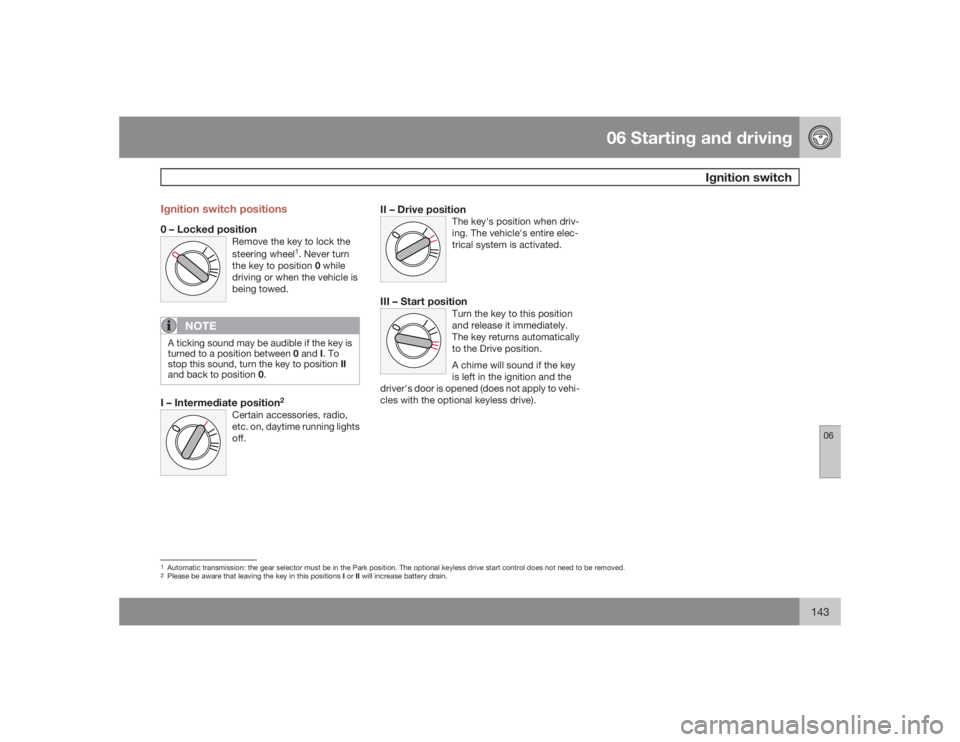
0 – Locked position
Remove the key to lock the
steering wheel
1. Never turn
the key to position 0 while
driving or when the vehicle is
being towed.
NOTE
A ticking sound may be audible if the key is
turned to a position between 0 and I. To
stop this sound, turn the key to position II
and back to position 0.I – Intermediate position
2
Certain accessories, radio,
etc. on, daytime running lights
off.
II – Drive position
The key's position when driv-
ing. The vehicle's entire elec-
trical system is activated.
III – Start position
Turn the key to this position
and release it immediately.
The key returns automatically
to the Drive position.
A chime will sound if the key
is left in the ignition and the
driver's door is opened (does not apply to vehi-
cles with the optional keyless drive).
1Automatic transmission: the gear selector must be in the Park position. The optional keyless drive start control does not need to be removed.2Please be aware that leaving the key in this positions I or II will increase battery drain.
Page 238 of 286
G020924
238
Audio functions..................................................................................... 240
Radio functions..................................................................................... 244
CD player/CD changer.......................................................................... 249
Audio menu........................................................................................... 253
BluetoothŸ hands-free connection....................................................... 254
Page 240 of 286
10 AudioAudio functions
10240
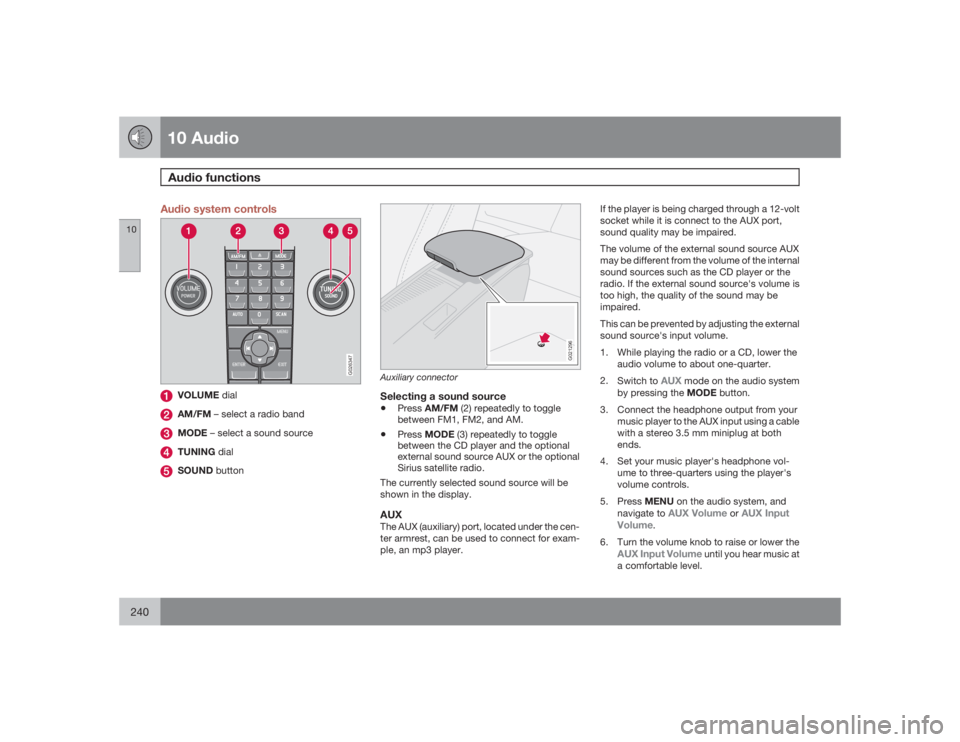
Audio system controls
G026347
VOLUME dialAM/FM – select a radio bandMODE – select a sound sourceTUNING dialSOUND button
G021296
Auxiliary connectorSelecting a sound source•
PressAM/FM (2) repeatedly to toggle
between FM1, FM2, and AM.
•
PressMODE (3) repeatedly to toggle
between the CD player and the optional
external sound source AUX or the optional
Sirius satellite radio.
The currently selected sound source will be
shown in the display.
AUXThe AUX (auxiliary) port, located under the cen-
ter armrest, can be used to connect for exam-
ple, an mp3 player.If the player is being charged through a 12-volt
socket while it is connect to the AUX port,
sound quality may be impaired.
The volume of the external sound source AUX
may be different from the volume of the internal
sound sources such as the CD player or the
radio. If the external sound source's volume is
too high, the quality of the sound may be
impaired.
This can be prevented by adjusting the external
sound source's input volume.
1. While playing the radio or a CD, lower the
audio volume to about one-quarter.
2.
Switch to
AUX
mode on the audio system
by pressing the MODE button.
3. Connect the headphone output from your
music player to the AUX input using a cable
with a stereo 3.5 mm miniplug at both
ends.
4. Set your music player's headphone vol-
ume to three-quarters using the player's
volume controls.
5.
PressMENU on the audio system, and
navigate to
AUX Volume
orAUX Input
Volume
.
6. Turn the volume knob to raise or lower the
AUX Input Volume
until you hear music at
a comfortable level.
Page 241 of 286
10 Audio
Audio functions
10``241
7. If there is distortion, lower your music play-
er's headphone volume until the distortion
goes away.
8. Finally, exit the menu and adjust the audio
volume to a comfortable level.VolumeUse the volume dial (1) or the buttons in the
steering wheel keypad to adjust the volume
level. The volume level is also adjusted auto-
matically according to the vehicle's speed, see
page 243 for more information on this func-
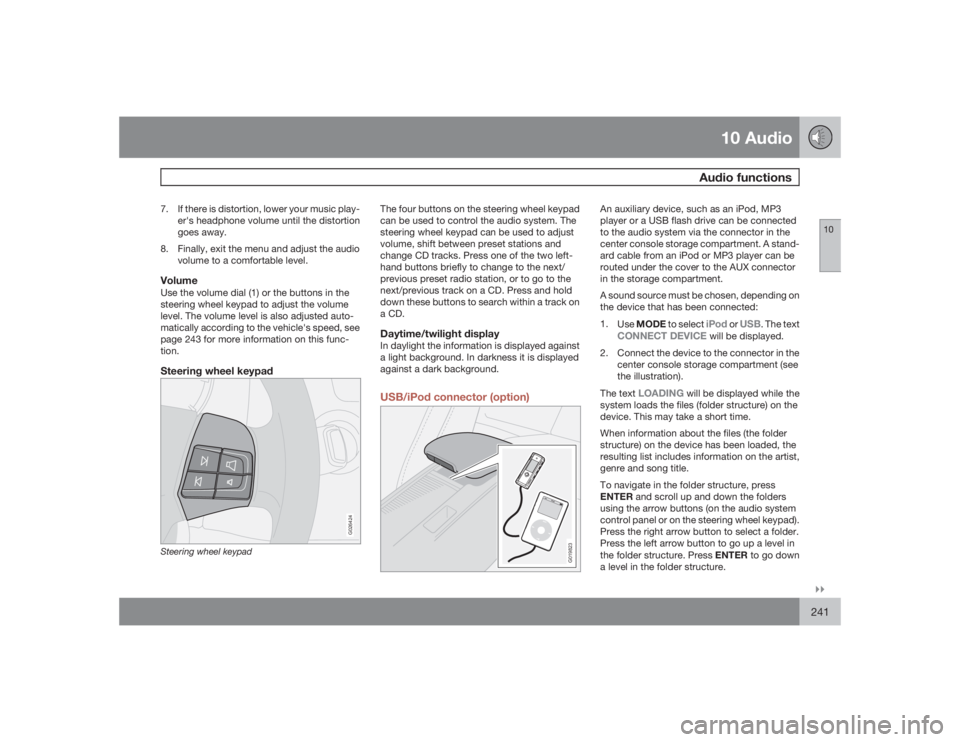
tion.Steering wheel keypad
G026424
Steering wheel keypad
The four buttons on the steering wheel keypad
can be used to control the audio system. The
steering wheel keypad can be used to adjust
volume, shift between preset stations and
change CD tracks. Press one of the two left-
hand buttons briefly to change to the next/
previous preset radio station, or to go to the
next/previous track on a CD. Press and hold
down these buttons to search within a track on
a CD.Daytime/twilight displayIn daylight the information is displayed against
a light background. In darkness it is displayed
against a dark background.USB/iPod connector (option)
G019823
An auxiliary device, such as an iPod, MP3
player or a USB flash drive can be connected
to the audio system via the connector in the
center console storage compartment. A stand-
ard cable from an iPod or MP3 player can be
routed under the cover to the AUX connector
in the storage compartment.
A sound source must be chosen, depending on
the device that has been connected:
1.
UseMODE to select
iPod
or
USB
. The text
CONNECT DEVICE
will be displayed.
2. Connect the device to the connector in the
center console storage compartment (see
the illustration).
The text
LOADING
will be displayed while the
system loads the files (folder structure) on the
device. This may take a short time.
When information about the files (the folder
structure) on the device has been loaded, the
resulting list includes information on the artist,
genre and song title.
To navigate in the folder structure, press
ENTER and scroll up and down the folders
using the arrow buttons (on the audio system
control panel or on the steering wheel keypad).
Press the right arrow button to select a folder.
Press the left arrow button to go up a level in
the folder structure. Press ENTER to go down
a level in the folder structure.
Page 242 of 286
10 AudioAudio functions
10242
Tracks can be selected in two ways:•
Turn the Tuning knob (no. 4 in the illustra-
tion on page 244) clockwise or counter-
clockwise
•
Use the right or left arrow keys on the nav-
igation control (no. 5 in the illustration on
page 244) to select the desired track. The
arrow keys on the steering wheel keypad
can also be used in the same way.NOTE
The system supports playback of files in the
most common versions of formats such as
mp3, wma, and wav. However, there may be
versions of these formats that the system
does not support.USB flash driveTo simplify the use of a USB flash drive, it is
advisable to only store music files on the drive.
It will take considerably longer for the system
to index the files on the drive if it contains any-
thing other than compatible music files.MP3 playerMany mp3 players have a file indexing system
that is not supported by the vehicle's audio
system. In order to use an mp3 player, the sys-
tem must be set to USB Removable device/
Mass Storage Device.
iPodAn iPod receives current and its battery is
charged through the connecting cord. How-
ever, if the iPod's battery is completely
drained, it should be recharged before the iPod
is connected to the audio system.
NOTE
When an iPOD is used as a sound source,
the vehicle's audio system has a menu
structure similar to the one in the iPOD. See
the iPOD's manual for detailed information.For further information, refer to the accessory
manual USB/iPod Music Interface.Sound settingsOptimal sound reproductionThe audio system is calibrated for optimal
sound reproduction through the use of digital
signal processing. This calibration takes into
account the speakers, amplifier, cabin acous-
tics, the seating position of the listener, etc., for
each combination of vehicle and audio system.
There is also dynamic calibration that takes
into account the setting of the volume control,
radio reception, and the vehicle's speed. The
sound settings described in this manual, such
as
BASS
,TREBLE
, and
EQUALIZER
are onlyintended to enable the user to adapt sound
reproduction to his/her personal preferences.
1.
PressSOUND (5). Press this button
repeatedly until you come to the setting
that you wish to change.
2.
Turn the TUNING dial (4) to make the
desired setting.
The following settings can be made:
BASS
–set the bass level
TREBLE
–set the treble level
BALANCE
–set the left/right sound balance
FADER
–set the front/rear sound balance
SUBWOOFER
(accessory)–set the level for
the subwoofer (bass speaker)
CENTER
–make settings for the center speaker
SURROUND
–make settings for surround
sound
Subwoofer (accessory)To switch the subwoofer on or off:
1.
PressMENU followed by ENTER.
2.
Select
AUDIO SETTINGS
and press
ENTER.
3.
Select
SUBWOOFER
and press ENTER.
Page 243 of 286
10 Audio
Audio functions
10
243
Surround sound
Surround sound settings are used to
balance sound levels throughout the
vehicle. Surround settings for the var-
ious sound sources are made sepa-
rately.G021216NOTE
•
Dolby Surround Pro Logic II is only
available on the Premium Sound sys-
tem.
•
When listening to FM radio stations,
Dolby Surround Pro Logic II functions
best in areas with strong reception. If
reception is weak, selecting 2 or 3-
channel stereo may provide better
sound quality.
The Dolby symbol will be appear in the display
when Dolby Pro Logic II is activated.
There are three alternative settings:•
Pro Logic II
•
3-channel
•
Off (normal 2-channel stereo)
Activating/deactivating Surround sound1.
PressMENU followed by ENTER.2.
Select
AUDIO SETTINGS
in the menu and
pressENTER.
3.
Select Surround
FM/AM/CD/AUX
and
pressENTER.
4.
Select
Pro logic II
, 3-channel stereo or
Off
and press ENTER.
Equalizer Front/RearThis function is used to fine-tune the sound
level for different frequencies separately.
NOTE
This function is only available on certain
sound systems.To adjust the equalizer settings:
1.
PressMENU followed by ENTER.
2.
Select
AUDIO SETTINGS
in the menu and
pressENTER.
3.
Select
Equalizer Front/Rear
and press
ENTER.
The column in the display indicates the sound
level for the current frequency.
•
Adjust the level with the TUNING dial (4),
or use the Up/Down arrows. Additional fre-quencies can be selected with the Right/
Left arrows.
•
Save the settings by pressing ENTER or
exit without saving by pressing EXIT.
Automatic sound controlThe audio system's volume is adjusted auto-
matically according to the speed of the vehicle.
There are three settings available, which deter-
mine the level of volume compensation:•
Low
•
Medium
1
•
High
To set the automatic sound level:
1.
PressMENU followed by ENTER.
2.
Select
AUDIO SETTINGS
in the menu and
pressENTER.
3.
Select
AUTO. VOLUME CONTROL
in the
menu and press ENTER.
4.
Select
Low
,Medium
, or
High
and press
ENTER.
1Default setting.