trunk VOLVO S40 2009 Owner´s Manual
[x] Cancel search | Manufacturer: VOLVO, Model Year: 2009, Model line: S40, Model: VOLVO S40 2009Pages: 286, PDF Size: 7.08 MB
Page 5 of 286
Contents
5
03
03 ClimateGeneral information.................................. 92
Air vents.................................................... 94
Manual climate control.............................. 95
Electronic Climate Control (ECC) –
option........................................................ 98
Air distribution......................................... 101
04
04 InteriorFront seats.............................................. 104
Interior lighting........................................ 107
Storage compartments........................... 109
Rear seat................................................. 113
Trunk ...................................................... 115
05
05 Locks and alarmRemote control and key blade................118
Valet locking ........................................... 122
Keyless drive (option as available).......... 123
Locking and unlocking............................ 127
Child safety locks.................................... 129
Alarm (option).......................................... 130
Page 59 of 286
02 Instruments and controls
Symbols – instrument panel
0259
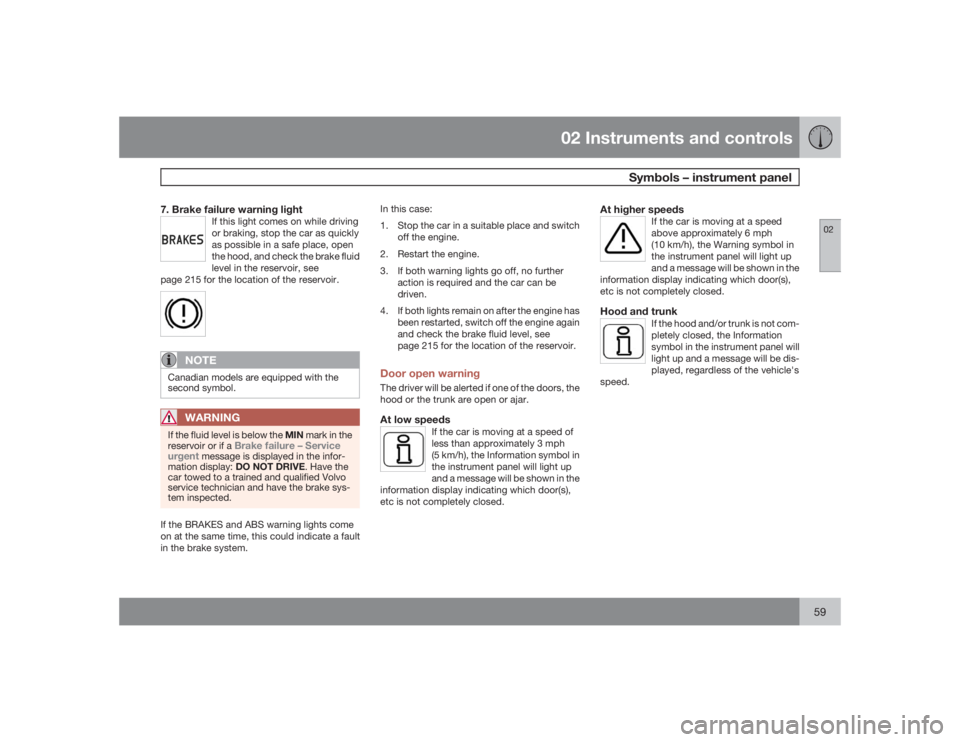
7. Brake failure warning light
If this light comes on while driving
or braking, stop the car as quickly
as possible in a safe place, open
the hood, and check the brake fluid
level in the reservoir, see
page 215 for the location of the reservoir.
NOTE
Canadian models are equipped with the
second symbol.
WARNING
If the fluid level is below the MIN mark in the
reservoir or if a
Brake failure – Service
urgent
message is displayed in the infor-
mation display: DO NOT DRIVE. Have the
car towed to a trained and qualified Volvo
service technician and have the brake sys-
tem inspected.
If the BRAKES and ABS warning lights come
on at the same time, this could indicate a fault
in the brake system.In this case:
1. Stop the car in a suitable place and switch
off the engine.
2. Restart the engine.
3. If both warning lights go off, no further
action is required and the car can be
driven.
4. If both lights remain on after the engine has
been restarted, switch off the engine again
and check the brake fluid level, see
page 215 for the location of the reservoir.
Door open warningThe driver will be alerted if one of the doors, the
hood or the trunk are open or ajar.At low speeds
If the car is moving at a speed of
less than approximately 3 mph
(5 km/h), the Information symbol in
the instrument panel will light up
and a message will be shown in the
information display indicating which door(s),
etc is not completely closed.
At higher speeds
If the car is moving at a speed
above approximately 6 mph
(10 km/h), the Warning symbol in
the instrument panel will light up
and a message will be shown in the
information display indicating which door(s),
etc is not completely closed.
Hood and trunk
If the hood and/or trunk is not com-
pletely closed, the Information
symbol in the instrument panel will
light up and a message will be dis-
played, regardless of the vehicle's
speed.
Page 83 of 286
02 Instruments and controls
Personal settings
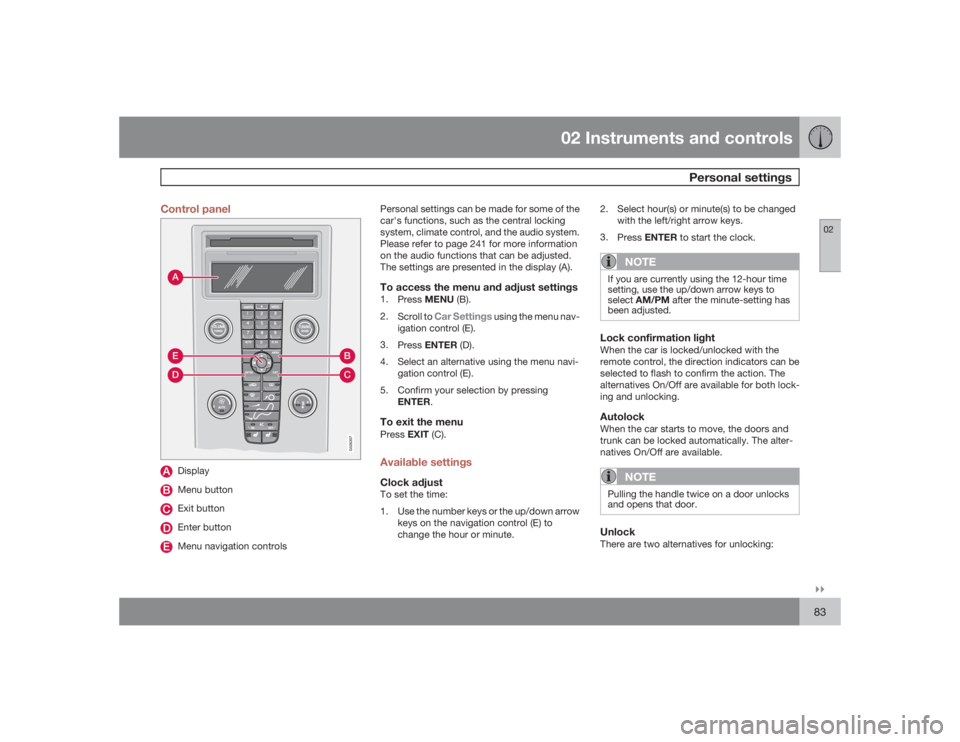
02``83 Control panel
AD
BC
E
G026307
DisplayMenu buttonExit buttonEnter buttonMenu navigation controlsPersonal settings can be made for some of the
car's functions, such as the central locking
system, climate control, and the audio system.
Please refer to page 241 for more information
on the audio functions that can be adjusted.
The settings are presented in the display (A).
To access the menu and adjust settings1.
PressMENU (B).
2.
Scroll to
Car Settings
using the menu nav-
igation control (E).
3.
PressENTER (D).
4. Select an alternative using the menu navi-
gation control (E).
5. Confirm your selection by pressing
ENTER.
To exit the menuPressEXIT (C).Available settingsClock adjustTo set the time:
1. Use the number keys or the up/down arrow
keys on the navigation control (E) to
change the hour or minute.2. Select hour(s) or minute(s) to be changed
with the left/right arrow keys.
3.
PressENTER to start the clock.
NOTE
If you are currently using the 12-hour time
setting, use the up/down arrow keys to
selectAM/PM after the minute-setting has
been adjusted.Lock confirmation lightWhen the car is locked/unlocked with the
remote control, the direction indicators can be
selected to flash to confirm the action. The
alternatives On/Off are available for both lock-
ing and unlocking.AutolockWhen the car starts to move, the doors and
trunk can be locked automatically. The alter-
natives On/Off are available.
NOTE
Pulling the handle twice on a door unlocks
and opens that door.UnlockThere are two alternatives for unlocking:
Page 84 of 286
02 Instruments and controlsPersonal settings
0284
•
Global (All doors) – unlocks all doors and
the trunk with one press on the remote
control.
•
Two Step (Two-stage unlocking) – This
alternative unlocks the driver's door with
one press on the remote control. A second
press unlocks the passenger's door and
the trunk
Automatically folding the door mirrorsThe setting makes it possible to automatically
fold the door mirrors in or out when the vehicle
is locked or unlocked. See page 79.Operating side windowsThe following alternative can be selected for
opening all side windows at the same time by
pressing and holding the Unlock switch in
either of the front doors (see page 127 for
additional information)
1
NOTE
The ignition key must be in position I or
higher (see page 143) before all side win-
dows can be opened using the switches in
the front doors.•
Auto open all windows On/Off
Temporarily turning off the alarm
sensor(s)The alarm sensors can be temporarily turned
off (if, for example, a person or a pet remains
in the vehicle when the doors are locked from
outside with the remote control). There are two
alternatives:
Activate once
and
Ask on exit
,
see page 118 and 130 .
Approach lightingThis alternative determines the length of time
for which the car's lights will remain on when
the Approach light button on the central lock-
ing system's remote control is pressed. Inter-
vals of 30/60/90 seconds may be selected, see
teh section "Remote control functions" for
more information.Home safe lightingThis alternative determines the length of time
for which the car's lights will remain on when
the high beam lever on the steering column is
pulled toward the wheel with the ignition
switched off. Intervals of 30/60/90 seconds
may be selected, see page 66 for information
on using this function.
Information•
VIN number – The VIN (Vehicle Identifica-
tion Number) is the car's unique identity
number.
•
Number of Keys – the number of keys reg-
istered for the car is displayed here.
Climate functions•
Blower speed in AUTO mode – the blower
speed can be set to AUTO mode in models
equipped with ECC. Choose between
"Low", "Normal" and "High".
•
Timer for recirculation – when the timer is
active, the air recirculates in the car for 3–
12 minutes depending on the ambient tem-
perature. Select On/Off depending on
whether the recirculation timer is to be
active or not.
Keyless locking and unlocking (option as
available)The following alternatives can be selected for
locking and unlocking the doors and trunk:•
All doors – all doors are locked or unlocked
at the same time.
•
Doors on the same side – front and rear
doors on the same side are unlocked
together.
1This menu alternative also makes it possible to open all side windows by pressing and holding the Unlock button on the remote control for several seconds.
Page 102 of 286
G020908
102
Front seats............................................................................................ 104
Interior lighting...................................................................................... 107
Storage compartments......................................................................... 109
Rear seat............................................................................................... 113
Trunk .................................................................................................... 115
Page 115 of 286
04 Interior
Trunk
04
115 Load anchoring eyelets
G018099
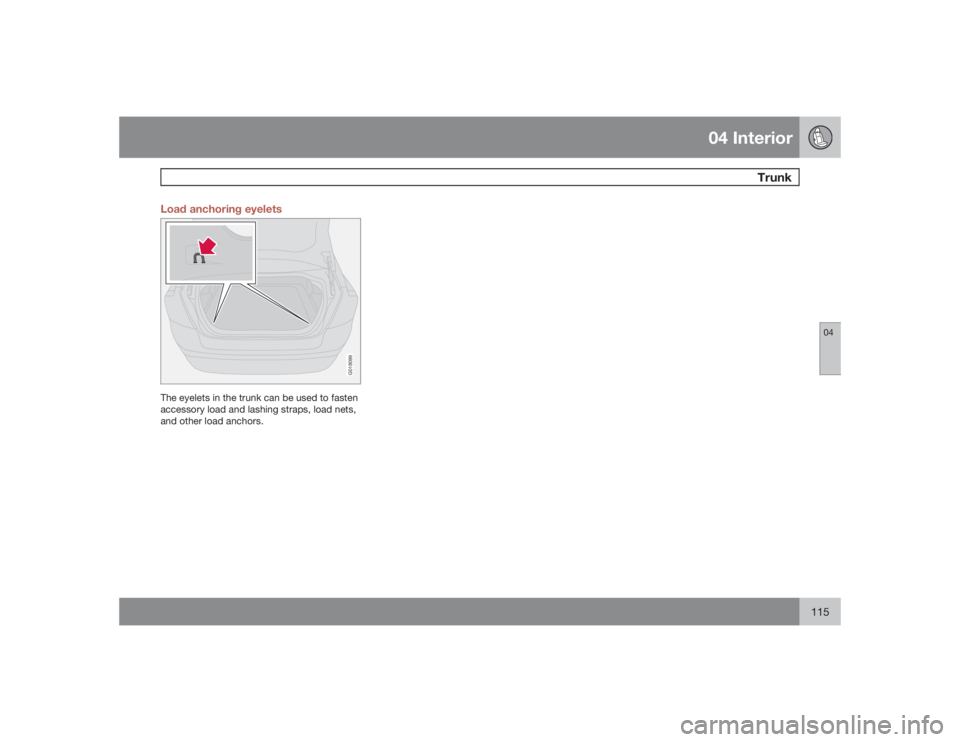
The eyelets in the trunk can be used to fasten
accessory load and lashing straps, load nets,
and other load anchors.
Page 118 of 286
05 Locks and alarmRemote control and key blade
05118
Remote controlsTwo remote controls that also function as igni-
tion keys are provided with your car. The
remote controls contain detachable metal key
blades for manually locking or unlocking the
driver's door and the glove compartment.
USA – FCC ID: LTQVO315TX
This device complies with part 15 of the FCC
rules. Operation is subject to the following con-
ditions: (1) This device may not cause harmful
interference, and (2) this device must accept
any interference received, including interfer-
ence that may cause undesired operation.
Canada – IC: 3659AVO315TX
Operation is subject to the following condi-
tions: (1) this device may not cause interfer-
ence, and (2) this device must accept any
interference, including interference that may
cause undesired operation of the device.Loss of a remote controlIf either of the remote controls is lost, the other
must be taken with the car to a Volvo retailer.
As an anti-theft measure, the code of the lost
remote control must be erased from the sys-
tem.
Each key blade has a unique code, which is
used if new key blades are required. A maxi-mum of six remote controls/key blades can be
programmed and used for one car.
Immobilizer (start inhibitor)Each of the keys supplied with your car con-
tains a coded transponder. The code in the key
is transmitted to an antenna in the ignition
switch where it is compared to the code stored
in the start inhibitor module. The car will start
only with a properly coded key. If you misplace
a key, take the other keys to an authorized
Volvo retailer for reprogramming as an antitheft
measure.
USA – FCC ID: LTQWFS 125VO
This device complies with part 15 of the FCC
rules. Operation is subject to the following con-
dition: (1) This device may not cause harmful
interference, and (2) this device must accept
any interference received, including interfer-
ence that may cause undesired operation.
Canada – IC: 3659A-WFS125VO
Operation is subject to the following condi-
tions: (1) this device may not cause interfer-
ence, and (2) this device must accept any
interference, including interference that may
cause undesired operation of the device.
CAUTION
Never use force on the narrow section of the
remote control – this is where the trans-
ponder is located. The car cannot be started
if the transponder is damaged.Remote control functions
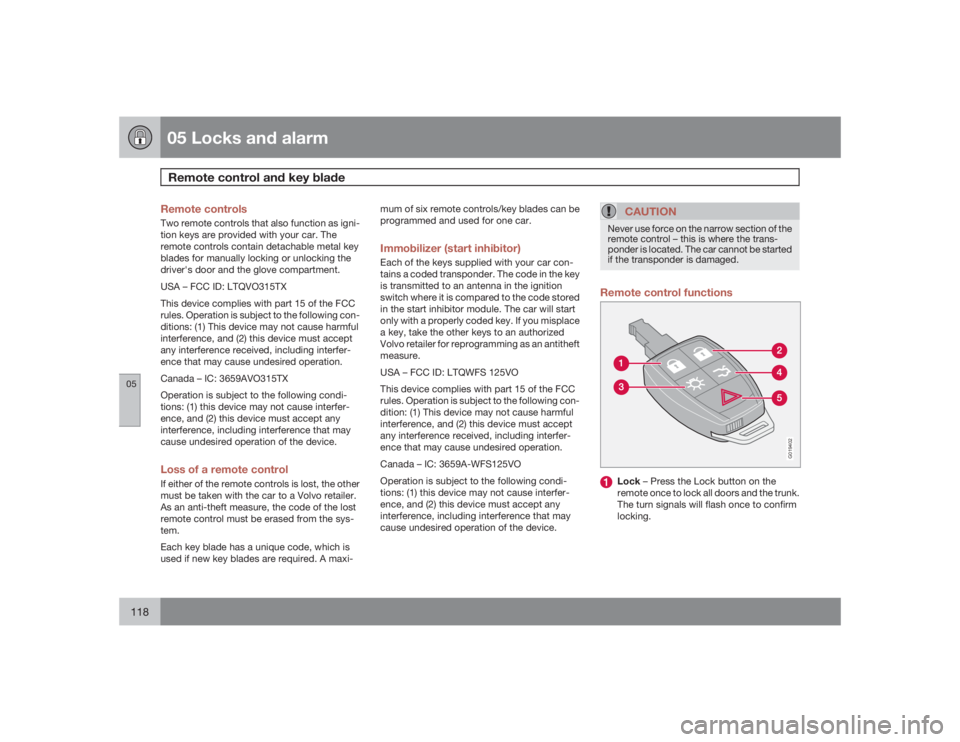
G019402
Lock – Press the Lock button on the
remote once to lock all doors and the trunk.
The turn signals will flash once to confirm
locking.
Page 119 of 286
05 Locks and alarm
Remote control and key blade
05``119
NOTE
The car can also be locked if a door is open
(does not apply to vehicles with the optional
keyless drive).Unlock – Press the Unlock button on the
remote once to unlock the driver's door.
After a short pause, press the Unlock but-
ton a second time within 10 seconds to
unlock the other doors and the trunk. A
long press (at least several seconds) opens
all side windows.
NOTE
•
The turn signals flash to confirm that the
vehicle has been correctly locked/
unlocked with the remote control or the
optional keyless drive. When locking the
vehicle, the turn signals will flash a con-
firmation only if all the doors are
securely closed and locked. Flashing
confirmation for locking and unlocking
may be customized in the vehicle's Per-
sonal settings menu, see page 83 for
more information.
•
The two-step unlocking function can be
changed so that one press of the
Unlock button unlocks all of the doors
and the trunk. See Personal settings
page 83 for more information.
•
Automatic relocking: If the doors are
unlocked, the locks will automatically reen-
gage (re-lock) and the alarm will rearm after
2 minutes unless a door or the trunk has
been opened.
•
Automatic locking: When the car starts to
move, the doors and trunk can be locked
automatically. This feature can be turned
on or off, see Personal settings on page
83 for more information.
•
Airbag deployment will automatically
attempt to unlock the doors.
Approach lighting – As you approach the
car: Press the button on the remote control
to illuminate the area around the car in dark
conditions. Pressing the button once lights
up the interior lighting, parking lights, and
license plate lighting. These lights will
switch off automatically after 30, 60 or
90 seconds. See the Personal settings pa
ge 83 for information about adjusting the
time setting.Unlock trunk – Press the button once to
disarm the alarm system and unlock only
the trunk. After closing, the trunk will not
automatically relock. Press Lock to relock
it and rearm the alarm.NOTE
This function will unlock, but not pop open,
the trunk.Panic alarm – This button can be used to
attract attention during emergency situa-
tions. To activate the panic alarm, press
and hold the red button for at least 3 sec-
onds or press it twice within 3 seconds.
The turn signals and horn will be activated.
The panic alarm will stop automatically
after 30 seconds. To deactivate, wait
approximately 5 seconds and press the red
button again.
Page 121 of 286
05 Locks and alarm
Remote control and key blade
05
121
Reinserting the key blade in the remote
control1. Hold the remote control with the pointed
end down.
2. Carefully slide the key blade into its groove.
3. Gently press the key blade in the groove
until it clicks into place.Unlocking the doors with the detached
key blade±
Insert the key blade as far as possible in the
driver's door lock. Turn the key blade
clockwise approximately one-quarter turn
to unlock the driver's door only.
NOTE
After unlocking the driver's door with the
key blade, opening the door will trigger the
alarm.To disable the alarmPress the Unlock button on the remote control,
or insert the key in the ignition switch.Locking the doors with the detached key
blade1. Lock the other door(s) by pressing the lock
button on each door. Please note that this
does not arm the alarm or lock the trunk.2. Turn the key blade one-quarter turn coun-
ter-clockwise to lock the driver's door.
Page 122 of 286
05 Locks and alarmValet locking
05122
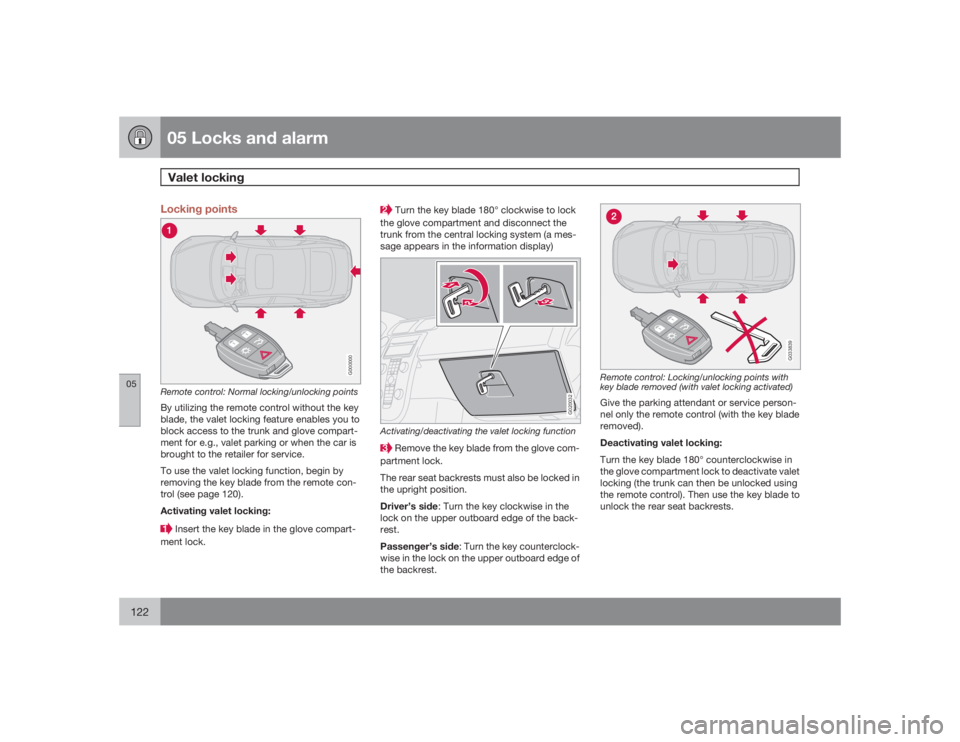
Locking points
G000000
Remote control: Normal locking/unlocking pointsBy utilizing the remote control without the key
blade, the valet locking feature enables you to
block access to the trunk and glove compart-
ment for e.g., valet parking or when the car is
brought to the retailer for service.
To use the valet locking function, begin by
removing the key blade from the remote con-
trol (see page 120).
Activating valet locking: Insert the key blade in the glove compart-
ment lock.
Turn the key blade 180° clockwise to lock
the glove compartment and disconnect the
trunk from the central locking system (a mes-
sage appears in the information display)
G020032
Activating/deactivating the valet locking function Remove the key blade from the glove com-
partment lock.
The rear seat backrests must also be locked in
the upright position.
Driver’s side: Turn the key clockwise in the
lock on the upper outboard edge of the back-
rest.
Passenger’s side: Turn the key counterclock-
wise in the lock on the upper outboard edge of
the backrest.
G033839
Remote control: Locking/unlocking points with
key blade removed (with valet locking activated)Give the parking attendant or service person-
nel only the remote control (with the key blade
removed).
Deactivating valet locking:
Turn the key blade 180° counterclockwise in
the glove compartment lock to deactivate valet
locking (the trunk can then be unlocked using
the remote control). Then use the key blade to
unlock the rear seat backrests.