turn signal VOLVO S60 2001 Owners Manual
[x] Cancel search | Manufacturer: VOLVO, Model Year: 2001, Model line: S60, Model: VOLVO S60 2001Pages: 128, PDF Size: 2.52 MB
Page 3 of 128
For Volvo, all homogeneous plastic parts weighing more than 1.7 oz. (50 grams) are marked with international
symbols that indicate how the component is to be sorted for recycling.
In addition to continuous environmental refinement of conventional gasoline- powered internal combustion engines,
Volvo is actively looking at advanced technology alternative- fuel vehicles.
When you drive a Volvo, you become our partner in the work to lessen the car's impact on the environment. To reduce
your vehicle's environmental impact, you can:
Maintain proper air pressure in your tires. Tests have shown decreased fuel economy with improperly inflated tires.
Follow the recommended maintenance schedule.
Drive at a constant speed.
See an authorized Volvo retailer as soon as possible for inspection if the check engine (malfunction indicator) lamp
illuminates, or stays on after the vehicle has started.
Properly dispose of any vehicle- related waste such as used motor oil, used batteries, brake pads, etc.
When cleaning your car, use Volvo's own car care products, all of which have systematically been adapted to the
environment.
For additional information regarding the environmental activities in which Volvo Cars of North America, Inc. and
Volvo Car Corporation are involved, visit our Internet Home Page at: http://www.volvocars.com
Prem-Air
On the surface of the radiator in the engine compartment, there is a special coating called Prem- Air. Prem- Air works
as a catalytic converter, converting most of the ground level ozone passing through the radiator into oxygen, thereby
reducing harmful ground-level ozone.
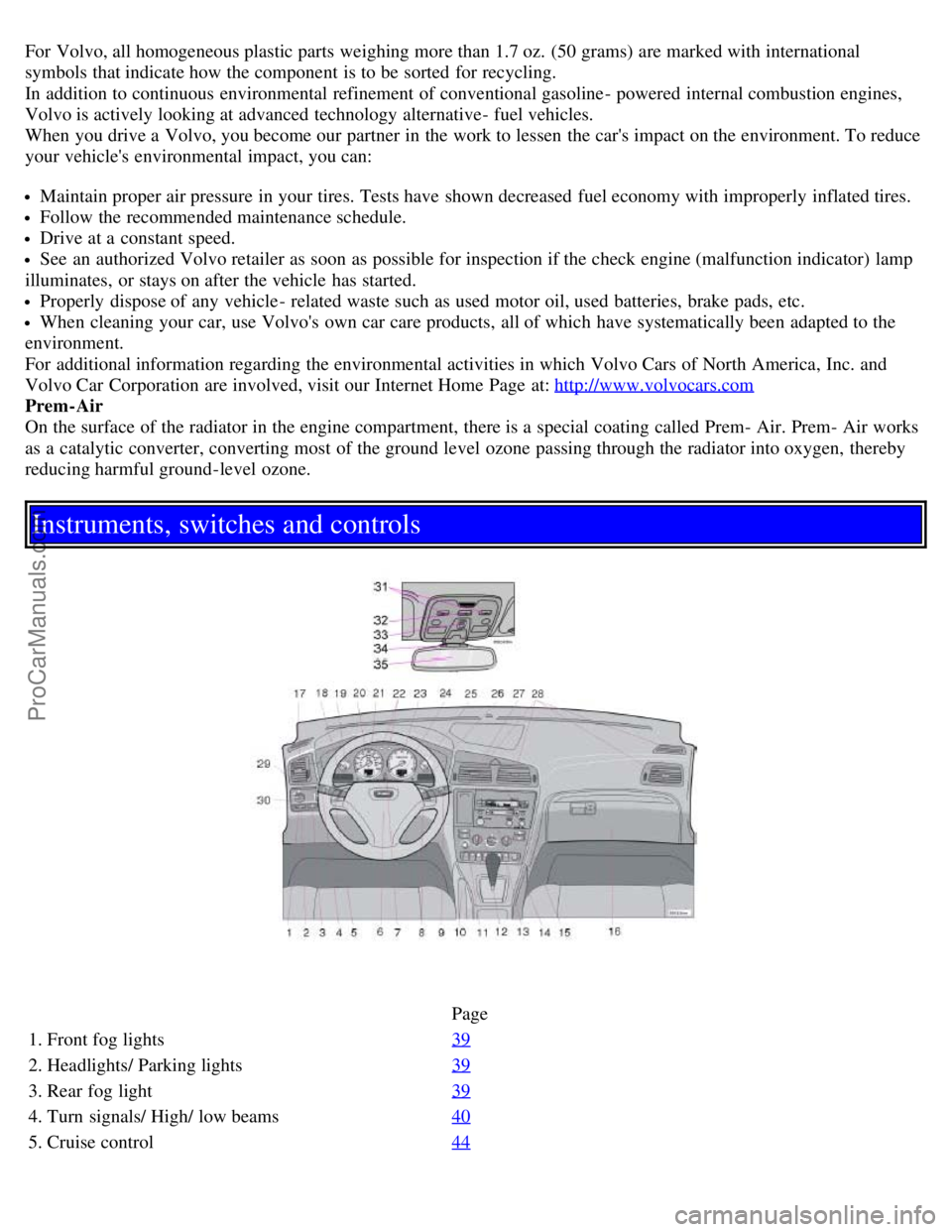
Instruments, switches and controls
Page
1. Front fog lights 39
2. Headlights/ Parking lights39
3. Rear fog light39
4. Turn signals/ High/ low beams40
5. Cruise control44
ProCarManuals.com
Page 4 of 128

6. Horn4
7. Instrument panel30
8. Audio controls67
9. Windshield wipers41
10. Parking brake (hand brake)45
11. Center console switches37, 38
12. Climate control51
13. Audio system61
14. 12 V socket45
15. Hazard warning flashers42
16. Glove compartment108
17. Panel vents53
18. Text window30
19. Temperature gauge30
20. Odometer/ Trip odometer/Cruise control indicator30/ 44
21. Speedometer30
22. Turn signal indicators30
23. Tachometer30
24. Ambient temperature/ Clock/Selected gear indicator30
25. Fuel gauge30
26. Indicator and warning symbols31
27. Cup holder (option)108
28. Panel vents53
29. Instrument lighting39
30. Lighting panel39
31. Reading lights104
32. Interior lighting104
33. Sun roof control49
34. Seat belt reminder4, 10
35. Rearview mirror48
36. Lock button, for all doors119
37. Blocking rear seat power windows46
38. Controls, power windows46
39. Controls, sideview mirrors48
ProCarManuals.com
Page 6 of 128
2 0 0 1
VOLVO S60
Instruments and controls
pg. 29 Instruments and controls
Instrument panel 30
Indicator and warning symbols31
Steering wheel adjustment36
Switches in the center console37
Lighting panel39
Turn signals40
Windshield wipers/ washer41
Hazard warning flashers, rear window/ sideview mirror defroster, heated front seats42
Trip computer (option)43
Cruise control44
Parking brake, electric socket/ cigarette lighter45
Electrically operated windows46
Rearview mirror/ sideview mirrors48
Electrically operated sun roof49
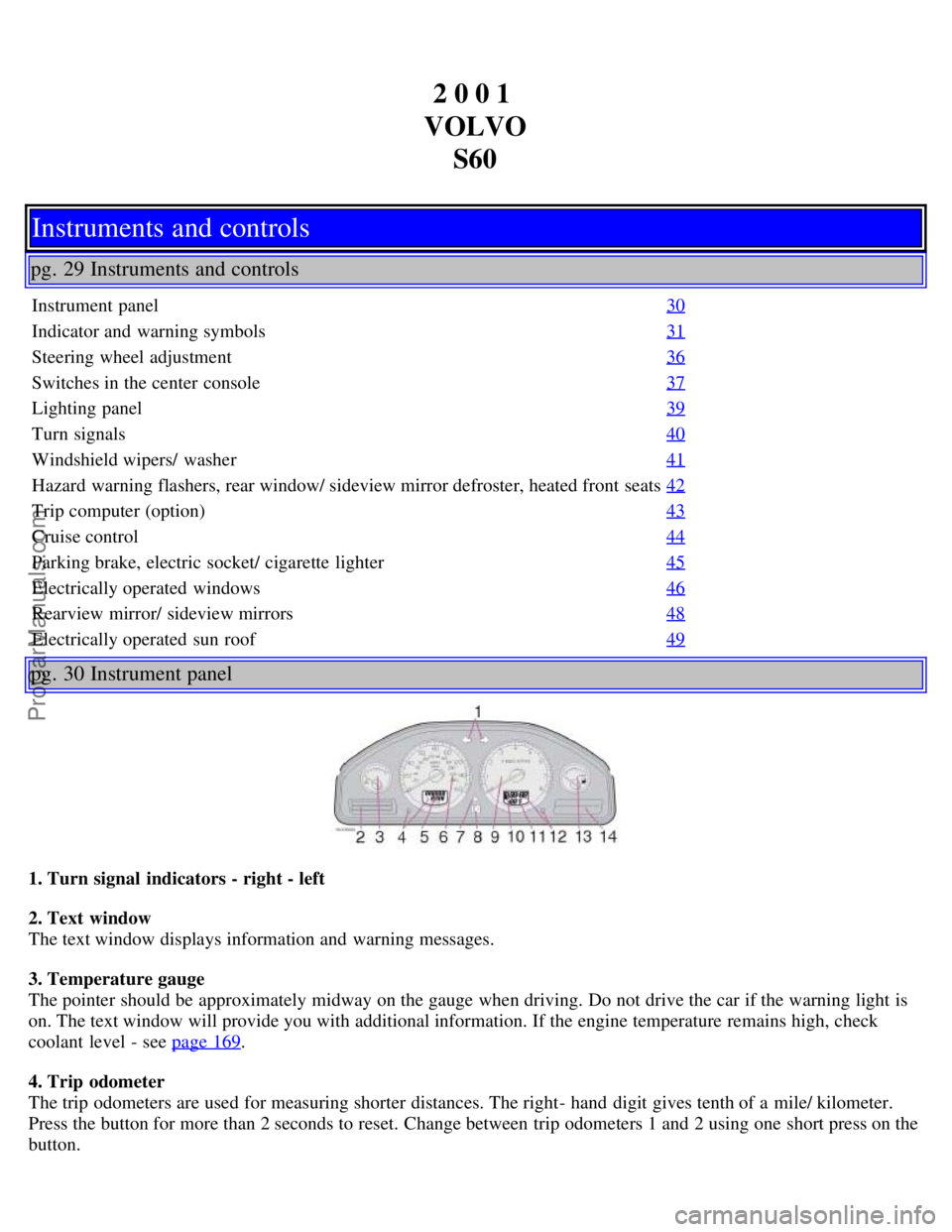
pg. 30 Instrument panel
1. Turn signal indicators - right - left
2. Text window
The text window displays information and warning messages.
3. Temperature gauge
The pointer should be approximately midway on the gauge when driving. Do not drive the car if the warning light is
on. The text window will provide you with additional information. If the engine temperature remains high, check
coolant level - see page 169
.
4. Trip odometer
The trip odometers are used for measuring shorter distances. The right- hand digit gives tenth of a mile/ kilometer.
Press the button for more than 2 seconds to reset. Change between trip odometers 1 and 2 using one short press on the
button.
ProCarManuals.com
Page 9 of 128
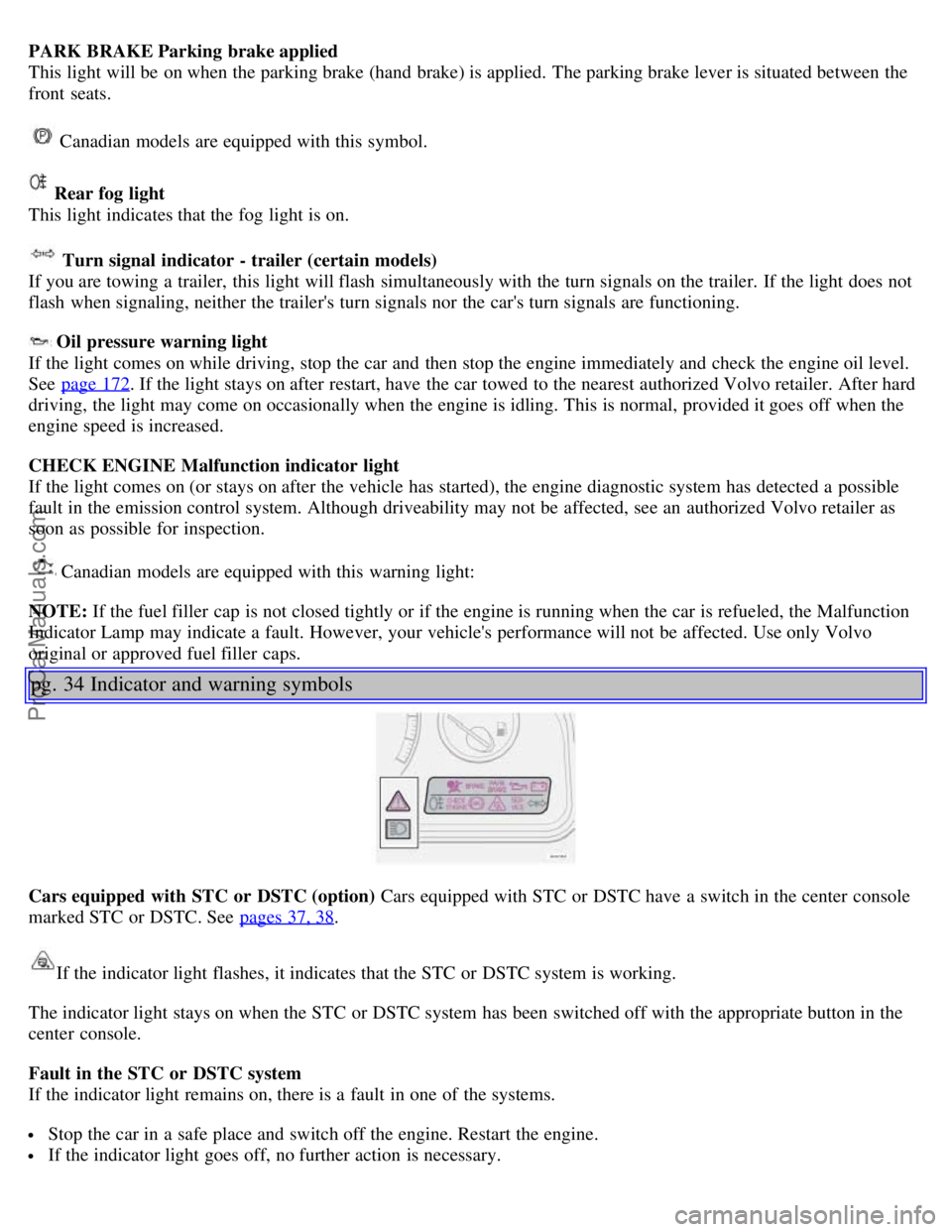
PARK BRAKE Parking brake applied
This light will be on when the parking brake (hand brake) is applied. The parking brake lever is situated between the
front seats.
Canadian models are equipped with this symbol.
Rear fog light
This light indicates that the fog light is on.
Turn signal indicator - trailer (certain models)
If you are towing a trailer, this light will flash simultaneously with the turn signals on the trailer. If the light does not
flash when signaling, neither the trailer's turn signals nor the car's turn signals are functioning.
Oil pressure warning light
If the light comes on while driving, stop the car and then stop the engine immediately and check the engine oil level.
See page 172
. If the light stays on after restart, have the car towed to the nearest authorized Volvo retailer. After hard
driving, the light may come on occasionally when the engine is idling. This is normal, provided it goes off when the
engine speed is increased.
CHECK ENGINE Malfunction indicator light
If the light comes on (or stays on after the vehicle has started), the engine diagnostic system has detected a possible
fault in the emission control system. Although driveability may not be affected, see an authorized Volvo retailer as
soon as possible for inspection.
Canadian models are equipped with this warning light:
NOTE: If the fuel filler cap is not closed tightly or if the engine is running when the car is refueled, the Malfunction
Indicator Lamp may indicate a fault. However, your vehicle's performance will not be affected. Use only Volvo
original or approved fuel filler caps.
pg. 34 Indicator and warning symbols
Cars equipped with STC or DSTC (option) Cars equipped with STC or DSTC have a switch in the center console
marked STC or DSTC. See pages 37, 38
.
If the indicator light flashes, it indicates that the STC or DSTC system is working.
The indicator light stays on when the STC or DSTC system has been switched off with the appropriate button in the
center console.
Fault in the STC or DSTC system
If the indicator light remains on, there is a fault in one of the systems.
Stop the car in a safe place and switch off the engine. Restart the engine.
If the indicator light goes off, no further action is necessary.
ProCarManuals.com
Page 12 of 128
Please be aware that the car's handling characteristics may be affected if Dynamic Stability Traction Control
(DSTC) is switched off.
6. Temporarily disconnecting the alarm sensors (option)
See page 123
for more details.
7. Not in use
8. 12 volt socket
This 12 volt socket can be used to plug in certain accessories such as cellular telephones, etc. The ignition key must
be in position 1 (or higher) for the auxiliary socket to function.
NOTE: The auxiliary sockets can also be used for cigarette lighters, which are available at your Volvo retailer.
pg. 39 Lighting panel
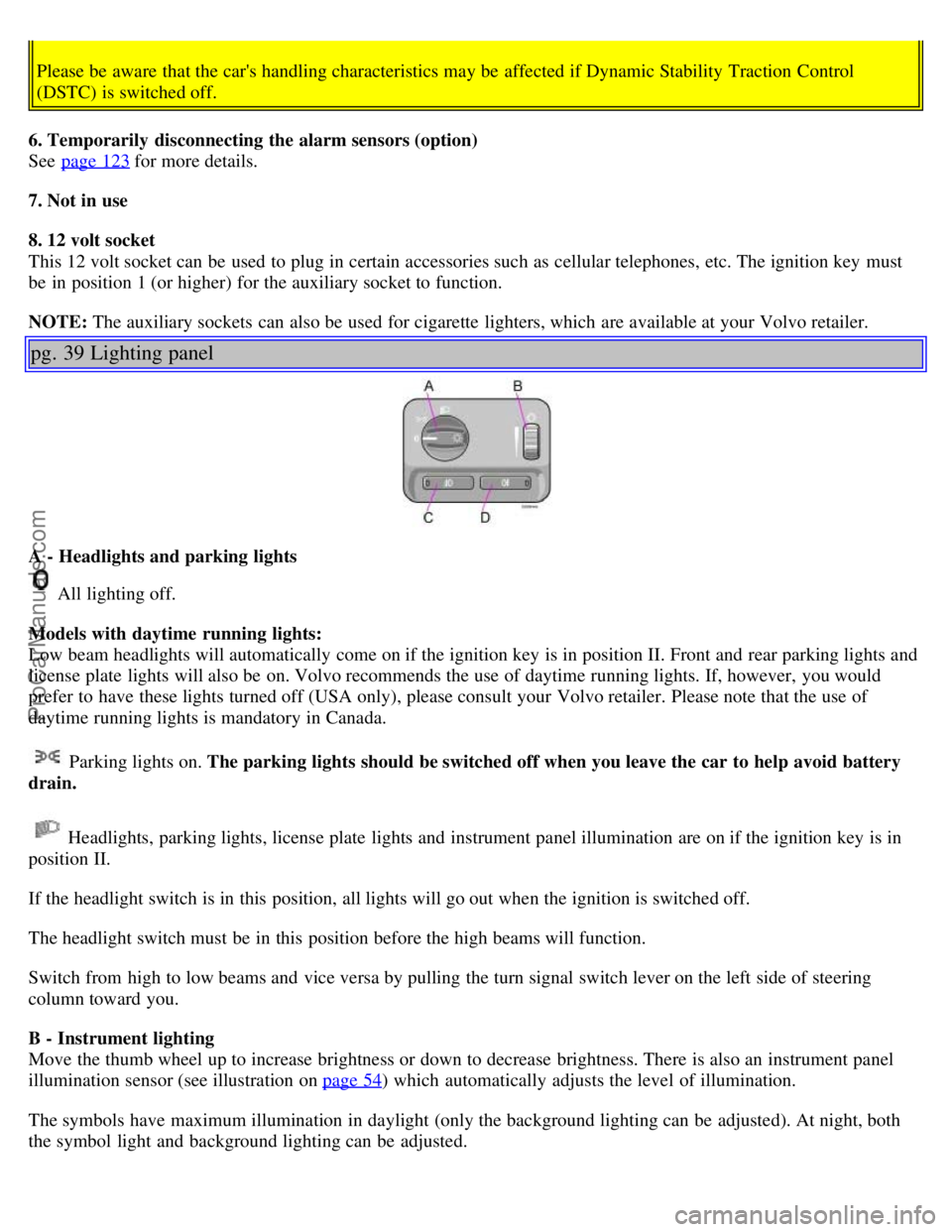
A - Headlights and parking lights
All lighting off.
Models with daytime running lights:
Low beam headlights will automatically come on if the ignition key is in position II. Front and rear parking lights and
license plate lights will also be on. Volvo recommends the use of daytime running lights. If, however, you would
prefer to have these lights turned off (USA only), please consult your Volvo retailer. Please note that the use of
daytime running lights is mandatory in Canada.
Parking lights on. The parking lights should be switched off when you leave the car to help avoid battery
drain.
Headlights, parking lights, license plate lights and instrument panel illumination are on if the ignition key is in
position II.
If the headlight switch is in this position, all lights will go out when the ignition is switched off.
The headlight switch must be in this position before the high beams will function.
Switch from high to low beams and vice versa by pulling the turn signal switch lever on the left side of steering
column toward you.
B - Instrument lighting
Move the thumb wheel up to increase brightness or down to decrease brightness. There is also an instrument panel
illumination sensor (see illustration on page 54
) which automatically adjusts the level of illumination.
The symbols have maximum illumination in daylight (only the background lighting can be adjusted). At night, both
the symbol light and background lighting can be adjusted.
ProCarManuals.com
Page 14 of 128
2 0 0 1
VOLVO S60
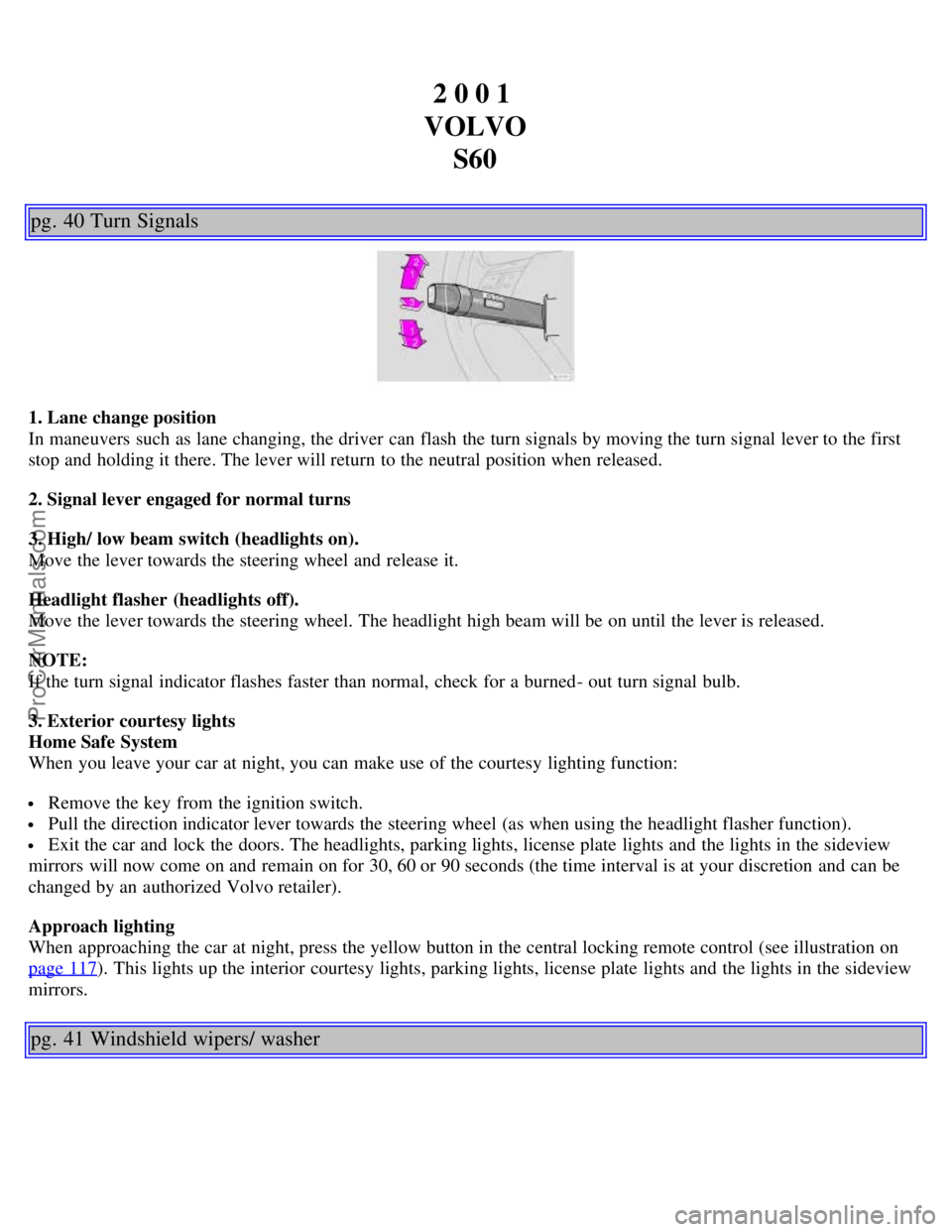
pg. 40 Turn Signals
1. Lane change position
In maneuvers such as lane changing, the driver can flash the turn signals by moving the turn signal lever to the first
stop and holding it there. The lever will return to the neutral position when released.
2. Signal lever engaged for normal turns
3. High/ low beam switch (headlights on).
Move the lever towards the steering wheel and release it.
Headlight flasher (headlights off).
Move the lever towards the steering wheel. The headlight high beam will be on until the lever is released.
NOTE:
If the turn signal indicator flashes faster than normal, check for a burned- out turn signal bulb.
3. Exterior courtesy lights
Home Safe System
When you leave your car at night, you can make use of the courtesy lighting function:
Remove the key from the ignition switch.
Pull the direction indicator lever towards the steering wheel (as when using the headlight flasher function).
Exit the car and lock the doors. The headlights, parking lights, license plate lights and the lights in the sideview
mirrors will now come on and remain on for 30, 60 or 90 seconds (the time interval is at your discretion and can be
changed by an authorized Volvo retailer).
Approach lighting
When approaching the car at night, press the yellow button in the central locking remote control (see illustration on
page 117
). This lights up the interior courtesy lights, parking lights, license plate lights and the lights in the sideview
mirrors.
pg. 41 Windshield wipers/ washer
ProCarManuals.com
Page 26 of 128
For Volvo, all homogeneous plastic parts weighing more than 1.7 oz. (50 grams) are marked with international
symbols that indicate how the component is to be sorted for recycling.
In addition to continuous environmental refinement of conventional gasoline- powered internal combustion engines,
Volvo is actively looking at advanced technology alternative- fuel vehicles.
When you drive a Volvo, you become our partner in the work to lessen the car's impact on the environment. To reduce
your vehicle's environmental impact, you can:
Maintain proper air pressure in your tires. Tests have shown decreased fuel economy with improperly inflated tires.
Follow the recommended maintenance schedule.
Drive at a constant speed.
See an authorized Volvo retailer as soon as possible for inspection if the check engine (malfunction indicator) lamp
illuminates, or stays on after the vehicle has started.
Properly dispose of any vehicle- related waste such as used motor oil, used batteries, brake pads, etc.
When cleaning your car, use Volvo's own car care products, all of which have systematically been adapted to the
environment.
For additional information regarding the environmental activities in which Volvo Cars of North America, Inc. and
Volvo Car Corporation are involved, visit our Internet Home Page at: http://www.volvocars.com
Prem-Air
On the surface of the radiator in the engine compartment, there is a special coating called Prem- Air. Prem- Air works
as a catalytic converter, converting most of the ground level ozone passing through the radiator into oxygen, thereby
reducing harmful ground-level ozone.
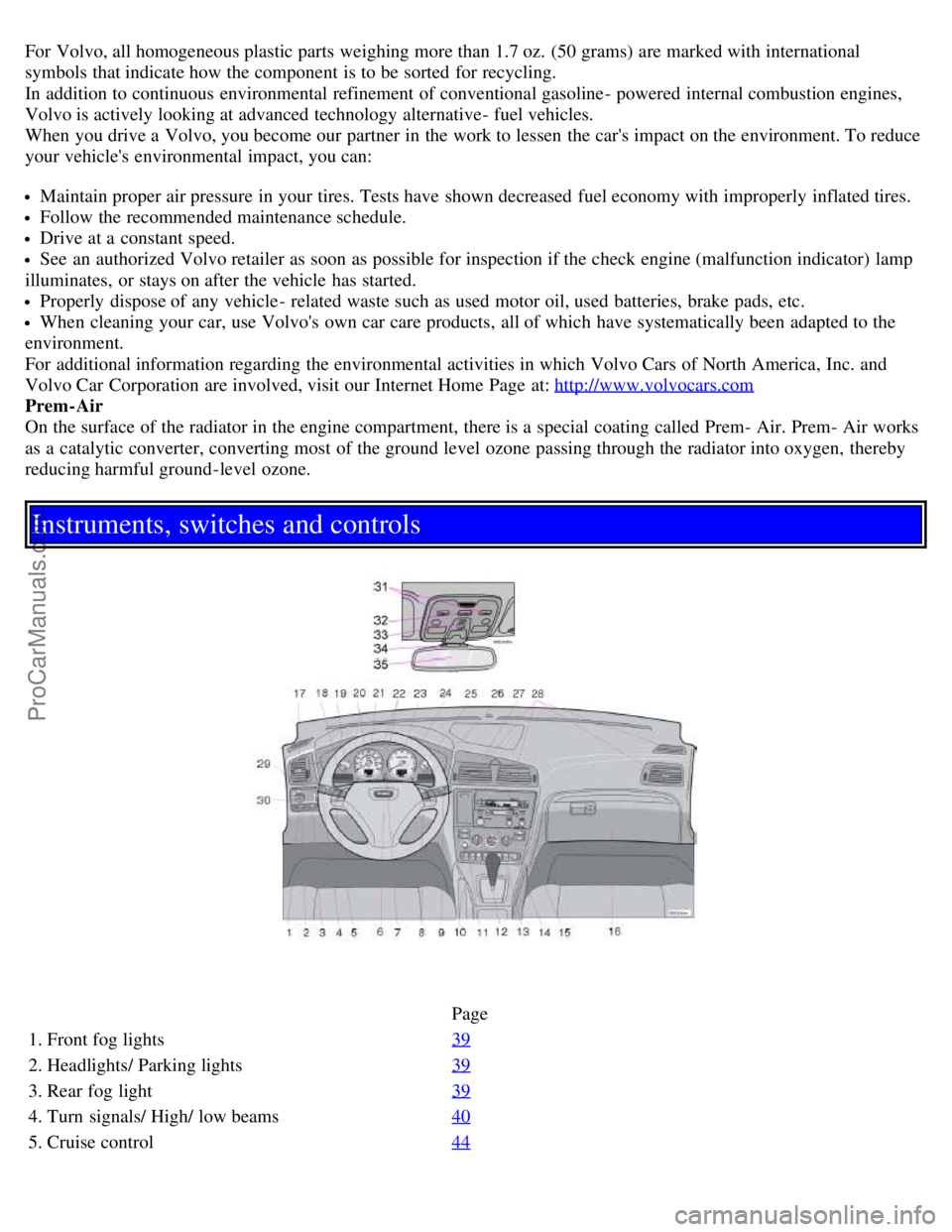
Instruments, switches and controls
Page
1. Front fog lights 39
2. Headlights/ Parking lights39
3. Rear fog light39
4. Turn signals/ High/ low beams40
5. Cruise control44
ProCarManuals.com
Page 27 of 128

6. Horn4
7. Instrument panel30
8. Audio controls67
9. Windshield wipers41
10. Parking brake (hand brake)45
11. Center console switches37, 38
12. Climate control51
13. Audio system61
14. 12 V socket45
15. Hazard warning flashers42
16. Glove compartment108
17. Panel vents53
18. Text window30
19. Temperature gauge30
20. Odometer/ Trip odometer/Cruise control indicator30/ 44
21. Speedometer30
22. Turn signal indicators30
23. Tachometer30
24. Ambient temperature/ Clock/Selected gear indicator30
25. Fuel gauge30
26. Indicator and warning symbols31
27. Cup holder (option)108
28. Panel vents53
29. Instrument lighting39
30. Lighting panel39
31. Reading lights104
32. Interior lighting104
33. Sun roof control49
34. Seat belt reminder4, 10
35. Rearview mirror48
36. Lock button, for all doors119
37. Blocking rear seat power windows46
38. Controls, power windows46
39. Controls, sideview mirrors48
ProCarManuals.com
Page 34 of 128
Steering wheel keypad
If you have a keypad in the steering wheel, press the right or left arrow to select preset stations.
Scan function
Press the SCAN button (HU- 613) or the SOURCE knob (HU- 803) to start the station scan function. When a station
is found, scanning stops for several seconds, after which scanning will continue.
Press the SCAN button or SOURCE knob when a station has been found if you would like to listen to that station and
to discontinue the scan function.
pg. 68 Audio systems HU- 413/ HU- 613/ HU- 803
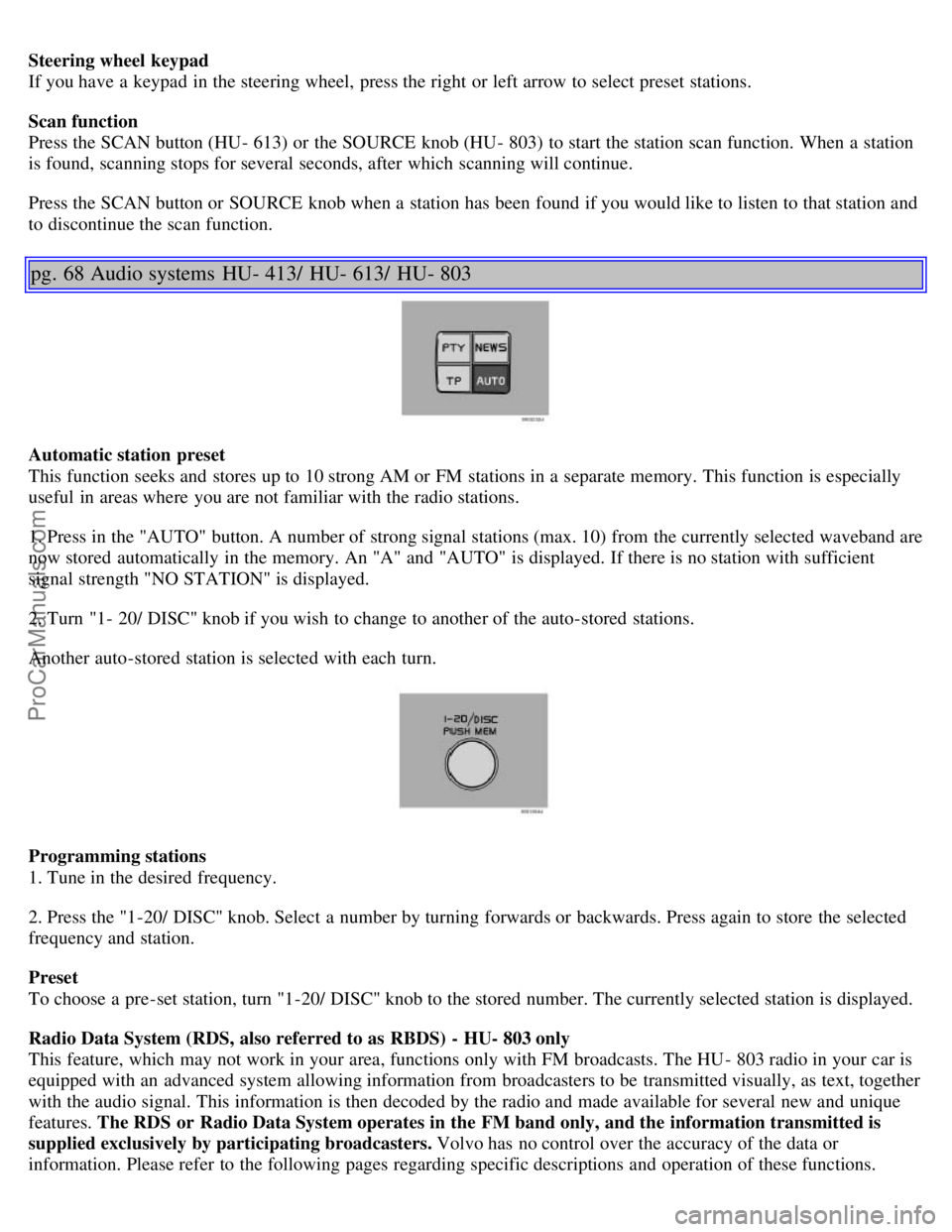
Automatic station preset
This function seeks and stores up to 10 strong AM or FM stations in a separate memory. This function is especially
useful in areas where you are not familiar with the radio stations.
1. Press in the "AUTO" button. A number of strong signal stations (max. 10) from the currently selected waveband are
now stored automatically in the memory. An "A" and "AUTO" is displayed. If there is no station with sufficient
signal strength "NO STATION" is displayed.
2. Turn "1- 20/ DISC" knob if you wish to change to another of the auto-stored stations.
Another auto-stored station is selected with each turn.
Programming stations
1. Tune in the desired frequency.
2. Press the "1-20/ DISC" knob. Select a number by turning forwards or backwards. Press again to store the selected
frequency and station.
Preset
To choose a pre-set station, turn "1-20/ DISC" knob to the stored number. The currently selected station is displayed.
Radio Data System (RDS, also referred to as RBDS) - HU- 803 only
This feature, which may not work in your area, functions only with FM broadcasts. The HU - 803 radio in your car is
equipped with an advanced system allowing information from broadcasters to be transmitted visually, as text, together
with the audio signal. This information is then decoded by the radio and made available for several new and unique
features. The RDS or Radio Data System operates in the FM band only, and the information transmitted is
supplied exclusively by participating broadcasters. Volvo has no control over the accuracy of the data or
information. Please refer to the following pages regarding specific descriptions and operation of these functions.
ProCarManuals.com
Page 35 of 128

Coverage by local broadcasters may be limited at this time, but as the technology and benefits grow, you will find the
radio in your car is equipped to take advantage of this system.
pg. 69 Audio systems HU- 803 - radio
Traffic information (TP) - HU- 803 only
This feature may not be apply in your area and only functions with FM broadcasts. (See previous page)
Push the "TP" button for traffic information from RDS stations. "TP" is displayed when the function is connected.
When the unit is in Cassette or CD mode, the FM radio function will seek in the background for a station with a
strong signal broadcasting traffic information. If a cassette or CD are playing when the radio receives a traffic
bulletin, that function is interrupted and the bulletin is broadcast with the volume preselected for traffic information.
When the bulletin is finished the unit immedi- ately returns to the previously set volume and continues playing the
cassette or CD.
Traffic information can only be heard when TP and are displayed at the same time.
If only TP is displayed, it means that no traffic information is being broadcast from the current transmitter.
If you do not wish to listen to an ongoing traffic bulletin, press the TP button. The TP function, however, is still
connected and the radio waits for the next traffic bulletin.
Press the TP button to switch off the TP function. TP will no longer be shown in the display.
News on/ off - HU- 803 only
This feature may not apply in your area and only functions with FM broadcasts. (See previous page)
Press the "NEWS" button to activate the news function. The text NEWS is displayed. Press the "NEWS" button again
if you want to switch off the function.
As soon as a news broadcast begins, the news program will interrupt the Cassette, CD or CD changer.
If you do not wish to listen to the news program, press the "NEWS" button again. The news function will remain
active and the radio will continue to monitor news programs.
pg. 70 Audio systems HU- 803 - radio
ProCarManuals.com