light VOLVO S60 2005 Owner's Manual
[x] Cancel search | Manufacturer: VOLVO, Model Year: 2005, Model line: S60, Model: VOLVO S60 2005Pages: 120, PDF Size: 2.27 MB
Page 34 of 120

2 0 0 5
VOLVO S60
Interior
pg. 59 Interior
Front seats 60
Interior lighting64
Floor mats65
Storage compartments66
Rear seat and trunk69
Spare wheel, tools and jack71
pg. 60 Interior
Front seats
Manually adjusted front seats
1. Front-rear adjustment: lift the bar and move the seat to the position of your choice.
2. Raise/lower the front edge of the seat cushion (option): use the control to pump the front edge of the cushion up or
down.
3. Raise/lower seat height: pump the seat up or down
4. Lumbar support: turn the control for firmer or softer lumbar support.
5. Backrest tilt: turn the control to adjust the angle of the backrest.
6. Control panel for optional power seat (see page 62
for more information).
WARNING!
- Do not adjust the seat while driving. The seat should be adjusted so that the brake pedal can be depressed fully. In
addition, position the seat as far rearward as comfort and control allow.
- Check that the seat is securely locked into position after adjusting.
ProCarManuals.com
Page 37 of 120

WARNING!
Because the driver's seat can be adjusted with the ignition off, children should never be left unattended in the car.
Movement of the seat can be STOPPED at any time by pressing any button on the power seat control panel.
Do not adjust the seat while driving. The seat should be adjusted so that the brake pedal can be depressed fully. In
addition, position the seat as far rearward as comfort and control allow.
The seat rails on the floor must not be obstructed in any way when the seat is in motion.
Programming the memory (option)
Three different seating and door mirror positions can be stored in the driver seat's memory.
The following example explains how button 1 can be programmed. Buttons 2 and 3 can be programmed in the same
way.
To program (store) a seat position in button 1:
1. Move the seat to the desired position using the seat adjustment controls (see the previous page).
2. Press and hold down the MEM (memory) button.
3. With the MEM button depressed, press button 1 briefly to store the seat's current position.
To move the seat to the position that it was in when button 1 was programmed:
Press and hold down button 1 until the seat stops moving.
As a safety precaution, the seat will stop automatically if the button is released before the seat has reached the preset
position.
pg. 64 Interior
Interior lighting
Courtesy light
The courtesy light can be turned on or off by pressing the center button. The light also has a timer function which turns
ProCarManuals.com
Page 38 of 120

the light on for 30 seconds if:
You unlock the car from the outside with the key or remote control.
You switch off the ignition (turn the key to position 0).
The courtesy light stays on for 10 minutes if one of the doors is left open after the car is unlocked.
The courtesy light switches off if:
The engine is started.
The car is locked from the outside with the key or remote control.
The courtesy light can be switched off or on in all situations by briefly pressing the button.
When you switch the light on, it remains lit for 10 minutes.
You can disconnect the automatic function by pressing the courtesy light button for more than 3 seconds. Briefly
pressing the courtesy light button again automatically reconnects the function.
The courtesy light timer periods can be changed. Contact your Volvo retailer.
Rear reading lights
Reading lights - front/rear
The reading lights can be switched on or off by pressing the respective buttons. These lights switch off automatically
after 10 minutes if the engine is not running. If the engine is running, the lights stay on indefinitely. The lights can be
switched off at any time by pressing the button.
pg. 65 Interior
ProCarManuals.com
Page 39 of 120

Vanity mirror
The light comes on when you open the cover.
Floor mats
Volvo offers floor mats specially manufactured for your car. They must be properly placed and secured in the mat
clips.
WARNING!
An extra mat on the driver's floor can cause the accelerator pedal to catch. Check that the movement of the
accelerator pedal is not impeded. No more than one protective floor covering may be used at one time.
Contents | Top of Page
ProCarManuals.com
Page 42 of 120

Using the remote control
Button 1: Press to extend the key. This button must also be pressed when the key is folded back into the slot in the
side of the remote control unit.
Button 2(Lock): Press once to lock all doors, and the trunk.
Button 3(Approach light): Press this button when approaching the car at night to light up the interior courtesy light,
parking lights, license plate lights and the lights in the sideview mirrors.
Button 4(Panic): See page 80
for more information on this function.
Button 5(Open trunk): Press this button twice within 3 seconds to pop open the trunk (without unlocking the other
doors).
Button 6(Unlock): Press this button once to unlock the driver's door only. Wait for at least 1 second and press the
button again (within 10 seconds) to unlock all doors, and the trunk.
NOTE:
Airbag deployment will automatically unlock the doors.
The keys may also be used to lock and unlock the doors, and to activate and deactivate the alarm system.
To avoid leaving your keys in the car, make a habit of always locking the car with the remote control.
Automatic re-locking
If the doors are unlocked, the locks will automatically re-engage (re-lock) and the alarm will rearm after 2 minutes
unless a door or the trunk has been opened.
pg. 76 Locks and alarm
FCC ID:LQNP2T-APU
This device complies with part 15 of the FCC rules. Operation is subject to the following conditions: (1) This device
may not cause harmful interference, and (2) this device must accept any interference received, including interference
that may cause undesired operation.
Canadian 2306104388
Model 504 2927 by Donnelly Operation is subject to the following conditions: (1) this device may not cause
interference, and (2) this device must accept any interference, including interference that may cause undesired
operation of the device.
Canadian 2306104388A
Model 509 977 by Connaught Electronics Operation is subject to the following conditions: (1) this device may not
cause interference, and (2) this device must accept any interference, including interference that may cause undesired
operation of the device.
ProCarManuals.com
Page 43 of 120
WARNING!
Never use the transmitter to lock the doors from inside the car
Doing so would ACTIVATE:
the break-in alarm, which would sound if one of the doors were opened
the optional interior motion and inclination alarm sensors.
Doing so would DEACTIVATE:
the moonroof and interior courtesy light controls.
the central locking buttons on the front door armrests, although the interior door handles would still function to
allow occupants to leave the car.
Disabled features would remain disabled until the remote were used again to unlock the car.
In addition, locking an occupied vehicle would hinder rapid access to the occupants in an accident or emergency.
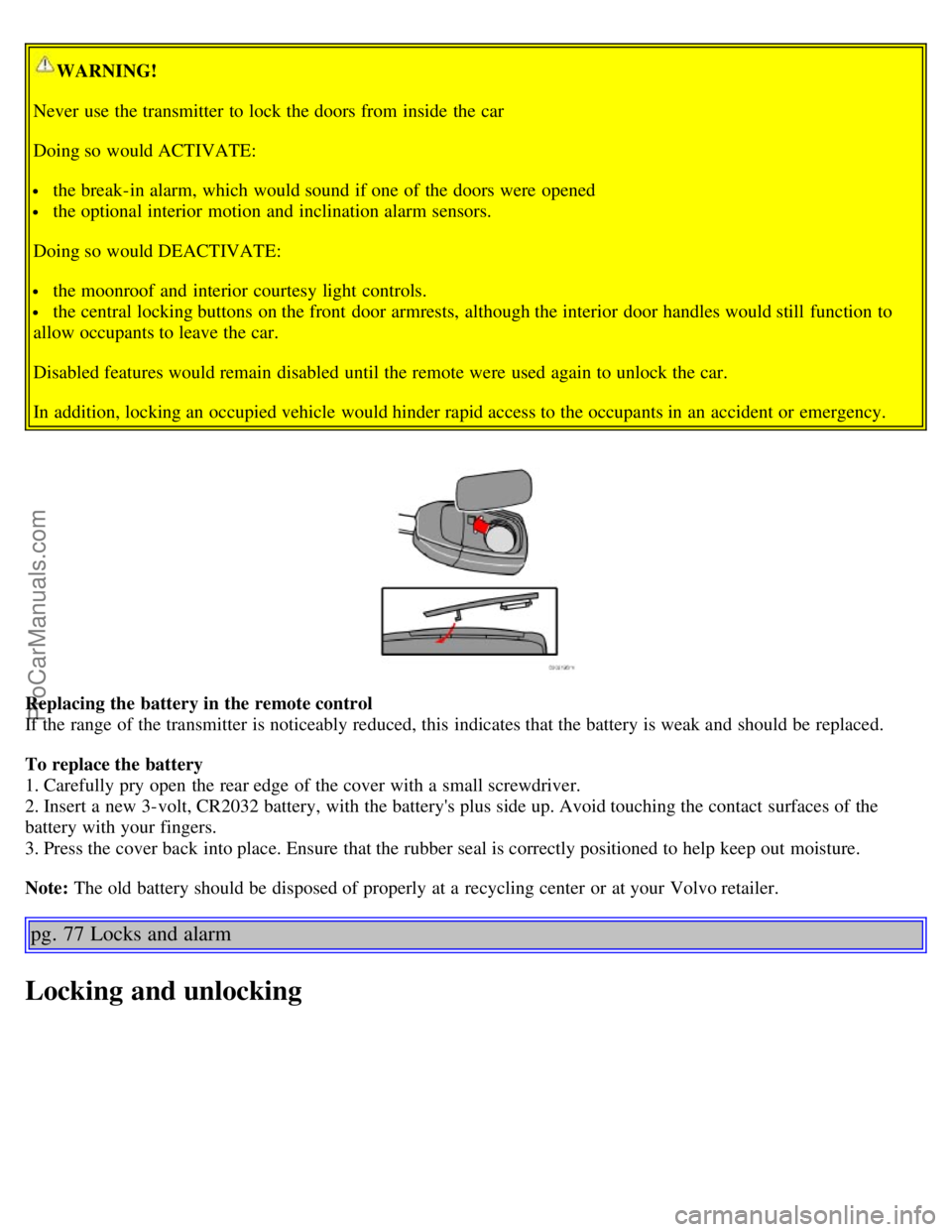
Replacing the battery in the remote control
If the range of the transmitter is noticeably reduced, this indicates that the battery is weak and should be replaced.
To replace the battery
1. Carefully pry open the rear edge of the cover with a small screwdriver.
2. Insert a new 3-volt, CR2032 battery, with the battery's plus side up. Avoid touching the contact surfaces of the
battery with your fingers.
3. Press the cover back into place. Ensure that the rubber seal is correctly positioned to help keep out moisture.
Note: The old battery should be disposed of properly at a recycling center or at your Volvo retailer.
pg. 77 Locks and alarm
Locking and unlocking
ProCarManuals.com
Page 46 of 120
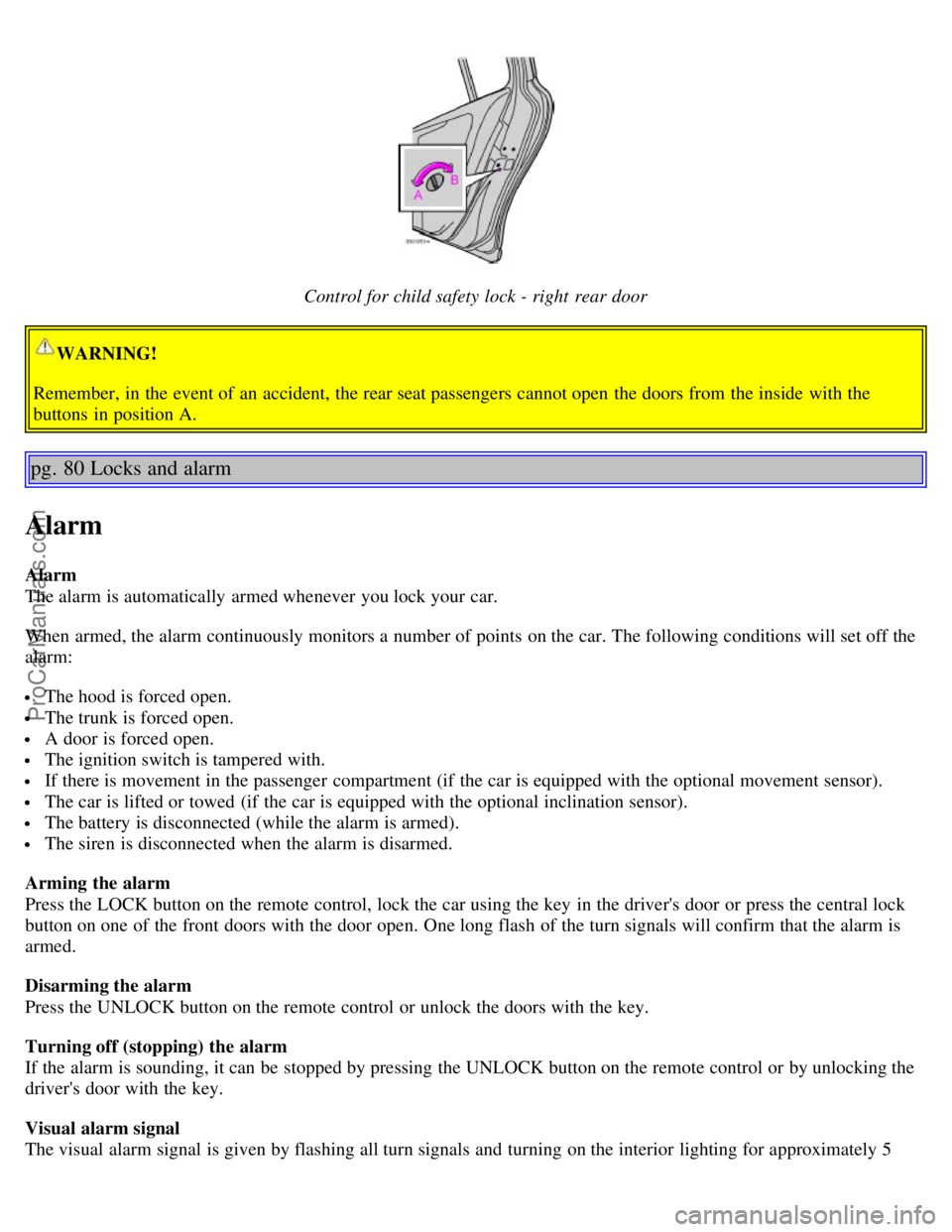
Control for child safety lock - right rear door
WARNING!
Remember, in the event of an accident, the rear seat passengers cannot open the doors from the inside with the
buttons in position A.
pg. 80 Locks and alarm
Alarm
Alarm
The alarm is automatically armed whenever you lock your car.
When armed, the alarm continuously monitors a number of points on the car. The following conditions will set off the
alarm:
The hood is forced open.
The trunk is forced open.
A door is forced open.
The ignition switch is tampered with.
If there is movement in the passenger compartment (if the car is equipped with the optional movement sensor).
The car is lifted or towed (if the car is equipped with the optional inclination sensor).
The battery is disconnected (while the alarm is armed).
The siren is disconnected when the alarm is disarmed.
Arming the alarm
Press the LOCK button on the remote control, lock the car using the key in the driver's door or press the central lock
button on one of the front doors with the door open. One long flash of the turn signals will confirm that the alarm is
armed.
Disarming the alarm
Press the UNLOCK button on the remote control or unlock the doors with the key.
Turning off (stopping) the alarm
If the alarm is sounding, it can be stopped by pressing the UNLOCK button on the remote control or by unlocking the
driver's door with the key.
Visual alarm signal
The visual alarm signal is given by flashing all turn signals and turning on the interior lighting for approximately 5
ProCarManuals.com
Page 47 of 120
minutes.
Audible alarm signal
An audible alarm signal is given by a battery powered siren. One alarm cycle lasts for 25 seconds.
"Panic" button
In an emergency situation, this feature can be used to attract attention.
Activate the "panic" button by pressing the red button on the remote control (see illustration on page 75
) for at least 3
seconds or by pressing this button twice within 3 seconds. The turn signals will flash, and the car's horn will sound.
The function can be turned off by pressing any of the buttons on the remote control or will stop automatically after 25
seconds. When a button is pressed, there is a 5 second delay before the panic alarm is deactivated.
NOTE: This button will NOT unlock the car.
pg. 81 Locks and alarm
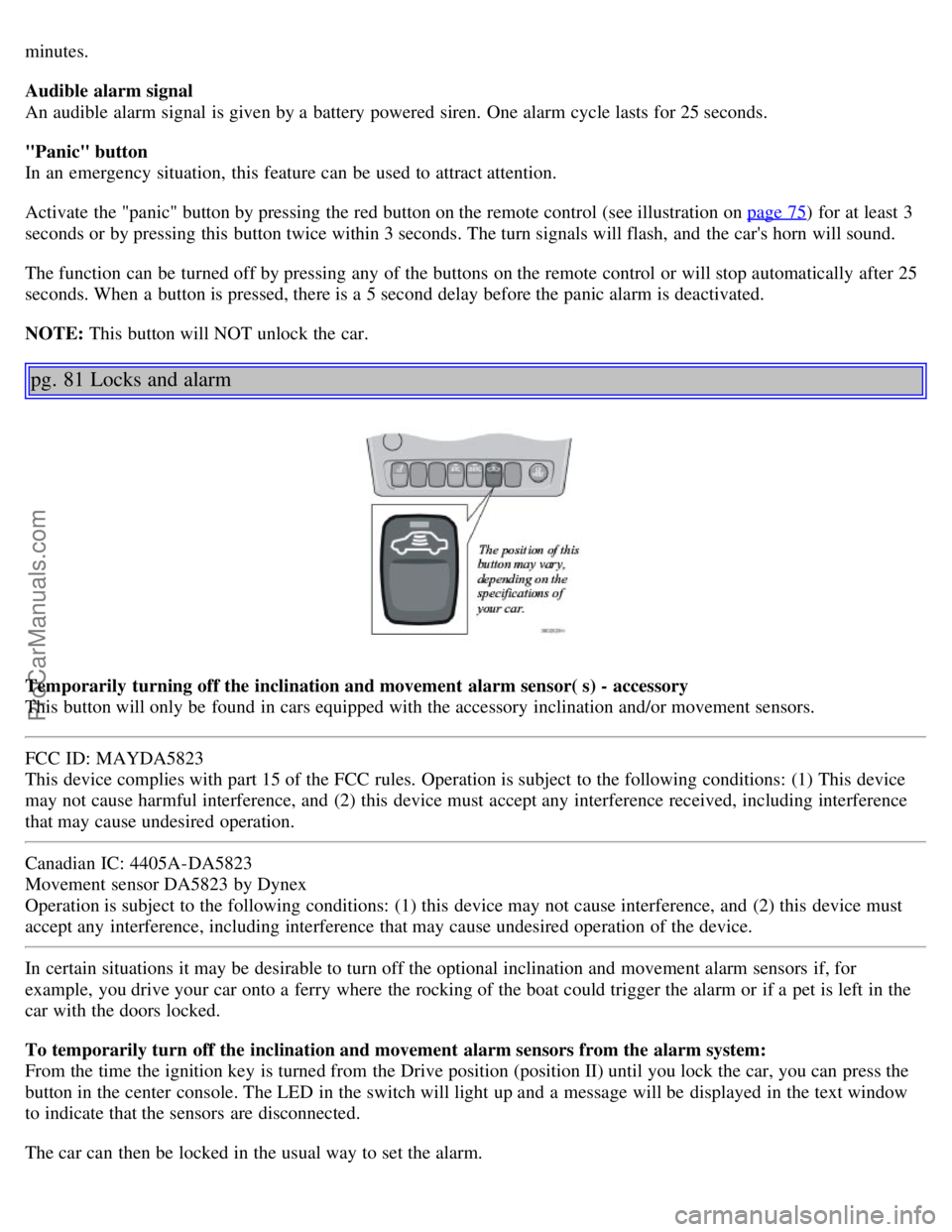
Temporarily turning off the inclination and movement alarm sensor( s) - accessory
This button will only be found in cars equipped with the accessory inclination and/or movement sensors.
FCC ID: MAYDA5823
This device complies with part 15 of the FCC rules. Operation is subject to the following conditions: (1) This device
may not cause harmful interference, and (2) this device must accept any interference received, including interference
that may cause undesired operation.
Canadian IC: 4405A-DA5823
Movement sensor DA5823 by Dynex
Operation is subject to the following conditions: (1) this device may not cause interference, and (2) this device must
accept any interference, including interference that may cause undesired operation of the device.
In certain situations it may be desirable to turn off the optional inclination and movement alarm sensors if, for
example, you drive your car onto a ferry where the rocking of the boat could trigger the alarm or if a pet is left in the
car with the doors locked.
To temporarily turn off the inclination and movement alarm sensors from the alarm system:
From the time the ignition key is turned from the Drive position (position II) until you lock the car, you can press the
button in the center console. The LED in the switch will light up and a message will be displayed in the text window
to indicate that the sensors are disconnected.
The car can then be locked in the usual way to set the alarm.
ProCarManuals.com
Page 50 of 120

Deposit control gasoline (detergent additives)
Volvo recommends the use of detergent gasoline to control engine deposits. Detergent gasoline is effective in keeping
injectors and intake valves clean. Consistent use of deposit control gasolines will help ensure good driveability and
fuel economy. If you are not sure whether the gasoline contains deposit control additives, check with the service
station operator.
NOTE: Volvo does not recommend the use of external fuel injector cleaning systems.
Unleaded fuel
Each Volvo has a three-way catalytic converter and must use only unleaded gasoline. U.S. and Canadian regulations
require that pumps delivering unleaded gasoline be labelled "UNLEADED". Only these pumps have nozzles which fit
your car's filler inlet. It is unlawful to dispense leaded fuel into a vehicle labeled "unleaded gasoline only". Leaded
gasoline damages the three-way catalytic converter and the heated oxygen sensor system. Repeated use of leaded
gasoline will lessen the effectiveness of the emission control system and could result in loss of emission warranty
coverage. State and local vehicle inspection programs will make detection of misfueling easier, possibly resulting in
emission test failure for misfueled vehicles.
NOTE: Some U.S. and Canadian gasolines contain an octane enhancing additive called methyl-cyclopentadienyl
manganese tricarbonyl (MMT). If such fuels are used, your Emission Control System performance may be affected,
and the Check Engine Light (malfunction indicator lamp) located on your instrument panel may light. If this occurs,
please return your vehicle to an authorized Volvo retailer for service.
Gasoline containing alcohol and ethers
"Oxygenated fuels"
Some fuel suppliers sell gasoline containing "oxygenates" which are usually alcohols or ethers. In some areas, state or
local laws require that the service pump be marked indicating use of alcohols or ethers. However, there are areas in
which the pumps are unmarked. If you are not sure whether there is alcohol or ethers in the gasoline you buy, check
with the service station operator. To meet seasonal air quality standards, some areas require the use of "oxygenated"
fuel.
Volvo allows the use of the following "oxygenated" fuels; however, the octane ratings listed on this page must still be
met.
Alcohol - Ethanol: Fuels containing up to 10% ethanol by volume may be used. Ethanol may also be referred to as
Ethyl alcohol, or "Gasohol".
Ethers - MTBE: Fuels containing up to 15% MTBE may be used.
pg. 85 Starting and driving
Carbon Monoxide - Important Warning
Carbon monoxide is a poisonous, colorless, and odorless gas. It is present in all exhaust gases. If you ever smell
exhaust fumes inside the vehicle, make sure the passenger compartment is ventilated, and immediately return the
vehicle to your retailer for correction.
Fuel Formulations
Do not use gasoline that contains lead as a knock inhibitor, and do not use lead additives. Besides damaging the
exhaust emission control systems on your car, lead has been strongly linked to certain forms of cancer.
Many fuels contain benzene as a solvent. Unburned benzene has been strongly linked to certain forms of cancer. If you
live in an area where you must fill your own gas tank, take precautions. These may include:
standing upwind away from the filler nozzle while refueling
refueling only at gas stations with vapor recovery systems that fully seal the mouth of the filler neck during refueling
ProCarManuals.com
Page 51 of 120

wear neoprene gloves while handling a fuel filler nozzle.
Use of Additives
With the exception of gas line antifreeze during winter months, do not add solvents, thickeners, or other store -bought
additives to your car's fuel, cooling, or lubricating systems. Overuse may damage your engine, and some of these
additives contain organically volatile chemicals. Do not needlessly expose yourself to these chemicals.
WARNING!
Never carry a cell phone that is switched on while refueling your vehicle. If the phone rings, this may cause a spark
that could ignite gasoline fumes, resulting in fire and injury.
pg. 86 Starting and driving
Fuel filler door
Press the button on the light switch panel (see illustration on page 34
) when the car is at a standstill to unlock the fuel
filler door. Please note that the fuel filler door will remain unlocked until the car begins to move forward. An audible
click will be heard when the fuel filler door relocks.
If you intend to leave your car while it is being refueled, this feature enables you to lock the doors/trunk while leaving
the fuel filler door unlocked.
You can also keep the car locked if you remain inside during refueling. The central locking button does not lock the
fuel filler door. Be sure the fuel filler door is not obstructed and is completely closed after refueling.
Open the fuel filler cap slowly during hot weather.
NOTE: During a transitional period, a small number of service stations may still have fuel nozzles that are not
compatible with the fuel filler neck on cars equipped with the evaporative control system.
Refueling
The fuel tank holds approximately:
Front wheel drive : 18.5 US gals (70 liters)
All turbo models: 18 US gals (68 liters)
with sufficient volume left over to accommodate possible expansion of the fuel in hot weather. Be aware that the
"usable" tank capacity will be somewhat less than the specified maximum. When the fuel level is low, such factors as
ambient temperature, the fuel's "Reid vapor pressure" characteristics, and terrain can affect the fuel pump's ability to
supply the engine with an adequate supply of fuel. Therefore, it is advisable to refuel as soon as possible when the
needle nears the red zone, or when the fuel warning light comes on.
CAUTION:
ProCarManuals.com