turn signal VOLVO S60 2005 Owners Manual
[x] Cancel search | Manufacturer: VOLVO, Model Year: 2005, Model line: S60, Model: VOLVO S60 2005Pages: 120, PDF Size: 2.27 MB
Page 4 of 120
Drive at a constant speed.
See an authorized Volvo retailer as soon as possible for inspection if the check engine (malfunction indicator) lamp
illuminates, or stays on after the vehicle has started.
Properly dispose of any vehicle-related waste such as used motor oil, used batteries, brake pads, etc.
When cleaning your car, use Volvo's own car care products, all of which have systematically been adapted to the
environment.
PremAir®
On the surface of the radiator in the engine compartment, there is a special coating called PremAir®. PremAir® works
as a catalytic converter, converting most of the ground level ozone passing through the radiator into oxygen, thereby
reducing harmful ground-level ozone.
PremAir is a registered trademark of Engelhard Corporation.
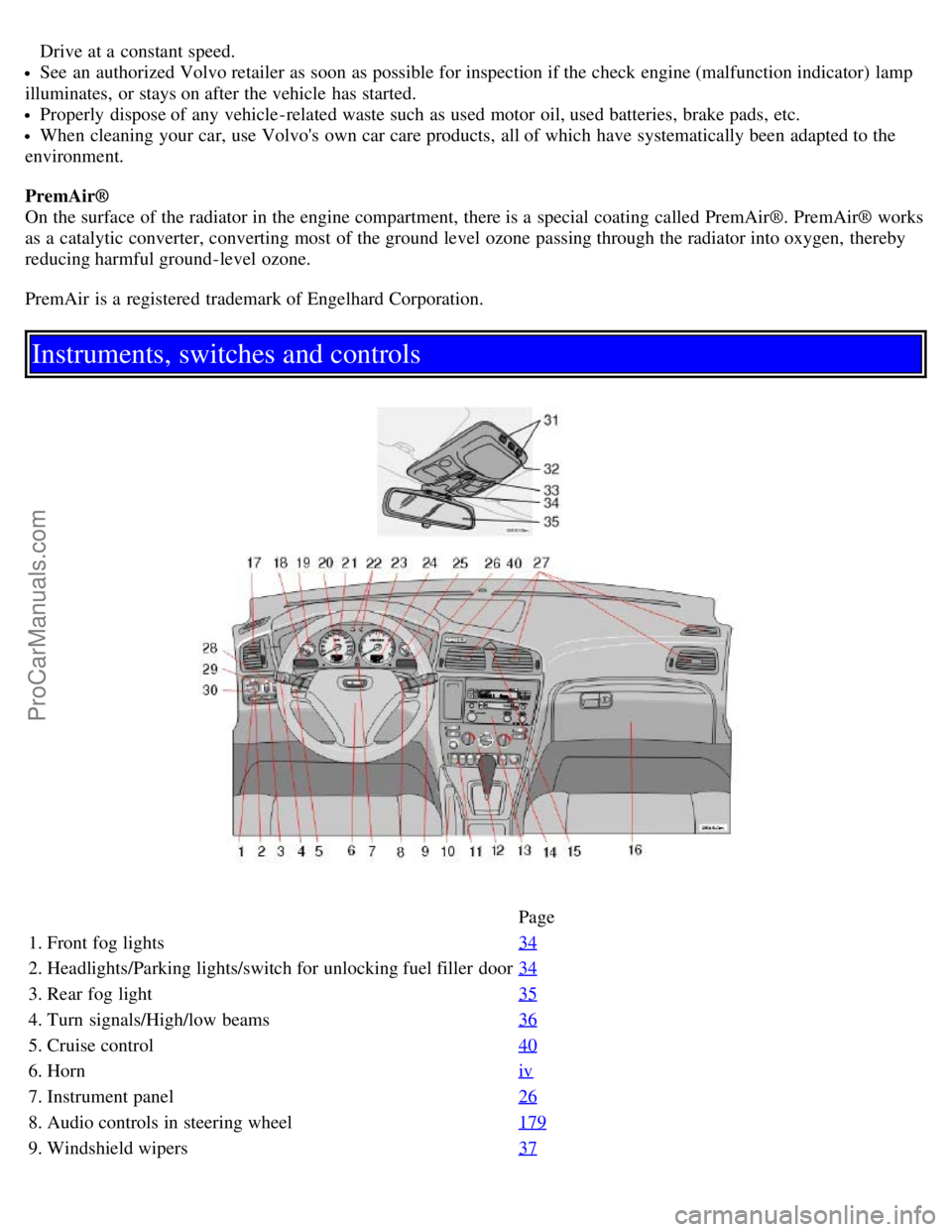
Instruments, switches and controls
Page
1. Front fog lights 34
2. Headlights/Parking lights/switch for unlocking fuel filler door34
3. Rear fog light35
4. Turn signals/High/low beams36
5. Cruise control40
6. Horniv
7. Instrument panel26
8. Audio controls in steering wheel179
9. Windshield wipers37
ProCarManuals.com
Page 5 of 120
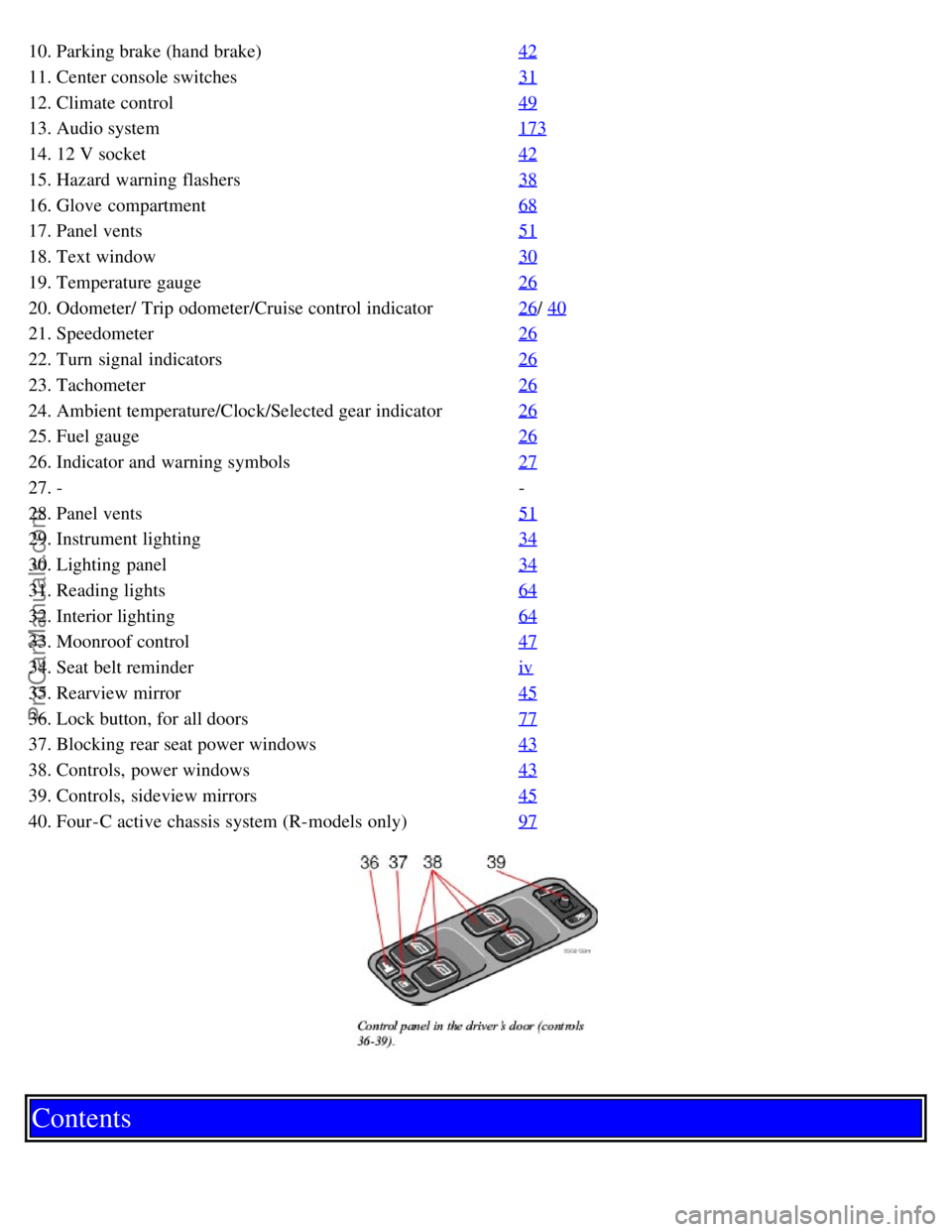
10. Parking brake (hand brake)42
11. Center console switches31
12. Climate control49
13. Audio system173
14. 12 V socket42
15. Hazard warning flashers38
16. Glove compartment68
17. Panel vents51
18. Text window30
19. Temperature gauge26
20. Odometer/ Trip odometer/Cruise control indicator26/ 40
21. Speedometer26
22. Turn signal indicators26
23. Tachometer26
24. Ambient temperature/Clock/Selected gear indicator26
25. Fuel gauge26
26. Indicator and warning symbols27
27. --
28. Panel vents 51
29. Instrument lighting34
30. Lighting panel34
31. Reading lights64
32. Interior lighting64
33. Moonroof control47
34. Seat belt reminderiv
35. Rearview mirror45
36. Lock button, for all doors77
37. Blocking rear seat power windows43
38. Controls, power windows43
39. Controls, sideview mirrors45
40. Four-C active chassis system (R-models only)97
Contents
ProCarManuals.com
Page 17 of 120

2 0 0 5
VOLVO S60
Instruments and controls
pg. 25 Instruments and controls
Instrument panel 26
Indicator and warning symbols27
Switches in the center console31
Steering wheel adjustment33
Lighting panel34
Lighting panel, Manually unlocking the fuel filler door35
Turn signals36
Windshield wipers/washer37
Hazard warning flashers, rear window/sideview mirror defroster, heated front seats38
Trip computer (option)39
Cruise control40
Parking brake, electric socket/cigarette lighter42
Electrically operated windows43
Rearview mirror/sideview mirrors45
Power moonroof (option)47
pg. 26 Instruments and controls
Instrument panel
1. Turn signal indicators - right/left
2. Text window
The text window displays information and warning messages.
3. Temperature gauge
The pointer should be approximately midway on the gauge when driving. Do not drive the car if the warning light is
on. The text window will provide you with additional information. If the engine temperature remains high, check
ProCarManuals.com
Page 20 of 120

If the brake fluid level is above the MIN mark, drive carefully to an authorized Volvo retailer and have the brake
system inspected.
pg. 29 Instruments and controls
Supplemental Restraint System SRS
If the light comes on (or stays on after the vehicle has started), the SRS diagnostic system has detected a fault. Drive to
an authorized Volvo retailer for an inspection of the system. See the SRS section for more information.
Generator warning light
If the light comes on while the engine is running, have the charging system checked.
Seat belt reminder
This symbol lights up to indicate that the driver has not fastened his/her seat belt.
Tire pressure monitoring light
See page 118
for more information on this function.
PARK BRAKE Parking brake applied
This light will be on when the parking brake (hand brake) is applied. The parking brake lever is situated between the
front seats.
Canadian models are equipped with this symbol.
Rear fog light
This light indicates that the fog light is on.
Turn signal indicator - trailer (certain models)
If you are towing a trailer, this light will flash simultaneously with the turn signals on the trailer. If the light does not
flash when signaling, neither the trailer's turn signals nor the car's turn signals are functioning.
Oil pressure warning light
If the light comes on while driving, stop the car and then stop the engine immediately and check the engine oil
level. See page 142
. R-models are also equipped with an oil level warning system. If the light stays on after restart,
have the car towed to the nearest authorized Volvo retailer. After hard driving, the light may come on occasionally
when the engine is idling. This is normal, provided it goes off when the engine speed is increased.
CHECK ENGINE Malfunction indicator light
On-Board Diagnostic II (OBDII): As you drive, a computer called "OBDII" monitors your car's engine, transmission,
electrical and emission systems. The CHECK ENGINE light will light up if the computer senses a condition that
potentially may need correcting. When this happens, please have your car checked by a Volvo retailer as soon as
possible.
A CHECK ENGINE light may have many causes. Sometimes, you may not notice a change in your car's behavior.
Even so, an uncorrected condition could hurt fuel economy, emission cleanliness, and driveability. Extended driving
without correcting the cause could even damage other components in your car.
Canadian models are equipped with this warning light.
ProCarManuals.com
Page 25 of 120
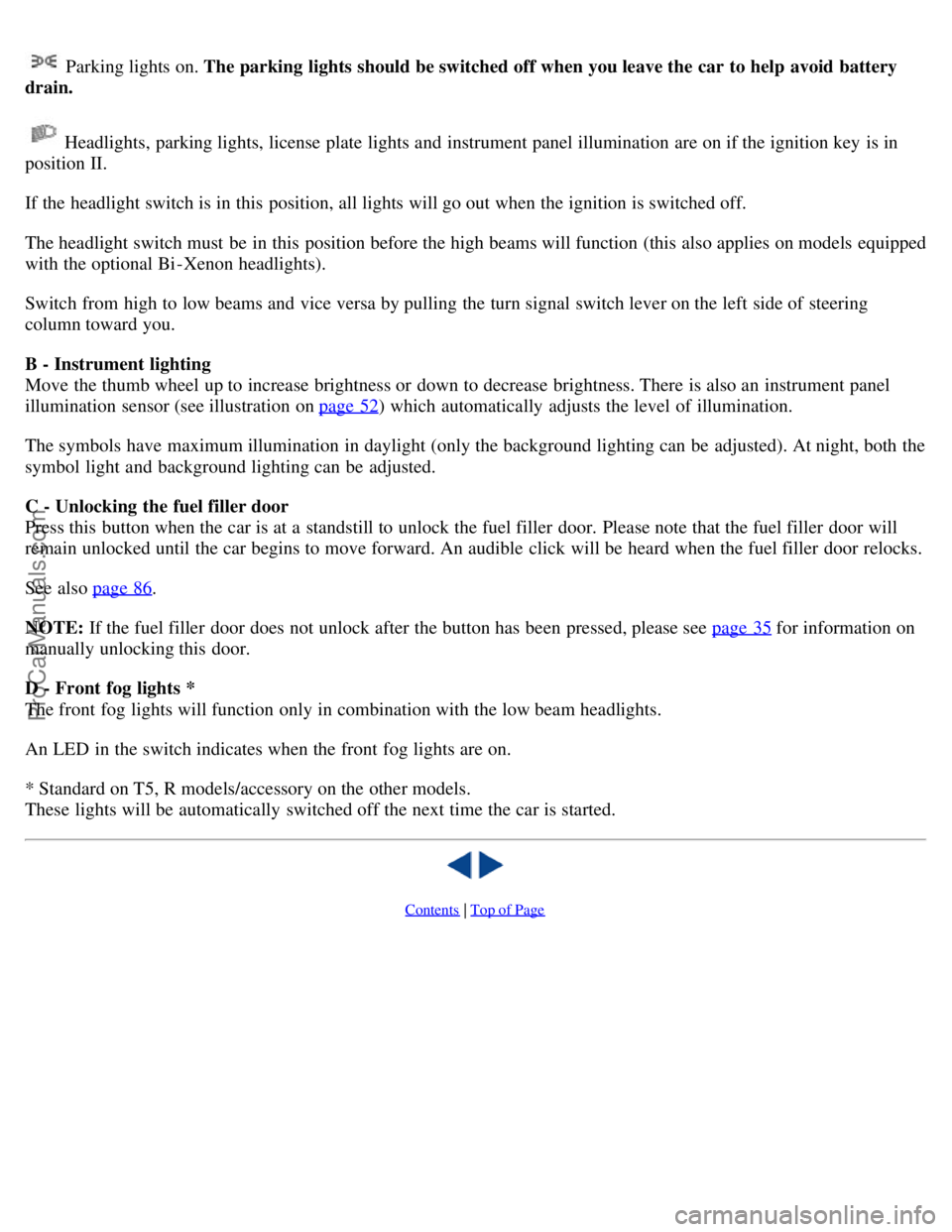
Parking lights on. The parking lights should be switched off when you leave the car to help avoid battery
drain.
Headlights, parking lights, license plate lights and instrument panel illumination are on if the ignition key is in
position II.
If the headlight switch is in this position, all lights will go out when the ignition is switched off.
The headlight switch must be in this position before the high beams will function (this also applies on models equipped
with the optional Bi -Xenon headlights).
Switch from high to low beams and vice versa by pulling the turn signal switch lever on the left side of steering
column toward you.
B - Instrument lighting
Move the thumb wheel up to increase brightness or down to decrease brightness. There is also an instrument panel
illumination sensor (see illustration on page 52
) which automatically adjusts the level of illumination.
The symbols have maximum illumination in daylight (only the background lighting can be adjusted). At night, both the
symbol light and background lighting can be adjusted.
C - Unlocking the fuel filler door
Press this button when the car is at a standstill to unlock the fuel filler door. Please note that the fuel filler door will
remain unlocked until the car begins to move forward. An audible click will be heard when the fuel filler door relocks.
See also page 86
.
NOTE: If the fuel filler door does not unlock after the button has been pressed, please see page 35
for information on
manually unlocking this door.
D - Front fog lights *
The front fog lights will function only in combination with the low beam headlights.
An LED in the switch indicates when the front fog lights are on.
* Standard on T5, R models/accessory on the other models.
These lights will be automatically switched off the next time the car is started.
Contents | Top of Page
ProCarManuals.com
Page 46 of 120
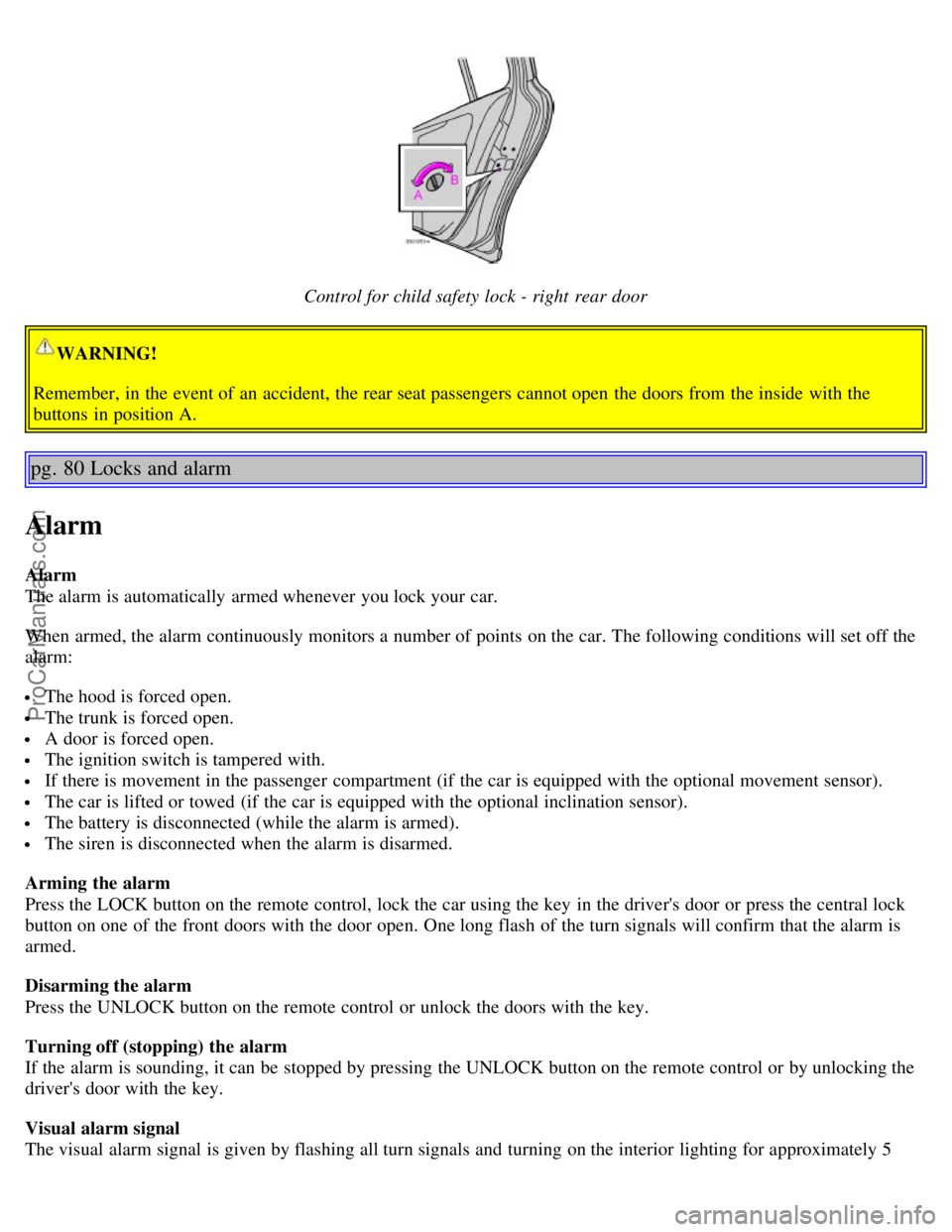
Control for child safety lock - right rear door
WARNING!
Remember, in the event of an accident, the rear seat passengers cannot open the doors from the inside with the
buttons in position A.
pg. 80 Locks and alarm
Alarm
Alarm
The alarm is automatically armed whenever you lock your car.
When armed, the alarm continuously monitors a number of points on the car. The following conditions will set off the
alarm:
The hood is forced open.
The trunk is forced open.
A door is forced open.
The ignition switch is tampered with.
If there is movement in the passenger compartment (if the car is equipped with the optional movement sensor).
The car is lifted or towed (if the car is equipped with the optional inclination sensor).
The battery is disconnected (while the alarm is armed).
The siren is disconnected when the alarm is disarmed.
Arming the alarm
Press the LOCK button on the remote control, lock the car using the key in the driver's door or press the central lock
button on one of the front doors with the door open. One long flash of the turn signals will confirm that the alarm is
armed.
Disarming the alarm
Press the UNLOCK button on the remote control or unlock the doors with the key.
Turning off (stopping) the alarm
If the alarm is sounding, it can be stopped by pressing the UNLOCK button on the remote control or by unlocking the
driver's door with the key.
Visual alarm signal
The visual alarm signal is given by flashing all turn signals and turning on the interior lighting for approximately 5
ProCarManuals.com
Page 47 of 120
minutes.
Audible alarm signal
An audible alarm signal is given by a battery powered siren. One alarm cycle lasts for 25 seconds.
"Panic" button
In an emergency situation, this feature can be used to attract attention.
Activate the "panic" button by pressing the red button on the remote control (see illustration on page 75
) for at least 3
seconds or by pressing this button twice within 3 seconds. The turn signals will flash, and the car's horn will sound.
The function can be turned off by pressing any of the buttons on the remote control or will stop automatically after 25
seconds. When a button is pressed, there is a 5 second delay before the panic alarm is deactivated.
NOTE: This button will NOT unlock the car.
pg. 81 Locks and alarm
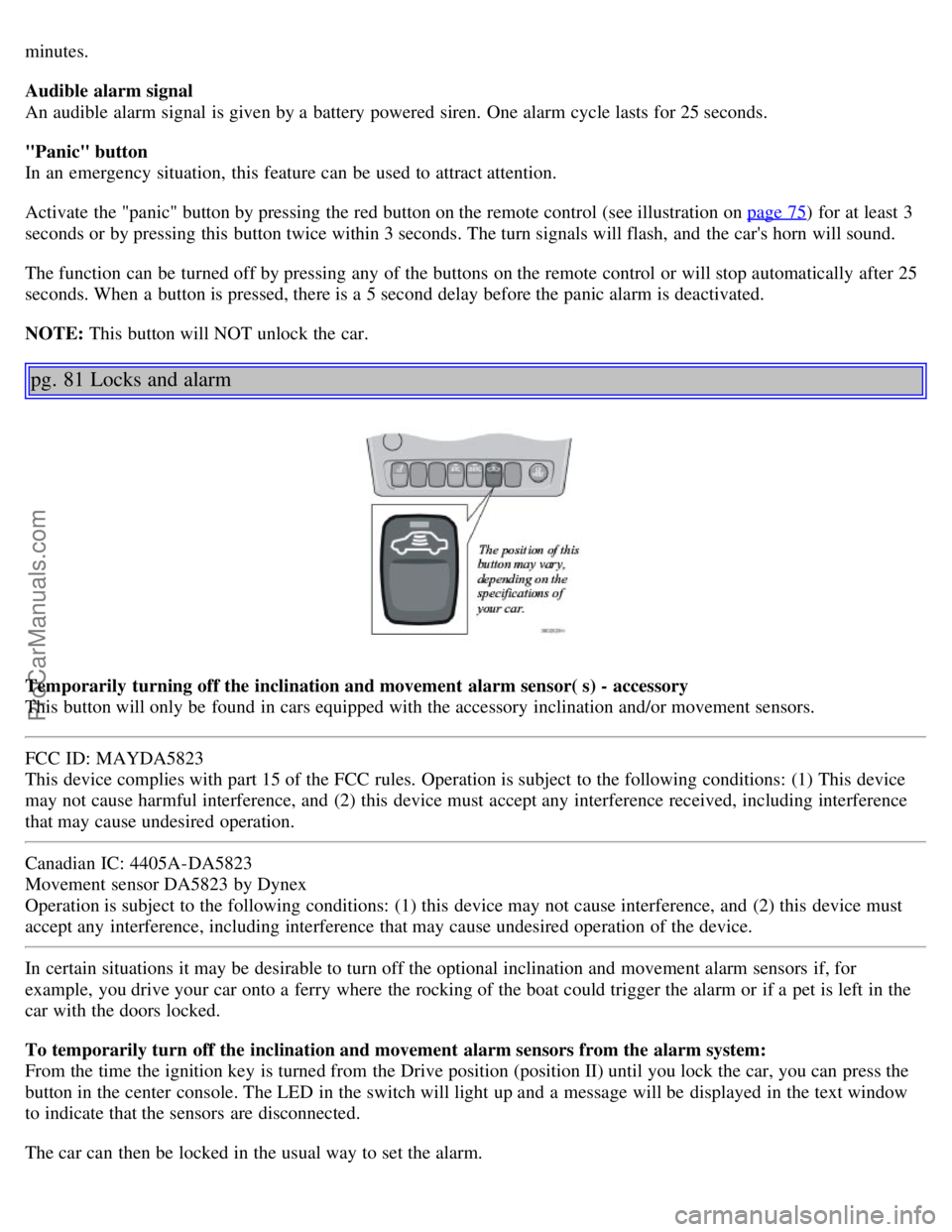
Temporarily turning off the inclination and movement alarm sensor( s) - accessory
This button will only be found in cars equipped with the accessory inclination and/or movement sensors.
FCC ID: MAYDA5823
This device complies with part 15 of the FCC rules. Operation is subject to the following conditions: (1) This device
may not cause harmful interference, and (2) this device must accept any interference received, including interference
that may cause undesired operation.
Canadian IC: 4405A-DA5823
Movement sensor DA5823 by Dynex
Operation is subject to the following conditions: (1) this device may not cause interference, and (2) this device must
accept any interference, including interference that may cause undesired operation of the device.
In certain situations it may be desirable to turn off the optional inclination and movement alarm sensors if, for
example, you drive your car onto a ferry where the rocking of the boat could trigger the alarm or if a pet is left in the
car with the doors locked.
To temporarily turn off the inclination and movement alarm sensors from the alarm system:
From the time the ignition key is turned from the Drive position (position II) until you lock the car, you can press the
button in the center console. The LED in the switch will light up and a message will be displayed in the text window
to indicate that the sensors are disconnected.
The car can then be locked in the usual way to set the alarm.
ProCarManuals.com
Page 48 of 120

NOTE:
This function will not turn off the vehicle's standard alarm.
The optional sensors are automatically reconnected to the alarm system the next time the vehicle is unlocked and
then locked again.
LED alarm status signals
The status of the alarm system is indicated by the red LED at the top of the dash:
LED off - the alarm is not armed
LED flashes once per second - the alarm is armed
LED flashes rapidly before the ignition is switched on - the alarm has been triggered
Fault in the alarm system : If a fault has been detected in the alarm system, a message will be displayed in the text
window. Contact your Volvo retailer.
Automatic re-lock/re -arm system
If the car is unlocked with the remote, the car will re-lock and the alarm will re-arm after 2 minutes unless a door or
the trunk has been opened.
pg. 82 This page intentionally left blank.
Contents | Top of Page
ProCarManuals.com
Page 99 of 120
BulbsTypeSocket
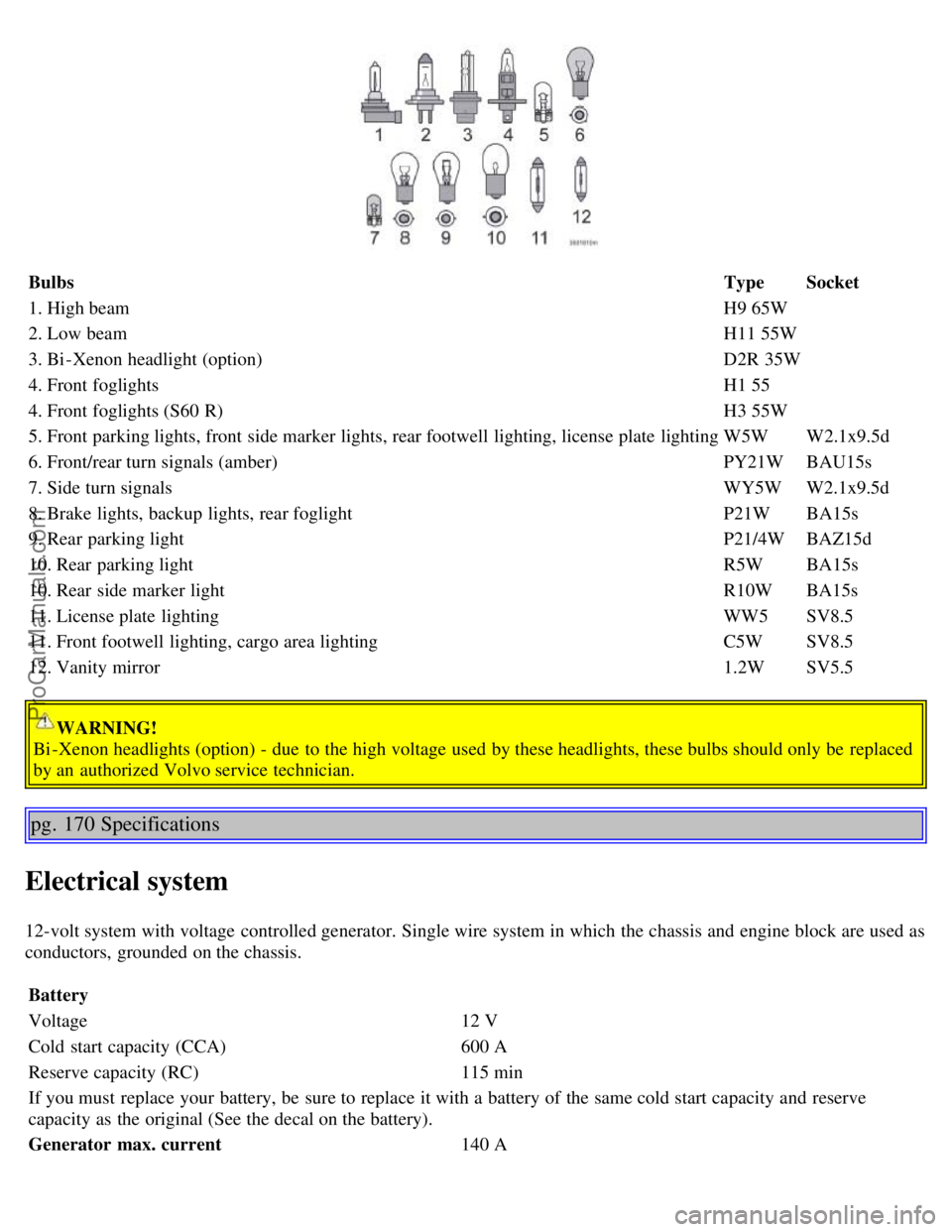
1. High beam H9 65W
2. Low beam H11 55W
3. Bi -Xenon headlight (option) D2R 35W
4. Front foglights H1 55
4. Front foglights (S60 R) H3 55W
5. Front parking lights, front side marker lights, rear footwell lighting, license plate lighting W5WW2.1x9.5d
6. Front/rear turn signals (amber) PY21WBAU15s
7. Side turn signals WY5WW2.1x9.5d
8. Brake lights, backup lights, rear foglight P21WBA15s
9. Rear parking light P21/4WBAZ15d
10. Rear parking light R5WBA15s
10. Rear side marker light R10WBA15s
11. License plate lighting WW5SV8.5
11. Front footwell lighting, cargo area lighting C5WSV8.5
12. Vanity mirror 1.2WSV5.5
WARNING!
Bi -Xenon headlights (option) - due to the high voltage used by these headlights, these bulbs should only be replaced
by an authorized Volvo service technician.
pg. 170 Specifications
Electrical system
12-volt system with voltage controlled generator. Single wire system in which the chassis and engine block are used as
conductors, grounded on the chassis.
Battery
Voltage 12 V
Cold start capacity (CCA) 600 A
Reserve capacity (RC) 115 min
If you must replace your battery, be sure to replace it with a battery of the same cold start capacity and reserve
capacity as the original (See the decal on the battery).
Generator max. current 140 A
ProCarManuals.com
Page 107 of 120

Storing stations
To store a selected station under one of the station setting buttons 1-6:
1. Tune to the desired station.
2. Press the button under which the station is to be stored and keep it depressed. The audio system sound will be
interrupted for a few seconds and STORED will appear in the display. The station is now stored.
A total of 30 stations can be stored; 6 stations each in AM1, AM2, FM1, FM2, and FM3.
Storing stations automatically
This function automatically searches for and stores up to 10 strong AM or FM stations in a separate memory. If more
than ten stations are found, the ten strongest ones are stored. This function is especially useful in areas in which you
are not familiar with radio stations or their frequencies.
To use the AUTO function:
1. Select radio mode using the AM or FM buttons, or by turning the SOURCE knob.
2. Start the search by pressing AUTO for more than 2 seconds.
3. AUTO appears in the display and a number of stations with strong signals (max. 10) from the selected frequency
band will be
pg. 180 Audio
Radio functions HU-650/HU-850 (contd)
stored in the auto-store memory. If there are no stations with sufficient signal strength, NO STATION is displayed.
4. Press the AUTO button or the arrow keys on the optional steering wheel controls briefly to select the stored stations.
When the radio is in auto-store mode, AUTO is shown in the display. AUTO disappears when you return to the
normal radio mode.
Return to the normal radio mode by pressing the AM, FM, or EXIT button.
To return to the Auto-store mode, press the AUTO button briefly.
pg. 181 Audio
RBDS functions HU-650/HU-850
ProCarManuals.com