light VOLVO S60 2006 Owner's Manual
[x] Cancel search | Manufacturer: VOLVO, Model Year: 2006, Model line: S60, Model: VOLVO S60 2006Pages: 132, PDF Size: 2.33 MB
Page 28 of 132
signals will flash until the lever has been released.
NOTE: If the turn signal indicator flashes faster than normal, check for a burned-out turn signal bulb.
High/low beam headlights
Continuous high beams
Turn the ignition key to position II.
With the light switch (1) in position , (see page 32) pull the turn signal lever toward the steering wheel (position 4) to
toggle between high and low beams (this also applies on models equipped with the optional Bi -Xenon headlights).
High beam flash
Turn the ignition key to position II.
Pull the turn signal lever to position 3. The high beams will remain on until the lever is released.
Home safe lighting
When you leave your car at night, you can make use of the home safe lighting function to illuminate the area in front
of the car.
Remove the key from the ignition switch.
Pull the direction indicator lever as far as possible towards the steering wheel (to position 4) and release it.
Exit the car and lock the doors.
The headlights and parking lights will illuminate and remain on for 30
1, 60 or 90 seconds. The time interval can be
changed by an authorized Volvo retailer.
1. Factory setting
pg. 35 Instruments and controls
Right-side steering wheel lever
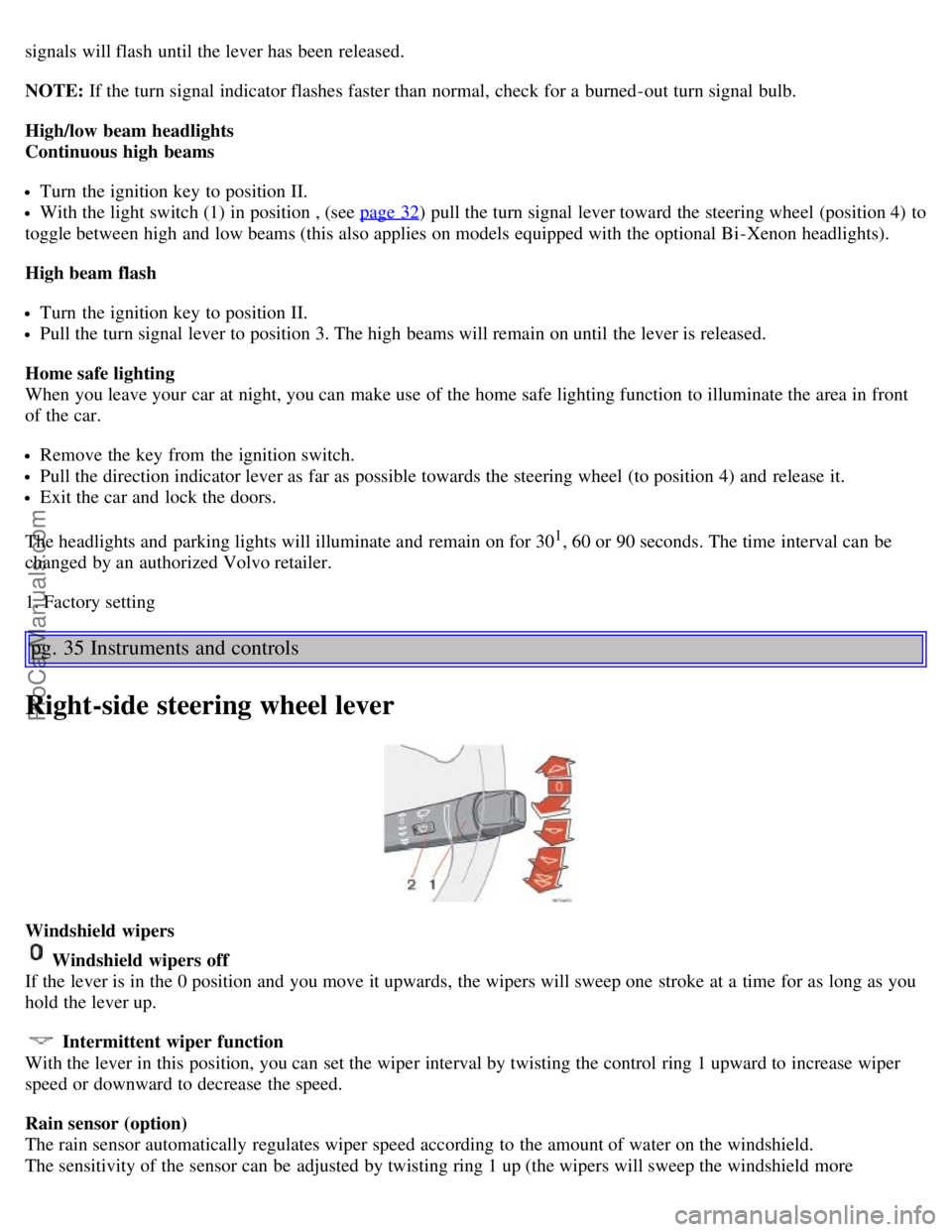
Windshield wipers
Windshield wipers off
If the lever is in the 0 position and you move it upwards, the wipers will sweep one stroke at a time for as long as you
hold the lever up.
Intermittent wiper function
With the lever in this position, you can set the wiper interval by twisting the control ring 1 upward to increase wiper
speed or downward to decrease the speed.
Rain sensor (option)
The rain sensor automatically regulates wiper speed according to the amount of water on the windshield.
The sensitivity of the sensor can be adjusted by twisting ring 1 up (the wipers will sweep the windshield more
ProCarManuals.com
Page 29 of 132
frequently) or down (the wipers will sweep the windshield less frequently).
Activating the rain sensor:
1. Turn the ignition key to at least position I and put the windshield wiper lever in position 0.
2. Press button 2.
An LED in the button will light up to indicate that the rain sensor is active.
Deactivating the rain sensor:
Press button 2.
or
Move the windshield wiper lever down to another position.
Moving the lever up will not deactivate the rain sensor. Doing so will cause the wipers to sweep the windshield until
the lever is released, at which time the wipers return to rain sensor mode.
Continuous wiper function
Wipers operate at "high" speed
CAUTION:
The rain sensor should be deactivated when washing the car in an automatic car wash, etc. If the rain sensor function is
left on, the wipers will start inadvertently in the car wash and could be damaged.
pg. 36 Instruments and controls
Headlight wiper/washer (certain models)
When the lever is pulled to wash the windshield, high pressure jets mounted in the bumper will spray the headlights.
CAUTION:
Use ample washer fluid when washing the windshield to avoid scratching the glass.
To conserve washer fluid in driving conditions where the windshield washers are used frequently, the headlights will
only be washed once for every five times the windshield is washed within a 10- minute period.
When approximately 1 US quart (1 liter) remains in the washer fluid reservoir, the headlights will not be washed
when the lever is pulled to conserve washer fluid for the windshield.
NOTE: R-models are also equipped with headlight wipers, which are activated along with the washer function.
pg. 37 Instruments and controls
Hazard warning flashers, rear window/sideview mirror defroster, heated
front seats
ProCarManuals.com
Page 30 of 132
Hazard warning flashers
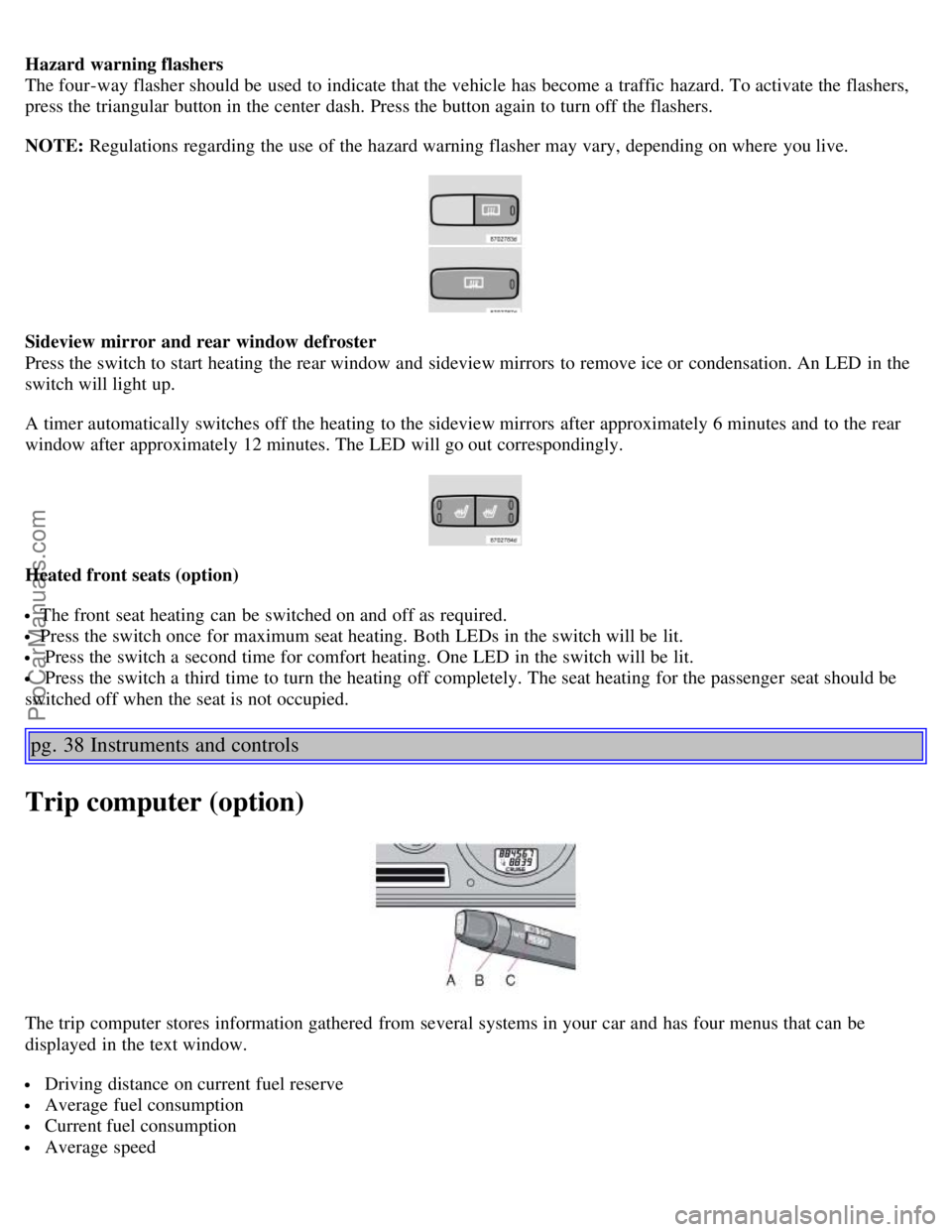
The four-way flasher should be used to indicate that the vehicle has become a traffic hazard. To activate the flashers,
press the triangular button in the center dash. Press the button again to turn off the flashers.
NOTE: Regulations regarding the use of the hazard warning flasher may vary, depending on where you live.
Sideview mirror and rear window defroster
Press the switch to start heating the rear window and sideview mirrors to remove ice or condensation. An LED in the
switch will light up.
A timer automatically switches off the heating to the sideview mirrors after approximately 6 minutes and to the rear
window after approximately 12 minutes. The LED will go out correspondingly.
Heated front seats (option)
The front seat heating can be switched on and off as required.
Press the switch once for maximum seat heating. Both LEDs in the switch will be lit.
Press the switch a second time for comfort heating. One LED in the switch will be lit.
Press the switch a third time to turn the heating off completely. The seat heating for the passenger seat should be
switched off when the seat is not occupied.
pg. 38 Instruments and controls
Trip computer (option)
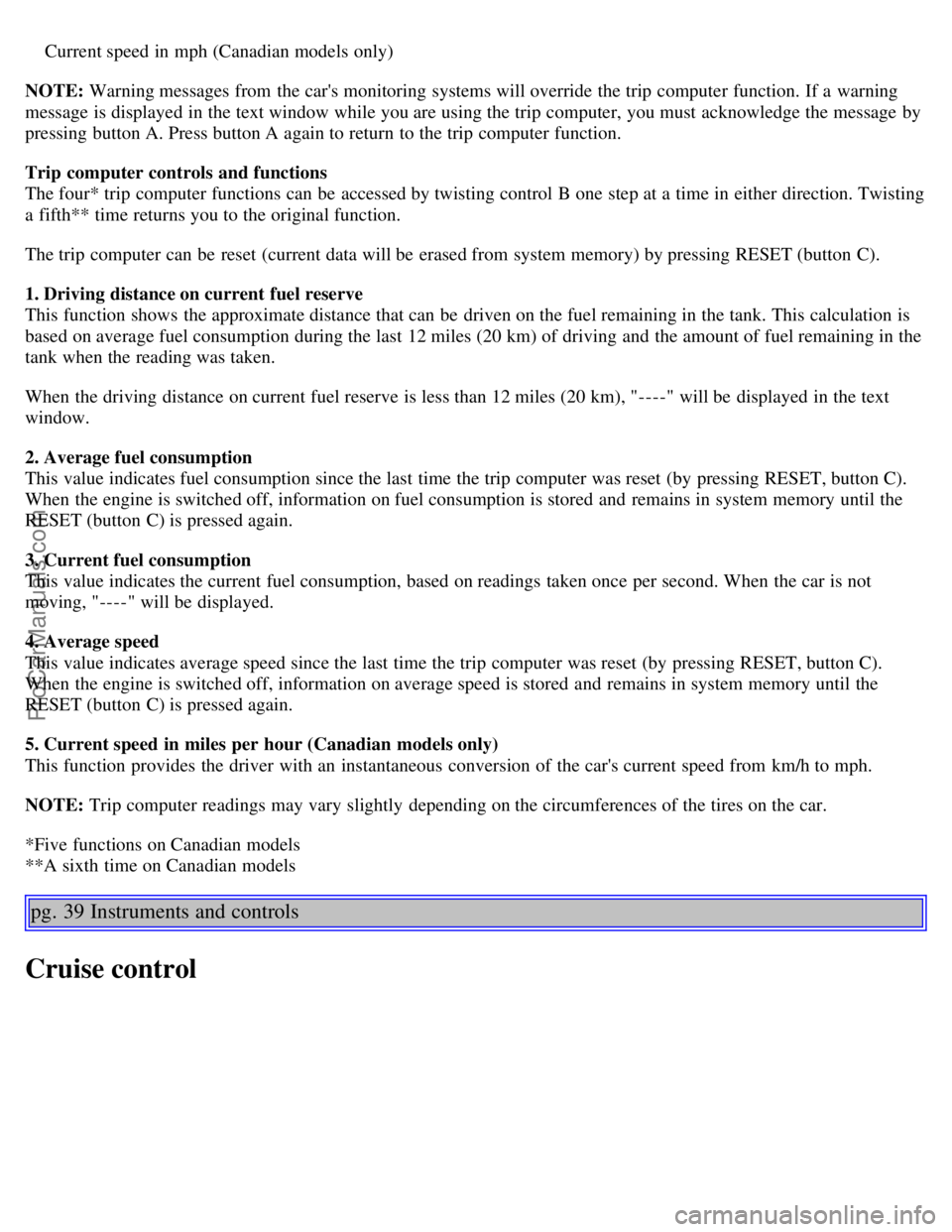
The trip computer stores information gathered from several systems in your car and has four menus that can be
displayed in the text window.
Driving distance on current fuel reserve
Average fuel consumption
Current fuel consumption
Average speed
ProCarManuals.com
Page 31 of 132
Current speed in mph (Canadian models only)
NOTE: Warning messages from the car's monitoring systems will override the trip computer function. If a warning
message is displayed in the text window while you are using the trip computer, you must acknowledge the message by
pressing button A. Press button A again to return to the trip computer function.
Trip computer controls and functions
The four* trip computer functions can be accessed by twisting control B one step at a time in either direction. Twisting
a fifth** time returns you to the original function.
The trip computer can be reset (current data will be erased from system memory) by pressing RESET (button C).
1. Driving distance on current fuel reserve
This function shows the approximate distance that can be driven on the fuel remaining in the tank. This calculation is
based on average fuel consumption during the last 12 miles (20 km) of driving and the amount of fuel remaining in the
tank when the reading was taken.
When the driving distance on current fuel reserve is less than 12 miles (20 km), "----" will be displayed in the text
window.
2. Average fuel consumption
This value indicates fuel consumption since the last time the trip computer was reset (by pressing RESET, button C).
When the engine is switched off, information on fuel consumption is stored and remains in system memory until the
RESET (button C) is pressed again.
3. Current fuel consumption
This value indicates the current fuel consumption, based on readings taken once per second. When the car is not
moving, "----" will be displayed.
4. Average speed
This value indicates average speed since the last time the trip computer was reset (by pressing RESET, button C).
When the engine is switched off, information on average speed is stored and remains in system memory until the
RESET (button C) is pressed again.
5. Current speed in miles per hour (Canadian models only)
This function provides the driver with an instantaneous conversion of the car's current speed from km/h to mph.
NOTE: Trip computer readings may vary slightly depending on the circumferences of the tires on the car.
*Five functions on Canadian models
**A sixth time on Canadian models
pg. 39 Instruments and controls
Cruise control
ProCarManuals.com
Page 33 of 132
instrument panel.
pg. 40 Instruments and controls
Press the brake pedal.
Press "resume"
to return to the previously set speed.
WARNING!
Cruise control should not be used in heavy traffic or when driving on wet or slippery roads. Cruise control may not
maintain set speed on steep downgrades.
pg. 41 Instruments and controls
Parking brake, electric socket/cigarette lighter
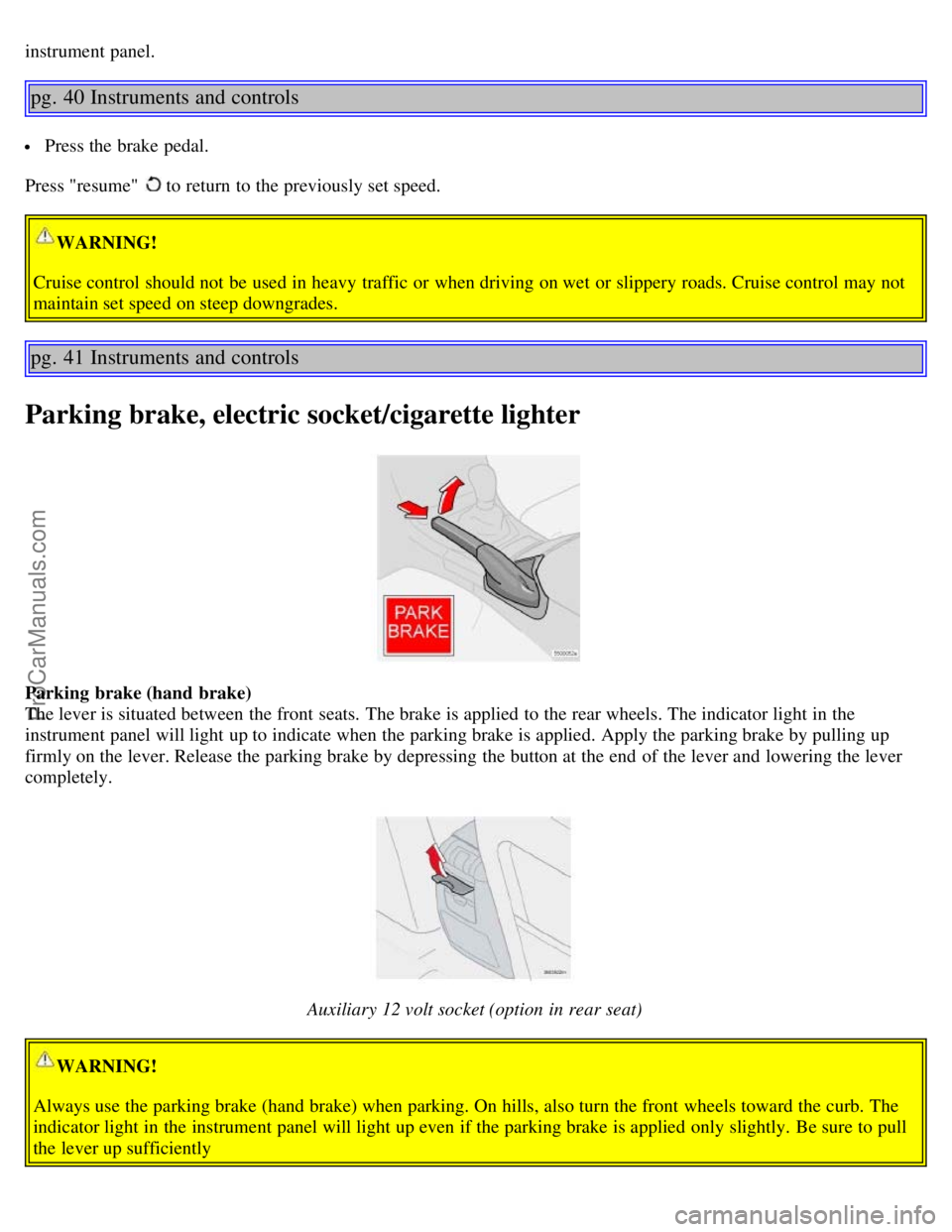
Parking brake (hand brake)
The lever is situated between the front seats. The brake is applied to the rear wheels. The indicator light in the
instrument panel will light up to indicate when the parking brake is applied. Apply the parking brake by pulling up
firmly on the lever. Release the parking brake by depressing the button at the end of the lever and lowering the lever
completely.
Auxiliary 12 volt socket (option in rear seat)
WARNING!
Always use the parking brake (hand brake) when parking. On hills, also turn the front wheels toward the curb. The
indicator light in the instrument panel will light up even if the parking brake is applied only slightly. Be sure to pull
the lever up sufficiently
ProCarManuals.com
Page 34 of 132

Auxiliary sockets
These 12 volt sockets can be used to plug in certain accessories such as cellular telephones, etc. The key must be in
position I (or higher) for the auxiliary socket to function.
The auxiliary sockets can also be used for cigarette lighters, which are available at your Volvo retailer.
NOTE: The cover should be folded down when the auxiliary socket is not in use.
Ashtrays
Volvo cars in North America do not have an ashtray in the front seat as standard equipment. If you want to have an
ashtray in the front seat, please contact your Volvo retailer.
pg. 42 Instruments and controls
Electrically operated windows
The electrically operated windows are controlled by buttons in the arm rests. The ignition switch must be ON *
(ignition key in position I, II or the engine running) for the electrically operated windows to function.
To lower: Press down the front edge of the button to the first detent ("stop").
To raise: Lightly pull up the front edge of the button to the first detent ("stop").
* The electrically operated windows will also function after the ignition has been switched off as long as neither of the
front doors has been opened.
Auto up/down function (front doors only):
Either front door window can be opened or closed automatically.
Auto down: Press the front part of the button as far down as possible and release it immediately. To stop the window
at any time, pull the button up.
Auto up: Pull the front part of the button up as far as possible and release it immediately. To stop the window at any
time, press the button down.
A - front windows, B - rear windows
NOTE: The electrically operated windows in the front seat have an overload protecting circuit breaker which reverses
movement of the electrically operated windows to their starting points if they are obstructed in any way. Thereafter the
windows will operate normally again.
WARNING!
Always remove the ignition key when the vehicle is unattended.
Make sure that childrens' hands are clear before raising the windows.
Never leave children unattended in the car.
ProCarManuals.com
Page 36 of 132
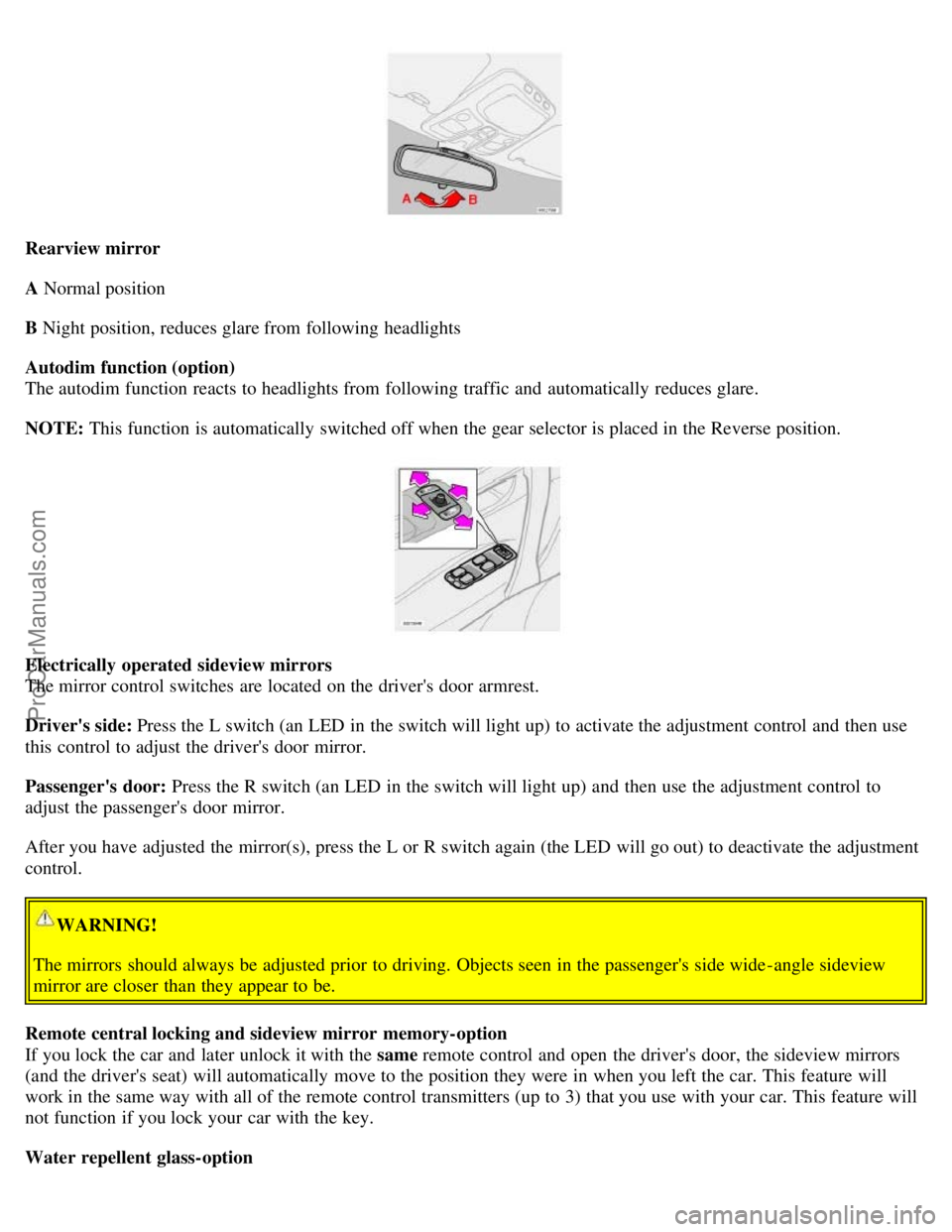
Rearview mirror
A Normal position
B Night position, reduces glare from following headlights
Autodim function (option)
The autodim function reacts to headlights from following traffic and automatically reduces glare.
NOTE: This function is automatically switched off when the gear selector is placed in the Reverse position.
Electrically operated sideview mirrors
The mirror control switches are located on the driver's door armrest.
Driver's side: Press the L switch (an LED in the switch will light up) to activate the adjustment control and then use
this control to adjust the driver's door mirror.
Passenger's door: Press the R switch (an LED in the switch will light up) and then use the adjustment control to
adjust the passenger's door mirror.
After you have adjusted the mirror(s), press the L or R switch again (the LED will go out) to deactivate the adjustment
control.
WARNING!
The mirrors should always be adjusted prior to driving. Objects seen in the passenger's side wide -angle sideview
mirror are closer than they appear to be.
Remote central locking and sideview mirror memory-option
If you lock the car and later unlock it with the same remote control and open the driver's door, the sideview mirrors
(and the driver's seat) will automatically move to the position they were in when you left the car. This feature will
work in the same way with all of the remote control transmitters (up to 3) that you use with your car. This feature will
not function if you lock your car with the key.
Water repellent glass-option
ProCarManuals.com
Page 39 of 132
2 0 0 6
VOLVO S60
Climate control
pg. 49 Climate control
Climate control systems - general information 50
Air distribution51
Electronic climate control, ECC52
pg. 50 Climate control
Climate control systems - general information
Condensation on the inside of the windows
Keeping the insides of the windows clean will help reduce the amount of condensation that forms on the windows. Use
a commercial window cleaning agent to clean the windows.
Ice and snow
Always keep the air intake grille at the base of the windshield free of snow.
Cabin air filter
Replace the cabin air filter with a new one at the recommended intervals. Please refer to your Warranty and Service
Records Information booklet, or consult your Volvo retailer for these intervals. The filter should be replaced more
often when driving under dirty and dusty conditions. The filter cannot be cleaned and therefore should always be
replaced with a new one.
Sensors
The sunlight sensor on the dashboard and passenger compartment temperature sensor in the ECC control panel should
not be covered in any way as this could cause incorrect information to be sent to the ECC system.
Parking the car in warm weather
If your car has been parked in the sun in warm weather, opening the windows and moonroof (option) for several
minutes before driving will help release the warm air from the passenger compartment. When the engine is running,
close the windows and moonroof and use the recirculation function for several minutes to enable the air conditioning
to cool the compartment as quickly as possible.
Windows and optional moonroof
The ECC system will function best if the windows and optional moonroof are closed. If you drive with the moonroof
open, we recommend that you manually adjust the temperature and blower control (the LED in the AUTO switch
should be off).
Acceleration
The air conditioning is momentarily disengaged during full-throttle acceleration.
Climate control maintenance
ProCarManuals.com
Page 42 of 132
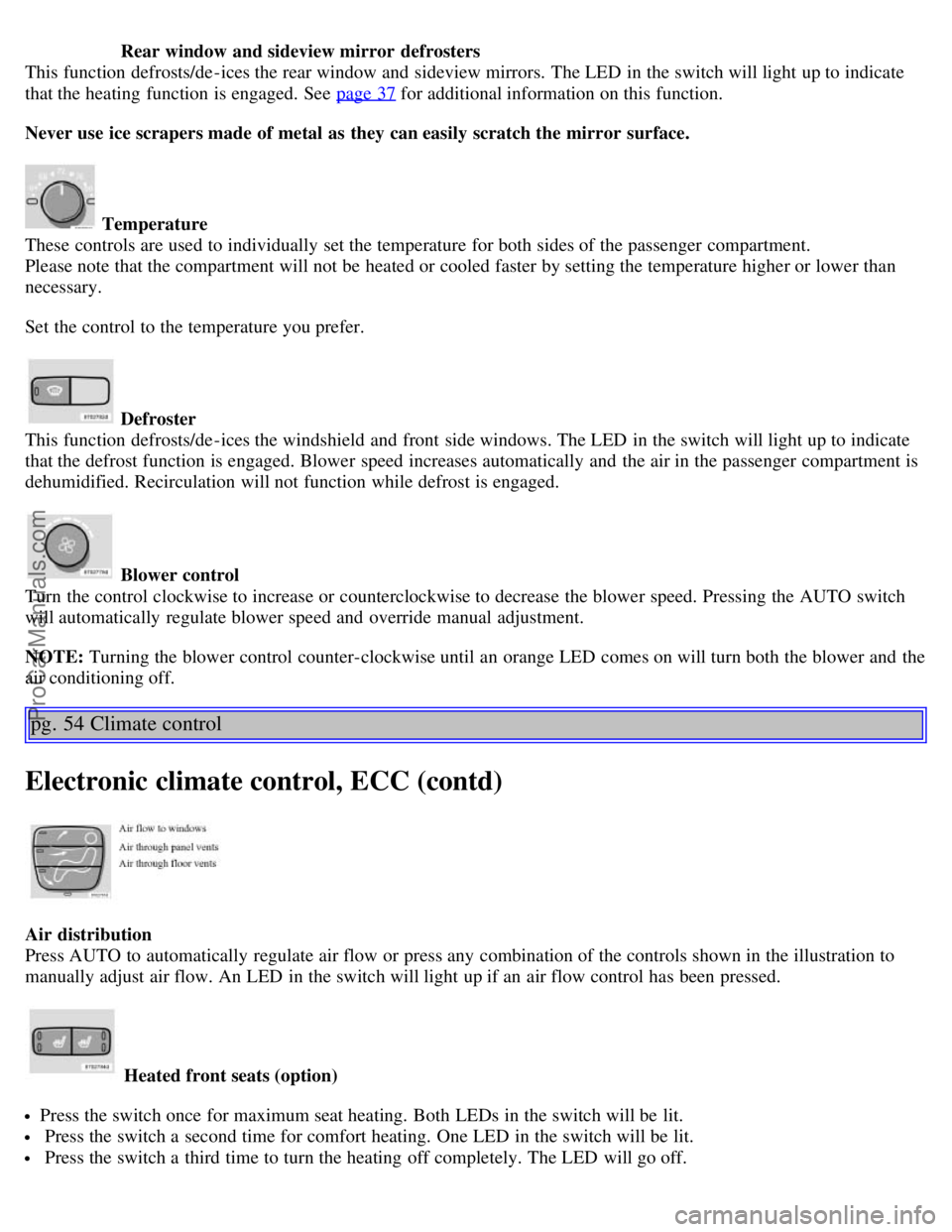
Rear window and sideview mirror defrosters
This function defrosts/de-ices the rear window and sideview mirrors. The LED in the switch will light up to indicate
that the heating function is engaged. See page 37
for additional information on this function.
Never use ice scrapers made of metal as they can easily scratch the mirror surface.
Temperature
These controls are used to individually set the temperature for both sides of the passenger compartment.
Please note that the compartment will not be heated or cooled faster by setting the temperature higher or lower than
necessary.
Set the control to the temperature you prefer.
Defroster
This function defrosts/de-ices the windshield and front side windows. The LED in the switch will light up to indicate
that the defrost function is engaged. Blower speed increases automatically and the air in the passenger compartment is
dehumidified. Recirculation will not function while defrost is engaged.
Blower control
Turn the control clockwise to increase or counterclockwise to decrease the blower speed. Pressing the AUTO switch
will automatically regulate blower speed and override manual adjustment.
NOTE: Turning the blower control counter-clockwise until an orange LED comes on will turn both the blower and the
air conditioning off.
pg. 54 Climate control
Electronic climate control, ECC (contd)
Air distribution
Press AUTO to automatically regulate air flow or press any combination of the controls shown in the illustration to
manually adjust air flow. An LED in the switch will light up if an air flow control has been pressed.
Heated front seats (option)
Press the switch once for maximum seat heating. Both LEDs in the switch will be lit.
Press the switch a second time for comfort heating. One LED in the switch will be lit.
Press the switch a third time to turn the heating off completely. The LED will go off.
ProCarManuals.com
Page 43 of 132
The seat heating for the passenger seat should be switched off when the seat is not occupied.
A/C - ON/OFF
Press the switch to turn the air conditioning on or off. The "ON" or "OFF" LED will light up to indicate if the system
is switched on or off. Other functions will still be regulated automatically (if the AUTO switch is on).
The air conditioning functions only at temperatures above 32° F (0° C).
While the Defroster function is selected, the air conditioning is temporarily activated to dehumidify the air, even if
you have manually switched the air conditioning off. This will only function if the blower is not switched off.
Recirculation
Press this switch to engage the recirculation function (air in the passenger compartment recirculates - no fresh air
enters the compartment). The LED in the switch will light up to indicate that the function is engaged.
Use this function if the outside air is contaminated with exhaust gases, smoke, etc or to heat/cool the car quickly.
Recirculation should not be used for more than 15 minutes. If your windows begin to fog or mist, make sure that the
recirculation function is switched off.
Selecting Defroster automatically switches recirculation off.
Timer mode activation: (Cars with the Interior Air Quality system have no timer mode) Press and hold the
recirculation button for at least 3 seconds to activate a recirculation timer mode. The amber LED in the recirculation
button will flash 5 times to show that the timer mode is being activated. In timer mode, each time the recirculation
button is pressed, the climate control system will recirculate the air in the passenger compartment for 5-12 minutes,
depending on the outside air temperature, and then revert back to fresh air.
Timer mode deactivation: Press and hold the recirculation button for 3 seconds. The amber LED in the recirculation
button will illuminate steadily for 5 seconds to show a return to "normal" mode.
pg. 55 Climate control
Electronic climate control, ECC (contd)
In normal mode, when the recirculation button is pressed, the climate control system will recirculate the air in the
passenger compartment until the recirculation button is pressed again.
Timer mode memory: If the car is turned off while timer mode is active, timer mode will still be active when the car
is restarted.
Interior air quality sensor (option)
Some cars are equipped with a multifilter and air quality sensor. The filter separates gases and particles, thereby
reducing the amounts of odors and contaminants entering the car. The air quality sensor detects increased levels of
contaminants in the outside air. When the air quality sensor detects contaminated outside air, the air intake closes and
the air inside the passenger compartment is recirculated, i.e. no outside air enters the car. The filter also cleans
recirculated passenger compartment air.
ProCarManuals.com