door lock VOLVO S60 2007 Owner's Guide
[x] Cancel search | Manufacturer: VOLVO, Model Year: 2007, Model line: S60, Model: VOLVO S60 2007Pages: 200, PDF Size: 4.03 MB
Page 191 of 200
Radio frequency range
AM: 530 - 1710 kHz
FM: 87.7 - 107.9 MHz
1. The HU- 850 must be connected to an external amplifier.
Alarm
"Alarm!" is displayed when an alarm message is sent. The function is used to warn the driver of a serious accident
or disaster situation.
CAUTION!
The optional supplementary amplifier (HU-850) may be mounted under the front passenger's seat. If the floor of the
vehicle has become soaked for any reason, do not turn on the radio. This would cause damage to the amplifier.
Contact a Volvo retailer.
Low battery voltage
If the level of battery voltage is low, a message will be displayed. The vehicle's energy conservation function may
switch off the audio system. Recharge the battery by starting the engine.
pg. 229 Specifications
HomeLink® Universal Transceiver (option)
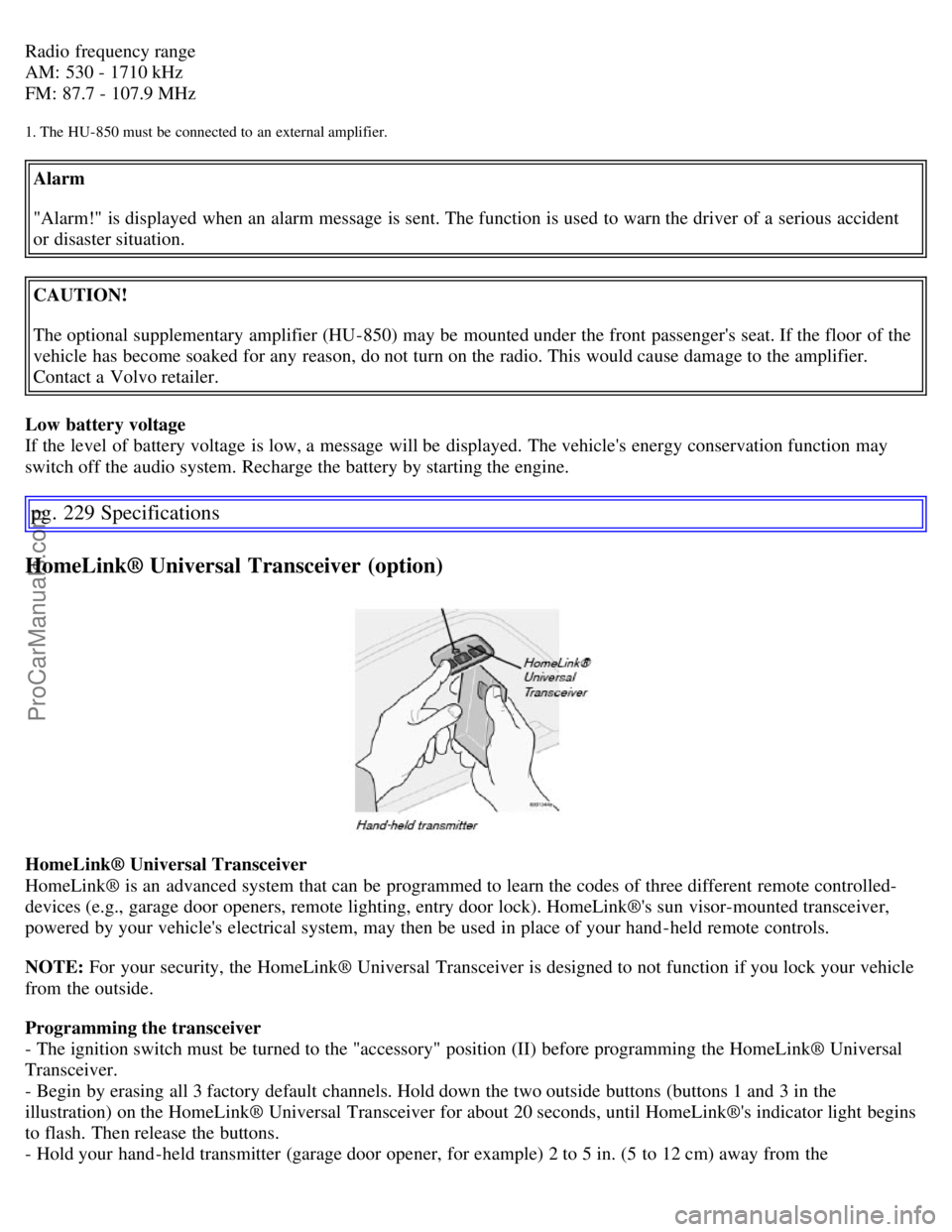
HomeLink® Universal Transceiver
HomeLink® is an advanced system that can be programmed to learn the codes of three different remote controlled-
devices (e.g., garage door openers, remote lighting, entry door lock). HomeLink®'s sun visor-mounted transceiver,
powered by your vehicle's electrical system, may then be used in place of your hand -held remote controls.
NOTE: For your security, the HomeLink® Universal Transceiver is designed to not function if you lock your vehicle
from the outside.
Programming the transceiver
- The ignition switch must be turned to the "accessory" position (II) before programming the HomeLink® Universal
Transceiver.
- Begin by erasing all 3 factory default channels. Hold down the two outside buttons (buttons 1 and 3 in the
illustration) on the HomeLink® Universal Transceiver for about 20 seconds, until HomeLink®'s indicator light begins
to flash. Then release the buttons.
- Hold your hand -held transmitter (garage door opener, for example) 2 to 5 in. (5 to 12 cm) away from the
ProCarManuals.com
Page 192 of 200
HomeLink® surface, keeping the indicator light in view. For placement questions, contact HomeLink® toll-free 1-
800-355-3515 (Internet: www.HomeLink.com).
- Using two hands, push and hold both your hand -held transmitter's button and the transceiver button you wish to
program.
The indicator light will flash first slowly, then rapidly. Rapid flashing tells you the HomeLink® button has been
successfully programmed. Release both buttons.
- If you are programming a rolling code-equipped device (e.g., garage door opener or entry door lock), refer to
"Programming rolling codes" on the next page to complete the programming process.
Repeat the third and fourth steps to program the other two transceiver buttons. If, after several attempts, you are unable
to successfully train the HomeLink® Universal Transceiver to learn your hand -held transmitter's signal, contact
HomeLink® toll-free 1-800-355-3515 (Internet: www.HomeLink.com
)
pg. 230 Specifications
HomeLink® Universal Transceiver (option)
WARNING!
If you use HomeLink® to open a garage door or gate, be sure no one is near the gate or door while it is in motion.
Do not use the HomeLink® Universal Transceiver with any garage door opener that lacks safety "stop" and
"reverse" features as required by federal safety standards. (This includes any garage door opener model
manufactured before April 1, 1982) A garage door opener that cannot "detect" an object, signalling the door to
"stop" and "reverse" does not meet current federal safety standards. Using a garage door opener without these
features increases the risk of serious injury or death. For more information on this matter, call toll-free
1-800-355-3515
(Internet: www.HomeLink.com
).
NOTE: Canadian residents:
During programming, your hand -held transmitter may automatically stop transmitting. To successfully train
HomeLink®, continue to hold the HomeLink® button. At the same time, repeatedly press and hold your handheld
transmitter's button at two-second intervals until HomeLink® has learned your transmitter's code. The HomeLink®
indicator light will flash first slowly, and then rapidly to indicate that the button has been successfully programmed.
Determining if your garage door uses a rolling code
Determine, in one of the following ways, if your garage door uses a rolling code system and is manufactured after
1996:
Refer to the garage door opener owner's manual for verification.
If your hand -held transmitter appears to program the HomeLink® Universal Transceiver but the programmed button
does not activate the garage door, your garage door opener may have a rolling code.
Press the programmed HomeLink® button. If the garage door opener has the rolling code feature, the HomeLink®
indicator light flashes rapidly and then glows steadily after approximately 2 seconds.
To train a rolling code garage door opener, follow these instructions after programming the desired transceiver
button according to "Programming the transceiver." The help of a second person may make training easier.
- Locate the training button on the garage door opener motor head unit. The location and color of the training button
may vary. If you encounter difficulty, refer to the garage door opener owner's manual or call toll-free 1-800-355-3515
(Internet: www.HomeLink.com
).
- Press the "training" button on the garage door opener motor head unit until the "training" light comes on.
- Press and release the programmed HomeLink® button. Press and release the programmed HomeLink® button a
second time to complete the training process.
Some garage door openers may require you to do this procedure a third time to complete the training.
ProCarManuals.com
Page 195 of 200
C
Capacities202
Capacity weight153
Carbon Monoxide - Important Warning107
Catalytic converter205
Central locking system - remote control97
Changing coolant172
Check Engine warning light46
Child safety child restraints31
Child safety lock102
Climate system72
Clock44
Coat hanger89
Cold weather precautions136
Coolant176
changing172
checking level of172
Coolant - changing176
Cooling system204
Courtesy light84
Cruise control60
Cup holders
center console88
rear seat
87
Curb weight153
Current fuel consumption59
D
Defroster75
Detachable trailer hitch133
Door mirror defroster58
Door mirrors51
Driver distraction5
Driving economically113
DSTC50
Dynamic Stability and Traction Control (DSTC)50
E
Economical driving113
Electric socket51
Electrical system207
Electrically operated moonroof68
Emission inspection170
Engine - starting111
Engine compartment173
Engine oil174, 203
ProCarManuals.com