brake VOLVO S60 2008 User Guide
[x] Cancel search | Manufacturer: VOLVO, Model Year: 2008, Model line: S60, Model: VOLVO S60 2008Pages: 230, PDF Size: 5.33 MB
Page 45 of 230
47 02 Instruments and controls
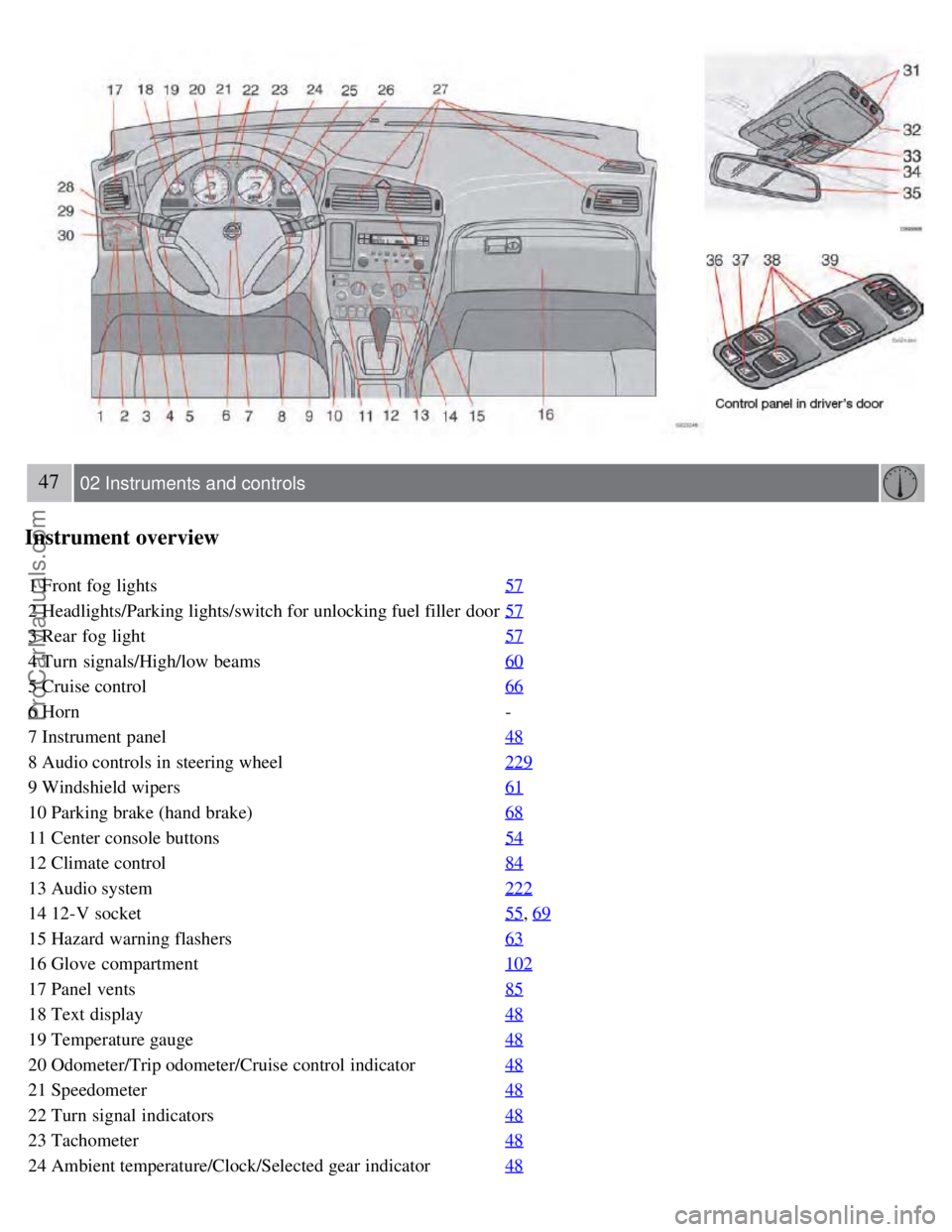
Instrument overview
1 Front fog lights57
2 Headlights/Parking lights/switch for unlocking fuel filler door57
3 Rear fog light57
4 Turn signals/High/low beams60
5 Cruise control66
6 Horn-
7 Instrument panel 48
8 Audio controls in steering wheel229
9 Windshield wipers61
10 Parking brake (hand brake)68
11 Center console buttons54
12 Climate control84
13 Audio system222
14 12-V socket55, 69
15 Hazard warning flashers63
16 Glove compartment102
17 Panel vents85
18 Text display48
19 Temperature gauge48
20 Odometer/Trip odometer/Cruise control indicator48
21 Speedometer48
22 Turn signal indicators48
23 Tachometer48
24 Ambient temperature/Clock/Selected gear indicator48
ProCarManuals.com
Page 47 of 230
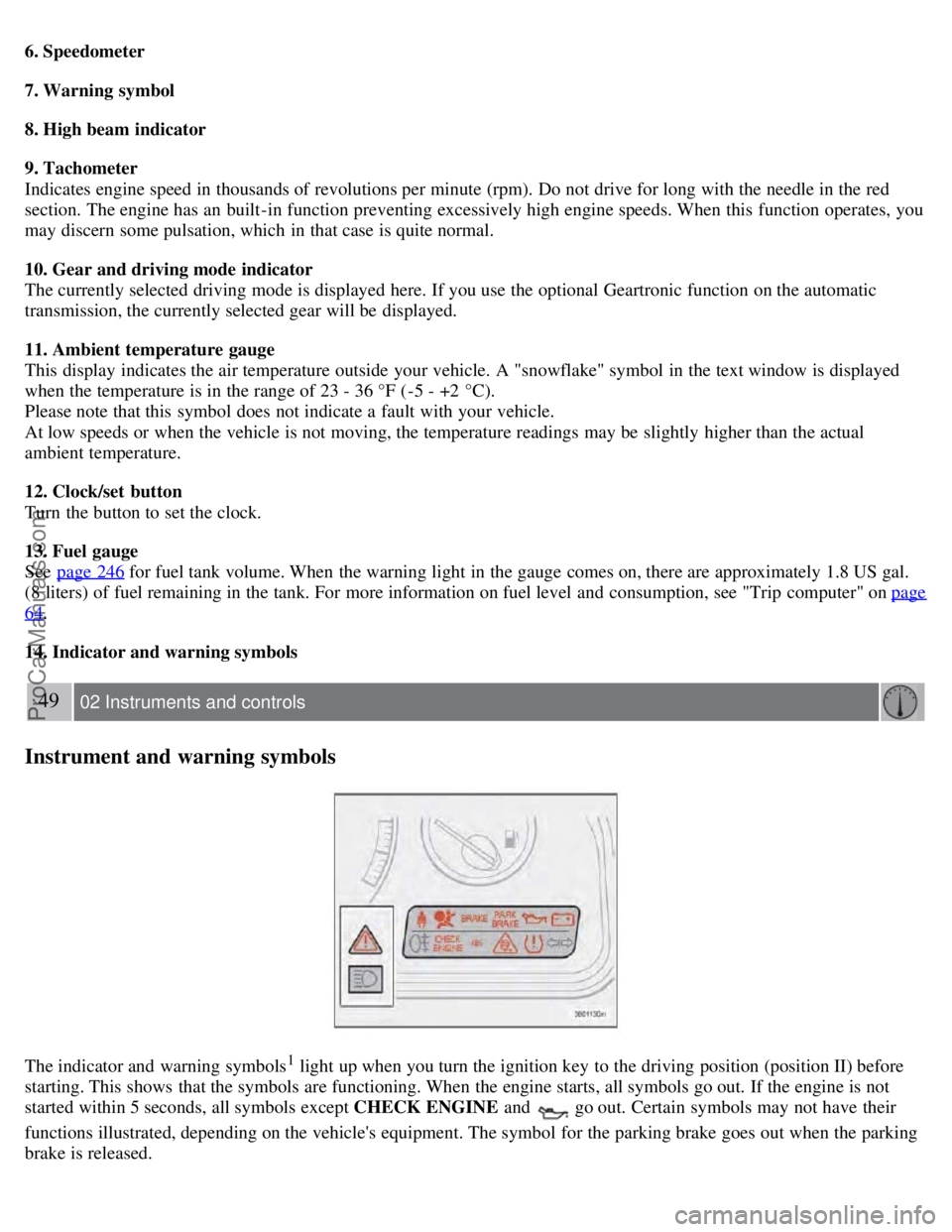
6. Speedometer
7. Warning symbol
8. High beam indicator
9. Tachometer
Indicates engine speed in thousands of revolutions per minute (rpm). Do not drive for long with the needle in the red
section. The engine has an built-in function preventing excessively high engine speeds. When this function operates, you
may discern some pulsation, which in that case is quite normal.
10. Gear and driving mode indicator
The currently selected driving mode is displayed here. If you use the optional Geartronic function on the automatic
transmission, the currently selected gear will be displayed.
11. Ambient temperature gauge
This display indicates the air temperature outside your vehicle. A "snowflake" symbol in the text window is displayed
when the temperature is in the range of 23 - 36 °F (-5 - +2 °C).
Please note that this symbol does not indicate a fault with your vehicle.
At low speeds or when the vehicle is not moving, the temperature readings may be slightly higher than the actual
ambient temperature.
12. Clock/set button
Turn the button to set the clock.
13. Fuel gauge
See page 246
for fuel tank volume. When the warning light in the gauge comes on, there are approximately 1.8 US gal.
(8 liters) of fuel remaining in the tank. For more information on fuel level and consumption, see "Trip computer" on page
64.
14. Indicator and warning symbols
49 02 Instruments and controls
Instrument and warning symbols
The indicator and warning symbols1 light up when you turn the ignition key to the driving position (position II) before
starting. This shows that the symbols are functioning. When the engine starts, all symbols go out. If the engine is not
started within 5 seconds, all symbols except CHECK ENGINE and
go out. Certain symbols may not have their
functions illustrated, depending on the vehicle's equipment. The symbol for the parking brake goes out when the parking
brake is released.
ProCarManuals.com
Page 48 of 230
1On certain engines, the symbol for low oil pressure is not used. Instead, a text warning is provided in the information display, see also page 52.
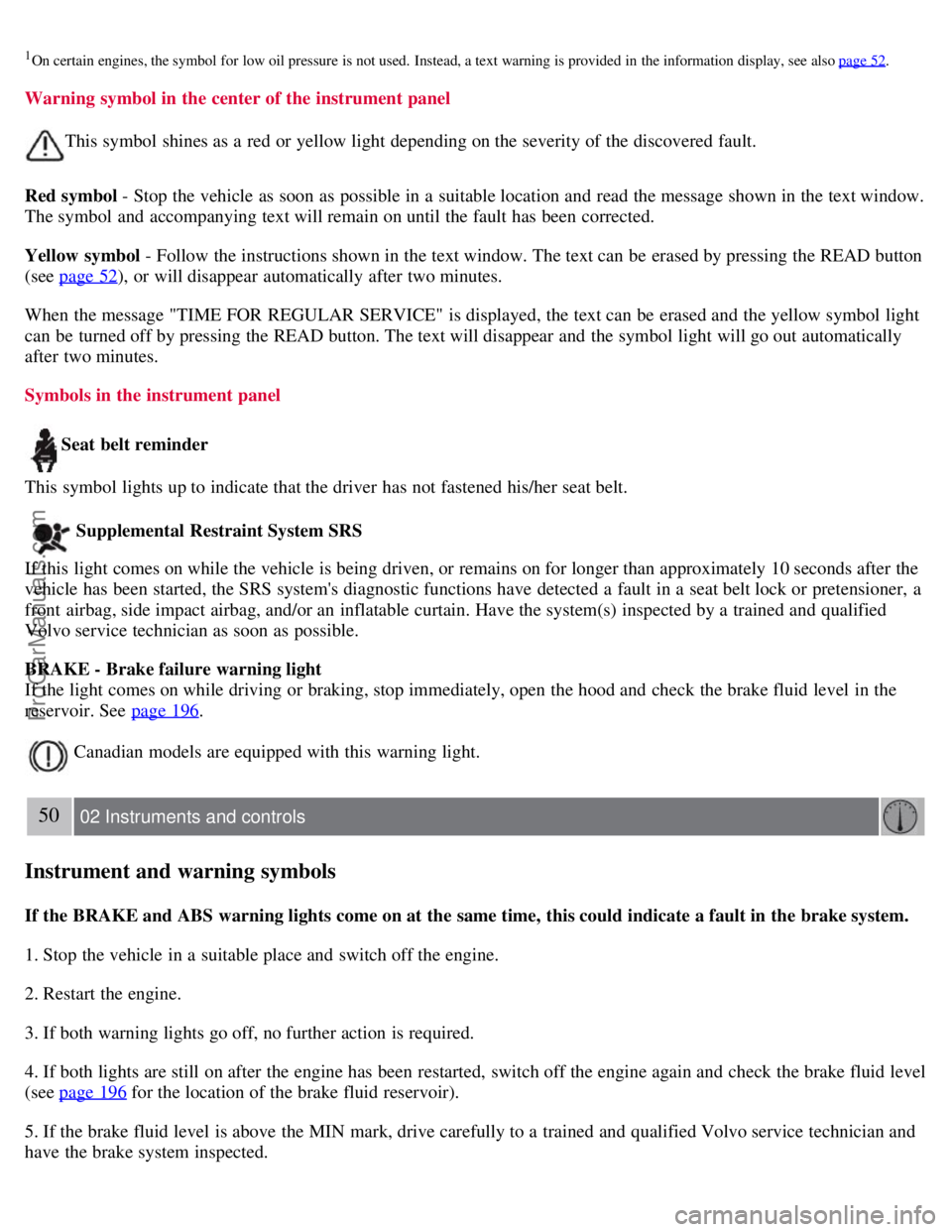
Warning symbol in the center of the instrument panel
This symbol shines as a red or yellow light depending on the severity of the discovered fault.
Red symbol - Stop the vehicle as soon as possible in a suitable location and read the message shown in the text window.
The symbol and accompanying text will remain on until the fault has been corrected.
Yellow symbol - Follow the instructions shown in the text window. The text can be erased by pressing the READ button
(see page 52
), or will disappear automatically after two minutes.
When the message "TIME FOR REGULAR SERVICE" is displayed, the text can be erased and the yellow symbol light
can be turned off by pressing the READ button. The text will disappear and the symbol light will go out automatically
after two minutes.
Symbols in the instrument panel
Seat belt reminder
This symbol lights up to indicate that the driver has not fastened his/her seat belt.
Supplemental Restraint System SRS
If this light comes on while the vehicle is being driven, or remains on for longer than approximately 10 seconds after the
vehicle has been started, the SRS system's diagnostic functions have detected a fault in a seat belt lock or pretensioner, a
front airbag, side impact airbag, and/or an inflatable curtain. Have the system(s) inspected by a trained and qualified
Volvo service technician as soon as possible.
BRAKE - Brake failure warning light
If the light comes on while driving or braking, stop immediately, open the hood and check the brake fluid level in the
reservoir. See page 196
.
Canadian models are equipped with this warning light.
50 02 Instruments and controls
Instrument and warning symbols
If the BRAKE and ABS warning lights come on at the same time, this could indicate a fault in the brake system.
1. Stop the vehicle in a suitable place and switch off the engine.
2. Restart the engine.
3. If both warning lights go off, no further action is required.
4. If both lights are still on after the engine has been restarted, switch off the engine again and check the brake fluid level
(see page 196
for the location of the brake fluid reservoir).
5. If the brake fluid level is above the MIN mark, drive carefully to a trained and qualified Volvo service technician and
have the brake system inspected.
ProCarManuals.com
Page 49 of 230
WARNING
If the fluid level is below the MIN mark in the reservoir or if a "Brake failure - Service urgent" message is displayed in
the text window: DO NOT DRIVE. Have the vehicle towed to a trained and qualified Volvo service technician and
have the brake system inspected.
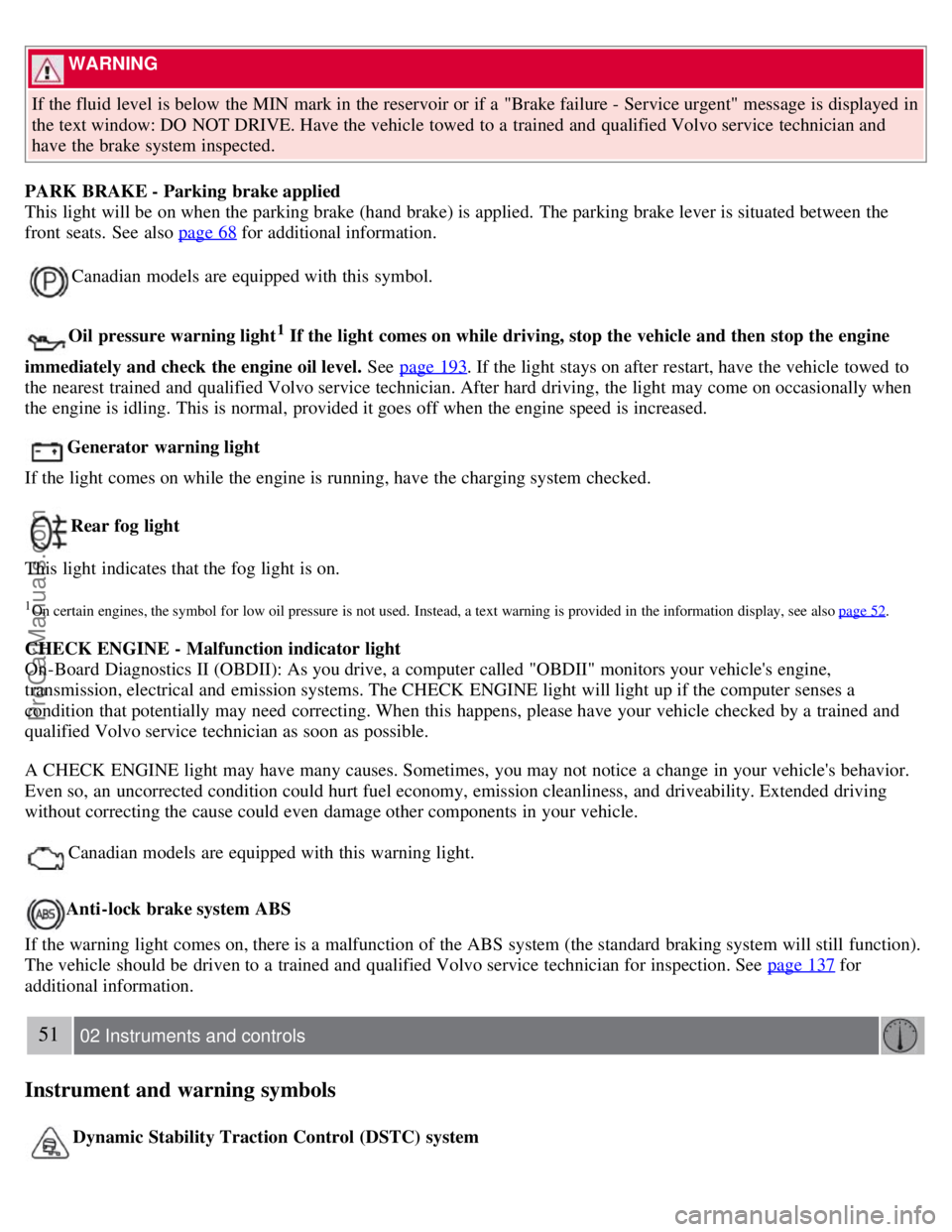
PARK BRAKE - Parking brake applied
This light will be on when the parking brake (hand brake) is applied. The parking brake lever is situated between the
front seats. See also page 68
for additional information.
Canadian models are equipped with this symbol.
Oil pressure warning light1 If the light comes on while driving, stop the vehicle and then stop the engine
immediately and check the engine oil level. See page 193
. If the light stays on after restart, have the vehicle towed to
the nearest trained and qualified Volvo service technician. After hard driving, the light may come on occasionally when
the engine is idling. This is normal, provided it goes off when the engine speed is increased.
Generator warning light
If the light comes on while the engine is running, have the charging system checked.
Rear fog light
This light indicates that the fog light is on.
1On certain engines, the symbol for low oil pressure is not used. Instead, a text warning is provided in the information display, see also page 52.
CHECK ENGINE - Malfunction indicator light
On-Board Diagnostics II (OBDII): As you drive, a computer called "OBDII" monitors your vehicle's engine,
transmission, electrical and emission systems. The CHECK ENGINE light will light up if the computer senses a
condition that potentially may need correcting. When this happens, please have your vehicle checked by a trained and
qualified Volvo service technician as soon as possible.
A CHECK ENGINE light may have many causes. Sometimes, you may not notice a change in your vehicle's behavior.
Even so, an uncorrected condition could hurt fuel economy, emission cleanliness, and driveability. Extended driving
without correcting the cause could even damage other components in your vehicle.
Canadian models are equipped with this warning light.
Anti-lock brake system ABS
If the warning light comes on, there is a malfunction of the ABS system (the standard braking system will still function).
The vehicle should be driven to a trained and qualified Volvo service technician for inspection. See page 137
for
additional information.
51 02 Instruments and controls
Instrument and warning symbols
Dynamic Stability Traction Control (DSTC) system
ProCarManuals.com
Page 62 of 230
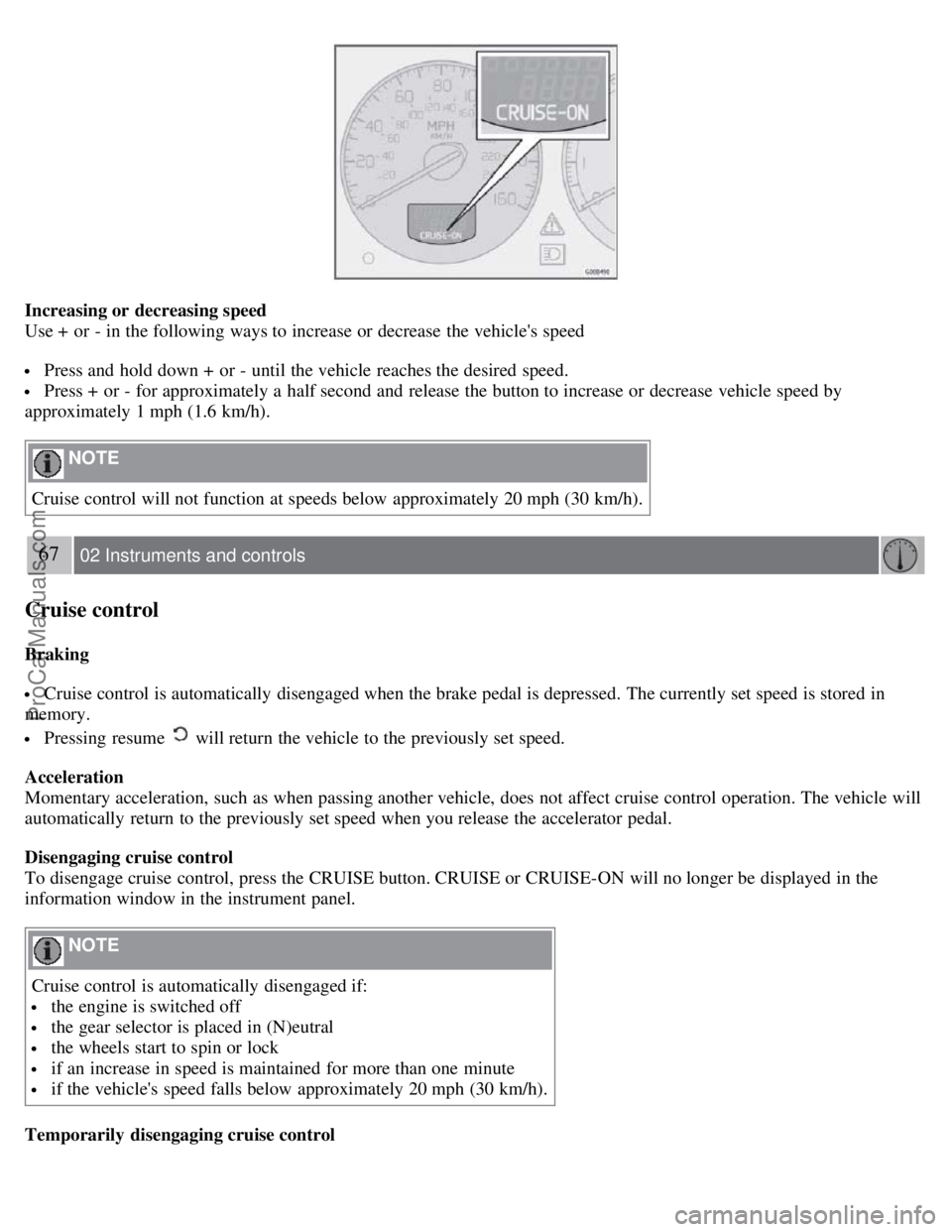
Increasing or decreasing speed
Use + or - in the following ways to increase or decrease the vehicle's speed
Press and hold down + or - until the vehicle reaches the desired speed.
Press + or - for approximately a half second and release the button to increase or decrease vehicle speed by
approximately 1 mph (1.6 km/h).
NOTE
Cruise control will not function at speeds below approximately 20 mph (30 km/h).
67 02 Instruments and controls
Cruise control
Braking
Cruise control is automatically disengaged when the brake pedal is depressed. The currently set speed is stored in
memory.
Pressing resume will return the vehicle to the previously set speed.
Acceleration
Momentary acceleration, such as when passing another vehicle, does not affect cruise control operation. The vehicle will
automatically return to the previously set speed when you release the accelerator pedal.
Disengaging cruise control
To disengage cruise control, press the CRUISE button. CRUISE or CRUISE-ON will no longer be displayed in the
information window in the instrument panel.
NOTE
Cruise control is automatically disengaged if:
the engine is switched off
the gear selector is placed in (N)eutral
the wheels start to spin or lock
if an increase in speed is maintained for more than one minute
if the vehicle's speed falls below approximately 20 mph (30 km/h).
Temporarily disengaging cruise control
ProCarManuals.com
Page 63 of 230
Press 0 to temporarily disengage cruise control. CRUISE will be displayed in the information window in the
instrument panel.
Press the brake pedal.
Press "resume"
to return to the previously set speed.
WARNING
Cruise control should not be used in heavy traffic or when driving on wet or slippery roads, or when driving on
unpaved or uneven road surfaces. Cruise control may not maintain set speed on steep downgrades.
68 02 Instruments and controls
Parking brake
The parking brake lever is located between the front seats.
NOTE
The indicator light will light up even if the parking brake has only been partially applied.
When applying the parking brake
1. Press firmly on the brake pedal.
2. Pull the parking brake lever up firmly to its full extent.
3. Release the brake pedal and ensure that the vehicle is at a standstill.
4. If the vehicle rolls, the parking brake lever must be pulled more firmly.
5. When parking a vehicle always put the gear selector in first gear (for manual transmission) or P (for automatic
transmission).
Parking on a hill
If the vehicle is pointing uphill, turn the front wheels so that they point away from the curb.
If the vehicle is pointing downhill, turn the front wheels so that they point toward the curb.
Releasing the parking brake
1. Press firmly on the brake pedal.
ProCarManuals.com
Page 64 of 230
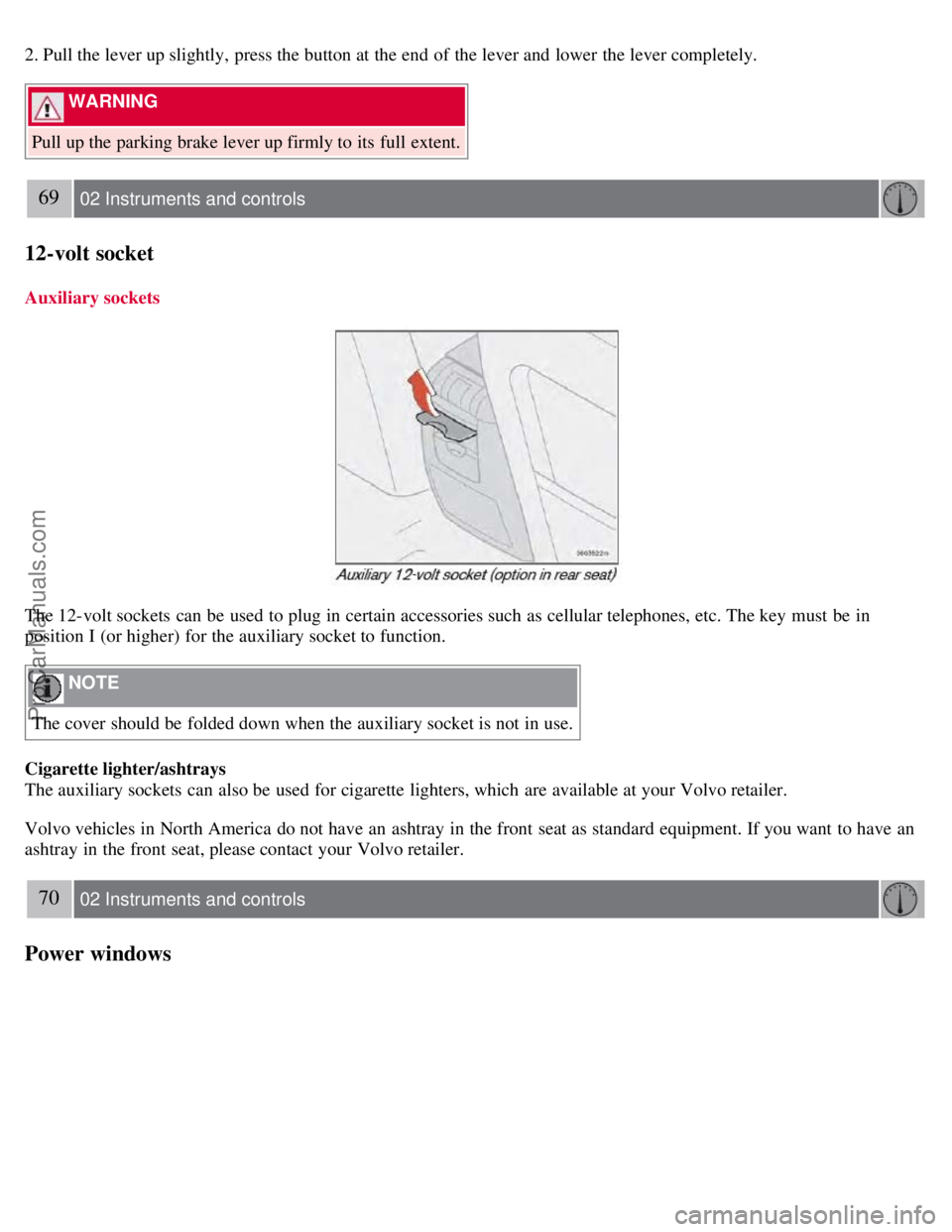
2. Pull the lever up slightly, press the button at the end of the lever and lower the lever completely.
WARNING
Pull up the parking brake lever up firmly to its full extent.
69 02 Instruments and controls
12-volt socket
Auxiliary sockets
The 12-volt sockets can be used to plug in certain accessories such as cellular telephones, etc. The key must be in
position I (or higher) for the auxiliary socket to function.
NOTE
The cover should be folded down when the auxiliary socket is not in use.
Cigarette lighter/ashtrays
The auxiliary sockets can also be used for cigarette lighters, which are available at your Volvo retailer.
Volvo vehicles in North America do not have an ashtray in the front seat as standard equipment. If you want to have an
ashtray in the front seat, please contact your Volvo retailer.
70 02 Instruments and controls
Power windows
ProCarManuals.com
Page 86 of 230
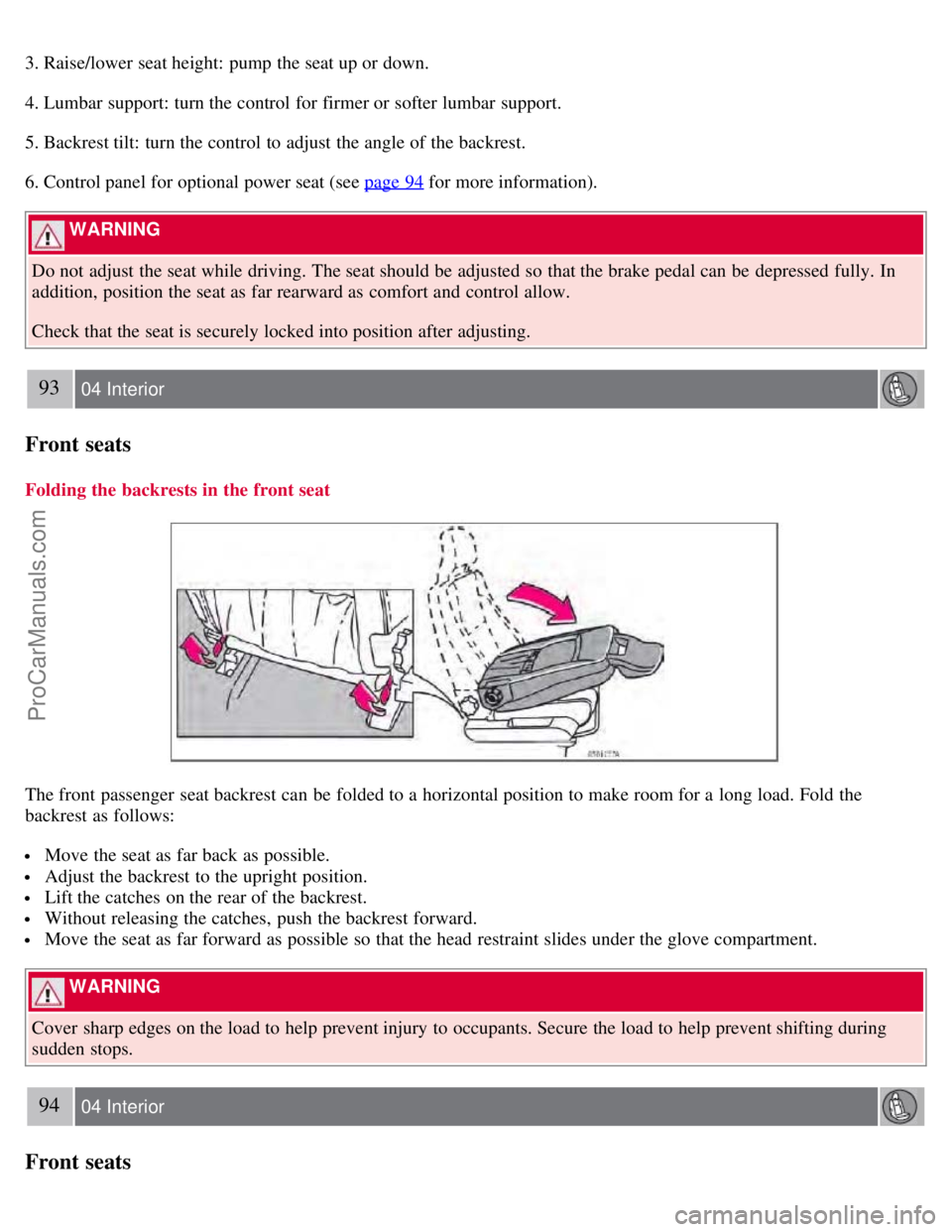
3. Raise/lower seat height: pump the seat up or down.
4. Lumbar support: turn the control for firmer or softer lumbar support.
5. Backrest tilt: turn the control to adjust the angle of the backrest.
6. Control panel for optional power seat (see page 94
for more information).
WARNING
Do not adjust the seat while driving. The seat should be adjusted so that the brake pedal can be depressed fully. In
addition, position the seat as far rearward as comfort and control allow.
Check that the seat is securely locked into position after adjusting.
93 04 Interior
Front seats
Folding the backrests in the front seat
The front passenger seat backrest can be folded to a horizontal position to make room for a long load. Fold the
backrest as follows:
Move the seat as far back as possible.
Adjust the backrest to the upright position.
Lift the catches on the rear of the backrest.
Without releasing the catches, push the backrest forward.
Move the seat as far forward as possible so that the head restraint slides under the glove compartment.
WARNING
Cover sharp edges on the load to help prevent injury to occupants. Secure the load to help prevent shifting during
sudden stops.
94 04 Interior
Front seats
ProCarManuals.com
Page 88 of 230
The position of the seat is now stored in the remote control.
Automatic seat adjustment
To move the seat to the position in which you left it:
1. Unlock the driver's door with the same remote control (the one used to lock the doors)
95 04 Interior
Front seats
2. Open the driver's door within 2 minutes.
The driver's seat will automatically move to the position in which you left it.
NOTE
The seat will move to this position even if someone else has moved it to a different seating position and locked the
vehicle with a different remote control.
This feature will work in the same way with all of the remote control transmitters (up to 3) that you use with your
vehicle.
This feature will not function if you lock your vehicle with the key.
WARNING
Because the driver's seat can be adjusted with the ignition off, children should never be left unattended in the
vehicle.
Movement of the seat can be STOPPED at any time by pressing any button on the power seat control panel.
Do not adjust the seat while driving. The seat should be adjusted so that the brake pedal can be depressed fully. In
addition, position the seat as far rearward as comfort and control allow.
The seat rails on the floor must not be obstructed in any way when the seat is in motion.
Programming the memory (option)
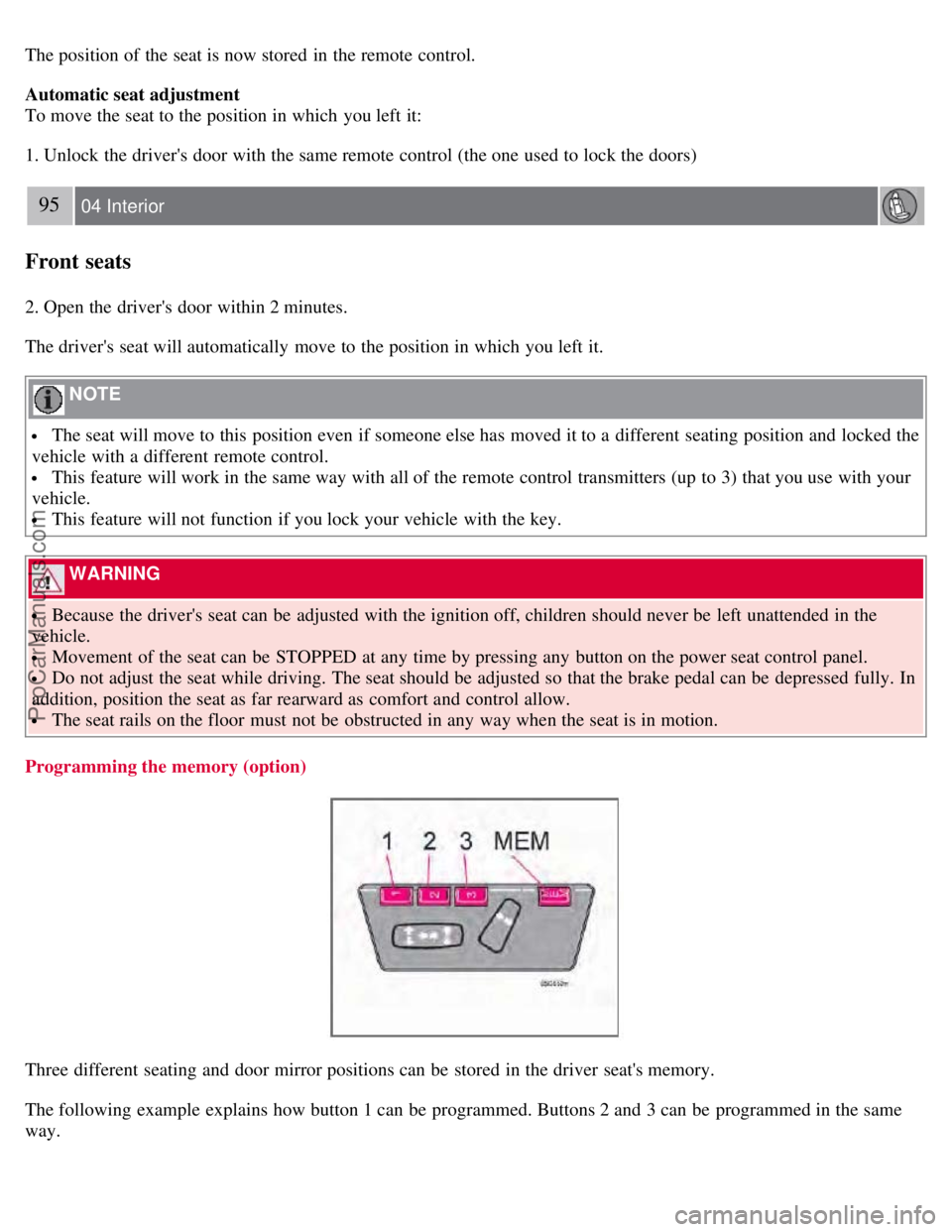
Three different seating and door mirror positions can be stored in the driver seat's memory.
The following example explains how button 1 can be programmed. Buttons 2 and 3 can be programmed in the same
way.
ProCarManuals.com
Page 95 of 230
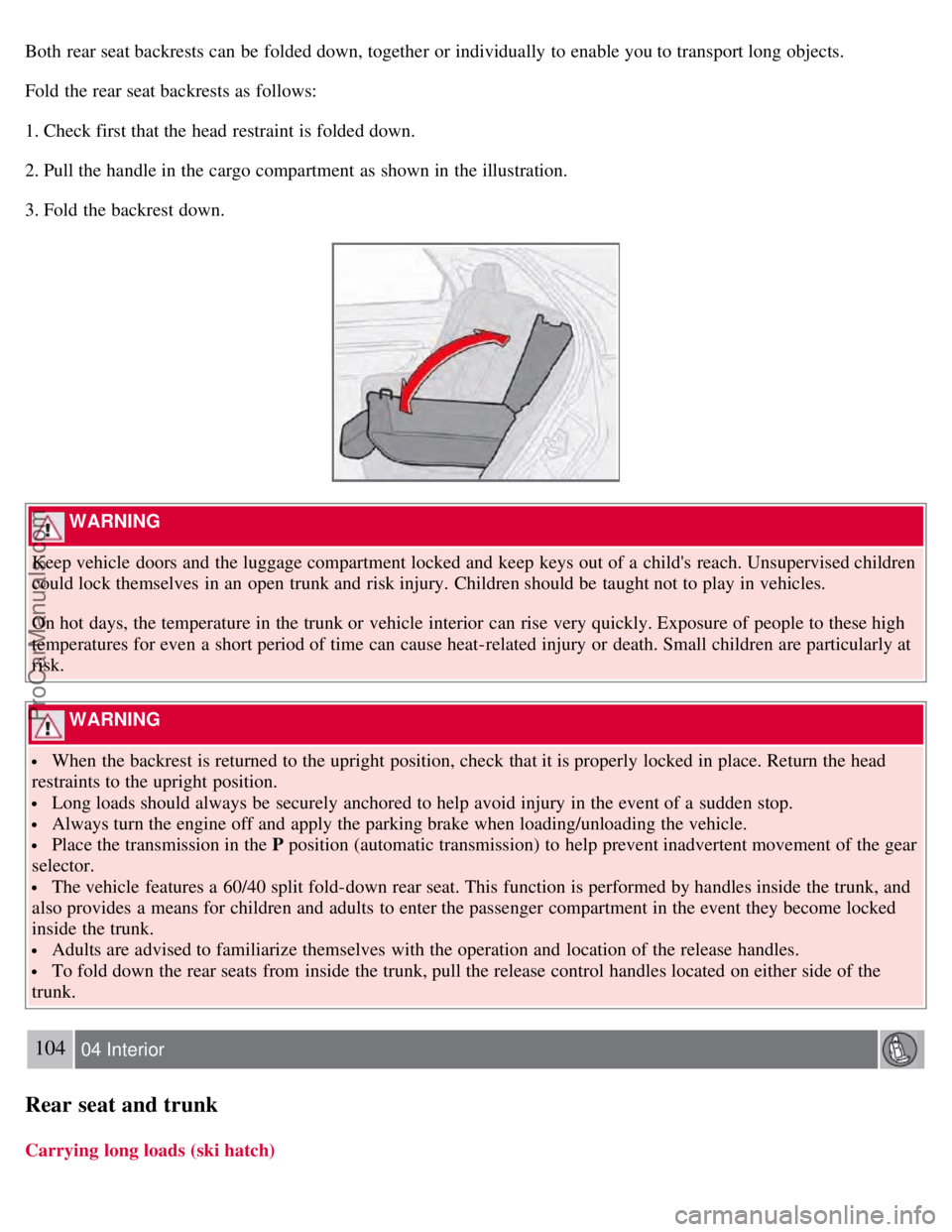
Both rear seat backrests can be folded down, together or individually to enable you to transport long objects.
Fold the rear seat backrests as follows:
1. Check first that the head restraint is folded down.
2. Pull the handle in the cargo compartment as shown in the illustration.
3. Fold the backrest down.
WARNING
Keep vehicle doors and the luggage compartment locked and keep keys out of a child's reach. Unsupervised children
could lock themselves in an open trunk and risk injury. Children should be taught not to play in vehicles.
On hot days, the temperature in the trunk or vehicle interior can rise very quickly. Exposure of people to these high
temperatures for even a short period of time can cause heat-related injury or death. Small children are particularly at
risk.
WARNING
When the backrest is returned to the upright position, check that it is properly locked in place. Return the head
restraints to the upright position.
Long loads should always be securely anchored to help avoid injury in the event of a sudden stop.
Always turn the engine off and apply the parking brake when loading/unloading the vehicle.
Place the transmission in the P position (automatic transmission) to help prevent inadvertent movement of the gear
selector.
The vehicle features a 60/40 split fold-down rear seat. This function is performed by handles inside the trunk, and
also provides a means for children and adults to enter the passenger compartment in the event they become locked
inside the trunk.
Adults are advised to familiarize themselves with the operation and location of the release handles.
To fold down the rear seats from inside the trunk, pull the release control handles located on either side of the
trunk.
104 04 Interior
Rear seat and trunk
Carrying long loads (ski hatch)
ProCarManuals.com