alarm VOLVO S60 2009 Owner´s Manual
[x] Cancel search | Manufacturer: VOLVO, Model Year: 2009, Model line: S60, Model: VOLVO S60 2009Pages: 254, PDF Size: 6.17 MB
Page 114 of 254
05 Locks and alarmChild safety locks
05114
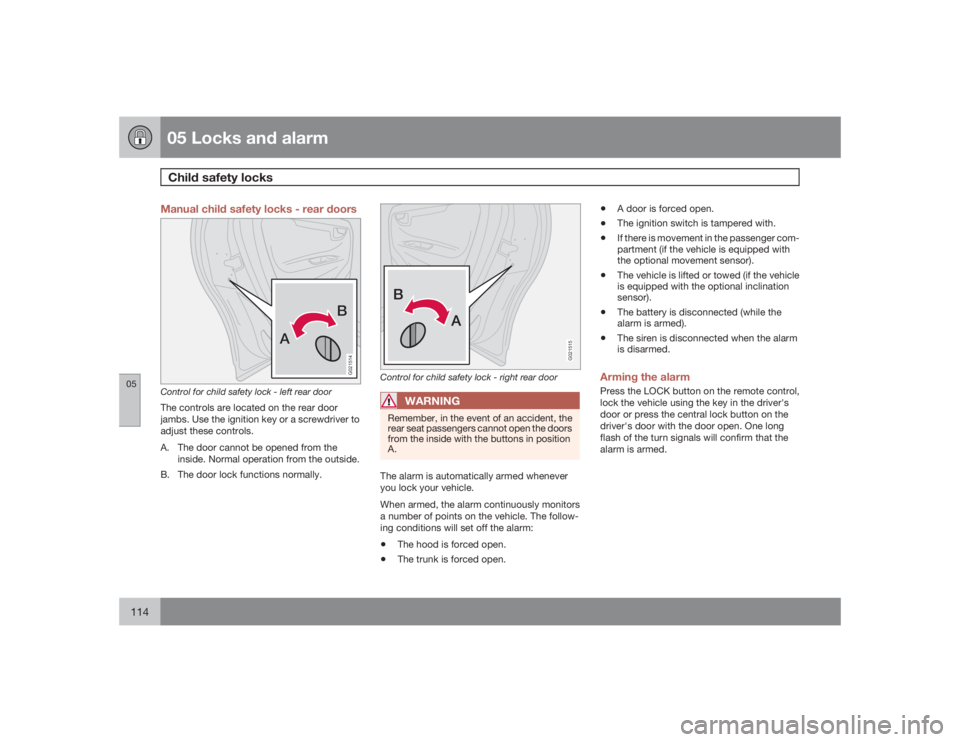
Manual child safety locks - rear doors
AB
G021514
Control for child safety lock - left rear doorThe controls are located on the rear door
jambs. Use the ignition key or a screwdriver to
adjust these controls.
A. The door cannot be opened from the
inside. Normal operation from the outside.
B. The door lock functions normally.
G021515
Control for child safety lock - right rear door
WARNING
Remember, in the event of an accident, the
rear seat passengers cannot open the doors
from the inside with the buttons in position
A.The alarm is automatically armed whenever
you lock your vehicle.
When armed, the alarm continuously monitors
a number of points on the vehicle. The follow-
ing conditions will set off the alarm:•
The hood is forced open.
•
The trunk is forced open.
•
A door is forced open.
•
The ignition switch is tampered with.
•
If there is movement in the passenger com-
partment (if the vehicle is equipped with
the optional movement sensor).
•
The vehicle is lifted or towed (if the vehicle
is equipped with the optional inclination
sensor).
•
The battery is disconnected (while the
alarm is armed).
•
The siren is disconnected when the alarm
is disarmed.
Arming the alarmPress the LOCK button on the remote control,
lock the vehicle using the key in the driver's
door or press the central lock button on the
driver's door with the door open. One long
flash of the turn signals will confirm that the
alarm is armed.
Page 115 of 254
05 Locks and alarm
Child safety locks
05
115 Disarming the alarm
Press the UNLOCK button on the remote con-
trol or unlock the doors with the key.Turning off (stopping) the alarmIf the alarm is sounding, it can be stopped by
pressing the UNLOCK button on the remote
control or by unlocking the driver's door with
the key.
Page 116 of 254
05 Locks and alarmAlarm
05116
Visual alarm signalThe visual alarm signal is given by flashing all
turn signals and turning on the interior lighting
for approximately 5 minutes.Audible alarm signalAn audible alarm signal is given by a battery
powered siren. One alarm cycle lasts for
25 seconds."Panic" buttonIn an emergency situation, this feature can be
used to attract attention.
Activate the "panic" button by pressing the red
button on the remote control (see the illustra-
tion on page 109) for at least 3 seconds or by
pressing this button twice within 3 seconds.
The turn signals will flash, and the vehicle's
horn will sound.
The function can be turned off by pressing any
of the buttons on the remote control or will stop
automatically after 25 seconds. When a button
is pressed, there is a 5 second delay before the
panic alarm is deactivated.
NOTE
This button will NOT unlock the vehicle.
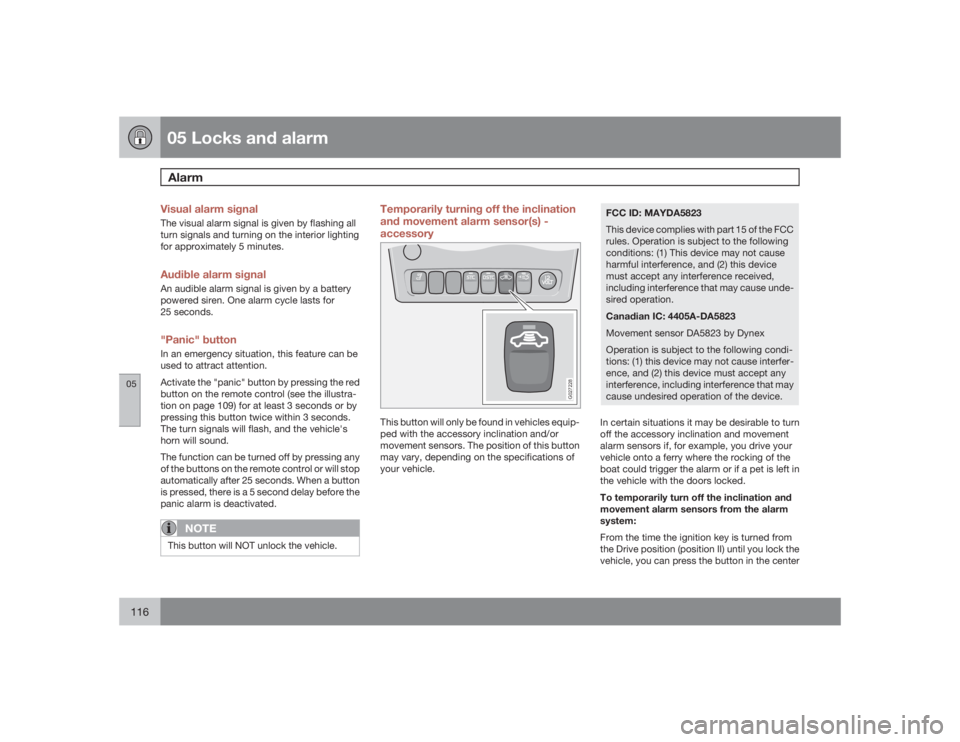
Temporarily turning off the inclination
and movement alarm sensor(s) -
accessory
G027228
This button will only be found in vehicles equip-
ped with the accessory inclination and/or
movement sensors. The position of this button
may vary, depending on the specifications of
your vehicle.
FCC ID: MAYDA5823
This device complies with part 15 of the FCC
rules. Operation is subject to the following
conditions: (1) This device may not cause
harmful interference, and (2) this device
must accept any interference received,
including interference that may cause unde-
sired operation.
Canadian IC: 4405A-DA5823
Movement sensor DA5823 by Dynex
Operation is subject to the following condi-
tions: (1) this device may not cause interfer-
ence, and (2) this device must accept any
interference, including interference that may
cause undesired operation of the device.In certain situations it may be desirable to turn
off the accessory inclination and movement
alarm sensors if, for example, you drive your
vehicle onto a ferry where the rocking of the
boat could trigger the alarm or if a pet is left in
the vehicle with the doors locked.
To temporarily turn off the inclination and
movement alarm sensors from the alarm
system:
From the time the ignition key is turned from
the Drive position (position II) until you lock the
vehicle, you can press the button in the center
Page 117 of 254
05 Locks and alarm
Alarm
05
117
console. The LED in the switch will light up and
a message will be displayed in the text window
to indicate that the sensors are disconnected.
The vehicle can then be locked in the usual way
to set the alarm.
NOTE
•
This function will not turn off the vehi-
cle's standard alarm.
•
The optional sensors are automatically
reconnected to the alarm system the
next time the vehicle is unlocked and
then locked again.
LED alarm status signalsThe status of the alarm system is indicated by
the red LED at the top of the dash:•
LED off - the alarm is not armed
•
LED flashes once per second - the alarm is
armed
•
LED flashes rapidly before the ignition is
switched on - the alarm has been triggered
•
Fault in the alarm system: If a fault has
been detected in the alarm system, a mes-
sage will be displayed in the text window.
Contact a trained and qualified Volvo serv-
ice technician.
Automatic re-lock/re-arm systemIf the vehicle is unlocked with the remote, the
vehicle will re-lock and the alarm will re-arm
after 2 minutes unless a door or the trunk has
been opened.
Page 209 of 254
09 Maintenance and servicing
Fuses
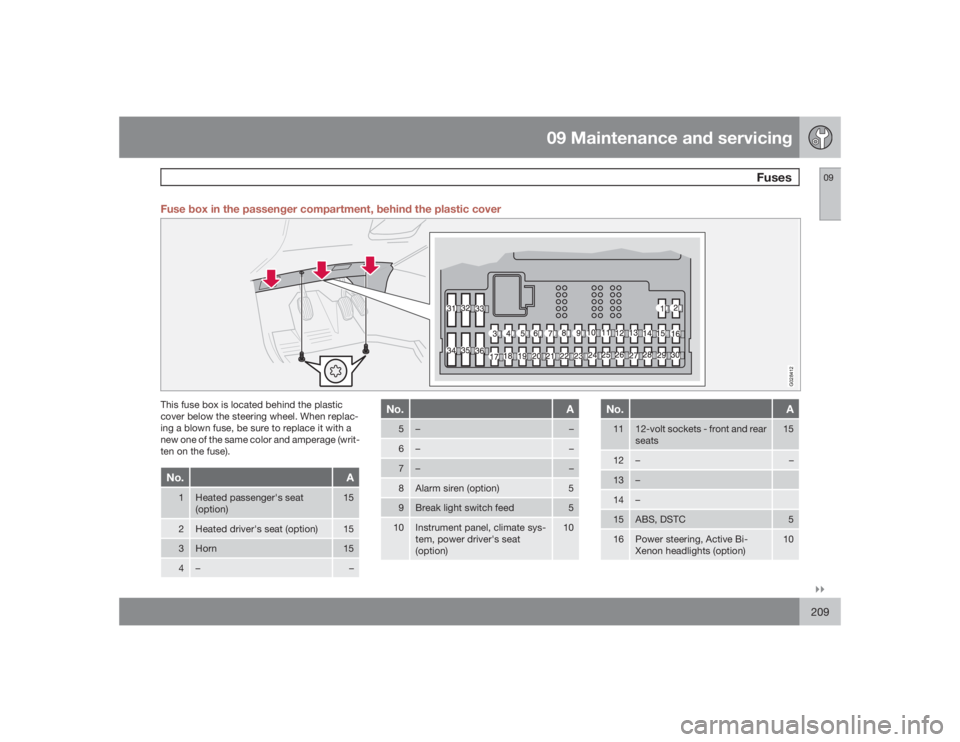
09``209 Fuse box in the passenger compartment, behind the plastic cover
G028412
This fuse box is located behind the plastic
cover below the steering wheel. When replac-
ing a blown fuse, be sure to replace it with a
new one of the same color and amperage (writ-
ten on the fuse).No.
A
1
Heated passenger's seat
(option)
15
2
Heated driver's seat (option)
15
3
Horn
15
4
–
–
No.
A
5
–
–
6
–
–
7
–
–
8
Alarm siren (option)
5
9
Break light switch feed
5
10
Instrument panel, climate sys-
tem, power driver's seat
(option)
10
No.
A
11
12-volt sockets - front and rear
seats
15
12
–
–
13
–
14
–
15
ABS, DSTC
5
16
Power steering, Active Bi-
Xenon headlights (option)
10
Page 219 of 254

10 Audio
Radio functions HU-650/HU-850
10``219
Switch on/off
Press the knob to switch on or
turn off the radio.
Volume controlTurn the knob clockwise to increase volume.
Volume control is electronic and does not have
an end stop. If you have a key pad in the steer-
ing wheel, increase or decrease the volume
with the + or – buttons.Volume control - ALARMIf a CD is playing when the radio receives an
alarm bulletin (available in certain areas only),
the CD player enters pause mode. The bulletin
is broadcast at the volume selected for this
type of message.
G026678
Auxiliary (AUX) 3.5 mm connector portAfter the bulletin has been completed, the
audio system reverts to the originally selected
sound.AUX connector (option)The AUX (auxiliary) port can be used to connect
external devices such as an mp3 player.
Turn the SOURCE control (see the illustrations
on on page 217 or 218) to choose AUX.
If the player is being charged through a 12-volt
socket while it is connect to the AUX port,
sound quality may be impaired.
The volume of the external sound source AUX
may be different from the volume of the internalsound sources such as the CD player or the
radio.
To change the AUX volume level:
1. While playing the radio or a CD, lower the
audio volume to about one-quarter.
2. Switch to AUX mode on the audio system.
3. Connect the headphone output from your
music player to the AUX input using a cable
with a stereo 3.5mm miniplug at both ends.
4. Set your music player's headphone vol-
ume to three-quarters using the player's
volume controls.
5.
PressSOURCE, turn the SOURCE knob,
select
ADVANCED MENU
and press
SOURCE.
6.
Press the SOURCE knob, turn to AUDIO
SETTINGS and press SOURCE.
7.
Press the SOURCE knob, turn to
AUX
INPUT
and press SOURCE.
8. Turn the volume knob to raise or lower the
AUX Input Volume
until you hear music at
a comfortable level.
9. If there is distortion, lower your music play-
er's headphone volume until the distortion
goes away.
10. Finally, exit the menu and adjust the audio
volume to a comfortable level.
Page 223 of 254
10 Audio
RBDS functions HU-650/HU-850
10``223 Radio Broadcast Data System - RBDS
This feature, which may not be available in your
area, functions only with FM broadcasts. The
radio in your vehicle is equipped with an
advanced system allowing information from
broadcasters to be transmitted visually, as
text, together with the audio signal. This infor-
mation is then decoded by the radio and made
available for several new and unique features.
The RBDS or Radio Broadcast Data System
operates in the FM band only, and the infor-
mation transmitted is supplied exclusively by
participating broadcasters. Volvo has no con-
trol over the accuracy of the data or informa-
tion.
Coverage by local broadcasters may be limited
at this time, but as the technology and benefits
grow, you will find the radio in your vehicle is
equipped to take advantage of this system.PI (Program Information) Seek:When an FM station has been stored as a pre-
set, the radio also stores RBDS program infor-
mation if it is available. When the preset is
selected at a later time, the radio tries to access
updated program information. In weak signal
areas, there may be a delay before the station
becomes audible. During this delay, "PI seek"
will be displayed and there will be no sound.
PI seek can be interrupted by pressing EXIT.
Radio textCertain RBDS stations broadcast program
information, which can be shown in the display.
The text will be shown twice in the display.To start this function:Press the FM button for several seconds.To deactivate this function:Press FM briefly.
Station information will be shown twice in the
display.AlarmAlarms bulletins are transmitted automatically
by certain RBDS stations. The function cannot
be deactivated.Alarm!
is shown in the radio display when an
alarm message is sent. The function is used to
warn motorists of serious accidents, etc.
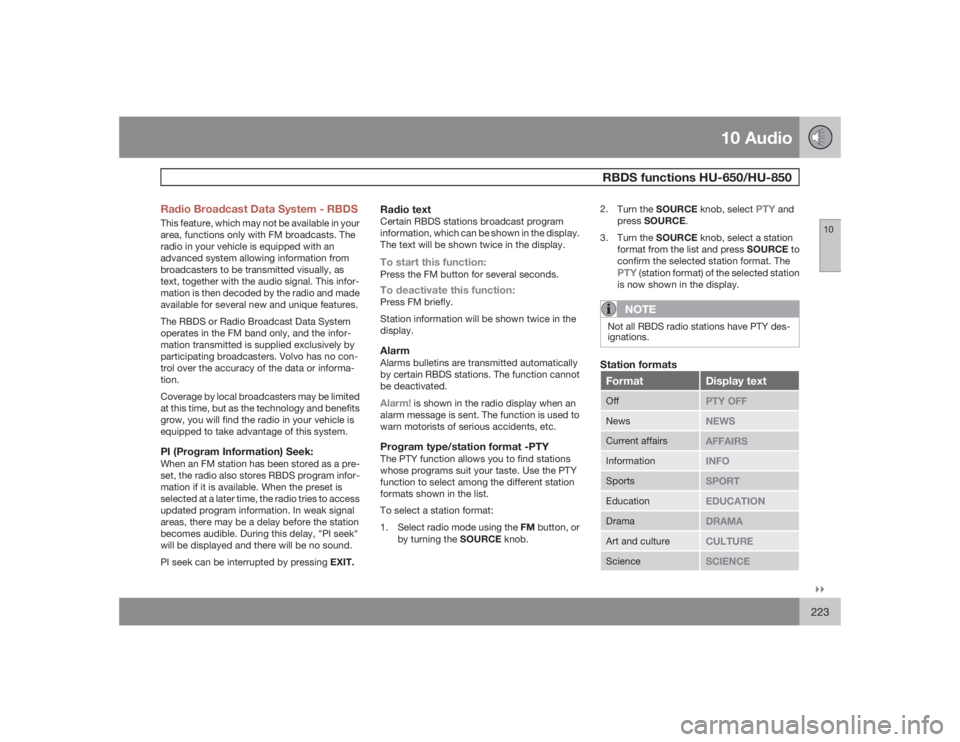
Program type/station format -PTYThe PTY function allows you to find stations
whose programs suit your taste. Use the PTY
function to select among the different station
formats shown in the list.
To select a station format:
1.
Select radio mode using the FM button, or
by turning the SOURCE knob.2.
Turn the SOURCE knob, select
PTY
and
pressSOURCE.
3.
Turn the SOURCE knob, select a station
format from the list and press SOURCE to
confirm the selected station format. The
PTY
(station format) of the selected station
is now shown in the display.NOTE
Not all RBDS radio stations have PTY des-
ignations.Station formatsFormat
Display text
Off
PTY OFF
News
NEWS
Current affairs
AFFAIRS
Information
INFO
Sports
SPORT
Education
EDUCATION
Drama
DRAMA
Art and culture
CULTURE
Science
SCIENCE
Page 230 of 254
10 AudioAudio systems - specifications
10230
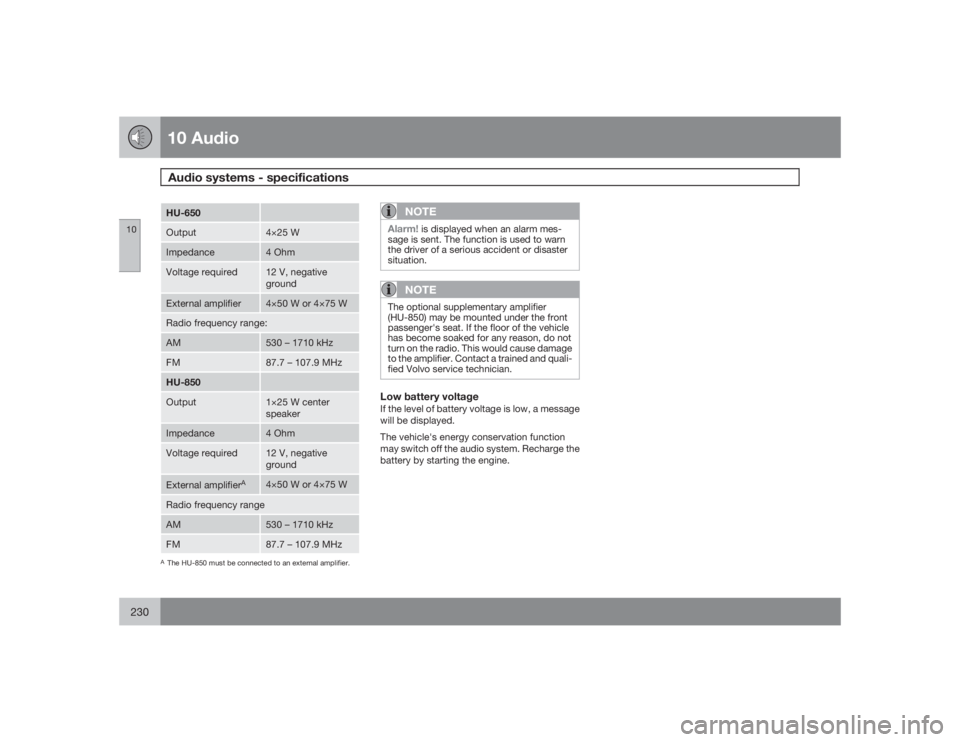
HU-650Output
4×25 W
Impedance
4 Ohm
Voltage required
12 V, negative
ground
External amplifier
4×50 W or 4×75 W
Radio frequency range:AM
530 – 1710 kHz
FM
87.7 – 107.9 MHz
HU-850Output
1×25 W center
speaker
Impedance
4 Ohm
Voltage required
12 V, negative
ground
External amplifier
A
4×50 W or 4×75 W
Radio frequency rangeAM
530 – 1710 kHz
FM
87.7 – 107.9 MHz
AThe HU-850 must be connected to an external amplifier.
NOTE
Alarm!
is displayed when an alarm mes-
sage is sent. The function is used to warn
the driver of a serious accident or disaster
situation.
NOTE
The optional supplementary amplifier
(HU-850) may be mounted under the front
passenger's seat. If the floor of the vehicle
has become soaked for any reason, do not
turn on the radio. This would cause damage
to the amplifier. Contact a trained and quali-
fied Volvo service technician.Low battery voltageIf the level of battery voltage is low, a message
will be displayed.
The vehicle's energy conservation function
may switch off the audio system. Recharge the
battery by starting the engine.
Page 248 of 254

12 Index
12248
AA/C (air conditioning)................................. 90
ABS.......................................................... 136
Airbag system............................................ 20
Air conditioning.......................................... 89
Air distribution................................ 88, 90, 91
Air quality sensor....................................... 91
Air vents..................................................... 88
Alarm........................................................ 116
All Wheel Drive......................................... 134
towing.................................................141
Anti-lock Brake System (ABS)................. 136
Audio system........................................... 216
CD changer (external)......................... 228
CD player.................................... 226, 227
Dolby Surround Pro Logic II............... 229
PI seek................................................ 223
selecting a sound source.................... 221
sound settings.................................... 220
storing radio stations.......................... 222
AUTO (climate control)............................... 89
Automatic transmission........................... 130
Geartronic........................................... 132
kickdown............................................ 131AWD......................................................... 134
BBackrest, rear seat, folding...................... 102
Battery..................................................... 187
maintenance....................................... 195
replacing............................................. 196
specifications...................................... 244
Belt check................................................ 187
Black Box (Vehicle Event Data)............... 184
Blower (fan)................................................ 90
Brake circuit............................................. 135
Brake fluid................................................ 193
Brake system........................................... 135
Bulbs
list of................................................... 243
replacing............................................. 198CCapacities, fluids..................................... 240
Capacity weight....................................... 163Catalytic converter, three-way................. 245
CD changer.............................................. 227
CD changer (external).............................. 228
CD player................................................. 226
Central locking system - remote control. 109
Changing a wheel.................................... 169
Changing coolant..................................... 188
Charge air cooler..................................... 242
Child restraints
recalls and registration......................... 44
Child safety................................................ 32
child restraints...................................... 34
Child safety lock...................................... 114
Climate system.......................................... 86
Coat hanger............................................. 101
Cold weather precautions........................ 148
Coolant.................................................... 192
changing..................................... 188, 192
checking level of................................. 187
Courtesy lighting........................................ 97
Cup holders
rear seat.............................................. 100
Curb weight............................................. 163