audio VOLVO S60 2009 Owner´s Manual
[x] Cancel search | Manufacturer: VOLVO, Model Year: 2009, Model line: S60, Model: VOLVO S60 2009Pages: 254, PDF Size: 6.17 MB
Page 215 of 254
10
AUDIO
Page 216 of 254

10 AudioIntroduction
10216
The audio system in your vehicle is operated
with the buttons and knobs in the system's
front panel. Certain functions, such as adjust-
ing the volume, changing radio stations or
tracks on a CD, etc, can also be controlled with
the steering wheel-mounted keypad.
The audio system is available in two versions:HU-650Features: AM/FM radio, single-disc CD player,
4×25W output, six
1 speakers.
HU-850Features: AM/FM radio, integrated 6-disc CD
changer, 4×50W or 4×70W output plus 25W
Dolby Pro Logic II, eleven speakers.Compact disc care•
Keep the discs clean. Wipe them with a
soft, clean, lint-free cloth, working from the
center outwards. If necessary, dampen the
cloth with a neutral soap solution. Dry thor-
oughly before using.
•
Never use cleaning spray or antistatic liq-
uid. Use only cleaners specifically made for
CDs.
•
Use discs of the correct size only (3.5"
discs should never be used).
•
The discs should conform to the norms
EN60908 (IEC60908). CDR discs cancause listening problems due to the quality
of the disc or recording equipment used.
•
Do not put tape or labels on the disc itself.
•
Volvo does not recommend the use of
plastic outer rings on the disc.
•
Condensation may occur on discs/optical
components of the changer in cold winter
weather. The disc can be dried with a
clean, lint-free cloth. Optical components
in the CD changer may, however, take up
to one hour to dry off.
•
Never attempt to play a disc which is dam-
aged in any way.
•
When not in use, the discs should be
stored in their covers. Avoid storing discs
in excessive heat, direct sunlight or dusty
locations.
1T5 and 2.5T/2.5T AWD with the Premium package: eight speakers
Page 217 of 254

10 Audio
Audio system HU-650 - overview
10
217
HU-650COMPACT
DIGITAL AUDIO
1
789
101112
2
6
5
3
416
17 18 13 14 15
G025598
RND CD random playAM AM (select AM1 or AM2)CD slotDisplayScan (automatically search for radio sta-
tions)CD ejectFM FM (select FM1, FM2, FM3)CD CD playerAUTO AUTO - automatically search for
radio stations
Navigation buttons (seek/change radio
station or CD track)EXIT Exit (exit the menu)Buttons for selecting stored radio stations/
discs in optional CD changerPOWER On/off - press Volume - turnBASS Bass (press to release control and
turn to adjust)TREBLE Treble (press to release control
and turn to adjust)BALANCE Balance (left/right) - press to
release control and turn to adjustFADER Fader (front/rear) - press to release
control and turn to adjustSOURCE PUSH MENU Source/Menu
Press to open main menu Turn to select
FM, AM, CD, CD changer (option), or AUX
(option)
Page 218 of 254

10 AudioAudio system HU-850 - overview
10218
HU-850COMPACT
DIGITAL AUDIO
91011
121314
8 7
16
17 18
15 20 2119 12 65 34
G025599
RND CD random playAM AM (select AM1 or AM2)CD slotDisplay3-CH 3-channel stereoOFF 2-channel stereoDolby Surround Pro Logic IICD ejectFM FM (select FM1, FM2, FM3)CD CD player
AUTO AUTO - automatically search for
radio stationsNavigation buttons (seek/change radio
station or CD track)EXIT Exit (exit the menu)SCAN Scan function (automatically search
for radio stations)POWER On/off - press Volume - turn1-6 Buttons for selecting stored radio sta-
tions/discs in optional CD changerBASS Bass (press to release control and
turn to adjust)TREBLE Treble (press to release control
and turn to adjust)BALANCE Balance (left/right) - press to
release control and turn to adjustFADER Fader (front/rear) - press to release
control and turn to adjustSOURCE PUSH MENU Source/Menu
Press to open main menu Turn to select
FM, AM, CD, CD changer (option), or AUX
(option)
Page 219 of 254

10 Audio
Radio functions HU-650/HU-850
10``219
Switch on/off
Press the knob to switch on or
turn off the radio.
Volume controlTurn the knob clockwise to increase volume.
Volume control is electronic and does not have
an end stop. If you have a key pad in the steer-
ing wheel, increase or decrease the volume
with the + or – buttons.Volume control - ALARMIf a CD is playing when the radio receives an
alarm bulletin (available in certain areas only),
the CD player enters pause mode. The bulletin
is broadcast at the volume selected for this
type of message.
G026678
Auxiliary (AUX) 3.5 mm connector portAfter the bulletin has been completed, the
audio system reverts to the originally selected
sound.AUX connector (option)The AUX (auxiliary) port can be used to connect
external devices such as an mp3 player.
Turn the SOURCE control (see the illustrations
on on page 217 or 218) to choose AUX.
If the player is being charged through a 12-volt
socket while it is connect to the AUX port,
sound quality may be impaired.
The volume of the external sound source AUX
may be different from the volume of the internalsound sources such as the CD player or the
radio.
To change the AUX volume level:
1. While playing the radio or a CD, lower the
audio volume to about one-quarter.
2. Switch to AUX mode on the audio system.
3. Connect the headphone output from your
music player to the AUX input using a cable
with a stereo 3.5mm miniplug at both ends.
4. Set your music player's headphone vol-
ume to three-quarters using the player's
volume controls.
5.
PressSOURCE, turn the SOURCE knob,
select
ADVANCED MENU
and press
SOURCE.
6.
Press the SOURCE knob, turn to AUDIO
SETTINGS and press SOURCE.
7.
Press the SOURCE knob, turn to
AUX
INPUT
and press SOURCE.
8. Turn the volume knob to raise or lower the
AUX Input Volume
until you hear music at
a comfortable level.
9. If there is distortion, lower your music play-
er's headphone volume until the distortion
goes away.
10. Finally, exit the menu and adjust the audio
volume to a comfortable level.
Page 220 of 254
10 AudioRadio functions HU-650/HU-850
10220
The volume level for the auxiliary device can
now be adjusted.
Press EXIT to save the setting and exit the
menu.Sound settings
G027191
Optimal sound reproductionThe audio system is calibrated for optimal
sound reproduction through the use of digital
signal processing. This calibration takes into
account the speakers, amplifier, cabin acous-
tics, the seating position of the listener, etc., for
each combination of vehicle and audio system.
There is also dynamic calibration that takes
into account the setting of the volume control,radio reception, and the vehicle's speed. The
sound settings described in this manual, such
as
BASS
,TREBLE
, and
EQUALIZER
are only
intended to enable the user to adapt sound
reproduction to his/her personal preferences.
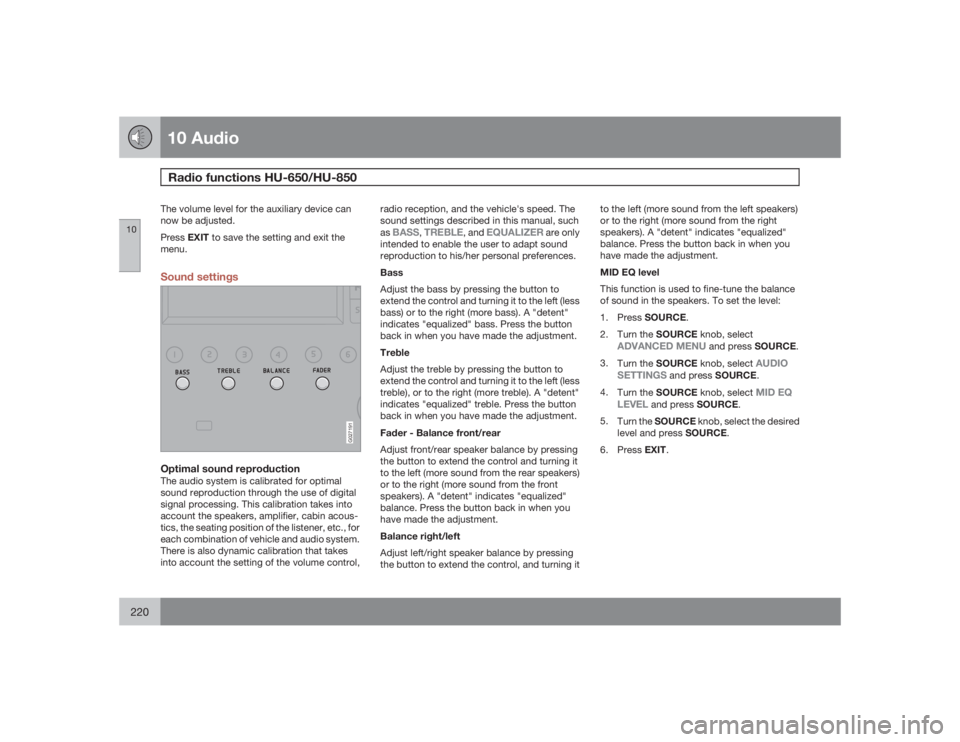
Bass
Adjust the bass by pressing the button to
extend the control and turning it to the left (less
bass) or to the right (more bass). A "detent"
indicates "equalized" bass. Press the button
back in when you have made the adjustment.
Treble
Adjust the treble by pressing the button to
extend the control and turning it to the left (less
treble), or to the right (more treble). A "detent"
indicates "equalized" treble. Press the button
back in when you have made the adjustment.
Fader - Balance front/rear
Adjust front/rear speaker balance by pressing
the button to extend the control and turning it
to the left (more sound from the rear speakers)
or to the right (more sound from the front
speakers). A "detent" indicates "equalized"
balance. Press the button back in when you
have made the adjustment.
Balance right/left
Adjust left/right speaker balance by pressing
the button to extend the control, and turning itto the left (more sound from the left speakers)
or to the right (more sound from the right
speakers). A "detent" indicates "equalized"
balance. Press the button back in when you
have made the adjustment.
MID EQ level
This function is used to fine-tune the balance
of sound in the speakers. To set the level:
1.
PressSOURCE.
2.
Turn the SOURCE knob, select
ADVANCED MENU
and press SOURCE.
3.
Turn the SOURCE knob, select
AUDIO
SETTINGS
and press SOURCE.
4.
Turn the SOURCE knob, select
MID EQ
LEVEL
and press SOURCE.
5.
Turn the SOURCE knob, select the desired
level and press SOURCE.
6.
PressEXIT.
Page 221 of 254

10 Audio
Radio functions HU-650/HU-850
10``221 Selecting a sound source
The sound source (e.g. AM,
FM, etc.) can be selected in two
ways:
•
Use the sound source buttons (see the
center illustration above).
•
Turn the SOURCE knob (see illustration) to
select a sound source (AM1, AM2, FM1,
FM2, FM3, or CD). Press the knob to select
theAM or FMband of your choice.
The sound source selected will be shown in the
display.
Scan
Press the SCAN button to start
the station scan function. When
a station is found, scanning
stops for approximately 10 sec-
onds, after which scanning will
continue.
Press the SCAN or SOURCE button when a
station has been found if you would like to lis-
ten to that station and to discontinue the scan
function.
Station seek up/downPress
or
to start the seek func-
tion. The radio seeks the next audible station
and tunes it in. Repeat the procedure to con-
tinue the seek function.
Manual station searchPress
or
and hold it down.
MAN will be shown in the display. The radio
scans slowly in the selected direction and will
increase the scanning speed after a few sec-
onds. Release the button when the desired
frequency appears in the display.
The frequency can be fine-tuned by short
presses on the or
keys.
The system will remain in manual search mode
for 5 seconds after the button is released, after
which it will return to seek mode.
Steering wheel key pad (option)
G027901
If the vehicle is equipped with the key pad in
the steering wheel press the right or left arrow
to switch between preset stations.
Page 222 of 254
10 AudioRadio functions HU-650/HU-850
10222
Storing stations
G027191
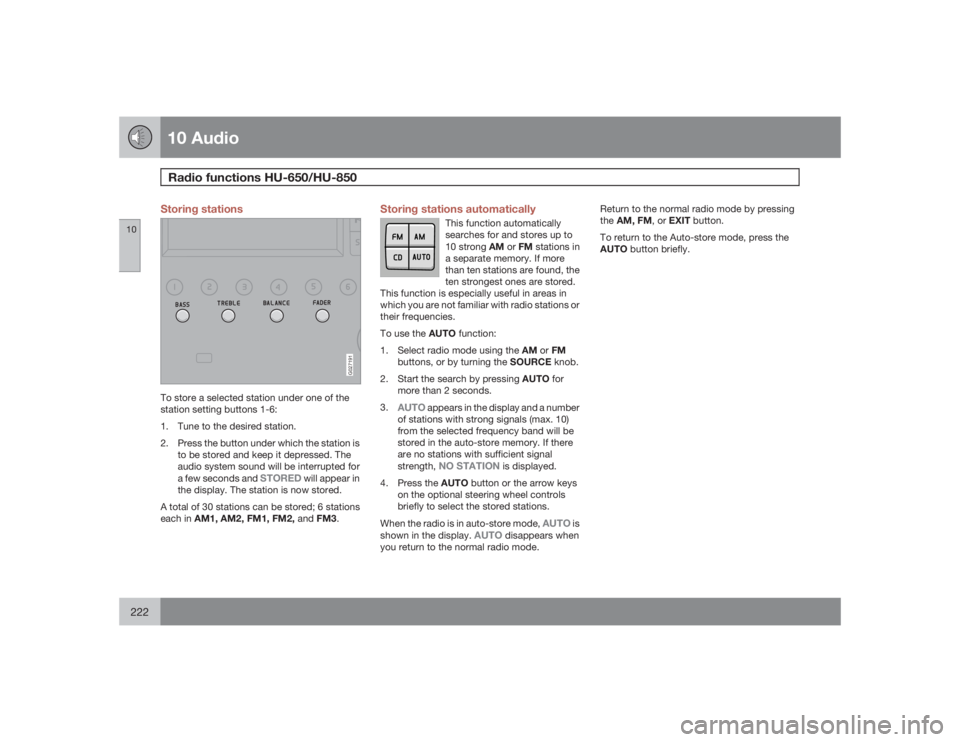
To store a selected station under one of the
station setting buttons 1-6:
1. Tune to the desired station.
2. Press the button under which the station is
to be stored and keep it depressed. The
audio system sound will be interrupted for
a few seconds and
STORED
will appear in
the display. The station is now stored.
A total of 30 stations can be stored; 6 stations
each in AM1, AM2, FM1, FM2, andFM3.
Storing stations automatically
This function automatically
searches for and stores up to
10 strong AM or FM stations in
a separate memory. If more
than ten stations are found, the
ten strongest ones are stored.
This function is especially useful in areas in
which you are not familiar with radio stations or
their frequencies.
To use the AUTO function:
1.
Select radio mode using the AM or FM
buttons, or by turning the SOURCE knob.
2.
Start the search by pressing AUTO for
more than 2 seconds.
3.
AUTO
appears in the display and a number
of stations with strong signals (max. 10)
from the selected frequency band will be
stored in the auto-store memory. If there
are no stations with sufficient signal
strength,
NO STATION
is displayed.
4.
Press the AUTO button or the arrow keys
on the optional steering wheel controls
briefly to select the stored stations.
When the radio is in auto-store mode,
AUTO
is
shown in the display.
AUTO
disappears when
you return to the normal radio mode.Return to the normal radio mode by pressing
theAM, FM, or EXIT button.
To return to the Auto-store mode, press the
AUTO button briefly.
Page 223 of 254
10 Audio
RBDS functions HU-650/HU-850
10``223 Radio Broadcast Data System - RBDS
This feature, which may not be available in your
area, functions only with FM broadcasts. The
radio in your vehicle is equipped with an
advanced system allowing information from
broadcasters to be transmitted visually, as
text, together with the audio signal. This infor-
mation is then decoded by the radio and made
available for several new and unique features.
The RBDS or Radio Broadcast Data System
operates in the FM band only, and the infor-
mation transmitted is supplied exclusively by
participating broadcasters. Volvo has no con-
trol over the accuracy of the data or informa-
tion.
Coverage by local broadcasters may be limited
at this time, but as the technology and benefits
grow, you will find the radio in your vehicle is
equipped to take advantage of this system.PI (Program Information) Seek:When an FM station has been stored as a pre-
set, the radio also stores RBDS program infor-
mation if it is available. When the preset is
selected at a later time, the radio tries to access
updated program information. In weak signal
areas, there may be a delay before the station
becomes audible. During this delay, "PI seek"
will be displayed and there will be no sound.
PI seek can be interrupted by pressing EXIT.
Radio textCertain RBDS stations broadcast program
information, which can be shown in the display.
The text will be shown twice in the display.To start this function:Press the FM button for several seconds.To deactivate this function:Press FM briefly.
Station information will be shown twice in the
display.AlarmAlarms bulletins are transmitted automatically
by certain RBDS stations. The function cannot
be deactivated.Alarm!
is shown in the radio display when an
alarm message is sent. The function is used to
warn motorists of serious accidents, etc.
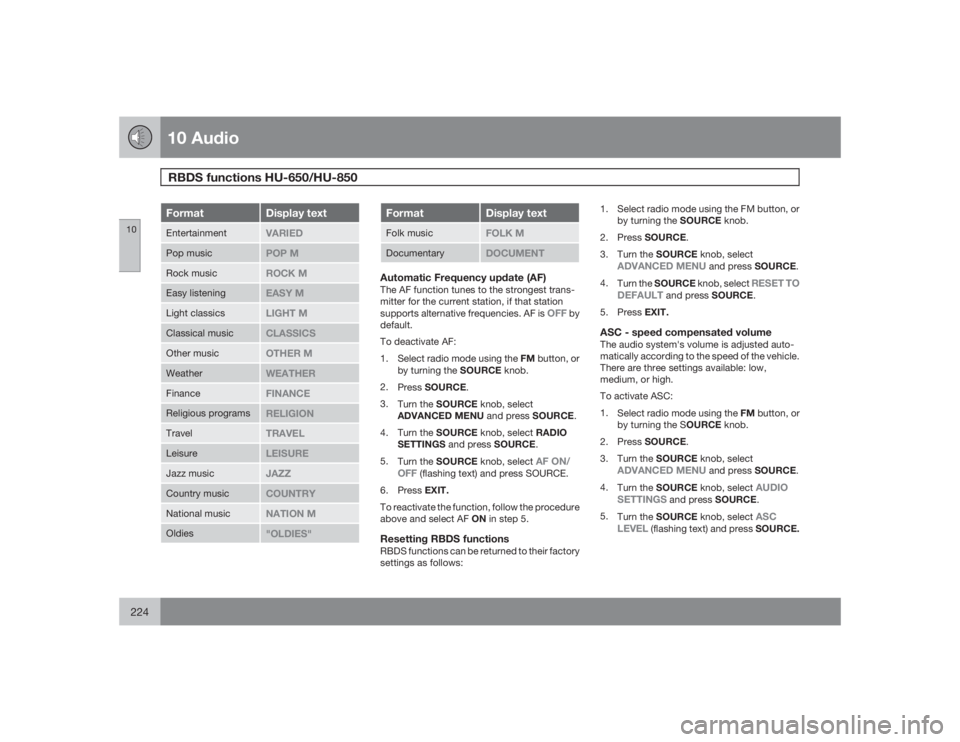
Program type/station format -PTYThe PTY function allows you to find stations
whose programs suit your taste. Use the PTY
function to select among the different station
formats shown in the list.
To select a station format:
1.
Select radio mode using the FM button, or
by turning the SOURCE knob.2.
Turn the SOURCE knob, select
PTY
and
pressSOURCE.
3.
Turn the SOURCE knob, select a station
format from the list and press SOURCE to
confirm the selected station format. The
PTY
(station format) of the selected station
is now shown in the display.NOTE
Not all RBDS radio stations have PTY des-
ignations.Station formatsFormat
Display text
Off
PTY OFF
News
NEWS
Current affairs
AFFAIRS
Information
INFO
Sports
SPORT
Education
EDUCATION
Drama
DRAMA
Art and culture
CULTURE
Science
SCIENCE
Page 224 of 254
10 AudioRBDS functions HU-650/HU-850
10224
Format
Display text
Entertainment
VARIED
Pop music
POP M
Rock music
ROCK M
Easy listening
EASY M
Light classics
LIGHT M
Classical music
CLASSICS
Other music
OTHER M
Weather
WEATHER
Finance
FINANCE
Religious programs
RELIGION
Travel
TRAVEL
Leisure
LEISURE
Jazz music
JAZZ
Country music
COUNTRY
National music
NATION M
Oldies
"OLDIES"
Format
Display text
Folk music
FOLK M
Documentary
DOCUMENT
Automatic Frequency update (AF)The AF function tunes to the strongest trans-
mitter for the current station, if that station
supports alternative frequencies. AF is
OFF
by
default.
To deactivate AF:
1.
Select radio mode using the FM button, or
by turning the SOURCE knob.
2.
PressSOURCE.
3.
Turn the SOURCE knob, select
ADVANCED MENU and press SOURCE.
4.
Turn the SOURCE knob, select RADIO
SETTINGS and press SOURCE.
5.
Turn the SOURCE knob, select
AF ON/
OFF
(flashing text) and press SOURCE.
6.
PressEXIT.
To reactivate the function, follow the procedure
above and select AF ON in step 5.
Resetting RBDS functionsRBDS functions can be returned to their factory
settings as follows:1. Select radio mode using the FM button, or
by turning the SOURCE knob.
2.
PressSOURCE.
3.
Turn the SOURCE knob, select
ADVANCED MENU
and press SOURCE.
4.
Turn the SOURCE knob, select
RESET TO
DEFAULT
and press SOURCE.
5.
PressEXIT.
ASC - speed compensated volumeThe audio system's volume is adjusted auto-
matically according to the speed of the vehicle.
There are three settings available: low,
medium, or high.
To activate ASC:
1.
Select radio mode using the FMbutton, or
by turning the SOURCE knob.
2.
PressSOURCE.
3.
Turn the SOURCE knob, select
ADVANCED MENU
and press SOURCE.
4.
Turn the SOURCE knob, select
AUDIO
SETTINGS
and press SOURCE.
5.
Turn the SOURCE knob, select
ASC
LEVEL
(flashing text) and press SOURCE.