roof VOLVO S60 2009 Owner´s Manual
[x] Cancel search | Manufacturer: VOLVO, Model Year: 2009, Model line: S60, Model: VOLVO S60 2009Pages: 254, PDF Size: 6.17 MB
Page 4 of 254
Contents
4
00
00 IntroductionGeneral information.................................. 10
Volvo and the environment....................... 11
Important warnings................................... 13
01
01 SafetyOccupant safety........................................ 16
Seat belts.................................................. 18
Supplemental Restraint System............... 20
Front airbags............................................. 21
Occupant Weight Sensor (OWS).............. 25
Side impact (SIPS) airbag......................... 28
Volvo Inflatable Curtain (VIC).................... 29
Whiplash Protection System (WHIPS)...... 30
Child safety............................................... 32
Child restraint systems............................. 34
Infant seats............................................... 36
Convertible seats...................................... 38
Booster cushions...................................... 40
ISOFIX lower anchors............................... 41
Top tether anchors.................................... 43
Child restraint registration and recalls...... 44
02
02 Instruments and controlsInstrument overview.................................. 48
Instrument panel....................................... 50
Indicator and warning symbols................. 52
Buttons in the center console................... 56
Steering wheel adjustment....................... 58
Lighting panel........................................... 59
Fuel filler door–unlocking manually........... 61
Left-side steering wheel lever................... 62
Right-side steering wheel lever................. 64
Hazard warning flashers, door mirror
defroster.................................................... 66
Trip computer........................................... 67
Cruise control............................................ 69
Parking brake............................................ 71
12-volt socket........................................... 72
Power windows......................................... 73
Mirrors....................................................... 75
Power moonroof (option).......................... 78
HomeLink® Wireless Control System
(option)...................................................... 80
Page 29 of 254
01 Safety
Volvo Inflatable Curtain (VIC)
0129
G027218
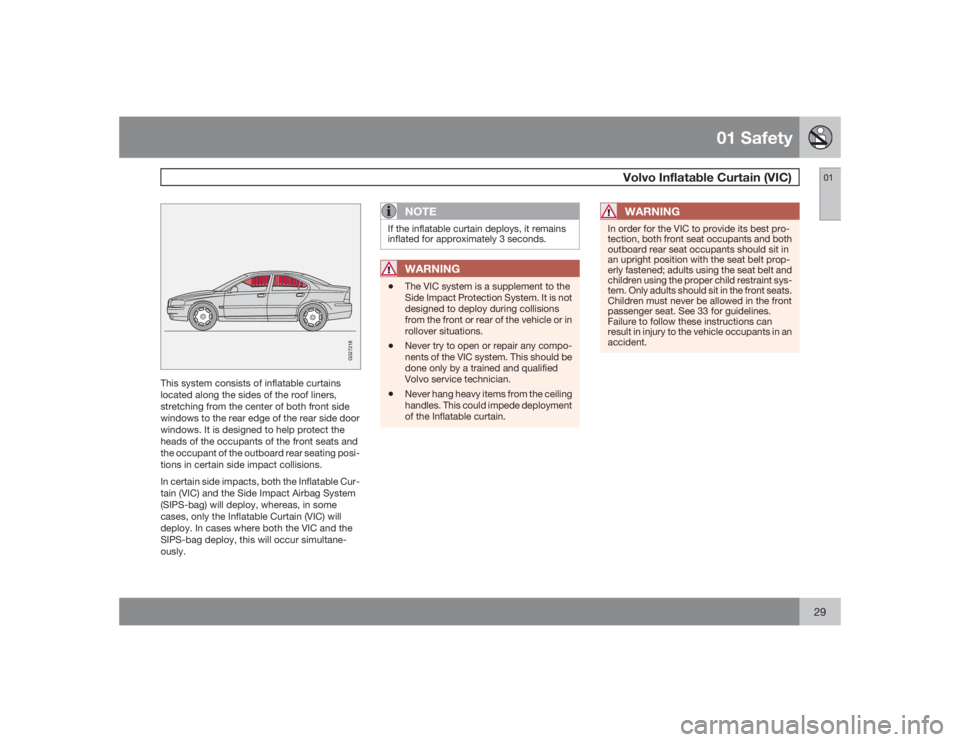
This system consists of inflatable curtains
located along the sides of the roof liners,
stretching from the center of both front side
windows to the rear edge of the rear side door
windows. It is designed to help protect the
heads of the occupants of the front seats and
the occupant of the outboard rear seating posi-
tions in certain side impact collisions.
In certain side impacts, both the Inflatable Cur-
tain (VIC) and the Side Impact Airbag System
(SIPS-bag) will deploy, whereas, in some
cases, only the Inflatable Curtain (VIC) will
deploy. In cases where both the VIC and the
SIPS-bag deploy, this will occur simultane-
ously.
NOTE
If the inflatable curtain deploys, it remains
inflated for approximately 3 seconds.
WARNING
•
The VIC system is a supplement to the
Side Impact Protection System. It is not
designed to deploy during collisions
from the front or rear of the vehicle or in
rollover situations.
•
Never try to open or repair any compo-
nents of the VIC system. This should be
done only by a trained and qualified
Volvo service technician.
•
Never hang heavy items from the ceiling
handles. This could impede deployment
of the Inflatable curtain.
WARNING
In order for the VIC to provide its best pro-
tection, both front seat occupants and both
outboard rear seat occupants should sit in
an upright position with the seat belt prop-
erly fastened; adults using the seat belt and
children using the proper child restraint sys-
tem. Only adults should sit in the front seats.
Children must never be allowed in the front
passenger seat. See 33 for guidelines.
Failure to follow these instructions can
result in injury to the vehicle occupants in an
accident.
Page 46 of 254
G020901
46
Instrument overview................................................................................ 48
Instrument panel..................................................................................... 50
Indicator and warning symbols............................................................... 52
Buttons in the center console................................................................. 56
Steering wheel adjustment...................................................................... 58
Lighting panel.......................................................................................... 59
Fuel filler door–unlocking manually......................................................... 61
Left-side steering wheel lever................................................................. 62
Right-side steering wheel lever............................................................... 64
Hazard warning flashers, door mirror defroster...................................... 66
Trip computer.......................................................................................... 67
Cruise control.......................................................................................... 69
Parking brake.......................................................................................... 71
12-volt socket......................................................................................... 72
Power windows....................................................................................... 73
Mirrors..................................................................................................... 75
Power moonroof (option)........................................................................ 78
HomeLink® Wireless Control System (option)....................................... 80
Page 49 of 254
02 Instruments and controls
Instrument overview
0249
G029581
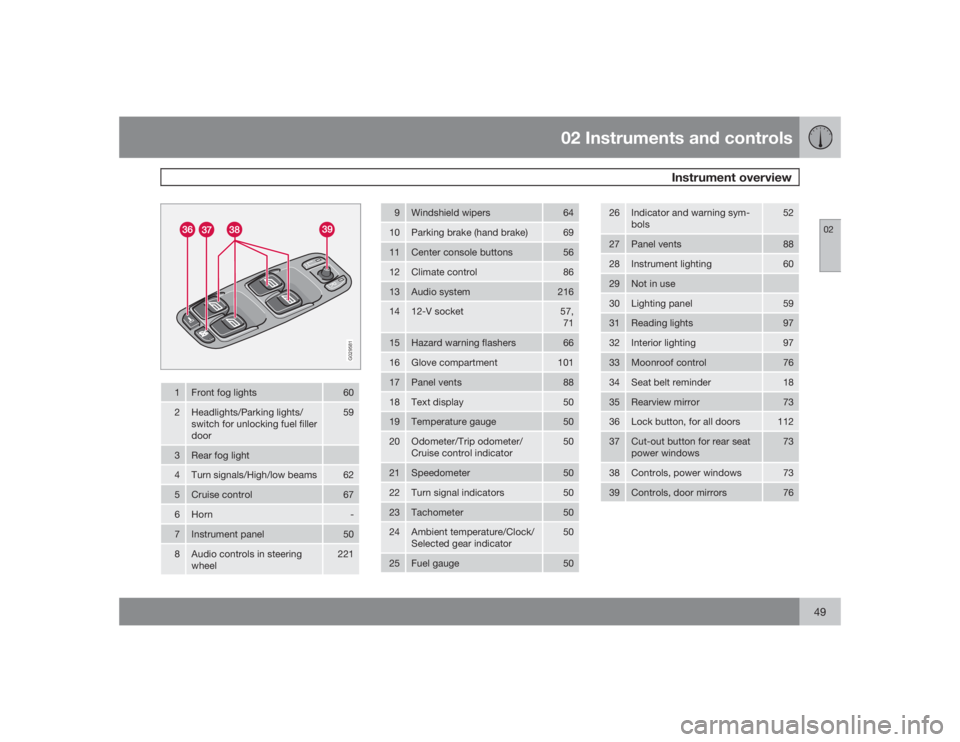
1
Front fog lights
60
2
Headlights/Parking lights/
switch for unlocking fuel filler
door
59
3
Rear fog light
4
Turn signals/High/low beams
62
5
Cruise control
67
6
Horn
-
7
Instrument panel
50
8
Audio controls in steering
wheel
221
9
Windshield wipers
64
10
Parking brake (hand brake)
69
11
Center console buttons
56
12
Climate control
86
13
Audio system
216
14
12-V socket
57,
71
15
Hazard warning flashers
66
16
Glove compartment
101
17
Panel vents
88
18
Text display
50
19
Temperature gauge
50
20
Odometer/Trip odometer/
Cruise control indicator
50
21
Speedometer
50
22
Turn signal indicators
50
23
Tachometer
50
24
Ambient temperature/Clock/
Selected gear indicator
50
25
Fuel gauge
50
26
Indicator and warning sym-
bols
52
27
Panel vents
88
28
Instrument lighting
60
29
Not in use
30
Lighting panel
59
31
Reading lights
97
32
Interior lighting
97
33
Moonroof control
76
34
Seat belt reminder
18
35
Rearview mirror
73
36
Lock button, for all doors
112
37
Cut-out button for rear seat
power windows
73
38
Controls, power windows
73
39
Controls, door mirrors
76
Page 78 of 254
02 Instruments and controlsPower moonroof (option)
0278
G027325
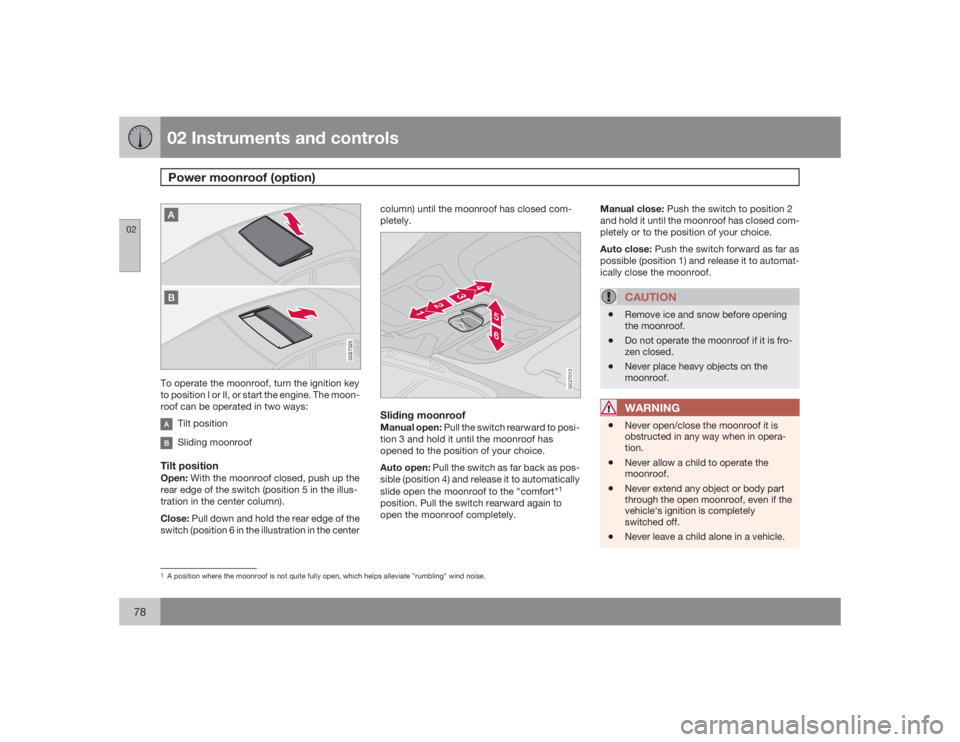
To operate the moonroof, turn the ignition key
to position I or II, or start the engine. The moon-
roof can be operated in two ways:
Tilt positionSliding moonroof
Tilt positionOpen: With the moonroof closed, push up the
rear edge of the switch (position 5 in the illus-
tration in the center column).
Close: Pull down and hold the rear edge of the
switch (position 6 in the illustration in the centercolumn) until the moonroof has closed com-
pletely.
G027010
Sliding moonroofManual open: Pull the switch rearward to posi-
tion 3 and hold it until the moonroof has
opened to the position of your choice.
Auto open: Pull the switch as far back as pos-
sible (position 4) and release it to automatically
slide open the moonroof to the "comfort"
1
position. Pull the switch rearward again to
open the moonroof completely.Manual close: Push the switch to position 2
and hold it until the moonroof has closed com-
pletely or to the position of your choice.
Auto close: Push the switch forward as far as
possible (position 1) and release it to automat-
ically close the moonroof.
CAUTION
•
Remove ice and snow before opening
the moonroof.
•
Do not operate the moonroof if it is fro-
zen closed.
•
Never place heavy objects on the
moonroof.WARNING
•
Never open/close the moonroof it is
obstructed in any way when in opera-
tion.
•
Never allow a child to operate the
moonroof.
•
Never extend any object or body part
through the open moonroof, even if the
vehicle's ignition is completely
switched off.
•
Never leave a child alone in a vehicle.
1A position where the moonroof is not quite fully open, which helps alleviate "rumbling" wind noise.
Page 79 of 254
02 Instruments and controls
Power moonroof (option)
0279
G020157
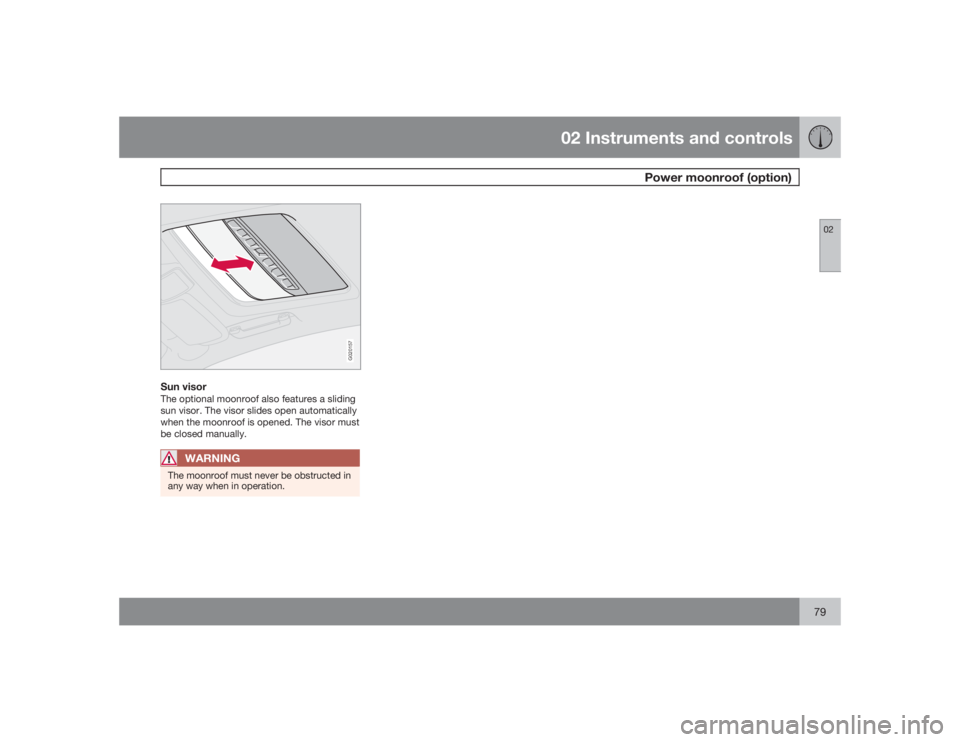
Sun visorThe optional moonroof also features a sliding
sun visor. The visor slides open automatically
when the moonroof is opened. The visor must
be closed manually.
WARNING
The moonroof must never be obstructed in
any way when in operation.
Page 86 of 254

03 ClimateClimate control systems - general information
0386
Condensation on the inside of the
windowsThe defroster function should be used to
remove fog or mist from the inside of the win-
dows. Keeping the windows clean with a com-
mercially available window washing spray will
also help prevent fogging or misting.Ice and snowAlways keep the air intake grille at the base of
the windshield free of snow.Cabin air filterReplace the cabin air filter with a new one at
the recommended intervals. Please refer to
your Warranty and Service Records Informa-
tion booklet, or consult a trained and qualified
Volvo service technician for these intervals.
The filter should be replaced more often when
driving under dirty and dusty conditions. The
filter cannot be cleaned and therefore should
always be replaced with a new one.
SensorsThe sunlight sensor on the dashboard and pas-
senger compartment temperature sensor in
the ECC control panel should not be covered
in any way as this could cause incorrect infor-
mation to be sent to the ECC system.Parking the vehicle in warm weatherIf your vehicle has been parked in the sun in
warm weather, opening the windows and
moonroof (option) for several minutes before
driving will help release the warm air from the
passenger compartment. When the engine is
running, close the windows and moonroof and
use the recirculation function for several
minutes to enable the air conditioning to cool
the compartment as quickly as possible.Windows and optional moonroofThe ECC system will function best if the win-
dows and optional moonroof are closed. If you
drive with the moonroof open, we recommend
that you manually adjust the temperature and
blower control (the LED in the AUTO switch
should be off).
AccelerationThe air conditioning is momentarily disen-
gaged during full-throttle acceleration.Climate control maintenanceSpecial tools and equipment are required to
maintain and carry out repairs on the climate
system. Work of this type should only be done
by a trained and qualified Volvo service tech-
nician.RefrigerantVolvo cares about the environment. The air
conditioning system in your vehicle contains a
CFC-free refrigerant - R134a (HFC134a). This
substance will not deplete the ozone layer. The
system contains 1.5 lbs (700 g) R134a and
uses PAG oil.Climate system blowerThe climate system blower will be automati-
cally switched off when the engine is not run-
ning (even if the ignition key is in position Ior
II) to avoid unnecessary battery drain. To acti-
vate the blower, turn the control to the desired
setting.
Page 110 of 254

05 Locks and alarmRemote control
05110
•
FCC ID:LQNP2T-APU This device
complies with part 15 of the FCC rules.
Operation is subject to the following
conditions: (1) This device may not
cause harmful interference, and (2) this
device must accept any interference
received, including interference that
may cause undesired operation.
•
Canadian 2306104388 Model 504 2927
by Donnelly Operation is subject to the
following conditions: (1) this device may
not cause interference, and (2) this
device must accept any interference,
including interference that may cause
undesired operation of the device.
•
Canadian 2306104388A Model 509
977 by Connaught Electronics Opera-
tion is subject to the following condi-
tions: (1) this device may not cause
interference, and (2) this device must
accept any interference, including inter-
ference that may cause undesired oper-
ation of the device.
NOTE
•
If an airbag deploys, your vehicle's SRS
control module will attempt to automat-
ically unlock all doors.
•
The keys may also be used to lock and
unlock the doors, and to activate and
deactivate the alarm system.
•
To avoid leaving your keys in the vehi-
cle, make a habit of always locking the
vehicle with the remote control.
•
If the key blade section of the remote is
not fully folded out when starting the
vehicle, the immobilizer function may
make it impossible to start the engine.
•
The vehicle can be locked even if a door
is open. When the door(s) are closed,
they will be locked. Please be aware
that the keys could be locked in the car
when this is done.
Automatic re-lockingIf the doors are unlocked, the locks will auto-
matically reengage (re-lock) and the alarm will
rearm after 2 minutes unless a door or the trunk
has been opened. This helps prevent the car
from inadvertently being left unlocked.
WARNING
Never use the transmitter to lock the doors
from inside the vehicle.
Doing so would ACTIVATE:•
the break-in alarm, which would sound
if one of the doors were opened
•
the optional interior motion and inclina-
tion alarm sensors.
Doing so would DEACTIVATE:
•
the moonroof and interior courtesy light
controls.
•
the central locking buttons on the front
door armrests, although the interior
door handles would still function to
allow occupants to leave the vehicle.
Disabled features would remain disabled
until the remote is used again to unlock the
vehicle.
In addition, locking an occupied vehicle
would hinder rapid access to the occupants
in an accident or emergency.
Page 127 of 254
06 Starting and driving
Economical driving
06
127 Economical driving conserves natural
resources
Better driving economy may be obtained by
thinking ahead, avoiding rapid starts and stops
and adjusting the speed of your vehicle to
immediate traffic conditions. Observe the fol-
lowing rules:•
Bring the engine to normal operating tem-
perature as soon as possible by driving
with a light foot on the accelerator pedal for
the first few minutes of operation. A cold
engine uses more fuel and is subject to
increased wear.
•
Whenever possible, avoid using the vehicle
for driving short distances. This does not
allow the engine to reach normal operating
temperature.
•
Drive carefully and avoid rapid acceleration
and hard braking.
•
Do not exceed posted speed limits.
•
Avoid carrying unnecessary items (extra
load) in the vehicle.
•
Maintain correct tire pressure. Check tire
pressure regularly (when tires are cold).
•
Remove snow tires when threat of snow or
ice has ended.
•
Note that roof racks, ski racks, etc,
increase air resistance and also fuel con-
sumption.
•
Avoid using automatic transmission kick-
down feature unless necessary.
•
However, at higher driving speeds, fuel
consumption will be lower with the air con-
ditioning on and the windows closed than
with the air conditioning off and the win-
dows open.
•
Using the onboard trip computer's fuel
consumption modes can help you learn
how to drive more economically.
Other factors that decrease gas mileage are:
•
Dirty air cleaner
•
Dirty engine oil and clogged oil filter
•
Dragging brakes
•
Incorrect front end alignment.
Some of the above mentioned items and others
are checked at the standard Maintenance
Service intervals.NOTE
Vehicles equipped with automatic transmis-
sions should use (D)rive as often as possible
and avoid using "kickdown" to help improve
fuel economy.
CAUTION
Drive slowly and carefully if going through
standing water (i.e. flooded roadways, etc.).
Damage to the engine could result if excess
water is drawn in through the air intake sys-
tem. Never drive the vehicle in water deeper
than 1 foot (300 mm).
Page 146 of 254
06 Starting and drivingLoad carriers (accessory)
06146
G027340
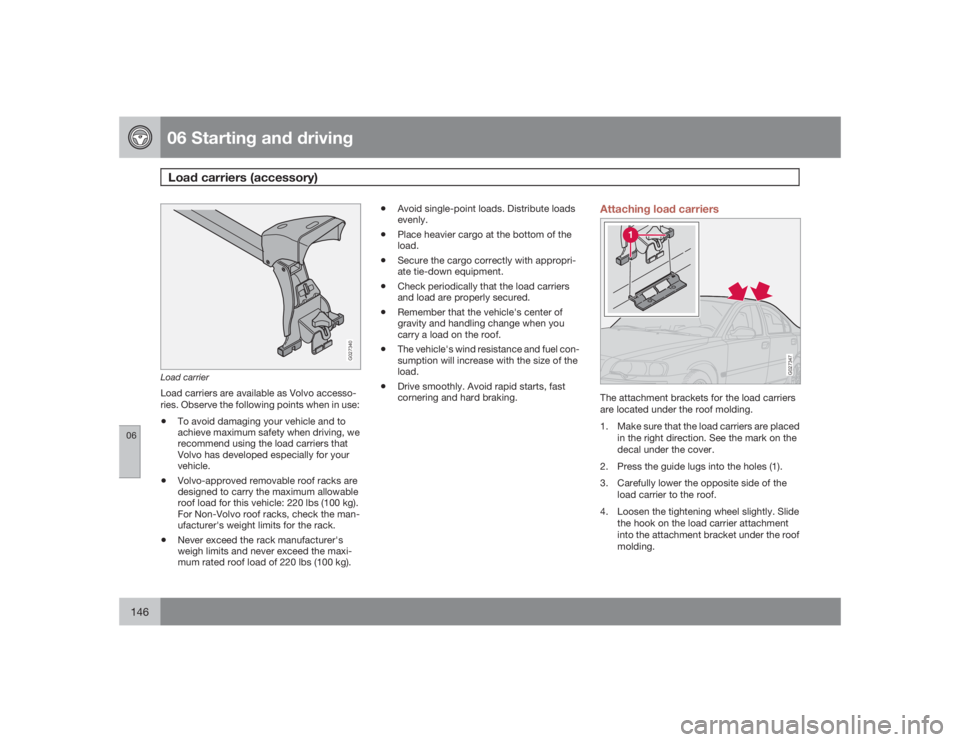
Load carrierLoad carriers are available as Volvo accesso-
ries. Observe the following points when in use:•
To avoid damaging your vehicle and to
achieve maximum safety when driving, we
recommend using the load carriers that
Volvo has developed especially for your
vehicle.
•
Volvo-approved removable roof racks are
designed to carry the maximum allowable
roof load for this vehicle: 220 lbs (100 kg).
For Non-Volvo roof racks, check the man-
ufacturer's weight limits for the rack.
•
Never exceed the rack manufacturer's
weigh limits and never exceed the maxi-
mum rated roof load of 220 lbs (100 kg).
•
Avoid single-point loads. Distribute loads
evenly.
•
Place heavier cargo at the bottom of the
load.
•
Secure the cargo correctly with appropri-
ate tie-down equipment.
•
Check periodically that the load carriers
and load are properly secured.
•
Remember that the vehicle's center of
gravity and handling change when you
carry a load on the roof.
•
The vehicle's wind resistance and fuel con-
sumption will increase with the size of the
load.
•
Drive smoothly. Avoid rapid starts, fast
cornering and hard braking.
Attaching load carriers
G027347
The attachment brackets for the load carriers
are located under the roof molding.
1. Make sure that the load carriers are placed
in the right direction. See the mark on the
decal under the cover.
2. Press the guide lugs into the holes (1).
3. Carefully lower the opposite side of the
load carrier to the roof.
4. Loosen the tightening wheel slightly. Slide
the hook on the load carrier attachment
into the attachment bracket under the roof
molding.