battery VOLVO S60 2013 Owner´s Manual
[x] Cancel search | Manufacturer: VOLVO, Model Year: 2013, Model line: S60, Model: VOLVO S60 2013Pages: 366, PDF Size: 6.85 MB
Page 112 of 366
03 Your driving environment
HomeLink® Wireless Control System*
03
110* Option/accessory, for more information, see Introduction.
Introduction
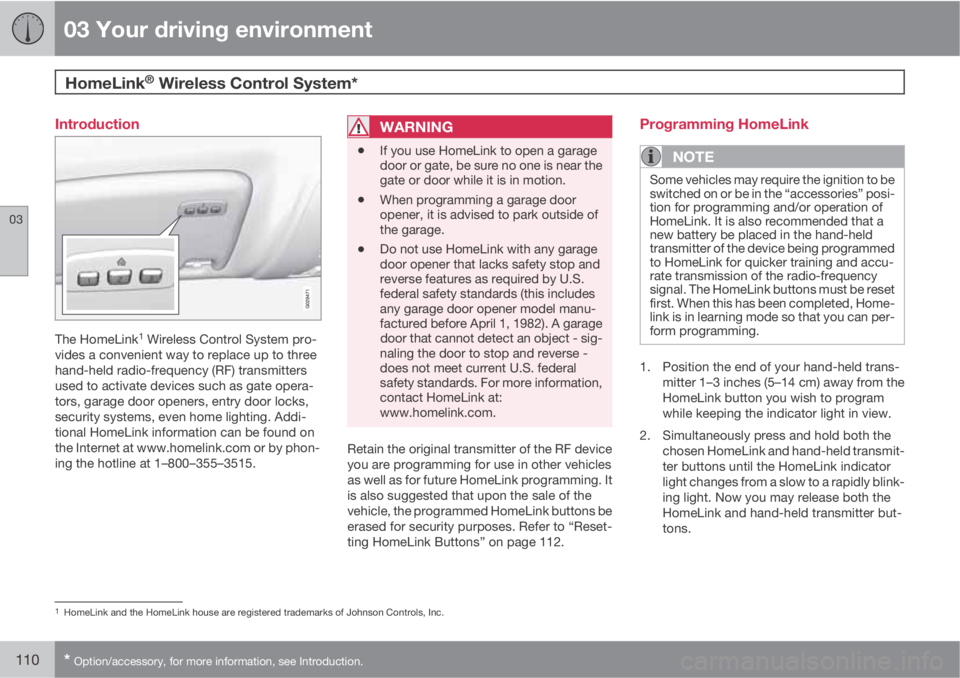
The HomeLink1 Wireless Control System pro-
vides a convenient way to replace up to three
hand-held radio-frequency (RF) transmitters
used to activate devices such as gate opera-
tors, garage door openers, entry door locks,
security systems, even home lighting. Addi-
tional HomeLink information can be found on
the Internet at www.homelink.com or by phon-
ing the hotline at 1–800–355–3515.
WARNING
•If you use HomeLink to open a garage
door or gate, be sure no one is near the
gate or door while it is in motion.
•When programming a garage door
opener, it is advised to park outside of
the garage.
•Do not use HomeLink with any garage
door opener that lacks safety stop and
reverse features as required by U.S.
federal safety standards (this includes
any garage door opener model manu-
factured before April 1, 1982). A garage
door that cannot detect an object - sig-
naling the door to stop and reverse -
does not meet current U.S. federal
safety standards. For more information,
contact HomeLink at:
www.homelink.com.
Retain the original transmitter of the RF device
you are programming for use in other vehicles
as well as for future HomeLink programming. It
is also suggested that upon the sale of the
vehicle, the programmed HomeLink buttons be
erased for security purposes. Refer to “Reset-
ting HomeLink Buttons” on page 112.
Programming HomeLink
NOTE
Some vehicles may require the ignition to be
switched on or be in the “accessories” posi-
tion for programming and/or operation of
HomeLink. It is also recommended that a
new battery be placed in the hand-held
transmitter of the device being programmed
to HomeLink for quicker training and accu-
rate transmission of the radio-frequency
signal. The HomeLink buttons must be reset
first. When this has been completed, Home-
link is in learning mode so that you can per-
form programming.
1. Position the end of your hand-held trans-
mitter 1–3 inches (5–14 cm) away from the
HomeLink button you wish to program
while keeping the indicator light in view.
2. Simultaneously press and hold both the
chosen HomeLink and hand-held transmit-
ter buttons until the HomeLink indicator
light changes from a slow to a rapidly blink-
ing light. Now you may release both the
HomeLink and hand-held transmitter but-
tons.
1HomeLink and the HomeLink house are registered trademarks of Johnson Controls, Inc.
Page 115 of 366
03 Your driving environment
Starting the engine
03
* Option/accessory, for more information, see Introduction.113 Start
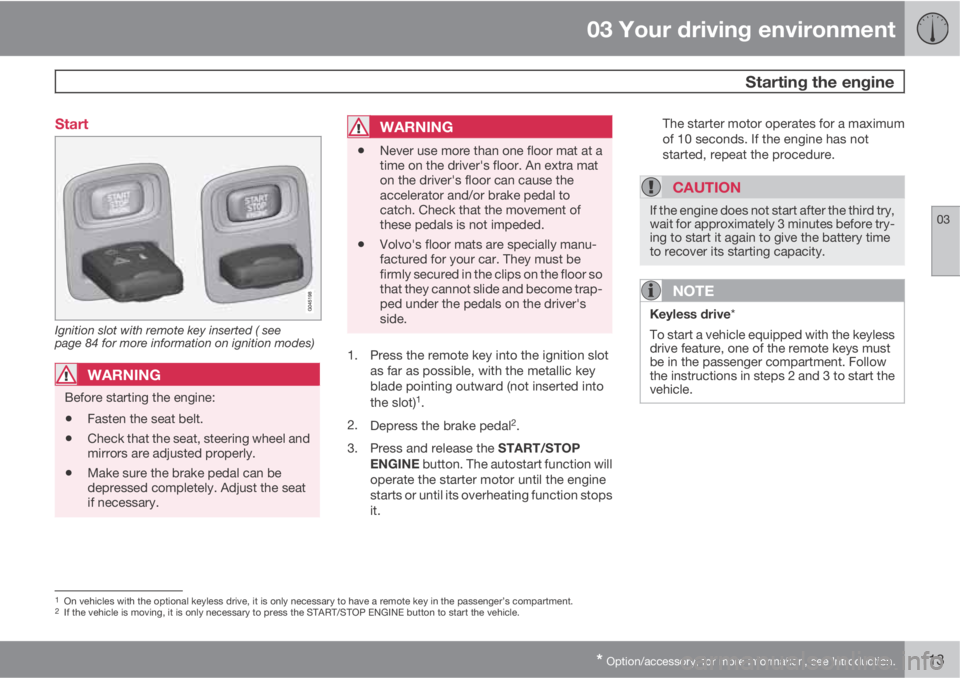
Ignition slot with remote key inserted ( see
page 84 for more information on ignition modes)
WARNING
Before starting the engine:
•Fasten the seat belt.
•Check that the seat, steering wheel and
mirrors are adjusted properly.
•Make sure the brake pedal can be
depressed completely. Adjust the seat
if necessary.
WARNING
•Never use more than one floor mat at a
time on the driver's floor. An extra mat
on the driver's floor can cause the
accelerator and/or brake pedal to
catch. Check that the movement of
these pedals is not impeded.
•Volvo's floor mats are specially manu-
factured for your car. They must be
firmly secured in the clips on the floor so
that they cannot slide and become trap-
ped under the pedals on the driver's
side.
1. Press the remote key into the ignition slot
as far as possible, with the metallic key
blade pointing outward (not inserted into
the slot)
1.
2.
Depress the brake pedal
2.
3.
Press and release the START/STOP
ENGINE button. The autostart function will
operate the starter motor until the engine
starts or until its overheating function stops
it.The starter motor operates for a maximum
of 10 seconds. If the engine has not
started, repeat the procedure.
CAUTION
If the engine does not start after the third try,
wait for approximately 3 minutes before try-
ing to start it again to give the battery time
to recover its starting capacity.
NOTE
Keyless drive*
To start a vehicle equipped with the keyless
drive feature, one of the remote keys must
be in the passenger compartment. Follow
the instructions in steps 2 and 3 to start the
vehicle.
1On vehicles with the optional keyless drive, it is only necessary to have a remote key in the passenger’s compartment.2If the vehicle is moving, it is only necessary to press the START/STOP ENGINE button to start the vehicle.
Page 118 of 366
03 Your driving environment
Starting the engine
03
116
Deactivated functionsWhen the engine is started with ERS, the fol-
lowing functions are deactivated:
•Headlights
•Parking lights
•License plate lights
•Windshield wipers
Switching off an engine started with ERSAny of the following will switch off the engine if
it has been started with ERS:
•Pressing the lock button (1) on the remote
key
•Unlocking the vehicle
•Opening a door
•Depressing the throttle or brake pedal
•Moving the gear selector from the P posi-
tion
•If there are less than approx. 2.5 gallons
(10 liters) of fuel in the tank
•More than 15 minutes have elapsed.
If the engine has been started with ERS and
switches off, the turn signals will illuminate for
3 seconds.
Message in the instrument panel displayIf ERS is interrupted, a text message will be
displayed in the instrument panel.
Switching off the engine
With the engine running, press the START/
STOP ENGINE button.
If the gear selector is not in the P position or if
the vehicle is moving, press the START/STOP
ENGINE button twice or press and hold it in
until the engine switches off.
Jump starting
G021347
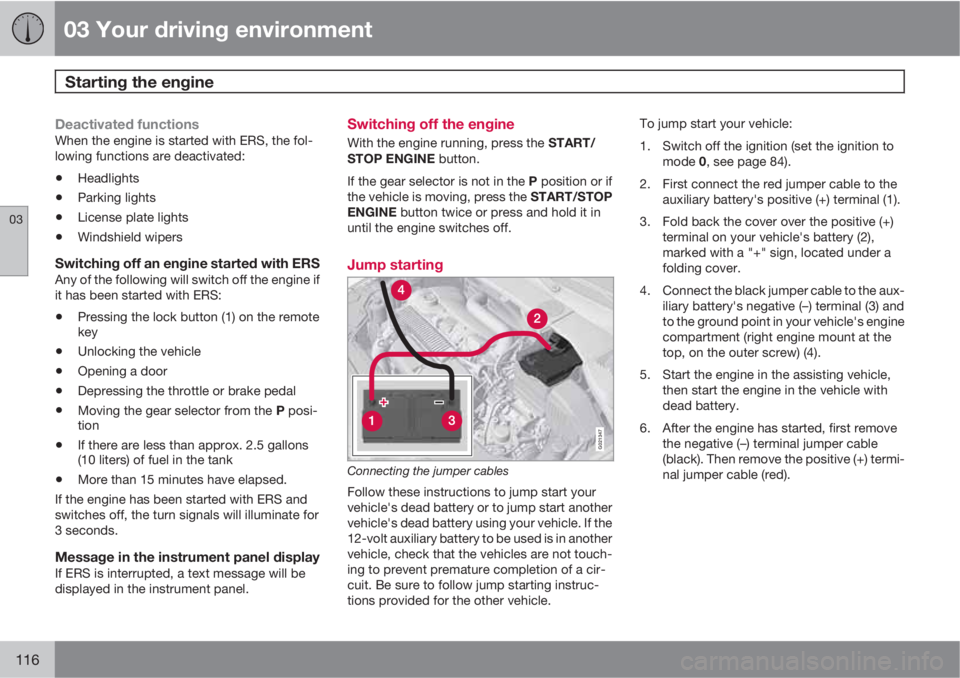
Connecting the jumper cables
Follow these instructions to jump start your
vehicle's dead battery or to jump start another
vehicle's dead battery using your vehicle. If the
12-volt auxiliary battery to be used is in another
vehicle, check that the vehicles are not touch-
ing to prevent premature completion of a cir-
cuit. Be sure to follow jump starting instruc-
tions provided for the other vehicle.To jump start your vehicle:
1. Switch off the ignition (set the ignition to
mode 0, see page 84).
2. First connect the red jumper cable to the
auxiliary battery's positive (+) terminal (1).
3. Fold back the cover over the positive (+)
terminal on your vehicle's battery (2),
marked with a "+" sign, located under a
folding cover.
4. Connect the black jumper cable to the aux-
iliary battery's negative (–) terminal (3) and
to the ground point in your vehicle's engine
compartment (right engine mount at the
top, on the outer screw) (4).
5. Start the engine in the assisting vehicle,
then start the engine in the vehicle with
dead battery.
6. After the engine has started, first remove
the negative (–) terminal jumper cable
(black). Then remove the positive (+) termi-
nal jumper cable (red).
Page 119 of 366
03 Your driving environment
Starting the engine
03
117
WARNING
PROPOSITION 65 WARNING!
Battery posts, terminals, and related acces-
sories contain lead and lead compounds,
chemicals known to the state of California
to cause cancer and reproductive harm.
Wash hands after handling.
CAUTION
Connect the jumper cables carefully to
avoid short circuits with other components
in the engine compartment.
WARNING
•Do not connect the jumper cable to any
part of the fuel system or to any moving
parts. Avoid touching hot manifolds.
•Batteries generate hydrogen gas, which
is flammable and explosive.
•Battery fluid contains sulfuric acid. Do
not allow battery fluid to contact eyes,
skin, fabrics or painted surfaces. If con-
tact occurs, flush the affected area
immediately with water. Obtain medical
help immediately if eyes are affected.
•Never expose the battery to open flame
or electric spark.
•Do not smoke near the battery.
•Failure to follow the instructions for
jump starting can lead to injury.
Page 122 of 366
03 Your driving environment
Transmission
03
120
3. Release the brake pedal and press gently
on the accelerator pedal.
Shiftlock override
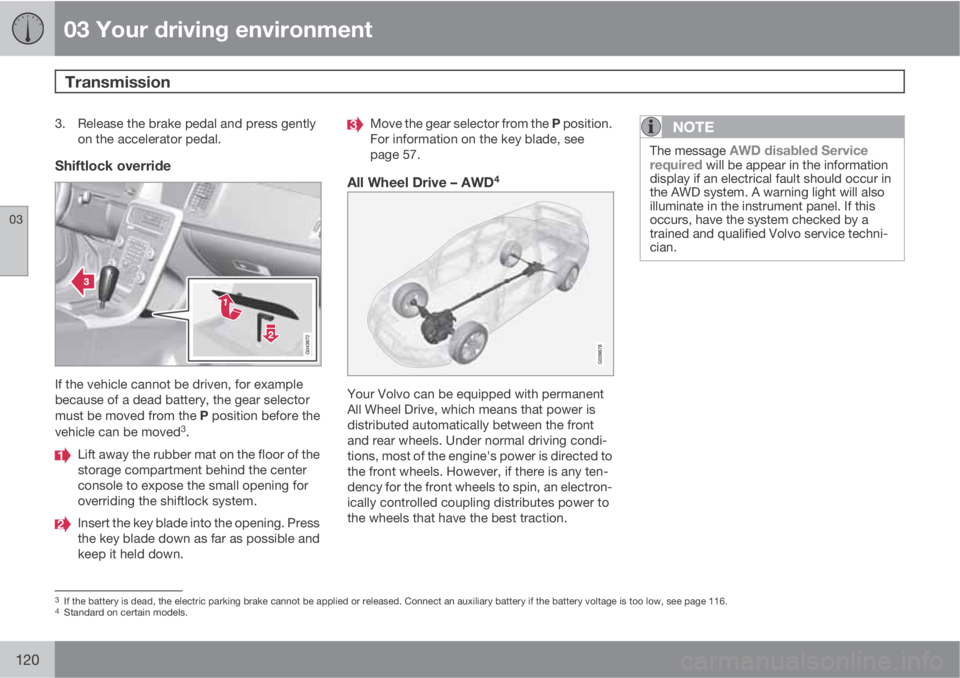
If the vehicle cannot be driven, for example
because of a dead battery, the gear selector
must be moved from the P position before the
vehicle can be moved
3.
Lift away the rubber mat on the floor of the
storage compartment behind the center
console to expose the small opening for
overriding the shiftlock system.
Insert the key blade into the opening. Press
the key blade down as far as possible and
keep it held down.
Move the gear selector from the P position.
For information on the key blade, see
page 57.
All Wheel Drive – AWD4
Your Volvo can be equipped with permanent
All Wheel Drive, which means that power is
distributed automatically between the front
and rear wheels. Under normal driving condi-
tions, most of the engine's power is directed to
the front wheels. However, if there is any ten-
dency for the front wheels to spin, an electron-
ically controlled coupling distributes power to
the wheels that have the best traction.
NOTE
The message AWD disabled Service
required will be appear in the information
display if an electrical fault should occur in
the AWD system. A warning light will also
illuminate in the instrument panel. If this
occurs, have the system checked by a
trained and qualified Volvo service techni-
cian.
3If the battery is dead, the electric parking brake cannot be applied or released. Connect an auxiliary battery if the battery voltage is too low, see page 116.4Standard on certain models.
Page 126 of 366
03 Your driving environment
Parking brake
03
124
Electric parking brake
An electric parking brake has the same func-
tion as a manual parking brake.
NOTE
•A faint sound from the parking brake's
electric motor can be heard when the
parking brake is being applied. This
sound can also be heard during the
automatic function check of the parking
brake.
•The brake pedal will move slightly when
the electric parking brake is applied or
released.
Low battery voltageIf the battery voltage is too low, the parking
brake cannot be applied or released. Connect
an auxiliary battery if the battery voltage is too
low, see page 116.
Applying the electric parking brake
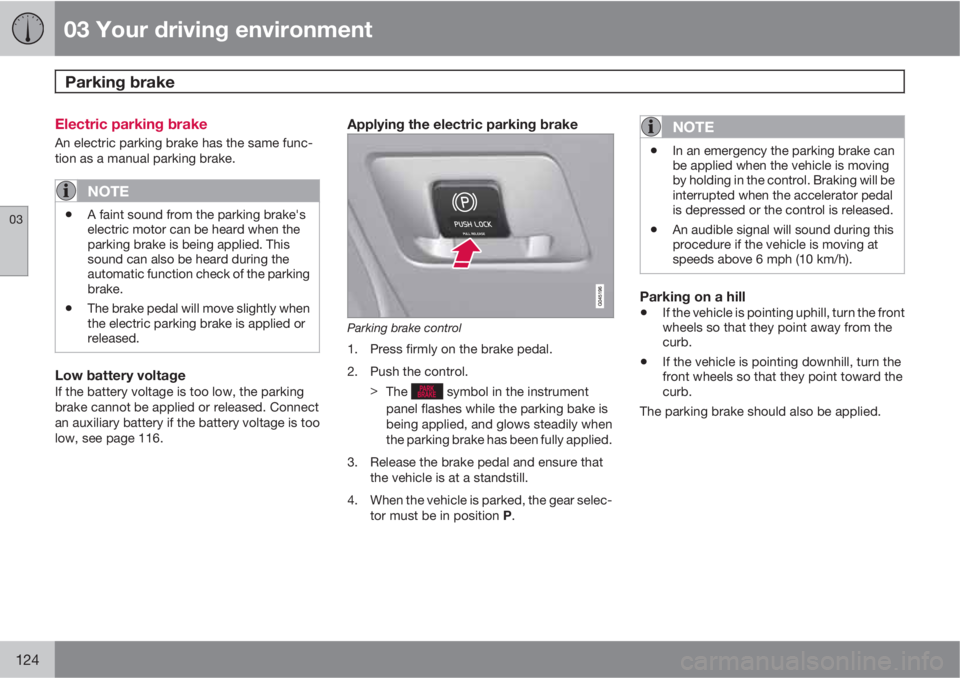
Parking brake control
1. Press firmly on the brake pedal.
2. Push the control.
>
The
symbol in the instrument
panel flashes while the parking bake is
being applied, and glows steadily when
the parking brake has been fully applied.
3. Release the brake pedal and ensure that
the vehicle is at a standstill.
4. When the vehicle is parked, the gear selec-
tor must be in position P.
NOTE
•In an emergency the parking brake can
be applied when the vehicle is moving
by holding in the control. Braking will be
interrupted when the accelerator pedal
is depressed or the control is released.
•An audible signal will sound during this
procedure if the vehicle is moving at
speeds above 6 mph (10 km/h).
Parking on a hill
•If the vehicle is pointing uphill, turn the front
wheels so that they point away from the
curb.
•If the vehicle is pointing downhill, turn the
front wheels so that they point toward the
curb.
The parking brake should also be applied.
Page 190 of 366
05 Comfort and driving pleasure
Menus and messages
05
188
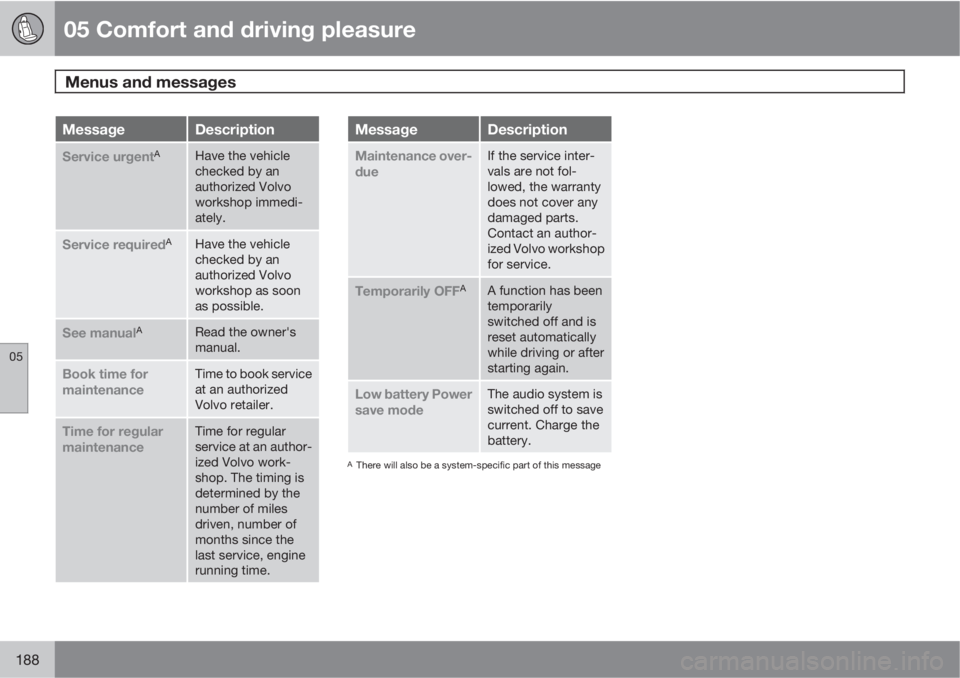
MessageDescription
Service urgentAHave the vehicle
checked by an
authorized Volvo
workshop immedi-
ately.
Service requiredAHave the vehicle
checked by an
authorized Volvo
workshop as soon
as possible.
See manualARead the owner's
manual.
Book time for
maintenanceTime to book service
at an authorized
Volvo retailer.
Time for regular
maintenanceTime for regular
service at an author-
ized Volvo work-
shop. The timing is
determined by the
number of miles
driven, number of
months since the
last service, engine
running time.
MessageDescription
Maintenance over-
dueIf the service inter-
vals are not fol-
lowed, the warranty
does not cover any
damaged parts.
Contact an author-
ized Volvo workshop
for service.
Temporarily OFFAA function has been
temporarily
switched off and is
reset automatically
while driving or after
starting again.
Low battery Power
save modeThe audio system is
switched off to save
current. Charge the
battery.
AThere will also be a system-specific part of this message
Page 211 of 366
05 Comfort and driving pleasure
Passenger compartment convenience
05
209
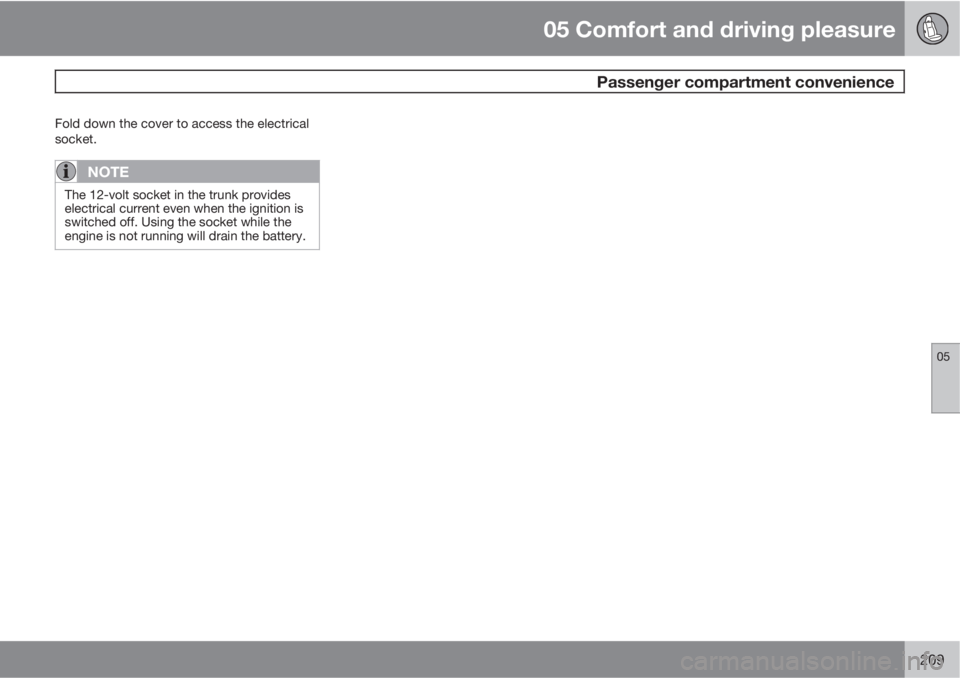
Fold down the cover to access the electrical
socket.
NOTE
The 12-volt socket in the trunk provides
electrical current even when the ignition is
switched off. Using the socket while the
engine is not running will drain the battery.
Page 214 of 366
06 Infotainment
Introduction
06
212* Option/accessory, for more information, see Introduction.
General information
The infotainment system consists of radio and
media player features and also makes it pos-
sible to communicate via a cell phone. The
information is displayed on a 7" screen in the
center console. Infotainment functions can be
controlled from the center console or via the
buttons on the steering wheel keypad. On
models equipped with the optional navigation
system, voice commands can also be used to
e.g., set destinations, make calls from a
Bluetooth
Ÿ-connected cell phone, etc.
If the infotainment system was on when the
ignition was switched off, the most recently
used source (
FM1, etc.) will restart the next
time the ignition is put in mode I or higher. The
driver's door must also be closed on vehicles
with keyless drive*.
The infotainment system can be operated for
15 minutes at a time while the engine is
switched off by pressing the On/Off button.
While the engine is being started, the infotain-
ment system will be temporarily interrupted
and will resume when the engine has started.
NOTE
To help avoid excessive battery drain,
remove the remote key from the ignition slot
if the infotainment system is used while the
engine is switched off.
Dolby Pro Logic
The system is manufactured under license
from Dolby Laboratories Licensing
Corporation.
Dolby Pro Logic II and the
symbol are
trademarks of Dolby Laboratories Licensing
Corporation.
Audyssey MultEQ1
The Audyssey MultEQ system has been used
to optimize sound quality to help ensure a
world-class listening experience.
1Applies only to models with Premium Sound Multimedia.
Page 239 of 366
06 Infotainment
AUX/USB sockets
06
237
MP3 playerMany MP3 players have a file indexing system
that is not supported by the vehicle's infotain-
ment system. In order to use an MP3 player,
the system must be set to
USB Removable
device/Mass Storage Device.
iPodŸŸ
An iPodŸ receives current and its battery is
charged through the USB cable.
The system will only play audio files from an
iPod
Ÿ.
NOTE
When an iPodŸ is used as a sound source,
the vehicle's infotainment system has a
menu structure similar to the one in the
iPod
Ÿ. See the iPod's manual for detailed
information.
Compatible file formats via the USB
socket
The following audio and video files are suppor-
ted by the system when playing a device con-
nected to the USB socket.
Audio formatsmp3, wma, aac,
m4a
Video formatsdivx, avi, asf