brakes VOLVO S60 2013 Owner´s Manual
[x] Cancel search | Manufacturer: VOLVO, Model Year: 2013, Model line: S60, Model: VOLVO S60 2013Pages: 366, PDF Size: 6.85 MB
Page 145 of 366
04 Driver support
Adaptive Cruise Control (ACC)*
04
* Option/accessory, for more information, see Introduction.143
•Your vehicle's speed goes below 10 mph
(15 km/h) and ACC cannot determine if the
target object is a stationary vehicle or some
other type of object such as e.g., a speed
bump.
•Your vehicle's speed goes below 10 mph
(15 km/h) and the vehicle ahead turns so
that ACC no longer has a target vehicle to
follow.
No automatic braking when at a
standstill
In certain situations, ACC will no longer apply
the brakes and go into standby mode while the
vehicle is not moving. This means that the
driver will have to apply the brakes.
This happens if:
•The driver presses the brake pedal
•The parking brake is activated
•The gear selected is moved to P,N or R
•The driver presses the button to put
ACC in standby mode
The parking brake is applied
automatically
In certain situations, ACC will apply the parking
brake in order to continue keeping the vehicle
at a standstill.
This happens if:
•The driver opens the door or takes off
his/her seat belt
•DSTC is put in Sport mode (see page 130)
•ACC has kept the vehicle at a standstill for
more than 2 minutes
•The engine has been switched off
•The brakes have overheated
Turning ACC off completely
•From standby mode, press once.
•From active mode, press twice.
The set speed and time interval are then
cleared from the system's memory and cannot
be resumed by pressing
.
The radar sensor and its limitations
In addition to being used by ACC, the radar
sensor is also used by Distance Alert (see
page 148) and Collision Warning with Full
Auto-brake and Pedestrian Detection (see
page 157). This sensor is designed to detect
cars or larger vehicles driving in the same
direction as your vehicle, in the same lane.
WARNING
Accessories or other objects, such as extra
headlights, must not be installed in front of
the grille.
Modification of the radar sensor could make
its use illegal.
The radar sensor's capacity to detect vehicles
ahead is impeded:
•if the radar sensor is obstructed and can-
not detect other vehicles, for example in
heavy rain, or if snow or other objects are
obscuring the radar sensor.
NOTE
Keep the area in front of the radar sensor
clean.
•if the speed of vehicles ahead is signifi-
cantly different from your own speed.
Page 147 of 366
04 Driver support
Adaptive Cruise Control (ACC)*
04
* Option/accessory, for more information, see Introduction.145
WARNING
•Adaptive Cruise Control is not a colli-
sion avoidance system. The driver is
always responsible for applying the
brakes if the system does not detect
another vehicle.
•Adaptive Cruise Control does not react
to people or animals, or small vehicles
such as bicycles and motorcycles. It
also does not react to slow moving,
parked or approaching vehicles, or sta-
tionary objects.
•Do not use Adaptive Cruise Control in
demanding driving conditions such as
city driving or other heavy traffic situa-
tions, in slippery conditions, when there
is a great deal of water or slush on the
road, during heavy rain or snow, in poor
visibility, on winding roads or on high-
way on- or off-ramps.
Fault tracing and actions
If the message Radar blocked See manual is
displayed, this means that the radar signals
from the sensor have been obstructed and that
a vehicle ahead cannot be detected.
This, in turn, means that the functions of the
ACC, Distance Alert, and Collision Warning
System with Auto-brake and Pedestrian
Detection will not function.
The table lists possible causes for this mes-
sage being displayed, and suitable actions.
CauseAction
The surface of the radar in the grille is dirty or obstructed in some way.Clean the radar surface, or remove the object causing the obstruction.
Heavy rain or snow is interfering with the radar signals.No action possible. Heavy precipitation may affect the function of the
radar.
Page 149 of 366
04 Driver support
Adaptive Cruise Control (ACC)*
04
* Option/accessory, for more information, see Introduction.147
SymbolMessageDescription
-Cruise control UnavailableACC cannot be put in active mode. This may be due to:
•high brake temperature
•the radar sensor is obstructed (by heavy rain, snow, etc.)
Radar blocked See manualACC has been temporarily disconnected because the radar is obstructed in some way and cannot
detect other vehicles.
See page 143 for information on the radar sensor’s limitations.
Cruise control Service
requiredACC is not functioning.
Contact a trained and qualified Volvo service technician.
Press Brake To hold + an
audible signalThe vehicle is at a standstill and ACC will release the brakes before the parking brake engages to keep
the vehicle stopped but a problem with the parking brake means that the vehicle may begin to roll.
The driver will have to apply the brakes. The message will remain in the display and the audible signal
will continue until the driver applies the brakes or presses the accelerator pedal.
–Below 20 mph Only follow-
ingThis is displayed if you try to activate ACC at speeds below approx. 18 mph (30 km/h) without a vehicle
ahead within range (approx. 100 ft/30 meters).
Page 153 of 366
04 Driver support
City Safety™
04
151 Introduction
City Safety™1 is a support system designed to
help the driver avoid low speed collisions when
driving in slow-moving, stop-and-go traffic.
City Safety™ is not active if your vehicle’s
speed is below approximately 2 mph (4 km/h).
This means that City Safety™ will not react if
your vehicle approaches another vehicle at
very low speed, for example, when parking.
The function is active at speeds up to approx-
imately 30 mph (50 km/h) and assists the driver
by applying the brakes automatically, thereby
avoiding or helping to reduce the effects of a
collision.
City Safety™ is designed to intervene as late
as possible to help avoid unnecessary activa-
tion.
City Safety™ triggers brief, forceful braking if a
low-speed collision is imminent. However, the
system will not intervene in situations where
the driver actively steers the vehicle or applies
the brakes, even if a collision cannot be avoi-
ded. This is done in order to always give the
driver’s actions highest priority.
City Safety™ activates in situations where the
driver has not applied the brakes in time, whichmeans that the system cannot help the driver
in all situations.
City Safety™ should not be used to alter the
way in which the driver operates the vehicle.
The driver should never rely solely on this sys-
tem to safely stop the vehicle.
Normally, the occupants of the vehicle will not
be aware of City Safety™ except when the
system intervenes when a low-speed collision
is imminent.
If the vehicle is also equipped with the optional
Collision Warning with Full Auto-brake and
Pedestrian Detection system, the two systems
interact. For more information about the Colli-
sion Warning with Auto-brake system, see
page 157.
WARNING
•City Safety™ is a supplemental aid to
the driver. It can never replace the
driver’s attention to traffic conditions or
his/her responsibility for operating the
vehicle in a safe manner.
•City Safety™ does not function in all
driving situations or in all traffic, weather
or road conditions.
WARNING
•City Safety™ only reacts to vehicles
traveling in the same direction as your
vehicle and does not react to small vehi-
cles, bicycles or motorcycles or to peo-
ple or animals.
•City Safety™ is not activated when your
vehicle is backing up.
•City Safety™ functions at speeds up to
30 mph (50 km/h). This system can help
prevent a collision if the difference in
speed between your vehicle and the
vehicle ahead is less than 9 mph
(15 km/h). If the difference in speed is
greater, a collision cannot be avoided
but the speed at which the collision
occurs can be reduced. The driver must
apply the vehicle’s brakes for full brak-
ing effect.
•City Safety™ will not intervene in a
potential collision situation if the vehicle
is being driven actively. The driver is
always responsible for maintaining a
safe distance to a vehicle or object
ahead.
1City Safety is a registered trademark of the Volvo Car Corporation
Page 154 of 366
04 Driver support
City Safety™
04
152
Function
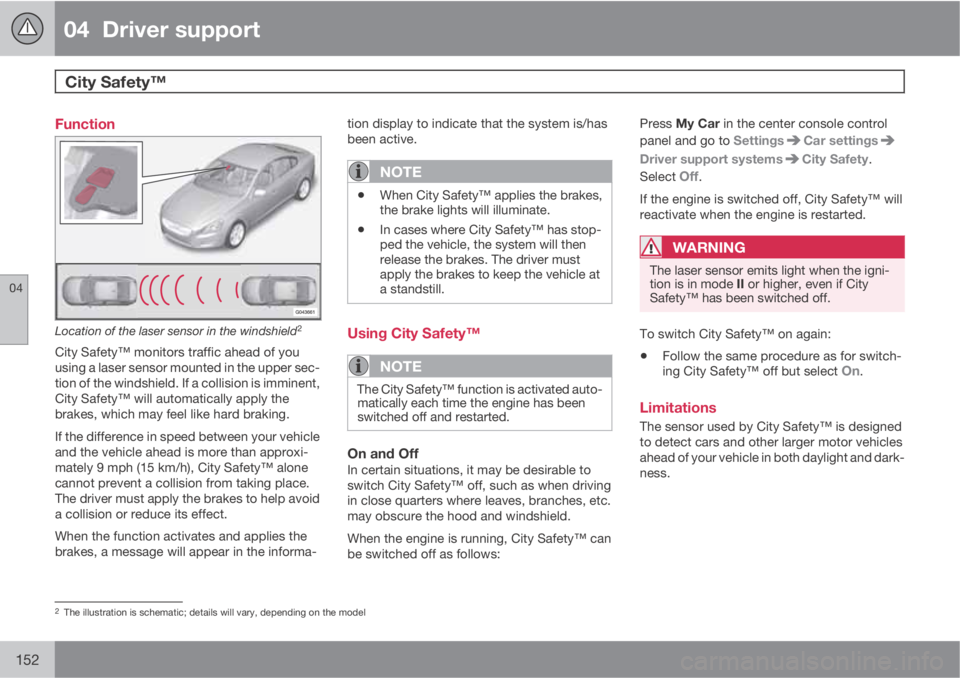
Location of the laser sensor in the windshield2
City Safety™ monitors traffic ahead of you
using a laser sensor mounted in the upper sec-
tion of the windshield. If a collision is imminent,
City Safety™ will automatically apply the
brakes, which may feel like hard braking.
If the difference in speed between your vehicle
and the vehicle ahead is more than approxi-
mately 9 mph (15 km/h), City Safety™ alone
cannot prevent a collision from taking place.
The driver must apply the brakes to help avoid
a collision or reduce its effect.
When the function activates and applies the
brakes, a message will appear in the informa-tion display to indicate that the system is/has
been active.
NOTE
•When City Safety™ applies the brakes,
the brake lights will illuminate.
•In cases where City Safety™ has stop-
ped the vehicle, the system will then
release the brakes. The driver must
apply the brakes to keep the vehicle at
a standstill.
Using City Safety™
NOTE
The City Safety™ function is activated auto-
matically each time the engine has been
switched off and restarted.
On and OffIn certain situations, it may be desirable to
switch City Safety™ off, such as when driving
in close quarters where leaves, branches, etc.
may obscure the hood and windshield.
When the engine is running, City Safety™ can
be switched off as follows:Press My Car in the center console control
panel and go to Settings
Car settings
Driver support systemsCity Safety.
Select
Off.
If the engine is switched off, City Safety™ will
reactivate when the engine is restarted.
WARNING
The laser sensor emits light when the igni-
tion is in mode II or higher, even if City
Safety™ has been switched off.
To switch City Safety™ on again:
•Follow the same procedure as for switch-
ing City Safety™ off but select On.
Limitations
The sensor used by City Safety™ is designed
to detect cars and other larger motor vehicles
ahead of your vehicle in both daylight and dark-
ness.
2The illustration is schematic; details will vary, depending on the model
Page 157 of 366
04 Driver support
City Safety™
04
155
WARNING
Eye injury may occur if any of the following
points are not followed:
•It is essential that all pertinent instruc-
tions be followed when handling laser
instruments. Testing, repairing, remov-
ing, adjusting and/or replacing any
components in the laser sensor may
only be done by a trained and qualified
Volvo service technician.
•Do not remove the laser sensor (includ-
ing removal of the lenses). A laser sen-
sor that has been removed belongs to
laser class 3B according to standard
IEC 60825-1. Devices in laser class 3B
present a risk of injury to the eyes.
•The laser sensor’s connector must be
disconnected before the sensor is
removed from the windshield.
•The laser sensor must be mounted in
place on the windshield before con-
necting the sensor’s connector.
•Do not view the laser sensor (which
emits spreading, invisible laser beams)
with optical instruments from a distance
of less than 4 inches (100 mm).
Symbols and messages in the display
When City Safety™ automatically applies the
brakes, one or more of the symbols in the main
instrument panel may illuminate and its asso-
ciated message will be displayed.
A text message can be erased by pressing
briefly on the OK button on the turn signal
lever.
Page 158 of 366
04 Driver support
City Safety™
04
156
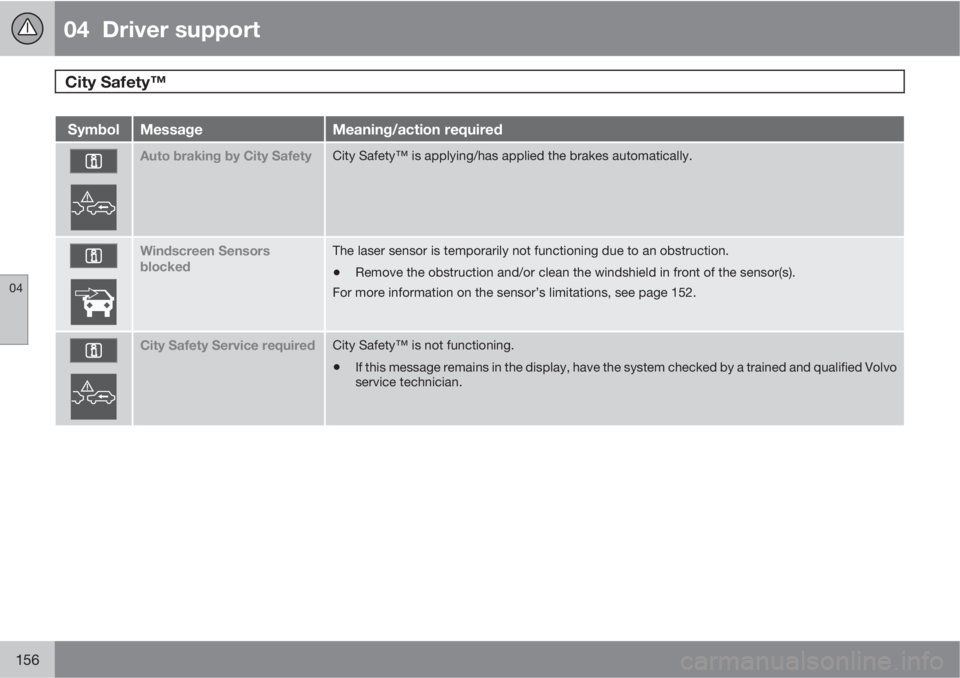
SymbolMessageMeaning/action required
Auto braking by City SafetyCity Safety™ is applying/has applied the brakes automatically.
Windscreen Sensors
blockedThe laser sensor is temporarily not functioning due to an obstruction.
•Remove the obstruction and/or clean the windshield in front of the sensor(s).
For more information on the sensor’s limitations, see page 152.
City Safety Service requiredCity Safety™ is not functioning.
•If this message remains in the display, have the system checked by a trained and qualified Volvo
service technician.
Page 159 of 366
04 Driver support
Collision warning with Full Auto-brake and Pedestrian Detection*
04
* Option/accessory, for more information, see Introduction.157 Introduction
Collision Warning with Full Auto-brake and
Pedestrian Detection is designed to assist the
driver if there is a risk of a collision with a
pedestrian, a vehicle ahead that is at a stand-
still or one that is moving in the same direction
as your vehicle.
Collision Warning consists of the following
three functions:
•Collision Warning warns the driver of a
potential collision situation.
•Brake Support helps the driver brake effi-
ciently in a critical situation.
•Auto-brake brakes the vehicle automati-
cally if a collision with a pedestrian or
another vehicle cannot be avoided and the
driver does not apply the brakes in time or
steer around the person/vehicle. Auto-
brake can help prevent a collision or
reduce the speed at which a collision
occurs.
Since Collision Warning with Full Auto-brake
and Pedestrian Detection is activated in cir-
cumstances where the driver should have
begun braking much sooner, the system will
not be able to assist the driver in all situations.
This system is designed to activate as late as
possible to help avoid unnecessary interven-
tion.The system should not be used in such a way
that the driver changes his/her way of operat-
ing the vehicle. If the driver relies entirely on the
system, the chances of an accident eventually
occurring increase considerably.
The Collision Warning and City Safety™ sys-
tems supplement each other. See page 151 for
detailed information about City Safety™.
WARNING
No automatic system can be guaranteed to
function 100% correctly in all situations. For
that reason, never test the Auto-brake sys-
tem by driving toward a person or object.
This could result in serious injury or death.
WARNING
•Collision Warning does not work in all
driving, traffic, weather and road condi-
tions. It does not react to vehicles not
traveling in the same direction as your
vehicle.
•Collision Warning does not react to ani-
mals.
•Warnings are only provided when the
risk of collision is high. The "Function"
section provides information about lim-
itations that the driver must be aware of
before using Collision Warning.
•Collision Warning will not provide a
warning or brake the vehicle for pedes-
trians at speeds above 50 mph
(80 km/h).
Page 160 of 366
04 Driver support
Collision warning with Full Auto-brake and Pedestrian Detection*
04
158* Option/accessory, for more information, see Introduction.
WARNING
•Collision Warning will not provide a
warning or brake the vehicle for pedes-
trians in darkness or in tunnels, even if
there is street lighting in the area.
•The auto-brake function can help pre-
vent a collision or reduce the speed at
impact but the driver should always
apply the brakes for the best possible
braking effect, even if auto-brake is
actively applying the brakes.
•Never wait for a collision warning. This
system is designed to be a supplemen-
tary driving aid. It is not, however,
intended to replace the driver's atten-
tion and judgement. The driver is
responsible for maintaining a safe dis-
tance and speed, even when the colli-
sion warning system is in use.
•Maintenance of the Collision Warning
system's components must only be
performed by a trained and qualified
Volvo technician.
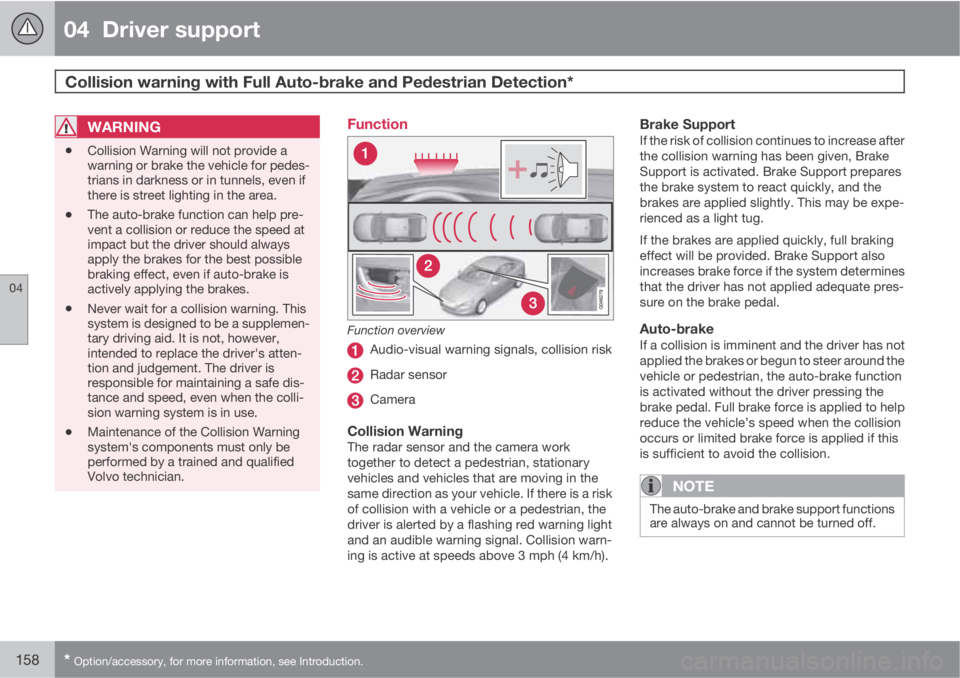
Function
Function overview
Audio-visual warning signals, collision risk
Radar sensor
Camera
Collision WarningThe radar sensor and the camera work
together to detect a pedestrian, stationary
vehicles and vehicles that are moving in the
same direction as your vehicle. If there is a risk
of collision with a vehicle or a pedestrian, the
driver is alerted by a flashing red warning light
and an audible warning signal. Collision warn-
ing is active at speeds above 3 mph (4 km/h).
Brake SupportIf the risk of collision continues to increase after
the collision warning has been given, Brake
Support is activated. Brake Support prepares
the brake system to react quickly, and the
brakes are applied slightly. This may be expe-
rienced as a light tug.
If the brakes are applied quickly, full braking
effect will be provided. Brake Support also
increases brake force if the system determines
that the driver has not applied adequate pres-
sure on the brake pedal.
Auto-brakeIf a collision is imminent and the driver has not
applied the brakes or begun to steer around the
vehicle or pedestrian, the auto-brake function
is activated without the driver pressing the
brake pedal. Full brake force is applied to help
reduce the vehicle’s speed when the collision
occurs or limited brake force is applied if this
is sufficient to avoid the collision.
NOTE
The auto-brake and brake support functions
are always on and cannot be turned off.
Page 161 of 366
04 Driver support
Collision warning with Full Auto-brake and Pedestrian Detection*
04
* Option/accessory, for more information, see Introduction.159 Operation
Settings are made by pressing MY CAR on the
center console control panel and using the
menus displayed.
Activating/deactivating both warning
signals
To switch Collision Warning's audible and vis-
ual signals on or off at the same time, press
MY CAR on the center console control panel
and go to Settings
Car settingsDriver
support systems
Collision Warning. If
Collision Warning is on, the system will perform
a self-test each time the engine is started by
briefly illuminating the warning light. See page
189 for a description of the menu system.
When the engine is switched on, the Collision
Warning setting that was being used when it
was switched off will be the default setting.
NOTE
The auto-brake and pedestrian detection
features are always on, even if the audible
and visual warning signals have been deac-
tivated.
Activating/deactivating the audible
warning signal only
The audible warning signal can be activated/
deactivated by pressing MY CAR on the centerconsole control panel and going to Settings
Car settingsDriver support systems
Warning sound if risk of collision.
Setting a warning distanceThis setting determines the distance at which
the visual and audible warnings are triggered.
Select
Long, Normal or Short by pressing MY
CAR on the center console control panel and
going to Settings
Car settingsDriver
support systems
Collision Warning
Warning distance.
The warning distance determines the level of
sensitivity used by the system. The warning
distance
Long provides an earlier warning.
Begin by using Long and if the system gives
too many warnings, try changing to Normal.
WARNING
•The setting Short should only be used
in situations where traffic is light and
moving at low speeds.
•Collision Warning alerts the driver to the
risk of a collision but this function can-
not reduce the driver’s reaction time.
•For Collision Warning to be as effective
as possible, it is recommended that Dis-
tance Alert be set to 4 or 5, see
page 148.
NOTE
•When Adaptive Cruise Control is used,
the warning light and signal will be used
by that function, even if the warnings
provided by Collision Warning have
been deactivated by the driver.
•In situations where traffic is moving at
considerably different speeds, or if the
vehicle ahead brakes suddenly, warn-
ings may be considered to be late, even
if the setting
Long has been selected.
Checking settingsThe current Collision Warning settings can be
checked by pressing MY CAR on the center
console control panel and going to Settings
Car settingsDriver support systems
Collision Warning.
Limitations
Strong sunlight, reflections, extreme light con-
trasts, the use of sunglasses, or if the driver is
not looking straight ahead may make the visual
warning signal in the windshield difficult to see.
For this reason, always activate the audible
warning signal.
Slippery driving conditions increase braking
distance, which can reduce the system's