belt VOLVO S60 2013 Owner´s Manual
[x] Cancel search | Manufacturer: VOLVO, Model Year: 2013, Model line: S60, Model: VOLVO S60 2013Pages: 366, PDF Size: 6.85 MB
Page 50 of 366
01 Safety
Top tether anchors 01
48
Child restraint anchorages
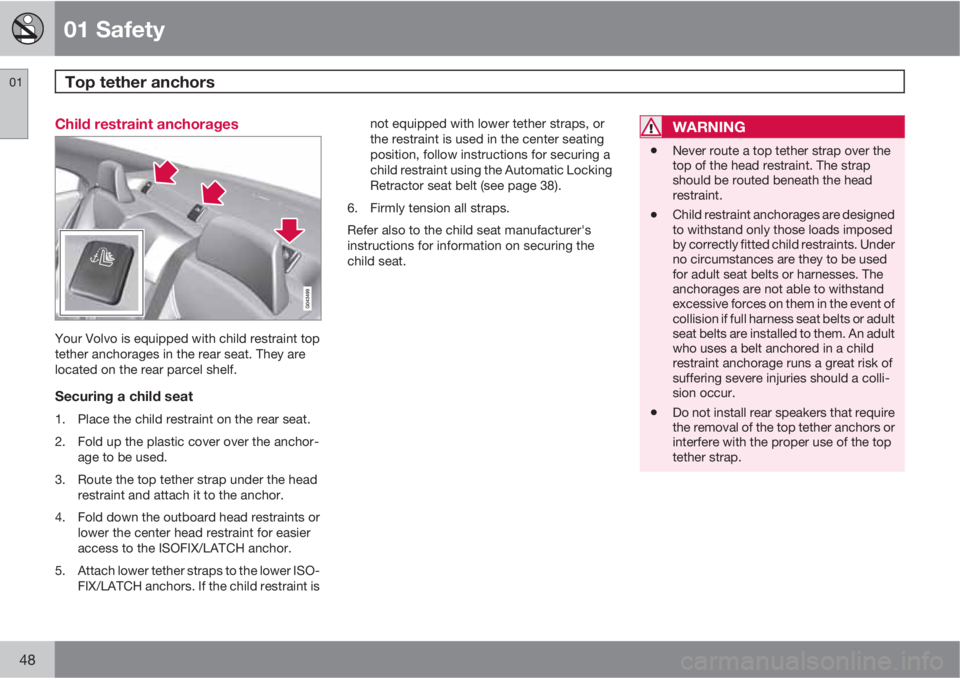
Your Volvo is equipped with child restraint top
tether anchorages in the rear seat. They are
located on the rear parcel shelf.
Securing a child seat
1. Place the child restraint on the rear seat.
2. Fold up the plastic cover over the anchor-
age to be used.
3. Route the top tether strap under the head
restraint and attach it to the anchor.
4. Fold down the outboard head restraints or
lower the center head restraint for easier
access to the ISOFIX/LATCH anchor.
5. Attach lower tether straps to the lower ISO-
FIX/LATCH anchors. If the child restraint isnot equipped with lower tether straps, or
the restraint is used in the center seating
position, follow instructions for securing a
child restraint using the Automatic Locking
Retractor seat belt (see page 38).
6. Firmly tension all straps.
Refer also to the child seat manufacturer's
instructions for information on securing the
child seat.
WARNING
•Never route a top tether strap over the
top of the head restraint. The strap
should be routed beneath the head
restraint.
•Child restraint anchorages are designed
to withstand only those loads imposed
by correctly fitted child restraints. Under
no circumstances are they to be used
for adult seat belts or harnesses. The
anchorages are not able to withstand
excessive forces on them in the event of
collision if full harness seat belts or adult
seat belts are installed to them. An adult
who uses a belt anchored in a child
restraint anchorage runs a great risk of
suffering severe injuries should a colli-
sion occur.
•Do not install rear speakers that require
the removal of the top tether anchors or
interfere with the proper use of the top
tether strap.
Page 82 of 366
03 Your driving environment
Instruments and controls
03
80
time (the length of time varies, depending on
the function affected).
The information symbol may also illuminate
together with other symbols.
High beam indicator
This symbol illuminates when the high beam
headlights are on, or if the high beam flash
function is used.
Left turn signal indicator
Right turn signal indicator
NOTE
•Both turn signal indicators will flash
when the hazard warning flashers are
used.
•If either of these indicators flash faster
than normal, the direction indicators are
not functioning properly.
Sport mode
This symbol illuminates to indicate that the sta-
bility system's Sport mode has been activated
to help provide maximum tractive force, for
example when driving with snow chains, or
driving in deep snow or loose sand.
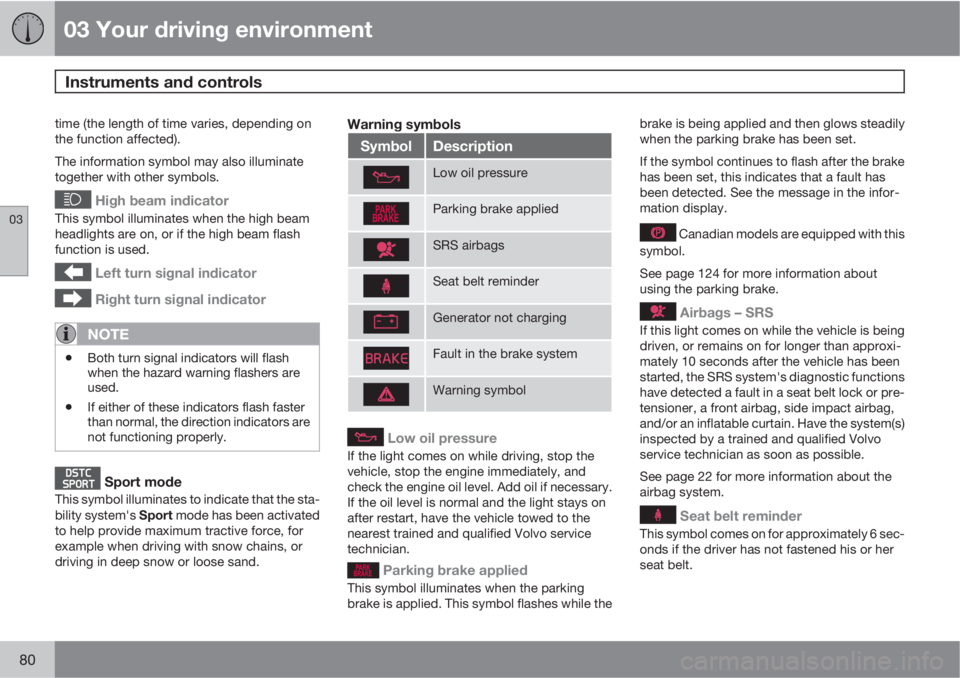
Warning symbols
SymbolDescription
Low oil pressure
Parking brake applied
SRS airbags
Seat belt reminder
Generator not charging
Fault in the brake system
Warning symbol
Low oil pressure
If the light comes on while driving, stop the
vehicle, stop the engine immediately, and
check the engine oil level. Add oil if necessary.
If the oil level is normal and the light stays on
after restart, have the vehicle towed to the
nearest trained and qualified Volvo service
technician.
Parking brake applied
This symbol illuminates when the parking
brake is applied. This symbol flashes while thebrake is being applied and then glows steadily
when the parking brake has been set.
If the symbol continues to flash after the brake
has been set, this indicates that a fault has
been detected. See the message in the infor-
mation display.
Canadian models are equipped with this
symbol.
See page 124 for more information about
using the parking brake.
Airbags – SRS
If this light comes on while the vehicle is being
driven, or remains on for longer than approxi-
mately 10 seconds after the vehicle has been
started, the SRS system's diagnostic functions
have detected a fault in a seat belt lock or pre-
tensioner, a front airbag, side impact airbag,
and/or an inflatable curtain. Have the system(s)
inspected by a trained and qualified Volvo
service technician as soon as possible.
See page 22 for more information about the
airbag system.
Seat belt reminder
This symbol comes on for approximately 6 sec-
onds if the driver has not fastened his or her
seat belt.
Page 93 of 366
03 Your driving environment
Seats
03
91
CAUTION
To help avoid damage to the upholstery,
there should be no objects on the rear seat
and the seat belt should not be buckled
when the backrest is folded down.
WARNING
•Keep vehicle doors and trunk locked
and keep keys out of a child’s reach.
Unsupervised children could lock them-
selves in an open trunk and risk injury.
Children should be taught not to play in
vehicles.
•On hot days, the temperature in the
trunk or vehicle interior can rise very
quickly. Exposure of people to these
high temperatures for even a short
period of time can cause heat-related
injury or death. Small children are par-
ticularly at risk.
WARNING
•When one or more sections of the back-
rest is returned to the upright position,
check that it is properly locked in place
by pushing and pulling it. The red indi-
cators should also not be visible.
•Return the outboard head restraints to
the upright position.
•Long loads should always be securely
anchored to help avoid injury in the
event of a sudden stop.
•Always turn the engine off and apply the
parking brake when loading/unloading
the vehicle.
•Place the transmission in the Park (P)
position to help prevent inadvertent
movement of the gear selector.
•On hot days, the temperature in the
vehicle interior can rise very quickly.
Exposure of people to these high tem-
peratures for even a short period of time
can cause heat-related injury or death.
Small children are particularly at risk.
Page 115 of 366
03 Your driving environment
Starting the engine
03
* Option/accessory, for more information, see Introduction.113 Start
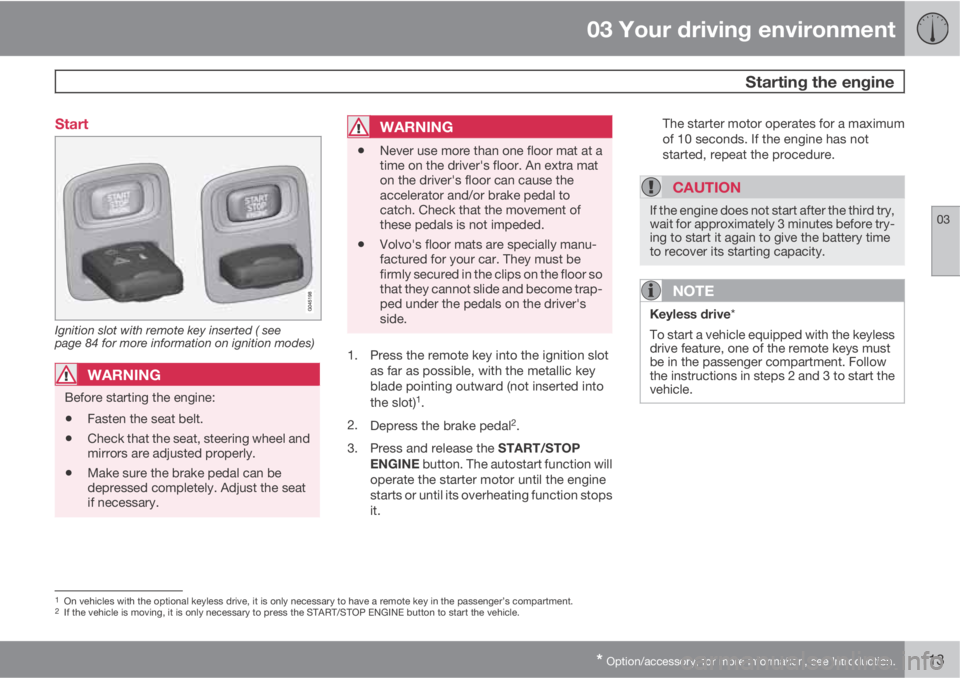
Ignition slot with remote key inserted ( see
page 84 for more information on ignition modes)
WARNING
Before starting the engine:
•Fasten the seat belt.
•Check that the seat, steering wheel and
mirrors are adjusted properly.
•Make sure the brake pedal can be
depressed completely. Adjust the seat
if necessary.
WARNING
•Never use more than one floor mat at a
time on the driver's floor. An extra mat
on the driver's floor can cause the
accelerator and/or brake pedal to
catch. Check that the movement of
these pedals is not impeded.
•Volvo's floor mats are specially manu-
factured for your car. They must be
firmly secured in the clips on the floor so
that they cannot slide and become trap-
ped under the pedals on the driver's
side.
1. Press the remote key into the ignition slot
as far as possible, with the metallic key
blade pointing outward (not inserted into
the slot)
1.
2.
Depress the brake pedal
2.
3.
Press and release the START/STOP
ENGINE button. The autostart function will
operate the starter motor until the engine
starts or until its overheating function stops
it.The starter motor operates for a maximum
of 10 seconds. If the engine has not
started, repeat the procedure.
CAUTION
If the engine does not start after the third try,
wait for approximately 3 minutes before try-
ing to start it again to give the battery time
to recover its starting capacity.
NOTE
Keyless drive*
To start a vehicle equipped with the keyless
drive feature, one of the remote keys must
be in the passenger compartment. Follow
the instructions in steps 2 and 3 to start the
vehicle.
1On vehicles with the optional keyless drive, it is only necessary to have a remote key in the passenger’s compartment.2If the vehicle is moving, it is only necessary to press the START/STOP ENGINE button to start the vehicle.
Page 127 of 366
03 Your driving environment
Parking brake
03
125
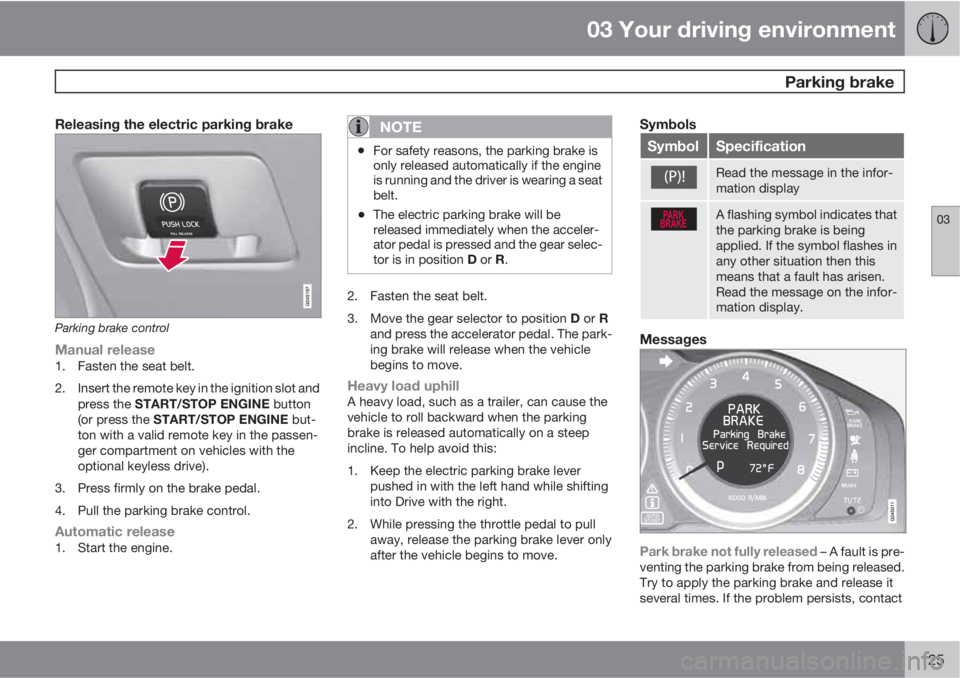
Releasing the electric parking brake
Parking brake control
Manual release1. Fasten the seat belt.
2. Insert the remote key in the ignition slot and
press the START/STOP ENGINE button
(or press the START/STOP ENGINE but-
ton with a valid remote key in the passen-
ger compartment on vehicles with the
optional keyless drive).
3. Press firmly on the brake pedal.
4. Pull the parking brake control.
Automatic release1. Start the engine.
NOTE
•For safety reasons, the parking brake is
only released automatically if the engine
is running and the driver is wearing a seat
belt.
•The electric parking brake will be
released immediately when the acceler-
ator pedal is pressed and the gear selec-
tor is in position D or R.
2. Fasten the seat belt.
3.
Move the gear selector to position D or R
and press the accelerator pedal. The park-
ing brake will release when the vehicle
begins to move.
Heavy load uphillA heavy load, such as a trailer, can cause the
vehicle to roll backward when the parking
brake is released automatically on a steep
incline. To help avoid this:
1. Keep the electric parking brake lever
pushed in with the left hand while shifting
into Drive with the right.
2. While pressing the throttle pedal to pull
away, release the parking brake lever only
after the vehicle begins to move.
Symbols
SymbolSpecification
Read the message in the infor-
mation display
A flashing symbol indicates that
the parking brake is being
applied. If the symbol flashes in
any other situation then this
means that a fault has arisen.
Read the message on the infor-
mation display.
Messages
Park brake not fully released – A fault is pre-
venting the parking brake from being released.
Try to apply the parking brake and release it
several times. If the problem persists, contact
Page 137 of 366
04 Driver support
Cruise control
04
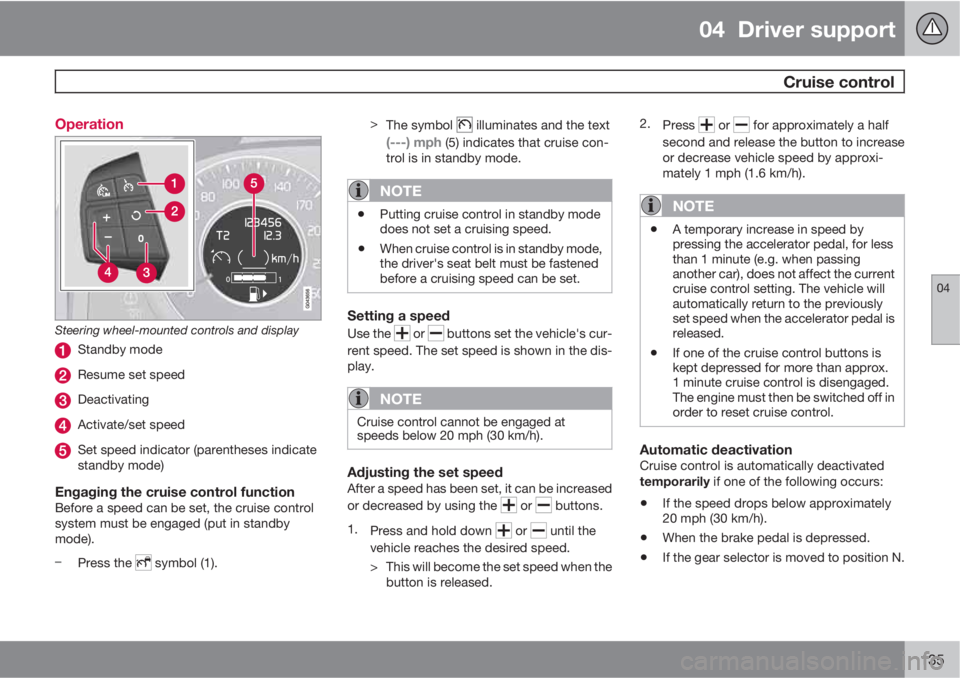
135 Operation
Steering wheel-mounted controls and display
Standby mode
Resume set speed
Deactivating
Activate/set speed
Set speed indicator (parentheses indicate
standby mode)
Engaging the cruise control functionBefore a speed can be set, the cruise control
system must be engaged (put in standby
mode).
–
Press the
symbol (1).>
The symbol
illuminates and the text
(---) mph (5) indicates that cruise con-
trol is in standby mode.
NOTE
•Putting cruise control in standby mode
does not set a cruising speed.
•When cruise control is in standby mode,
the driver's seat belt must be fastened
before a cruising speed can be set.
Setting a speed
Use the or buttons set the vehicle's cur-
rent speed. The set speed is shown in the dis-
play.
NOTE
Cruise control cannot be engaged at
speeds below 20 mph (30 km/h).
Adjusting the set speedAfter a speed has been set, it can be increased
or decreased by using the
or buttons.
1.
Press and hold down
or until the
vehicle reaches the desired speed.
> This will become the set speed when the
button is released.2.
Press
or for approximately a half
second and release the button to increase
or decrease vehicle speed by approxi-
mately 1 mph (1.6 km/h).
NOTE
•A temporary increase in speed by
pressing the accelerator pedal, for less
than 1 minute (e.g. when passing
another car), does not affect the current
cruise control setting. The vehicle will
automatically return to the previously
set speed when the accelerator pedal is
released.
•If one of the cruise control buttons is
kept depressed for more than approx.
1 minute cruise control is disengaged.
The engine must then be switched off in
order to reset cruise control.
Automatic deactivationCruise control is automatically deactivated
temporarily if one of the following occurs:
•If the speed drops below approximately
20 mph (30 km/h).
•When the brake pedal is depressed.
•If the gear selector is moved to position N.
Page 141 of 366
04 Driver support
Adaptive Cruise Control (ACC)*
04
* Option/accessory, for more information, see Introduction.139
WARNING
Adaptive Cruise Control only warns of vehi-
cles detected by the radar sensor, see
page 143. In some cases there may be no
warning or the warning may be delayed. The
driver should always apply the brakes when
necessary.
Steep inclines and/or heavy loadsACC is primarily intended for use on fairly level
roads. The system may have difficulty main-
taining the correct distance to a vehicle ahead
on steep inclines, if the vehicle is carrying a
heavy load or is towing a trailer. In these situa-
tions, the driver should always be prepared to
apply the brakes if necessary.
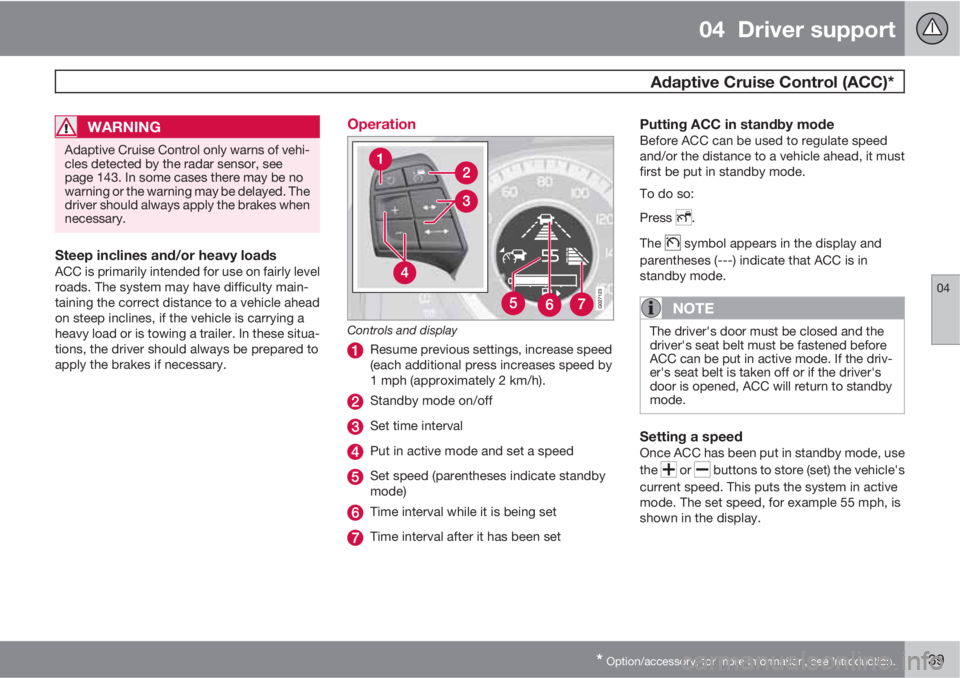
Operation
Controls and display
Resume previous settings, increase speed
(each additional press increases speed by
1 mph (approximately 2 km/h).
Standby mode on/off
Set time interval
Put in active mode and set a speed
Set speed (parentheses indicate standby
mode)
Time interval while it is being set
Time interval after it has been set
Putting ACC in standby modeBefore ACC can be used to regulate speed
and/or the distance to a vehicle ahead, it must
first be put in standby mode.
To do so:
Press
.
The
symbol appears in the display and
parentheses (---) indicate that ACC is in
standby mode.
NOTE
The driver's door must be closed and the
driver's seat belt must be fastened before
ACC can be put in active mode. If the driv-
er's seat belt is taken off or if the driver's
door is opened, ACC will return to standby
mode.
Setting a speedOnce ACC has been put in standby mode, use
the
or buttons to store (set) the vehicle's
current speed. This puts the system in active
mode. The set speed, for example 55 mph, is
shown in the display.
Page 144 of 366
04 Driver support
Adaptive Cruise Control (ACC)*
04
142* Option/accessory, for more information, see Introduction.
Please note that the lowest speed that can be
set is 18 mph (30 km/h), although ACC can
maintain a set speed/distance to a vehicle
ahead down to a standstill. Queue Assist con-
sists of the following features:
Enhanced speed interval
NOTE
The driver's door must be closed and the
driver's seat belt must be fastened before
ACC can be put in active mode. If the driv-
er's seat belt is taken off or if the driver's
door is opened, ACC will return to standby
mode.
Your vehicle can maintain the set time interval
to the vehicle ahead at any permissible speed,
including a complete stop.
In order to activate ACC at speeds below
18 mph (30 km/h):
•The vehicle ahead must be within a rea-
sonable distance (not farther away than
approx. 100 ft/30 meters)
•The lowest speed that can be selected is
18 mph (30 km/h), although ACC will also
help maintain the set time interval to the
vehicle ahead at lower speeds, including a
complete stop.During short stops (less than approximately
3 seconds) in slow-moving traffic, your vehicle
will begin moving again automatically as soon
as the vehicle ahead begins to move.
If it takes more than 3 seconds for the vehicle
ahead to begin moving, ACC will be automati-
cally go into standby mode.
The driver will then have to reactivate ACC in
one of the following ways:
•By pressing
•By accelerating up to at least 3 mph
(4 km/h). ACC will then resume following
the vehicle ahead.
Your vehicle will then resume following the
vehicle ahead at the set time interval.
NOTE
ACC can remain active and keep your vehi-
cle at a standstill for up to 4 minutes. After
4 minutes have elapsed, the parking brake
will be engaged and ACC will go into
standby mode.
To reactivate ACC, the driver must release
the parking brake (see page 125).
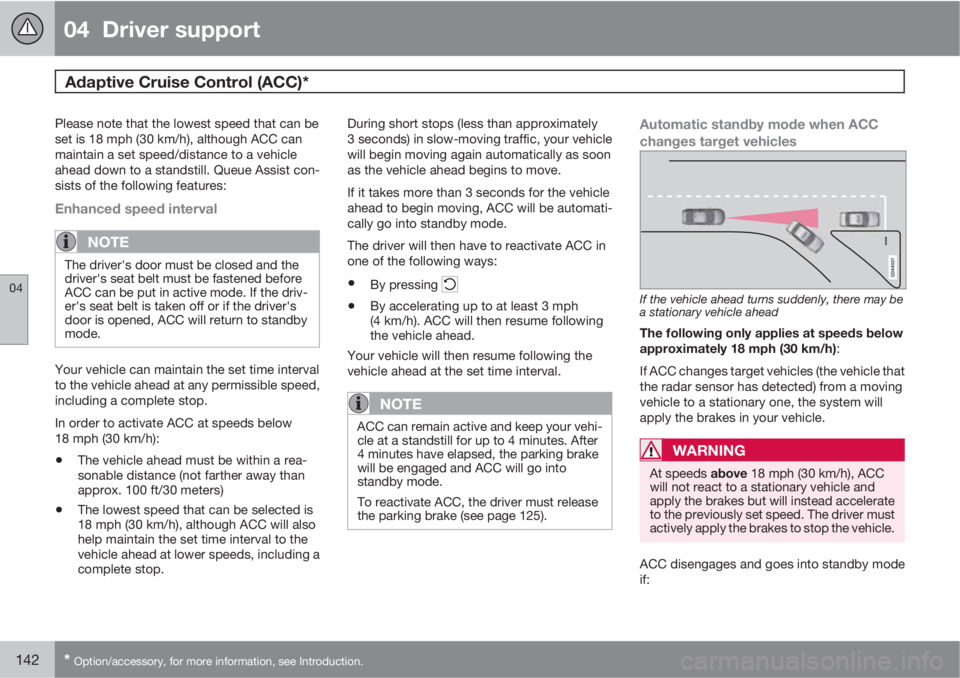
Automatic standby mode when ACC
changes target vehicles
If the vehicle ahead turns suddenly, there may be
a stationary vehicle ahead
The following only applies at speeds below
approximately 18 mph (30 km/h):
If ACC changes target vehicles (the vehicle that
the radar sensor has detected) from a moving
vehicle to a stationary one, the system will
apply the brakes in your vehicle.
WARNING
At speeds above 18 mph (30 km/h), ACC
will not react to a stationary vehicle and
apply the brakes but will instead accelerate
to the previously set speed. The driver must
actively apply the brakes to stop the vehicle.
ACC disengages and goes into standby mode
if:
Page 145 of 366
04 Driver support
Adaptive Cruise Control (ACC)*
04
* Option/accessory, for more information, see Introduction.143
•Your vehicle's speed goes below 10 mph
(15 km/h) and ACC cannot determine if the
target object is a stationary vehicle or some
other type of object such as e.g., a speed
bump.
•Your vehicle's speed goes below 10 mph
(15 km/h) and the vehicle ahead turns so
that ACC no longer has a target vehicle to
follow.
No automatic braking when at a
standstill
In certain situations, ACC will no longer apply
the brakes and go into standby mode while the
vehicle is not moving. This means that the
driver will have to apply the brakes.
This happens if:
•The driver presses the brake pedal
•The parking brake is activated
•The gear selected is moved to P,N or R
•The driver presses the button to put
ACC in standby mode
The parking brake is applied
automatically
In certain situations, ACC will apply the parking
brake in order to continue keeping the vehicle
at a standstill.
This happens if:
•The driver opens the door or takes off
his/her seat belt
•DSTC is put in Sport mode (see page 130)
•ACC has kept the vehicle at a standstill for
more than 2 minutes
•The engine has been switched off
•The brakes have overheated
Turning ACC off completely
•From standby mode, press once.
•From active mode, press twice.
The set speed and time interval are then
cleared from the system's memory and cannot
be resumed by pressing
.
The radar sensor and its limitations
In addition to being used by ACC, the radar
sensor is also used by Distance Alert (see
page 148) and Collision Warning with Full
Auto-brake and Pedestrian Detection (see
page 157). This sensor is designed to detect
cars or larger vehicles driving in the same
direction as your vehicle, in the same lane.
WARNING
Accessories or other objects, such as extra
headlights, must not be installed in front of
the grille.
Modification of the radar sensor could make
its use illegal.
The radar sensor's capacity to detect vehicles
ahead is impeded:
•if the radar sensor is obstructed and can-
not detect other vehicles, for example in
heavy rain, or if snow or other objects are
obscuring the radar sensor.
NOTE
Keep the area in front of the radar sensor
clean.
•if the speed of vehicles ahead is signifi-
cantly different from your own speed.
Page 258 of 366
07 During your trip
Driving recommendations
07
256
Before a long distance tripIt is always worthwhile to have your vehicle
checked by a trained and qualified Volvo serv-
ice technician before driving long distances.
Your retailer will also be able to supply you with
bulbs, fuses, spark plugs and wiper blades for
your use in the event that problems occur.
As a minimum, the following items should be
checked before any long trip:
•Check that engine runs smoothly and that
fuel consumption is normal.
•Check for fuel, oil, and fluid leakage
•Have the transmission oil level checked.
•Check condition of drive belts.
•Check state of the battery's charge.
•Examine tires carefully (the spare tire as
well), and replace those that are worn.
Check tire pressures.
•The brakes, front wheel alignment, and
steering gear should be checked by a
trained and qualified Volvo service techni-
cian only.
•Check all lights, including high beams.
•Reflective warning triangles are legally
required in some states/provinces.
•Have a word with a trained and qualified
Volvo service technician if you intend to
drive in countries where it may be difficult
to obtain the correct fuel.
•Consider your destination. If you will be
driving through an area where snow or ice
are likely to occur, consider snow tires.
Cold weather precautionsIf you wish to check your vehicle before the
approach of cold weather, the following advice
is worth noting:
•Make sure that the engine coolant contains
50 percent antifreeze. Any other mixture
will reduce freeze protection. This gives
protection against freezing down to
–31 °F (–35 °C). The use of "recycled" anti-
freeze is not approved by Volvo. Different
types of antifreeze must not be mixed.
•Volvo recommends using only genuine
Volvo antifreeze in your vehicle's radiator.
•Try to keep the fuel tank well filled – this
helps prevent the formation of condensa-
tion in the tank. In addition, in extremely
cold weather conditions it is worthwhile to
add fuel line de-icer before refueling.
•The viscosity of the engine oil is important.
Oil with low viscosity (thinner oil) improves
cold-weather starting as well as decreas-
ing fuel consumption while the engine is
warming up. 0W-30 oil is recommended for
driving in areas with sustained low temper-
atures.
•The load placed on the battery is greater
during the winter since the windshield wip-
ers, lighting, etc., are used more often.Moreover, the capacity of the battery
decreases as the temperature drops. In
very cold weather, a poorly charged bat-
tery can freeze and be damaged. It is there-
fore advisable to check the state of charge
more frequently and spray an anti-rust oil
on the battery posts.
•Volvo recommends the use of snow tires
on all four wheels for winter driving, see
page 286.
•To prevent the washer fluid reservoir from
freezing, add washer solvents containing
antifreeze. This is important since dirt is
often splashed on the windshield during
winter driving, requiring the frequent use of
the washers and wipers. Volvo Washer
Solvent should be diluted as follows: Down
to 14 °F (–10 °C): 1 part washer solvent and
4 parts water Down to 5 °F (–15 °C): 1 part
washer solvent and 3 parts water Down to
0 °F (–18 °C): 1 part washer solvent and
2 parts water Down to –18 °F (–28 °C):
1 part washer solvent and 1 part water.
•Use Volvo Teflon Lock Spray in the locks.
•Avoid using de-icing sprays as they can
cause damage to the locks.