warning VOLVO S60 2013 Owner´s Manual
[x] Cancel search | Manufacturer: VOLVO, Model Year: 2013, Model line: S60, Model: VOLVO S60 2013Pages: 366, PDF Size: 6.85 MB
Page 125 of 366
03 Your driving environment
Brakes
03
123
NOTE
•When the EBA system is activated, the
brake pedal will go down and pressure
in the brake system immediately increa-
ses to the maximum level. You must
maintain full pressure on the brake
pedal in order to utilize the system com-
pletely. There will be no braking effect if
the pedal is released. EBA is automati-
cally deactivated when the brake pedal
is released.
•When the vehicle has been parked for
some time, the brake pedal may sink
more than usual when the engine is
started. This is normal and the pedal will
return to its usual position when it is
released.
Symbols in the instrument panel
SymbolSpecification
Steady glow – Check the brake
fluid level. If the level is low, fill
with brake fluid and check for
the cause of the brake fluid
loss.
Steady glow for two seconds
when the engine is started –
There was a fault in the brake
system's ABS function when
the engine was last running.
WARNING
If and come on at the same time
and the brake level is below the MIN mark
in the reservoir or if a brake system-related
message is shown in the information dis-
play: DO NOT DRIVE. Have the vehicle
towed to a trained and qualified Volvo serv-
ice technician and have the brake system
inspected.
Page 128 of 366
03 Your driving environment
Parking brake
03
126
an authorized Volvo workshop. If you drive off
with this error message showing, a warning
signal sounds.
Parking brake not applied – A fault is pre-
venting the parking brake from being applied.
Try to apply the parking brake and release it
several times. If the problem persists, contact
an authorized Volvo workshop. If you drive off
with this error message showing, a warning
signal sounds.
Parking brake Service required – A fault has
occurred. Try to apply and release. Contact a
Volvo workshop if the fault remains.
WARNING
If the vehicle must be parked before the fault
has been corrected, always put the gear
selector in P and turn the wheels so that
they point away from the curb if the vehicle
is pointing uphill or toward the curb if it is
pointing downhill.
Page 130 of 366
G000000
128* Option/accessory, for more information, see Introduction.
Stability system..................................................................................... 130
Road sign information (RSI) .................................................................133
Cruise control........................................................................................ 135
Adaptive Cruise Control (ACC)*............................................................ 137
Distance Alert* ..................................................................................... 148
City Safety™ ........................................................................................ 151
Collision warning with Full Auto-brake and Pedestrian Detection*...... 157
Driver Alert System* ............................................................................. 165
Park assist*........................................................................................... 171
Rear Park Assist Camera (PAC)* .......................................................... 175
Blind Spot Information System*............................................................ 179
Page 134 of 366
04 Driver support
Stability system
04
132
WARNING
The stability system is intended to help
improve driving safety. It supplements, but
can never replace, the driver's judgment
and responsibility when operating the vehi-
cle. Speed and driving style should always
be adapted to traffic and road conditions.
Page 135 of 366
04 Driver support
Road sign information (RSI)
04
133 Introduction
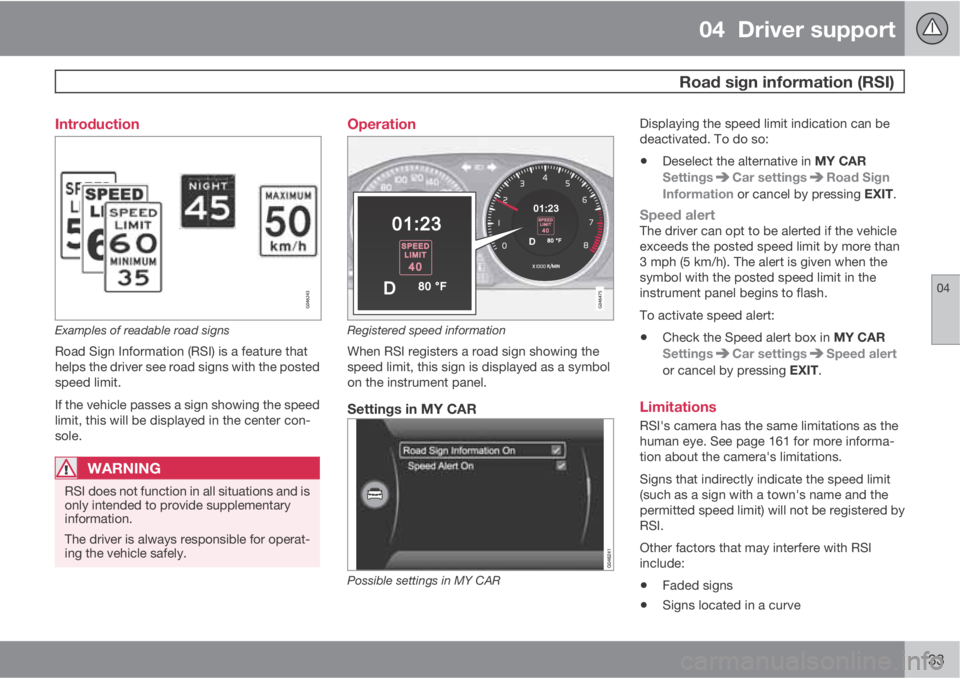
Examples of readable road signs
Road Sign Information (RSI) is a feature that
helps the driver see road signs with the posted
speed limit.
If the vehicle passes a sign showing the speed
limit, this will be displayed in the center con-
sole.
WARNING
RSI does not function in all situations and is
only intended to provide supplementary
information.
The driver is always responsible for operat-
ing the vehicle safely.
Operation
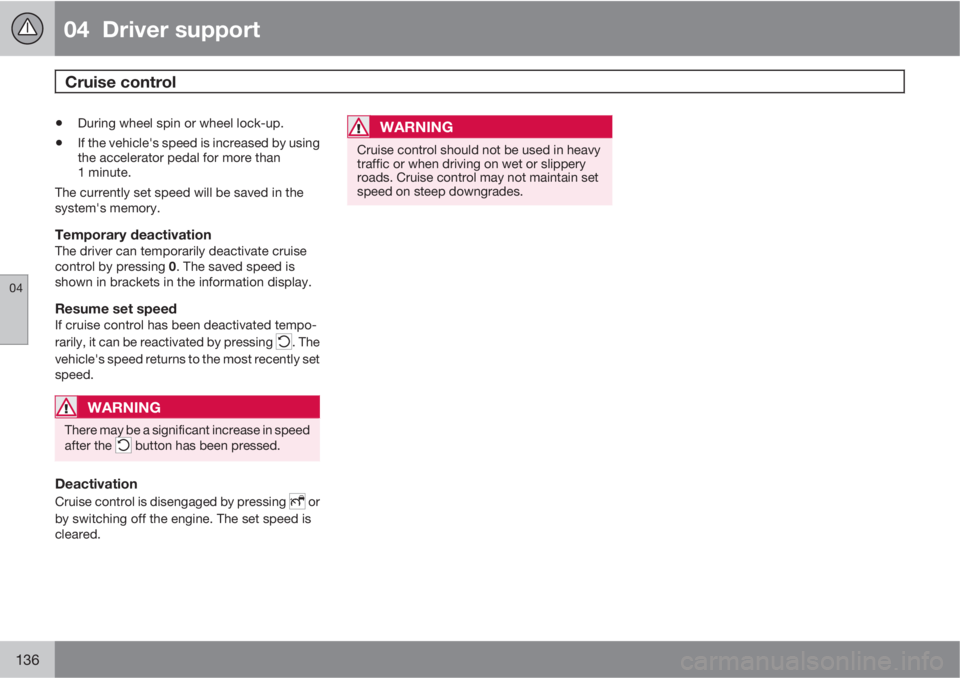
Registered speed information
When RSI registers a road sign showing the
speed limit, this sign is displayed as a symbol
on the instrument panel.
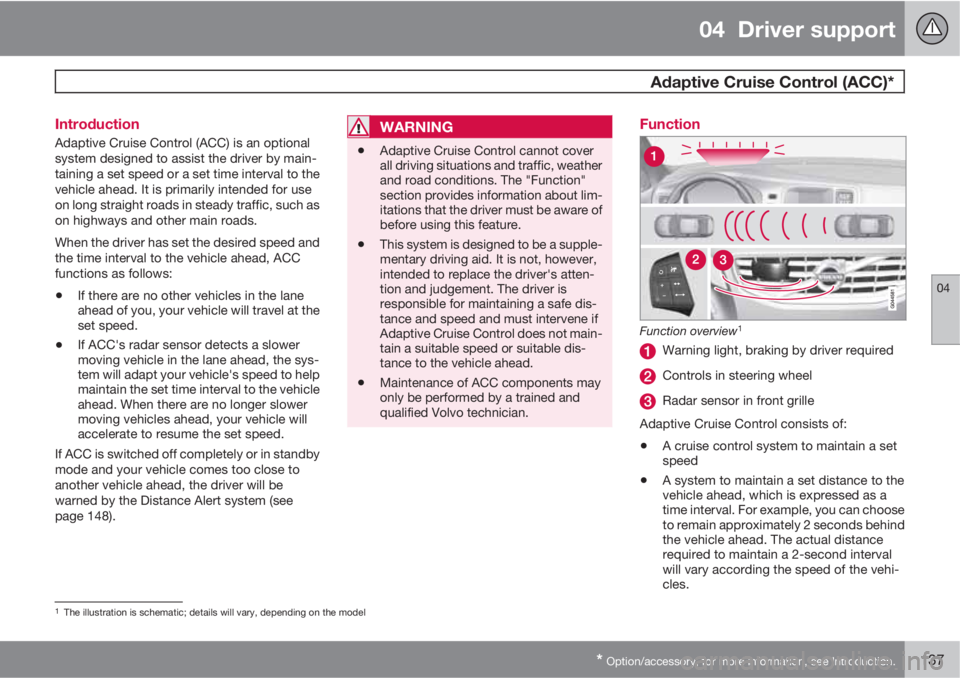
Settings in MY CAR
Possible settings in MY CAR
Displaying the speed limit indication can be
deactivated. To do so:
•Deselect the alternative in MY CAR
Settings
Car settingsRoad Sign
Information or cancel by pressing EXIT.
Speed alertThe driver can opt to be alerted if the vehicle
exceeds the posted speed limit by more than
3 mph (5 km/h). The alert is given when the
symbol with the posted speed limit in the
instrument panel begins to flash.
To activate speed alert:
•Check the Speed alert box in MY CAR
Settings
Car settingsSpeed alert
or cancel by pressing EXIT.
Limitations
RSI's camera has the same limitations as the
human eye. See page 161 for more informa-
tion about the camera's limitations.
Signs that indirectly indicate the speed limit
(such as a sign with a town's name and the
permitted speed limit) will not be registered by
RSI.
Other factors that may interfere with RSI
include:
•Faded signs
•Signs located in a curve
Page 138 of 366
04 Driver support
Cruise control
04
136
•During wheel spin or wheel lock-up.
•If the vehicle's speed is increased by using
the accelerator pedal for more than
1 minute.
The currently set speed will be saved in the
system's memory.
Temporary deactivationThe driver can temporarily deactivate cruise
control by pressing 0. The saved speed is
shown in brackets in the information display.
Resume set speedIf cruise control has been deactivated tempo-
rarily, it can be reactivated by pressing
. The
vehicle's speed returns to the most recently set
speed.
WARNING
There may be a significant increase in speed
after the button has been pressed.
Deactivation
Cruise control is disengaged by pressing or
by switching off the engine. The set speed is
cleared.
WARNING
Cruise control should not be used in heavy
traffic or when driving on wet or slippery
roads. Cruise control may not maintain set
speed on steep downgrades.
Page 139 of 366
04 Driver support
Adaptive Cruise Control (ACC)*
04
* Option/accessory, for more information, see Introduction.137 Introduction
Adaptive Cruise Control (ACC) is an optional
system designed to assist the driver by main-
taining a set speed or a set time interval to the
vehicle ahead. It is primarily intended for use
on long straight roads in steady traffic, such as
on highways and other main roads.
When the driver has set the desired speed and
the time interval to the vehicle ahead, ACC
functions as follows:
•If there are no other vehicles in the lane
ahead of you, your vehicle will travel at the
set speed.
•If ACC's radar sensor detects a slower
moving vehicle in the lane ahead, the sys-
tem will adapt your vehicle's speed to help
maintain the set time interval to the vehicle
ahead. When there are no longer slower
moving vehicles ahead, your vehicle will
accelerate to resume the set speed.
If ACC is switched off completely or in standby
mode and your vehicle comes too close to
another vehicle ahead, the driver will be
warned by the Distance Alert system (see
page 148).
WARNING
•Adaptive Cruise Control cannot cover
all driving situations and traffic, weather
and road conditions. The "Function"
section provides information about lim-
itations that the driver must be aware of
before using this feature.
•This system is designed to be a supple-
mentary driving aid. It is not, however,
intended to replace the driver's atten-
tion and judgement. The driver is
responsible for maintaining a safe dis-
tance and speed and must intervene if
Adaptive Cruise Control does not main-
tain a suitable speed or suitable dis-
tance to the vehicle ahead.
•Maintenance of ACC components may
only be performed by a trained and
qualified Volvo technician.
Function
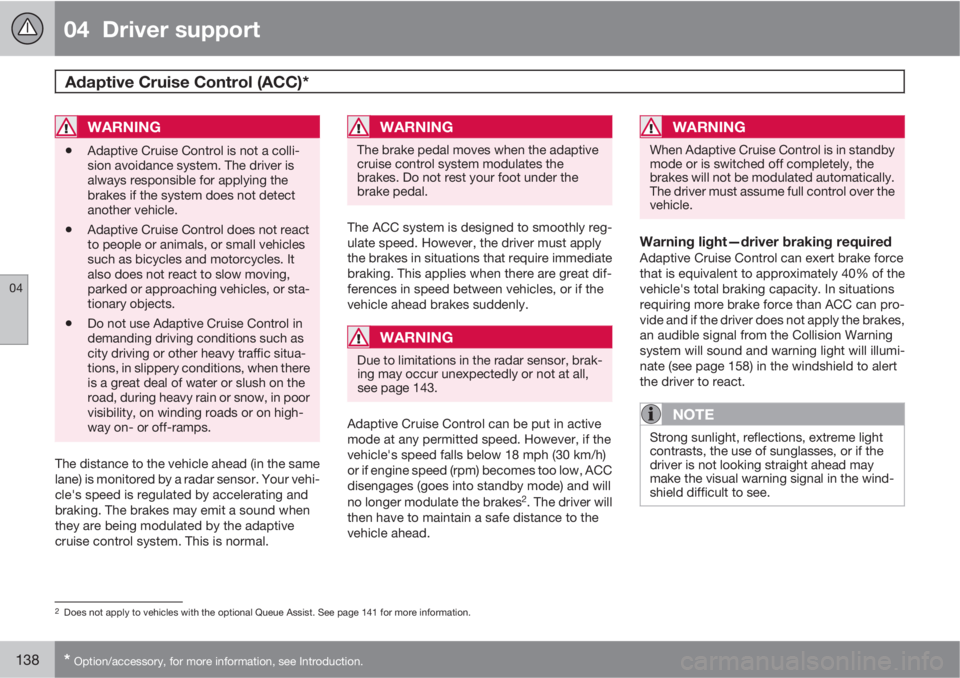
Function overview1
Warning light, braking by driver required
Controls in steering wheel
Radar sensor in front grille
Adaptive Cruise Control consists of:
•A cruise control system to maintain a set
speed
•A system to maintain a set distance to the
vehicle ahead, which is expressed as a
time interval. For example, you can choose
to remain approximately 2 seconds behind
the vehicle ahead. The actual distance
required to maintain a 2-second interval
will vary according the speed of the vehi-
cles.
1The illustration is schematic; details will vary, depending on the model
Page 140 of 366
04 Driver support
Adaptive Cruise Control (ACC)*
04
138* Option/accessory, for more information, see Introduction.
WARNING
•Adaptive Cruise Control is not a colli-
sion avoidance system. The driver is
always responsible for applying the
brakes if the system does not detect
another vehicle.
•Adaptive Cruise Control does not react
to people or animals, or small vehicles
such as bicycles and motorcycles. It
also does not react to slow moving,
parked or approaching vehicles, or sta-
tionary objects.
•Do not use Adaptive Cruise Control in
demanding driving conditions such as
city driving or other heavy traffic situa-
tions, in slippery conditions, when there
is a great deal of water or slush on the
road, during heavy rain or snow, in poor
visibility, on winding roads or on high-
way on- or off-ramps.
The distance to the vehicle ahead (in the same
lane) is monitored by a radar sensor. Your vehi-
cle's speed is regulated by accelerating and
braking. The brakes may emit a sound when
they are being modulated by the adaptive
cruise control system. This is normal.
WARNING
The brake pedal moves when the adaptive
cruise control system modulates the
brakes. Do not rest your foot under the
brake pedal.
The ACC system is designed to smoothly reg-
ulate speed. However, the driver must apply
the brakes in situations that require immediate
braking. This applies when there are great dif-
ferences in speed between vehicles, or if the
vehicle ahead brakes suddenly.
WARNING
Due to limitations in the radar sensor, brak-
ing may occur unexpectedly or not at all,
see page 143.
Adaptive Cruise Control can be put in active
mode at any permitted speed. However, if the
vehicle's speed falls below 18 mph (30 km/h)
or if engine speed (rpm) becomes too low, ACC
disengages (goes into standby mode) and will
no longer modulate the brakes
2. The driver will
then have to maintain a safe distance to the
vehicle ahead.
WARNING
When Adaptive Cruise Control is in standby
mode or is switched off completely, the
brakes will not be modulated automatically.
The driver must assume full control over the
vehicle.
Warning light—driver braking requiredAdaptive Cruise Control can exert brake force
that is equivalent to approximately 40% of the
vehicle's total braking capacity. In situations
requiring more brake force than ACC can pro-
vide and if the driver does not apply the brakes,
an audible signal from the Collision Warning
system will sound and warning light will illumi-
nate (see page 158) in the windshield to alert
the driver to react.
NOTE
Strong sunlight, reflections, extreme light
contrasts, the use of sunglasses, or if the
driver is not looking straight ahead may
make the visual warning signal in the wind-
shield difficult to see.
2Does not apply to vehicles with the optional Queue Assist. See page 141 for more information.
Page 141 of 366
04 Driver support
Adaptive Cruise Control (ACC)*
04
* Option/accessory, for more information, see Introduction.139
WARNING
Adaptive Cruise Control only warns of vehi-
cles detected by the radar sensor, see
page 143. In some cases there may be no
warning or the warning may be delayed. The
driver should always apply the brakes when
necessary.
Steep inclines and/or heavy loadsACC is primarily intended for use on fairly level
roads. The system may have difficulty main-
taining the correct distance to a vehicle ahead
on steep inclines, if the vehicle is carrying a
heavy load or is towing a trailer. In these situa-
tions, the driver should always be prepared to
apply the brakes if necessary.
Operation
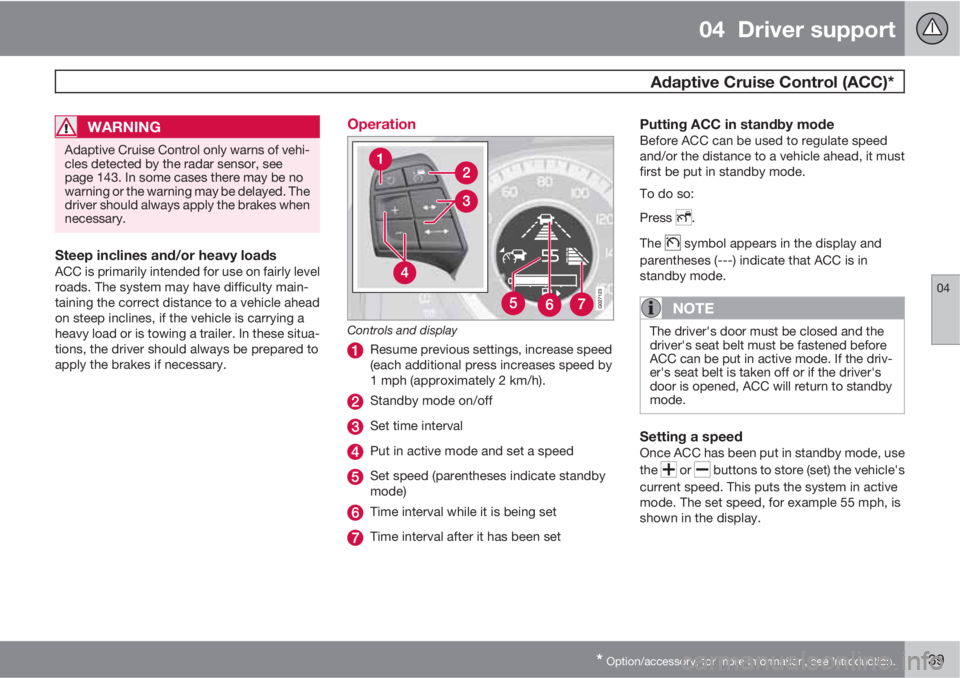
Controls and display
Resume previous settings, increase speed
(each additional press increases speed by
1 mph (approximately 2 km/h).
Standby mode on/off
Set time interval
Put in active mode and set a speed
Set speed (parentheses indicate standby
mode)
Time interval while it is being set
Time interval after it has been set
Putting ACC in standby modeBefore ACC can be used to regulate speed
and/or the distance to a vehicle ahead, it must
first be put in standby mode.
To do so:
Press
.
The
symbol appears in the display and
parentheses (---) indicate that ACC is in
standby mode.
NOTE
The driver's door must be closed and the
driver's seat belt must be fastened before
ACC can be put in active mode. If the driv-
er's seat belt is taken off or if the driver's
door is opened, ACC will return to standby
mode.
Setting a speedOnce ACC has been put in standby mode, use
the
or buttons to store (set) the vehicle's
current speed. This puts the system in active
mode. The set speed, for example 55 mph, is
shown in the display.
Page 142 of 366
04 Driver support
Adaptive Cruise Control (ACC)*
04
140* Option/accessory, for more information, see Introduction.
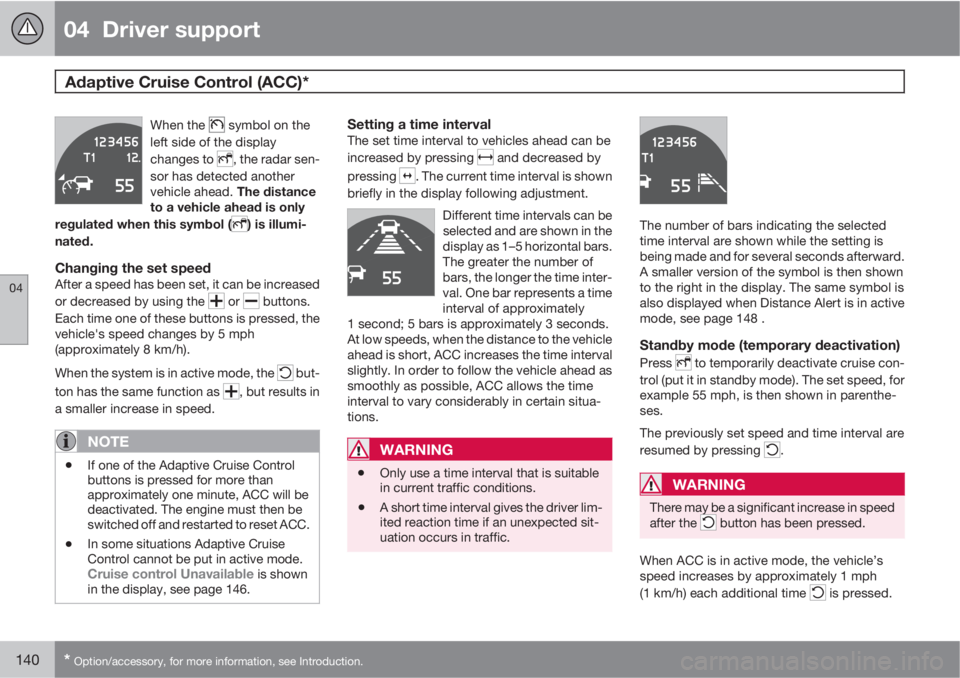
When the symbol on the
left side of the display
changes to
, the radar sen-
sor has detected another
vehicle ahead. The distance
to a vehicle ahead is only
regulated when this symbol (
) is illumi-
nated.
Changing the set speedAfter a speed has been set, it can be increased
or decreased by using the
or buttons.
Each time one of these buttons is pressed, the
vehicle's speed changes by 5 mph
(approximately 8 km/h).
When the system is in active mode, the
but-
ton has the same function as
, but results in
a smaller increase in speed.
NOTE
•If one of the Adaptive Cruise Control
buttons is pressed for more than
approximately one minute, ACC will be
deactivated. The engine must then be
switched off and restarted to reset ACC.
•In some situations Adaptive Cruise
Control cannot be put in active mode.
Cruise control Unavailable is shown
in the display, see page 146.
Setting a time intervalThe set time interval to vehicles ahead can be
increased by pressing
and decreased by
pressing
. The current time interval is shown
briefly in the display following adjustment.
Different time intervals can be
selected and are shown in the
display as 1–5 horizontal bars.
The greater the number of
bars, the longer the time inter-
val. One bar represents a time
interval of approximately
1 second; 5 bars is approximately 3 seconds.
At low speeds, when the distance to the vehicle
ahead is short, ACC increases the time interval
slightly. In order to follow the vehicle ahead as
smoothly as possible, ACC allows the time
interval to vary considerably in certain situa-
tions.
WARNING
•Only use a time interval that is suitable
in current traffic conditions.
•A short time interval gives the driver lim-
ited reaction time if an unexpected sit-
uation occurs in traffic.
The number of bars indicating the selected
time interval are shown while the setting is
being made and for several seconds afterward.
A smaller version of the symbol is then shown
to the right in the display. The same symbol is
also displayed when Distance Alert is in active
mode, see page 148 .
Standby mode (temporary deactivation)
Press to temporarily deactivate cruise con-
trol (put it in standby mode). The set speed, for
example 55 mph, is then shown in parenthe-
ses.
The previously set speed and time interval are
resumed by pressing
.
WARNING
There may be a significant increase in speed
after the button has been pressed.
When ACC is in active mode, the vehicle’s
speed increases by approximately 1 mph
(1 km/h) each additional time
is pressed.