air condition VOLVO S60 2014 Owner´s Manual
[x] Cancel search | Manufacturer: VOLVO, Model Year: 2014, Model line: S60, Model: VOLVO S60 2014Pages: 386, PDF Size: 11.24 MB
Page 206 of 386

05 Comfort and driving pleasure
Climate system
05
204
ditioning system contains 1.76 lbs (800 g) of R134a. The systems uses PAG oil.
Passenger compartment filterReplace the cabin air filter with a new one atthe recommended intervals. Please refer toyour Warranty and Service Records Informa-tion booklet, or consult a trained and qualifiedVolvo service technician for these intervals.The filter should be replaced more often whendriving under dirty and dusty conditions. Thefilter cannot be cleaned and therefore shouldalways be replaced with a new one.
NOTE
There are different types of cabin air filters. Ensure that the correct type is installed.
Interior Air Quality System (IAQS)A multifilter helps reduce gases and particles in the incoming air, thereby reducing the lev-els of odors and contaminants entering thevehicle. The air quality sensor detectsincreased levels of contaminants in the out-side air. When the air quality sensor detectscontaminated outside air, the air intake closesand the air inside the passenger compart-ment is recirculated, i.e., no outside air entersthe vehicle. The filter also cleans recirculatedpassenger compartment air.
NOTE
Contact your Volvo retailer for IAQS air fil- ter replacement intervals.
Materials used in the cabinThe materials used in the cabin have been developed to help minimize the amount ofdust and make the cabin easier to keepclean. All floor mats can be easily removedfor cleaning. Use car cleaning products rec-ommended by Volvo. See also the informa-tion beginning on page 353.
Menu settingsThe default settings for four of the climatesystem's functions can be changed in themenu system.• Blower speed in automatic mode.
• Recirculation timer for passenger com- partment air.
• Automatic rear window defrosting.
• The optional Interior Air Quality System(IAQS).
The functions can also be returned to factory settings in the menu system. See page 197 for a description of the menu system.
Air distribution
The incoming air is distributed from a number of different vents in the passenger compart-ment. Air distribution is fully automatic in AUTO
mode.If desired, air distribution can be controlled manually, see page 211.
Page 209 of 386
05 Comfort and driving pleasure
Climate system
05
* Option/accessory, for more information, see Introduction.207
Climate system controls
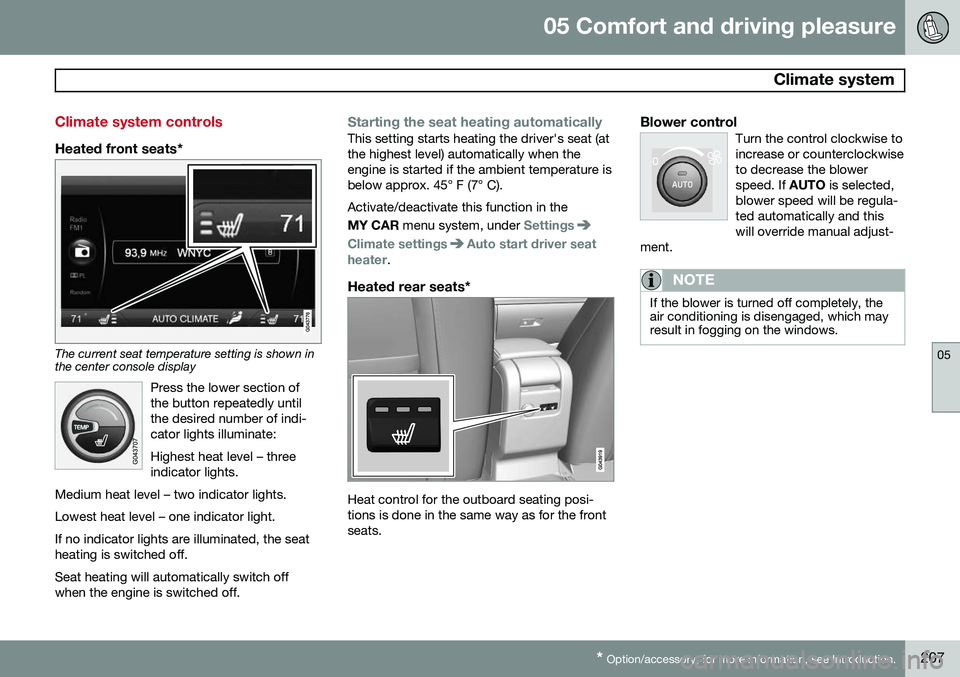
Heated front seats*
The current seat temperature setting is shown in the center console display
Press the lower section of the button repeatedly untilthe desired number of indi-cator lights illuminate: Highest heat level – three indicator lights.
Medium heat level – two indicator lights. Lowest heat level – one indicator light.If no indicator lights are illuminated, the seat heating is switched off.
Seat heating will automatically switch off when the engine is switched off.
Starting the seat heating automaticallyThis setting starts heating the driver's seat (at the highest level) automatically when theengine is started if the ambient temperature isbelow approx. 45° F (7° C). Activate/deactivate this function in the MY CAR menu system, under
Settings
Climate settingsAuto start driver seat
heater.
Heated rear seats*
Heat control for the outboard seating posi- tions is done in the same way as for the frontseats.
Blower controlTurn the control clockwise toincrease or counterclockwiseto decrease the blowerspeed. If AUTO is selected,
blower speed will be regula-ted automatically and thiswill override manual adjust-
ment.
NOTE
If the blower is turned off completely, the air conditioning is disengaged, which mayresult in fogging on the windows.
Page 211 of 386
05 Comfort and driving pleasure
Climate system
05
}}
* Option/accessory, for more information, see Introduction.209
A/C – ON/OFFWhen the indicator light in the button is on, the air con-ditioning is controlled auto-matically. This cools/heatsand dehumidifies the incom-ing air. When the indicatorlight in the button is off, the
air conditioning is disengaged. Other func-tions are still controlled automatically. Whenmaximum defroster is selected, the air condi-tioning system is set for maximum blowerspeed and dehumidifies the cabin as quicklyas possible.Max. defroster and electrically heated windshield*
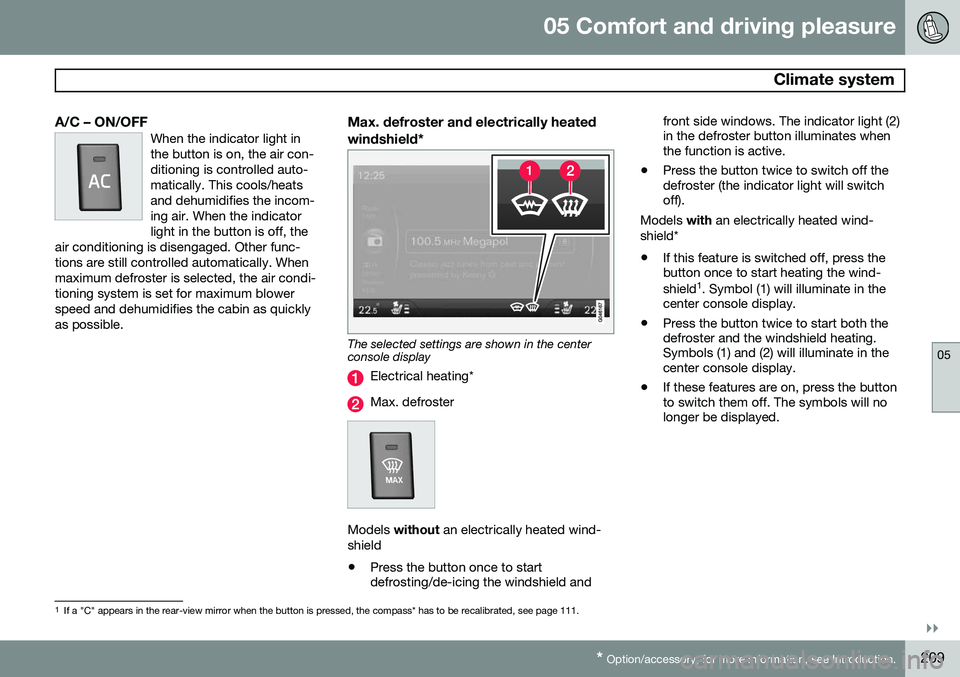
The selected settings are shown in the center console display
Electrical heating*
Max. defroster
Models without an electrically heated wind-
shield • Press the button once to start defrosting/de-icing the windshield and front side windows. The indicator light (2)in the defroster button illuminates whenthe function is active.
• Press the button twice to switch off thedefroster (the indicator light will switchoff).
Models with an electrically heated wind-
shield*
• If this feature is switched off, press thebutton once to start heating the wind- shield 1
. Symbol (1) will illuminate in the
center console display.
• Press the button twice to start both the defroster and the windshield heating.Symbols (1) and (2) will illuminate in thecenter console display.
• If these features are on, press the buttonto switch them off. The symbols will nolonger be displayed.
1
If a "C" appears in the rear-view mirror when the button is pressed, the compass* has to be recalibrated, see page 111.
Page 212 of 386

05 Comfort and driving pleasure
Climate system
05
210* Option/accessory, for more information, see Introduction.
NOTE
• Triangular areas at the far sides of the windshield are not heated electricallyand will take slightly longer todefrost/de-ice.
• The heated windshield may affect theperformance/range of e.g., transpond-ers used to automatically pay highwaytolls or other communication equip-ment.
The following occurs when the defroster/ windshield heating functions have been acti-vated: •
Blower speed increases automatically and the air conditioning will switch on (ifnot already on and if the passenger com-partment blower is not turned off) todehumidify the air in the passenger com-partment. Air conditioning can beswitched off by pressing the
AC button.
• Recirculation will not function whiledefrost is engaged.
The climate system will return to its previous settings when the defroster/windshield heat-ing function is switched off. See also page 109 for additional information.
Recirculation/air quality system
RecirculationThis function can be used to shut out exhaust fumes,smoke, etc., from the pas-senger compartment. The airin the passenger compart-ment is then recirculated,i.e., no air from outside the
car is taken into the car when this function isactivated. The indicator light in the button willilluminate when recirculation is selected. If the air in the car recirculates for too long, there is a risk of condensation forming on theinsides of the windows, especially in winter.
TimerThe timer function minimizes the risk of fog- ging, or stale air when the recirculation func-tion is selected by automatically switching offthe function after a certain length of time,depending on the ambient temperature. Acti-vate/deactivate the function under
Climate
settings
Recirculation timer. See page
197 for a description of the menu system.
NOTE
When Defroster is selected, recirculation is always deactivated.
Interior Air Quality System–IAQS*This system consists of a multifilter and an air quality sensor. The filter helps remove gasesand particles from the incoming air, therebyreducing the amounts of odors and contami-nants entering the vehicle. The air quality sen-sor detects increased levels of contaminantsin the outside air. When the air quality sensordetects contaminated outside air, the airintake closes and the air inside the passengercompartment is recirculated, i.e., no outsideair enters the vehicle. The filter also cleansrecirculated passenger compartment air.When the AUTO button is depressed the air
quality sensor is always engaged. Activate or deactivate this function in
Climate
settings
Interior air quality system.
NOTE
• The air quality sensor should always be engaged in order to obtain the bestair in the passenger compartment.
• Recirculation is limited in cold weatherto avoid fogging.
• If the insides of the windows start fog-ging, disengage the air quality sensor.Use the defroster function to increaseairflow to the front, side, and rear win-dows.
Page 213 of 386
05 Comfort and driving pleasure
Climate system
05
211
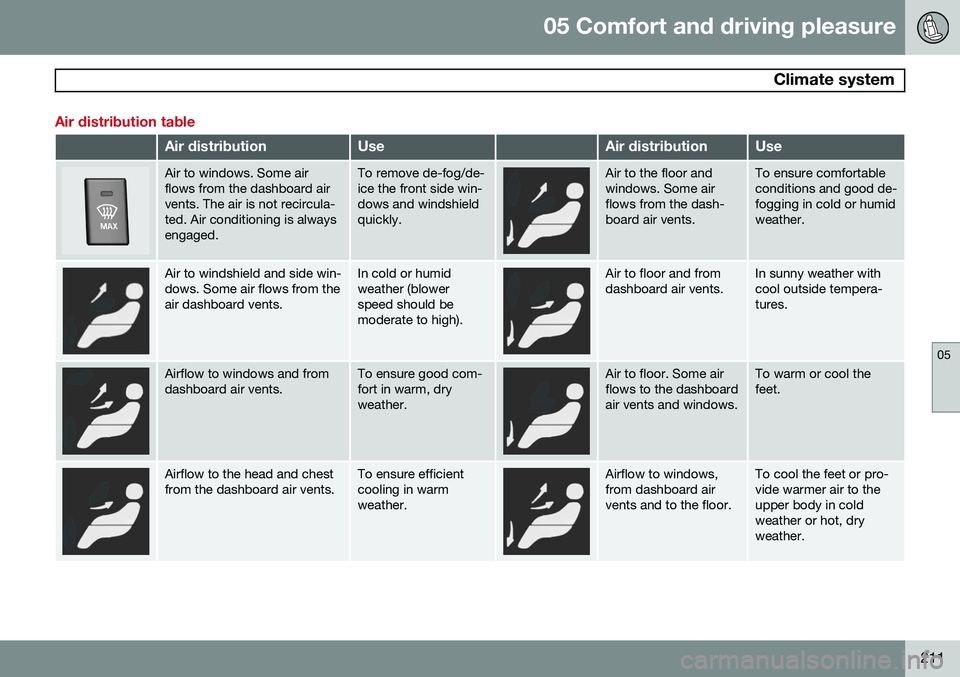
Air distribution table
Air distributionUseAir distributionUse
Air to windows. Some air flows from the dashboard airvents. The air is not recircula-ted. Air conditioning is alwaysengaged.To remove de-fog/de- ice the front side win-dows and windshieldquickly.Air to the floor and windows. Some airflows from the dash-board air vents.To ensure comfortable conditions and good de-fogging in cold or humidweather.
Air to windshield and side win- dows. Some air flows from theair dashboard vents.In cold or humid weather (blowerspeed should bemoderate to high).Air to floor and from dashboard air vents.In sunny weather with cool outside tempera-tures.
Airflow to windows and from dashboard air vents.To ensure good com- fort in warm, dryweather.Air to floor. Some air flows to the dashboardair vents and windows.To warm or cool the feet.
Airflow to the head and chest from the dashboard air vents.To ensure efficient cooling in warmweather.Airflow to windows, from dashboard airvents and to the floor.To cool the feet or pro- vide warmer air to theupper body in coldweather or hot, dryweather.
Page 272 of 386
07 During your trip
Driving recommendations
07
270
General information
Economical driving conserves natural
resources
Better driving economy may be obtained by thinking ahead, avoiding rapid starts andstops and adjusting the speed of your vehicleto immediate traffic conditions. Observe the following rules:
• Bring the engine to normal operating tem- perature as soon as possible by drivingwith a light foot on the accelerator pedalfor the first few minutes of operation. Acold engine uses more fuel and is subjectto increased wear.
• Whenever possible, avoid using the vehi-cle for driving short distances. This doesnot allow the engine to reach normaloperating temperature.
• Drive carefully and avoid rapid accelera-tion and hard braking.
• Use the transmission's Drive (
D) position
as often as possible and avoid using kick-down.
• Using the transmission's Sport mode 1
may increase fuel consumption some-what. Use the transmission's Drive ( D)
position as often as possible. See page 125 for additional information about Sportmode.
• Do not exceed posted speed limits.
• Avoid carrying unnecessary items (extraload) in the vehicle.
• Maintain correct tire pressure. Check tirepressure regularly (when tires are cold).
• Remove snow tires when threat of snowor ice has ended.
• Note that roof racks, ski racks, etc,increase air resistance and also fuel con-sumption.
• At highway driving speeds, fuel consump-tion will be lower with the air conditioningon and the windows closed than with theair conditioning off and the windowsopen.
• Using the onboard trip computer's fuelconsumption modes can help you learnhow to drive more economically.
Other factors that decrease gas mileage are: • Dirty air cleaner
• Dirty engine oil and clogged oil filter
• Dragging brakes
• Incorrect front end alignment Some of the above mentioned items and oth- ers are checked at the standard maintenanceintervals.WARNING
Driving with the trunk open:
Driving with
the trunk open could lead to poisonous exhaust gases entering the passengercompartment. If the trunk must be keptopen for any reason, proceed as follows:
• Close the windows
• Set the ventilation system control to air flow to floor, windshield and side win-dows and the blower control to itshighest setting.
Weight distribution affects handlingAt the specified curb weight your vehicle has a tendency to understeer, which means thatthe steering wheel has to be turned morethan might seem appropriate for the curva-ture of a bend. This ensures good stabilityand reduces the risk of rear wheel skid.Remember that these properties can alterwith the vehicle load. The heavier the load inthe trunk, the less the tendency to under-steer.
1
Certain models only.
Page 273 of 386
07 During your trip
Driving recommendations
07
271
Handling, roadholdingVehicle load, tire design and inflation pres- sure all affect vehicle handling. Therefore,check that the tires are inflated to the recom-mended pressure according to the vehicleload. See the "Tire pressure" section. Loadsshould be distributed so that capacity weightor maximum permissible axle loads are notexceeded.
Driving through water
•The vehicle can be driven through water up to a depth of approximately 10 in.(25 cm), at a maximum speed of 6 mph(10 km/h).
• Take particular care when driving throughflowing water.
• Clean the electrical connections for trailerwiring after driving in mud or water.
• When driving through water, maintain lowspeed and do not stop in the water.
WARNING
•Avoid driving through standing or rushing water. Doing so can be dan-gerous and it may also be difficult todetermine the actual depth of thewater.
• If water cannot be avoided, after driv-ing through the water, press lightly onthe brake pedal to ensure that thebrakes are functioning normally. Wateror mud can make the brake liningsslippery, resulting in delayed brakingeffect.
CAUTION
• Engine damage will occur if water is drawn into the air cleaner.
• If the vehicle is driven through waterdeeper than 10 in (25 cm), water mayenter the differential and the transmis-sion. This reduces the oil's lubricatingcapacity and may shorten the servicelife of these components.
• Do not allow the vehicle to stand inwater up to the door sills longer thanabsolutely necessary. This could resultin electrical malfunctions.
• If the engine has been stopped whilethe vehicle is in water, do not attemptto restart it. Have the vehicle towedout of the water.
Engine and cooling systemUnder special conditions, for example when driving in hilly terrain, extreme heat or withheavy loads, there is a risk that the engineand cooling system will overheat. Proceed asfollows to avoid overheating the engine. •
Maintain a low speed when driving with a trailer up long, steep hills.
• Do not turn the engine off immediatelywhen stopping after a hard drive.
Page 284 of 386
07 During your trip
Towing a trailer
07
282
Introduction
Volvo recommends the use of Volvo trailer hitches that are specially designed for thevehicle.
NOTE
See page 364 for the maximum trailer and tongue weights recommended by Volvo.
•Observe the legal requirements of the state/province in which the vehicles are
• All Volvo models are equipped withenergy-absorbing shock-mounted bump-ers. Trailer hitch installation should notinterfere with the proper operation of thisbumper system.
Trailer towing does not normally present any particular problems, but take into considera-tion: • Increase tire pressure to recommended full pressure. See the tire inflation tableon page 296.
• When your vehicle is new, avoid towingheavy trailers during the first 620 miles(1,000 km).
• Maximum speed when towing a trailer:50 mph (80 km/h).
• Engine and transmission are subject toincreased loads. Therefore, engine cool-ant temperature should be closely watched when driving in hot climates orhilly terrain. Use a lower gear and turn offthe air conditioner if the temperaturegauge needle enters the red range.
• If the automatic transmission begins tooverheat, a message will be displayed inthe text window.
• Avoid overload and other abusive opera-tion.
• Hauling a trailer affects handling, durabil-ity, and economy.
• It is necessary to balance trailer brakeswith the towing vehicle brakes to providea safe stop (check and observe state/local regulations).
• Do not connect the trailer's brake systemdirectly to the vehicle's brake system.
• More frequent vehicle maintenance isrequired.
• Remove the ball holder when the hitch isnot being used.
WARNING
• Bumper-attached trailer hitches must not be used on Volvos, nor shouldsafety chains be attached to thebumper.
• Trailer hitches attaching to the vehiclerear axle must not be used.
• Never connect a trailer's hydraulicbrake system directly to the vehiclebrake system, nor a trailer's lightingsystem directly to the vehicle lightingsystem. Consult your nearest author-ized Volvo retailer for correct installa-tion.
• When towing a trailer, the trailer'ssafety wire must be correctly fastenedto the hole or hook provided in thetrailer hitch on the vehicle. The safetywire should never be fastened to orwound around the drawbar ball.
Page 292 of 386
08 Wheels and tires
General information
08
290
Introduction
Your vehicle is equipped with tires according to the vehicle's tire information placard on theB-pillar (the structural member at the side ofthe vehicle, at the rear of the driver's dooropening).
CAUTION
Some Volvo models are equipped with an Ultra High Performance tire and wheelcombination designed to provide maxi-mum dry pavement performance with con-sideration for hydroplaning resistance.They may be more susceptible to roadhazard damage and, depending on drivingconditions, may achieve a tread life of lessthan 20,000 miles (30,000 km). Even if thisvehicle is equipped with Volvo’s advancedAWD or DSTC system, these tires are notdesigned for winter driving, and should bereplaced with winter tires when weatherconditions dictate.
The tires have good road holding characteris- tics and offer good handling on dry and wetsurfaces. It should be noted however that thetires have been developed to give these fea-tures on snow/ice-free surfaces. Most models are equipped with "all-season" tires, which provide a somewhat higherdegree of road holding on slippery surfacesthan tires without the "all-season" rating.However, for optimum road holding on icy orsnow-covered roads, we recommend suitablewinter tires on all four wheels. When replacing tires, be sure that the new tires are the same size designation, type(radial) and preferably from the same manu-facturer, on all four wheels. Otherwise there isa risk of altering the car's roadholding andhandling characteristics.
New Tires
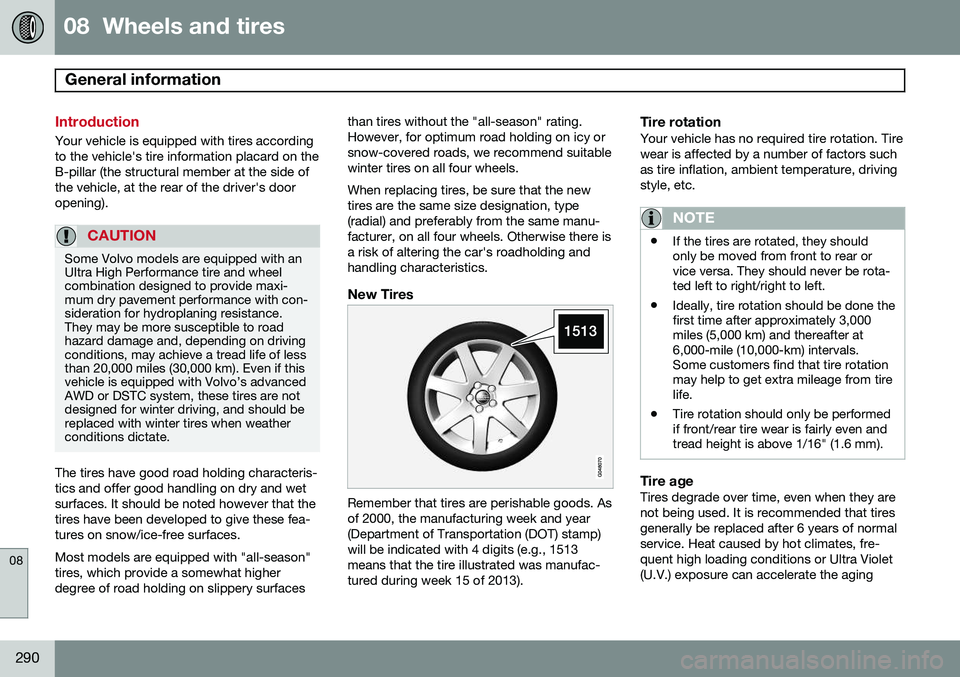
Remember that tires are perishable goods. Asof 2000, the manufacturing week and year(Department of Transportation (DOT) stamp)will be indicated with 4 digits (e.g., 1513means that the tire illustrated was manufac-tured during week 15 of 2013).
Tire rotationYour vehicle has no required tire rotation. Tire wear is affected by a number of factors suchas tire inflation, ambient temperature, drivingstyle, etc.
NOTE
•
If the tires are rotated, they should only be moved from front to rear orvice versa. They should never be rota-ted left to right/right to left.
• Ideally, tire rotation should be done thefirst time after approximately 3,000miles (5,000 km) and thereafter at6,000-mile (10,000-km) intervals.Some customers find that tire rotationmay help to get extra mileage from tirelife.
• Tire rotation should only be performedif front/rear tire wear is fairly even andtread height is above 1/16" (1.6 mm).
Tire ageTires degrade over time, even when they are not being used. It is recommended that tiresgenerally be replaced after 6 years of normalservice. Heat caused by hot climates, fre- quent high loading conditions or Ultra Violet(U.V.) exposure can accelerate the aging
Page 318 of 386
08 Wheels and tires
Tire Pressure Monitoring System (TPMS)
08
316
Introduction
NOTE
USA – FCC ID: KR5S122780002 This device complies with part 15 of the FCC rules. Operation is subject to the fol-lowing conditions: (1) This device may notcause harmful interference, and (2) thisdevice must accept any interferencereceived, including interference that maycause undesired operation.
The tire pressure monitoring system1
uses
sensors mounted in the tire valves to check inflation pressure levels. When the vehicle ismoving at a speed of approximately 20 mph(30 km/h) or faster, these sensors transmitinflation pressure data to a receiver located inthe vehicle. When low inflation pressure is detected or if a sensor is not functioning properly, TPMS will light up the tire pressure warning light (
)
(also referred to as a telltale) in the instrument panel and will display one of the following messages in the text window:
Tire pressure
low or
Tire needs air now.
NOTE
If a fault occurs in TPMS, the tire pressure warning light will flash for approximately 1 minute and
Tire press. syst Service
required will be displayed.
Each tire, including the spare 2
(if provided),
should be checked monthly when cold and inflated to the inflation pressure recom-mended by the vehicle manufacturer on thevehicle placard or tire inflation pressure label.(If your vehicle has tires of a different sizethan the size indicated on the vehicle placardor tire inflation pressure label, you shoulddetermine the proper tire inflation pressure forthose tires.) As an added safety feature, your vehicle has been equipped with a tire pressure monitor-ing system (TPMS) that illuminates a low tirepressure telltale when one or more of yourtires is significantly under-inflated. Accord-ingly, when the low tire pressure telltale illu-minates, you should stop and check yourtires as soon as possible, and inflate them tothe proper pressure. Driving on a significantlyunder-inflated tire causes the tire to overheatand can lead to tire failure. Under-inflationalso reduces fuel efficiency and tire tread life, and may affect the vehicle's handling andstopping ability. Please note that the TPMS is not a substitute for proper tire maintenance, and it is the driv-er's responsibility to maintain correct tirepressure, even if under-inflation has notreached the level to trigger illumination of theTPMS low tire pressure telltale. Your vehicle has also been equipped with a TPMS malfunction indicator to indicate whenthe system is not operating properly. TheTPMS malfunction indicator is combined withthe low tire pressure telltale. When the sys-tem detects a malfunction, the telltale willflash for approximately one minute and thenremain continuously illuminated. Thissequence will continue upon subsequentvehicle start-ups as long as the malfunctionexists. When the malfunction indicator is illu-minated, the system may not be able todetect or signal low tire pressure as intended.TPMS malfunctions may occur for a variety ofreasons, including the installation of replace-ment or alternate tires or wheels on the vehi-cle that prevent the TPMS from functioningproperly. Always check the TPMS malfunc-tion telltale after replacing one or more tiresor wheels on your vehicle to ensure that the
1
Not available in all markets or in all models.
2 Available as an accessory