reset VOLVO S60 2014 Owner´s Manual
[x] Cancel search | Manufacturer: VOLVO, Model Year: 2014, Model line: S60, Model: VOLVO S60 2014Pages: 386, PDF Size: 11.24 MB
Page 149 of 386
04 Driver support
Adaptive Cruise Control (ACC)*
04
* Option/accessory, for more information, see Introduction.147
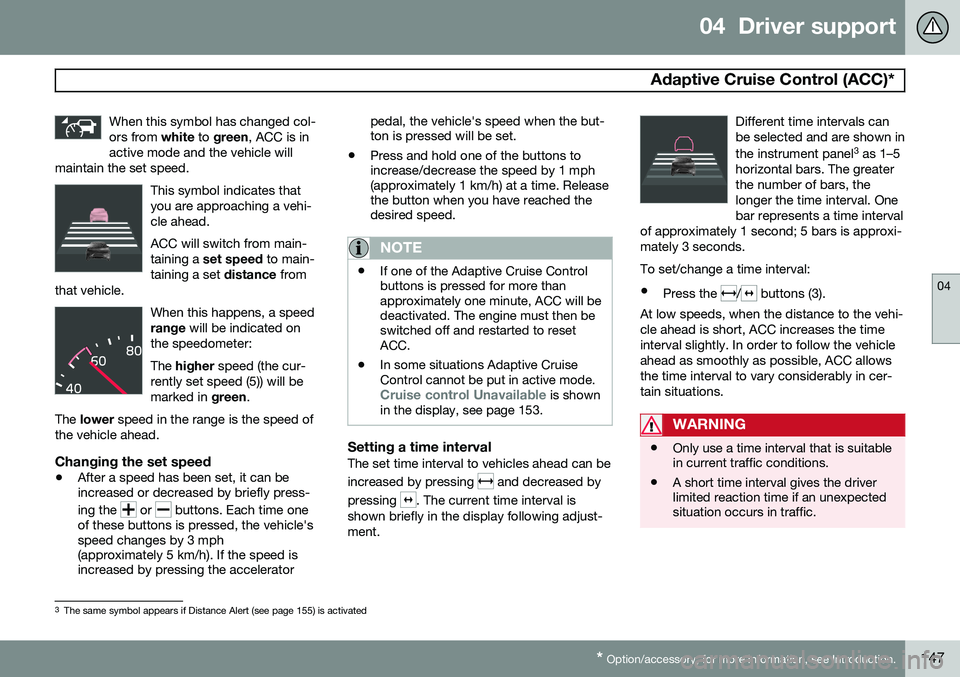
When this symbol has changed col- ors from
white to green , ACC is in
active mode and the vehicle will
maintain the set speed.
This symbol indicates that you are approaching a vehi-cle ahead. ACC will switch from main- taining a set speed to main-
taining a set distance from
that vehicle.
When this happens, a speed range will be indicated on
the speedometer: The higher speed (the cur-
rently set speed (5)) will be marked in green.
The lower speed in the range is the speed of
the vehicle ahead.
Changing the set speed
• After a speed has been set, it can be increased or decreased by briefly press- ing the
or buttons. Each time one
of these buttons is pressed, the vehicle's speed changes by 3 mph(approximately 5 km/h). If the speed isincreased by pressing the accelerator pedal, the vehicle's speed when the but-ton is pressed will be set.
• Press and hold one of the buttons toincrease/decrease the speed by 1 mph(approximately 1 km/h) at a time. Releasethe button when you have reached thedesired speed.
NOTE
•If one of the Adaptive Cruise Control buttons is pressed for more thanapproximately one minute, ACC will bedeactivated. The engine must then beswitched off and restarted to resetACC.
• In some situations Adaptive CruiseControl cannot be put in active mode.
Cruise control Unavailable is shown
in the display, see page 153.
Setting a time intervalThe set time interval to vehicles ahead can be increased by pressing
and decreased by
pressing
. The current time interval is
shown briefly in the display following adjust- ment. Different time intervals canbe selected and are shown in the instrument panel
3
as 1–5
horizontal bars. The greater the number of bars, thelonger the time interval. Onebar represents a time interval
of approximately 1 second; 5 bars is approxi-mately 3 seconds.
To set/change a time interval:
• Press the
/ buttons (3).
At low speeds, when the distance to the vehi- cle ahead is short, ACC increases the timeinterval slightly. In order to follow the vehicleahead as smoothly as possible, ACC allowsthe time interval to vary considerably in cer-tain situations.
WARNING
• Only use a time interval that is suitable in current traffic conditions.
• A short time interval gives the driverlimited reaction time if an unexpectedsituation occurs in traffic.
3
The same symbol appears if Distance Alert (see page 155) is activated
Page 197 of 386
05 Comfort and driving pleasure
Menus and messages
05
* Option/accessory, for more information, see Introduction.195
Main instrument panel
Analog Instrument panel and menu controls
Digital Instrument panel* and menu controls
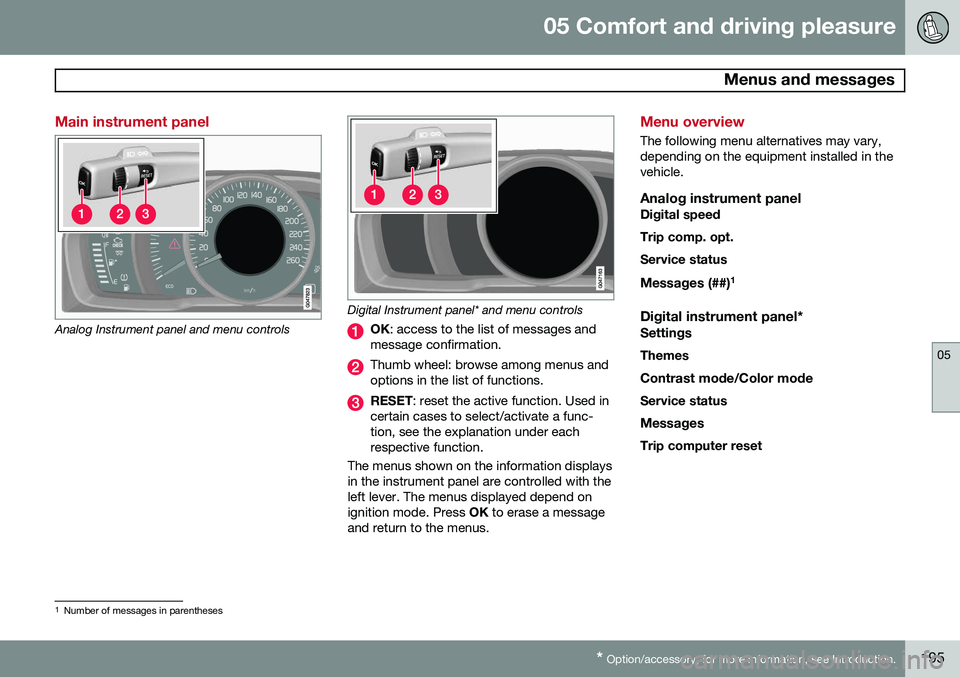
OK : access to the list of messages and
message confirmation.
Thumb wheel: browse among menus and options in the list of functions.
RESET : reset the active function. Used in
certain cases to select/activate a func- tion, see the explanation under eachrespective function.
The menus shown on the information displaysin the instrument panel are controlled with theleft lever. The menus displayed depend onignition mode. Press OK to erase a message
and return to the menus.
Menu overview
The following menu alternatives may vary, depending on the equipment installed in thevehicle.
Analog instrument panelDigital speed Trip comp. opt.Service status
Messages (##) 1
Digital instrument panel*
Settings
Themes
Contrast mode /Color mode
Service status
Messages Trip computer reset
1 Number of messages in parentheses
Page 198 of 386

05 Comfort and driving pleasure
Menus and messages
05
196
Messages
When a warning, information or indicator symbol comes on, a corresponding messageappears in the information panel. An errormessage is stored in a memory list until thefault is rectified. Press OK to acknowledge and scroll among
the messages.
NOTE
If a warning message appears while you are using the trip computer, the messagemust be read and confirmed by pressingOK before the previous activity can be
resumed.
MessageDescription
Stop engineAStop and switch off the engine as soon as possi-ble. Serious risk of dam-age. Contact an author-ized Volvo workshop.
Stop safelyAStop and switch off the engine. Serious risk ofdamage. Contact anauthorized Volvo work-shop.
MessageDescription
Service urgentAHave the vehicle checked by an authorized Volvoworkshop immediately.
Service requiredAHave the vehicle checked by an authorized Volvoworkshop as soon as pos-sible.
See man- ualARead the owner's manual.
Book time for mainte-nanceTime to book service at an authorized Volvo retailer.
Time for regularmainte-nanceTime for regular service at an authorized Volvo work-shop. The timing is deter-mined by the number ofmiles driven, number ofmonths since the lastservice, engine runningtime.
MessageDescription
Mainte- nance over-dueIf the service intervals are not followed, the warrantydoes not cover any dam-aged parts. Contact anauthorized Volvo work-shop for service.
Temporarily OFFAA function has been tem- porarily switched off andis reset automatically whiledriving or after startingagain.
Low battery Power savemodeThe audio system is switched off to save cur-rent. Charge the battery.
A There will also be a system-specific part of this message
Page 202 of 386
05 Comfort and driving pleasure
The MY CAR menus
05
200
Medium Low
See page 219 for more information. Reset car settings This feature returns the "Car settings" menu to the original factory settings.
MY CARSettingsDriver support
systems
Collision Warning
Collision Warning Warning distanceLongNormalShort
Warning sound
See page 166 for more information. Lane Departure Warning
Lane Departure Warning On at start-upIncreased sensitivity See page 175 for more information.
Road Sign Information OnOff
Speed alert OnOff
DSTC See page 138 for more information. City Safety See page 158 for more information. BLIS See page 186 for more information. Distance Alert See page 155 for more information. Driver Alert See page 172 for more information.
MY CARSettingsSystem options
Set/change time See page 85 for more information. Time format
12 h 24 h
Screen saver The contents of the screen are replaced by another image if this selection is marked. Thecontents of the screen will be displayed againif one of the buttons (1-4) is pressed, seepage 197. Uncheck the selection to turn the screen saver off. Language Select the language for menu texts. Show help text This displays help texts for the current menu. Distance and fuel units
MPG (UK) MPG (US)km/ll/100km
Page 203 of 386

05 Comfort and driving pleasure
The MY CAR menus
05
}}
201
See page 212 for more information about the trip computer.
Temperature unit
Celsius Fahrenheit
Select the temperature scale to be displayed by the climate control unit. Volume levels
Voice output volume Front park assist volumeRear park assist volumePhone ringing volume
Reset system options This feature returns the "System options" menu to the original factory settings.
MY CARSettingsVoice settingsA .
A Only on vehicles with the optional Volvo Navigation System
Voice tutorial Select this menu alternative and press
OK for
spoken information about how the system works. Voice command list
Phone commandsPhone Phone call contactPhone dial number
Navigation commands NavigationNavigation repeat instructionNavigation go to address
General commands HelpCancelVoice tutorial
The menu alternatives under Phone
commands show examples of the voice
commands available when a cell phone is connected to the Bluetooth ®
hands-free sys-
tem. See page 263 for more detailed infor- mation. The menu alternatives under
Navigation
commands show examples of the voice
commands available for the optional Volvo Navigation System. Refer to the navigation system's manual for detailed information. Voice user setting
Default setting User 1User 2
Two user profiles can be set, which is useful if more than one person uses voice commands regularly.
Default setting resets the factory
settings. Voice training
User 1 User 2
Voice training enables the system to
become familiar with the driver's voice and pronunciation. A list of phrases is presentedon the screen for the driver to read aloud.When the system has registered the driver'spronunciation, no additional phrases will bedisplayed. After completed voice training, select
User 1 or User 2 in Voice user
setting to set the system to the current user.
Voice output volume
• A volume control will be displayed. To set the volume level:
Page 204 of 386

05 Comfort and driving pleasure
The MY CAR menus
05
202
1. Adjust the volume using the thumb wheel
2. Test the setting by pressing OK
3. Store the setting and leave the menu by pressing EXIT.
Voice POI list
Edit list
The navigation system has a large number of
points of interest (POIs). A maximum of 30 POIs can be stored in this list. The menu alternative
Voice POI list is only
displayed if the vehicle is equipped with the optional Volvo Navigation System. Refer tothe navigation system's manual for detailedinformation.
MY CARSettingsAudio settings
See page 226 for more information about the infotainment system.
MY CARSettingsClimate settings
Automatic blower adjustment
Normal HighLow Recirculation timerAutomatic rear defrosterInterior air quality systemReset climate settings This feature returns the "Climate settings" menu to the original factory settings. For more information about the climate sys- tem, see page 203.
MY CARSettingsFavourites (FAV)
See page 230 for more information about this feature.
MY CARSettingsInformation
Number of keys See page 54 for more information. VIN number See page 361 for more information. DivX® VOD code See page 247 for more information. Bluetooth software version in car
See page 234 for more information.Map and software version Refer to the optional Volvo Navigation System manual for more information.
Page 214 of 386
05 Comfort and driving pleasure
Trip computer
05
212
Introduction
The content and appearance of the trip com- puter varies depending on whether the vehi-cle is equipped with an analog or digital
instrument panel. The instrument panel illuminates as soon as the vehicle is unlocked and trip computer set-tings can be made. If none of the trip com-puter's controls are used within 30 secondsafter the driver's door has been opened, theinstrument panel lighting will go out and thetrip computer cannot be used again until: • the ignition is put in mode II1
• the engine is started
NOTE
If a warning message appears while you are using the trip computer, this messagemust be acknowledged in order to returnto the trip computer function. Acknowl-edge a message by pressing
OK.
Trip computer in models with an analog instrument panel
The trip computer has two different menu groups: •
Trip computer functions
• Trip computer information headings in the instrument panel
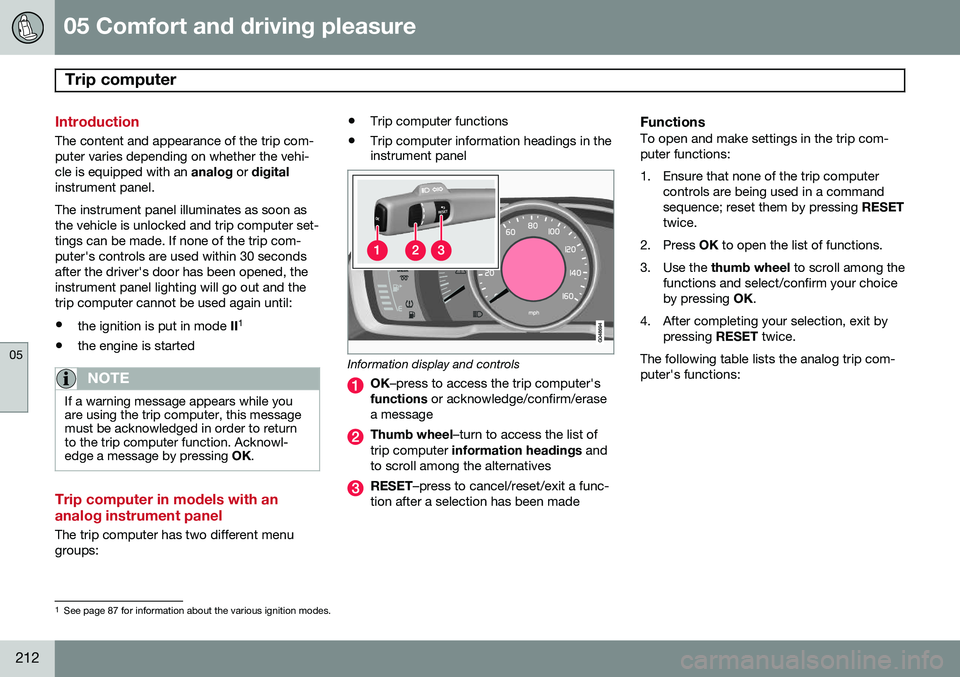
Information display and controls
OK
–press to access the trip computer's
functions or acknowledge/confirm/erase
a message
Thumb wheel –turn to access the list of
trip computer information headings and
to scroll among the alternatives
RESET –press to cancel/reset/exit a func-
tion after a selection has been made
FunctionsTo open and make settings in the trip com- puter functions:
1. Ensure that none of the trip computer controls are being used in a command sequence; reset them by pressing RESET
twice.
2. Press OK to open the list of functions.
3. Use the thumb wheel to scroll among the
functions and select/confirm your choiceby pressing OK.
4. After completing your selection, exit by pressing RESET twice.
The following table lists the analog trip com-puter's functions:
1 See page 87 for information about the various ignition modes.
Page 215 of 386
05 Comfort and driving pleasure
Trip computer
05
}}
213
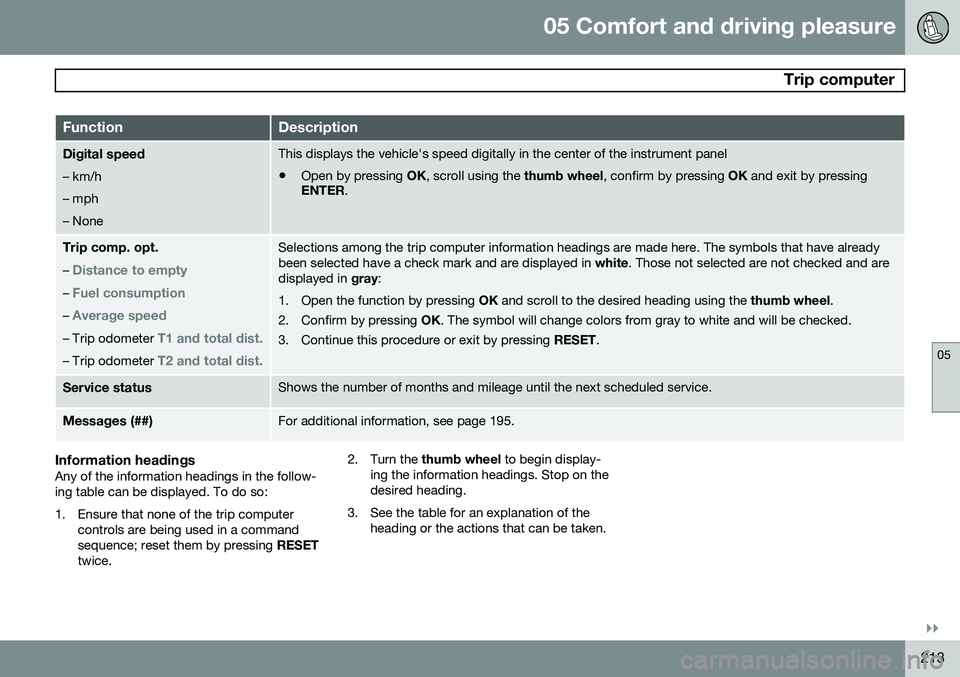
FunctionDescription
Digital speed – km/h – mph– NoneThis displays the vehicle's speed digitally in the center of the instrument panel
• Open by pressing
OK, scroll using the thumb wheel, confirm by pressing OK and exit by pressing
ENTER .
Trip comp. opt.
–
Distance to empty
– Fuel consumption
– Average speed
– Trip odometer T1 and total dist.
– Trip odometer T2 and total dist.
Selections among the trip computer information headings are made here. The symbols that have already been selected have a check mark and are displayed in white. Those not selected are not checked and are
displayed in gray:
1. Open the function by pressing OK and scroll to the desired heading using the thumb wheel.
2. Confirm by pressing OK. The symbol will change colors from gray to white and will be checked.
3. Continue this procedure or exit by pressing RESET.
Service statusShows the number of months and mileage until the next scheduled service.
Messages (##)For additional information, see page 195.
Information headingsAny of the information headings in the follow- ing table can be displayed. To do so:
1. Ensure that none of the trip computer
controls are being used in a command sequence; reset them by pressing RESET
twice. 2. Turn the
thumb wheel to begin display-
ing the information headings. Stop on thedesired heading.
3. See the table for an explanation of the heading or the actions that can be taken.
Page 216 of 386
05 Comfort and driving pleasure
Trip computer
05
214
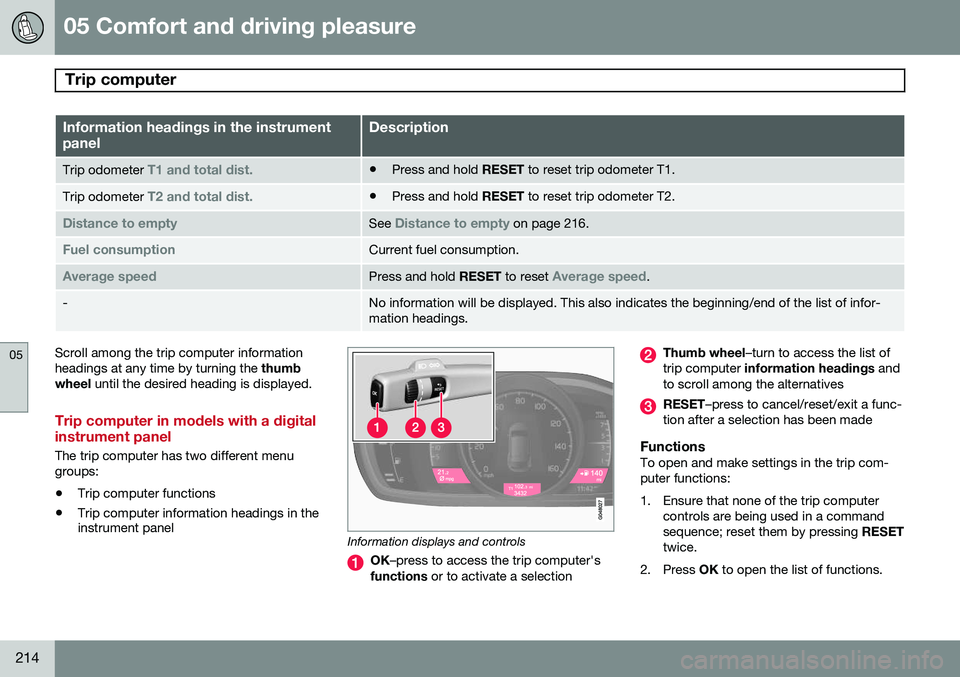
Information headings in the instrument panelDescription
Trip odometer T1 and total dist.•Press and hold
RESET to reset trip odometer T1.
Trip odometer T2 and total dist.•Press and hold
RESET to reset trip odometer T2.
Distance to emptySee Distance to empty on page 216.
Fuel consumptionCurrent fuel consumption.
Average speedPress and hold RESET to reset Average speed.
-No information will be displayed. This also indicates the beginning/end of the list of infor- mation headings.
Scroll among the trip computer information headings at any time by turning the thumb
wheel until the desired heading is displayed.
Trip computer in models with a digital instrument panel
The trip computer has two different menu groups:
• Trip computer functions
• Trip computer information headings in the instrument panel
Information displays and controls
OK
–press to access the trip computer's
functions or to activate a selection
Thumb wheel –turn to access the list of
trip computer information headings and
to scroll among the alternatives
RESET –press to cancel/reset/exit a func-
tion after a selection has been made
FunctionsTo open and make settings in the trip com- puter functions:
1. Ensure that none of the trip computer controls are being used in a command sequence; reset them by pressing RESET
twice.
2. Press OK to open the list of functions.
Page 217 of 386
05 Comfort and driving pleasure
Trip computer
05
}}
* Option/accessory, for more information, see Introduction.215
3. Use the
thumb wheel to scroll among the
functions and select/confirm your choice by pressing OK. 4. After completing your selection, exit by
pressing RESET twice. The following table lists the digital trip com-puter's functions:
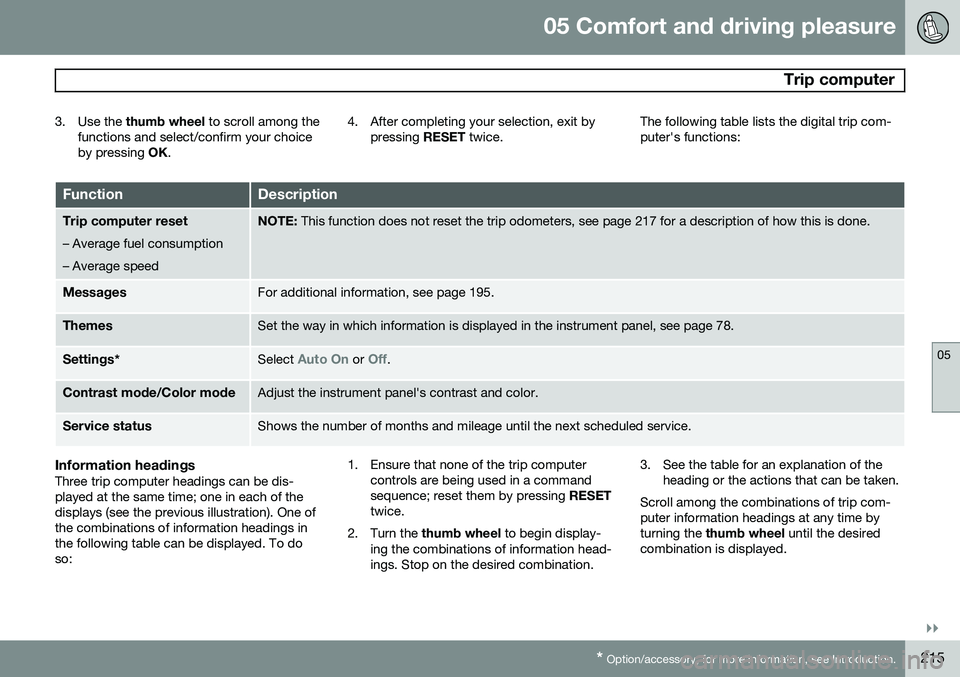
FunctionDescription
Trip computer reset
– Average fuel consumption – Average speedNOTE: This function does not reset the trip odometers, see page 217 for a description of how this is done.
MessagesFor additional information, see page 195.
ThemesSet the way in which information is displayed in the instrument panel, see page 78.
Settings *Select Auto On or Off.
Contrast mode /Color modeAdjust the instrument panel's contrast and color.
Service statusShows the number of months and mileage until the next scheduled service.
Information headingsThree trip computer headings can be dis- played at the same time; one in each of thedisplays (see the previous illustration). One ofthe combinations of information headings inthe following table can be displayed. To doso: 1. Ensure that none of the trip computer
controls are being used in a commandsequence; reset them by pressing RESET
twice.
2. Turn the thumb wheel to begin display-
ing the combinations of information head-ings. Stop on the desired combination. 3. See the table for an explanation of the
heading or the actions that can be taken.
Scroll among the combinations of trip com-puter information headings at any time byturning the thumb wheel until the desired
combination is displayed.