trunk VOLVO S60 2014 Owner´s Manual
[x] Cancel search | Manufacturer: VOLVO, Model Year: 2014, Model line: S60, Model: VOLVO S60 2014Pages: 386, PDF Size: 11.24 MB
Page 105 of 386
03 Your driving environment
Lighting
03
103
If the lighting is switched on manually and the vehicle is locked, the courtesy lighting willswitch off automatically after one minute.
Trunk lightingThe trunk lighting comes on automaticallywhen the trunk lid is opened.
Home safe lighting
When you leave your vehicle at night, you can make use of the home safe lighting functionto illuminate the area in front of the vehicle.
1. Remove the key from the ignition slot to
put the ignition in mode 0 (see page 87
for information about the ignition modes).
2. Pull the turn signal lever as far as possible towards the steering wheel and release it.
3. Exit the vehicle and lock the doors.The headlights, parking lights, turn signals, lights in the door mirrors, license plate lights,and footwell lighting will illuminate and remain on for 30 4
, 60 or 90 seconds. The time inter-
val can be set in MY CAR under
Settings
Car settingsLight settingsHome safe
light duration. See page 197 for a descrip-
tion of the menu system.
Approach lighting
Approach lighting is activated by pressing the approach light button on the remote key (seethe illustration on page 57). When the function has been activated, the parking lights, indicator lights, door mirrorlights, license plate lighting, dome lightingand door step lighting come on. The time interval for this lighting can be set by pressing MY CAR and going to
Car
settings
Light settingsApproach light
duration. See page 197 for a description of
the menu system.
4 Factory setting
Page 184 of 386
04 Driver support
Rear Park Assist Camera (PAC)*
04
182* Option/accessory, for more information, see Introduction.
Introduction
The Park Assist Camera uses the display in the center console to show the area behindthe car while you are backing up. PAC also shows guiding lines in the on- screen image to indicate the direction that thevehicle will take as it moves rearward, whichhelps simplify parallel parking, backing into atight space or when attaching a trailer to thevehicle.
NOTE
A trailer hitch whose wiring is integrated with the vehicle's electrical system will beincluded in the measurement of the availa-ble space behind the vehicle.
WARNING
• PAC is designed to be a supplemen- tary aid when parking the vehicle. It isnot, however, intended to replace thedriver’s attention and judgment.
• The camera has blind spots where itcannot detect objects or peoplebehind the vehicle.
• Pay particular attention to people oranimals that are close to the vehicle.
Function
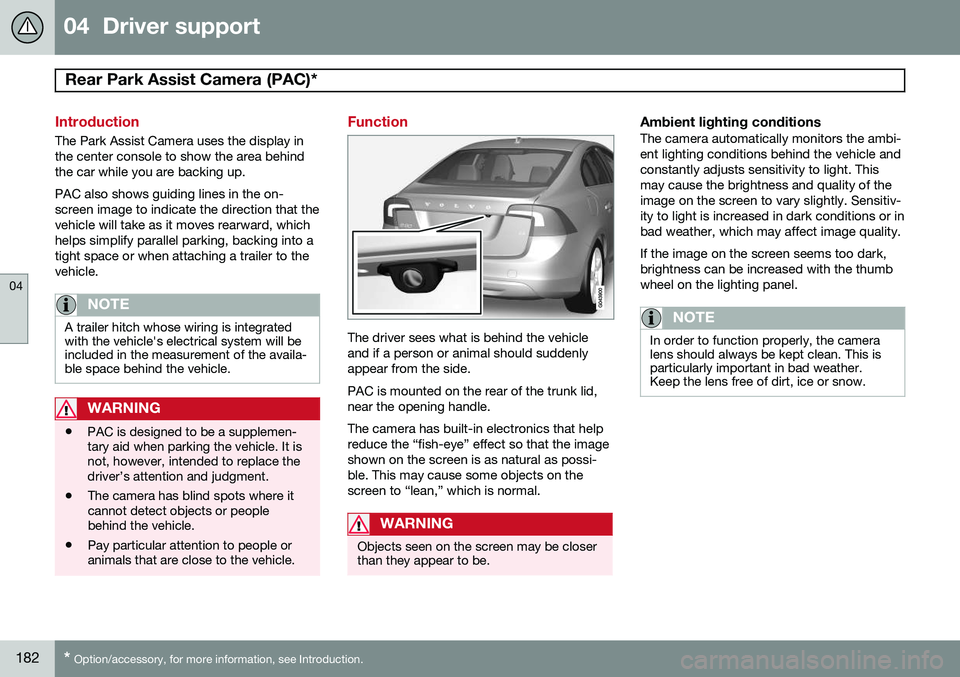
The driver sees what is behind the vehicle and if a person or animal should suddenlyappear from the side. PAC is mounted on the rear of the trunk lid, near the opening handle. The camera has built-in electronics that help reduce the “fish-eye” effect so that the imageshown on the screen is as natural as possi-ble. This may cause some objects on thescreen to “lean,” which is normal.
WARNING
Objects seen on the screen may be closer than they appear to be.
Ambient lighting conditionsThe camera automatically monitors the ambi- ent lighting conditions behind the vehicle andconstantly adjusts sensitivity to light. Thismay cause the brightness and quality of theimage on the screen to vary slightly. Sensitiv-ity to light is increased in dark conditions or inbad weather, which may affect image quality. If the image on the screen seems too dark, brightness can be increased with the thumbwheel on the lighting panel.
NOTE
In order to function properly, the camera lens should always be kept clean. This isparticularly important in bad weather.Keep the lens free of dirt, ice or snow.
Page 187 of 386

04 Driver support
Rear Park Assist Camera (PAC)*
04
* Option/accessory, for more information, see Introduction.185
changed in the
MY CAR menu) and the
image is shown on the center console display.
• When backing up, two solid lines are pro-jected on the screen to show the paththat the vehicle's rear wheels will take.These lines are affected by movements ofthe steering wheel. The vehicle's approxi-mate outer dimension are shown by twodashed lines.
• The graphic lines will not be displayedwhen backing up with a trailer that is con-nected to the vehicle's electrical system.
• Objects on the ground that are closerthan 1 ft (30 centimeters) cannot bedetected by the camera.
• The camera is active for approx.5 seconds after the gear selector ismoved to
R or until the vehicle's speed
exceeds 6 mph (10 km/h).
• The optional Park Assist sensors and theparking camera work together and infor-mation from the sensors is shown graphi-cally on the display.
• The graphic lines shown on the screenwhen the vehicle backs up can be disa-bled in the settings menu.
• Manual zoom can be selected in the
MY
CAR menu.
• The system can be switched off by press-ing
CAM . By default, the system is acti- vated when the gear selector is moved toR
. This setting can be changed in the MY
CAR menu.
• If there are two cameras installed on thevehicle*, to switch between cameras, turnTUNE
(at least one of the cameras has to
be active), press CAM repeatedly or use
the center console controls. If the frontcamera is on, it overrides the optionalpark assist system's visual indicator butthere will still be an audible signal.
Limitations
Even if a fairly small section of the screen image appears to be obstructed, this maymean that a relatively large area behind thevehicle is hidden and objects there may notbe detected until they are very near the vehi-cle.
NOTE
Bicycle carriers or other accessories mounted on the trunk may obstruct thecamera's field of view.
Keep in mind
• Keep the camera's lens free of dirt, ice and snow. Remove ice and snow care-fully to avoid scratching the lens.
• Clean the lens regularly with warm waterand a suitable car washing detergent.
Page 225 of 386
05 Comfort and driving pleasure
Passenger compartment convenience
05
* Option/accessory, for more information, see Introduction.223
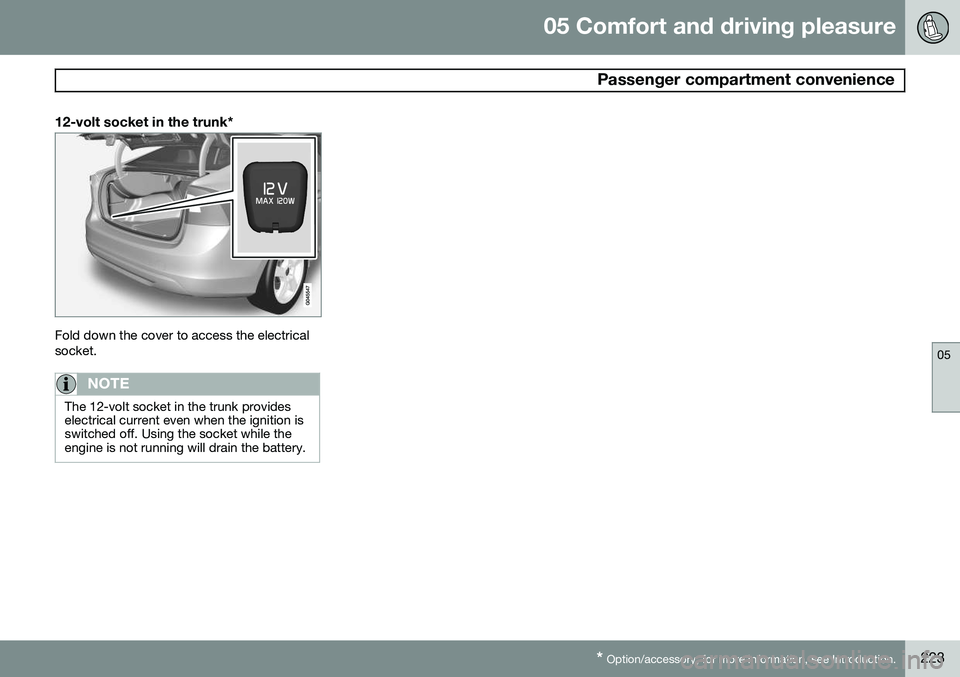
12-volt socket in the trunk*
Fold down the cover to access the electrical socket.
NOTE
The 12-volt socket in the trunk provides electrical current even when the ignition isswitched off. Using the socket while theengine is not running will drain the battery.
Page 272 of 386
07 During your trip
Driving recommendations
07
270
General information
Economical driving conserves natural
resources
Better driving economy may be obtained by thinking ahead, avoiding rapid starts andstops and adjusting the speed of your vehicleto immediate traffic conditions. Observe the following rules:
• Bring the engine to normal operating tem- perature as soon as possible by drivingwith a light foot on the accelerator pedalfor the first few minutes of operation. Acold engine uses more fuel and is subjectto increased wear.
• Whenever possible, avoid using the vehi-cle for driving short distances. This doesnot allow the engine to reach normaloperating temperature.
• Drive carefully and avoid rapid accelera-tion and hard braking.
• Use the transmission's Drive (
D) position
as often as possible and avoid using kick-down.
• Using the transmission's Sport mode 1
may increase fuel consumption some-what. Use the transmission's Drive ( D)
position as often as possible. See page 125 for additional information about Sportmode.
• Do not exceed posted speed limits.
• Avoid carrying unnecessary items (extraload) in the vehicle.
• Maintain correct tire pressure. Check tirepressure regularly (when tires are cold).
• Remove snow tires when threat of snowor ice has ended.
• Note that roof racks, ski racks, etc,increase air resistance and also fuel con-sumption.
• At highway driving speeds, fuel consump-tion will be lower with the air conditioningon and the windows closed than with theair conditioning off and the windowsopen.
• Using the onboard trip computer's fuelconsumption modes can help you learnhow to drive more economically.
Other factors that decrease gas mileage are: • Dirty air cleaner
• Dirty engine oil and clogged oil filter
• Dragging brakes
• Incorrect front end alignment Some of the above mentioned items and oth- ers are checked at the standard maintenanceintervals.WARNING
Driving with the trunk open:
Driving with
the trunk open could lead to poisonous exhaust gases entering the passengercompartment. If the trunk must be keptopen for any reason, proceed as follows:
• Close the windows
• Set the ventilation system control to air flow to floor, windshield and side win-dows and the blower control to itshighest setting.
Weight distribution affects handlingAt the specified curb weight your vehicle has a tendency to understeer, which means thatthe steering wheel has to be turned morethan might seem appropriate for the curva-ture of a bend. This ensures good stabilityand reduces the risk of rear wheel skid.Remember that these properties can alterwith the vehicle load. The heavier the load inthe trunk, the less the tendency to under-steer.
1
Certain models only.
Page 278 of 386
07 During your trip
Refueling
07
276
Opening/closing the fuel filler door
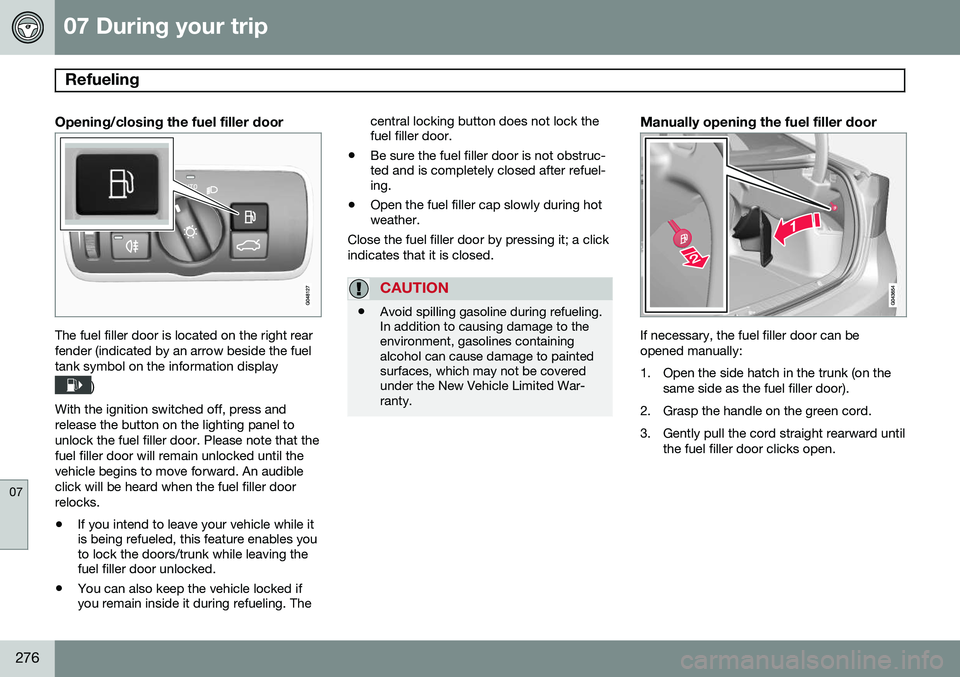
The fuel filler door is located on the right rear fender (indicated by an arrow beside the fueltank symbol on the information display
)
With the ignition switched off, press and release the button on the lighting panel tounlock the fuel filler door. Please note that thefuel filler door will remain unlocked until thevehicle begins to move forward. An audibleclick will be heard when the fuel filler doorrelocks. • If you intend to leave your vehicle while it is being refueled, this feature enables youto lock the doors/trunk while leaving thefuel filler door unlocked.
• You can also keep the vehicle locked ifyou remain inside it during refueling. The central locking button does not lock thefuel filler door.
• Be sure the fuel filler door is not obstruc-ted and is completely closed after refuel-ing.
• Open the fuel filler cap slowly during hotweather.
Close the fuel filler door by pressing it; a click indicates that it is closed.
CAUTION
• Avoid spilling gasoline during refueling. In addition to causing damage to theenvironment, gasolines containingalcohol can cause damage to paintedsurfaces, which may not be coveredunder the New Vehicle Limited War-ranty.
Manually opening the fuel filler door
If necessary, the fuel filler door can be opened manually:
1. Open the side hatch in the trunk (on the
same side as the fuel filler door).
2. Grasp the handle on the green cord.
3. Gently pull the cord straight rearward until the fuel filler door clicks open.
Page 281 of 386
07 During your trip
Loading
07
* Option/accessory, for more information, see Introduction.279
Introduction
The load carrying capacity of your vehicle is determined by factors such as the number ofpassengers, the amount of cargo, the weightof any accessories that may be installed, etc. To increase loading space, the rear seat backrests can be folded down, see page 91. When loading the trunk, keep the following in mind:
The trunk lid can be unlocked anpopped open slightly via the buttonlocated on the lighting panel, see
page 70.
• Load objects in the trunk against the backrest whenever possible.
• Unstable loads can be secured to theload anchoring eyelets with straps or weblashings to help keep them from shifting.
• Stop the engine and apply the parkingbrake when loading or unloading longobjects. The gear selector can beknocked out of position by long loads,which could set the vehicle in motion.
WARNING
• Stop the engine, put the gear selector in
P, and apply the parking brake
when loading or unloading longobjects.
• The vehicle's driving characteristicsmay change depending on the weightand distribution of the load.
• A 44-pound (20 kg) object produces aforce of 2,200 pounds (1,000 kg) in ahead-on collision at 30 mph (50 km/h).
• The rear seat should not be loaded toa level higher than 2 in. (5 cm) belowthe upper edge of the rear side win-dows. Objects placed higher than thislevel could impede the function of theVolvo Inflatable Curtain.
Folding down the rear seat backrests
The rear seat backrests can be folded down for additional loading space, see page 92.
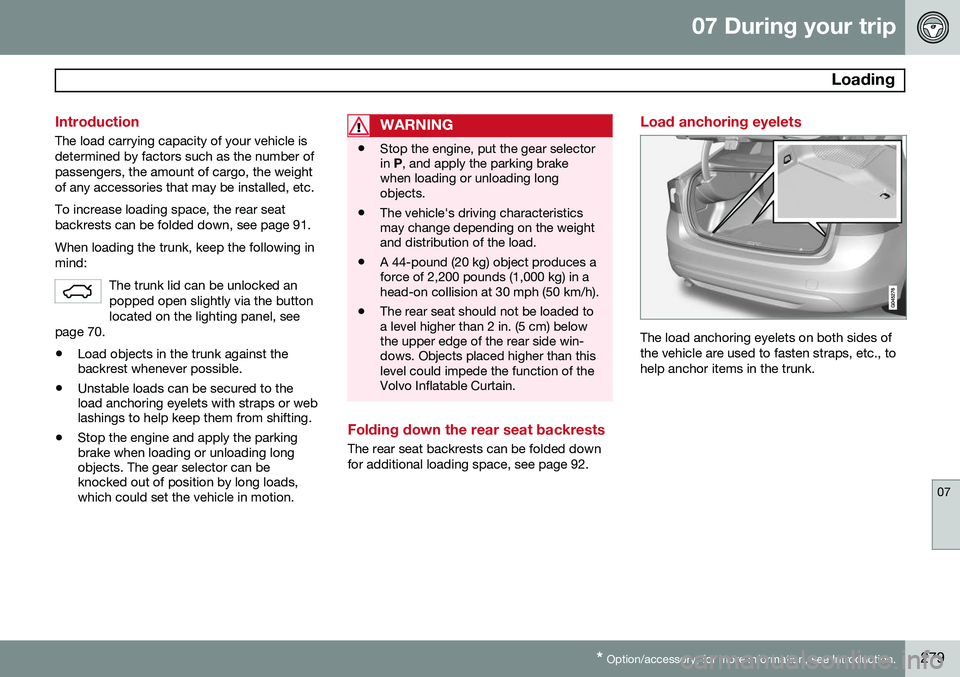
Load anchoring eyelets
The load anchoring eyelets on both sides of the vehicle are used to fasten straps, etc., tohelp anchor items in the trunk.
Page 282 of 386
07 During your trip
Loading
07
280* Option/accessory, for more information, see Introduction.
WARNING
• Cover sharp edges on long loads to help prevent injury to occupants.Secure the load to help prevent shift-ing during sudden stops.
• Always secure large and heavy objectswith a seat belt or cargo retainingstraps.
• Always secure the load to help preventit from moving in the event of suddenstops.
• Switch off the engine, apply the park-ing brake and put the gear selector inP
when loading and unloading the
vehicle.
Grocery bag holder*
Grocery bag holder under the floor of the trunk
The grocery bag holder holds shopping bags in place.
1. Open the hatch in the floor of the trunk.
2. Secure the shopping bags with the strap.
Ski hatch
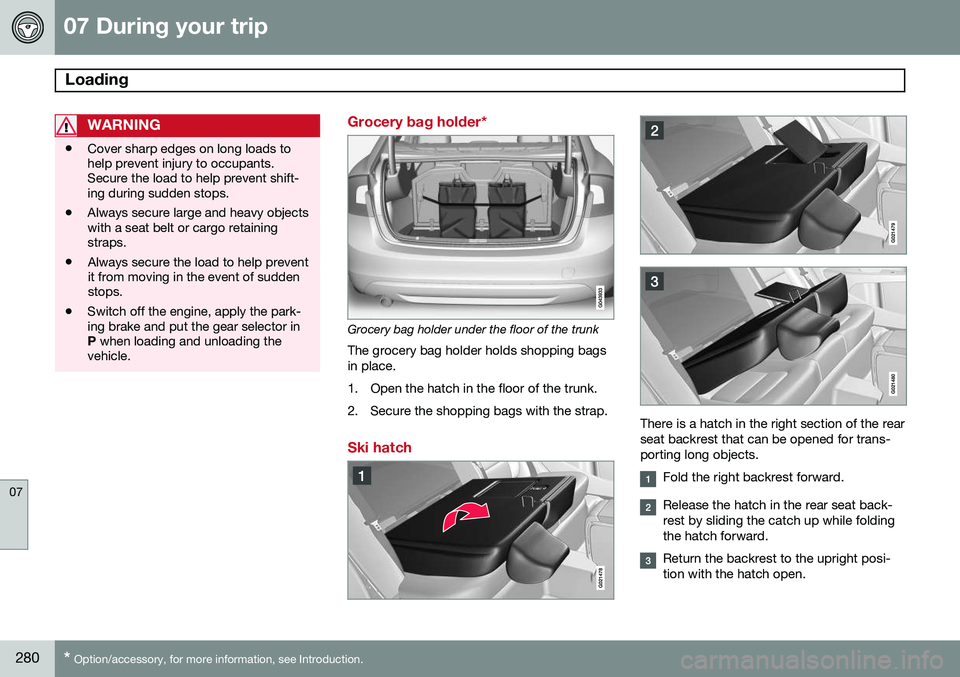
There is a hatch in the right section of the rear seat backrest that can be opened for trans-porting long objects.
Fold the right backrest forward.
Release the hatch in the rear seat back- rest by sliding the catch up while foldingthe hatch forward.
Return the backrest to the upright posi- tion with the hatch open.
Page 287 of 386
07 During your trip
Emergency towing
07
285
Towing eyelet
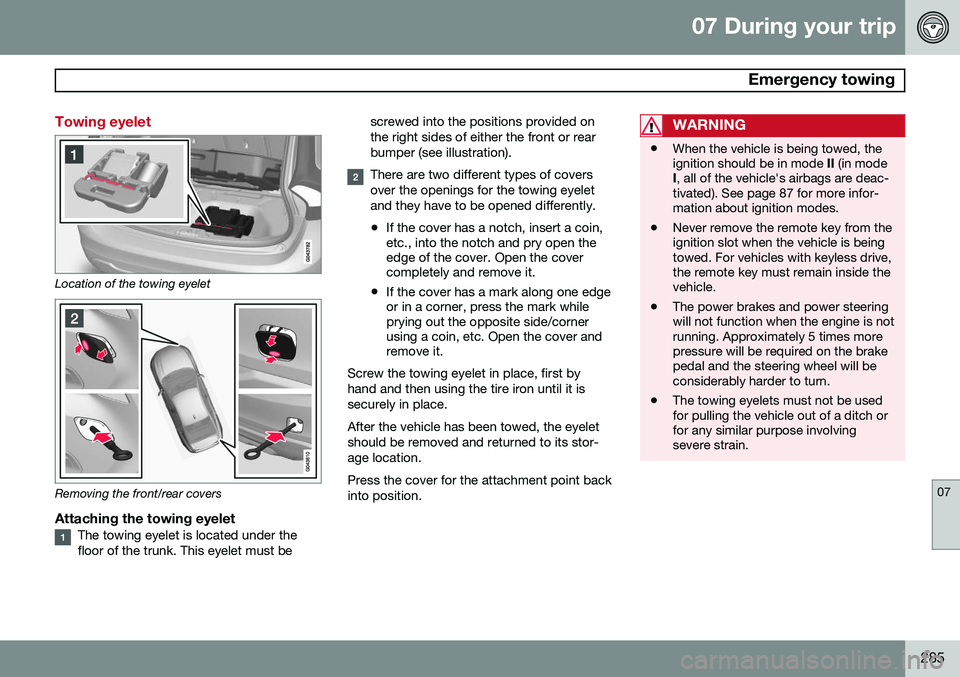
Location of the towing eyelet
Removing the front/rear covers
Attaching the towing eyeletThe towing eyelet is located under the floor of the trunk. This eyelet must bescrewed into the positions provided onthe right sides of either the front or rearbumper (see illustration).
There are two different types of covers over the openings for the towing eyeletand they have to be opened differently.
• If the cover has a notch, insert a coin, etc., into the notch and pry open theedge of the cover. Open the covercompletely and remove it.
• If the cover has a mark along one edgeor in a corner, press the mark whileprying out the opposite side/cornerusing a coin, etc. Open the cover andremove it.
Screw the towing eyelet in place, first by hand and then using the tire iron until it issecurely in place. After the vehicle has been towed, the eyelet should be removed and returned to its stor-age location. Press the cover for the attachment point back into position.
WARNING
• When the vehicle is being towed, the ignition should be in mode
II (in mode
I , all of the vehicle's airbags are deac-
tivated). See page 87 for more infor-mation about ignition modes.
• Never remove the remote key from theignition slot when the vehicle is beingtowed. For vehicles with keyless drive,the remote key must remain inside thevehicle.
• The power brakes and power steeringwill not function when the engine is notrunning. Approximately 5 times morepressure will be required on the brakepedal and the steering wheel will beconsiderably harder to turn.
• The towing eyelets must not be usedfor pulling the vehicle out of a ditch orfor any similar purpose involvingsevere strain.
Page 308 of 386
08 Wheels and tires
Tire Sealing System*
08
306* Option/accessory, for more information, see Introduction.
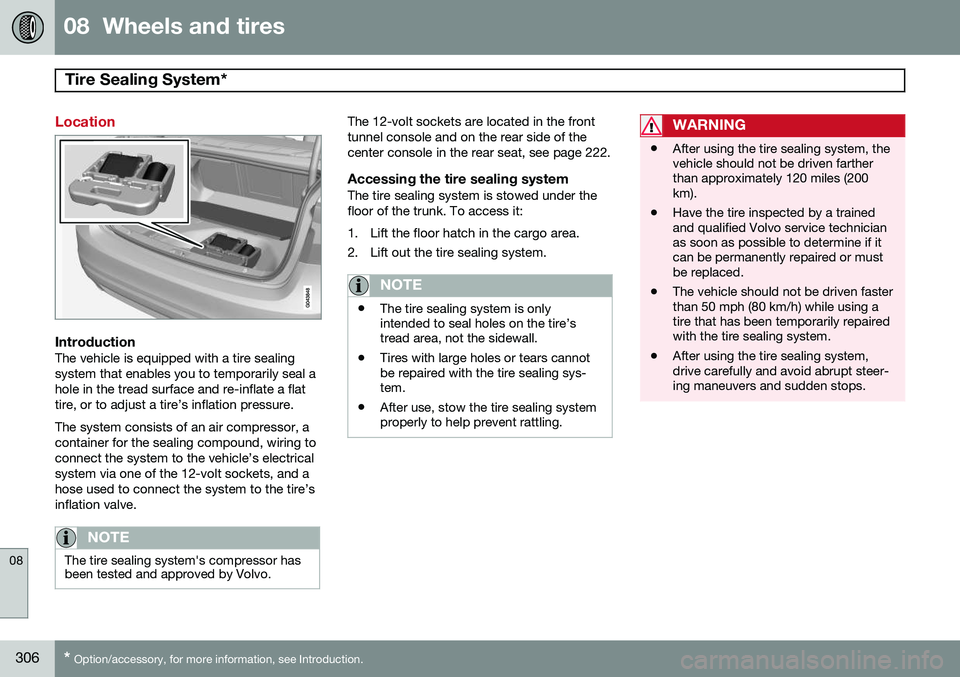
Location
IntroductionThe vehicle is equipped with a tire sealing system that enables you to temporarily seal ahole in the tread surface and re-inflate a flattire, or to adjust a tire’s inflation pressure. The system consists of an air compressor, a container for the sealing compound, wiring toconnect the system to the vehicle’s electricalsystem via one of the 12-volt sockets, and ahose used to connect the system to the tire’sinflation valve.
NOTE
The tire sealing system's compressor has been tested and approved by Volvo.
The 12-volt sockets are located in the front tunnel console and on the rear side of thecenter console in the rear seat, see page 222.
Accessing the tire sealing systemThe tire sealing system is stowed under thefloor of the trunk. To access it:
1. Lift the floor hatch in the cargo area.
2. Lift out the tire sealing system.
NOTE
• The tire sealing system is only intended to seal holes on the tire’stread area, not the sidewall.
• Tires with large holes or tears cannotbe repaired with the tire sealing sys-tem.
• After use, stow the tire sealing systemproperly to help prevent rattling.
WARNING
• After using the tire sealing system, the vehicle should not be driven fartherthan approximately 120 miles (200km).
• Have the tire inspected by a trainedand qualified Volvo service technicianas soon as possible to determine if itcan be permanently repaired or mustbe replaced.
• The vehicle should not be driven fasterthan 50 mph (80 km/h) while using atire that has been temporarily repairedwith the tire sealing system.
• After using the tire sealing system,drive carefully and avoid abrupt steer-ing maneuvers and sudden stops.