wheel VOLVO S60 2014 Owner´s Manual
[x] Cancel search | Manufacturer: VOLVO, Model Year: 2014, Model line: S60, Model: VOLVO S60 2014Pages: 386, PDF Size: 11.24 MB
Page 186 of 386

04 Driver support
Rear Park Assist Camera (PAC)*
04
184* Option/accessory, for more information, see Introduction.
WARNING
Keep in mind that the image on the screen only shows the area behind the vehicle.The driver must always watch for people,animals, other vehicles, etc., near the sidesof the vehicle when turning while backingup.
Marker lines
The PAC system's lines
Marker line for a 1-foot (30-centimeter) zone behind the vehicle
Marker line for the clear back-up zone
"Wheel tracks"
The solid line (1) indicates a zone within 1 ft (30 centimeters) of the rear bumper. The dashed line (2) indicates the clear zone ofapproximately 5 feet (1.5 m) behind thebumper. These lines also indicate the out-most limits that any object (door mirrors, cor-ners of the body, etc.) extends out from thevehicle, even when it turns. The "wheel tracks" (3) between the side marker lines show where the wheels will rolland can extend up to approximately 10.5 ft(3.2 m) behind the bumper if there are noobjects in the way.
Vehicles equipped with Park Assist
Colored fields (4-one per sensor) indicate dis- tance If the vehicle is equipped with the optional Park Assist system, the distance to an objectwill be indicated more exactly and colored
markers in the display indicate which of thesensor(s) has detected the object. The markers change color (from yellow to orange to red) as the vehicle comes closer tothe object.
Marker (color)Distance to object
Yellowmore than 5 ft (1.5 m)
Orange5–1 ft (0.3–1.5 m)
Red0–1 ft (0–0.3 m)
SettingsPress
OK/MENU when a normal camera view
is displayed and make the desired settings.
Parking camera settings
• Mark Guide lines to display the sidelines
while backing up.
• Mark
Distance bars to display the inter-
secting lines while backing up.
Activating the system
• Mark Automatic activation of rear
camera to activate PAC each time
reverse gear is selected.
• Mark
Off to turn off PAC completely.
Summary
•The camera is activated when the gear selector is moved to
R (this can be
Page 187 of 386

04 Driver support
Rear Park Assist Camera (PAC)*
04
* Option/accessory, for more information, see Introduction.185
changed in the
MY CAR menu) and the
image is shown on the center console display.
• When backing up, two solid lines are pro-jected on the screen to show the paththat the vehicle's rear wheels will take.These lines are affected by movements ofthe steering wheel. The vehicle's approxi-mate outer dimension are shown by twodashed lines.
• The graphic lines will not be displayedwhen backing up with a trailer that is con-nected to the vehicle's electrical system.
• Objects on the ground that are closerthan 1 ft (30 centimeters) cannot bedetected by the camera.
• The camera is active for approx.5 seconds after the gear selector ismoved to
R or until the vehicle's speed
exceeds 6 mph (10 km/h).
• The optional Park Assist sensors and theparking camera work together and infor-mation from the sensors is shown graphi-cally on the display.
• The graphic lines shown on the screenwhen the vehicle backs up can be disa-bled in the settings menu.
• Manual zoom can be selected in the
MY
CAR menu.
• The system can be switched off by press-ing
CAM . By default, the system is acti- vated when the gear selector is moved toR
. This setting can be changed in the MY
CAR menu.
• If there are two cameras installed on thevehicle*, to switch between cameras, turnTUNE
(at least one of the cameras has to
be active), press CAM repeatedly or use
the center console controls. If the frontcamera is on, it overrides the optionalpark assist system's visual indicator butthere will still be an audible signal.
Limitations
Even if a fairly small section of the screen image appears to be obstructed, this maymean that a relatively large area behind thevehicle is hidden and objects there may notbe detected until they are very near the vehi-cle.
NOTE
Bicycle carriers or other accessories mounted on the trunk may obstruct thecamera's field of view.
Keep in mind
• Keep the camera's lens free of dirt, ice and snow. Remove ice and snow care-fully to avoid scratching the lens.
• Clean the lens regularly with warm waterand a suitable car washing detergent.
Page 189 of 386
04 Driver support
Blind Spot Information System (BLIS)*
04
* Option/accessory, for more information, see Introduction.187
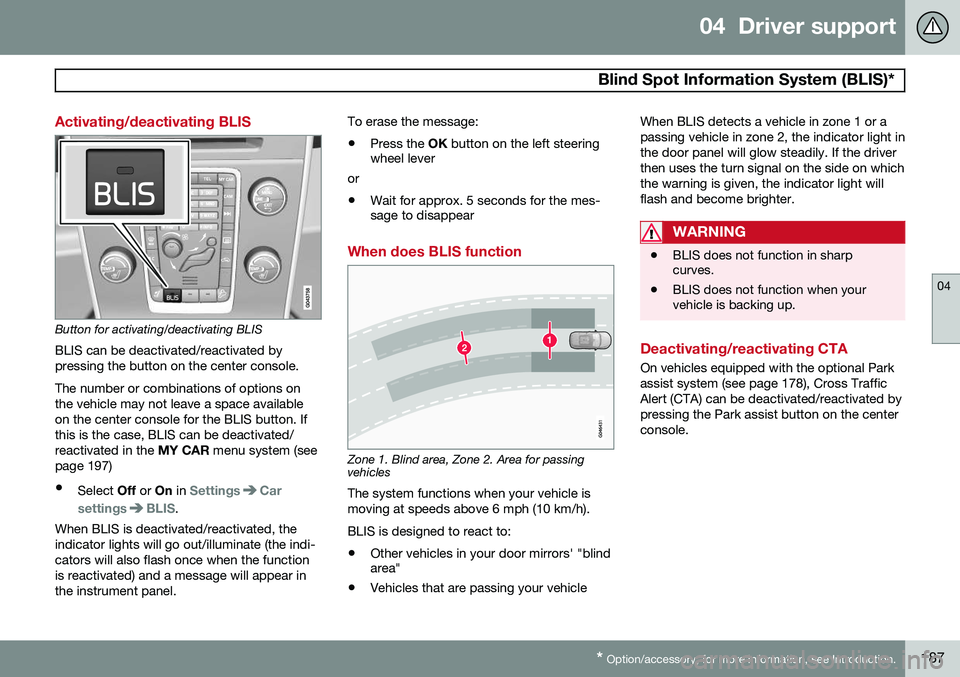
Activating/deactivating BLIS
Button for activating/deactivating BLIS BLIS can be deactivated/reactivated by pressing the button on the center console. The number or combinations of options on the vehicle may not leave a space availableon the center console for the BLIS button. Ifthis is the case, BLIS can be deactivated/reactivated in the MY CAR menu system (see
page 197)
• Select Off or On in
SettingsCar
settings
BLIS.
When BLIS is deactivated/reactivated, the indicator lights will go out/illuminate (the indi-cators will also flash once when the functionis reactivated) and a message will appear inthe instrument panel. To erase the message: •
Press the
OK button on the left steering
wheel lever
or
• Wait for approx. 5 seconds for the mes- sage to disappear
When does BLIS function
Zone 1. Blind area, Zone 2. Area for passing vehicles
The system functions when your vehicle is moving at speeds above 6 mph (10 km/h). BLIS is designed to react to:
• Other vehicles in your door mirrors' "blind area"
• Vehicles that are passing your vehicle When BLIS detects a vehicle in zone 1 or a passing vehicle in zone 2, the indicator light inthe door panel will glow steadily. If the driverthen uses the turn signal on the side on whichthe warning is given, the indicator light willflash and become brighter.
WARNING
•
BLIS does not function in sharp curves.
• BLIS does not function when yourvehicle is backing up.
Deactivating/reactivating CTA
On vehicles equipped with the optional Park assist system (see page 178), Cross TrafficAlert (CTA) can be deactivated/reactivated bypressing the Park assist button on the centerconsole.
Page 192 of 386
04 Driver support
Blind Spot Information System (BLIS)*
04
190* Option/accessory, for more information, see Introduction.
Messages
If BLIS/CTA are not functioning normally, a symbol will illuminate in the instrument paneland a text message will be displayed. Followany instructions that may be provided. These messages include:
MessageSystem status
CTA OFFCTA has been switched off manually. BLIS remainsactive.
BLIS and CTA OFFTrailerattachedBLIS and CTA are tempo- rarily deactivated becausea trailer's wiring has beenconnected to the vehicle'selectrical system.
BLIS and CTA Serv-ice requiredBLIS and CTA are not functioning normally.
• If this message recurs, the systems should beinspected by a trainedand qualified Volvoservice technician.
Messages can be erased by pressing the
OK
button on the left steering wheel lever.
Page 196 of 386

05 Comfort and driving pleasure
Volvo Sensus
05
194* Option/accessory, for more information, see Introduction.
Introduction
Center console control panel
Volvo Navigation System (VNS)* – NAV:
see the separate VNS manual for operat- ing instructions.
Infotainment ( RADIO, MEDIA , TEL ): see
page 226 .
Vehicle-related settings - MY CAR: see
page 197.
Park assist camera - CAM*: see
page 182.
Climate system: see page 203.
Volvo Sensus is the operating system in your vehicle providing a coordinated interface for anumber of functions such as the individual-ized settings that can be made in the MY
CAR menus, the climate and infotainment systems as well as other options such as thepark assist camera(s), etc. Volvo Sensus uses the screen in the center instrument panel to display information andselections are made using this panel’s con-trols and buttons. Certain features can alsobe controlled using the steering wheel key-pad. Press
MY CAR to present all of the available
settings related to driving and/or controlling the vehicle, such as City Safety, setting theclock, lock settings, etc. Press RADIO , MEDIA , TEL , NAV * and CAM*
to change a source and to activated systems or functions such as AM, FM1, CD, DVD,Bluetooth, navigation* and the park assistcamera *. See the respective sections in this manual for more detailed information about your vehi-cle's various features and functions.
Page 197 of 386
05 Comfort and driving pleasure
Menus and messages
05
* Option/accessory, for more information, see Introduction.195
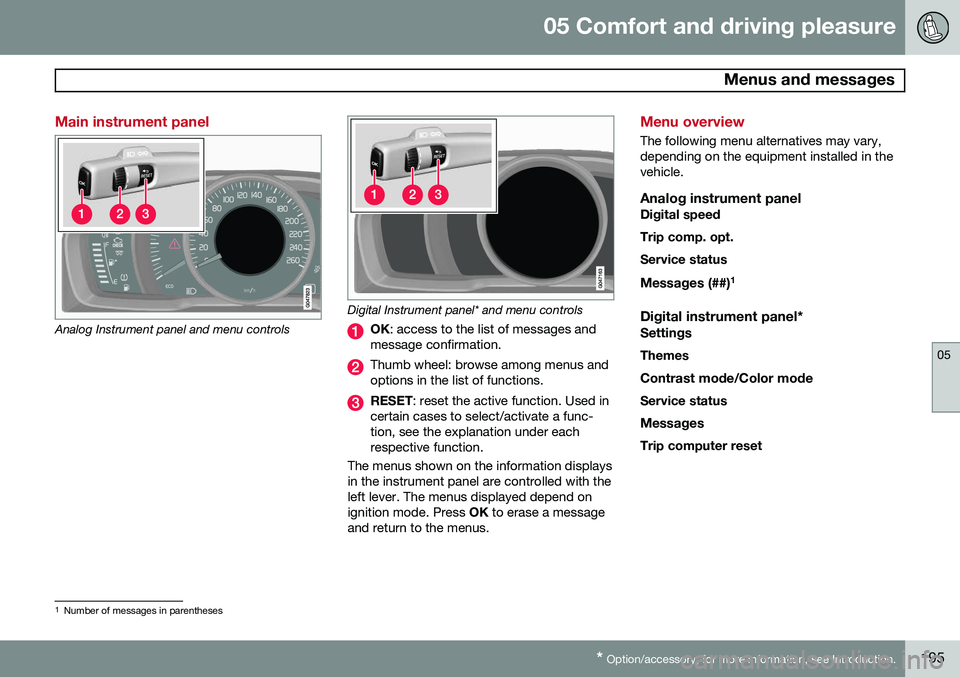
Main instrument panel
Analog Instrument panel and menu controls
Digital Instrument panel* and menu controls
OK : access to the list of messages and
message confirmation.
Thumb wheel: browse among menus and options in the list of functions.
RESET : reset the active function. Used in
certain cases to select/activate a func- tion, see the explanation under eachrespective function.
The menus shown on the information displaysin the instrument panel are controlled with theleft lever. The menus displayed depend onignition mode. Press OK to erase a message
and return to the menus.
Menu overview
The following menu alternatives may vary, depending on the equipment installed in thevehicle.
Analog instrument panelDigital speed Trip comp. opt.Service status
Messages (##) 1
Digital instrument panel*
Settings
Themes
Contrast mode /Color mode
Service status
Messages Trip computer reset
1 Number of messages in parentheses
Page 199 of 386
05 Comfort and driving pleasure
The MY CAR menus
05
}}
197
Introduction
The menu system provides access to menus for operating many of the vehi-cle's functions, such as setting the
clock, door mirrors, locks, etc.
Navigating in the menus is done using the buttons on the center console control panelor with the right-side steering wheel keypad. Some of the features mentioned in this sec- tion are optional.
Operation
Center console controls
Center console controls for menu navigation
Press MY CAR to access the My Car
menus.
Press OK/MENU to select a highlighted
selection or to store a certain function in the system's memory.
Turn to navigate up/down among menu selections.
EXIT
EXIT functionsThe results of a short press on EXIT vary,
depending on where the cursor is and where you are in the menu structure. •
Reject and incoming phone call
• The current function will be cancelled
• Characters that have been entered will be erased
• The most recent selection will be cancel-led
• Go back (upward) in the menu system
A long press will take you to the highest
menu level (the main view), giving you access to all of the vehicles/menus. See page 227for additional information.
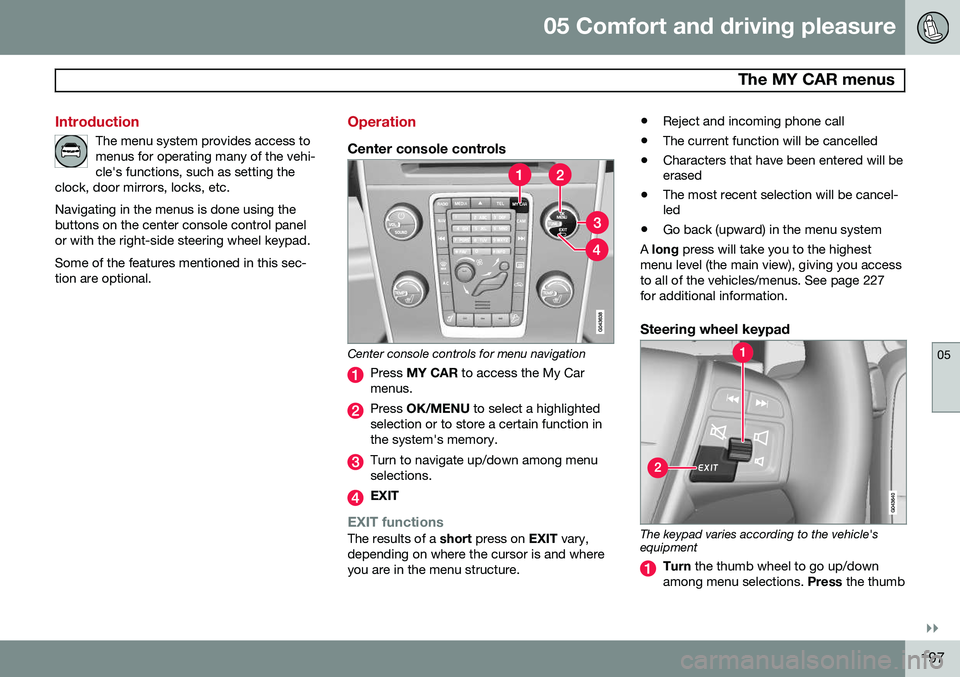
Steering wheel keypad
The keypad varies according to the vehicle's equipment
Turn the thumb wheel to go up/down
among menu selections. Press the thumb
Page 200 of 386
05 Comfort and driving pleasure
The MY CAR menus
05
198
wheel to make a selection or store a func- tion in the system's memory.
EXIT.
PathsThe current menu level is displayed at the upper right of the center console display.Menu paths are displayed as follows, forexample:
SettingsCar settingsLock settings
Doors unlockDriver door, then all
The following is an example of how to set a function in the menu system:
1. Press the MY CAR button on the center
console control panel.
2. Navigate to a menu, for example
Settings using the thumb wheel (1) and
press it to open a submenu.
3. Navigate to the desired submenu such as
Car settings.
4. Navigate to
Lock settings and press the
thumb wheel to open a new submenu.
5. Navigate to
Doors unlock and press the
thumb wheel to open a submenu with alternatives that can be selected. 6. Use the thumb wheel to move to the
desired choice and press the thumbwheel to put an X in the box.
7. Finish by exiting the menu system either one step at a time with short presses onEXIT (2) or press and hold this button to
return to the main menu.
The OK/MENU (2), EXIT (4) and control (3) in
the center console can be used in the sameway.
MY CAR
When the MY CAR symbol has been
selected, the following menu alternatives are displayed.
•My S60
•Trip statistics
•Support systems
•Settings
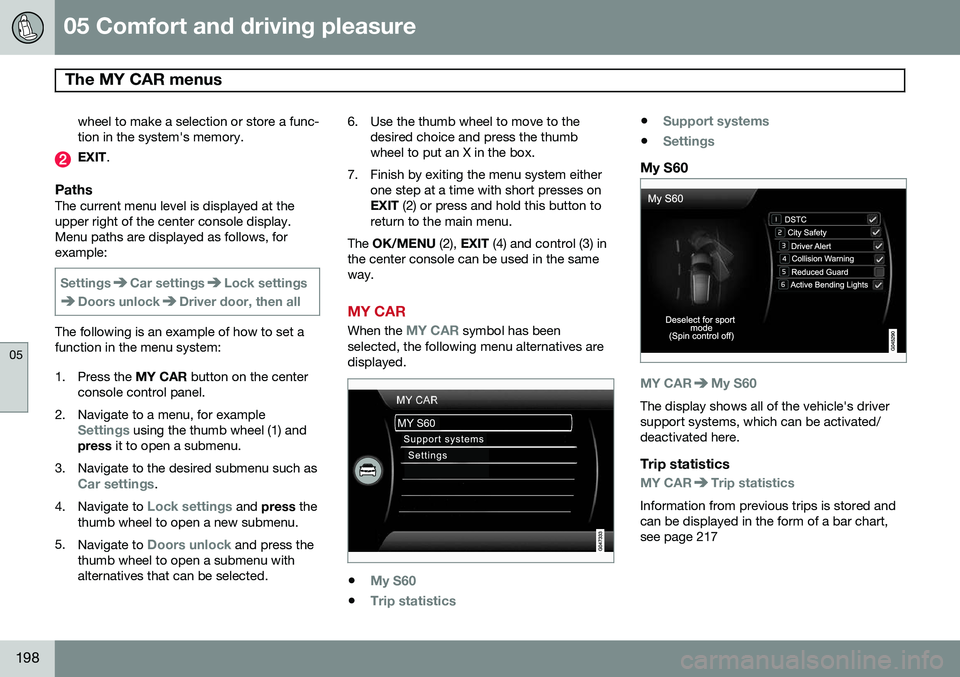
My S60
MY CARMy S60
The display shows all of the vehicle's driver support systems, which can be activated/deactivated here.
Trip statistics
MY CARTrip statistics
Information from previous trips is stored and can be displayed in the form of a bar chart,see page 217
Page 201 of 386
05 Comfort and driving pleasure
The MY CAR menus
05
}}
199
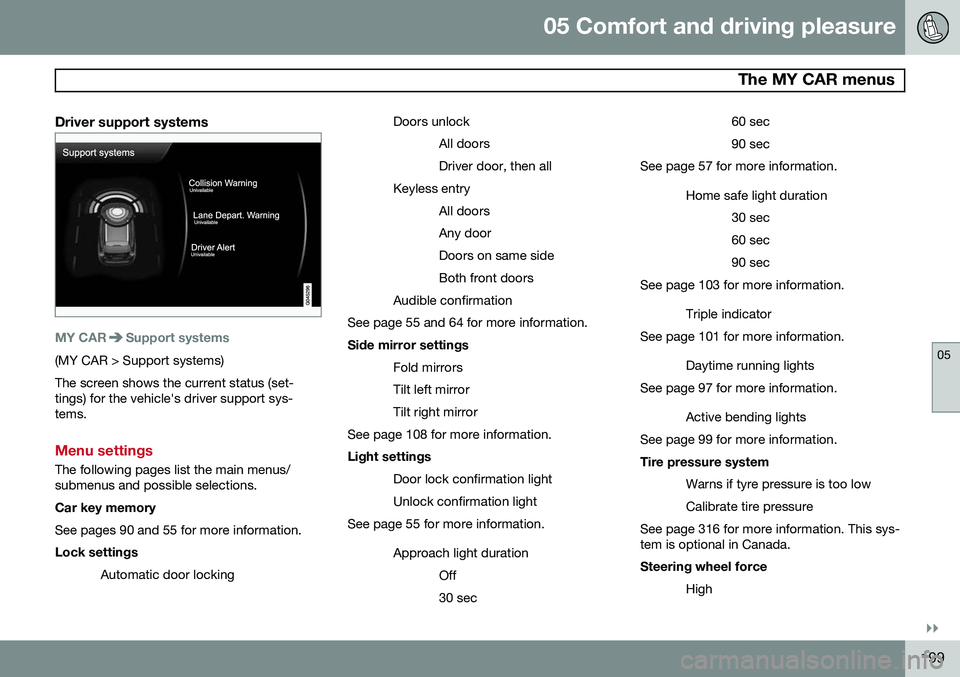
Driver support systems
MY CARSupport systems
(MY CAR > Support systems) The screen shows the current status (set- tings) for the vehicle's driver support sys-tems.
Menu settings
The following pages list the main menus/ submenus and possible selections. Car key memory See pages 90 and 55 for more information. Lock settingsAutomatic door locking Doors unlock
All doors Driver door, then all
Keyless entry All doorsAny doorDoors on same sideBoth front doors
Audible confirmation
See page 55 and 64 for more information. Side mirror settings
Fold mirrors Tilt left mirrorTilt right mirror
See page 108 for more information. Light settings
Door lock confirmation light Unlock confirmation light
See page 55 for more information.
Approach light durationOff30 sec 60 sec90 sec
See page 57 for more information.
Home safe light duration30 sec60 sec90 sec
See page 103 for more information.
Triple indicator
See page 101 for more information.
Daytime running lights
See page 97 for more information.
Active bending lights
See page 99 for more information. Tire pressure system
Warns if tyre pressure is too low Calibrate tire pressure
See page 316 for more information. This sys- tem is optional in Canada. Steering wheel force
High
Page 204 of 386

05 Comfort and driving pleasure
The MY CAR menus
05
202
1. Adjust the volume using the thumb wheel
2. Test the setting by pressing OK
3. Store the setting and leave the menu by pressing EXIT.
Voice POI list
Edit list
The navigation system has a large number of
points of interest (POIs). A maximum of 30 POIs can be stored in this list. The menu alternative
Voice POI list is only
displayed if the vehicle is equipped with the optional Volvo Navigation System. Refer tothe navigation system's manual for detailedinformation.
MY CARSettingsAudio settings
See page 226 for more information about the infotainment system.
MY CARSettingsClimate settings
Automatic blower adjustment
Normal HighLow Recirculation timerAutomatic rear defrosterInterior air quality systemReset climate settings This feature returns the "Climate settings" menu to the original factory settings. For more information about the climate sys- tem, see page 203.
MY CARSettingsFavourites (FAV)
See page 230 for more information about this feature.
MY CARSettingsInformation
Number of keys See page 54 for more information. VIN number See page 361 for more information. DivX® VOD code See page 247 for more information. Bluetooth software version in car
See page 234 for more information.Map and software version Refer to the optional Volvo Navigation System manual for more information.