ECO mode VOLVO S60 2014 Owner´s Manual
[x] Cancel search | Manufacturer: VOLVO, Model Year: 2014, Model line: S60, Model: VOLVO S60 2014Pages: 386, PDF Size: 11.24 MB
Page 259 of 386
06 Infotainment
Bluetooth®
hands-free connection
06
}}
257
Making a call1. Ensure that is shown at the top of
the center console display and that the hands-free function is in telephone mode.
2. Dial the desired phone number using the center console keypad or use the speeddial function (see page 261). In normalview (see page see page 227 for informa-tion about the various display views), it isalso possible to turn TUNE clockwise to
access the phone book and then counter-clockwise for the call list. See page 262for more information about the phonebook.
3. Press the thumb wheel or OK/MENU.
End or reject a call by pressing EXIT.
Disconnecting the cell phoneThe cell phone is automatically disconnectedfrom the infotainment system if it is movedout of range. The cell phone can be manually disconnected from the hands-free system by pressing andholding TEL or in phone mode, going to
Phone menuDisconnect phone. See also
page 258 for more information about con- nections. The hands-free system is also deactivatedwhen the ignition is switched off (or if thedriver’s door is opened). When the cell phone is disconnected from the hands-free system, a call in progress can becontinued using the cell phone’s own speakerand microphone. Even if the cell phone has been disconnected manually, some phones may reconnect auto-matically, for example when a new call is initi-ated.
Removing a paired deviceA paired phone or device can be removedfrom the list. To do so:
1. Press
TEL.
2. Select
Phone menuRemove
Bluetooth device.
Handling calls
Incoming calls–Press OK/MENU (or the thumb wheel on
the steering wheel keypad) to answer a call, even if the infotainment system is currently in another mode (e.g.,
RADIO orMEDIA).
Press EXIT to reject a call.
Auto answerThis function means that incoming calls will be answered automatically. Activate or deac-tivate the function in the menu system under
Phone menuCall optionsAuto
answer.
Call settingsWhile a call is in progress, press OK/MENU
or the thumb wheel on the steering wheel keypad to access the following functions:
•
Mute: mute the infotainment system’s
microphone.
•
Mobile phone: transfer the call from
hands-free to the cell phone. On certain cell phones, the connection will be bro-ken, which is normal. The hands-freefunction will ask if you would like toreconnect.
•
Dial number: dial a third party during an
ongoing call using the keypad (the current call will be put on hold).
Call listsCall lists are copied to the hands-free func- tion each time a cell phone is connected andthe lists are updated while the phone is con-nected. In normal view, turn TUNE counter-
clockwise to see the
All calls list.
Page 262 of 386
06 Infotainment
Bluetooth®
hands-free connection
06
260
ButtonFunction
+ 0 p w
# *
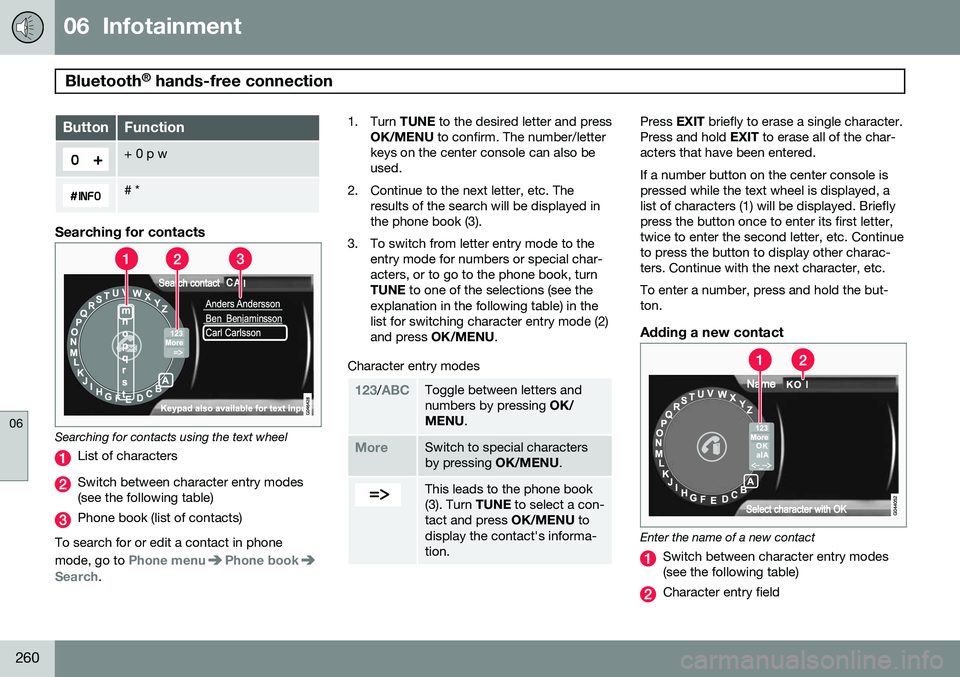
Searching for contacts
Searching for contacts using the text wheel
List of characters
Switch between character entry modes (see the following table)
Phone book (list of contacts)
To search for or edit a contact in phone mode, go to
Phone menuPhone bookSearch. 1. Turn
TUNE to the desired letter and press
OK/MENU to confirm. The number/letter
keys on the center console can also be used.
2. Continue to the next letter, etc. The results of the search will be displayed inthe phone book (3).
3. To switch from letter entry mode to the entry mode for numbers or special char-acters, or to go to the phone book, turnTUNE to one of the selections (see the
explanation in the following table) in thelist for switching character entry mode (2)and press OK/MENU .
Character entry modes
123/ABCToggle between letters and numbers by pressing OK/
MENU .
MoreSwitch to special characters by pressing OK/MENU.
This leads to the phone book (3). Turn TUNE to select a con-
tact and press OK/MENU to
display the contact's informa-tion.
Press EXIT briefly to erase a single character.
Press and hold EXIT to erase all of the char-
acters that have been entered. If a number button on the center console is pressed while the text wheel is displayed, alist of characters (1) will be displayed. Brieflypress the button once to enter its first letter,twice to enter the second letter, etc. Continueto press the button to display other charac-ters. Continue with the next character, etc. To enter a number, press and hold the but- ton.
Adding a new contact
Enter the name of a new contact
Switch between character entry modes (see the following table)
Character entry field
Page 263 of 386
06 Infotainment
Bluetooth®
hands-free connection
06
}}
261
New contacts can be added in phone mode in
Phone menuPhone bookNew
contact.
1. When
Name is highlighted, press OK/
MENU to go to the character entry mode
(see the illustration).
2. Turn TUNE to the desired letter and press
OK/MENU to confirm. The number/letter
keys on the center console can also be used.
3. Continue to the next letter, etc. The name entered will be displayed in the characterentry field (2).
4. To switch from letter entry mode to the entry mode for numbers or special char-acters, or to toggle between upper andlower case letters, etc., turn TUNE to one
of the selections (see the explanation inthe following table) in the list (1) and pressOK/MENU .
When you have finished entering the name, select
OK in the list in the display (1) and
press OK/MENU . Continue by entering the
phone number in the same way. When you have entered the phone number, press OK/MENU and select a tag for the
number (
Mobile phone, Home, Work orGeneral). Press OK/MENU to confirm. When all of the contact's information has been entered, select
Save contact in the
menu to save.
123/AB
CToggle between letters and numbers by pressing OK/
MENU .
MoreSwitch to special characters by pressing OK/MENU.
OKSave and return to Add con-
tact by pressing OK/MENU.
Toggle between upper and lower case letters by pressingOK/MENU.
Press OK/MENU and the cur-
sor will move to the character entry field (2) at the top of thedisplay. The cursor can now bemoved by turning TUNE to a
position where new characterscan be entered or deleted bypressing EXIT. In order to add
characters, return to text entrymode by pressing OK/MENU.
Speed dialSpeed dial numbers can be added in phone mode in
Phone menuPhone bookSpeed dial.
To use speed dial to make a call in phone mode, press a button on the center consolekeypad followed by OK/MENU. If a contact
has not been saved on the speed dial numberused, you will be prompted to save a contacton the number selected.
Accept vCardsvCards from other cell phones can be addedto the infotainment system's phone book. Toenable this feature, put the infotainment sys- tem in discoverable mode for Bluetooth ®
. The
feature is activated in
Phone menuPhone
book
Receive vCard.
Memory statusIn phone mode, the memory status of the infotainment system's phone book and theconnected cell phone's phone book can be seen in
Phone menuPhone bookMemory status.
Clearing the phone bookIn phone mode, all entries in the infotainment system's phone book can be cleared in
Page 272 of 386
07 During your trip
Driving recommendations
07
270
General information
Economical driving conserves natural
resources
Better driving economy may be obtained by thinking ahead, avoiding rapid starts andstops and adjusting the speed of your vehicleto immediate traffic conditions. Observe the following rules:
• Bring the engine to normal operating tem- perature as soon as possible by drivingwith a light foot on the accelerator pedalfor the first few minutes of operation. Acold engine uses more fuel and is subjectto increased wear.
• Whenever possible, avoid using the vehi-cle for driving short distances. This doesnot allow the engine to reach normaloperating temperature.
• Drive carefully and avoid rapid accelera-tion and hard braking.
• Use the transmission's Drive (
D) position
as often as possible and avoid using kick-down.
• Using the transmission's Sport mode 1
may increase fuel consumption some-what. Use the transmission's Drive ( D)
position as often as possible. See page 125 for additional information about Sportmode.
• Do not exceed posted speed limits.
• Avoid carrying unnecessary items (extraload) in the vehicle.
• Maintain correct tire pressure. Check tirepressure regularly (when tires are cold).
• Remove snow tires when threat of snowor ice has ended.
• Note that roof racks, ski racks, etc,increase air resistance and also fuel con-sumption.
• At highway driving speeds, fuel consump-tion will be lower with the air conditioningon and the windows closed than with theair conditioning off and the windowsopen.
• Using the onboard trip computer's fuelconsumption modes can help you learnhow to drive more economically.
Other factors that decrease gas mileage are: • Dirty air cleaner
• Dirty engine oil and clogged oil filter
• Dragging brakes
• Incorrect front end alignment Some of the above mentioned items and oth- ers are checked at the standard maintenanceintervals.WARNING
Driving with the trunk open:
Driving with
the trunk open could lead to poisonous exhaust gases entering the passengercompartment. If the trunk must be keptopen for any reason, proceed as follows:
• Close the windows
• Set the ventilation system control to air flow to floor, windshield and side win-dows and the blower control to itshighest setting.
Weight distribution affects handlingAt the specified curb weight your vehicle has a tendency to understeer, which means thatthe steering wheel has to be turned morethan might seem appropriate for the curva-ture of a bend. This ensures good stabilityand reduces the risk of rear wheel skid.Remember that these properties can alterwith the vehicle load. The heavier the load inthe trunk, the less the tendency to under-steer.
1
Certain models only.
Page 274 of 386
07 During your trip
Driving recommendations
07
272
WARNING
The cooling fan may start or continue to operate (for up to 6 minutes) after theengine has been switched off.
•Remove any auxiliary lights from in front of the grille when driving in hot weatherconditions.
• Do not exceed engine speeds of4500 rpm if driving with a trailer in hillyterrain. The oil temperature could becometoo high.
Conserving electrical currentKeep the following in mind to help minimize battery drain:
• When the engine is not running, avoid using ignition mode
II. Many electrical
systems (the audio system, the optionalnavigation system, power windows, etc)will function in ignition modes 0 and I.
These modes reduce drain on the battery.
• Please keep in mind that using systems,accessories, etc., that consume a greatdeal of current when the engine is notrunning could result in the battery beingcompletely drained. Driving or having theengine running for approximately15 minutes will help keep the batterycharged.
Before a long distance tripIt is always worthwhile to have your vehicle checked by a trained and qualified Volvoservice technician before driving long dis-tances. Your retailer will also be able to sup-ply you with bulbs, fuses, spark plugs andwiper blades for your use in the event thatproblems occur. As a minimum, the following items should be checked before any long trip:
• Check that engine runs smoothly and that fuel consumption is normal.
• Check for fuel, oil, and fluid leakage
• Have the transmission oil level checked.
• Check condition of drive belts.
• Check state of the battery's charge.
• Examine tires carefully (the spare tire aswell), and replace those that are worn.Check tire pressures.
• The brakes, front wheel alignment, andsteering gear should be checked by atrained and qualified Volvo service techni-cian only.
• Check all lights, including high beams.
• Reflective warning triangles are legallyrequired in some states/provinces.
• Have a word with a trained and qualifiedVolvo service technician if you intend to drive in countries where it may be difficultto obtain the correct fuel.
• Consider your destination. If you will bedriving through an area where snow or iceare likely to occur, consider snow tires.
Cold weather precautionsIf you wish to check your vehicle before the approach of cold weather, the followingadvice is worth noting:
• Make sure that the engine coolant con- tains 50 percent antifreeze. Any othermixture will reduce freeze protection. Thisgives protection against freezing down to–31 °F (–35 °C). The use of "recycled"antifreeze is not approved by Volvo. Dif-ferent types of antifreeze must not bemixed.
• Volvo recommends using only genuineVolvo antifreeze in your vehicle's radiator.
• Try to keep the fuel tank well filled – thishelps prevent the formation of condensa-tion in the tank. In addition, in extremelycold weather conditions it is worthwhileto add fuel line de-icer before refueling.
• The viscosity of the engine oil is impor-tant. Oil with low viscosity (thinner oil)improves cold-weather starting as well asdecreasing fuel consumption while theengine is warming up. Full synthetic
Page 284 of 386
07 During your trip
Towing a trailer
07
282
Introduction
Volvo recommends the use of Volvo trailer hitches that are specially designed for thevehicle.
NOTE
See page 364 for the maximum trailer and tongue weights recommended by Volvo.
•Observe the legal requirements of the state/province in which the vehicles are
• All Volvo models are equipped withenergy-absorbing shock-mounted bump-ers. Trailer hitch installation should notinterfere with the proper operation of thisbumper system.
Trailer towing does not normally present any particular problems, but take into considera-tion: • Increase tire pressure to recommended full pressure. See the tire inflation tableon page 296.
• When your vehicle is new, avoid towingheavy trailers during the first 620 miles(1,000 km).
• Maximum speed when towing a trailer:50 mph (80 km/h).
• Engine and transmission are subject toincreased loads. Therefore, engine cool-ant temperature should be closely watched when driving in hot climates orhilly terrain. Use a lower gear and turn offthe air conditioner if the temperaturegauge needle enters the red range.
• If the automatic transmission begins tooverheat, a message will be displayed inthe text window.
• Avoid overload and other abusive opera-tion.
• Hauling a trailer affects handling, durabil-ity, and economy.
• It is necessary to balance trailer brakeswith the towing vehicle brakes to providea safe stop (check and observe state/local regulations).
• Do not connect the trailer's brake systemdirectly to the vehicle's brake system.
• More frequent vehicle maintenance isrequired.
• Remove the ball holder when the hitch isnot being used.
WARNING
• Bumper-attached trailer hitches must not be used on Volvos, nor shouldsafety chains be attached to thebumper.
• Trailer hitches attaching to the vehiclerear axle must not be used.
• Never connect a trailer's hydraulicbrake system directly to the vehiclebrake system, nor a trailer's lightingsystem directly to the vehicle lightingsystem. Consult your nearest author-ized Volvo retailer for correct installa-tion.
• When towing a trailer, the trailer'ssafety wire must be correctly fastenedto the hole or hook provided in thetrailer hitch on the vehicle. The safetywire should never be fastened to orwound around the drawbar ball.
Page 287 of 386
07 During your trip
Emergency towing
07
285
Towing eyelet
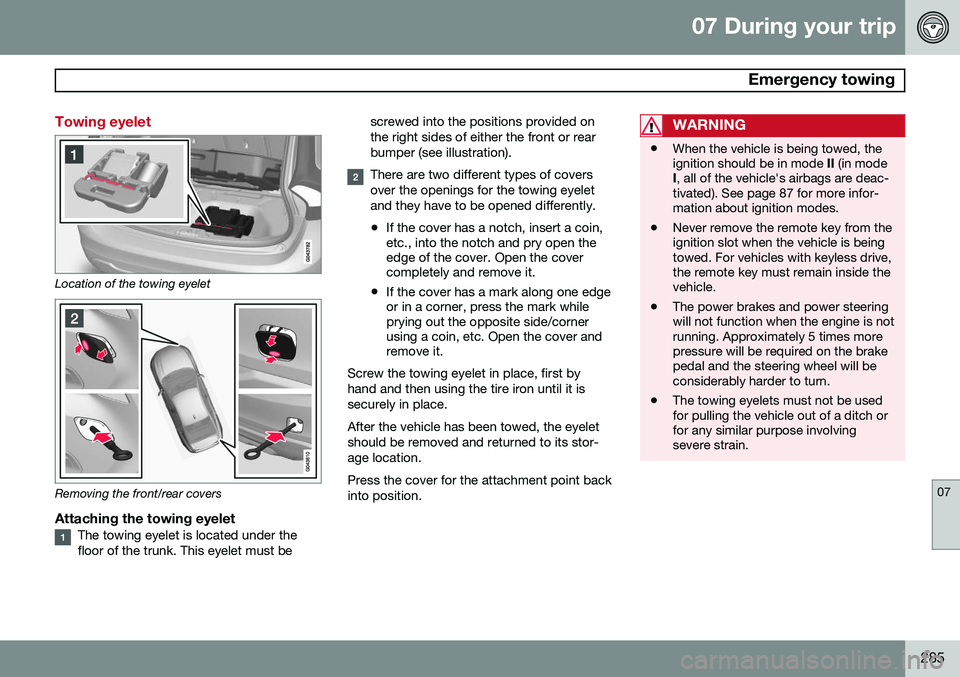
Location of the towing eyelet
Removing the front/rear covers
Attaching the towing eyeletThe towing eyelet is located under the floor of the trunk. This eyelet must bescrewed into the positions provided onthe right sides of either the front or rearbumper (see illustration).
There are two different types of covers over the openings for the towing eyeletand they have to be opened differently.
• If the cover has a notch, insert a coin, etc., into the notch and pry open theedge of the cover. Open the covercompletely and remove it.
• If the cover has a mark along one edgeor in a corner, press the mark whileprying out the opposite side/cornerusing a coin, etc. Open the cover andremove it.
Screw the towing eyelet in place, first by hand and then using the tire iron until it issecurely in place. After the vehicle has been towed, the eyelet should be removed and returned to its stor-age location. Press the cover for the attachment point back into position.
WARNING
• When the vehicle is being towed, the ignition should be in mode
II (in mode
I , all of the vehicle's airbags are deac-
tivated). See page 87 for more infor-mation about ignition modes.
• Never remove the remote key from theignition slot when the vehicle is beingtowed. For vehicles with keyless drive,the remote key must remain inside thevehicle.
• The power brakes and power steeringwill not function when the engine is notrunning. Approximately 5 times morepressure will be required on the brakepedal and the steering wheel will beconsiderably harder to turn.
• The towing eyelets must not be usedfor pulling the vehicle out of a ditch orfor any similar purpose involvingsevere strain.
Page 288 of 386

07 During your trip
Emergency towing
07
286
Towing the vehicle
1. With the remote key fully pressed into theignition slot 1
, press START/STOP
ENGINE for approximately 2 seconds to
activate ignition mode II.
2. The remote key must remain in the igni- tion slot 2
for the entire time that the vehi-
cle is being towed.
3. Keep the tow rope taut when the towing vehicle slows down by applying light pressure on the brake pedal. This willhelp prevent jarring movements of thevehicle being towed.
4. Be prepared to apply the brakes to stop the vehicle being towed.CAUTION
General towing precautions:
• Please check with state and local authorities before attempting this typeof towing, as vehicles being towed aresubject to regulations regarding maxi-mum towing speed, length and type oftowing device, lighting, etc.
• If the vehicle's battery is dead, attachjumper cables (see page 121) to pro-vide current for releasing the electricparking brake and to move the gearselector from the
P position to N. If
this is not possible, see page 126 forinformation about manually overridingthe shiftlock system to move the gearselector from P to N.
• Maximum speed: 50 mph (80 km/h).Do not exceed the maximum allowabletowing speed.
• Maximum distance with front wheelson ground: 50 miles (80 km).
• The vehicle should only be towed inthe forward direction.
Having the vehicle towed by a tow truck
Call for professional help from an authorized towing company.Volvo recommends the useof flat bed equipment. The towing eyelet may be used to pull the vehicle onto a flatbed tow truck if:
• The angle of the tow truck’s ramp is not more than 12 degrees from a horizontalplane
• The vehicle’s wheels rotate freely and rollstraight ahead
WARNING
No person or object should be behind the tow truck while the vehicle is being pulledup onto the flatbed.
1
Not necessary in vehicles with the optional keyless drive.
2 For vehicles with the the optional keyless dirive, the remote key must be in the vehicle.
Page 292 of 386
08 Wheels and tires
General information
08
290
Introduction
Your vehicle is equipped with tires according to the vehicle's tire information placard on theB-pillar (the structural member at the side ofthe vehicle, at the rear of the driver's dooropening).
CAUTION
Some Volvo models are equipped with an Ultra High Performance tire and wheelcombination designed to provide maxi-mum dry pavement performance with con-sideration for hydroplaning resistance.They may be more susceptible to roadhazard damage and, depending on drivingconditions, may achieve a tread life of lessthan 20,000 miles (30,000 km). Even if thisvehicle is equipped with Volvo’s advancedAWD or DSTC system, these tires are notdesigned for winter driving, and should bereplaced with winter tires when weatherconditions dictate.
The tires have good road holding characteris- tics and offer good handling on dry and wetsurfaces. It should be noted however that thetires have been developed to give these fea-tures on snow/ice-free surfaces. Most models are equipped with "all-season" tires, which provide a somewhat higherdegree of road holding on slippery surfacesthan tires without the "all-season" rating.However, for optimum road holding on icy orsnow-covered roads, we recommend suitablewinter tires on all four wheels. When replacing tires, be sure that the new tires are the same size designation, type(radial) and preferably from the same manu-facturer, on all four wheels. Otherwise there isa risk of altering the car's roadholding andhandling characteristics.
New Tires
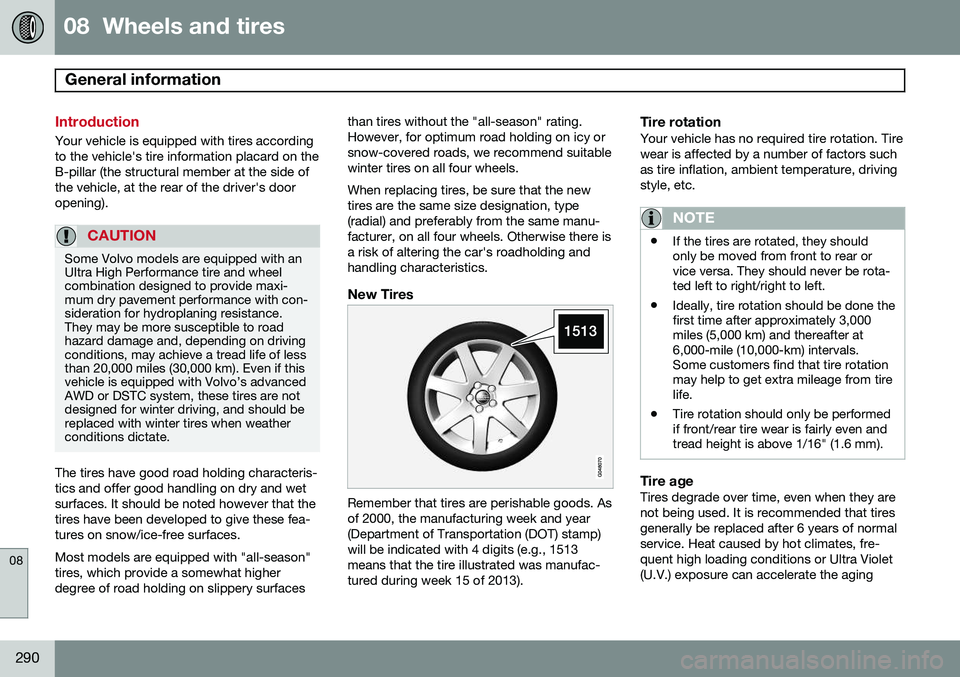
Remember that tires are perishable goods. Asof 2000, the manufacturing week and year(Department of Transportation (DOT) stamp)will be indicated with 4 digits (e.g., 1513means that the tire illustrated was manufac-tured during week 15 of 2013).
Tire rotationYour vehicle has no required tire rotation. Tire wear is affected by a number of factors suchas tire inflation, ambient temperature, drivingstyle, etc.
NOTE
•
If the tires are rotated, they should only be moved from front to rear orvice versa. They should never be rota-ted left to right/right to left.
• Ideally, tire rotation should be done thefirst time after approximately 3,000miles (5,000 km) and thereafter at6,000-mile (10,000-km) intervals.Some customers find that tire rotationmay help to get extra mileage from tirelife.
• Tire rotation should only be performedif front/rear tire wear is fairly even andtread height is above 1/16" (1.6 mm).
Tire ageTires degrade over time, even when they are not being used. It is recommended that tiresgenerally be replaced after 6 years of normalservice. Heat caused by hot climates, fre- quent high loading conditions or Ultra Violet(U.V.) exposure can accelerate the aging
Page 293 of 386
08 Wheels and tires
General information
08
}}
291
process. The temporary spare
1
should also
be replaced at 6-year intervals, even if it has never been used. A tire's age can be determined by the DOT stamp on the sidewall (see the illustration). A tire with e.g., visible cracks or discoloration should be replaced immediately.
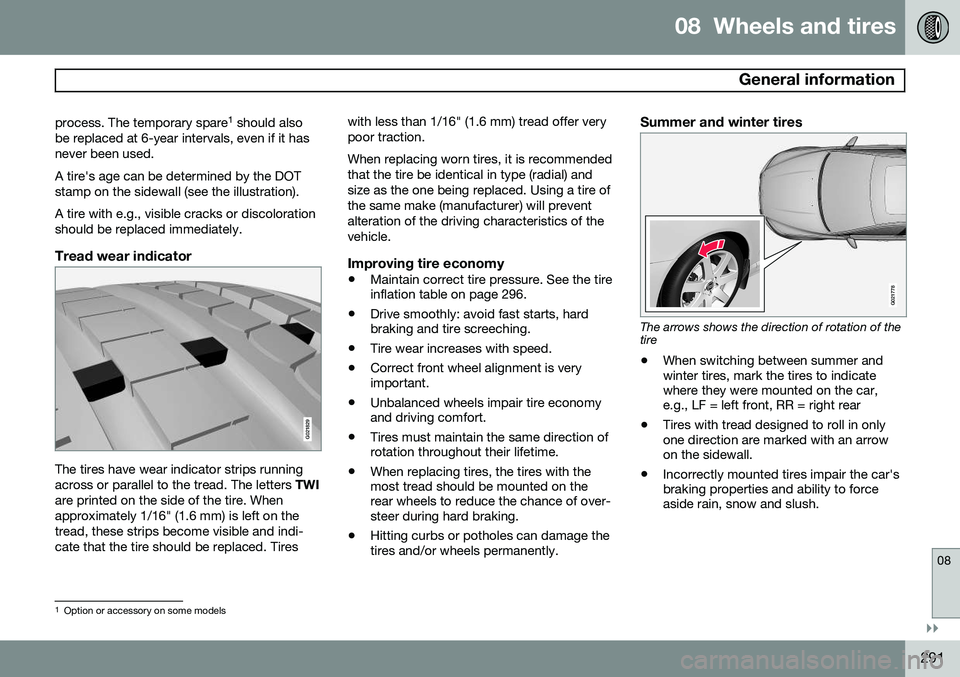
Tread wear indicator
G021829
The tires have wear indicator strips running across or parallel to the tread. The letters TWI
are printed on the side of the tire. Whenapproximately 1/16" (1.6 mm) is left on thetread, these strips become visible and indi-cate that the tire should be replaced. Tires with less than 1/16" (1.6 mm) tread offer verypoor traction. When replacing worn tires, it is recommended that the tire be identical in type (radial) andsize as the one being replaced. Using a tire ofthe same make (manufacturer) will preventalteration of the driving characteristics of thevehicle.
Improving tire economy
•
Maintain correct tire pressure. See the tire inflation table on page 296.
• Drive smoothly: avoid fast starts, hardbraking and tire screeching.
• Tire wear increases with speed.
• Correct front wheel alignment is veryimportant.
• Unbalanced wheels impair tire economyand driving comfort.
• Tires must maintain the same direction ofrotation throughout their lifetime.
• When replacing tires, the tires with themost tread should be mounted on therear wheels to reduce the chance of over-steer during hard braking.
• Hitting curbs or potholes can damage thetires and/or wheels permanently.
Summer and winter tires
G021778
The arrows shows the direction of rotation of the tire
• When switching between summer and winter tires, mark the tires to indicatewhere they were mounted on the car,e.g., LF = left front, RR = right rear
• Tires with tread designed to roll in onlyone direction are marked with an arrowon the sidewall.
• Incorrectly mounted tires impair the car'sbraking properties and ability to forceaside rain, snow and slush.
1
Option or accessory on some models