camera VOLVO S60 2014 Owner´s Manual
[x] Cancel search | Manufacturer: VOLVO, Model Year: 2014, Model line: S60, Model: VOLVO S60 2014Pages: 386, PDF Size: 11.24 MB
Page 5 of 386
Contents
* Option/accessory, for more information, see Introduction.3
03
03 Your driving environment
Instruments and controls.......................... 76
Ignition modes.......................................... 86
Seats......................................................... 88
Steering wheel.......................................... 94
Lighting..................................................... 96
Wipers and washers............................... 104
Windows................................................. 106
Mirrors..................................................... 108
Digial compass*...................................... 111
Power moonroof..................................... 113 HomeLink ®
Wireless Control System*.... 115
Starting the engine.................................. 118
Transmission........................................... 123
Eco Guide* and Power Meter*................ 127
Brakes..................................................... 129
Parking brake.......................................... 132
04
04 Driver support
Stability system....................................... 138
Road sign information (RSI)* .................. 140
Cruise control.......................................... 142
Adaptive Cruise Control (ACC)*.............. 144
Distance Alert* ....................................... 155
City Safety™ .......................................... 158Collision warning with Full Auto-brake
and Pedestrian Detection*...................... 164
Driver Alert System* ............................... 172
Park assist*............................................. 178
Rear Park Assist Camera (PAC)* ............ 182
Blind Spot Information System (BLIS)* .. 186
05
05 Comfort and driving pleasure
Volvo Sensus.......................................... 194
Menus and messages............................. 195
The MY CAR menus............................... 197
Climate system....................................... 203
Trip computer......................................... 212
Active chassis system–Four C*............... 219
Passenger compartment convenience... 220
Page 99 of 386
03 Your driving environment
Lighting
03
}}
* Option/accessory, for more information, see Introduction.97
High/low beam headlights
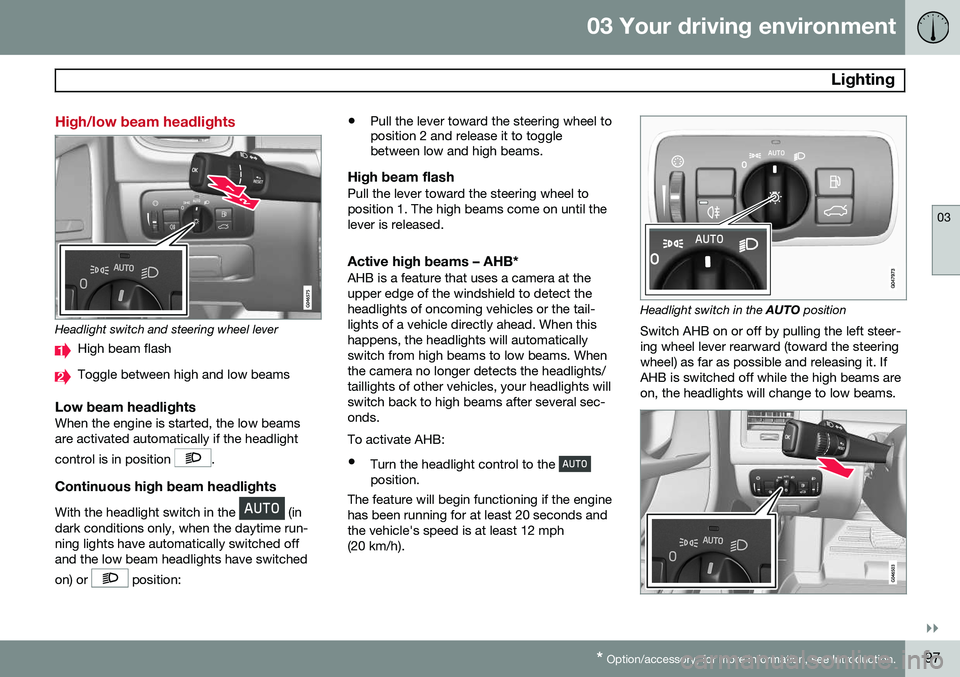
Headlight switch and steering wheel lever
High beam flash
Toggle between high and low beams
Low beam headlightsWhen the engine is started, the low beams are activated automatically if the headlight control is in position
.
Continuous high beam headlights
With the headlight switch in the (in
dark conditions only, when the daytime run- ning lights have automatically switched offand the low beam headlights have switched on) or
position: •
Pull the lever toward the steering wheel to position 2 and release it to togglebetween low and high beams.
High beam flashPull the lever toward the steering wheel to position 1. The high beams come on until thelever is released.
Active high beams – AHB*AHB is a feature that uses a camera at theupper edge of the windshield to detect theheadlights of oncoming vehicles or the tail-lights of a vehicle directly ahead. When thishappens, the headlights will automaticallyswitch from high beams to low beams. Whenthe camera no longer detects the headlights/taillights of other vehicles, your headlights willswitch back to high beams after several sec-onds. To activate AHB:
• Turn the headlight control to the
position.
The feature will begin functioning if the engine has been running for at least 20 seconds andthe vehicle's speed is at least 12 mph(20 km/h).
Headlight switch in the AUTO position
Switch AHB on or off by pulling the left steer- ing wheel lever rearward (toward the steeringwheel) as far as possible and releasing it. IfAHB is switched off while the high beams areon, the headlights will change to low beams.
Page 100 of 386
03 Your driving environment
Lighting
03
98
Models with an analog instrument panel When AHB is activated, the
symbol
will illuminate in the instrument panel. The high beam indicator (
) in the instrument
panel will also illuminate when the high beams are on. Models with a digital instrument panel When AHB is activated,
will illuminate
as a white symbol in the instrument panel.
When the high beams are on, the symbol will change to blue.
NOTE
•Keep the windshield in front of the camera free of ice, snow, dirt, etc.
• Do not mount or in any way attachanything on the windshield that couldobstruct the camera.
If Active high beam Temporary
unavailable Switch manually is displayed in
the instrument panel, switching between high and low beams will have to be done man-ually. However, the light switch can remain inthe AUTO position. The same applies if
Windscreen Sensors blocked is displayed
and the
symbol is displayed. The
symbol will go out when these mes-
sages are displayed.
AHB may be temporarily unavailable (e.g., in heavy fog or rain). When AHB becomes activeagain or if the sensors in the windshield areno longer obscured, the messages will disap- pear and the
symbol will illuminate.
CAUTION
In the following situations, it may be nec- essary to switch between high and lowbeams manually:
• In heavy fog or rain
• In blowing snow or slush
• In bright moonlight
• In freezing rain
• In areas with dim street lighting
• When oncoming vehicles have dim front lighting
• If there are pedestrians on or near theroad
• If there are reflective objects, such assigns, near the road
• When oncoming vehicles' lights areobscured by e.g., fences, bushes, etc.
• When there are vehicles on connectingroads
• At the top of hills or in dips in the road
• In sharp curves
See page168 for more information about the camera's limitations.
Page 138 of 386
G000000
136* Option/accessory, for more information, see Introduction. Stability system..................................................................................... 138
Road sign information (RSI)* ................................................................ 140Cruise control........................................................................................ 142
Adaptive Cruise Control (ACC)*............................................................ 144Distance Alert* ..................................................................................... 155City Safety™ ........................................................................................ 158
Collision warning with Full Auto-brake and Pedestrian Detection*...... 164
Driver Alert System* ............................................................................. 172Park assist*........................................................................................... 178
Rear Park Assist Camera (PAC)* .......................................................... 182
Blind Spot Information System (BLIS)* ................................................ 186
Page 142 of 386
04 Driver support
Road sign information (RSI)*
04
140* Option/accessory, for more information, see Introduction.
Introduction
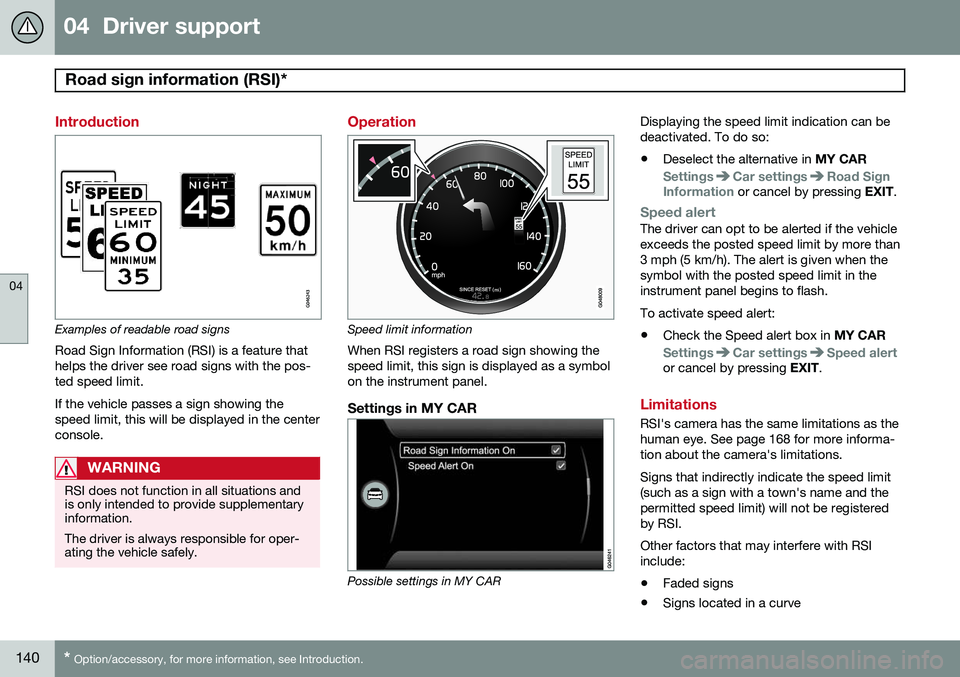
Examples of readable road signs Road Sign Information (RSI) is a feature that helps the driver see road signs with the pos-ted speed limit. If the vehicle passes a sign showing the speed limit, this will be displayed in the centerconsole.
WARNING
RSI does not function in all situations and is only intended to provide supplementaryinformation. The driver is always responsible for oper- ating the vehicle safely.
Operation
Speed limit information
When RSI registers a road sign showing the speed limit, this sign is displayed as a symbolon the instrument panel.
Settings in MY CAR
Possible settings in MY CAR Displaying the speed limit indication can be deactivated. To do so:
• Deselect the alternative in
MY CAR
SettingsCar settingsRoad Sign
Information or cancel by pressing EXIT.
Speed alertThe driver can opt to be alerted if the vehicle exceeds the posted speed limit by more than3 mph (5 km/h). The alert is given when thesymbol with the posted speed limit in theinstrument panel begins to flash. To activate speed alert:
• Check the Speed alert box in
MY CAR
SettingsCar settingsSpeed alertor cancel by pressing EXIT.
Limitations
RSI's camera has the same limitations as the human eye. See page 168 for more informa-tion about the camera's limitations. Signs that indirectly indicate the speed limit (such as a sign with a town's name and thepermitted speed limit) will not be registeredby RSI. Other factors that may interfere with RSI include:
• Faded signs
• Signs located in a curve
Page 167 of 386

04 Driver support
Collision warning with Full Auto-brake and Pedestrian Detection*
04
* Option/accessory, for more information, see Introduction.165
WARNING
• Collision Warning will not provide a warning or brake the vehicle forpedestrians in darkness or in tunnels,even if there is street lighting in thearea.
• The auto-brake function can help pre-vent a collision or reduce the speed atimpact but the driver should alwaysapply the brakes for the best possiblebraking effect, even if auto-brake isactively applying the brakes.
• Never wait for a collision warning. Thissystem is designed to be a supple-mentary driving aid. It is not, however,intended to replace the driver's atten-tion and judgement. The driver isresponsible for maintaining a safe dis-tance and speed, even when the colli-sion warning system is in use.
• Maintenance of the Collision Warningsystem's components must only beperformed by a trained and qualifiedVolvo technician.
Function
Function overview
Audio-visual warning signals, collision risk
Radar sensor
Camera
Collision WarningThe radar sensor and the camera work together to detect a pedestrian, stationaryvehicles and vehicles that are moving in thesame direction as your vehicle. If there is arisk of collision with a vehicle or a pedestrian,the driver is alerted by a flashing red warninglight and an audible warning signal. Collisionwarning is active at speeds above 3 mph(4 km/h).
Brake SupportIf the risk of collision continues to increaseafter the collision warning has been given,Brake Support is activated. Brake Supportprepares the brake system to react quickly,and the brakes are applied slightly. This maybe experienced as a light tug. If the brakes are applied quickly, full braking effect will be provided. Brake Support alsoincreases brake force if the system deter-mines that the driver has not applied ade-quate pressure on the brake pedal.
Auto-brakeIf a collision is imminent and the driver hasnot applied the brakes or begun to steeraround the vehicle or pedestrian, the auto-brake function is activated without the driverpressing the brake pedal. Full brake force isapplied to help reduce the vehicle’s speedwhen the collision occurs or limited brakeforce is applied if this is sufficient to avoid thecollision.
NOTE
The auto-brake and brake support func- tions are always on and cannot be turnedoff.
Page 169 of 386

04 Driver support
Collision warning with Full Auto-brake and Pedestrian Detection*
04
* Option/accessory, for more information, see Introduction.167
console control panel and going to
Settings
Car settingsDriver support systems
Collision Warning.
Maintenance
Camera and radar sensor
1
.
In order to function properly, the camera and laser sensor must be kept clean. Dirt, ice,snow, etc., will reduce the function of thesecomponents. Remove ice and snow when necessary and wash these areas regularly with a suitable carwashing liquid.
Limitations
Strong sunlight, reflections, extreme light contrasts, the use of sunglasses, or if thedriver is not looking straight ahead may makethe visual warning signal in the windshield dif-ficult to see. For this reason, always activatethe audible warning signal. Slippery driving conditions increase braking distance, which can reduce the system'scapacity to avoid a collision. In these condi-tions, the ABS and DSTC systems providethe best possible braking effect while helpingto maintain stability.
NOTE
The visual warning signal may be tempo- rarily disengaged in the event of high pas-senger compartment temperature due tostrong sunlight, etc. If this occurs, theaudible warning signal will be used, even ifit has been deactivated in the menu sys-tem.
WARNING
• In certain situations, the system can- not provide warnings or warnings maybe delayed if traffic conditions or otherexternal factors make it impossible forthe radar sensor or camera to detect apedestrian or a vehicle ahead.
• Warnings may not be provided if thedistance to the vehicle ahead is short,or if movements of the steering wheel/brake pedal are great, such as duringactive driving.
• The sensor system has a limited rangefor pedestrians and provides warningsand braking effect most effectively atspeeds up to 30 mph (50 km/h). Forstationary or slow-moving vehicles, thesystem functions best if your vehicle’sspeed is below approximately 45 mph(70 km/h).
• Warnings for stationary or slow-mov-ing vehicles may not be provided indark conditions or in poor visibility.
The Collision Warning system uses the same radar sensors as Adaptive Cruise Control. Formore information on the radar sensor and itslimitations, see page 151.
1
The illustration is generic; details will vary, depending on the model
Page 170 of 386
04 Driver support
Collision warning with Full Auto-brake and Pedestrian Detection*
04
168* Option/accessory, for more information, see Introduction.
NOTE
If warnings are given too frequently, the warning distance can be reduced (seepage 166). This causes the system to pro-vide later warnings, which decreases thetotal number of warnings provided.
WARNING
• The system is not activated at speeds under approx. 2 mph (4 km/h). There-fore, it will not brake your vehicle if youapproach a vehicle ahead at very lowspeed, such as when parking.
• The driver's actions always have high-est priority and override the CollisionWarning system. This means that thesystem will not intervene in situationswhere the driver is actively steering,braking or pressing the acceleratorpedal, even if a collision is imminent.
• When Auto-brake has prevented a col-lision with a stationary object, yourvehicle will remain at a standstill forapprox. 1.5 seconds. If your vehiclehas been braked for a moving vehicleahead, your vehicle's speed will bereduced to the same speed as thatvehicle's.
The camera’s limitationsThe camera is used by Collision Warning with Auto-brake, Driver Alert Control (seepage 172), and Lane Departure Warning (seepage 175).
NOTE
•To help protect the camera in very hot conditions, it may be temporarilyswitched off for approximately 15minutes after the engine has beenstarted.
• Keep the section of the windshield infront of the camera clean and free ofice, snow, or condensation.
WARNING
•The camera has the same limitations as the human eye. In other words, its“vision is impaired” by adverseweather conditions such as heavysnowfall, dense fog, etc. These condi-tions may reduce the function of sys-tems that depend on the camera orcause these systems to temporarilystop functioning.
• Never place any objects, decals, etc.,on the windshield in front of the cam-era. This could reduce or block thecamera’s function, and could causeone or more of the systems that utilizethe camera to stop functioning.
• Strong sunlight, reflections from theroad surface, ice or snow covering theroad, a dirty road surface, or unclearlane marker lines may drasticallyreduce the camera’s capacity todetect the side of a lane, a pedestrianor another vehicle.
Page 171 of 386

04 Driver support
Collision warning with Full Auto-brake and Pedestrian Detection*
04
* Option/accessory, for more information, see Introduction.169
Pedestrians
The system cannot identify all pedestrians
The Collision Warning system can only iden- tify and detect a pedestrian who is standingupright. This person can be standing still,walking or running. This means that the system has to be able to identify a person's head, arms, shoulders,legs, the upper and lower parts of the bodyand a person's pattern of movement whenwalking or running. If parts of the body are not visible to the cam- era, the system cannot detect the pedestrian. The following conditions apply:
• In order to detect a pedestrian, the sys- tem must have a full view of the person'sentire body and the person must be atleast 32 in. (80 cm) tall.
• The system cannot detect a pedestriancarrying a large object.
• The camera's capacity to see a pedes-trian at dawn or dusk is limited, much asit is for the human eye.
• The camera's function is deactivated andwill not detect a pedestrian in darkness orin tunnels, even if there is street lighting inthe area.
WARNING
• Collision Warning with Full Auto-brake and Pedestrian Detection is designedto be a supplementary driving aid. It isnot, however, intended to replace thedriver's attention and judgement. Thedriver is always responsible for operat-ing the vehicle in a safe manner.
• The system cannot detect all pedes-trians in all situations, such as in dark-ness/at night and cannot detect parti-ally hidden pedestrians, people whoare less than approx. 32 in. (80 cm)tall, or people wearing clothing thatobscures the contours of their bodies.
Fault tracing and actions
If the message Windscreen Sensors
blocked is displayed, this means that the
camera is obscured and cannot detect pedestrians, vehicles or road marker lines infront of the vehicle. This, in turn, means that Collision Warning with Full Auto-brake and Pedestrian Detec-tion, Lane Departure Warning, and DriverAlert Control will not have full functionality. The table lists possible causes for this mes- sage being displayed, and suitable actions.
Page 172 of 386
04 Driver support
Collision warning with Full Auto-brake and Pedestrian Detection*
04
170* Option/accessory, for more information, see Introduction.
CauseAction
The surface of the windshield in front of the camera is dirty or covered with ice or snow.Clean or clear the section of the windshield in front of the camera.
Fog, heavy rain or snow is interfering with the function of the camera.No action possible. Heavy precipitation may affect the function of the camera.
The surface of the windshield is clean but the message remains in the display.Wait a short time. It may take several minutes for the camera to regis- ter visibility.
The surface between the inside of the windshield and the camera is dirty.Contact an authorized Volvo retailer or service technician to have this surface cleaned.
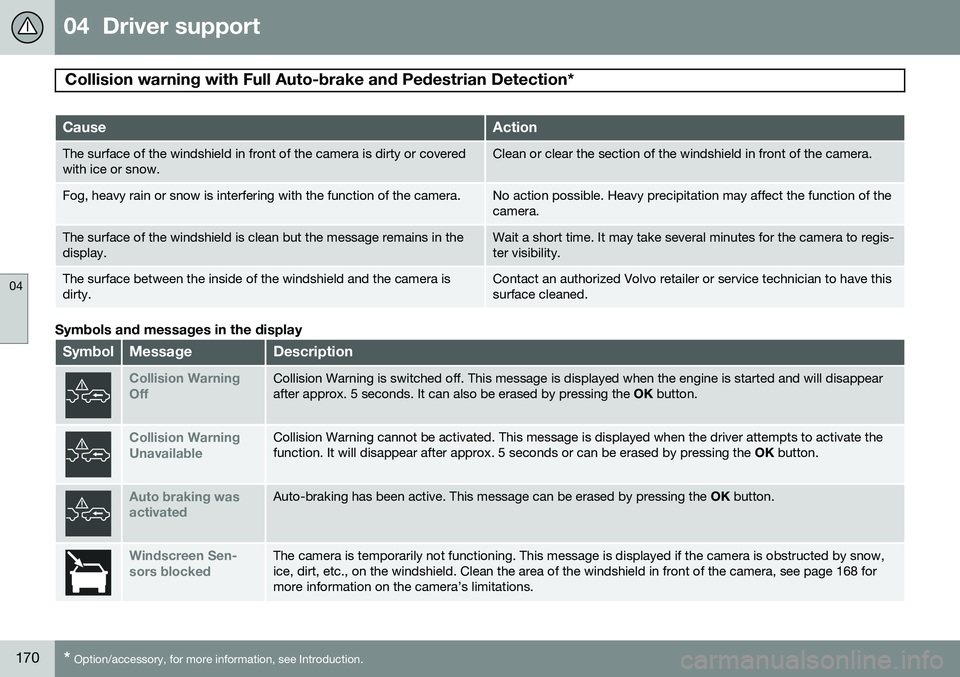
Symbols and messages in the display
SymbolMessageDescription
Collision Warning OffCollision Warning is switched off. This message is displayed when the engine is started and will disappear after approx. 5 seconds. It can also be erased by pressing the OK button.
Collision Warning UnavailableCollision Warning cannot be activated. This message is displayed when the driver attempts to activate the function. It will disappear after approx. 5 seconds or can be erased by pressing the OK button.
Auto braking was activatedAuto-braking has been active. This message can be erased by pressing the OK button.
Windscreen Sen- sors blockedThe camera is temporarily not functioning. This message is displayed if the camera is obstructed by snow, ice, dirt, etc., on the windshield. Clean the area of the windshield in front of the camera, see page 168 formore information on the camera’s limitations.