climate settings VOLVO S60 2014 Owner´s Manual
[x] Cancel search | Manufacturer: VOLVO, Model Year: 2014, Model line: S60, Model: VOLVO S60 2014Pages: 386, PDF Size: 11.24 MB
Page 111 of 386
03 Your driving environment
Mirrors
03
}}
* Option/accessory, for more information, see Introduction.109
Automatically tilting the door mirrors when parking
The door mirrors can tilt down automatically to help give the driver a better view along thesides of the vehicle, for example when paral-lel parking. When the transmission is nolonger in reverse, the mirrors will automati-cally return to their original position. This function can be activated/deactivated in MY CAR under
SettingsCar settings
Side mirror settingsIn reverse gear tilt
left mirror
or In reverse gear tilt right
mirror. See page 197 for information about
the MY CAR menu system.
Automatic retraction when lockingWhen the vehicle is locked/unlocked with the remote key the door mirrors are automaticallyretracted/extended. The function can be activated/deactivated in MY CAR under
SettingsCar settings
Side mirror settingsRetract side mirrors
when locking. See page 197 for a descrip-
tion of the menu system.
Resetting to neutralMirrors that have been moved out of position by an external force must be electrically resetto the neutral position for electric retracting/extending to work. •
Retract the mirrors with the
L and R but-
tons.
• Fold them out again with the
L and R but-
tons.
The mirrors are now reset in neutral position.
Home safe and approach lightingThe light on the door mirrors comes on whenapproach lighting or home safe lighting isselected, see page 103.
Heated windshield*, rear window and door mirror defrosters
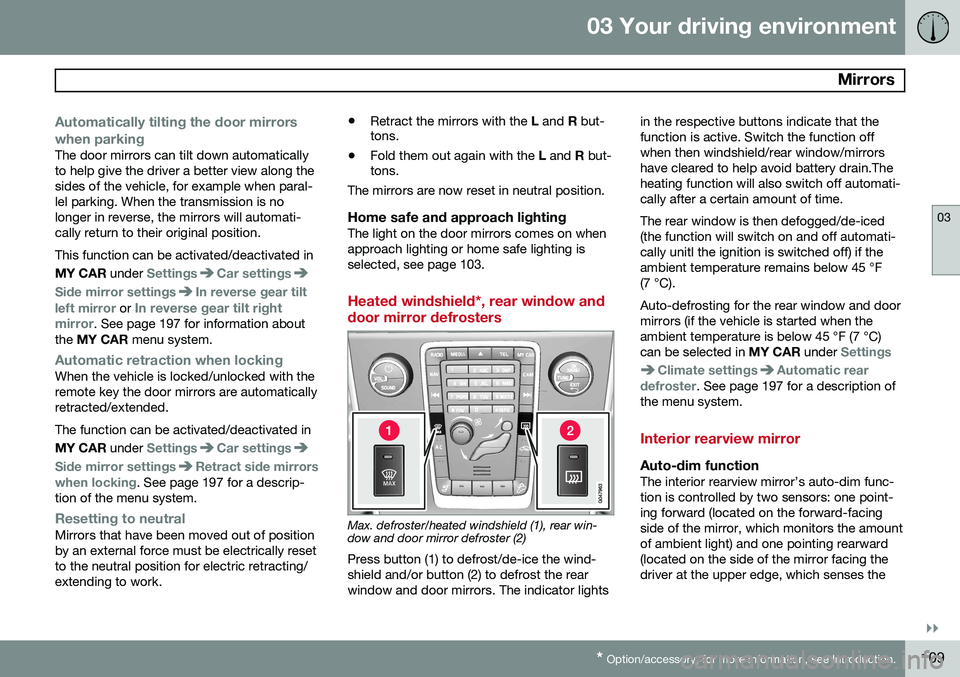
Max. defroster/heated windshield (1), rear win- dow and door mirror defroster (2)
Press button (1) to defrost/de-ice the wind- shield and/or button (2) to defrost the rearwindow and door mirrors. The indicator lights in the respective buttons indicate that thefunction is active. Switch the function offwhen then windshield/rear window/mirrorshave cleared to help avoid battery drain.Theheating function will also switch off automati-cally after a certain amount of time. The rear window is then defogged/de-iced (the function will switch on and off automati-cally unitl the ignition is switched off) if theambient temperature remains below 45 °F(7 °C). Auto-defrosting for the rear window and door mirrors (if the vehicle is started when theambient temperature is below 45 °F (7 °C)can be selected in
MY CAR under
Settings
Climate settingsAutomatic rear
defroster. See page 197 for a description of
the menu system.
Interior rearview mirror
Auto-dim functionThe interior rearview mirror’s auto-dim func- tion is controlled by two sensors: one point-ing forward (located on the forward-facingside of the mirror, which monitors the amountof ambient light) and one pointing rearward(located on the side of the mirror facing thedriver at the upper edge, which senses the
Page 122 of 386
03 Your driving environment
Starting the engine
03
120* Option/accessory, for more information, see Introduction.
Engine Remote Start (ERS)*
IntroductionERS is a feature that makes it possible to remotely start the engine to cool or heat thepassenger compartment before driving. The climate control system will start using the same settings as when the engine wasswitched off. When the engine is started using ERS, it will run for a maximum of 15 minutes beforeautomatically switching off again. After 2 ERSstarts, the engine must be started in the nor-mal way before ERS can be used again.
NOTE
• Always adhere to applicable State, Province and/or Local laws regardingengine idling when using ERS.
• The service life of the remote key'sbattery is affected by ERS use. If thisfeature is used frequently, the batteryshould be replaced once a year, seepage 57).
WARNING
Keep the following in mind before using ERS
• The vehicle should be in view.
• The vehicle should be unoccupied.
• The vehicle must not be parked indoors or in an enclosed area.Exhaust fumes are harmful to thehealth.
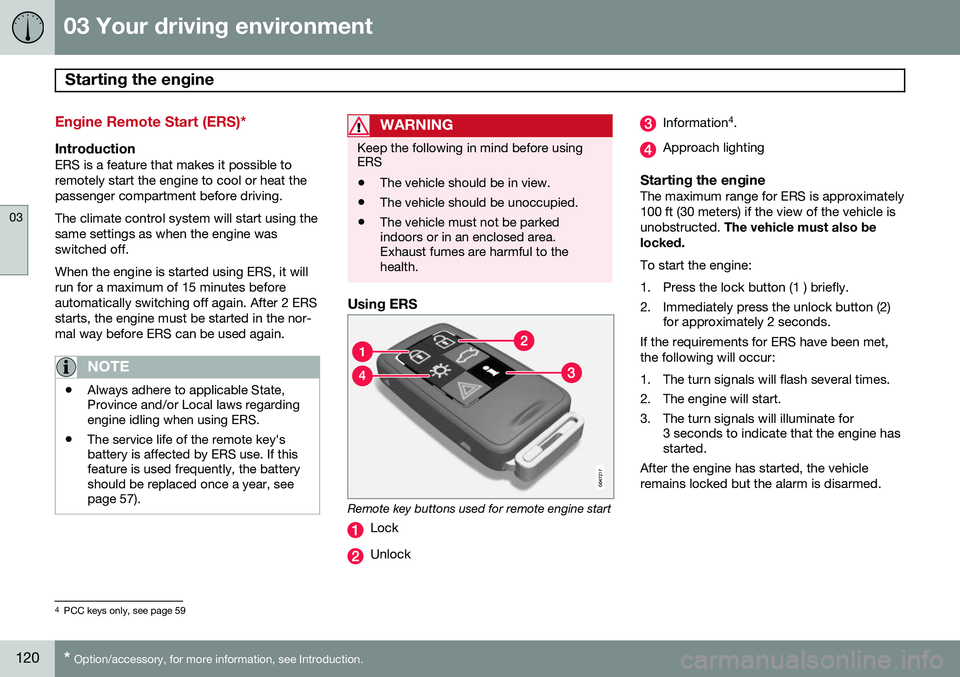
Using ERS
Remote key buttons used for remote engine start
Lock
Unlock
Information 4
.
Approach lighting
Starting the engineThe maximum range for ERS is approximately 100 ft (30 meters) if the view of the vehicle isunobstructed. The vehicle must also be
locked. To start the engine:
1. Press the lock button (1 ) briefly.
2. Immediately press the unlock button (2) for approximately 2 seconds.
If the requirements for ERS have been met, the following will occur:
1. The turn signals will flash several times.
2. The engine will start.
3. The turn signals will illuminate for 3 seconds to indicate that the engine has started.
After the engine has started, the vehicle remains locked but the alarm is disarmed.
4 PCC keys only, see page 59
Page 196 of 386

05 Comfort and driving pleasure
Volvo Sensus
05
194* Option/accessory, for more information, see Introduction.
Introduction
Center console control panel
Volvo Navigation System (VNS)* – NAV:
see the separate VNS manual for operat- ing instructions.
Infotainment ( RADIO, MEDIA , TEL ): see
page 226 .
Vehicle-related settings - MY CAR: see
page 197.
Park assist camera - CAM*: see
page 182.
Climate system: see page 203.
Volvo Sensus is the operating system in your vehicle providing a coordinated interface for anumber of functions such as the individual-ized settings that can be made in the MY
CAR menus, the climate and infotainment systems as well as other options such as thepark assist camera(s), etc. Volvo Sensus uses the screen in the center instrument panel to display information andselections are made using this panel’s con-trols and buttons. Certain features can alsobe controlled using the steering wheel key-pad. Press
MY CAR to present all of the available
settings related to driving and/or controlling the vehicle, such as City Safety, setting theclock, lock settings, etc. Press RADIO , MEDIA , TEL , NAV * and CAM*
to change a source and to activated systems or functions such as AM, FM1, CD, DVD,Bluetooth, navigation* and the park assistcamera *. See the respective sections in this manual for more detailed information about your vehi-cle's various features and functions.
Page 203 of 386

05 Comfort and driving pleasure
The MY CAR menus
05
}}
201
See page 212 for more information about the trip computer.
Temperature unit
Celsius Fahrenheit
Select the temperature scale to be displayed by the climate control unit. Volume levels
Voice output volume Front park assist volumeRear park assist volumePhone ringing volume
Reset system options This feature returns the "System options" menu to the original factory settings.
MY CARSettingsVoice settingsA .
A Only on vehicles with the optional Volvo Navigation System
Voice tutorial Select this menu alternative and press
OK for
spoken information about how the system works. Voice command list
Phone commandsPhone Phone call contactPhone dial number
Navigation commands NavigationNavigation repeat instructionNavigation go to address
General commands HelpCancelVoice tutorial
The menu alternatives under Phone
commands show examples of the voice
commands available when a cell phone is connected to the Bluetooth ®
hands-free sys-
tem. See page 263 for more detailed infor- mation. The menu alternatives under
Navigation
commands show examples of the voice
commands available for the optional Volvo Navigation System. Refer to the navigation system's manual for detailed information. Voice user setting
Default setting User 1User 2
Two user profiles can be set, which is useful if more than one person uses voice commands regularly.
Default setting resets the factory
settings. Voice training
User 1 User 2
Voice training enables the system to
become familiar with the driver's voice and pronunciation. A list of phrases is presentedon the screen for the driver to read aloud.When the system has registered the driver'spronunciation, no additional phrases will bedisplayed. After completed voice training, select
User 1 or User 2 in Voice user
setting to set the system to the current user.
Voice output volume
• A volume control will be displayed. To set the volume level:
Page 204 of 386

05 Comfort and driving pleasure
The MY CAR menus
05
202
1. Adjust the volume using the thumb wheel
2. Test the setting by pressing OK
3. Store the setting and leave the menu by pressing EXIT.
Voice POI list
Edit list
The navigation system has a large number of
points of interest (POIs). A maximum of 30 POIs can be stored in this list. The menu alternative
Voice POI list is only
displayed if the vehicle is equipped with the optional Volvo Navigation System. Refer tothe navigation system's manual for detailedinformation.
MY CARSettingsAudio settings
See page 226 for more information about the infotainment system.
MY CARSettingsClimate settings
Automatic blower adjustment
Normal HighLow Recirculation timerAutomatic rear defrosterInterior air quality systemReset climate settings This feature returns the "Climate settings" menu to the original factory settings. For more information about the climate sys- tem, see page 203.
MY CARSettingsFavourites (FAV)
See page 230 for more information about this feature.
MY CARSettingsInformation
Number of keys See page 54 for more information. VIN number See page 361 for more information. DivX® VOD code See page 247 for more information. Bluetooth software version in car
See page 234 for more information.Map and software version Refer to the optional Volvo Navigation System manual for more information.
Page 206 of 386

05 Comfort and driving pleasure
Climate system
05
204
ditioning system contains 1.76 lbs (800 g) of R134a. The systems uses PAG oil.
Passenger compartment filterReplace the cabin air filter with a new one atthe recommended intervals. Please refer toyour Warranty and Service Records Informa-tion booklet, or consult a trained and qualifiedVolvo service technician for these intervals.The filter should be replaced more often whendriving under dirty and dusty conditions. Thefilter cannot be cleaned and therefore shouldalways be replaced with a new one.
NOTE
There are different types of cabin air filters. Ensure that the correct type is installed.
Interior Air Quality System (IAQS)A multifilter helps reduce gases and particles in the incoming air, thereby reducing the lev-els of odors and contaminants entering thevehicle. The air quality sensor detectsincreased levels of contaminants in the out-side air. When the air quality sensor detectscontaminated outside air, the air intake closesand the air inside the passenger compart-ment is recirculated, i.e., no outside air entersthe vehicle. The filter also cleans recirculatedpassenger compartment air.
NOTE
Contact your Volvo retailer for IAQS air fil- ter replacement intervals.
Materials used in the cabinThe materials used in the cabin have been developed to help minimize the amount ofdust and make the cabin easier to keepclean. All floor mats can be easily removedfor cleaning. Use car cleaning products rec-ommended by Volvo. See also the informa-tion beginning on page 353.
Menu settingsThe default settings for four of the climatesystem's functions can be changed in themenu system.• Blower speed in automatic mode.
• Recirculation timer for passenger com- partment air.
• Automatic rear window defrosting.
• The optional Interior Air Quality System(IAQS).
The functions can also be returned to factory settings in the menu system. See page 197 for a description of the menu system.
Air distribution
The incoming air is distributed from a number of different vents in the passenger compart-ment. Air distribution is fully automatic in AUTO
mode.If desired, air distribution can be controlled manually, see page 211.
Page 209 of 386
05 Comfort and driving pleasure
Climate system
05
* Option/accessory, for more information, see Introduction.207
Climate system controls
Heated front seats*
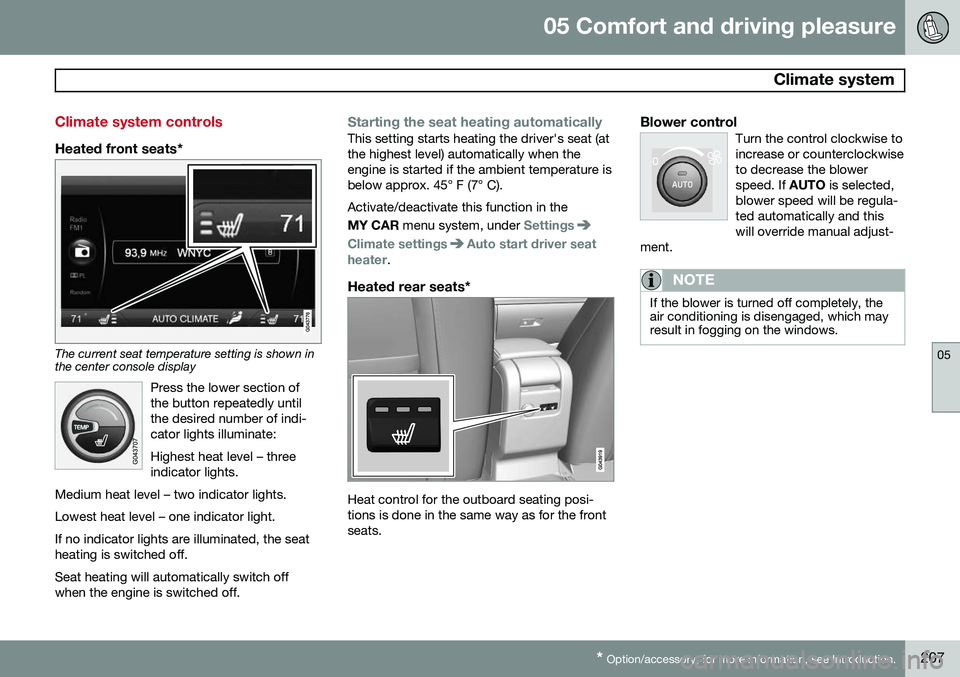
The current seat temperature setting is shown in the center console display
Press the lower section of the button repeatedly untilthe desired number of indi-cator lights illuminate: Highest heat level – three indicator lights.
Medium heat level – two indicator lights. Lowest heat level – one indicator light.If no indicator lights are illuminated, the seat heating is switched off.
Seat heating will automatically switch off when the engine is switched off.
Starting the seat heating automaticallyThis setting starts heating the driver's seat (at the highest level) automatically when theengine is started if the ambient temperature isbelow approx. 45° F (7° C). Activate/deactivate this function in the MY CAR menu system, under
Settings
Climate settingsAuto start driver seat
heater.
Heated rear seats*
Heat control for the outboard seating posi- tions is done in the same way as for the frontseats.
Blower controlTurn the control clockwise toincrease or counterclockwiseto decrease the blowerspeed. If AUTO is selected,
blower speed will be regula-ted automatically and thiswill override manual adjust-
ment.
NOTE
If the blower is turned off completely, the air conditioning is disengaged, which mayresult in fogging on the windows.
Page 210 of 386

05 Comfort and driving pleasure
Climate system
05
208
Air distribution
Manual air distribution—defroster
Manual air distribution—dashboard air vents
Manual air distribution—floor
The figure consists of three buttons. When a button is pressed, the corresponding figurewill appear in the display with an arrow indi-cating which manual air flow has beenselected (see the following illustration). Seealso the air distribution chart on page 211.
Air distribution is shown in the center console display
AutoThe function automatically regulates cooling, heating,blower speed, recirculation,and air distribution to main-tain the chosen temperature.If you select one or moremanual functions, the other
functions continue to be controlled automati-cally. The air quality sensor is engaged and allmanual settings are switched off when AUTO
is pressed. The display shows
AUTO
CLIMATE.
Blower speed in automatic mode can be set under
Climate settingsAutomatic blower
adjustment
. Choose between Low, Normalor High.
NOTE
Selecting the lowest blower speed may increases the risk of fog forming on thewindows.
Temperature controlThe temperatures on the driver and passenger sidescan be set separately. Whenthe vehicle is started, themost recent setting isresumed.
NOTE
Heating or cooling cannot be speeded up by selecting a higher/lower temperaturethan the actual temperature required.
Page 211 of 386
05 Comfort and driving pleasure
Climate system
05
}}
* Option/accessory, for more information, see Introduction.209
A/C – ON/OFFWhen the indicator light in the button is on, the air con-ditioning is controlled auto-matically. This cools/heatsand dehumidifies the incom-ing air. When the indicatorlight in the button is off, the
air conditioning is disengaged. Other func-tions are still controlled automatically. Whenmaximum defroster is selected, the air condi-tioning system is set for maximum blowerspeed and dehumidifies the cabin as quicklyas possible.Max. defroster and electrically heated windshield*
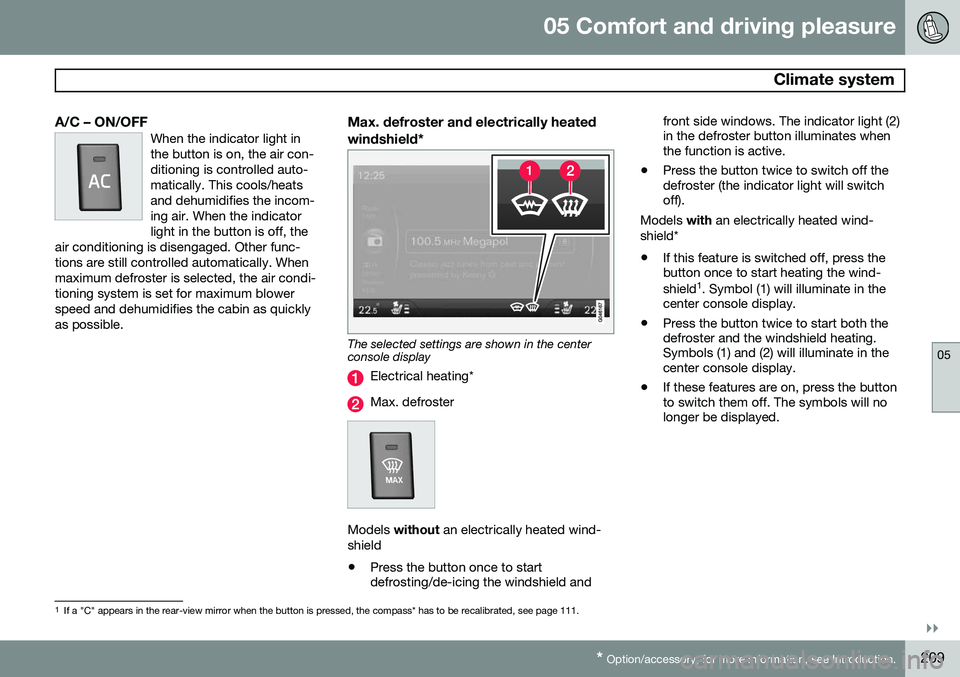
The selected settings are shown in the center console display
Electrical heating*
Max. defroster
Models without an electrically heated wind-
shield • Press the button once to start defrosting/de-icing the windshield and front side windows. The indicator light (2)in the defroster button illuminates whenthe function is active.
• Press the button twice to switch off thedefroster (the indicator light will switchoff).
Models with an electrically heated wind-
shield*
• If this feature is switched off, press thebutton once to start heating the wind- shield 1
. Symbol (1) will illuminate in the
center console display.
• Press the button twice to start both the defroster and the windshield heating.Symbols (1) and (2) will illuminate in thecenter console display.
• If these features are on, press the buttonto switch them off. The symbols will nolonger be displayed.
1
If a "C" appears in the rear-view mirror when the button is pressed, the compass* has to be recalibrated, see page 111.
Page 212 of 386

05 Comfort and driving pleasure
Climate system
05
210* Option/accessory, for more information, see Introduction.
NOTE
• Triangular areas at the far sides of the windshield are not heated electricallyand will take slightly longer todefrost/de-ice.
• The heated windshield may affect theperformance/range of e.g., transpond-ers used to automatically pay highwaytolls or other communication equip-ment.
The following occurs when the defroster/ windshield heating functions have been acti-vated: •
Blower speed increases automatically and the air conditioning will switch on (ifnot already on and if the passenger com-partment blower is not turned off) todehumidify the air in the passenger com-partment. Air conditioning can beswitched off by pressing the
AC button.
• Recirculation will not function whiledefrost is engaged.
The climate system will return to its previous settings when the defroster/windshield heat-ing function is switched off. See also page 109 for additional information.
Recirculation/air quality system
RecirculationThis function can be used to shut out exhaust fumes,smoke, etc., from the pas-senger compartment. The airin the passenger compart-ment is then recirculated,i.e., no air from outside the
car is taken into the car when this function isactivated. The indicator light in the button willilluminate when recirculation is selected. If the air in the car recirculates for too long, there is a risk of condensation forming on theinsides of the windows, especially in winter.
TimerThe timer function minimizes the risk of fog- ging, or stale air when the recirculation func-tion is selected by automatically switching offthe function after a certain length of time,depending on the ambient temperature. Acti-vate/deactivate the function under
Climate
settings
Recirculation timer. See page
197 for a description of the menu system.
NOTE
When Defroster is selected, recirculation is always deactivated.
Interior Air Quality System–IAQS*This system consists of a multifilter and an air quality sensor. The filter helps remove gasesand particles from the incoming air, therebyreducing the amounts of odors and contami-nants entering the vehicle. The air quality sen-sor detects increased levels of contaminantsin the outside air. When the air quality sensordetects contaminated outside air, the airintake closes and the air inside the passengercompartment is recirculated, i.e., no outsideair enters the vehicle. The filter also cleansrecirculated passenger compartment air.When the AUTO button is depressed the air
quality sensor is always engaged. Activate or deactivate this function in
Climate
settings
Interior air quality system.
NOTE
• The air quality sensor should always be engaged in order to obtain the bestair in the passenger compartment.
• Recirculation is limited in cold weatherto avoid fogging.
• If the insides of the windows start fog-ging, disengage the air quality sensor.Use the defroster function to increaseairflow to the front, side, and rear win-dows.