manual transmission VOLVO S60 2014 Owner´s Manual
[x] Cancel search | Manufacturer: VOLVO, Model Year: 2014, Model line: S60, Model: VOLVO S60 2014Pages: 386, PDF Size: 11.24 MB
Page 62 of 386
02 Locks and alarm
Remote key and key blade
02
60* Option/accessory, for more information, see Introduction.
or unlock the vehicle will show the vehicle's most recently received status. The indicatorlights will not flash when the information but-ton is pressed while the PCC is out of range. If more than one PCC is used to lock/unlock the vehicle, only the one used most recentlywill show the correct locking status.
NOTE
If none of the indicator lights illuminate when the information button is pressed,this may be because the most recenttransmission between the vehicle and thePCC was interrupted or impeded by build-ings or other objects.
Keyless driveVehicles equipped with the optional Personal Car Communicator have the keyless drivefunction, see page 64 for detailed informa-tion.
Detachable key blade
The key blade can be removed from the remote key. When removed, the key bladecan be used to:
• Lock/unlock the driver's door if the remote key is not functioning properly
• Lock/unlock the glove compartment (seepage 69)
• Override the transmission's shiftlock sys-tem (see page 126)
• Enable/disable the valet locking function(see page 63)
• The front passenger's door and the rearside doors can be locked manually if nec-essary (see page 67)
• The trunk can be opened manually if nec-essary (see page 70)
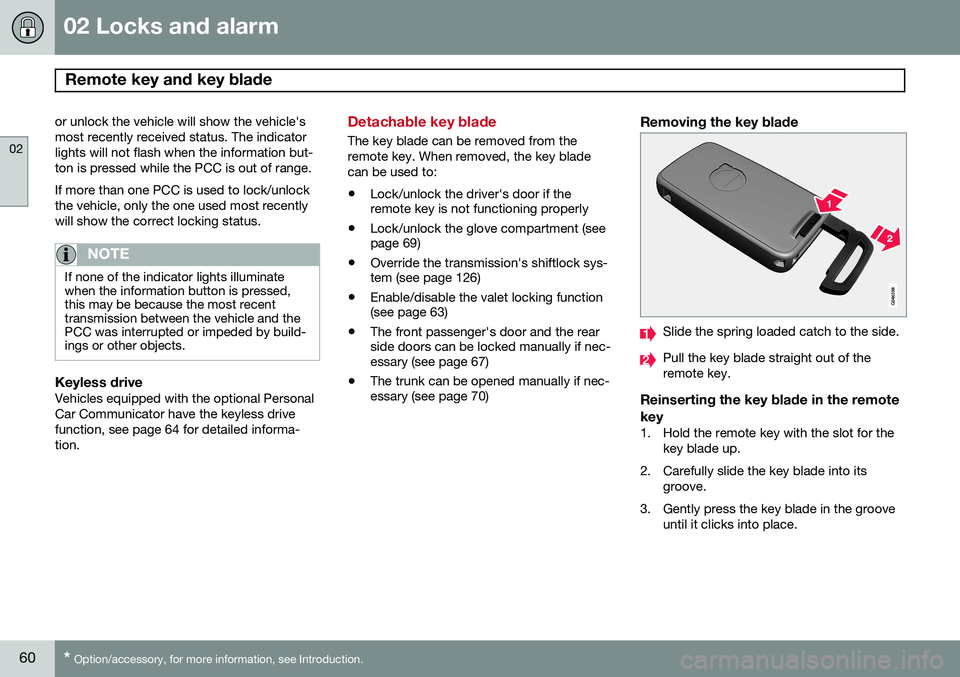
Removing the key blade
Slide the spring loaded catch to the side.
Pull the key blade straight out of the remote key.
Reinserting the key blade in the remote key
1. Hold the remote key with the slot for the
key blade up.
2. Carefully slide the key blade into its groove.
3. Gently press the key blade in the groove until it clicks into place.
Page 125 of 386
03 Your driving environment
Transmission
03
123
Automatic transmission
G021351
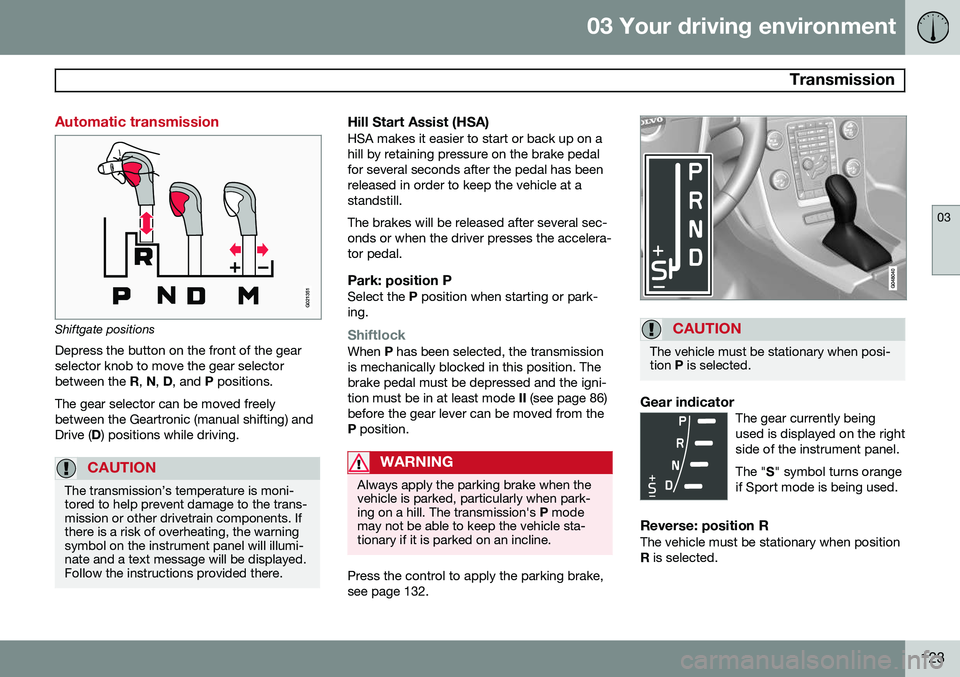
Shiftgate positions
Depress the button on the front of the gear selector knob to move the gear selectorbetween the R, N , D , and P positions.
The gear selector can be moved freelybetween the Geartronic (manual shifting) andDrive ( D) positions while driving.
CAUTION
The transmission’s temperature is moni- tored to help prevent damage to the trans-mission or other drivetrain components. Ifthere is a risk of overheating, the warningsymbol on the instrument panel will illumi-nate and a text message will be displayed.Follow the instructions provided there.
Hill Start Assist (HSA)HSA makes it easier to start or back up on a hill by retaining pressure on the brake pedalfor several seconds after the pedal has beenreleased in order to keep the vehicle at astandstill. The brakes will be released after several sec- onds or when the driver presses the accelera-tor pedal.
Park: position PSelect the P position when starting or park-
ing.
ShiftlockWhen P has been selected, the transmission
is mechanically blocked in this position. The brake pedal must be depressed and the igni-tion must be in at least mode II (see page 86)
before the gear lever can be moved from theP position.
WARNING
Always apply the parking brake when the vehicle is parked, particularly when park-ing on a hill. The transmission's P mode
may not be able to keep the vehicle sta-tionary if it is parked on an incline.
Press the control to apply the parking brake, see page 132.
CAUTION
The vehicle must be stationary when posi- tion P is selected.
Gear indicatorThe gear currently being used is displayed on the rightside of the instrument panel. The " S" symbol turns orange
if Sport mode is being used.
Reverse: position RThe vehicle must be stationary when position R is selected.
Page 126 of 386
03 Your driving environment
Transmission
03
124* Option/accessory, for more information, see Introduction.
Neutral: position NNo gear is engaged and the engine can be started with the gear selector in this position.Apply the parking brake if the vehicle is sta-tionary with the gear selector in position N.
Drive: position DD is the normal driving position. The car auto-
matically shifts between the various forwardgears, based on the level of acceleration andspeed. The car must be at a standstill whenshifting from position R to position D.
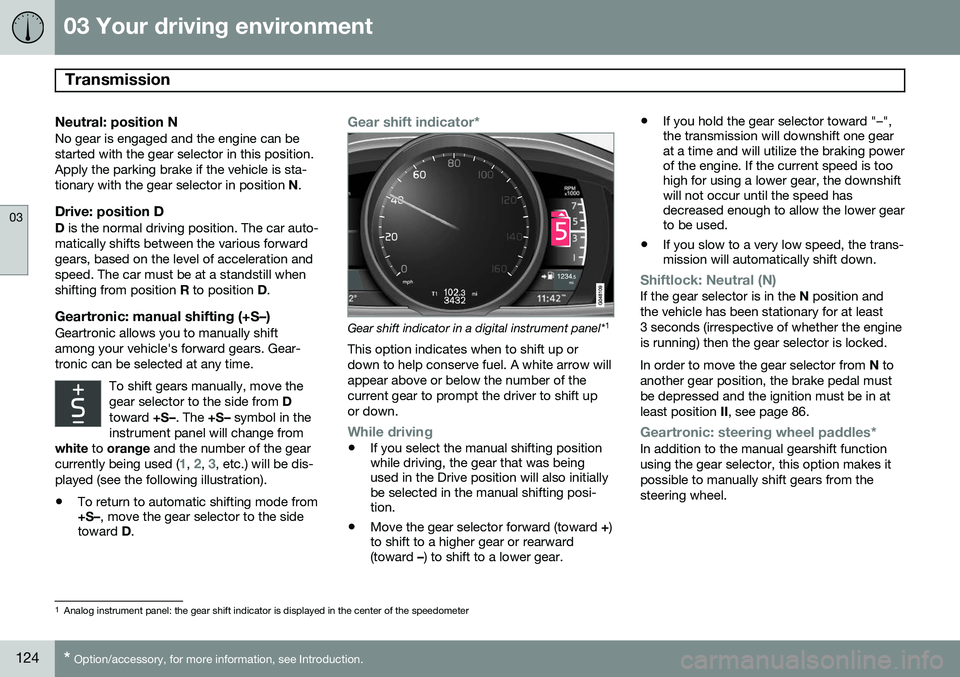
Geartronic: manual shifting (+S–)Geartronic allows you to manually shiftamong your vehicle's forward gears. Gear-tronic can be selected at any time.
To shift gears manually, move thegear selector to the side from D
toward +S–. The +S– symbol in the
instrument panel will change from
white to orange and the number of the gear
currently being used (
1, 2, 3, etc.) will be dis-
played (see the following illustration).
• To return to automatic shifting mode from +S–
, move the gear selector to the side
toward D.
Gear shift indicator*
Gear shift indicator in a digital instrument panel* 1
This option indicates when to shift up or down to help conserve fuel. A white arrow willappear above or below the number of thecurrent gear to prompt the driver to shift upor down.
While driving
• If you select the manual shifting position while driving, the gear that was beingused in the Drive position will also initiallybe selected in the manual shifting posi-tion.
• Move the gear selector forward (toward
+)
to shift to a higher gear or rearward(toward –) to shift to a lower gear. •
If you hold the gear selector toward "–",the transmission will downshift one gearat a time and will utilize the braking powerof the engine. If the current speed is toohigh for using a lower gear, the downshiftwill not occur until the speed hasdecreased enough to allow the lower gearto be used.
• If you slow to a very low speed, the trans-mission will automatically shift down.
Shiftlock: Neutral (N)If the gear selector is in the
N position and
the vehicle has been stationary for at least 3 seconds (irrespective of whether the engineis running) then the gear selector is locked. In order to move the gear selector from N to
another gear position, the brake pedal must be depressed and the ignition must be in atleast position II, see page 86.
Geartronic: steering wheel paddles*In addition to the manual gearshift function using the gear selector, this option makes itpossible to manually shift gears from thesteering wheel.
1
Analog instrument panel: the gear shift indicator is displayed in the center of the speedometer
Page 127 of 386
03 Your driving environment
Transmission
03
125
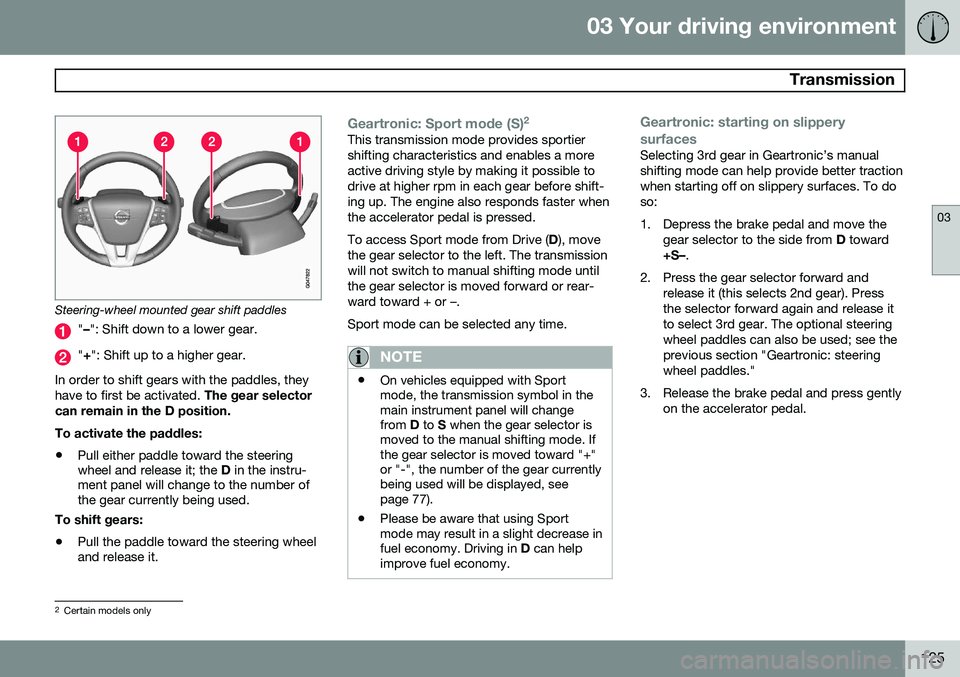
Steering-wheel mounted gear shift paddles
"– ": Shift down to a lower gear.
"+ ": Shift up to a higher gear.
In order to shift gears with the paddles, they have to first be activated. The gear selector
can remain in the D position. To activate the paddles:
• Pull either paddle toward the steering wheel and release it; the
D in the instru-
ment panel will change to the number ofthe gear currently being used.
To shift gears:
• Pull the paddle toward the steering wheeland release it.
Geartronic: Sport mode (S) 2This transmission mode provides sportier shifting characteristics and enables a moreactive driving style by making it possible todrive at higher rpm in each gear before shift-ing up. The engine also responds faster whenthe accelerator pedal is pressed. To access Sport mode from Drive (
D), move
the gear selector to the left. The transmission will not switch to manual shifting mode untilthe gear selector is moved forward or rear-ward toward + or –. Sport mode can be selected any time.
NOTE
• On vehicles equipped with Sport mode, the transmission symbol in themain instrument panel will changefrom
D to S when the gear selector is
moved to the manual shifting mode. Ifthe gear selector is moved toward "+"or "-", the number of the gear currentlybeing used will be displayed, seepage 77).
• Please be aware that using Sportmode may result in a slight decrease infuel economy. Driving in
D can help
improve fuel economy.
Geartronic: starting on slippery surfaces
Selecting 3rd gear in Geartronic’s manual shifting mode can help provide better tractionwhen starting off on slippery surfaces. To doso:
1. Depress the brake pedal and move the
gear selector to the side from D toward
+S– .
2. Press the gear selector forward and release it (this selects 2nd gear). Press the selector forward again and release itto select 3rd gear. The optional steeringwheel paddles can also be used; see theprevious section "Geartronic: steeringwheel paddles."
3. Release the brake pedal and press gently on the accelerator pedal.
2Certain models only
Page 383 of 386
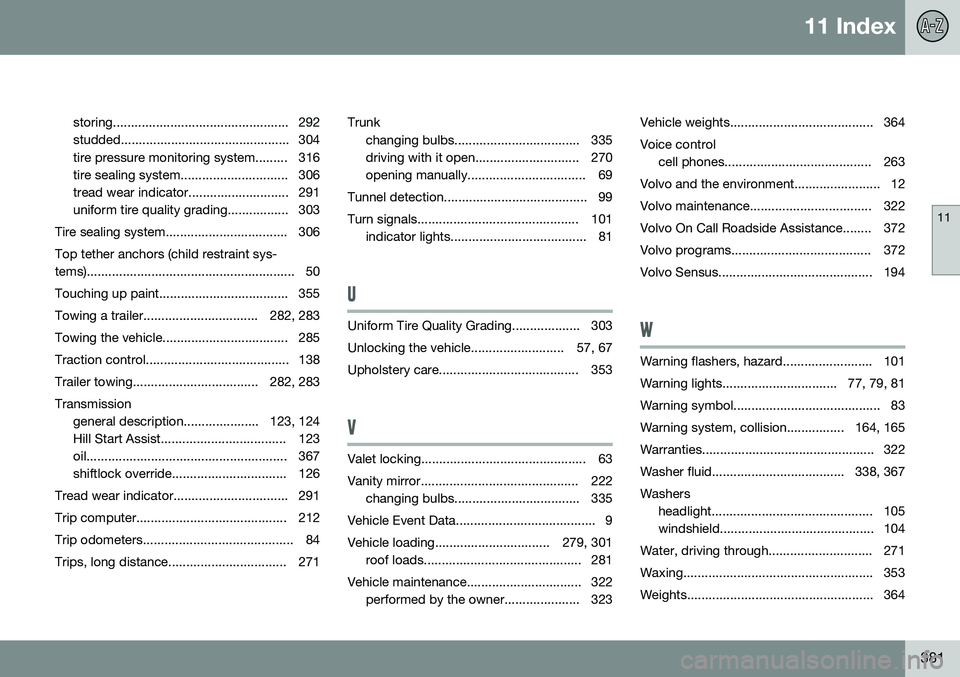
11 Index
11
381
storing................................................. 292
studded............................................... 304
tire pressure monitoring system......... 316
tire sealing system.............................. 306
tread wear indicator............................ 291
uniform tire quality grading................. 303
Tire sealing system.................................. 306 Top tether anchors (child restraint sys-
tems).......................................................... 50
Touching up paint.................................... 355
Towing a trailer................................ 282, 283
Towing the vehicle................................... 285
Traction control........................................ 138
Trailer towing................................... 282, 283Transmission general description..................... 123, 124
Hill Start Assist................................... 123
oil........................................................ 367
shiftlock override................................ 126
Tread wear indicator................................ 291
Trip computer.......................................... 212
Trip odometers.......................................... 84
Trips, long distance................................. 271 Trunk
changing bulbs................................... 335
driving with it open............................. 270
opening manually................................. 69
Tunnel detection........................................ 99
Turn signals............................................. 101 indicator lights...................................... 81
U
Uniform Tire Quality Grading................... 303
Unlocking the vehicle.......................... 57, 67
Upholstery care....................................... 353
V
Valet locking.............................................. 63
Vanity mirror............................................ 222 changing bulbs................................... 335
Vehicle Event Data....................................... 9
Vehicle loading................................ 279, 301 roof loads............................................ 281
Vehicle maintenance................................ 322 performed by the owner..................... 323 Vehicle weights........................................ 364Voice control
cell phones......................................... 263
Volvo and the environment........................ 12
Volvo maintenance.................................. 322
Volvo On Call Roadside Assistance........ 372
Volvo programs....................................... 372
Volvo Sensus........................................... 194
W
Warning flashers, hazard......................... 101
Warning lights................................ 77, 79, 81
Warning symbol......................................... 83
Warning system, collision................ 164, 165
Warranties................................................ 322
Washer fluid..................................... 338, 367Washers headlight............................................. 105
windshield........................................... 104
Water, driving through............................. 271
Waxing..................................................... 353
Weights.................................................... 364