light VOLVO S60 2015 Owner´s Manual
[x] Cancel search | Manufacturer: VOLVO, Model Year: 2015, Model line: S60, Model: VOLVO S60 2015Pages: 406, PDF Size: 11.26 MB
Page 342 of 406
09 Maintenance and specifications
Maintaining your car 09
340
Hoisting the vehicle
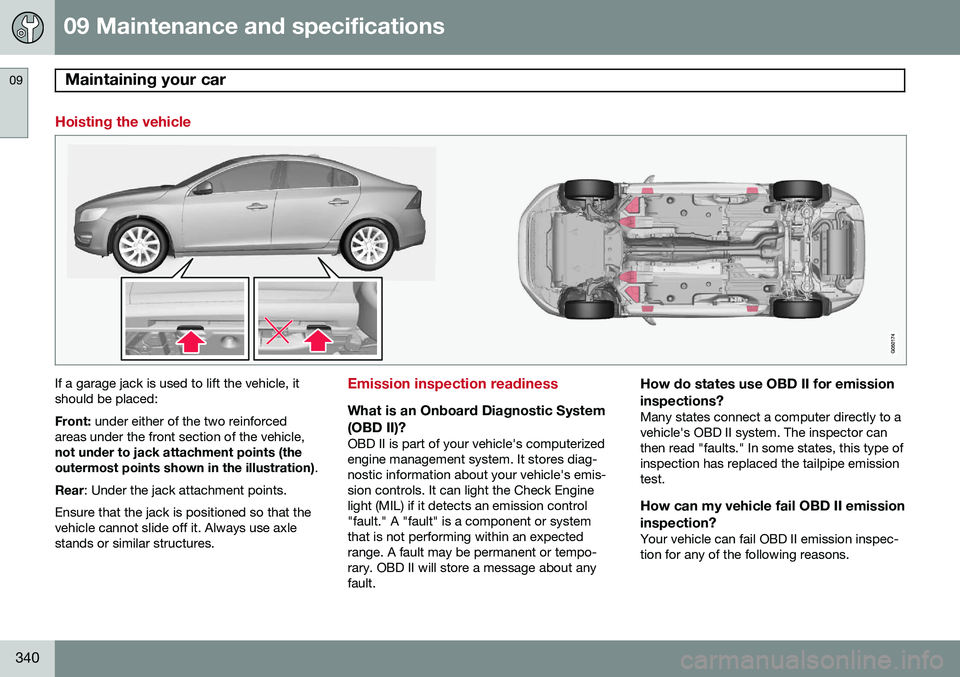
If a garage jack is used to lift the vehicle, it should be placed: Front: under either of the two reinforced
areas under the front section of the vehicle, not under to jack attachment points (the outermost points shown in the illustration) .
Rear : Under the jack attachment points.
Ensure that the jack is positioned so that the vehicle cannot slide off it. Always use axlestands or similar structures.Emission inspection readiness
What is an Onboard Diagnostic System (OBD II)?
OBD II is part of your vehicle's computerized engine management system. It stores diag-nostic information about your vehicle's emis-sion controls. It can light the Check Enginelight (MIL) if it detects an emission control"fault." A "fault" is a component or systemthat is not performing within an expectedrange. A fault may be permanent or tempo-rary. OBD II will store a message about anyfault.
How do states use OBD II for emission inspections?
Many states connect a computer directly to a vehicle's OBD II system. The inspector canthen read "faults." In some states, this type ofinspection has replaced the tailpipe emissiontest.
How can my vehicle fail OBD II emission inspection?
Your vehicle can fail OBD II emission inspec-tion for any of the following reasons.
Page 343 of 406
09 Maintenance and specifications
Maintaining your car09
341
•
If your Check Engine (MIL) light is lit, your vehicle may fail inspection.
• If your vehicle's Check Engine light waslit, but went out without any action onyour part, OBD II will still have a recordedfault. Your vehicle may pass or fail,depending on the inspection practices inyour area.
• If you had recent service that requireddisconnecting the battery, OBD II diag-nostic information may be incompleteand "not ready" for inspection. A vehiclethat is not ready may fail inspection.
How can I prepare for my next OBD II
emission inspection?
• If your Check Engine (MIL) light is lit – orwas lit but went out without service, haveyour vehicle diagnosed and, if necessary,serviced by a qualified Volvo technician.
• If you recently had service for a lit CheckEngine light, or if you had service thatrequired disconnecting the battery, aperiod of driving is necessary to bring theOBD II system to "ready" for inspection.Two half-hour trips of mixed stop-and-go/highway driving are typically neededto allow OBD II to reach readiness. YourVolvo retailer can provide you with moreinformation on planning a trip.
• Maintain your vehicle in accordance withyour vehicle's maintenance schedule.
Page 344 of 406
09 Maintenance and specifications
Hood and engine compartment 09
342
Opening and closing the hood
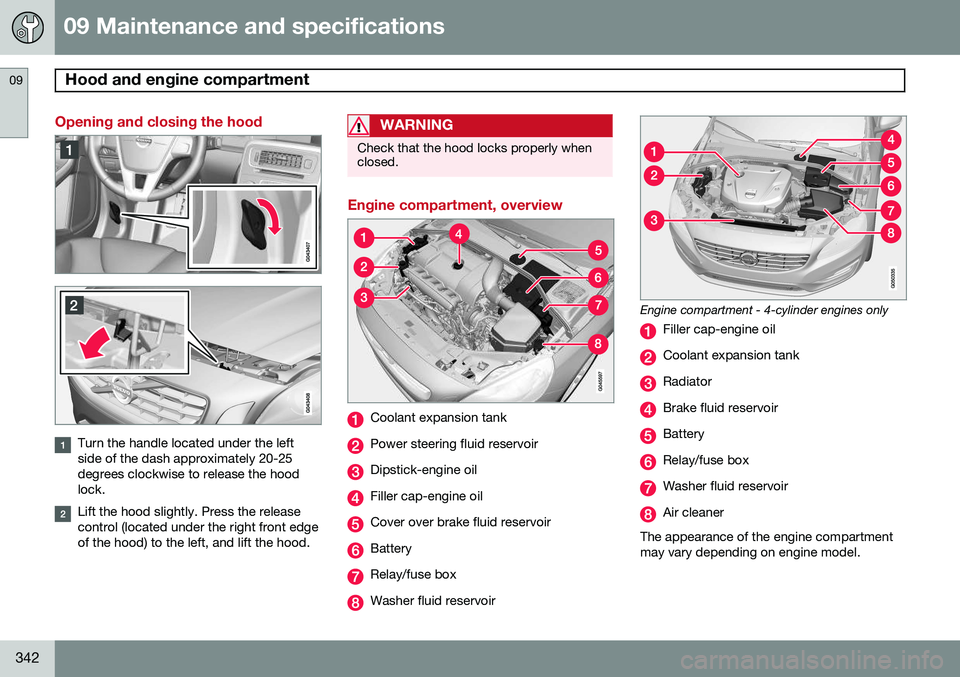
Turn the handle located under the left side of the dash approximately 20-25degrees clockwise to release the hoodlock.
Lift the hood slightly. Press the release control (located under the right front edgeof the hood) to the left, and lift the hood.
WARNING
Check that the hood locks properly when closed.
Engine compartment, overview
Coolant expansion tank
Power steering fluid reservoir
Dipstick-engine oil
Filler cap-engine oil
Cover over brake fluid reservoir
Battery
Relay/fuse box
Washer fluid reservoir
Engine compartment - 4-cylinder engines only
Filler cap-engine oil
Coolant expansion tank
Radiator
Brake fluid reservoir
Battery
Relay/fuse box
Washer fluid reservoir
Air cleaner
The appearance of the engine compartment may vary depending on engine model.
Page 350 of 406
09 Maintenance and specifications
Replacing bulbs 09
348* Option/accessory, for more information, see Introduction.
Introduction
All bulb specifications are listed on page 353. The following bulbs should only be replacedby a trained and qualified Volvo service tech-nician:
• Active Bending Lights
• Front parking lights
• Front side marker lights
• Cornering lights
• Turn signals in the door mirrors
• Approach lighting in the door mirrors
• Interior lighting (except for the front foot- well lighting)
• Glove compartment lighting
• Rear parking lights
• LED bulbsNOTE
• For information regarding any bulbs not mentioned in this section, pleasecontact your Volvo retailer or a trainedand authorized Volvo service techni-cian.
• Always switch off the ignition beforestarting to replace a bulb.
• If an error message remains in the dis-play after a faulty bulb has beenreplaced, contact an authorized Volvoworkshop.
• Condensation may form temporarily onthe inside of the lenses of exteriorlights such as headlights, fog lights, ortaillights. This is normal and the lightsare designed to withstand moisture.Normally, condensation will dissipateafter the lights have been on for ashort time.
• The optional Active Bending Lightbulbs contain trace amounts of mer-cury. These bulbs should always bedisposed of by a trained and qualifiedVolvo service technician.
CAUTION
Never touch the glass of bulbs with your fingers. Grease and oils from your fingersvaporize in the heat and will leave adeposit on the reflector, which will damageit.
WARNING
•The engine should not be running when changing bulbs.
• If the engine has been running justprior to replacing bulbs in the head-light housing, please keep in mind thatcomponents in the engine compart-ment will be hot.
WARNING
•Active Bending Lights* – due to the high voltage used by these headlights,these bulbs should only be replacedby a trained and qualified Volvo serv-ice technician.
• Turn off the lights and remove theremote key from the ignition beforechanging any bulbs.
Page 351 of 406
09 Maintenance and specifications
Replacing bulbs09
}}
349
Headlight housing
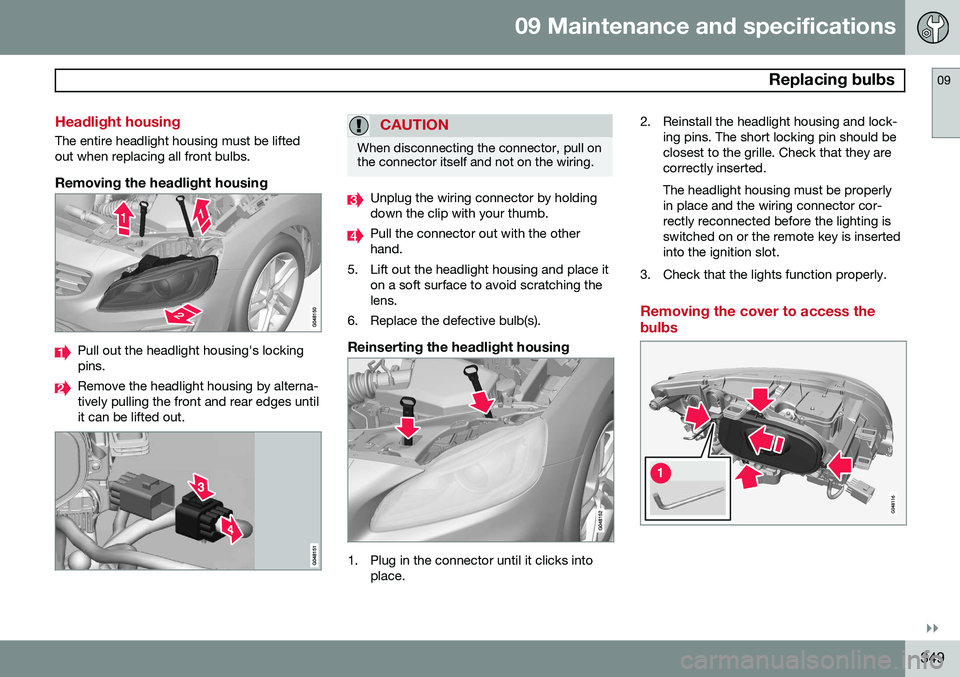
The entire headlight housing must be lifted out when replacing all front bulbs.
Removing the headlight housing
Pull out the headlight housing's locking pins.
Remove the headlight housing by alterna- tively pulling the front and rear edges untilit can be lifted out.
CAUTION
When disconnecting the connector, pull on the connector itself and not on the wiring.
Unplug the wiring connector by holding down the clip with your thumb.
Pull the connector out with the other hand.
5. Lift out the headlight housing and place it on a soft surface to avoid scratching thelens.
6. Replace the defective bulb(s).
Reinserting the headlight housing
1. Plug in the connector until it clicks into place. 2. Reinstall the headlight housing and lock-
ing pins. The short locking pin should be closest to the grille. Check that they arecorrectly inserted. The headlight housing must be properly in place and the wiring connector cor-rectly reconnected before the lighting isswitched on or the remote key is insertedinto the ignition slot.
3. Check that the lights function properly.
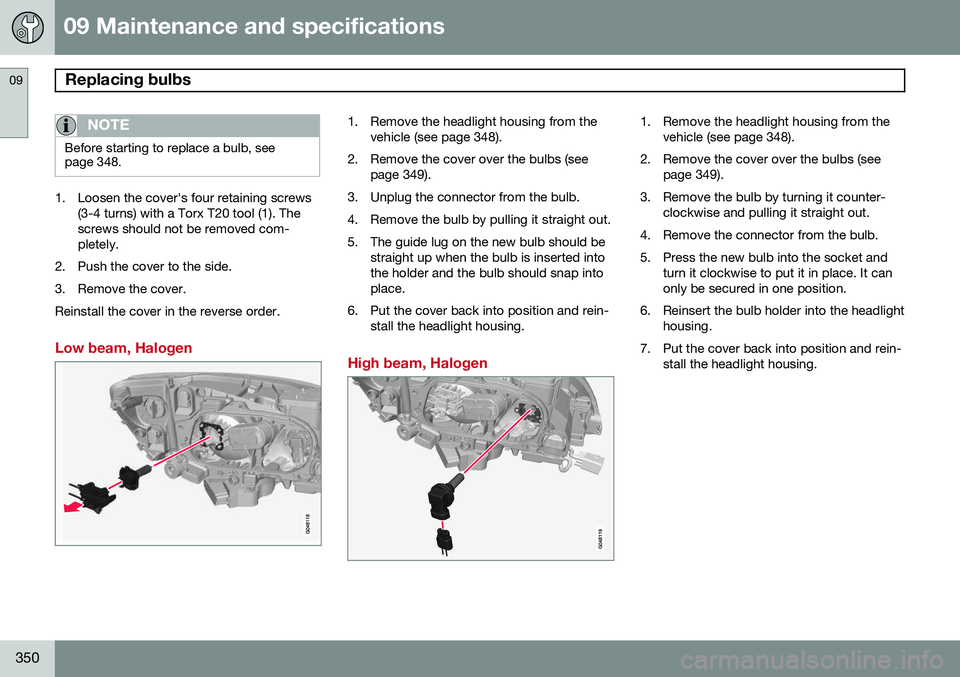
Removing the cover to access the bulbs
Page 352 of 406
09 Maintenance and specifications
Replacing bulbs 09
350
NOTE
Before starting to replace a bulb, see page 348.
1. Loosen the cover's four retaining screws(3-4 turns) with a Torx T20 tool (1). The screws should not be removed com-pletely.
2. Push the cover to the side.
3. Remove the cover.Reinstall the cover in the reverse order.
Low beam, Halogen
1. Remove the headlight housing from the vehicle (see page 348).
2. Remove the cover over the bulbs (see page 349).
3. Unplug the connector from the bulb.
4. Remove the bulb by pulling it straight out.
5. The guide lug on the new bulb should be straight up when the bulb is inserted into the holder and the bulb should snap intoplace.
6. Put the cover back into position and rein- stall the headlight housing.
High beam, Halogen
1. Remove the headlight housing from the vehicle (see page 348).
2. Remove the cover over the bulbs (see page 349).
3. Remove the bulb by turning it counter- clockwise and pulling it straight out.
4. Remove the connector from the bulb.
5. Press the new bulb into the socket and turn it clockwise to put it in place. It can only be secured in one position.
6. Reinsert the bulb holder into the headlight housing.
7. Put the cover back into position and rein- stall the headlight housing.
Page 353 of 406
09 Maintenance and specifications
Replacing bulbs09
}}
351
Extra high beam1
1. Remove the headlight housing from the
vehicle (see page 348).
2. Remove the cover over the bulbs (see page 349).
3. Remove the bulb by turning it counter- clockwise and pulling it straight out.
4. Remove the connector from the bulb.
5. Press the new bulb into the socket and turn it clockwise to put it in place. It can only be secured in one position.
6. Put the cover back into position and rein- stall the headlight housing.
Turn signals
1. Remove the headlight housing from thevehicle (see page 348).
2. Remove the cover by pulling it straight out.
3. Pull the holder to access the bulb.
4. Press in the bulb and turn it to remove it from the holder.
5. Press and turn the new bulb into place.
6. Reinsert the bulb holder into the headlight housing.
7. Put the cover back into position and rein- stall the headlight housing.
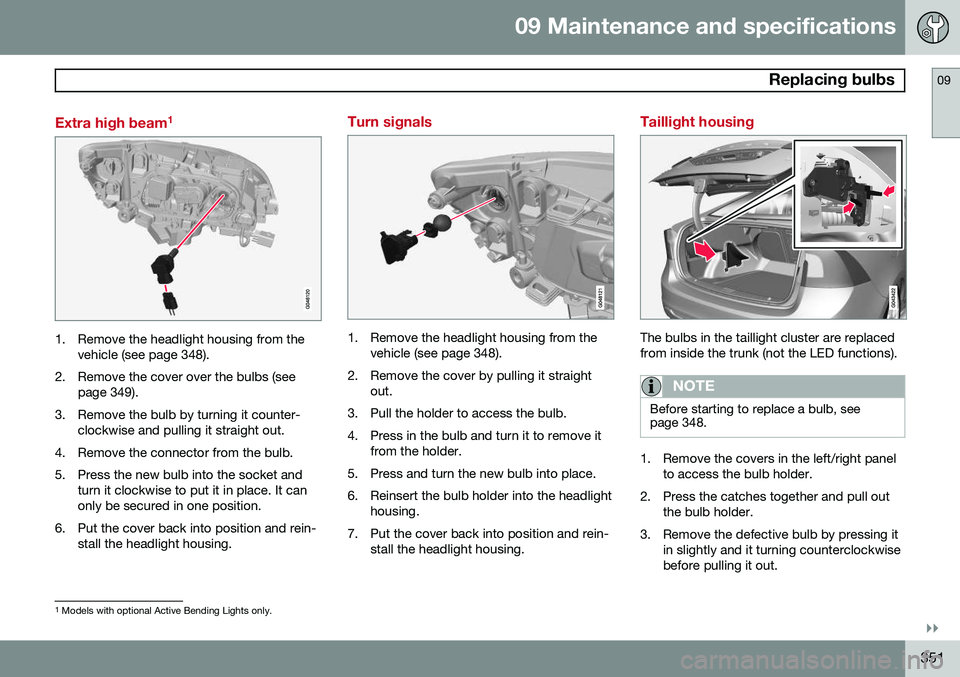
Taillight housing
The bulbs in the taillight cluster are replaced from inside the trunk (not the LED functions).
NOTE
Before starting to replace a bulb, see page 348.
1. Remove the covers in the left/right panel to access the bulb holder.
2. Press the catches together and pull out the bulb holder.
3. Remove the defective bulb by pressing it in slightly and it turning counterclockwise before pulling it out.
1Models with optional Active Bending Lights only.
Page 354 of 406
09 Maintenance and specifications
Replacing bulbs 09
352
4. Insert a new bulb, press it in slightly andturn it clockwise.
5. Press the bulb holder back into place and reinstall the cover.
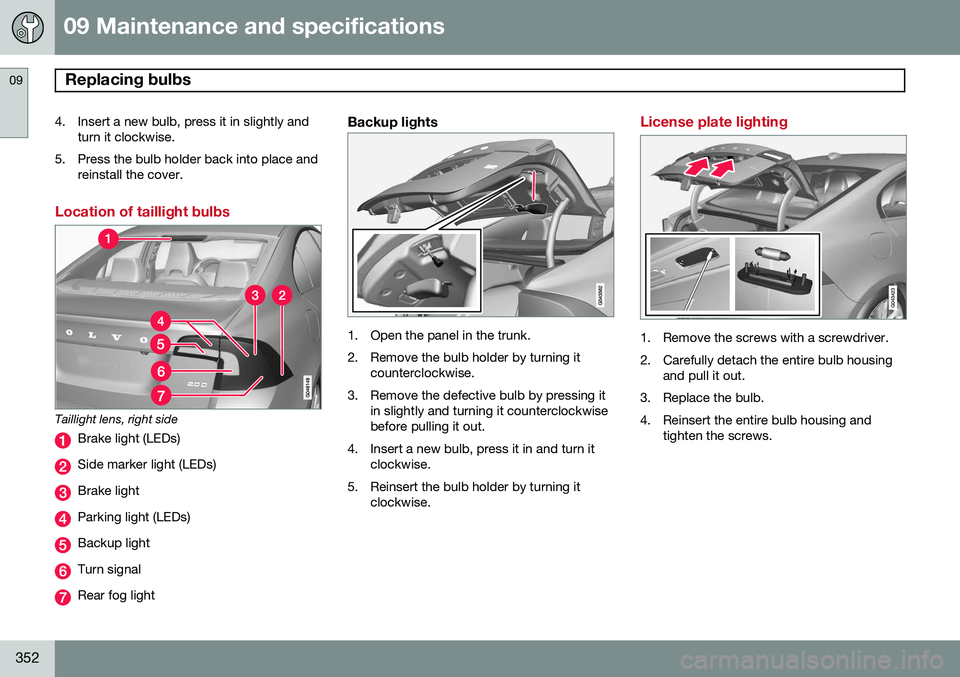
Location of taillight bulbs
Taillight lens, right side
Brake light (LEDs)
Side marker light (LEDs)
Brake light
Parking light (LEDs)
Backup light
Turn signal
Rear fog light
Backup lights
1. Open the panel in the trunk.
2. Remove the bulb holder by turning itcounterclockwise.
3. Remove the defective bulb by pressing it in slightly and turning it counterclockwise before pulling it out.
4. Insert a new bulb, press it in and turn it clockwise.
5. Reinsert the bulb holder by turning it clockwise.
License plate lighting
1. Remove the screws with a screwdriver.
2. Carefully detach the entire bulb housing and pull it out.
3. Replace the bulb.
4. Reinsert the entire bulb housing and tighten the screws.
Page 355 of 406
09 Maintenance and specifications
Replacing bulbs09
}}
* Option/accessory, for more information, see Introduction.353
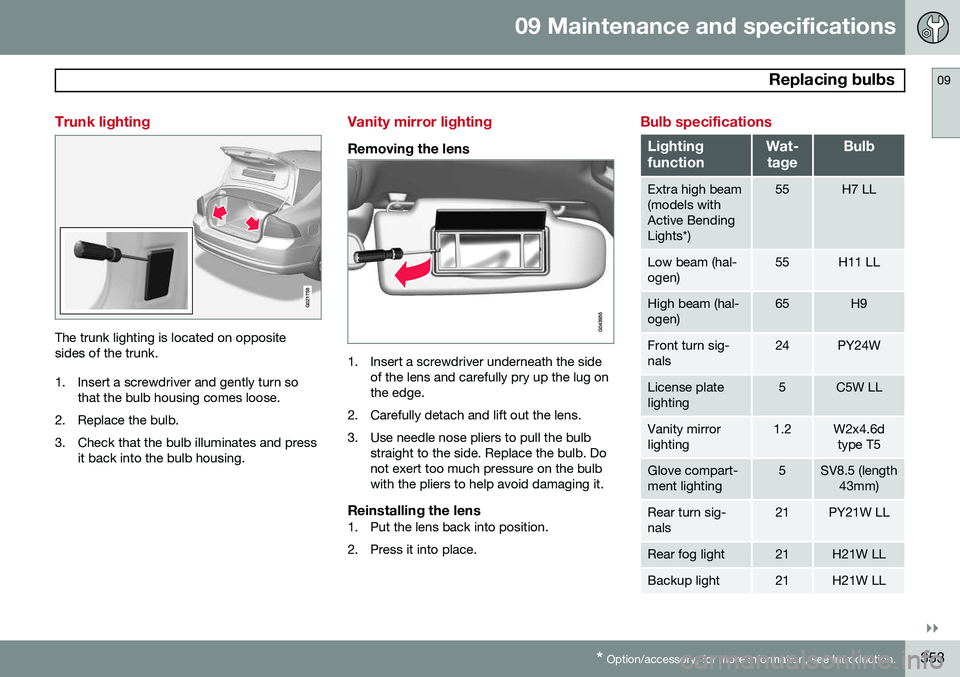
Trunk lighting
G021758
The trunk lighting is located on opposite sides of the trunk.
1. Insert a screwdriver and gently turn so
that the bulb housing comes loose.
2. Replace the bulb.
3. Check that the bulb illuminates and press it back into the bulb housing.
Vanity mirror lighting
Removing the lens
1. Insert a screwdriver underneath the sideof the lens and carefully pry up the lug on the edge.
2. Carefully detach and lift out the lens.
3. Use needle nose pliers to pull the bulb straight to the side. Replace the bulb. Do not exert too much pressure on the bulbwith the pliers to help avoid damaging it.
Reinstalling the lens1. Put the lens back into position.
2. Press it into place.
Bulb specifications
Lighting functionWat-
tageBulb
Extra high beam (models withActive BendingLights*)55H7 LL
Low beam (hal- ogen)55H11 LL
High beam (hal- ogen)65H9
Front turn sig- nals24PY24W
License plate lighting5C5W LL
Vanity mirror lighting1.2W2x4.6d type T5
Glove compart- ment lighting5SV8.5 (length 43mm)
Rear turn sig- nals21PY21W LL
Rear fog light21H21W LL
Backup light21H21W LL
Page 356 of 406
09 Maintenance and specifications
Replacing bulbs 09
354
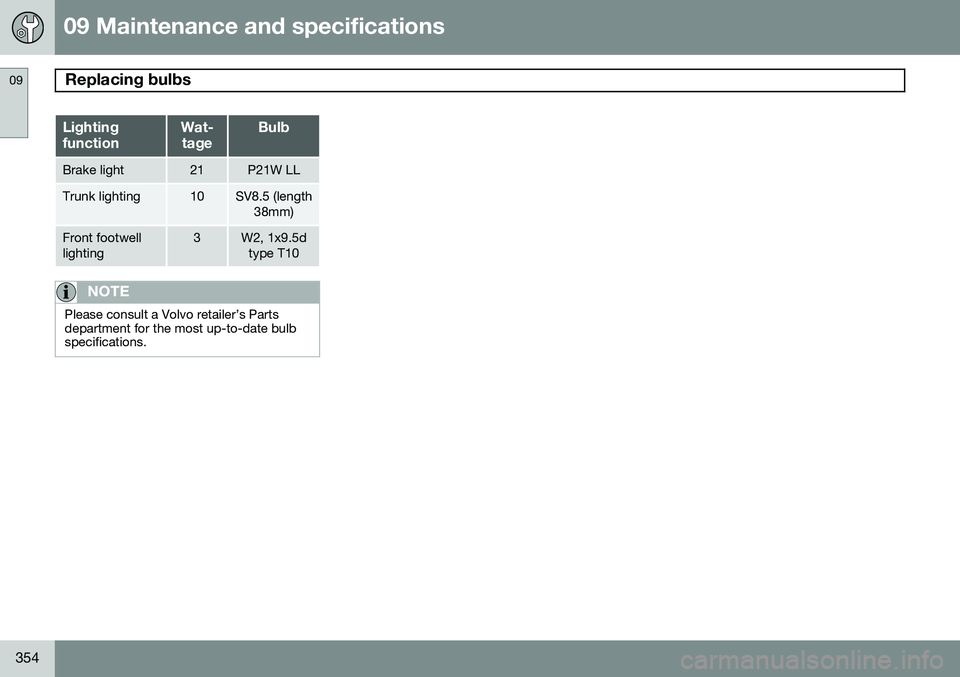
Lighting functionWat-tageBulb
Brake light21P21W LL
Trunk lighting10SV8.5 (length 38mm)
Front footwell lighting3W2, 1x9.5dtype T10
NOTE
Please consult a Volvo retailer’s Parts department for the most up-to-date bulbspecifications.