park assist VOLVO S60 2015 Owner´s Manual
[x] Cancel search | Manufacturer: VOLVO, Model Year: 2015, Model line: S60, Model: VOLVO S60 2015Pages: 406, PDF Size: 11.26 MB
Page 207 of 406
04 Driver support
Park Assist Pilot (PAP)*
04
* Option/accessory, for more information, see Introduction.205
•
PAP may not be able to provide parking assistance on narrow streets due to lackof space to maneuver the vehicle. In sit-uations like this, it may help to drive asclose to the side of the road as possiblewhere the parking space is located.
• Use only approved tires with the correctinflation pressure because this affectsPAP's capacity to provide parking assis-tance. See the table on page 312.Changing to a different approved tire sizemay affect PAP's parameters. Consult atrained and qualified Volvo service techni-cian.
• Heavy rain or snow may inhibit PAP'scapacity to correctly measure a parkingspace.
• Do not use PAP if snow chains or a tem-porary spare tire is being used.
• Do not use PAP if there are any objectsprotruding from the vehicle.
WARNING
• The front end of your vehicle may turn out toward oncoming traffic during theparking procedure.
• Objects located above the parkingsensors' field of vision are not includedwhen PAP measures a parking space.For this reason, PAP may turn into theparking space too soon. Avoid parkingspaces of this type.
• The driver is always responsible fordetermining if PAP has selected a suit-able parking space.
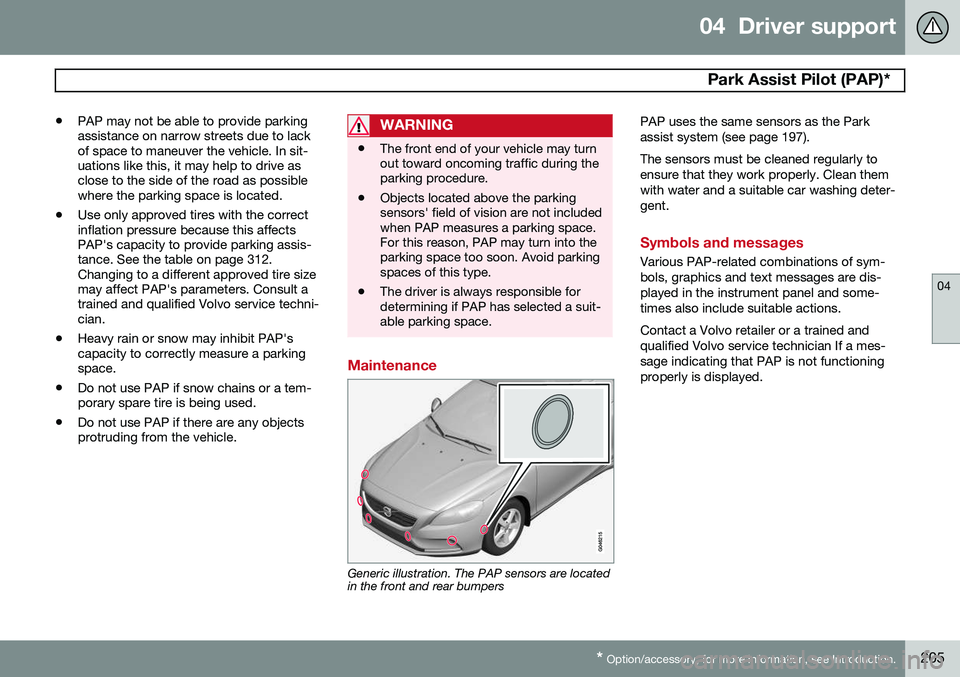
Maintenance
Generic illustration. The PAP sensors are located in the front and rear bumpers PAP uses the same sensors as the Park assist system (see page 197). The sensors must be cleaned regularly to ensure that they work properly. Clean themwith water and a suitable car washing deter-gent.
Symbols and messages
Various PAP-related combinations of sym- bols, graphics and text messages are dis-played in the instrument panel and some-times also include suitable actions. Contact a Volvo retailer or a trained and qualified Volvo service technician If a mes-sage indicating that PAP is not functioningproperly is displayed.
Page 209 of 406
04 Driver support
Blind Spot Information System (BLIS)*
04
}}
* Option/accessory, for more information, see Introduction.207
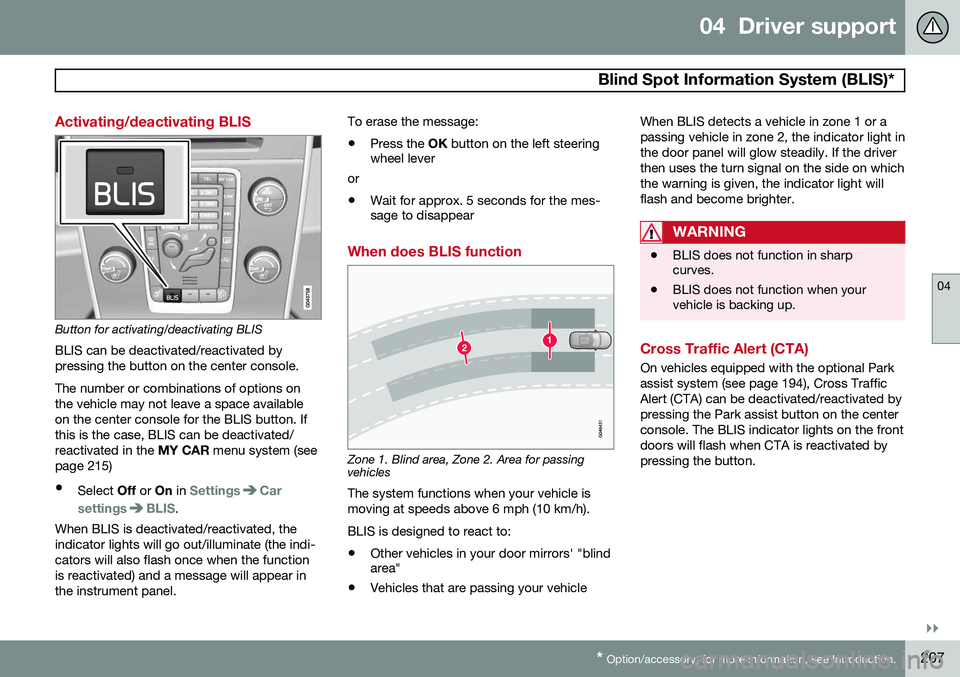
Activating/deactivating BLIS
Button for activating/deactivating BLIS BLIS can be deactivated/reactivated by pressing the button on the center console. The number or combinations of options on the vehicle may not leave a space availableon the center console for the BLIS button. Ifthis is the case, BLIS can be deactivated/reactivated in the MY CAR menu system (see
page 215)
• Select Off or On in
SettingsCar
settings
BLIS.
When BLIS is deactivated/reactivated, the indicator lights will go out/illuminate (the indi-cators will also flash once when the functionis reactivated) and a message will appear inthe instrument panel. To erase the message: •
Press the
OK button on the left steering
wheel lever
or
• Wait for approx. 5 seconds for the mes- sage to disappear
When does BLIS function
Zone 1. Blind area, Zone 2. Area for passing vehicles
The system functions when your vehicle is moving at speeds above 6 mph (10 km/h). BLIS is designed to react to:
• Other vehicles in your door mirrors' "blind area"
• Vehicles that are passing your vehicle When BLIS detects a vehicle in zone 1 or a passing vehicle in zone 2, the indicator light inthe door panel will glow steadily. If the driverthen uses the turn signal on the side on whichthe warning is given, the indicator light willflash and become brighter.
WARNING
•
BLIS does not function in sharp curves.
• BLIS does not function when yourvehicle is backing up.
Cross Traffic Alert (CTA)
On vehicles equipped with the optional Park assist system (see page 194), Cross TrafficAlert (CTA) can be deactivated/reactivated bypressing the Park assist button on the centerconsole. The BLIS indicator lights on the frontdoors will flash when CTA is reactivated bypressing the button.
Page 210 of 406
04 Driver support
Blind Spot Information System (BLIS)*
04
208* Option/accessory, for more information, see Introduction.
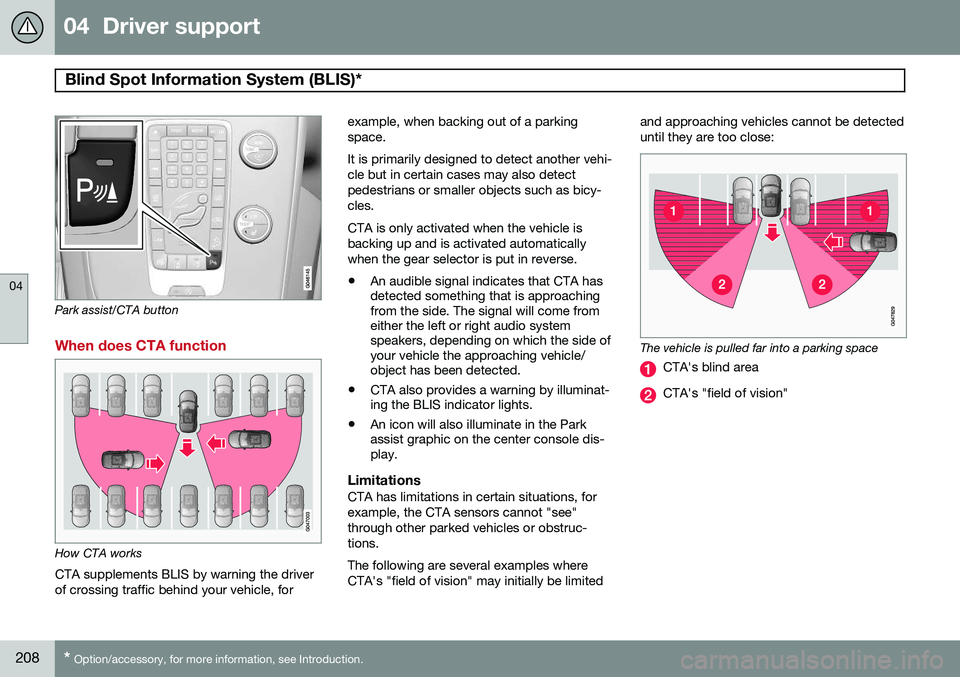
Park assist/CTA button
When does CTA function
How CTA works
CTA supplements BLIS by warning the driver of crossing traffic behind your vehicle, for example, when backing out of a parkingspace. It is primarily designed to detect another vehi- cle but in certain cases may also detectpedestrians or smaller objects such as bicy-cles. CTA is only activated when the vehicle is backing up and is activated automaticallywhen the gear selector is put in reverse.
• An audible signal indicates that CTA has detected something that is approachingfrom the side. The signal will come fromeither the left or right audio systemspeakers, depending on which the side ofyour vehicle the approaching vehicle/object has been detected.
• CTA also provides a warning by illuminat-ing the BLIS indicator lights.
• An icon will also illuminate in the Parkassist graphic on the center console dis-play.
LimitationsCTA has limitations in certain situations, for example, the CTA sensors cannot "see"through other parked vehicles or obstruc-tions. The following are several examples where CTA's "field of vision" may initially be limited and approaching vehicles cannot be detecteduntil they are too close:
The vehicle is pulled far into a parking space
CTA's blind area
CTA's "field of vision"
Page 214 of 406
05 Comfort and driving pleasure
Volvo Sensus
05
212* Option/accessory, for more information, see Introduction.
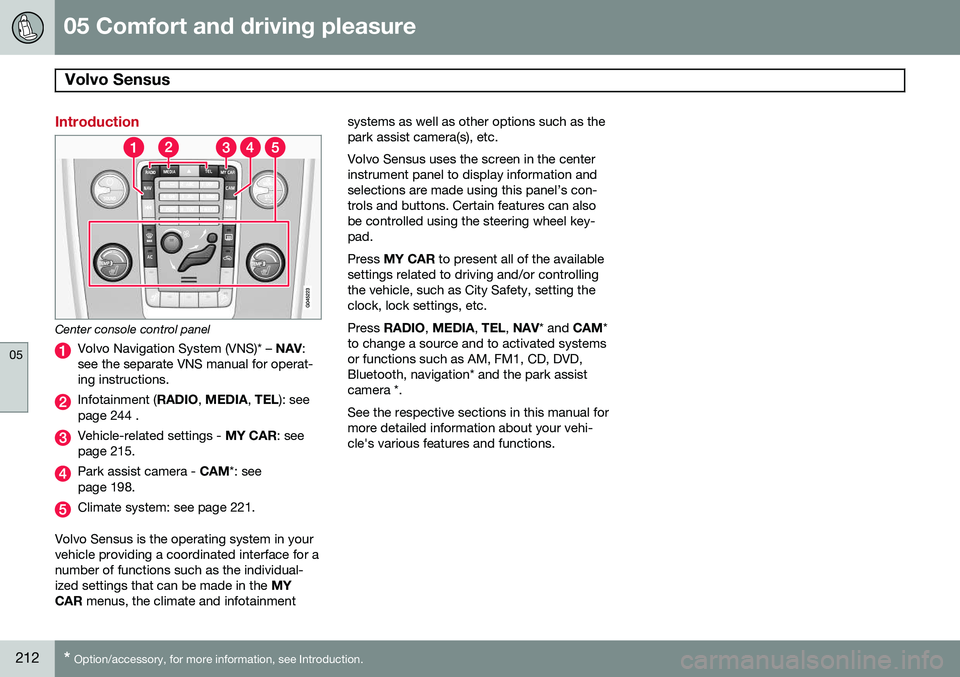
Introduction
Center console control panel
Volvo Navigation System (VNS)* – NAV:
see the separate VNS manual for operat- ing instructions.
Infotainment ( RADIO, MEDIA , TEL ): see
page 244 .
Vehicle-related settings - MY CAR: see
page 215.
Park assist camera - CAM*: see
page 198.
Climate system: see page 221.
Volvo Sensus is the operating system in your vehicle providing a coordinated interface for anumber of functions such as the individual-ized settings that can be made in the MY
CAR menus, the climate and infotainment systems as well as other options such as thepark assist camera(s), etc. Volvo Sensus uses the screen in the center instrument panel to display information andselections are made using this panel’s con-trols and buttons. Certain features can alsobe controlled using the steering wheel key-pad. Press
MY CAR to present all of the available
settings related to driving and/or controlling the vehicle, such as City Safety, setting theclock, lock settings, etc. Press RADIO , MEDIA , TEL , NAV * and CAM*
to change a source and to activated systems or functions such as AM, FM1, CD, DVD,Bluetooth, navigation* and the park assistcamera *. See the respective sections in this manual for more detailed information about your vehi-cle's various features and functions.
Page 220 of 406
05 Comfort and driving pleasure
The MY CAR menus
05
218
MY CARSettingsDriver support
systems
Collision Warning
Collision Warning Warning distanceLongNormalShort
Warning sound
See page 177 for more information. Lane Departure Warning
Lane Departure Warning Lane Keeping AidOn at start-upIncreased sensitivity
See page 187 for more information.
Road Sign Information OnOff
Speed alert On Off
DSTC See page 148 for more information. City Safety See page 169 for more information. BLIS See page 206 for more information. Distance Alert See page 166 for more information. Driver Alert See page 185 for more information.
MY CARSettingsSystem options
Set/change time See page 86 for more information. Time format
12 h 24 h
Screen saver The contents of the screen are replaced by another image if this selection is marked. Thecontents of the screen will be displayed again if one of the buttons (1-4) is pressed, seepage 215. Uncheck the selection to turn the screen saver off. Language Select the language for menu texts. Show help text This displays help texts for the current menu. Distance and fuel units
MPG (UK) MPG (US)km/ll/100km
See page 230 for more information about the trip computer. Temperature unit
Celsius Fahrenheit
Select the temperature scale to be displayed by the climate control unit. Volume levels
Voice output volume Front park assist volume
Page 221 of 406
05 Comfort and driving pleasure
The MY CAR menus
05
}}
219
Rear park assist volume Phone ringing volume
Reset system options This feature returns the "System options" menu to the original factory settings.
MY CARSettingsVoice settingsA .
A Only on vehicles with the optional Volvo Navigation System
Voice tutorial Select this menu alternative and press OK for
spoken information about how the system works. Voice command list
Phone commandsPhone Phone call contactPhone dial number
Navigation commands NavigationNavigation repeat instructionNavigation go to address
General commands Help CancelVoice tutorial
The menu alternatives under
Phone
commands show examples of the voice
commands available when a cell phone is connected to the Bluetooth ®
hands-free sys-
tem. See page 281 for more detailed infor- mation. The menu alternatives under
Navigation
commands show examples of the voice
commands available for the optional Volvo Navigation System. Refer to the navigationsystem's manual for detailed information. Voice user setting
Default setting User 1User 2
Two user profiles can be set, which is useful if more than one person uses voice commands regularly.
Default setting resets the factory
settings. Voice training
User 1 User 2
Voice training enables the system to
become familiar with the driver's voice and pronunciation. A list of phrases is presented on the screen for the driver to read aloud.When the system has registered the driver'spronunciation, no additional phrases will bedisplayed. After completed voice training, select
User 1 or User 2 in Voice user
setting to set the system to the current user.
Voice output volume
• A volume control will be displayed. To set the volume level:
1. Adjust the volume using the thumb wheel
2. Test the setting by pressing OK
3. Store the setting and leave the menu by pressing EXIT.
Voice POI list
Edit list
The navigation system has a large number of points of interest (POIs). A maximum of 30POIs can be stored in this list. The menu alternative
Voice POI list is only
displayed if the vehicle is equipped with the optional Volvo Navigation System. Refer tothe navigation system's manual for detailedinformation.
MY CARSettingsAudio settings
Page 303 of 406
07 During your trip
Towing a trailer
07
301
NOTE
•When parking the vehicle with a trailer on a hill, apply the parking brakebefore putting the gear selector in
P.
Always follow the trailer manufactur-er's recommendations for wheelchocking.
• When starting on a hill, put the gearselector in
D before releasing the park-
ing brake.
• If you use the manual (Geartronic) shiftpositions while towing a trailer, makesure the gear you select does not puttoo much strain on the engine (usingtoo high a gear).
• The drawbar assembly/trailer hitchmay be rated for trailers heavier thanthe vehicle is designed to tow. Pleaseadhere to Volvo's recommended trailerweights.
• Avoid driving with a trailer on inclinesof more than 15%.
Trailer cableAn adapter is required if the vehicle's trailer hitch has a 13-pin connector and the trailerhas 7 pins. Use an adapter cable approvedby Volvo. Make sure the cable does not dragon the ground.
Trailer Stability Assist (TSA)
Trailer Stability Assist is a system designed to help stabilize a vehicle that is towing a trailerwhen the vehicle and trailer have begun tosway and is part of the Dynamic Stability andTraction Control system (DSTC). See page148 for information on DSTC.
FunctionA vehicle towing a trailer may begin to swayfor various reasons. Normally this only occursat high speeds but, for example, if the traileris overloaded or if the load is unevenly dis-tributed in the trailer, there is risk of swayingat speeds between approximately 45-55 mph(70-90 km/h). Swaying may be caused by factors such as: •
The vehicle and trailer are hit by a sud- den, strong crosswind
• The vehicle and trailer are traveling on anuneven road surface or drive over a bump
• Sudden movements of the steering wheel
Facts about TSA
• TSA intervenes at speeds above approxi-mately 40 mph (60 km/h)
• The DSTC symbol (
) in the instru-
ment panel will flash when TSA is working
• If the driver switches off the DSTC sys- tem's Spin Control function, TSA will also be switched off (but will be on again thenext time the engine is started)
• TSA may not intervene when the vehicleand trailer begin to sway if the driver triesto compensate for the swaying motion bymoving the steering wheel rapidly
How TSA worksOnce swaying has begun, it can be very diffi- cult to stop, which makes it difficult to controlthe vehicle and trailer. The TSA system continuously monitors the vehicle's movements, particularly lateralmovement. If the system detects a tendencyto sway, the brakes are applied individuallyon the front wheels, which has a stabilizingeffect on the vehicle and trailer. This is oftenenough to enable the driver to regain controlof the vehicle. If this is not adequate to stop the swaying motion, the brakes are applied to all of thewheels on the vehicle and on the trailer if it isequipped with brakes, and engine power istemporarily reduced. As the swaying motionbegins to decrease and the vehicle-trailerhave once again become stable, TSA will nowstop regulating the brakes/engine power andthe driver regains control of the vehicle.
Page 327 of 406
08 Wheels and tires
Tire Sealing System*
08
}}
* Option/accessory, for more information, see Introduction.325
6. Connect the electrical wire to the nearest
12-volt socket in the vehicle.
NOTE
Be sure that none of the other 12-volt sockets is being used while the compres-sor is in operation.
7. Start the vehicle’s engine.
WARNING
The vehicle´s engine should be running when the tire sealing system is used toavoid battery drain. Therefore, be sure thevehicle is parked in a well ventilated place,or outdoors, before using the system.
8. Start the tire sealing system’s compres- sor by pressing the on/off switch to posi- tion I.
WARNING
• Never stand next to the tire being infla- ted when the compressor is in opera-tion.
• If cracks, bubbles, etc. form on the tire,switch off the compressor immediately.
• If there is visible damage to the sidewallor the rim, the tire cannot be repaired.The vehicle should not be driven if thisoccurs. Contact a towing service orVolvo On Call Roadside Assistance ifapplicable.
NOTE
The air pressure gauge will temporarily show an increase in pressure to approxi-mately 88 psi (6 bar) while the sealingcompound is being pumped into the tire.The pressure should return to a normallevel after approximately 30 seconds.
9. Within seven minutes, inflate the tire to
between 22—44 psi (1.8—3.0 bar). Switch off the compressor briefly to get aclear reading from the pressure gauge.
CAUTION
The compressor should not be used for more than 10 minutes at a time to avoidoverheating.
WARNING
If the pressure remains below 22 psi (1.8 bar) after approximately sevenminutes, turn off the compressor. In thiscase, the hole is too large to be sealed andthe vehicle should not be driven.
10. Switch off the compressor and discon- nect the electrical wire from the 12-volt socket.
11. Unscrew the hose from the tire’s inflation valve and reinstall the valve cap.
CAUTION
•After pumping the tires, always reinstall the valve cap to help avoid damage tothe valve from dirt, gravel, etc.
• Use plastic valve caps only. Metal capscould corrode and become difficult toremove.
Page 369 of 406
09 Maintenance and specifications
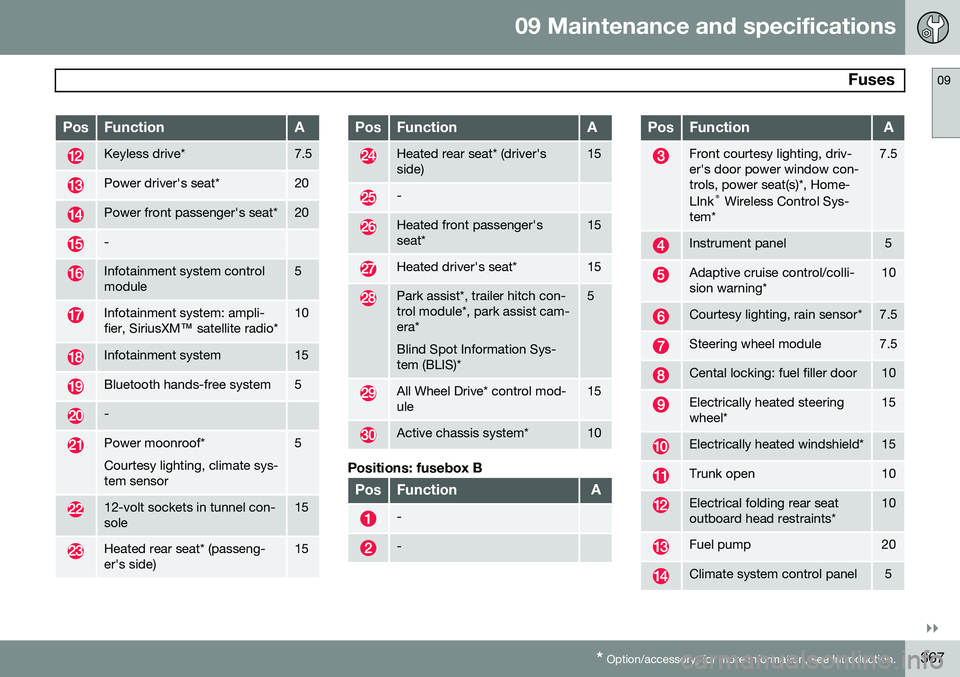
Fuses09
}}
* Option/accessory, for more information, see Introduction.367
PosFunctionA
Keyless drive*7.5
Power driver's seat*20
Power front passenger's seat*20
-
Infotainment system control module5
Infotainment system: ampli- fier, SiriusXM ™ satellite radio*10
Infotainment system15
Bluetooth hands-free system5
-
Power moonroof* Courtesy lighting, climate sys- tem sensor5
12-volt sockets in tunnel con- sole15
Heated rear seat* (passeng- er's side)15
PosFunctionA
Heated rear seat* (driver's side)15
-
Heated front passenger's seat*15
Heated driver's seat*15
Park assist*, trailer hitch con- trol module*, park assist cam-era* Blind Spot Information Sys- tem (BLIS)*5
All Wheel Drive* control mod- ule15
Active chassis system*10
Positions: fusebox B
PosFunctionA
-
-
PosFunctionA
Front courtesy lighting, driv- er's door power window con-trols, power seat(s)*, Home- LInk ®
Wireless Control Sys-
tem*7.5
Instrument panel5
Adaptive cruise control/colli- sion warning*10
Courtesy lighting, rain sensor*7.5
Steering wheel module7.5
Cental locking: fuel filler door10
Electrically heated steering wheel*15
Electrically heated windshield*15
Trunk open10
Electrical folding rear seat outboard head restraints*10
Fuel pump20
Climate system control panel5
Page 392 of 406
10 Specifications
Overview of information and warning symbols
10
390* Option/accessory, for more information, see Introduction.
Introduction
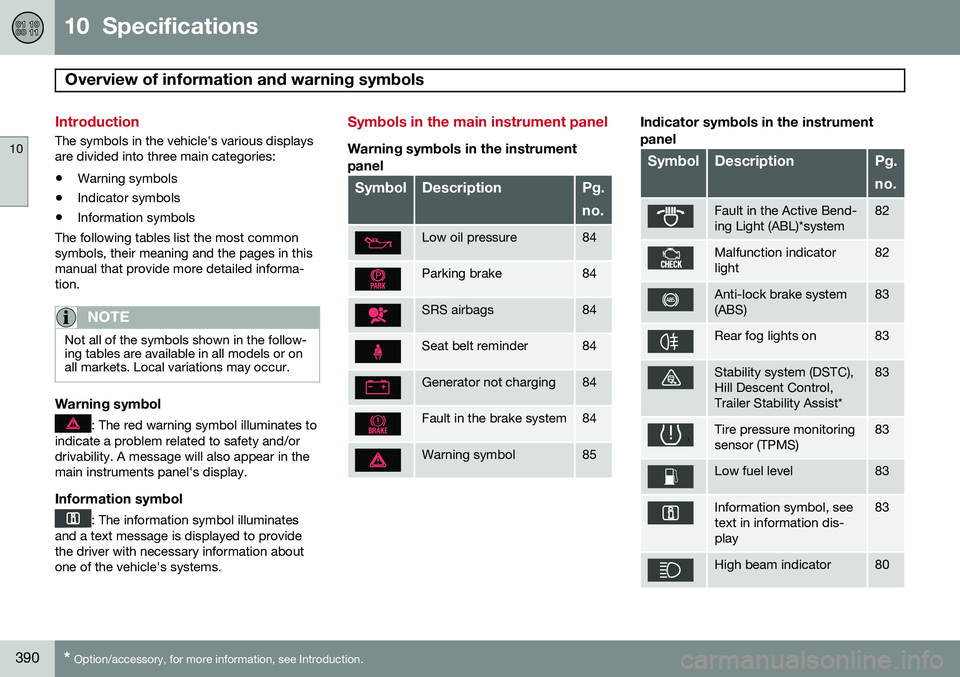
The symbols in the vehicle's various displays are divided into three main categories:
• Warning symbols
• Indicator symbols
• Information symbols
The following tables list the most commonsymbols, their meaning and the pages in thismanual that provide more detailed informa-tion.
NOTE
Not all of the symbols shown in the follow- ing tables are available in all models or onall markets. Local variations may occur.
Warning symbol
: The red warning symbol illuminates to
indicate a problem related to safety and/or drivability. A message will also appear in themain instruments panel's display.
Information symbol
: The information symbol illuminates
and a text message is displayed to provide the driver with necessary information aboutone of the vehicle's systems.
Symbols in the main instrument panel
Warning symbols in the instrument
panel
SymbolDescriptionPg. no.
Low oil pressure84
Parking brake84
SRS airbags84
Seat belt reminder84
Generator not charging84
Fault in the brake system84
Warning symbol85
Indicator symbols in the instrument panel
SymbolDescriptionPg. no.
Fault in the Active Bend- ing Light (ABL)*system82
Malfunction indicator light82
Anti-lock brake system (ABS)83
Rear fog lights on83
Stability system (DSTC), Hill Descent Control,Trailer Stability Assist*83
Tire pressure monitoring sensor (TPMS)83
Low fuel level83
Information symbol, see text in information dis-play83
High beam indicator80