seats VOLVO S60 2015 Owner´s Manual
[x] Cancel search | Manufacturer: VOLVO, Model Year: 2015, Model line: S60, Model: VOLVO S60 2015Pages: 406, PDF Size: 11.26 MB
Page 49 of 406
01 Safety
Convertible seats01
47
WARNING
A child seat should never be used in the front passenger seat of any vehicle with afront passenger airbag – not even if the"Passenger airbag off" symbol near therear-view mirror is illuminated. If theseverity of an accident were to cause theairbag to inflate, this could lead to seriousinjury or death to a child seated in thisposition.
Page 50 of 406
01 Safety
Booster cushions 01
48
Securing a booster cushion
G022851
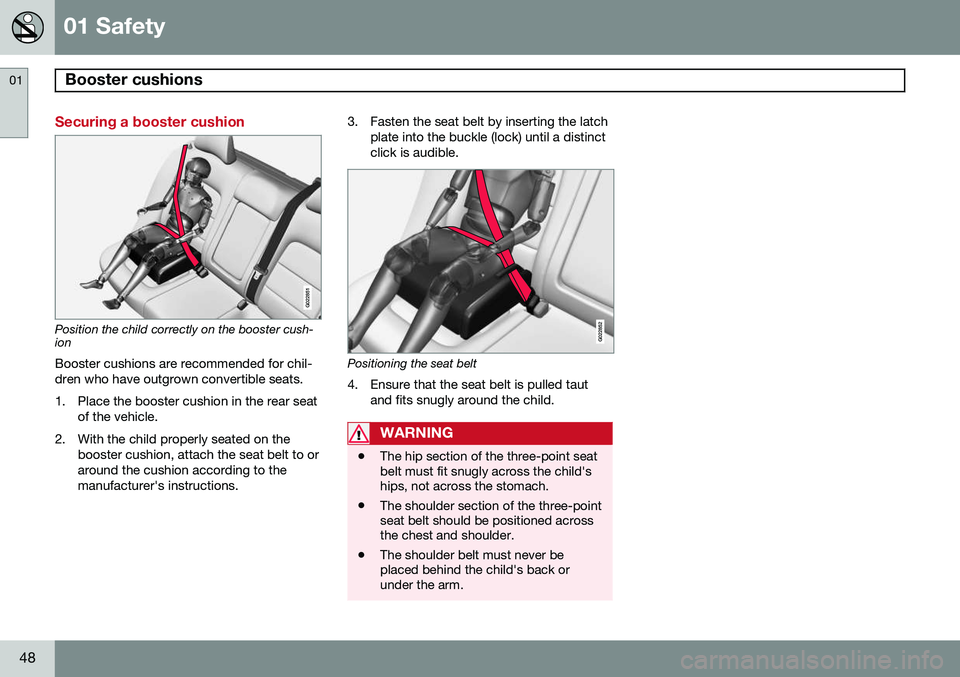
Position the child correctly on the booster cush- ion
Booster cushions are recommended for chil- dren who have outgrown convertible seats.
1. Place the booster cushion in the rear seat of the vehicle.
2. With the child properly seated on the booster cushion, attach the seat belt to or around the cushion according to themanufacturer's instructions. 3. Fasten the seat belt by inserting the latch
plate into the buckle (lock) until a distinctclick is audible.G022852
Positioning the seat belt
4. Ensure that the seat belt is pulled taut and fits snugly around the child.
WARNING
•The hip section of the three-point seat belt must fit snugly across the child'ships, not across the stomach.
• The shoulder section of the three-pointseat belt should be positioned acrossthe chest and shoulder.
• The shoulder belt must never beplaced behind the child's back orunder the arm.
Page 51 of 406
01 Safety
ISOFIX/LATCH lower anchors01
}}
49
Using the ISOFIX/LATCH lower child seat anchors
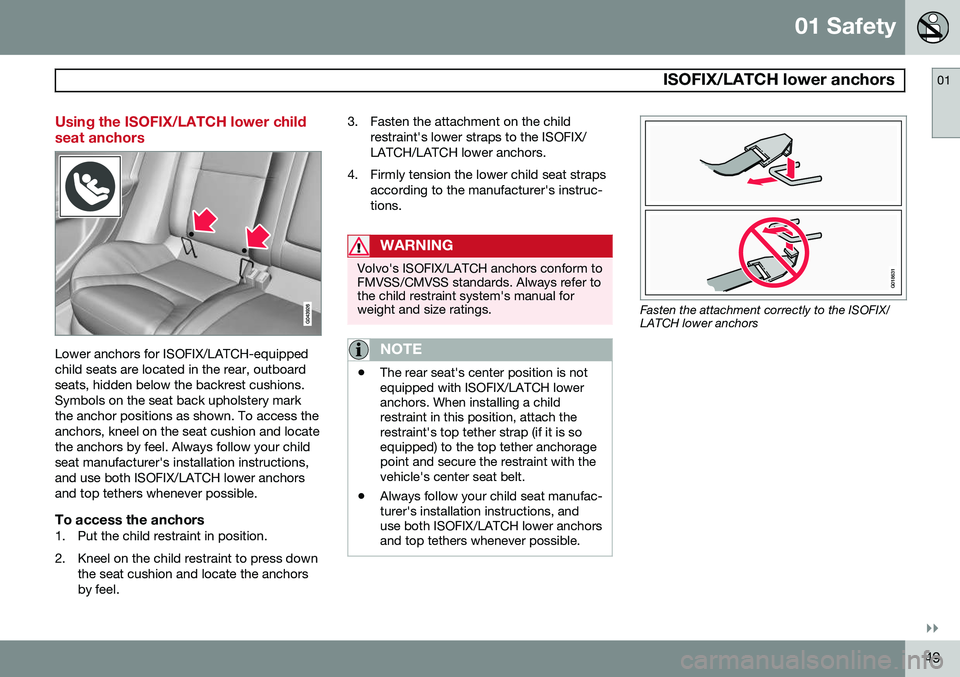
Lower anchors for ISOFIX/LATCH-equipped child seats are located in the rear, outboardseats, hidden below the backrest cushions.Symbols on the seat back upholstery markthe anchor positions as shown. To access theanchors, kneel on the seat cushion and locatethe anchors by feel. Always follow your childseat manufacturer's installation instructions,and use both ISOFIX/LATCH lower anchorsand top tethers whenever possible.
To access the anchors1. Put the child restraint in position.
2. Kneel on the child restraint to press downthe seat cushion and locate the anchors by feel. 3. Fasten the attachment on the child
restraint's lower straps to the ISOFIX/LATCH/LATCH lower anchors.
4. Firmly tension the lower child seat straps according to the manufacturer's instruc-tions.
WARNING
Volvo's ISOFIX/LATCH anchors conform to FMVSS/CMVSS standards. Always refer tothe child restraint system's manual forweight and size ratings.
NOTE
•The rear seat's center position is not equipped with ISOFIX/LATCH loweranchors. When installing a childrestraint in this position, attach therestraint's top tether strap (if it is soequipped) to the top tether anchoragepoint and secure the restraint with thevehicle's center seat belt.
• Always follow your child seat manufac-turer's installation instructions, anduse both ISOFIX/LATCH lower anchorsand top tethers whenever possible.
G018631
Fasten the attachment correctly to the ISOFIX/ LATCH lower anchors
Page 52 of 406
01 Safety
ISOFIX/LATCH lower anchors 01
50
WARNING
•Be sure to fasten the attachment cor- rectly to the anchor (see the illustra-tion). If the attachment is not correctlyfastened, the child restraint may notbe properly secured in the event of acollision.
• The ISOFIX/LATCH lower childrestraint anchors are only intended foruse with child seats positioned in theoutboard seating positions. Theseanchors are not certified for use withany child restraint that is positioned inthe center seating position. Whensecuring a child restraint in the centerseating position, use only the vehicle'scenter seat belt.
Page 78 of 406
76* Option/accessory, for more information, see Introduction. Instruments and controls........................................................................ 78 Ignition modes........................................................................................ 88Seats....................................................................................................... 90Steering wheel........................................................................................ 96Lighting................................................................................................... 98
Wipers and washers.............................................................................. 106Windows............................................................................................... 108Mirrors................................................................................................... 110
Digial compass*.................................................................................... 113
Power moonroof................................................................................... 115 HomeLink
®
Wireless Control System*.................................................. 117
Starting the engine................................................................................ 120 Transmission......................................................................................... 125
Eco Guide* and Power Meter*.............................................................. 130Eco* ...................................................................................................... 132Start/Stop* ........................................................................................... 135Brakes................................................................................................... 139Parking brake........................................................................................ 142
Page 90 of 406
03 Your driving environment
Ignition modes
03
88* Option/accessory, for more information, see Introduction.
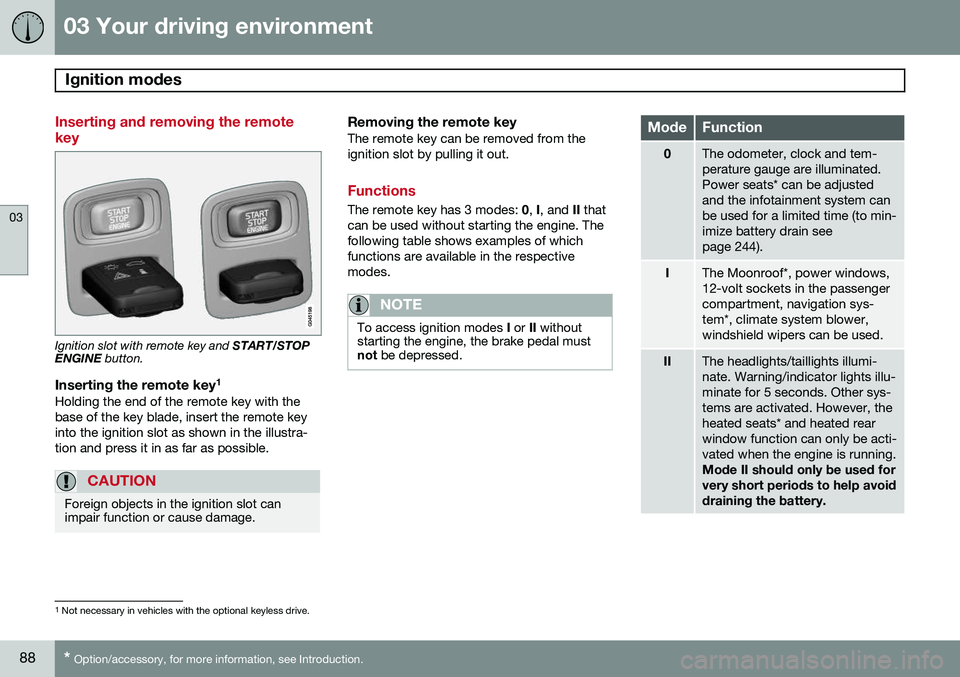
Inserting and removing the remote key
Ignition slot with remote key and START/STOP
ENGINE button.
Inserting the remote key 1Holding the end of the remote key with the base of the key blade, insert the remote keyinto the ignition slot as shown in the illustra-tion and press it in as far as possible.
CAUTION
Foreign objects in the ignition slot can impair function or cause damage.
Removing the remote keyThe remote key can be removed from the ignition slot by pulling it out.
Functions
The remote key has 3 modes:
0, I, and II that
can be used without starting the engine. The following table shows examples of whichfunctions are available in the respectivemodes.
NOTE
To access ignition modes I or II without
starting the engine, the brake pedal must not be depressed.
ModeFunction
0The odometer, clock and tem- perature gauge are illuminated.Power seats* can be adjustedand the infotainment system canbe used for a limited time (to min-imize battery drain seepage 244).
IThe Moonroof*, power windows, 12-volt sockets in the passengercompartment, navigation sys-tem*, climate system blower,windshield wipers can be used.
IIThe headlights/taillights illumi- nate. Warning/indicator lights illu-minate for 5 seconds. Other sys-tems are activated. However, theheated seats* and heated rearwindow function can only be acti-vated when the engine is running. Mode II should only be used for very short periods to help avoiddraining the battery.
1
Not necessary in vehicles with the optional keyless drive.
Page 92 of 406
03 Your driving environment
Seats
03
90* Option/accessory, for more information, see Introduction.
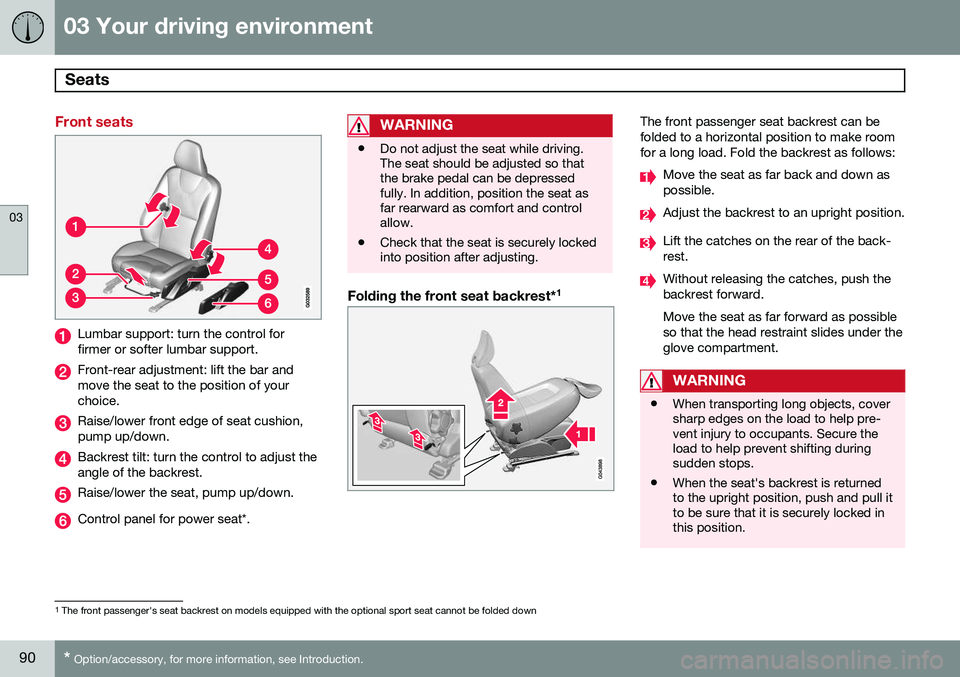
Front seats
Lumbar support: turn the control for firmer or softer lumbar support.
Front-rear adjustment: lift the bar and move the seat to the position of yourchoice.
Raise/lower front edge of seat cushion, pump up/down.
Backrest tilt: turn the control to adjust the angle of the backrest.
Raise/lower the seat, pump up/down.
Control panel for power seat*.
WARNING
• Do not adjust the seat while driving. The seat should be adjusted so thatthe brake pedal can be depressedfully. In addition, position the seat asfar rearward as comfort and controlallow.
• Check that the seat is securely lockedinto position after adjusting.
Folding the front seat backrest* 1
The front passenger seat backrest can be folded to a horizontal position to make roomfor a long load. Fold the backrest as follows:
Move the seat as far back and down as possible.
Adjust the backrest to an upright position.
Lift the catches on the rear of the back- rest.
Without releasing the catches, push the backrest forward. Move the seat as far forward as possible so that the head restraint slides under theglove compartment.
WARNING
•
When transporting long objects, cover sharp edges on the load to help pre-vent injury to occupants. Secure theload to help prevent shifting duringsudden stops.
• When the seat's backrest is returnedto the upright position, push and pull itto be sure that it is securely locked inthis position.
1
The front passenger's seat backrest on models equipped with the optional sport seat cannot be folded down
Page 93 of 406
03 Your driving environment
Seats
03
}}
91
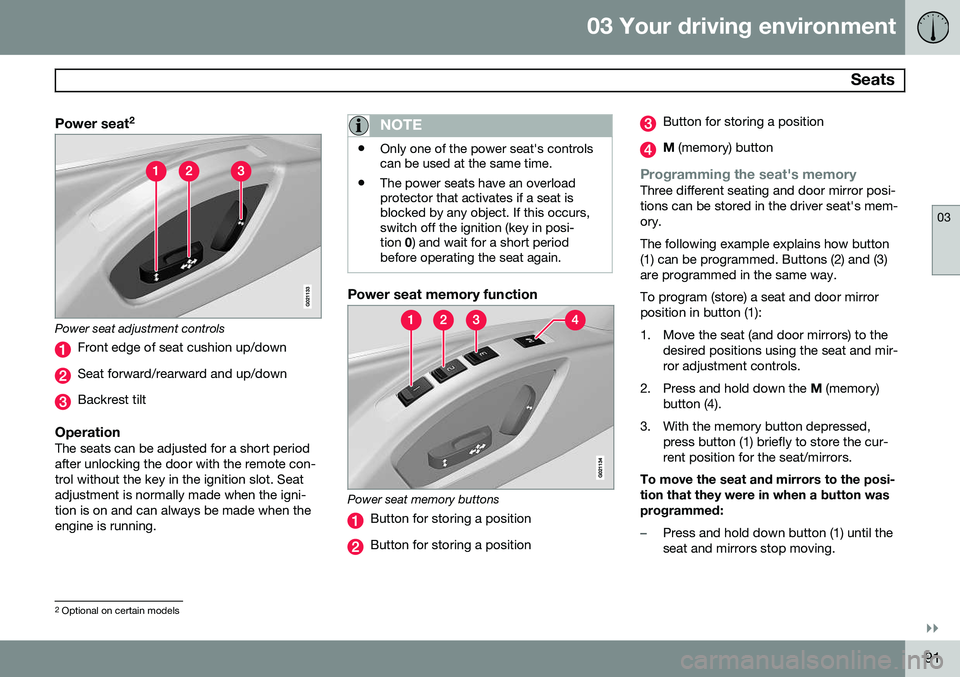
Power seat2
Power seat adjustment controls
Front edge of seat cushion up/down
Seat forward/rearward and up/down
Backrest tilt
OperationThe seats can be adjusted for a short period after unlocking the door with the remote con-trol without the key in the ignition slot. Seatadjustment is normally made when the igni-tion is on and can always be made when theengine is running.
NOTE
•
Only one of the power seat's controls can be used at the same time.
• The power seats have an overloadprotector that activates if a seat isblocked by any object. If this occurs,switch off the ignition (key in posi-tion
0) and wait for a short period
before operating the seat again.
Power seat memory function
Power seat memory buttons
Button for storing a position
Button for storing a position
Button for storing a position
M (memory) button
Programming the seat's memoryThree different seating and door mirror posi- tions can be stored in the driver seat's mem-ory. The following example explains how button (1) can be programmed. Buttons (2) and (3)are programmed in the same way. To program (store) a seat and door mirror position in button (1):
1. Move the seat (and door mirrors) to the
desired positions using the seat and mir- ror adjustment controls.
2. Press and hold down the M (memory)
button (4).
3. With the memory button depressed, press button (1) briefly to store the cur-rent position for the seat/mirrors.
To move the seat and mirrors to the posi-tion that they were in when a button wasprogrammed:
–Press and hold down button (1) until the seat and mirrors stop moving.
2 Optional on certain models
Page 94 of 406
03 Your driving environment
Seats
03
92* Option/accessory, for more information, see Introduction.
NOTE
As a safety precaution, the seat will stop automatically if the button is releasedbefore the seat has reached the presetposition.
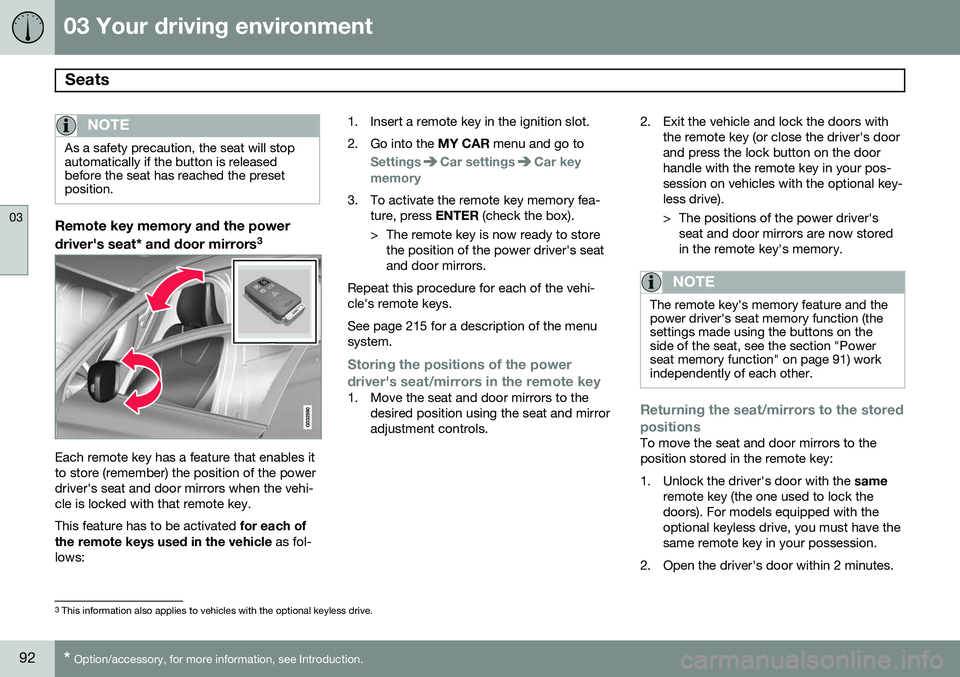
Remote key memory and the power
driver's seat* and door mirrors 3
Each remote key has a feature that enables it to store (remember) the position of the powerdriver's seat and door mirrors when the vehi-cle is locked with that remote key. This feature has to be activated
for each of
the remote keys used in the vehicle as fol-
lows: 1. Insert a remote key in the ignition slot.
2. Go into the
MY CAR menu and go to
SettingsCar settingsCar key
memory
3. To activate the remote key memory fea- ture, press ENTER (check the box).
> The remote key is now ready to store the position of the power driver's seat and door mirrors.
Repeat this procedure for each of the vehi-cle's remote keys. See page 215 for a description of the menu system.
Storing the positions of the power
driver's seat/mirrors in the remote key
1. Move the seat and door mirrors to the desired position using the seat and mirror adjustment controls. 2. Exit the vehicle and lock the doors with
the remote key (or close the driver's doorand press the lock button on the doorhandle with the remote key in your pos-session on vehicles with the optional key-less drive).
> The positions of the power driver'sseat and door mirrors are now stored in the remote key's memory.
NOTE
The remote key's memory feature and the power driver's seat memory function (thesettings made using the buttons on theside of the seat, see the section "Powerseat memory function" on page 91) workindependently of each other.
Returning the seat/mirrors to the stored positions
To move the seat and door mirrors to the position stored in the remote key:
1. Unlock the driver's door with the same
remote key (the one used to lock the doors). For models equipped with theoptional keyless drive, you must have thesame remote key in your possession.
2. Open the driver's door within 2 minutes.
3 This information also applies to vehicles with the optional keyless drive.
Page 95 of 406
03 Your driving environment
Seats
03
}}
* Option/accessory, for more information, see Introduction.93
The driver's seat and door mirrors will auto- matically move to the position in which youleft them (if the vehicle has been unlockedwith one of the other keys and new seat/mirror adjustments have been made).
NOTE
•
The seat will move to this position even if someone else has moved it to adifferent position and locked the vehi-cle with a
different remote key.
• This feature will work in the same waywith all of the remote keys that youuse with your vehicle.
Emergency stop
WARNING
•Because the driver's seat can be adjusted with the ignition off, childrenshould never be left unattended in thevehicle.
• Movement of the seat can be STOP-PED at any time by pressing any but-ton on the power seat control panel.
• Do not adjust the seat while driving.The seat should be adjusted so thatthe brake pedal can be depressedfully. In addition, position the seat asfar rearward as comfort and controlallow.
• The seat rails on the floor must not beobstructed in any way when the seat isin motion.
Heated seats*See page 225.
Rear seats
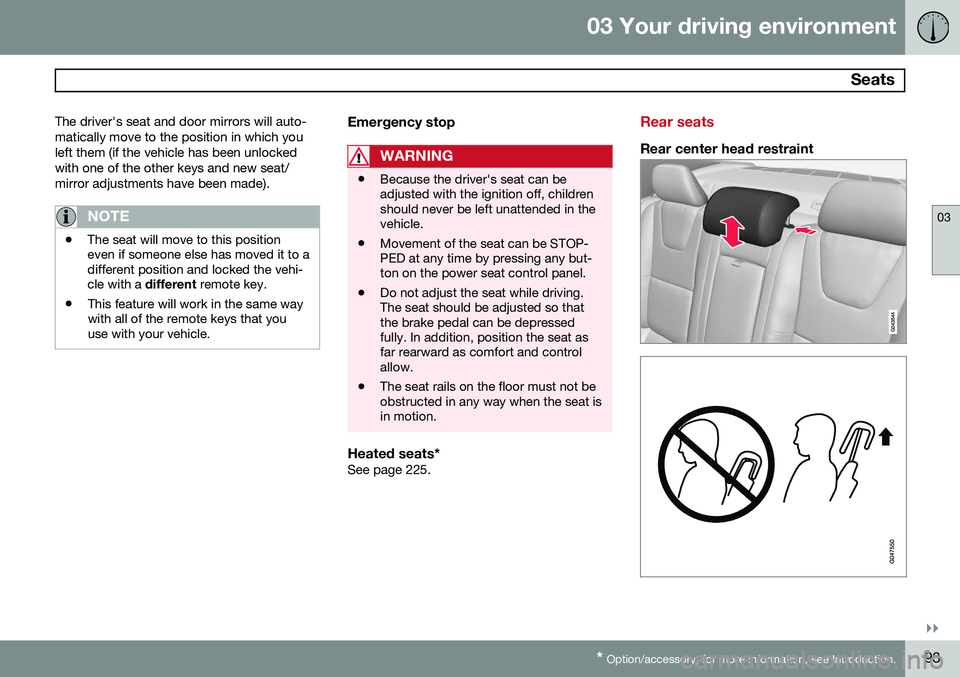
Rear center head restraint