tow VOLVO S60 2015 Owner´s Manual
[x] Cancel search | Manufacturer: VOLVO, Model Year: 2015, Model line: S60, Model: VOLVO S60 2015Pages: 406, PDF Size: 11.26 MB
Page 198 of 406
04 Driver support
Park assist*
04
196* Option/accessory, for more information, see Introduction.
NOTE
• Rear park assist is deactivated auto- matically when towing a trailer if Volvogenuine trailer wiring is used. If a non-Volvo trailer hitch is being used, it maybe necessary to switch off the systemmanually, see page 194.
• The system will not detect highobjects, such as a loading dock, etc.
• Objects such as chains, thin shinypoles or low objects may temporarilynot be detected by the system. Thismay result in the pulsing tone unex-pectedly stopping instead of changingto a constant tone as the vehicleapproaches the object. In such cases,use caution when backing up or stopthe vehicle to help avoid damage.
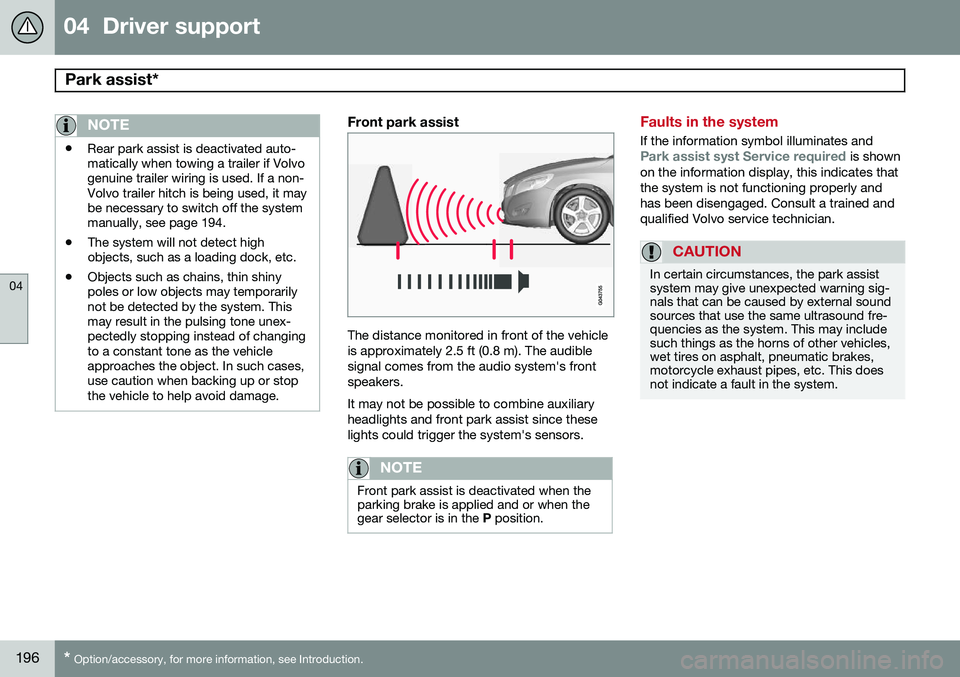
Front park assist
The distance monitored in front of the vehicle is approximately 2.5 ft (0.8 m). The audiblesignal comes from the audio system's frontspeakers. It may not be possible to combine auxiliary headlights and front park assist since theselights could trigger the system's sensors.
NOTE
Front park assist is deactivated when the parking brake is applied and or when thegear selector is in the
P position.
Faults in the system
If the information symbol illuminates andPark assist syst Service required is shown
on the information display, this indicates that the system is not functioning properly andhas been disengaged. Consult a trained andqualified Volvo service technician.
CAUTION
In certain circumstances, the park assist system may give unexpected warning sig-nals that can be caused by external soundsources that use the same ultrasound fre-quencies as the system. This may includesuch things as the horns of other vehicles,wet tires on asphalt, pneumatic brakes,motorcycle exhaust pipes, etc. This doesnot indicate a fault in the system.
Page 201 of 406
04 Driver support
Rear Park Assist Camera (PAC)*
04
}}
* Option/accessory, for more information, see Introduction.199
Using PAC
Activation
PAC is activated when the gear selector is moved to R if the system is selected in the
MY CAR menu system or by pressing the
CAM button in the center console. See page
215 for a description of the menu system. PAC will automatically override the view cur- rently displayed on the screen and display thecamera's view behind the vehicle.
ZoomThe camera can be useful when attaching atrailer. Press CAM to zoom in on the trailer
hitch (and press this button again to return tothe normal camera view). With the camera zoomed in on the trailerhitch, a guiding line showing the hitch's pathtoward the trailer will be projected. This fea-ture can be activated in the
MY CAR menu.
See page 215 for a description of the menusystem. The guiding lines for the wheels (seethe following section "Guiding lines") and forthe trailer hitch cannot be displayed at thesame time. If the camera shows an enlarged (zoomed) image, turn TUNE, or press CAM to return to
a normal view.
DeactivationMove the gear selector from R to another
gear. The camera remains active for approx.5 seconds after the gear selector has beenmoved from R or until the vehicle's forward
speed exceeds 6 mph (10 km/h)(21 mph/35 km/h in reverse). The screen willthen revert to the view that was displayedbefore R was selected.
NOTE
If any button on the center console control panel is pressed, the camera image willdisappear from the display. Pressing CAM
will return the camera image to the display.
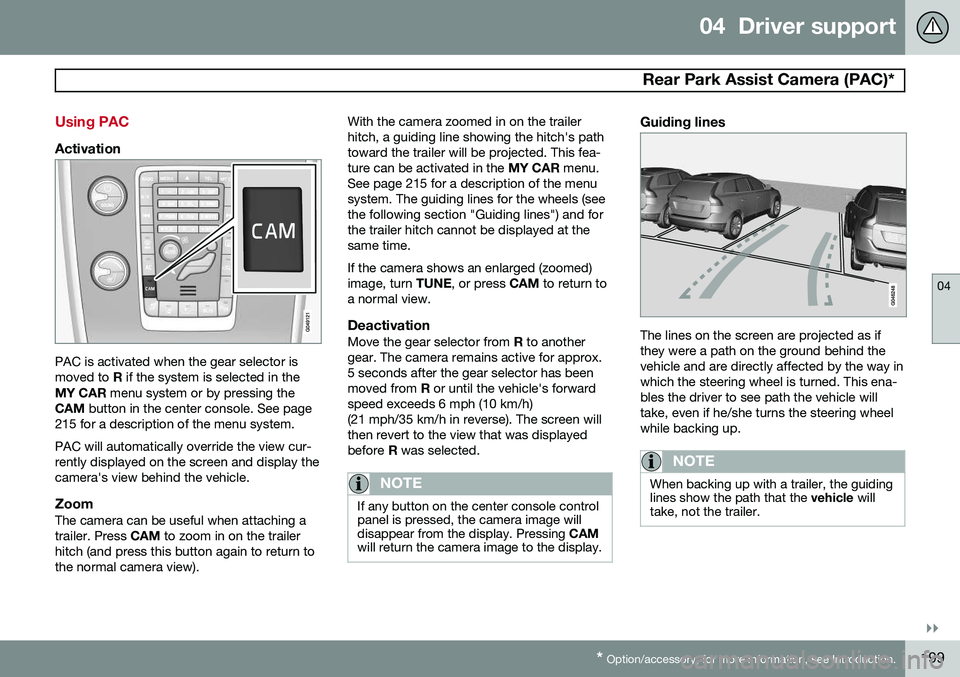
Guiding lines
The lines on the screen are projected as if they were a path on the ground behind thevehicle and are directly affected by the way inwhich the steering wheel is turned. This ena-bles the driver to see path the vehicle willtake, even if he/she turns the steering wheelwhile backing up.
NOTE
When backing up with a trailer, the guiding lines show the path that the vehicle will
take, not the trailer.
Page 204 of 406
04 Driver support
Park Assist Pilot (PAP)*
04
202* Option/accessory, for more information, see Introduction.
Introduction
The off/on button shown is located on the center console
Park Assist Pilot (PAP) is a semi-automatic system that provides assistance when parallelparking by:
• Finding a parking space and determining if it is big enough for the vehicle
• Helping to steer the vehicle into the park-ing space
Information about the actions required of the driver is provided in the instrument panel inthe form of symbols, images and text.
NOTE
If a trailer hitch is configured in the vehi- cle's electrical system, PAP will take thetrailer hitch into consideration when deter-mining the necessary size of a parkingspace.
WARNING
• PAP does not function in all situations and is only intended to assist thedriver when parallel parking.
• As the driver, you have full responsibil-ity for parking the vehicle in a safemanner.
Function
PAP's function is to measure the parking space and to turn the steering wheel duringthe parallel parking procedure. The driver isresponsible for following the instructionsshown in the instrument panel and for: shift-ing between
R (Reverse) and D (Drive) when
required, regulating the vehicle's speed,applying the brakes and stopping the vehicle. PAP can be activated in the following condi- tions: •
When the stability or ABS systems are not working actively
• The vehicle is not towing a trailer
• The vehicle's speed is below30 mph (50 km/h)How PAP works
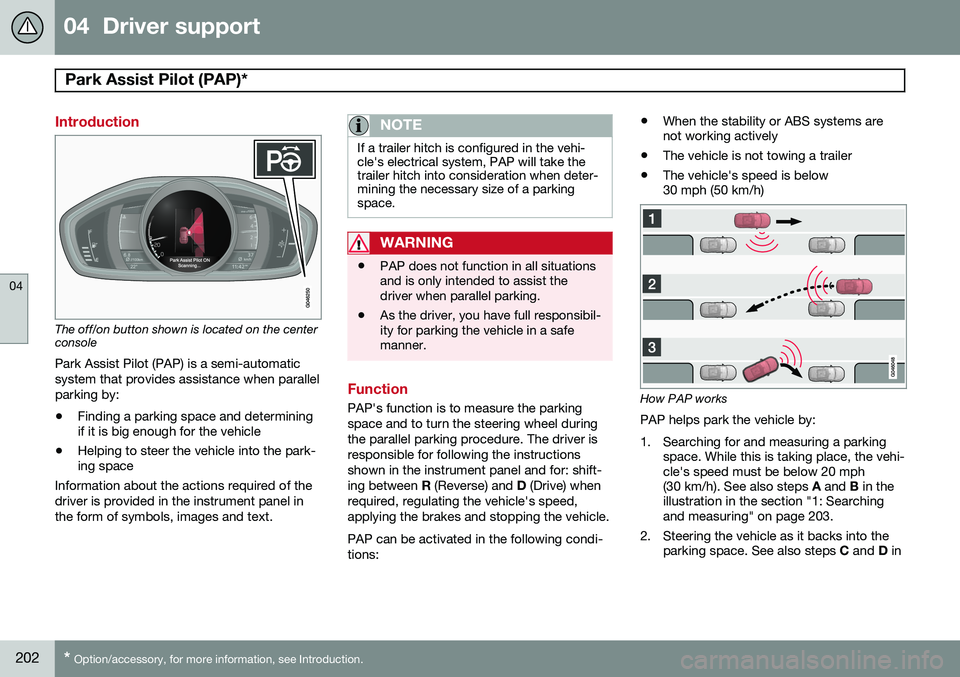
PAP helps park the vehicle by:
1. Searching for and measuring a parking space. While this is taking place, the vehi- cle's speed must be below 20 mph(30 km/h). See also steps A and B in the
illustration in the section "1: Searchingand measuring" on page 203.
2. Steering the vehicle as it backs into the parking space. See also steps C and D in
Page 207 of 406
04 Driver support
Park Assist Pilot (PAP)*
04
* Option/accessory, for more information, see Introduction.205
•
PAP may not be able to provide parking assistance on narrow streets due to lackof space to maneuver the vehicle. In sit-uations like this, it may help to drive asclose to the side of the road as possiblewhere the parking space is located.
• Use only approved tires with the correctinflation pressure because this affectsPAP's capacity to provide parking assis-tance. See the table on page 312.Changing to a different approved tire sizemay affect PAP's parameters. Consult atrained and qualified Volvo service techni-cian.
• Heavy rain or snow may inhibit PAP'scapacity to correctly measure a parkingspace.
• Do not use PAP if snow chains or a tem-porary spare tire is being used.
• Do not use PAP if there are any objectsprotruding from the vehicle.
WARNING
• The front end of your vehicle may turn out toward oncoming traffic during theparking procedure.
• Objects located above the parkingsensors' field of vision are not includedwhen PAP measures a parking space.For this reason, PAP may turn into theparking space too soon. Avoid parkingspaces of this type.
• The driver is always responsible fordetermining if PAP has selected a suit-able parking space.
Maintenance
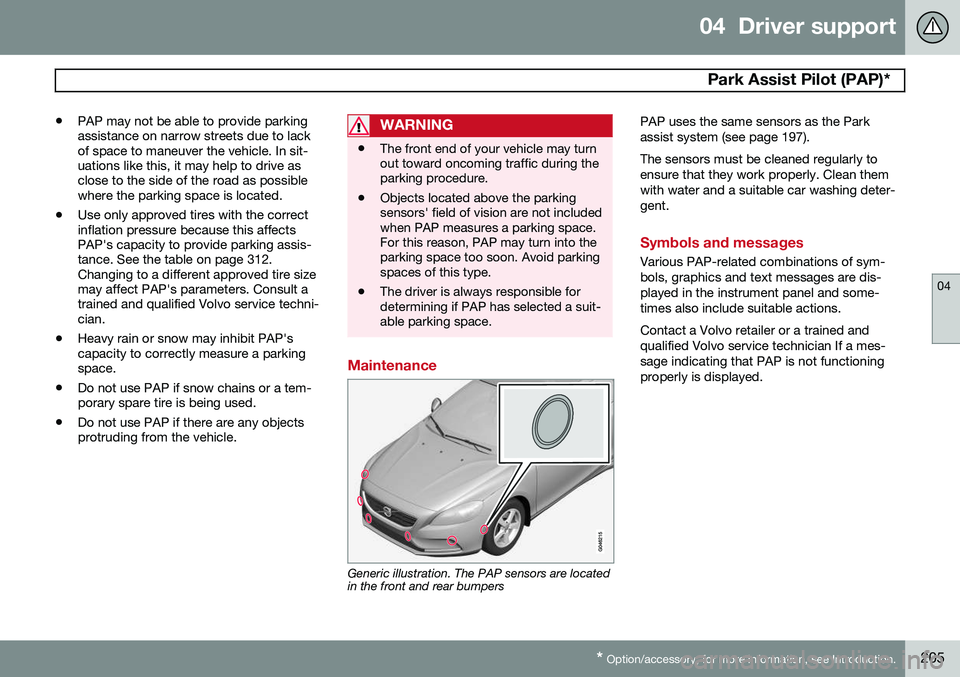
Generic illustration. The PAP sensors are located in the front and rear bumpers PAP uses the same sensors as the Park assist system (see page 197). The sensors must be cleaned regularly to ensure that they work properly. Clean themwith water and a suitable car washing deter-gent.
Symbols and messages
Various PAP-related combinations of sym- bols, graphics and text messages are dis-played in the instrument panel and some-times also include suitable actions. Contact a Volvo retailer or a trained and qualified Volvo service technician If a mes-sage indicating that PAP is not functioningproperly is displayed.
Page 225 of 406
05 Comfort and driving pleasure
Climate system
05
}}
223
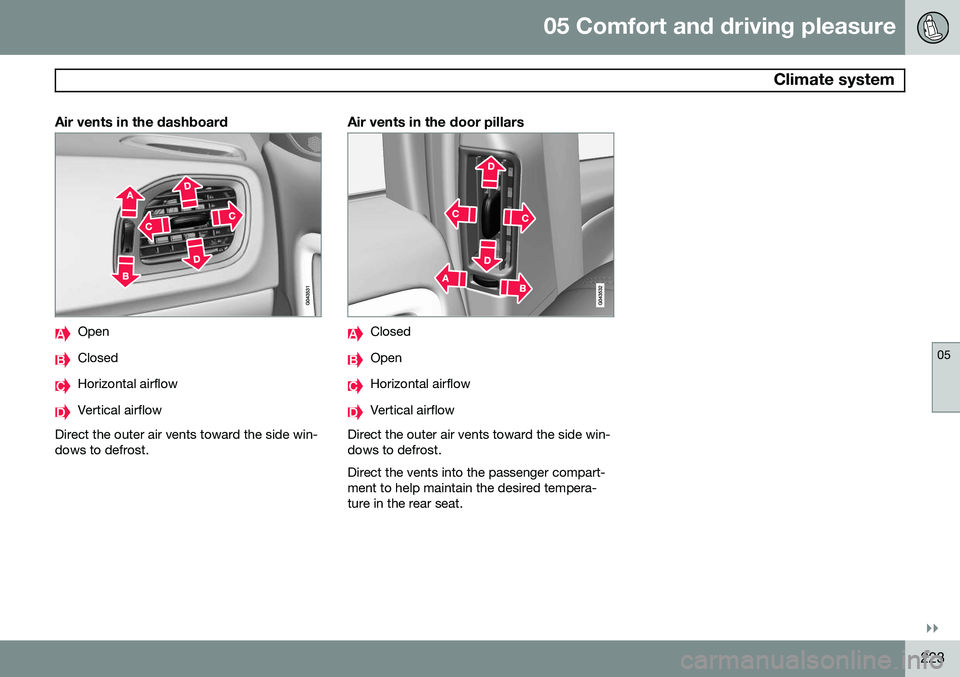
Air vents in the dashboard
Open
Closed
Horizontal airflow
Vertical airflow
Direct the outer air vents toward the side win- dows to defrost.
Air vents in the door pillars
Closed
Open
Horizontal airflow
Vertical airflow
Direct the outer air vents toward the side win- dows to defrost. Direct the vents into the passenger compart- ment to help maintain the desired tempera-ture in the rear seat.
Page 288 of 406
286
Driving recommendations..................................................................... 288 Refueling............................................................................................... 292Loading................................................................................................. 297Towing a trailer...................................................................................... 300
Emergency towing................................................................................ 302
Page 291 of 406
07 During your trip
Driving recommendations
07
}}
289
the trunk, the less the tendency to under- steer.
Handling, roadholdingVehicle load, tire design and inflation pres-sure all affect vehicle handling. Therefore,check that the tires are inflated to the recom-mended pressure according to the vehicleload. See the "Tire pressure" section. Loadsshould be distributed so that capacity weightor maximum permissible axle loads are notexceeded.
Driving through water
•
The vehicle can be driven through water up to a depth of approximately 10 in.(25 cm), at a maximum speed of 6 mph(10 km/h).
• Take particular care when driving throughflowing water.
• Clean the electrical connections for trailerwiring after driving in mud or water.
• When driving through water, maintain lowspeed and do not stop in the water.
WARNING
•Avoid driving through standing or rushing water. Doing so can be dan-gerous and it may also be difficult todetermine the actual depth of thewater.
• If water cannot be avoided, after driv-ing through the water, press lightly onthe brake pedal to ensure that thebrakes are functioning normally. Wateror mud can make the brake liningsslippery, resulting in delayed brakingeffect.
CAUTION
• Engine damage will occur if water is drawn into the air cleaner.
• If the vehicle is driven through waterdeeper than 10 in (25 cm), water mayenter the differential and the transmis-sion. This reduces the oil's lubricatingcapacity and may shorten the servicelife of these components.
• Do not allow the vehicle to stand inwater up to the door sills longer thanabsolutely necessary. This could resultin electrical malfunctions.
• If the engine has been stopped whilethe vehicle is in water, do not attemptto restart it. Have the vehicle towedout of the water.
Engine and cooling systemUnder special conditions, for example when driving in hilly terrain, extreme heat or withheavy loads, there is a risk that the engineand cooling system will overheat. Proceed asfollows to avoid overheating the engine. •
Maintain a low speed when driving with a trailer up long, steep hills.
• Do not turn the engine off immediatelywhen stopping after a hard drive.
Page 295 of 406
07 During your trip
Refueling
07
}}
293
Octane rating
Minimum octane
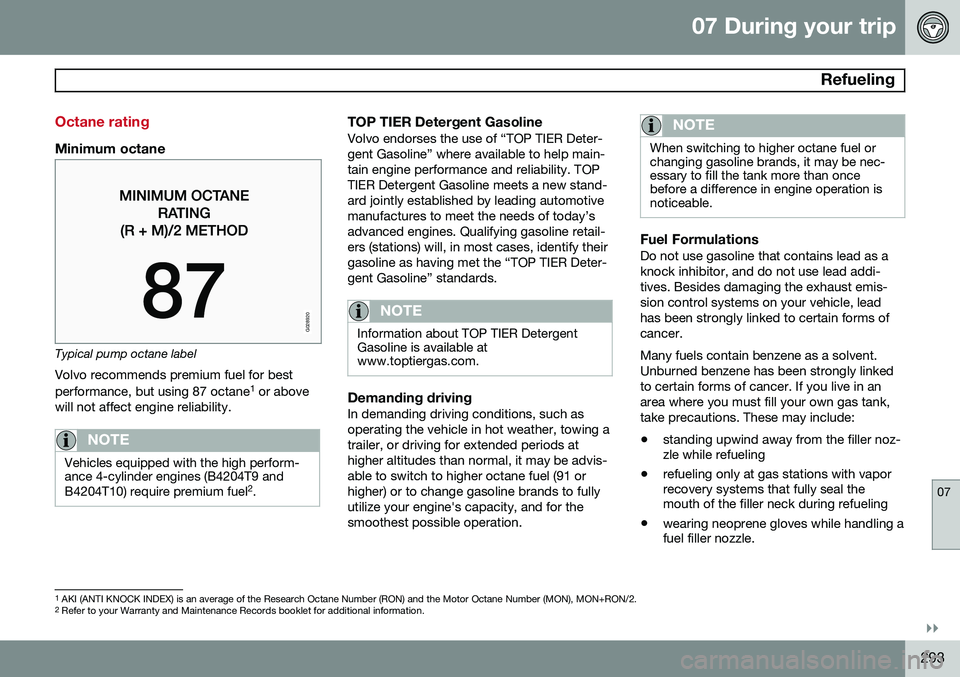
G028920
Typical pump octane labelVolvo recommends premium fuel for best performance, but using 87 octane 1
or above
will not affect engine reliability.
NOTE
Vehicles equipped with the high perform- ance 4-cylinder engines (B4204T9 and B4204T10) require premium fuel 2
.
TOP TIER Detergent GasolineVolvo endorses the use of “TOP TIER Deter- gent Gasoline” where available to help main-tain engine performance and reliability. TOPTIER Detergent Gasoline meets a new stand-ard jointly established by leading automotivemanufactures to meet the needs of today’sadvanced engines. Qualifying gasoline retail-ers (stations) will, in most cases, identify theirgasoline as having met the “TOP TIER Deter-gent Gasoline” standards.
NOTE
Information about TOP TIER Detergent Gasoline is available atwww.toptiergas.com.
Demanding drivingIn demanding driving conditions, such as operating the vehicle in hot weather, towing atrailer, or driving for extended periods athigher altitudes than normal, it may be advis-able to switch to higher octane fuel (91 orhigher) or to change gasoline brands to fullyutilize your engine's capacity, and for thesmoothest possible operation.
NOTE
When switching to higher octane fuel or changing gasoline brands, it may be nec-essary to fill the tank more than oncebefore a difference in engine operation isnoticeable.
Fuel FormulationsDo not use gasoline that contains lead as a knock inhibitor, and do not use lead addi-tives. Besides damaging the exhaust emis-sion control systems on your vehicle, leadhas been strongly linked to certain forms ofcancer. Many fuels contain benzene as a solvent. Unburned benzene has been strongly linkedto certain forms of cancer. If you live in anarea where you must fill your own gas tank,take precautions. These may include:
• standing upwind away from the filler noz- zle while refueling
• refueling only at gas stations with vaporrecovery systems that fully seal themouth of the filler neck during refueling
• wearing neoprene gloves while handling afuel filler nozzle.
1
AKI (ANTI KNOCK INDEX) is an average of the Research Octane Number (RON) and the Motor Octane Number (MON), MON+RON/2.
2 Refer to your Warranty and Maintenance Records booklet for additional information.
Page 302 of 406
07 During your trip
Towing a trailer
07
300
Introduction
Volvo recommends the use of Volvo trailer hitches that are specially designed for thevehicle.
NOTE
See page 384 for the maximum trailer and tongue weights recommended by Volvo.
•Observe the legal requirements of the state/province in which the vehicles are
• All Volvo models are equipped withenergy-absorbing shock-mounted bump-ers. Trailer hitch installation should notinterfere with the proper operation of thisbumper system.
Trailer towing does not normally present any particular problems, but take into considera-tion: • Increase tire pressure to recommended full pressure. See the tire inflation tableon page 312.
• When your vehicle is new, avoid towingheavy trailers during the first 620 miles(1,000 km).
• Maximum speed when towing a trailer:50 mph (80 km/h).
• Engine and transmission are subject toincreased loads. Therefore, engine cool-ant temperature should be closely watched when driving in hot climates orhilly terrain. Use a lower gear and turn offthe air conditioner if the temperaturegauge needle enters the red range.
• If the automatic transmission begins tooverheat, a message will be displayed inthe text window.
• Avoid overload and other abusive opera-tion.
• Hauling a trailer affects handling, durabil-ity, and economy.
• It is necessary to balance trailer brakeswith the towing vehicle brakes to providea safe stop (check and observe state/local regulations).
• Do not connect the trailer's brake systemdirectly to the vehicle's brake system.
• More frequent vehicle maintenance isrequired.
• Remove the ball holder when the hitch isnot being used.
WARNING
• Bumper-attached trailer hitches must not be used on Volvos, nor shouldsafety chains be attached to thebumper.
• Trailer hitches attaching to the vehiclerear axle must not be used.
• Never connect a trailer's hydraulicbrake system directly to the vehiclebrake system, nor a trailer's lightingsystem directly to the vehicle lightingsystem. Consult your nearest author-ized Volvo retailer for correct installa-tion.
• When towing a trailer, the trailer'ssafety wire must be correctly fastenedto the hole or hook provided in thetrailer hitch on the vehicle. The safetywire should never be fastened to orwound around the drawbar ball.
Page 303 of 406
07 During your trip
Towing a trailer
07
301
NOTE
•When parking the vehicle with a trailer on a hill, apply the parking brakebefore putting the gear selector in
P.
Always follow the trailer manufactur-er's recommendations for wheelchocking.
• When starting on a hill, put the gearselector in
D before releasing the park-
ing brake.
• If you use the manual (Geartronic) shiftpositions while towing a trailer, makesure the gear you select does not puttoo much strain on the engine (usingtoo high a gear).
• The drawbar assembly/trailer hitchmay be rated for trailers heavier thanthe vehicle is designed to tow. Pleaseadhere to Volvo's recommended trailerweights.
• Avoid driving with a trailer on inclinesof more than 15%.
Trailer cableAn adapter is required if the vehicle's trailer hitch has a 13-pin connector and the trailerhas 7 pins. Use an adapter cable approvedby Volvo. Make sure the cable does not dragon the ground.
Trailer Stability Assist (TSA)
Trailer Stability Assist is a system designed to help stabilize a vehicle that is towing a trailerwhen the vehicle and trailer have begun tosway and is part of the Dynamic Stability andTraction Control system (DSTC). See page148 for information on DSTC.
FunctionA vehicle towing a trailer may begin to swayfor various reasons. Normally this only occursat high speeds but, for example, if the traileris overloaded or if the load is unevenly dis-tributed in the trailer, there is risk of swayingat speeds between approximately 45-55 mph(70-90 km/h). Swaying may be caused by factors such as: •
The vehicle and trailer are hit by a sud- den, strong crosswind
• The vehicle and trailer are traveling on anuneven road surface or drive over a bump
• Sudden movements of the steering wheel
Facts about TSA
• TSA intervenes at speeds above approxi-mately 40 mph (60 km/h)
• The DSTC symbol (
) in the instru-
ment panel will flash when TSA is working
• If the driver switches off the DSTC sys- tem's Spin Control function, TSA will also be switched off (but will be on again thenext time the engine is started)
• TSA may not intervene when the vehicleand trailer begin to sway if the driver triesto compensate for the swaying motion bymoving the steering wheel rapidly
How TSA worksOnce swaying has begun, it can be very diffi- cult to stop, which makes it difficult to controlthe vehicle and trailer. The TSA system continuously monitors the vehicle's movements, particularly lateralmovement. If the system detects a tendencyto sway, the brakes are applied individuallyon the front wheels, which has a stabilizingeffect on the vehicle and trailer. This is oftenenough to enable the driver to regain controlof the vehicle. If this is not adequate to stop the swaying motion, the brakes are applied to all of thewheels on the vehicle and on the trailer if it isequipped with brakes, and engine power istemporarily reduced. As the swaying motionbegins to decrease and the vehicle-trailerhave once again become stable, TSA will nowstop regulating the brakes/engine power andthe driver regains control of the vehicle.