display VOLVO S60 2016 Owner´s Manual
[x] Cancel search | Manufacturer: VOLVO, Model Year: 2016, Model line: S60, Model: VOLVO S60 2016Pages: 392, PDF Size: 10.04 MB
Page 254 of 392
08 Starting and driving
08
252* Option/accessory, for more information, see Introduction.
Transmission – Geartronic
Geartronic allows you to manually shift among your vehicle's forward gears. The manualposition ( +S–) can be selected at any time.
Geartronic: manual shifting (+S–)To shift gears manually, move thegear selector to the side from D
toward +S–. The +S– symbol in the
instrument panel will change from
white to orange and the number of the gear
currently being used (
1, 2, 3, etc.) will be dis-
played (see the following illustration) 5
.
• To return to automatic shifting mode from +S–
, move the gear selector to the side
toward D.
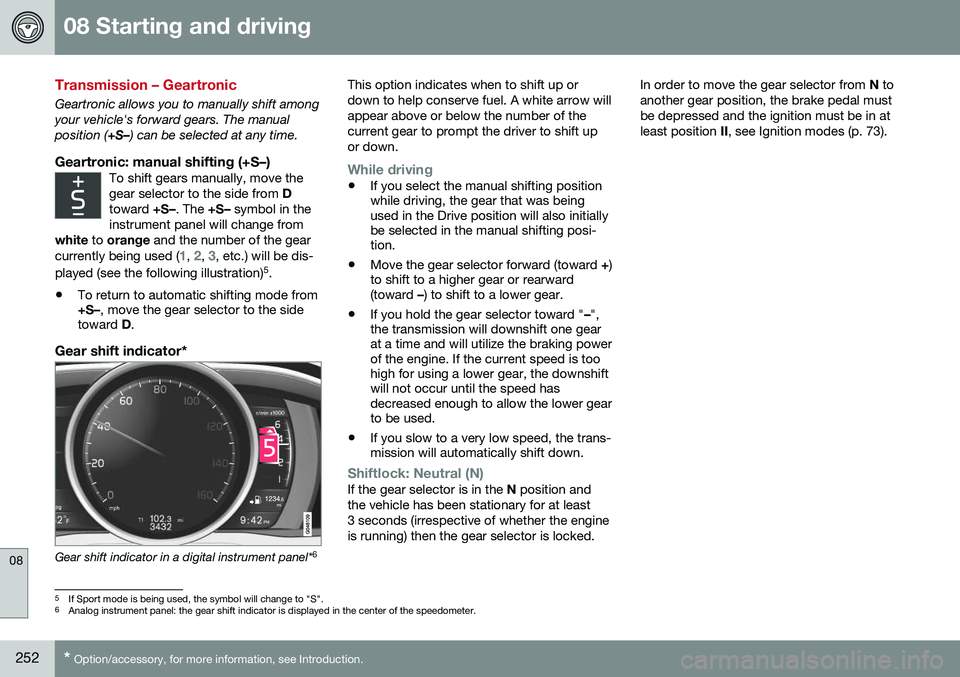
Gear shift indicator*
Gear shift indicator in a digital instrument panel* 6This option indicates when to shift up or down to help conserve fuel. A white arrow willappear above or below the number of thecurrent gear to prompt the driver to shift upor down.
While driving
•
If you select the manual shifting position while driving, the gear that was beingused in the Drive position will also initiallybe selected in the manual shifting posi-tion.
• Move the gear selector forward (toward
+)
to shift to a higher gear or rearward(toward –) to shift to a lower gear.
• If you hold the gear selector toward "
–",
the transmission will downshift one gearat a time and will utilize the braking powerof the engine. If the current speed is toohigh for using a lower gear, the downshiftwill not occur until the speed hasdecreased enough to allow the lower gearto be used.
• If you slow to a very low speed, the trans-mission will automatically shift down.
Shiftlock: Neutral (N)If the gear selector is in the
N position and
the vehicle has been stationary for at least 3 seconds (irrespective of whether the engineis running) then the gear selector is locked. In order to move the gear selector from
N to
another gear position, the brake pedal mustbe depressed and the ignition must be in atleast position II, see Ignition modes (p. 73).
5
If Sport mode is being used, the symbol will change to "S".
6 Analog instrument panel: the gear shift indicator is displayed in the center of the speedometer.
Page 255 of 392
08 Starting and driving
08
}}
* Option/accessory, for more information, see Introduction.253
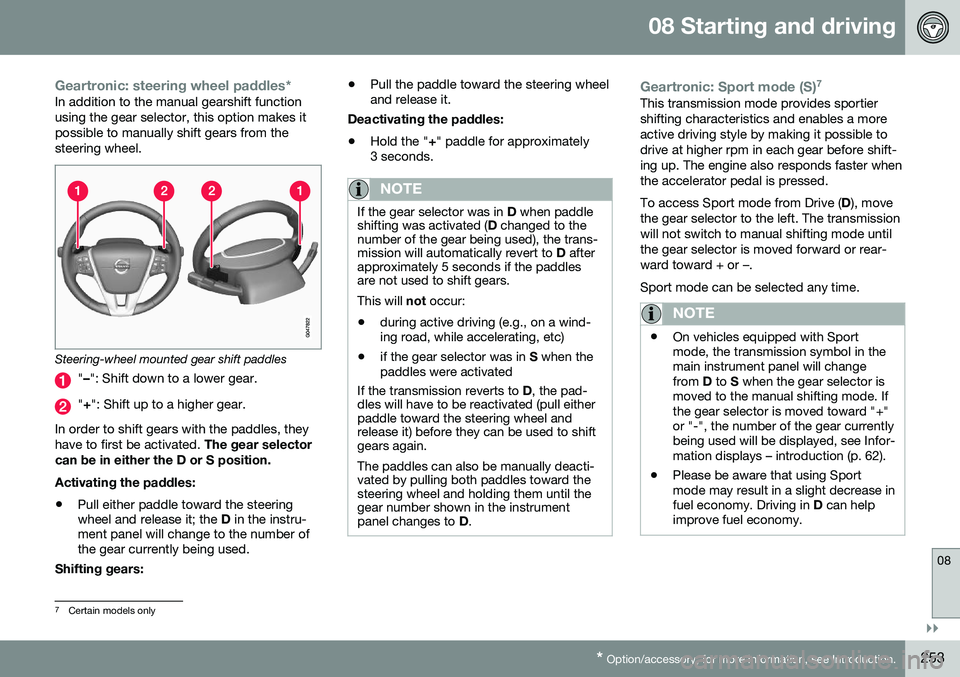
Geartronic: steering wheel paddles*In addition to the manual gearshift function using the gear selector, this option makes itpossible to manually shift gears from thesteering wheel.
Steering-wheel mounted gear shift paddles
" – ": Shift down to a lower gear.
"+ ": Shift up to a higher gear.
In order to shift gears with the paddles, they have to first be activated. The gear selector
can be in either the D or S position. Activating the paddles:
• Pull either paddle toward the steering wheel and release it; the
D in the instru-
ment panel will change to the number ofthe gear currently being used.
Shifting gears: •
Pull the paddle toward the steering wheeland release it.
Deactivating the paddles: • Hold the "
+" paddle for approximately
3 seconds.
NOTE
If the gear selector was in D when paddle
shifting was activated ( D changed to the
number of the gear being used), the trans- mission will automatically revert to D after
approximately 5 seconds if the paddlesare not used to shift gears. This will not occur:
• during active driving (e.g., on a wind- ing road, while accelerating, etc)
• if the gear selector was in
S when the
paddles were activated
If the transmission reverts to D, the pad-
dles will have to be reactivated (pull either paddle toward the steering wheel andrelease it) before they can be used to shiftgears again. The paddles can also be manually deacti- vated by pulling both paddles toward thesteering wheel and holding them until thegear number shown in the instrumentpanel changes to D.
Geartronic: Sport mode (S) 7This transmission mode provides sportier shifting characteristics and enables a moreactive driving style by making it possible todrive at higher rpm in each gear before shift-ing up. The engine also responds faster whenthe accelerator pedal is pressed. To access Sport mode from Drive (
D), move
the gear selector to the left. The transmission will not switch to manual shifting mode untilthe gear selector is moved forward or rear-ward toward + or –. Sport mode can be selected any time.
NOTE
• On vehicles equipped with Sport mode, the transmission symbol in themain instrument panel will changefrom
D to S when the gear selector is
moved to the manual shifting mode. Ifthe gear selector is moved toward "+"or "-", the number of the gear currentlybeing used will be displayed, see Infor-mation displays – introduction (p. 62).
• Please be aware that using Sportmode may result in a slight decrease infuel economy. Driving in
D can help
improve fuel economy.
7 Certain models only
Page 257 of 392
08 Starting and driving
08
}}
255
Start/Stop – Hill Start Assist (HSA)
When starting on steep hills, HSA (see Trans- mission – general information (p. 250)) retainspressure on the brake pedal for several sec-onds after the pedal has been released inorder to keep the vehicle at a standstill. Thebrakes will be released after several secondsor when the driver presses the acceleratorpedal. The pedal will return to its normal posi-tion somewhat slower than normal.
Related information
•Start/Stop – introduction (p. 255)
• Start/Stop – function (p. 255)
• Start/Stop – settings (p. 258)
• Start/Stop – Auto-stop exceptions (p. 256)
• Start/Stop – Auto-start exceptions(p. 257)
• Start/Stop – symbols and messages(p. 259)
Start/Stop – introduction
Start/Stop is a function that temporarily switches off the engine when the vehicle isnot moving, for instance in heavy traffic or at atraffic light to help reduce fuel consumption. Start/Stop is available with certain engines/ transmissions.
Related information
•Start/Stop – function (p. 255)
• Start/Stop – settings (p. 258)
• Start/Stop – Auto-stop exceptions (p. 256)
• Start/Stop – Auto-start exceptions(p. 257)
• Start/Stop – Hill Start Assist (HSA)(p. 255)
• Start/Stop – symbols and messages(p. 259)
Start/Stop – function
Function and use
Start/Stop symbol in the instrument panel
Start/Stop button on the center console
Start/Stop is activated automatically each time the engine is started 9
. The symbol in the
instrument panel will be displayed for several seconds when the engine starts and the indi-cator light in the On/Off button will remainilluminated while the function is activated. All of the vehicle's systems will function while the engine is auto-stopped, although thefunction of certain systems may reduced atthis time. For example, blower speed andhigh infotainment system volume may bereduced to help conserve the battery'scapacity.
9 Not when the engine is started using the optional Engine Remote Start feature, Starting the engine (p. 245)
Page 261 of 392
08 Starting and driving
08
259
Start/Stop – symbols and messages
Text messagesCombined with the information sym- bol in the instrument panel, the
Start/Stop function may also display mes- sages in certain situations. Follow the instruc-tions provided in the message. The followingtable gives several examples.
SymbolMessageInformation/action
Auto Start/Stop Service requiredStart/Stop is not functioning properly. Contact a Volvo retailer or a trained and qualified Volvo service technician.
Autostart Engine running + an
audible signalThis is triggered if the driver's door is opened while the engine is auto-stopped.
-Press Start buttonThe engine will not auto-start. Start the engine normally by pressing the START/STOP ENGINE
button.
-Select P or N to startStart/Stop has been deactivated. Move the gear selector to N or P and start the engine normally
be pressing the START/STOP ENGINE button.
-Press Start buttonThe engine will not auto-start. Move the gear selector to N or P and start the engine normally be
pressing the START/STOP ENGINE button.
If the message does not disappear after the suggested action has been taken, contact aVolvo retailer or a trained and qualified Volvoservice technician.
Related information
•Start/Stop – introduction (p. 255)
• Start/Stop – function (p. 255) •
Start/Stop – settings (p. 258)
• Start/Stop – Auto-stop exceptions (p. 256)
• Start/Stop – Auto-start exceptions(p. 257)
• Start/Stop – Hill Start Assist (HSA)(p. 255)
Page 262 of 392
08 Starting and driving
08
260* Option/accessory, for more information, see Introduction.
ECO*
Eco is a function 10
developed by Volvo to give
the driver the opportunity to actively drive more economically and to help reduce fuelconsumption.
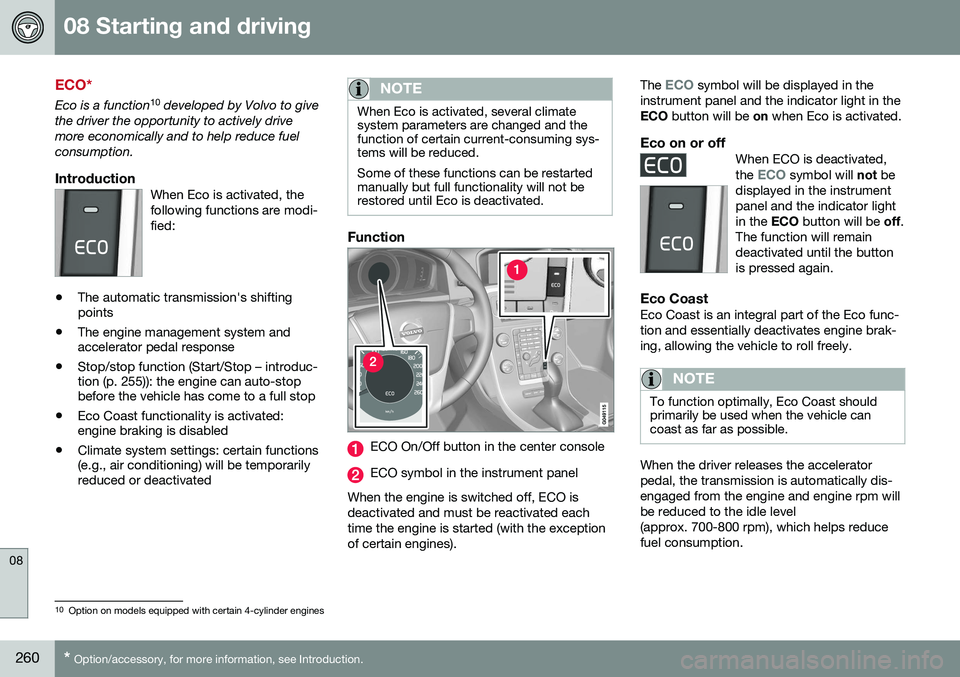
IntroductionWhen Eco is activated, thefollowing functions are modi-fied:
• The automatic transmission's shifting points
• The engine management system andaccelerator pedal response
• Stop/stop function (Start/Stop – introduc-tion (p. 255)): the engine can auto-stopbefore the vehicle has come to a full stop
• Eco Coast functionality is activated:engine braking is disabled
• Climate system settings: certain functions(e.g., air conditioning) will be temporarilyreduced or deactivated
NOTE
When Eco is activated, several climate system parameters are changed and thefunction of certain current-consuming sys-tems will be reduced. Some of these functions can be restarted manually but full functionality will not berestored until Eco is deactivated.
Function
ECO On/Off button in the center console
ECO symbol in the instrument panel
When the engine is switched off, ECO is deactivated and must be reactivated eachtime the engine is started (with the exceptionof certain engines). The
ECO symbol will be displayed in the
instrument panel and the indicator light in the ECO button will be on when Eco is activated.
Eco on or offWhen ECO is deactivated, the ECO symbol will not be
displayed in the instrument panel and the indicator lightin the ECO button will be off.
The function will remaindeactivated until the buttonis pressed again.
Eco CoastEco Coast is an integral part of the Eco func- tion and essentially deactivates engine brak-ing, allowing the vehicle to roll freely.
NOTE
To function optimally, Eco Coast should primarily be used when the vehicle cancoast as far as possible.
When the driver releases the accelerator pedal, the transmission is automatically dis-engaged from the engine and engine rpm willbe reduced to the idle level(approx. 700-800 rpm), which helps reducefuel consumption.
10 Option on models equipped with certain 4-cylinder engines
Page 264 of 392
08 Starting and driving
08
262
All Wheel Drive (AWD)
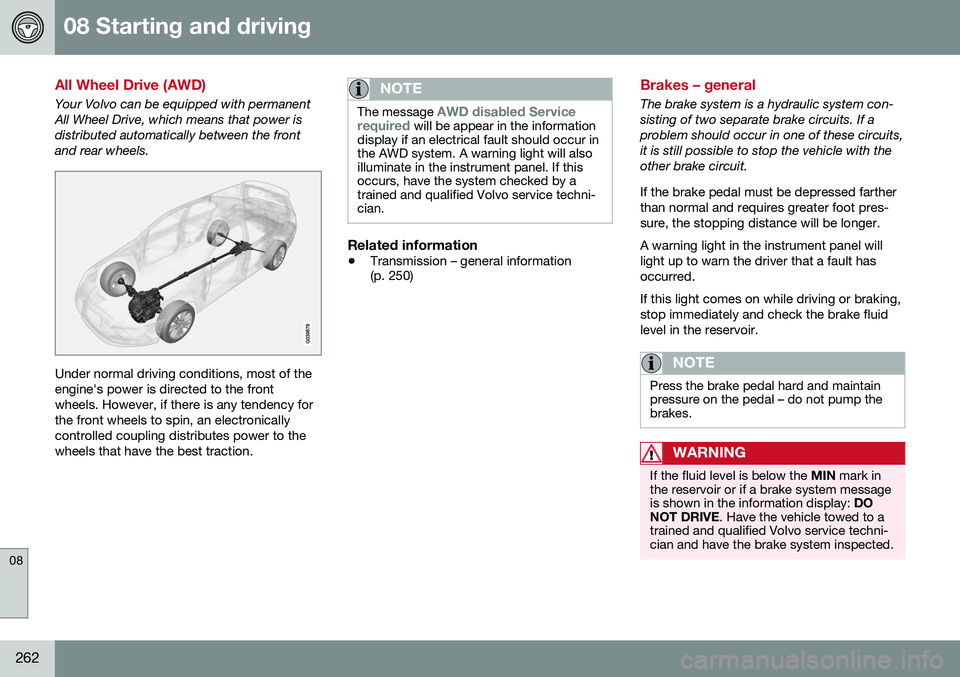
Your Volvo can be equipped with permanent All Wheel Drive, which means that power isdistributed automatically between the frontand rear wheels.
Under normal driving conditions, most of the engine's power is directed to the frontwheels. However, if there is any tendency forthe front wheels to spin, an electronicallycontrolled coupling distributes power to thewheels that have the best traction.
NOTE
The message AWD disabled Service
required will be appear in the information
display if an electrical fault should occur in the AWD system. A warning light will alsoilluminate in the instrument panel. If thisoccurs, have the system checked by atrained and qualified Volvo service techni-cian.
Related information
• Transmission – general information (p. 250)
Brakes – general
The brake system is a hydraulic system con- sisting of two separate brake circuits. If aproblem should occur in one of these circuits,it is still possible to stop the vehicle with theother brake circuit. If the brake pedal must be depressed farther than normal and requires greater foot pres-sure, the stopping distance will be longer. A warning light in the instrument panel will light up to warn the driver that a fault hasoccurred. If this light comes on while driving or braking, stop immediately and check the brake fluidlevel in the reservoir.
NOTE
Press the brake pedal hard and maintain pressure on the pedal – do not pump thebrakes.
WARNING
If the fluid level is below the
MIN mark in
the reservoir or if a brake system message is shown in the information display: DO
NOT DRIVE . Have the vehicle towed to a
trained and qualified Volvo service techni-cian and have the brake system inspected.
Page 266 of 392
||
08 Starting and driving
08
264
braking gently for a short period while the vehicle is moving.
Related information
•Parking brake – general information (p. 266)
• Emergency Brake Assistance (EBA)(p. 265)
• Brakes – general (p. 262)
• Anti-lock braking system (ABS) (p. 264)
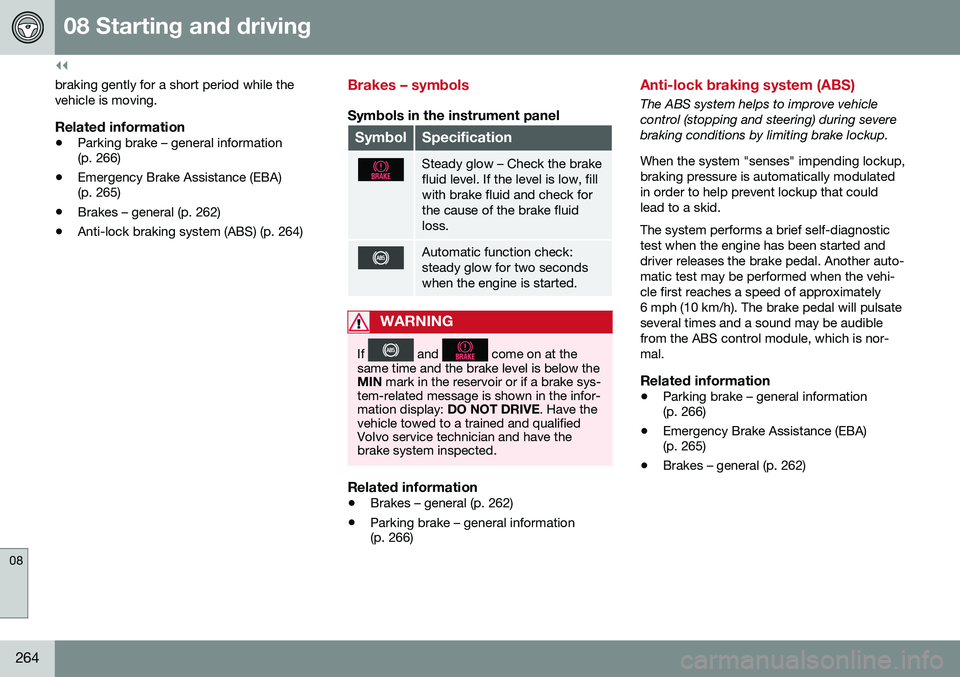
Brakes – symbols
Symbols in the instrument panel
SymbolSpecification
Steady glow – Check the brake fluid level. If the level is low, fillwith brake fluid and check forthe cause of the brake fluidloss.
Automatic function check: steady glow for two secondswhen the engine is started.
WARNING
If and come on at the
same time and the brake level is below the MIN mark in the reservoir or if a brake sys-
tem-related message is shown in the infor-mation display: DO NOT DRIVE . Have the
vehicle towed to a trained and qualifiedVolvo service technician and have thebrake system inspected.
Related information
• Brakes – general (p. 262)
• Parking brake – general information (p. 266)
Anti-lock braking system (ABS)
The ABS system helps to improve vehicle control (stopping and steering) during severebraking conditions by limiting brake lockup. When the system "senses" impending lockup, braking pressure is automatically modulatedin order to help prevent lockup that couldlead to a skid. The system performs a brief self-diagnostic test when the engine has been started anddriver releases the brake pedal. Another auto-matic test may be performed when the vehi-cle first reaches a speed of approximately6 mph (10 km/h). The brake pedal will pulsateseveral times and a sound may be audiblefrom the ABS control module, which is nor-mal.
Related information
• Parking brake – general information (p. 266)
• Emergency Brake Assistance (EBA)(p. 265)
• Brakes – general (p. 262)
Page 271 of 392
08 Starting and driving
08
269
Parking brake – symbols and messages
A text message can be erased by pressing briefly on the OK button on the turn signal
lever.
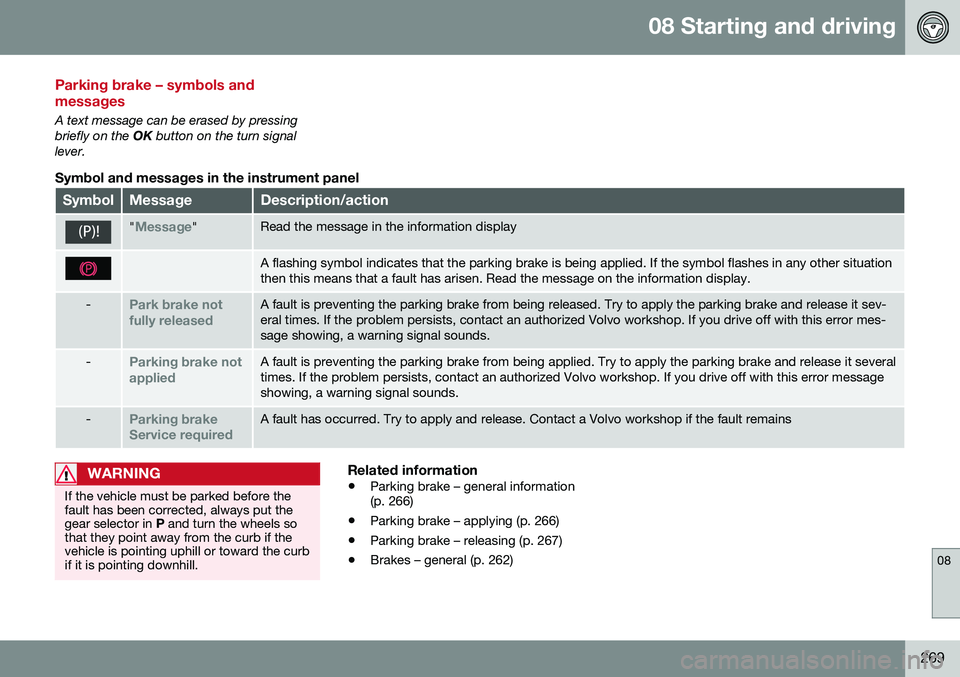
Symbol and messages in the instrument panel
SymbolMessageDescription/action
"Message"Read the message in the information display
A flashing symbol indicates that the parking brake is being applied. If the symbol flashes in any other situation then this means that a fault has arisen. Read the message on the information display.
-Park brake not fully releasedA fault is preventing the parking brake from being released. Try to apply the parking brake and release it sev- eral times. If the problem persists, contact an authorized Volvo workshop. If you drive off with this error mes-sage showing, a warning signal sounds.
-Parking brake not appliedA fault is preventing the parking brake from being applied. Try to apply the parking brake and release it several times. If the problem persists, contact an authorized Volvo workshop. If you drive off with this error messageshowing, a warning signal sounds.
-Parking brake Service requiredA fault has occurred. Try to apply and release. Contact a Volvo workshop if the fault remains
WARNING
If the vehicle must be parked before the fault has been corrected, always put thegear selector in P and turn the wheels so
that they point away from the curb if thevehicle is pointing uphill or toward the curbif it is pointing downhill.
Related information
• Parking brake – general information (p. 266)
• Parking brake – applying (p. 266)
• Parking brake – releasing (p. 267)
• Brakes – general (p. 262)
Page 277 of 392
08 Starting and driving
08
}}
275
WARNING
Never carry a cell phone that is switched
on while refueling your vehicle. If the
phone rings, this may cause a spark that could ignite gasoline fumes, resulting infire and injury.
WARNING
Carbon monoxide is a poisonous, color- less, and odorless gas. It is present in allexhaust gases. If you ever smell exhaustfumes inside the vehicle, make sure thepassenger compartment is ventilated, andimmediately return the vehicle to a trainedand qualified Volvo service technician forcorrection.
Related information
• Refueling – fuel requirements (p. 273)
Refueling – opening/closing fuel filler door
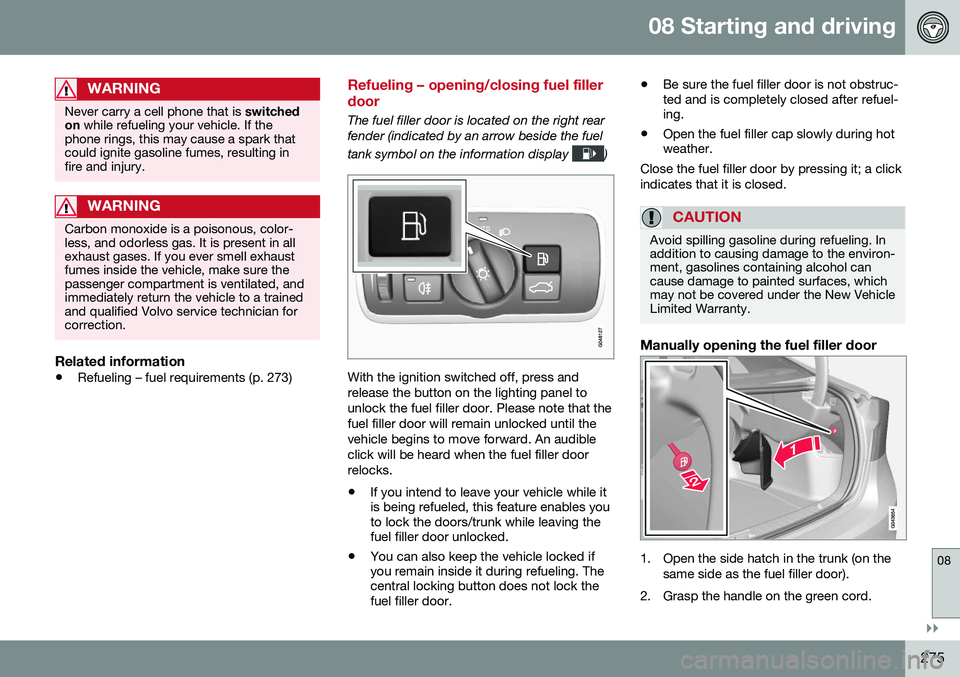
The fuel filler door is located on the right rear fender (indicated by an arrow beside the fuel tank symbol on the information display
)
With the ignition switched off, press and release the button on the lighting panel tounlock the fuel filler door. Please note that thefuel filler door will remain unlocked until thevehicle begins to move forward. An audibleclick will be heard when the fuel filler doorrelocks. •If you intend to leave your vehicle while it is being refueled, this feature enables youto lock the doors/trunk while leaving thefuel filler door unlocked.
• You can also keep the vehicle locked ifyou remain inside it during refueling. Thecentral locking button does not lock thefuel filler door. •
Be sure the fuel filler door is not obstruc-ted and is completely closed after refuel-ing.
• Open the fuel filler cap slowly during hotweather.
Close the fuel filler door by pressing it; a click indicates that it is closed.
CAUTION
Avoid spilling gasoline during refueling. In addition to causing damage to the environ-ment, gasolines containing alcohol cancause damage to painted surfaces, whichmay not be covered under the New VehicleLimited Warranty.
Manually opening the fuel filler door
1. Open the side hatch in the trunk (on the same side as the fuel filler door).
2. Grasp the handle on the green cord.
Page 279 of 392
08 Starting and driving
08
}}
277
Emission controls
Three-way catalytic converter
•Keep your engine properly tuned. Certain engine malfunctions, particularly involvingthe electrical, fuel or distributor ignitionsystems, may cause unusually high three-way catalytic converter temperatures. Donot continue to operate your vehicle ifyou detect engine misfire, noticeable lossof power or other unusual operating con-ditions, such as engine overheating orbackfiring. A properly tuned engine willhelp avoid malfunctions that could dam-age the three-way catalytic converter.
• Do not park your vehicle over combusti-ble materials, such as grass or leaves,which can come into contact with the hotexhaust system and cause such materialsto ignite under certain wind and weatherconditions.
• Excessive starter cranking (in excess ofone minute), or an intermittently firing orflooded engine can cause three-way cat-alytic converter or exhaust system over-heating.
• Remember that tampering or unauthor-ized modifications to the engine, theEngine Control Module, or the vehiclemay be illegal and can cause three-waycatalytic converter or exhaust systemoverheating. This includes: altering fuelinjection settings or components, alteringemission system components or location or removing components, and/or repea-ted use of leaded fuel.NOTE
Unleaded fuel is required for vehicles with three-way catalytic converters.
Heated oxygen sensorsThe heated oxygen sensors monitor the oxy- gen content of the exhaust gases. Readingsare fed into a control module that continu-ously monitors engine functions and controlsfuel injection. The ratio of fuel to air into theengine is continuously adjusted for efficientcombustion to help reduce harmful emis-sions.
Related information
•
Information displays – warning symbols (p. 68)
• Engine and cooling system (p. 271)
Economical driving
Better driving economy may be obtained by thinking ahead, avoiding rapid starts andstops and adjusting the speed of your vehicleto immediate traffic conditions.
Economical driving conserves natural resources
Observe the following rules:
• Bring the engine to normal operating tem- perature as soon as possible by drivingwith a light foot on the accelerator pedalfor the first few minutes of operation. Acold engine uses more fuel and is subjectto increased wear.
• Whenever possible, avoid using the vehi-cle for driving short distances. This doesnot allow the engine to reach normaloperating temperature.
• Drive carefully and avoid rapid accelera-tion and hard braking.
• Use the transmission's Drive (
D) position
as often as possible and avoid using kick-down.