light VOLVO S60 2016 Owner´s Manual
[x] Cancel search | Manufacturer: VOLVO, Model Year: 2016, Model line: S60, Model: VOLVO S60 2016Pages: 392, PDF Size: 10.04 MB
Page 333 of 392
10 Maintenance and servicing
10
}}
* Option/accessory, for more information, see Introduction.331
CAUTION
Never touch the glass of bulbs with your fingers. Grease and oils from your fingersvaporize in the heat and will leave adeposit on the reflector, which will damageit.
WARNING
• The engine should not be running when changing bulbs.
• If the engine has been running justprior to replacing bulbs in the head-light housing, please keep in mind thatcomponents in the engine compart-ment will be hot.
WARNING
•
Active Bending Lights* – due to the high voltage used by these headlights,these bulbs should only be replacedby a trained and qualified Volvo serv-ice technician.
• Turn off the lights and remove theremote key from the ignition beforechanging any bulbs.
Related information
•
Bulbs – headlight housing (p. 331)
• Bulbs – taillight housing (p. 336)
• Bulbs – vanity mirror lighting (p. 337)
• Bulbs – license plate lighting (p. 336)
Bulbs – headlight housing
The entire headlight housing must be lifted out when replacing all front bulbs.
Removing the headlight housing
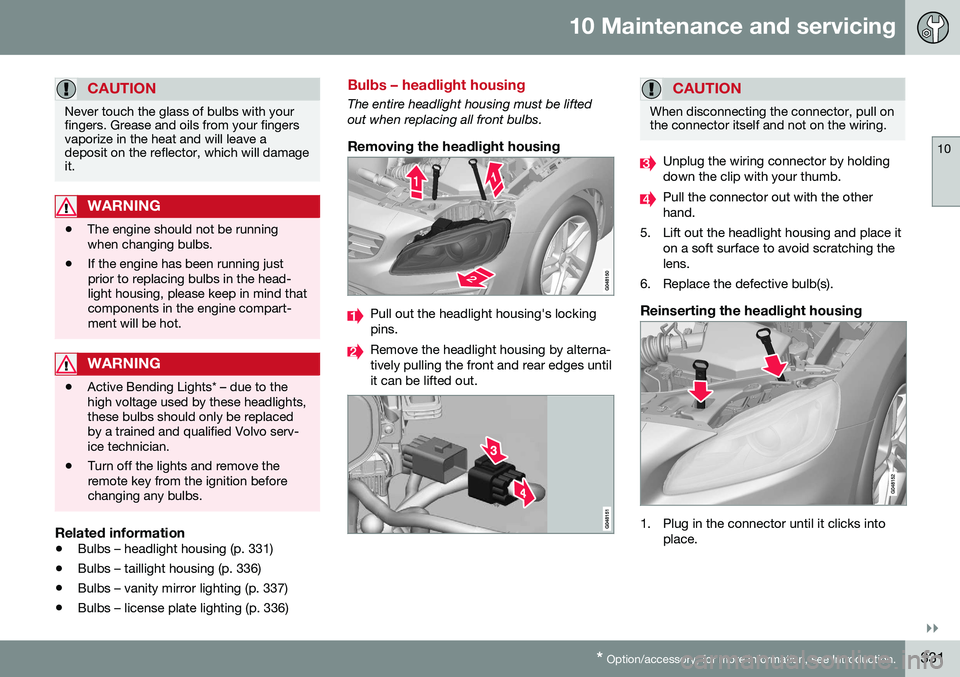
Pull out the headlight housing's locking pins.
Remove the headlight housing by alterna- tively pulling the front and rear edges untilit can be lifted out.
CAUTION
When disconnecting the connector, pull on the connector itself and not on the wiring.
Unplug the wiring connector by holding down the clip with your thumb.
Pull the connector out with the other hand.
5. Lift out the headlight housing and place it on a soft surface to avoid scratching thelens.
6. Replace the defective bulb(s).
Reinserting the headlight housing
1. Plug in the connector until it clicks into place.
Page 334 of 392
||
10 Maintenance and servicing
10
332
2. Reinstall the headlight housing and lock-ing pins. The short locking pin should be closest to the grille. Check that they arecorrectly inserted. The headlight housing must be properly in place and the wiring connector cor-rectly reconnected before the lighting isswitched on or the remote key is insertedinto the ignition slot.
3. Check that the lights function properly.
Related information
• Bulbs – introduction (p. 330)
• Bulbs – cover (p. 332)
• Bulbs – specifications (p. 337)
Bulbs – cover
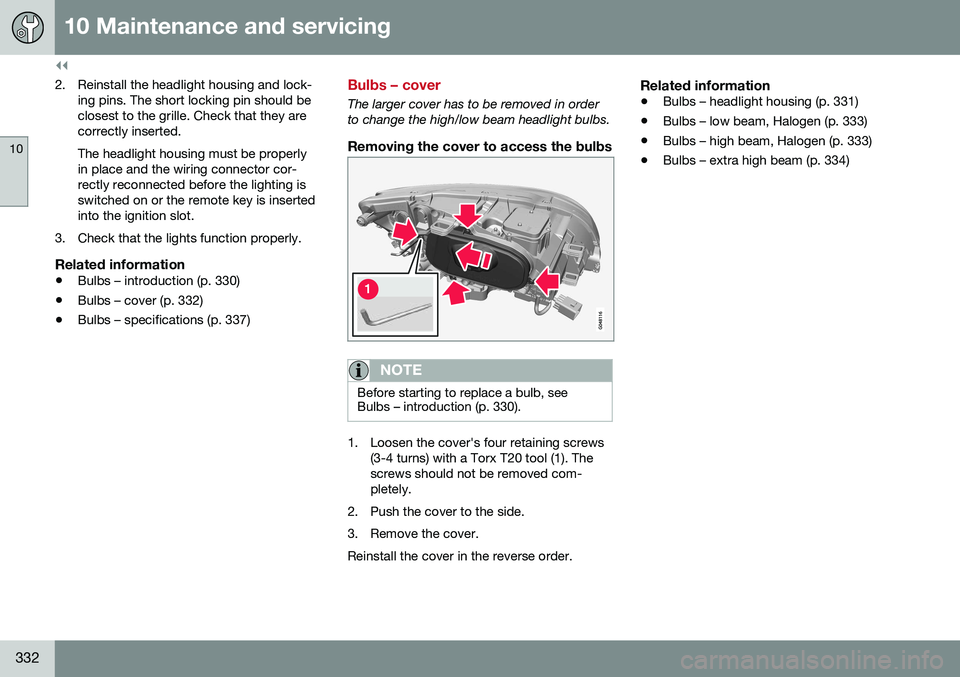
The larger cover has to be removed in order to change the high/low beam headlight bulbs.
Removing the cover to access the bulbs
NOTE
Before starting to replace a bulb, see Bulbs – introduction (p. 330).
1. Loosen the cover's four retaining screws
(3-4 turns) with a Torx T20 tool (1). The screws should not be removed com-pletely.
2. Push the cover to the side.
3. Remove the cover.Reinstall the cover in the reverse order.
Related information
• Bulbs – headlight housing (p. 331)
• Bulbs – low beam, Halogen (p. 333)
• Bulbs – high beam, Halogen (p. 333)
• Bulbs – extra high beam (p. 334)
Page 335 of 392
10 Maintenance and servicing
10
333
Bulbs – low beam, Halogen
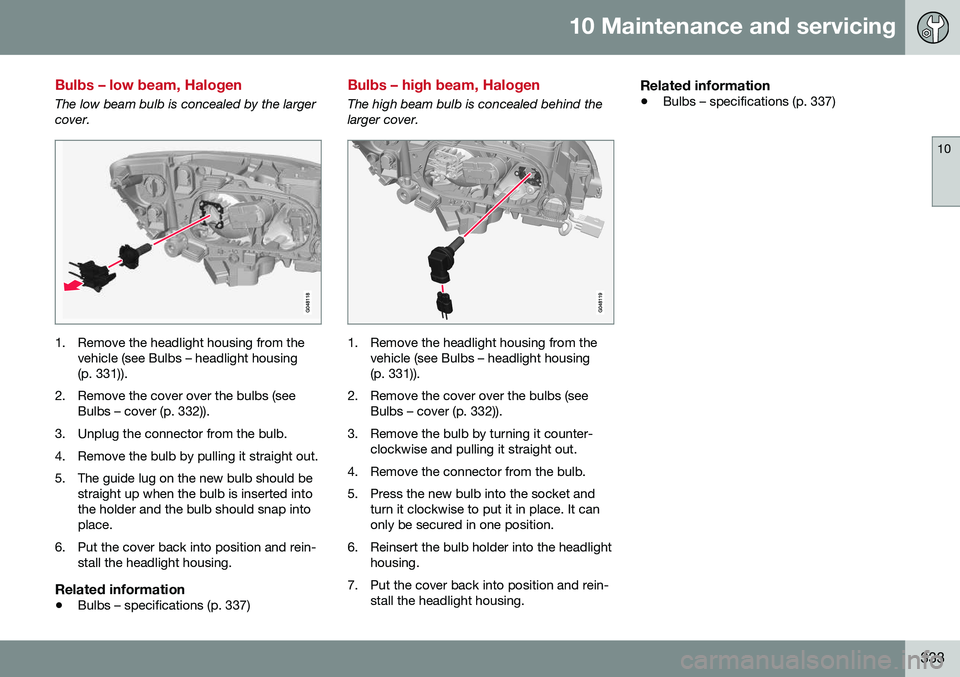
The low beam bulb is concealed by the larger cover.
1. Remove the headlight housing from thevehicle (see Bulbs – headlight housing (p. 331)).
2. Remove the cover over the bulbs (see Bulbs – cover (p. 332)).
3. Unplug the connector from the bulb.
4. Remove the bulb by pulling it straight out.
5. The guide lug on the new bulb should be straight up when the bulb is inserted into the holder and the bulb should snap intoplace.
6. Put the cover back into position and rein- stall the headlight housing.
Related information
• Bulbs – specifications (p. 337)
Bulbs – high beam, Halogen
The high beam bulb is concealed behind the larger cover.
1. Remove the headlight housing from the
vehicle (see Bulbs – headlight housing (p. 331)).
2. Remove the cover over the bulbs (see Bulbs – cover (p. 332)).
3. Remove the bulb by turning it counter- clockwise and pulling it straight out.
4. Remove the connector from the bulb.
5. Press the new bulb into the socket and turn it clockwise to put it in place. It can only be secured in one position.
6. Reinsert the bulb holder into the headlight housing.
7. Put the cover back into position and rein- stall the headlight housing.
Related information
• Bulbs – specifications (p. 337)
Page 336 of 392
10 Maintenance and servicing
10
334
Bulbs – extra high beam
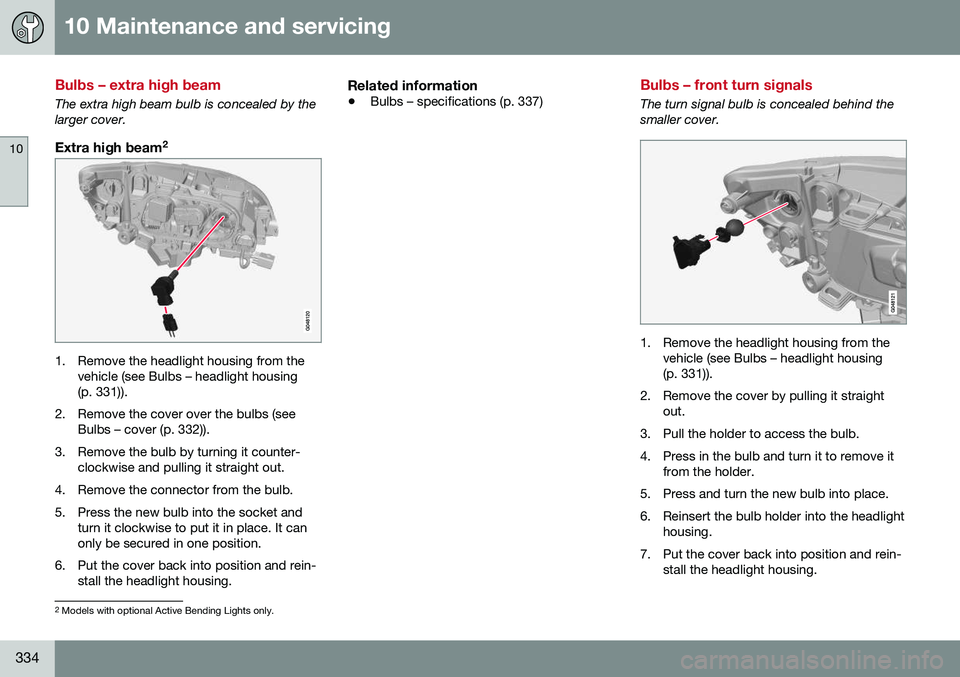
The extra high beam bulb is concealed by the larger cover.
Extra high beam2
1. Remove the headlight housing from the
vehicle (see Bulbs – headlight housing (p. 331)).
2. Remove the cover over the bulbs (see Bulbs – cover (p. 332)).
3. Remove the bulb by turning it counter- clockwise and pulling it straight out.
4. Remove the connector from the bulb.
5. Press the new bulb into the socket and turn it clockwise to put it in place. It can only be secured in one position.
6. Put the cover back into position and rein- stall the headlight housing.
Related information
• Bulbs – specifications (p. 337)
Bulbs – front turn signals
The turn signal bulb is concealed behind the smaller cover.
1. Remove the headlight housing from the
vehicle (see Bulbs – headlight housing (p. 331)).
2. Remove the cover by pulling it straight out.
3. Pull the holder to access the bulb.
4. Press in the bulb and turn it to remove it from the holder.
5. Press and turn the new bulb into place.
6. Reinsert the bulb holder into the headlight housing.
7. Put the cover back into position and rein- stall the headlight housing.
2Models with optional Active Bending Lights only.
Page 337 of 392
10 Maintenance and servicing
10
335
Related information
•Bulbs – specifications (p. 337)
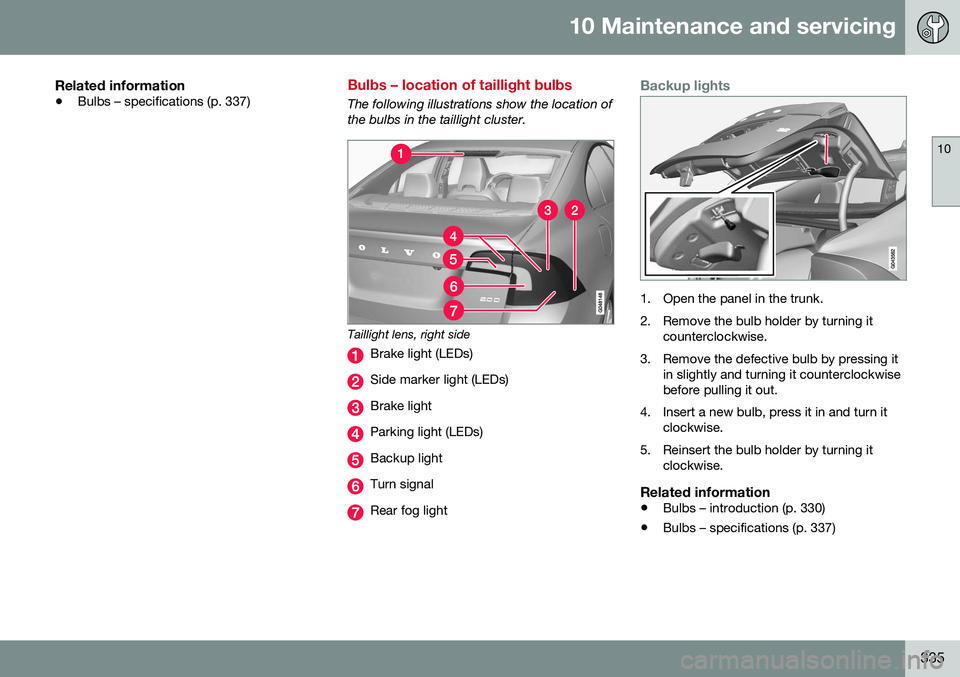
Bulbs – location of taillight bulbs
The following illustrations show the location of the bulbs in the taillight cluster.
Taillight lens, right side
Brake light (LEDs)
Side marker light (LEDs)
Brake light
Parking light (LEDs)
Backup light
Turn signal
Rear fog light
Backup lights
1. Open the panel in the trunk.
2. Remove the bulb holder by turning it
counterclockwise.
3. Remove the defective bulb by pressing it in slightly and turning it counterclockwise before pulling it out.
4. Insert a new bulb, press it in and turn it clockwise.
5. Reinsert the bulb holder by turning it clockwise.
Related information
• Bulbs – introduction (p. 330)
• Bulbs – specifications (p. 337)
Page 338 of 392
10 Maintenance and servicing
10
336
Bulbs – taillight housing
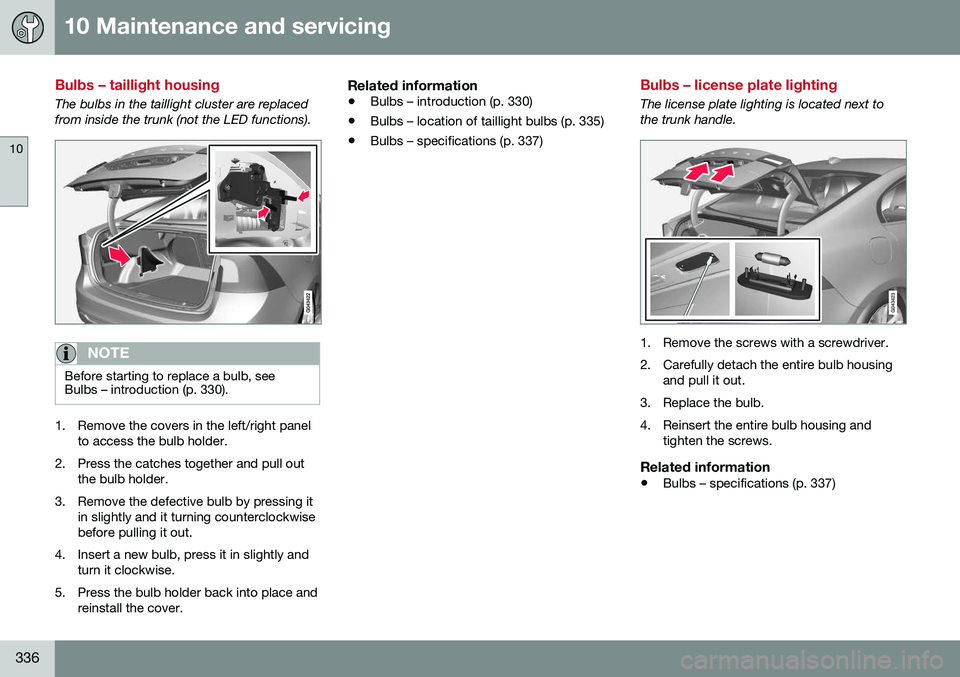
The bulbs in the taillight cluster are replaced from inside the trunk (not the LED functions).
NOTE
Before starting to replace a bulb, see Bulbs – introduction (p. 330).
1. Remove the covers in the left/right panelto access the bulb holder.
2. Press the catches together and pull out the bulb holder.
3. Remove the defective bulb by pressing it in slightly and it turning counterclockwise before pulling it out.
4. Insert a new bulb, press it in slightly and turn it clockwise.
5. Press the bulb holder back into place and reinstall the cover.
Related information
• Bulbs – introduction (p. 330)
• Bulbs – location of taillight bulbs (p. 335)
• Bulbs – specifications (p. 337)
Bulbs – license plate lighting
The license plate lighting is located next to the trunk handle.
1. Remove the screws with a screwdriver.
2. Carefully detach the entire bulb housing
and pull it out.
3. Replace the bulb.
4. Reinsert the entire bulb housing and tighten the screws.
Related information
• Bulbs – specifications (p. 337)
Page 339 of 392
10 Maintenance and servicing
10
}}
* Option/accessory, for more information, see Introduction.337
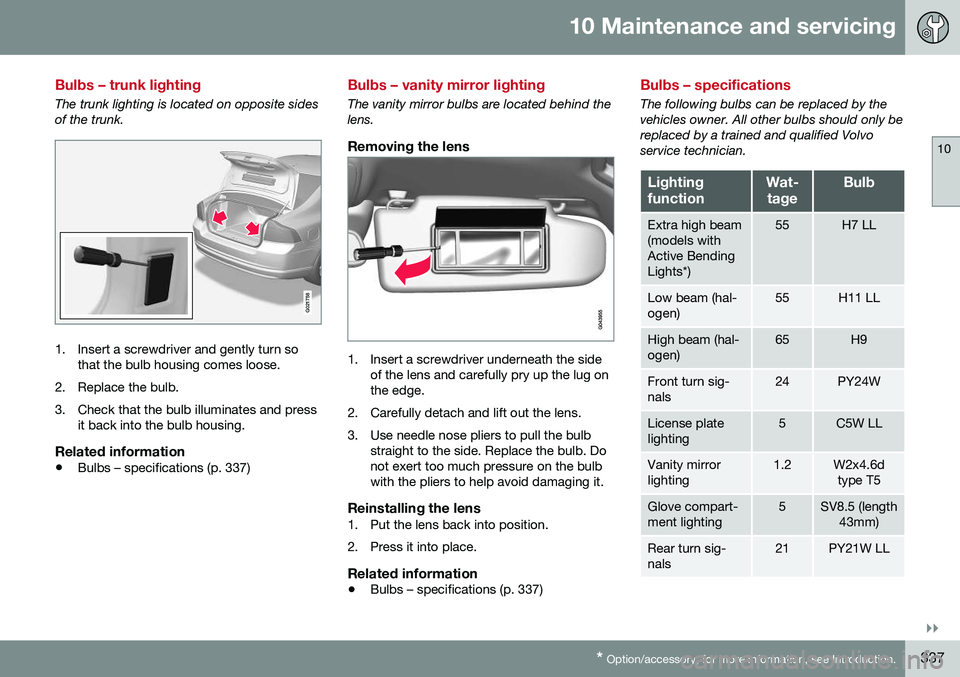
Bulbs – trunk lighting
The trunk lighting is located on opposite sides of the trunk.
G021758
1. Insert a screwdriver and gently turn so
that the bulb housing comes loose.
2. Replace the bulb.
3. Check that the bulb illuminates and press it back into the bulb housing.
Related information
• Bulbs – specifications (p. 337)
Bulbs – vanity mirror lighting
The vanity mirror bulbs are located behind the lens.
Removing the lens
1. Insert a screwdriver underneath the side
of the lens and carefully pry up the lug on the edge.
2. Carefully detach and lift out the lens.
3. Use needle nose pliers to pull the bulb straight to the side. Replace the bulb. Do not exert too much pressure on the bulbwith the pliers to help avoid damaging it.
Reinstalling the lens1. Put the lens back into position.
2. Press it into place.
Related information
• Bulbs – specifications (p. 337)
Bulbs – specifications
The following bulbs can be replaced by the vehicles owner. All other bulbs should only bereplaced by a trained and qualified Volvoservice technician.
Lighting functionWat-
tageBulb
Extra high beam (models withActive BendingLights*)55H7 LL
Low beam (hal- ogen)55H11 LL
High beam (hal- ogen)65H9
Front turn sig- nals24PY24W
License plate lighting5C5W LL
Vanity mirror lighting1.2W2x4.6d type T5
Glove compart- ment lighting5SV8.5 (length 43mm)
Rear turn sig- nals21PY21W LL
Page 340 of 392
||
10 Maintenance and servicing
10
338
Lighting functionWat-tageBulb
Rear fog light21H21W LL
Backup light21H21W LL
Brake light21P21W LL
Trunk lighting10SV8.5 (length 38mm)
Front footwell lighting3W2, 1x9.5dtype T10
NOTE
Please consult a Volvo retailer’s Parts department for the most up-to-date bulbspecifications.
Related information
• Bulbs – introduction (p. 330)
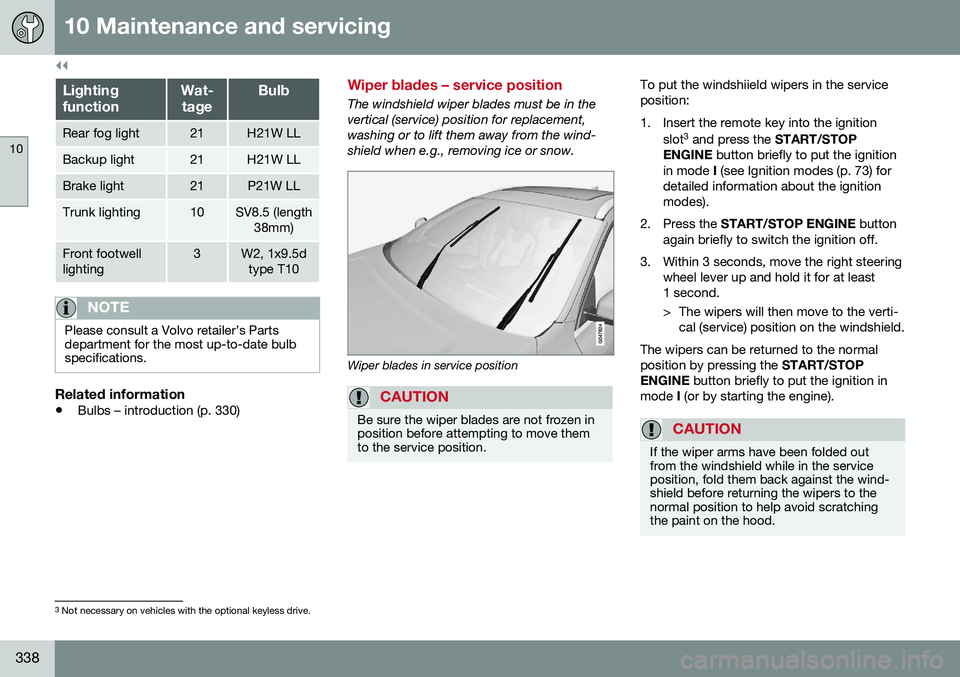
Wiper blades – service position
The windshield wiper blades must be in the vertical (service) position for replacement,washing or to lift them away from the wind-shield when e.g., removing ice or snow.
Wiper blades in service position
CAUTION
Be sure the wiper blades are not frozen in position before attempting to move themto the service position.
To put the windshiield wipers in the service position:
1. Insert the remote key into the ignition
slot3
and press the START/STOP
ENGINE button briefly to put the ignition
in mode I (see Ignition modes (p. 73) for
detailed information about the ignition modes).
2. Press the START/STOP ENGINE button
again briefly to switch the ignition off.
3. Within 3 seconds, move the right steering wheel lever up and hold it for at least1 second.
> The wipers will then move to the verti-cal (service) position on the windshield.
The wipers can be returned to the normal position by pressing the START/STOP
ENGINE button briefly to put the ignition in
mode I (or by starting the engine).
CAUTION
If the wiper arms have been folded out from the windshield while in the serviceposition, fold them back against the wind-shield before returning the wipers to thenormal position to help avoid scratchingthe paint on the hood.
3
Not necessary on vehicles with the optional keyless drive.
Page 342 of 392
||
10 Maintenance and servicing
10
340
With the wipers in the service position, fold out the wiper arm from the wind-shield. Press the button on the wiperblade attachment and pull the wiperblade straight out, parallel with the wiperarm.
Slide in the new wiper blade until it clicks into place.
Check that the blade is securely in place.
4. Press the wipers back against the wind- shield.
To return the wipers from the service position to the normal position, fold the wipers backagainst the windshield and press the START/
STOP ENGINE button briefly to put the igni-
tion in mode I (or start the engine).
CleaningKeeping the windshield and wiper bladesclean helps improve visibility and prolongsthe service life of the wiper blades. Clean thewiper blades with a stiff-bristle brush andlukewarm soap solution or car washing deter-gent.
Related information
• Engine compartment – washer fluid (p. 340)
• Wiper blades – service position (p. 338)
Engine compartment – washer fluid
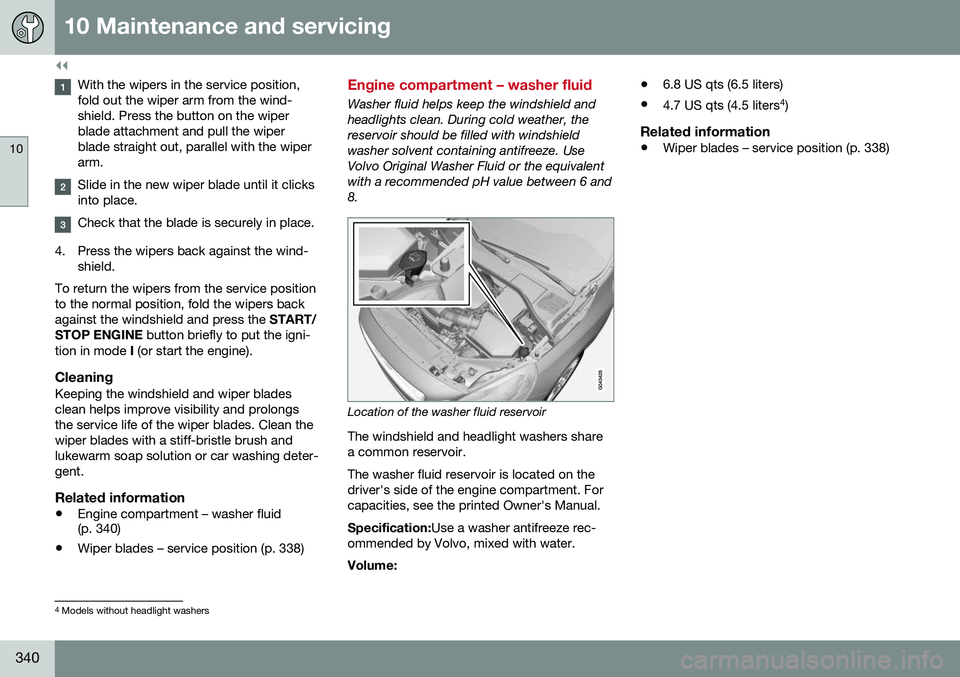
Washer fluid helps keep the windshield and headlights clean. During cold weather, thereservoir should be filled with windshieldwasher solvent containing antifreeze. UseVolvo Original Washer Fluid or the equivalentwith a recommended pH value between 6 and8.
Location of the washer fluid reservoir
The windshield and headlight washers share a common reservoir. The washer fluid reservoir is located on the driver's side of the engine compartment. Forcapacities, see the printed Owner's Manual. Specification: Use a washer antifreeze rec-
ommended by Volvo, mixed with water. Volume: •
6.8 US qts (6.5 liters)
• 4.7 US qts (4.5 liters 4
)
Related information
• Wiper blades – service position (p. 338)
4
Models without headlight washers
Page 344 of 392
||
10 Maintenance and servicing
10
342
CAUTION
The infotainment system's energy-saving feature may not function correctly or at all,and/or a message may be displayed if abattery charger or jumper cables are notconnected properly.
• The negative terminal on the battery must
never be used to connect a
jumper cable or a battery charger.Only the ground point on the chassismay be used.
See Jump starting (p. 249) for an illustra- tion and additional information.
WARNING
• Never expose the battery to open flame or electric spark.
• Do not smoke near the battery.
• Battery fluid contains sulfuric acid. Donot allow battery fluid to contact eyes,skin, fabrics or painted surfaces. Ifcontact occurs, flush the affected areaimmediately with water. Obtain medi-cal help immediately if eyes are affec-ted.
NOTE
The life of the battery is shortened if it becomes discharged repeatedly.
Related information
•
Battery – changing (p. 343)
• Battery – maintenance (p. 342)
• Battery – symbols (p. 341)
Battery – maintenance
Proper battery maintenance can help prolong its service life.
Maintenance
• Use a screw driver to open the caps or cover and a flashlight to inspect the level.
• If necessary, add distilled water. The levelshould never be above the indicator.
• The fluid level should be checked if thebattery has been recharged.
• After inspection, be sure the cap overeach battery cell or the cover is securelyin place.
• Check that the battery cables are cor-rectly connected and properly tightened.
• Never disconnect the battery when theengine is running, or when the key is inthe ignition. This could damage the vehi-cle's electrical system.
• The battery should be disconnected fromthe vehicle when a battery charger isused directly on the battery.
• To help keep the battery in good condi-tion, the vehicle should be driven for atleast 15 minutes a week or connected toa charger with an automatic chargingfunction.
• If the battery is fully discharged a numberof times, this may shorten its service life.Keeping the battery fully charged helpsprolong its service life.