alarm VOLVO S60 2016 Owner´s Manual
[x] Cancel search | Manufacturer: VOLVO, Model Year: 2016, Model line: S60, Model: VOLVO S60 2016Pages: 392, PDF Size: 10.04 MB
Page 157 of 392
06 Locks and alarm
06
}}
155
MY CAR
and going to
Car settingsLock
settings
Automatic door locking.
Related information
• Locking/unlocking – from the outside (p. 152)
• Alarm – general information (p. 157)
• Remote key – functions (p. 142)
Locking/unlocking – glove compartment
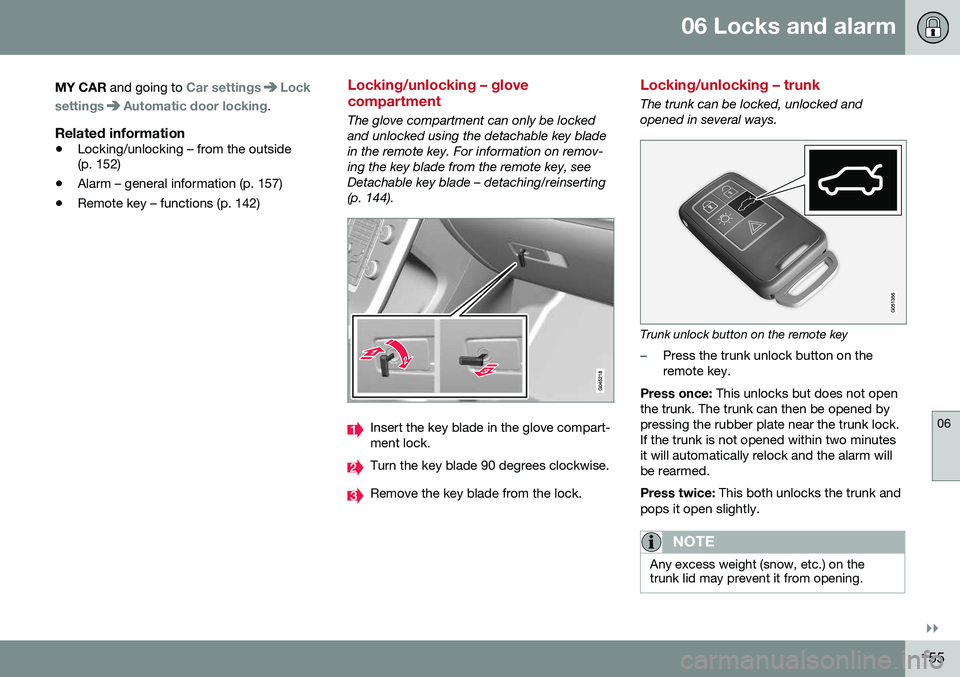
The glove compartment can only be locked and unlocked using the detachable key bladein the remote key. For information on remov-ing the key blade from the remote key, seeDetachable key blade – detaching/reinserting(p. 144).
Insert the key blade in the glove compart- ment lock.
Turn the key blade 90 degrees clockwise.
Remove the key blade from the lock.
Locking/unlocking – trunk
The trunk can be locked, unlocked and opened in several ways.
Trunk unlock button on the remote key
–Press the trunk unlock button on the remote key.
Press once: This unlocks but does not open
the trunk. The trunk can then be opened bypressing the rubber plate near the trunk lock.If the trunk is not opened within two minutesit will automatically relock and the alarm willbe rearmed. Press twice: This both unlocks the trunk and
pops it open slightly.
NOTE
Any excess weight (snow, etc.) on the trunk lid may prevent it from opening.
Page 158 of 392
||
06 Locks and alarm
06
156
The alarm indicator (p. 158) light on thedashboard will stop flashing to indicate that the alarm is not monitoring the entire vehicle. When the trunk is closed again (which has to be done manually), it will have to be relockedand the alarm rearmed by pressing the lockbutton on the remote key.
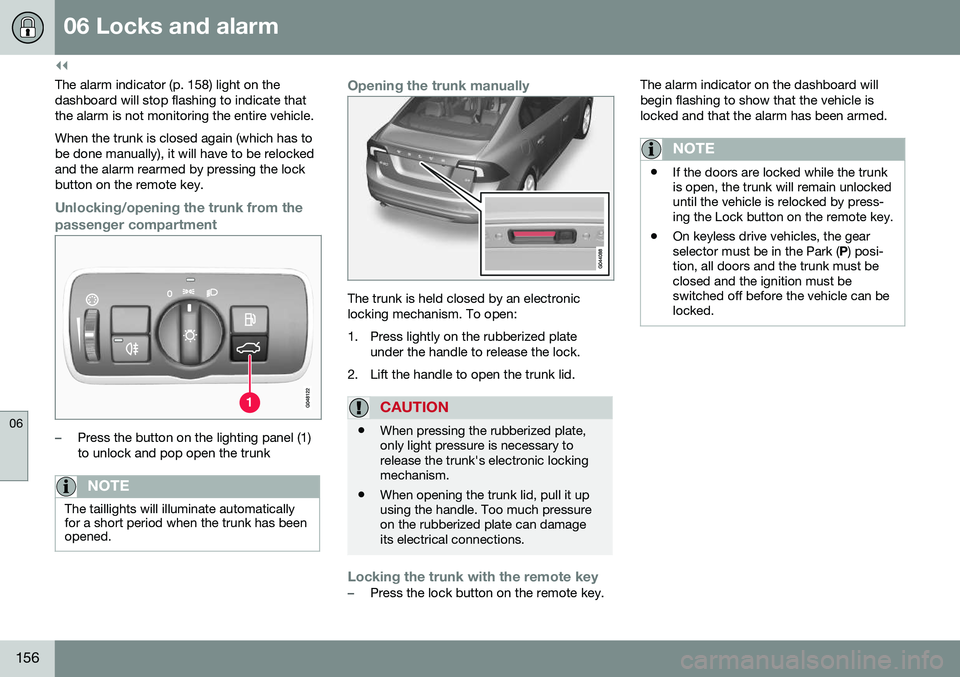
Unlocking/opening the trunk from the
passenger compartment
–Press the button on the lighting panel (1) to unlock and pop open the trunk
NOTE
The taillights will illuminate automatically for a short period when the trunk has beenopened.
Opening the trunk manually
The trunk is held closed by an electronic locking mechanism. To open:
1. Press lightly on the rubberized plate under the handle to release the lock.
2. Lift the handle to open the trunk lid.
CAUTION
• When pressing the rubberized plate, only light pressure is necessary torelease the trunk's electronic lockingmechanism.
• When opening the trunk lid, pull it upusing the handle. Too much pressureon the rubberized plate can damageits electrical connections.
Locking the trunk with the remote key–Press the lock button on the remote key. The alarm indicator on the dashboard will begin flashing to show that the vehicle islocked and that the alarm has been armed.
NOTE
•
If the doors are locked while the trunk is open, the trunk will remain unlockeduntil the vehicle is relocked by press-ing the Lock button on the remote key.
• On keyless drive vehicles, the gearselector must be in the Park (
P) posi-
tion, all doors and the trunk must beclosed and the ignition must beswitched off before the vehicle can belocked.
Page 159 of 392
06 Locks and alarm
06
}}
157
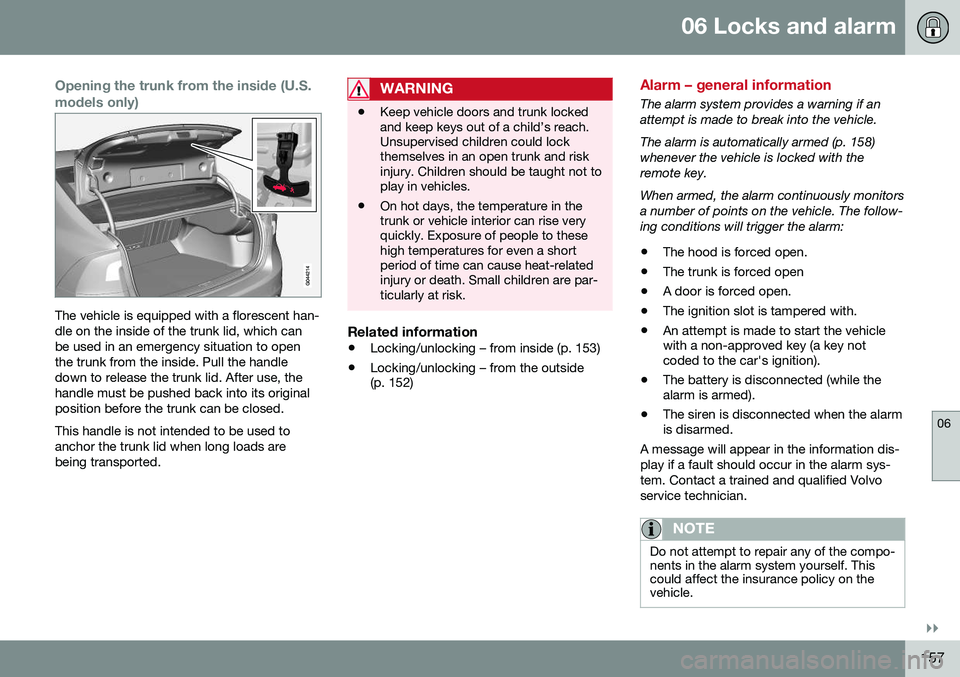
Opening the trunk from the inside (U.S. models only)
The vehicle is equipped with a florescent han- dle on the inside of the trunk lid, which canbe used in an emergency situation to openthe trunk from the inside. Pull the handledown to release the trunk lid. After use, thehandle must be pushed back into its originalposition before the trunk can be closed. This handle is not intended to be used to anchor the trunk lid when long loads arebeing transported.
WARNING
•Keep vehicle doors and trunk locked and keep keys out of a child’s reach.Unsupervised children could lockthemselves in an open trunk and riskinjury. Children should be taught not toplay in vehicles.
• On hot days, the temperature in thetrunk or vehicle interior can rise veryquickly. Exposure of people to thesehigh temperatures for even a shortperiod of time can cause heat-relatedinjury or death. Small children are par-ticularly at risk.
Related information
•
Locking/unlocking – from inside (p. 153)
• Locking/unlocking – from the outside (p. 152)
Alarm – general information
The alarm system provides a warning if an attempt is made to break into the vehicle. The alarm is automatically armed (p. 158) whenever the vehicle is locked with theremote key. When armed, the alarm continuously monitors a number of points on the vehicle. The follow-ing conditions will trigger the alarm:
• The hood is forced open.
• The trunk is forced open
• A door is forced open.
• The ignition slot is tampered with.
• An attempt is made to start the vehicle with a non-approved key (a key notcoded to the car's ignition).
• The battery is disconnected (while thealarm is armed).
• The siren is disconnected when the alarmis disarmed.
A message will appear in the information dis- play if a fault should occur in the alarm sys-tem. Contact a trained and qualified Volvoservice technician.
NOTE
Do not attempt to repair any of the compo- nents in the alarm system yourself. Thiscould affect the insurance policy on thevehicle.
Page 160 of 392
||
06 Locks and alarm
06
158
Related information
•Alarm – turning off (p. 159)
• Alarm signal (p. 159)
• Alarm indicator (p. 158)
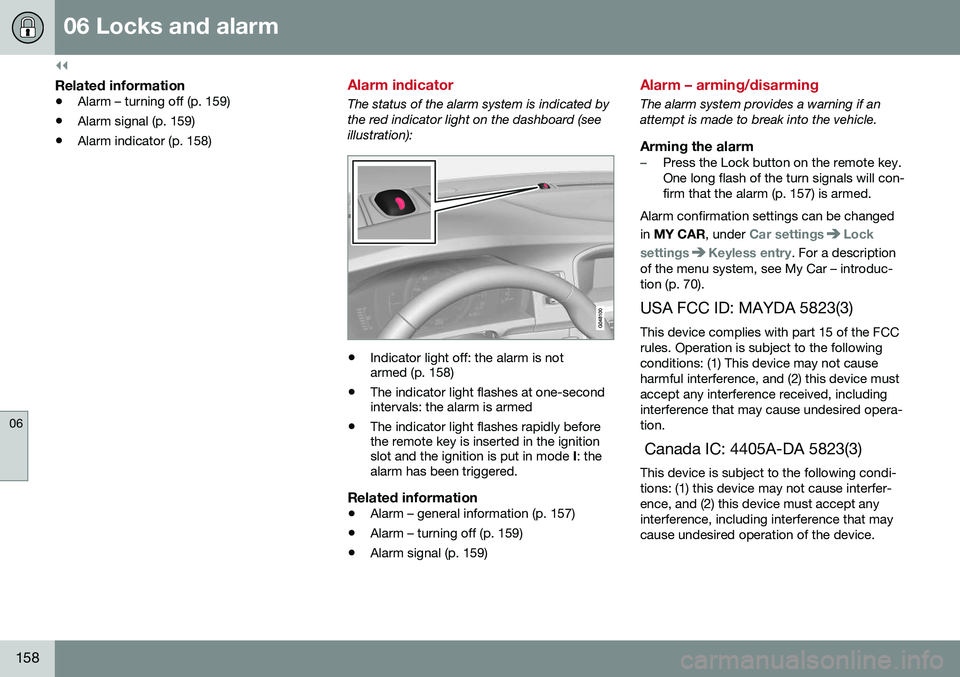
Alarm indicator
The status of the alarm system is indicated by the red indicator light on the dashboard (seeillustration):
•Indicator light off: the alarm is not armed (p. 158)
• The indicator light flashes at one-secondintervals: the alarm is armed
• The indicator light flashes rapidly beforethe remote key is inserted in the ignitionslot and the ignition is put in mode
I: the
alarm has been triggered.
Related information
• Alarm – general information (p. 157)
• Alarm – turning off (p. 159)
• Alarm signal (p. 159)
Alarm – arming/disarming
The alarm system provides a warning if an attempt is made to break into the vehicle.
Arming the alarm–Press the Lock button on the remote key. One long flash of the turn signals will con-firm that the alarm (p. 157) is armed.
Alarm confirmation settings can be changed in MY CAR , under
Car settingsLock
settings
Keyless entry. For a description
of the menu system, see My Car – introduc- tion (p. 70).
USA FCC ID: MAYDA 5823(3) This device complies with part 15 of the FCCrules. Operation is subject to the followingconditions: (1) This device may not causeharmful interference, and (2) this device mustaccept any interference received, includinginterference that may cause undesired opera-tion. Canada IC: 4405A-DA 5823(3) This device is subject to the following condi- tions: (1) this device may not cause interfer-ence, and (2) this device must accept anyinterference, including interference that maycause undesired operation of the device.
Page 161 of 392
06 Locks and alarm
06
159
Disarming the alarm–Press the Unlock button on the remote key.
> Two short flashes from the car's direc-tion indicators confirm that the alarm has been deactivated and that alldoors are unlocked.
Related information
• Alarm indicator (p. 158)
• Alarm signal (p. 159)
• Alarm – turning off (p. 159)
• Alarm-related functions (p. 160)
Alarm signal
An audible (p. 157) signal is given by a battery powered siren. The alarm cycle lasts for30 seconds. The visual alarm signal is given by flashing all turn signals for approximately 5 minutes oruntil the alarm is turned off.
Related information
•Alarm indicator (p. 158)
• Alarm – arming/disarming (p. 158)
• Alarm – turning off (p. 159)
Alarm – turning off
The alarm system provides a warning if an attempt is made to break into the vehicle. If the alarm is sounding, it can be stopped by pressing the Unlock button on the remote keyor by inserting the remote key in the ignitionslot. Two short flashes from the car's turn sig-nals confirm that the alarm has been turnedoff.
Related information
• Alarm indicator (p. 158)
• Alarm – arming/disarming (p. 158)
• Remote key – replacing the battery (p. 146)
Page 162 of 392
06 Locks and alarm
06
160
Alarm-related functions
The following is general information regarding the alarm system in your vehicle.
Automatic re-armingIf the doors are unlocked, the locks will auto-matically re-engage (re-lock) and the alarmwill re-arm after 2 minutes unless a door orthe trunk has been opened.
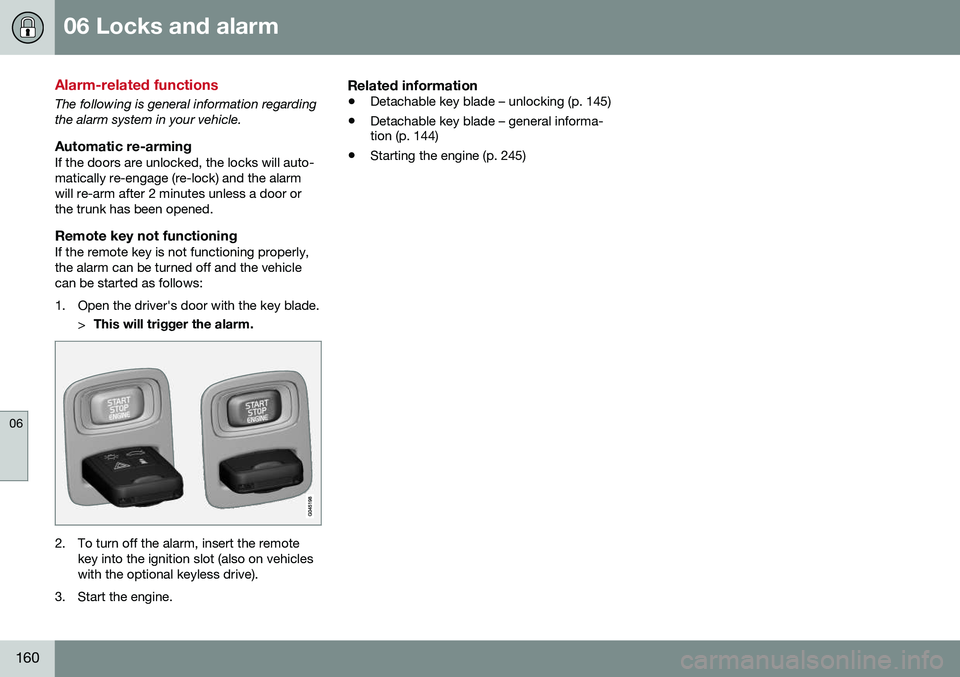
Remote key not functioningIf the remote key is not functioning properly,the alarm can be turned off and the vehiclecan be started as follows:
1. Open the driver's door with the key blade.>This will trigger the alarm.
2. To turn off the alarm, insert the remote
key into the ignition slot (also on vehicles with the optional keyless drive).
3. Start the engine.
Related information
• Detachable key blade – unlocking (p. 145)
• Detachable key blade – general informa- tion (p. 144)
• Starting the engine (p. 245)
Page 218 of 392
07 Driver support
07
216
Lane Departure Warning (LDW) – operation
Operation and function
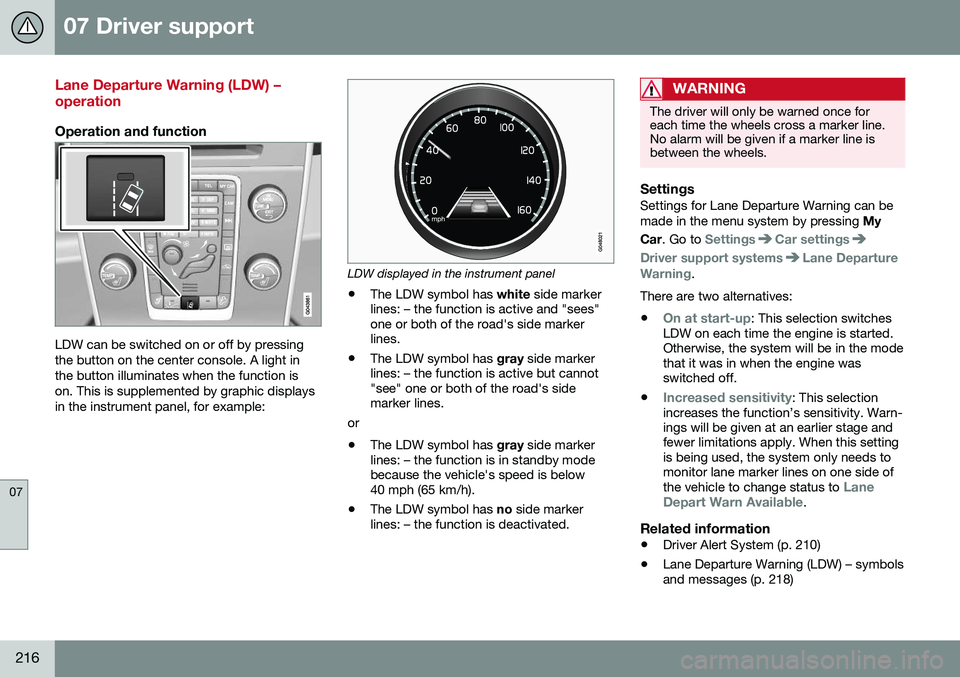
LDW can be switched on or off by pressing the button on the center console. A light inthe button illuminates when the function ison. This is supplemented by graphic displaysin the instrument panel, for example:
LDW displayed in the instrument panel
• The LDW symbol has
white side marker
lines: – the function is active and "sees" one or both of the road's side markerlines.
• The LDW symbol has
gray side marker
lines: – the function is active but cannot"see" one or both of the road's sidemarker lines.
or
• The LDW symbol has
gray side marker
lines: – the function is in standby modebecause the vehicle's speed is below40 mph (65 km/h).
• The LDW symbol has
no side marker
lines: – the function is deactivated.
WARNING
The driver will only be warned once for each time the wheels cross a marker line.No alarm will be given if a marker line isbetween the wheels.
SettingsSettings for Lane Departure Warning can be made in the menu system by pressing My
Car . Go to
SettingsCar settings
Driver support systemsLane Departure
Warning.
There are two alternatives:
•
On at start-up: This selection switches
LDW on each time the engine is started. Otherwise, the system will be in the modethat it was in when the engine wasswitched off.
•
Increased sensitivity: This selection
increases the function’s sensitivity. Warn- ings will be given at an earlier stage andfewer limitations apply. When this settingis being used, the system only needs tomonitor lane marker lines on one side of the vehicle to change status to
Lane
Depart Warn Available.
Related information
• Driver Alert System (p. 210)
• Lane Departure Warning (LDW) – symbols and messages (p. 218)
Page 250 of 392
08 Starting and driving
08
248* Option/accessory, for more information, see Introduction.
Engine Remote Start (ERS)* – starting the engine
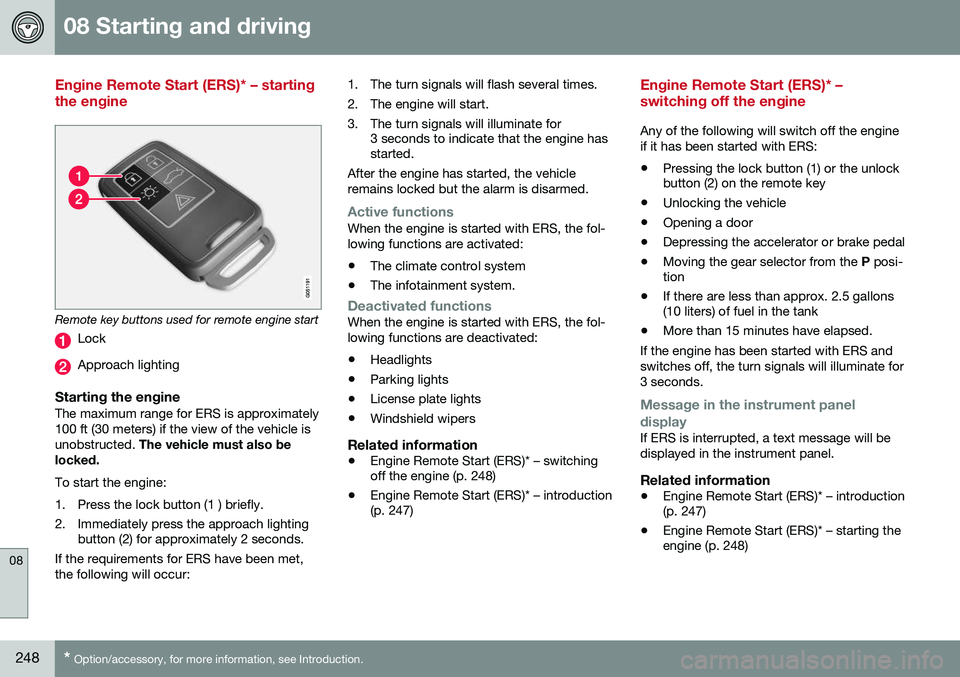
Remote key buttons used for remote engine start
Lock
Approach lighting
Starting the engineThe maximum range for ERS is approximately 100 ft (30 meters) if the view of the vehicle isunobstructed. The vehicle must also be
locked. To start the engine:
1. Press the lock button (1 ) briefly.
2. Immediately press the approach lighting button (2) for approximately 2 seconds.
If the requirements for ERS have been met, the following will occur: 1. The turn signals will flash several times.
2. The engine will start.
3. The turn signals will illuminate for
3 seconds to indicate that the engine has started.
After the engine has started, the vehicle remains locked but the alarm is disarmed.
Active functionsWhen the engine is started with ERS, the fol- lowing functions are activated: • The climate control system
• The infotainment system.
Deactivated functionsWhen the engine is started with ERS, the fol- lowing functions are deactivated: •Headlights
• Parking lights
• License plate lights
• Windshield wipers
Related information
•
Engine Remote Start (ERS)* – switching off the engine (p. 248)
• Engine Remote Start (ERS)* – introduction(p. 247)
Engine Remote Start (ERS)* – switching off the engine
Any of the following will switch off the engine if it has been started with ERS:
• Pressing the lock button (1) or the unlock button (2) on the remote key
• Unlocking the vehicle
• Opening a door
• Depressing the accelerator or brake pedal
• Moving the gear selector from the
P posi-
tion
• If there are less than approx. 2.5 gallons(10 liters) of fuel in the tank
• More than 15 minutes have elapsed.
If the engine has been started with ERS and switches off, the turn signals will illuminate for3 seconds.
Message in the instrument panel
display
If ERS is interrupted, a text message will be displayed in the instrument panel.
Related information
• Engine Remote Start (ERS)* – introduction (p. 247)
• Engine Remote Start (ERS)* – starting theengine (p. 248)
Page 353 of 392
10 Maintenance and servicing
10
}}
* Option/accessory, for more information, see Introduction.351
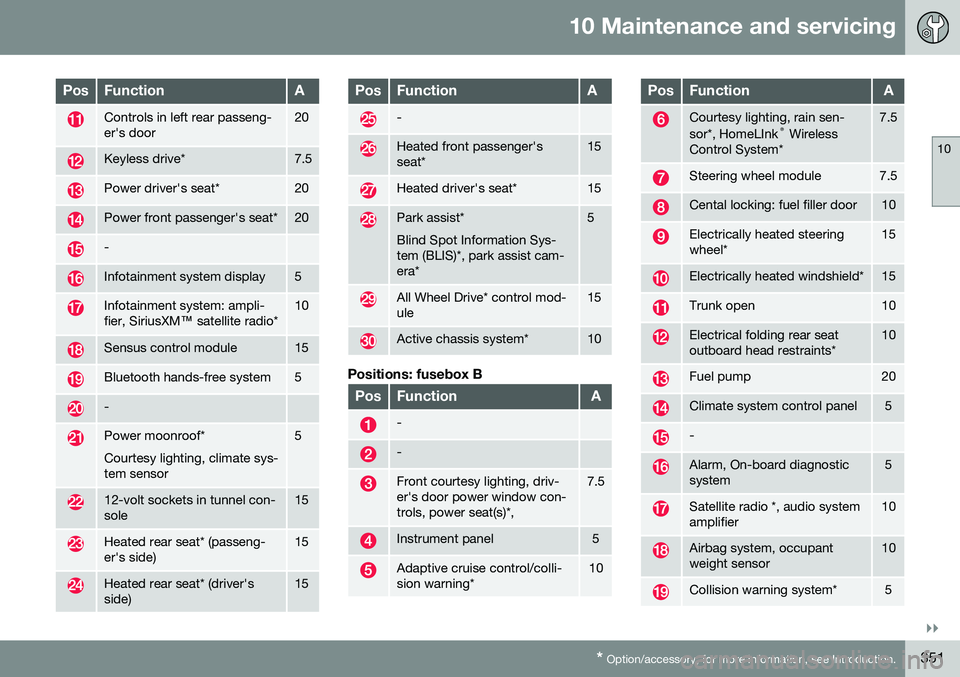
PosFunctionA
Controls in left rear passeng- er's door20
Keyless drive*7.5
Power driver's seat*20
Power front passenger's seat*20
-
Infotainment system display5
Infotainment system: ampli- fier, SiriusXM ™ satellite radio*10
Sensus control module15
Bluetooth hands-free system5
-
Power moonroof* Courtesy lighting, climate sys- tem sensor5
12-volt sockets in tunnel con- sole15
Heated rear seat* (passeng- er's side)15
Heated rear seat* (driver's side)15
PosFunctionA
-
Heated front passenger's seat*15
Heated driver's seat*15
Park assist* Blind Spot Information Sys- tem (BLIS)*, park assist cam-era*5
All Wheel Drive* control mod- ule15
Active chassis system*10
Positions: fusebox B
PosFunctionA
-
-
Front courtesy lighting, driv- er's door power window con-trols, power seat(s)*,7.5
Instrument panel5
Adaptive cruise control/colli- sion warning*10
PosFunctionA
Courtesy lighting, rain sen- sor*, HomeLInk ®
Wireless
Control System*7.5
Steering wheel module7.5
Cental locking: fuel filler door10
Electrically heated steering wheel*15
Electrically heated windshield*15
Trunk open10
Electrical folding rear seat outboard head restraints*10
Fuel pump20
Climate system control panel5
-
Alarm, On-board diagnostic system5
Satellite radio *, audio system amplifier10
Airbag system, occupant weight sensor10
Collision warning system*5
Page 382 of 392
12 Index
12
380
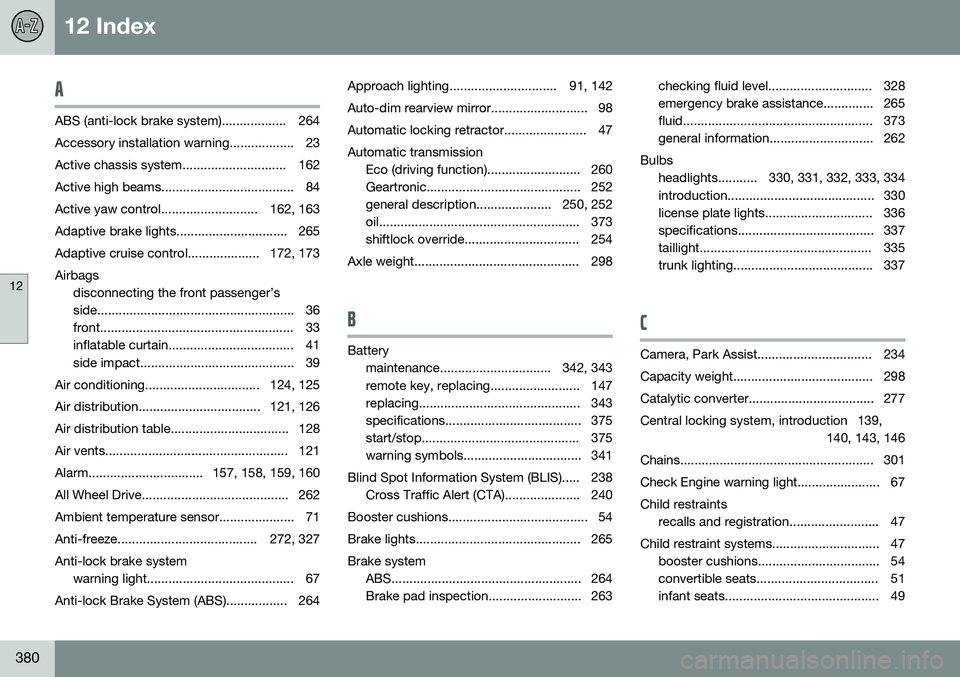
A
ABS (anti-lock brake system).................. 264
Accessory installation warning.................. 23
Active chassis system............................. 162
Active high beams..................................... 84Active yaw control........................... 162, 163
Adaptive brake lights............................... 265
Adaptive cruise control.................... 172, 173Airbags disconnecting the front passenger’s
side....................................................... 36
front...................................................... 33
inflatable curtain................................... 41
side impact........................................... 39
Air conditioning................................ 124, 125
Air distribution.................................. 121, 126
Air distribution table................................. 128
Air vents................................................... 121
Alarm................................ 157, 158, 159, 160
All Wheel Drive......................................... 262
Ambient temperature sensor..................... 71
Anti-freeze....................................... 272, 327Anti-lock brake system warning light......................................... 67
Anti-lock Brake System (ABS)................. 264 Approach lighting.............................. 91, 142
Auto-dim rearview mirror........................... 98
Automatic locking retractor....................... 47Automatic transmission
Eco (driving function).......................... 260
Geartronic........................................... 252
general description..................... 250, 252
oil........................................................ 373
shiftlock override................................ 254
Axle weight.............................................. 298
B
Battery maintenance............................... 342, 343
remote key, replacing......................... 147
replacing............................................. 343
specifications...................................... 375
start/stop............................................ 375
warning symbols................................. 341
Blind Spot Information System (BLIS)..... 238 Cross Traffic Alert (CTA)..................... 240
Booster cushions....................................... 54
Brake lights.............................................. 265Brake system ABS..................................................... 264
Brake pad inspection.......................... 263 checking fluid level............................. 328
emergency brake assistance.............. 265
fluid..................................................... 373
general information............................. 262
Bulbs headlights........... 330, 331, 332, 333, 334
introduction......................................... 330
license plate lights.............................. 336
specifications...................................... 337
taillight................................................ 335
trunk lighting....................................... 337
C
Camera, Park Assist................................ 234
Capacity weight....................................... 298
Catalytic converter................................... 277
Central locking system, introduction 139, 140, 143, 146
Chains...................................................... 301
Check Engine warning light....................... 67Child restraints recalls and registration......................... 47
Child restraint systems.............................. 47 booster cushions.................................. 54
convertible seats.................................. 51
infant seats........................................... 49