trunk lock VOLVO S60 2016 Owner´s Manual
[x] Cancel search | Manufacturer: VOLVO, Model Year: 2016, Model line: S60, Model: VOLVO S60 2016Pages: 392, PDF Size: 10.04 MB
Page 156 of 392
||
06 Locks and alarm
06
154
UnlockingThe vehicle can be unlocked from inside the vehicle in two ways:• By pressing the unlock button
.
• The
front doors can be unlocked and
opened by pulling the door handle once. The rear doors can be unlocked by pull-
ing the door handle once and opened bypulling the handle again.
Locking
• Press the lock button after the front
doors have been closed.
• Press the lock button
: all of the
doors that are closed will lock.
• Each door can be locked individually with the lock button on the respective doors.The door must be closed first.
Alternative locking when parkingThe central locking button on the driver's door can also be used to lock the vehiclewhen you leave it. To do so:
1. Open the door.
2. Press the lock section of the button.
3. Close the door. This will lock the vehicle
completely and arm the alarm.
NOTE
Please be aware that locking the vehicle in this way makes it possible to lock theremote key in the passenger compartment.To help avoid this, lock the vehicle fromthe outside by pressing the lock button onthe remote key. If the vehicle is locked using the central locking button, be sure that the remote keyis in your possession before closing thedoor.
Indicator light in the lock buttonsThere are two versions of the central locking system that affect the indicator light in thedriver's door central locking button. If only the driver's door has a central locking
button:
• If the light is on, this indicates that all of the doors are locked.
If there are central locking buttons in both
front doors and electric lock buttons in the rear side doors: • If a light is on in one of the buttons, this means that only that door is locked.When the lights are on in all of the but-tons, all of the doors are locked.
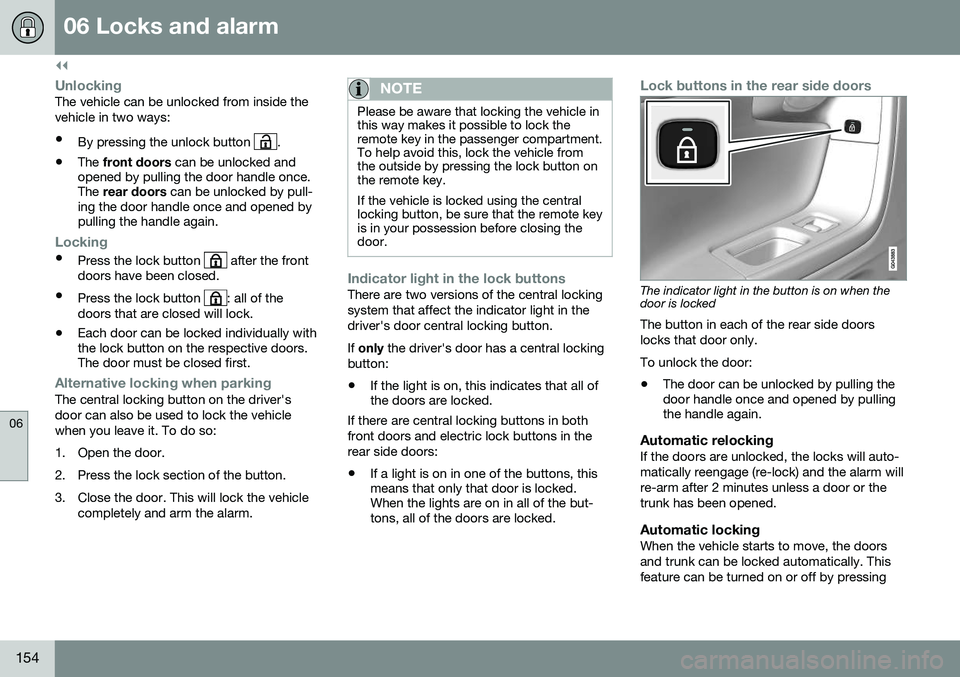
Lock buttons in the rear side doors
The indicator light in the button is on when the door is locked
The button in each of the rear side doors locks that door only. To unlock the door:
• The door can be unlocked by pulling the door handle once and opened by pullingthe handle again.
Automatic relockingIf the doors are unlocked, the locks will auto- matically reengage (re-lock) and the alarm willre-arm after 2 minutes unless a door or thetrunk has been opened.
Automatic lockingWhen the vehicle starts to move, the doorsand trunk can be locked automatically. Thisfeature can be turned on or off by pressing
Page 157 of 392
06 Locks and alarm
06
}}
155
MY CAR
and going to
Car settingsLock
settings
Automatic door locking.
Related information
• Locking/unlocking – from the outside (p. 152)
• Alarm – general information (p. 157)
• Remote key – functions (p. 142)
Locking/unlocking – glove compartment
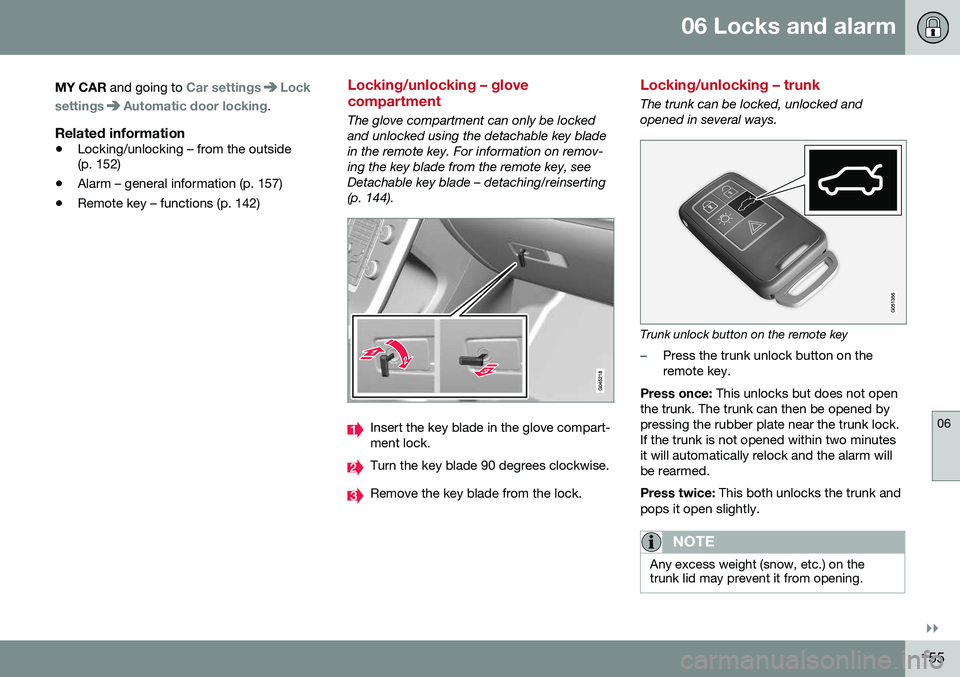
The glove compartment can only be locked and unlocked using the detachable key bladein the remote key. For information on remov-ing the key blade from the remote key, seeDetachable key blade – detaching/reinserting(p. 144).
Insert the key blade in the glove compart- ment lock.
Turn the key blade 90 degrees clockwise.
Remove the key blade from the lock.
Locking/unlocking – trunk
The trunk can be locked, unlocked and opened in several ways.
Trunk unlock button on the remote key
–Press the trunk unlock button on the remote key.
Press once: This unlocks but does not open
the trunk. The trunk can then be opened bypressing the rubber plate near the trunk lock.If the trunk is not opened within two minutesit will automatically relock and the alarm willbe rearmed. Press twice: This both unlocks the trunk and
pops it open slightly.
NOTE
Any excess weight (snow, etc.) on the trunk lid may prevent it from opening.
Page 158 of 392
||
06 Locks and alarm
06
156
The alarm indicator (p. 158) light on thedashboard will stop flashing to indicate that the alarm is not monitoring the entire vehicle. When the trunk is closed again (which has to be done manually), it will have to be relockedand the alarm rearmed by pressing the lockbutton on the remote key.
Unlocking/opening the trunk from the
passenger compartment
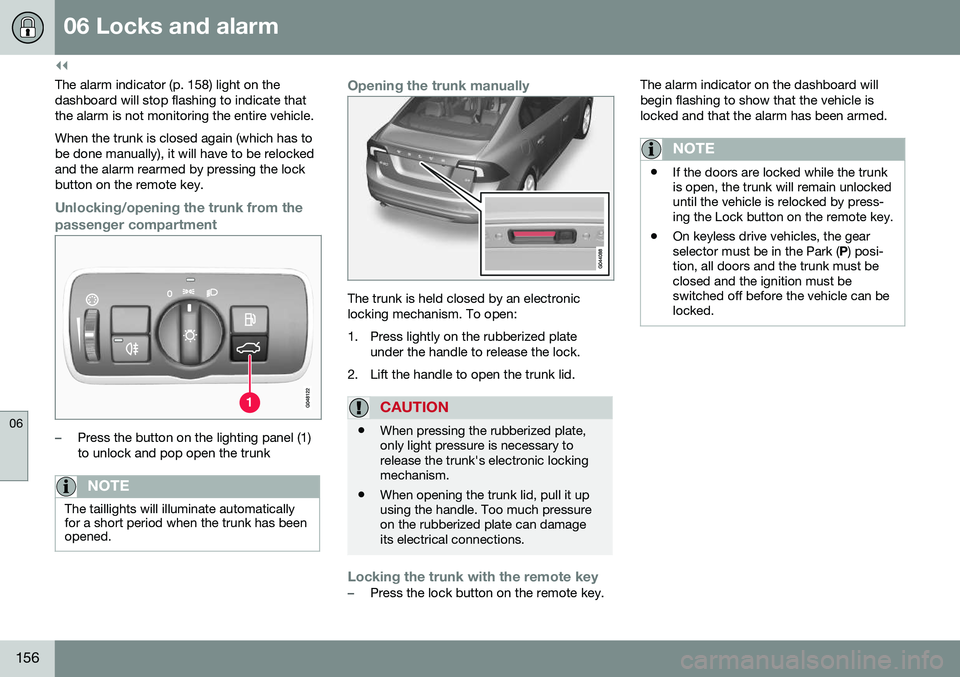
–Press the button on the lighting panel (1) to unlock and pop open the trunk
NOTE
The taillights will illuminate automatically for a short period when the trunk has beenopened.
Opening the trunk manually
The trunk is held closed by an electronic locking mechanism. To open:
1. Press lightly on the rubberized plate under the handle to release the lock.
2. Lift the handle to open the trunk lid.
CAUTION
• When pressing the rubberized plate, only light pressure is necessary torelease the trunk's electronic lockingmechanism.
• When opening the trunk lid, pull it upusing the handle. Too much pressureon the rubberized plate can damageits electrical connections.
Locking the trunk with the remote key–Press the lock button on the remote key. The alarm indicator on the dashboard will begin flashing to show that the vehicle islocked and that the alarm has been armed.
NOTE
•
If the doors are locked while the trunk is open, the trunk will remain unlockeduntil the vehicle is relocked by press-ing the Lock button on the remote key.
• On keyless drive vehicles, the gearselector must be in the Park (
P) posi-
tion, all doors and the trunk must beclosed and the ignition must beswitched off before the vehicle can belocked.
Page 159 of 392
06 Locks and alarm
06
}}
157
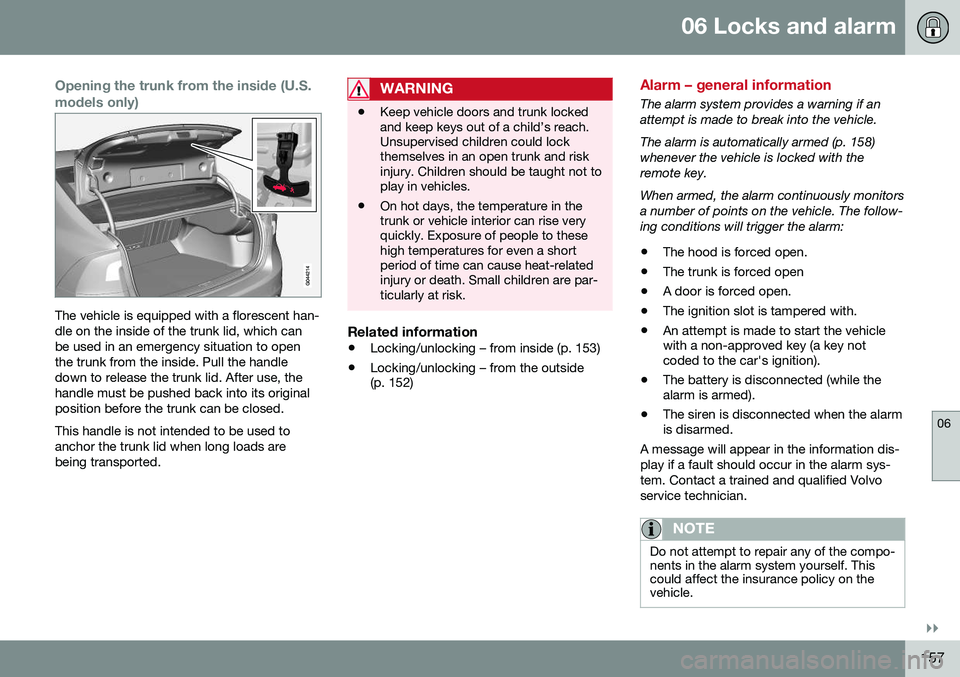
Opening the trunk from the inside (U.S. models only)
The vehicle is equipped with a florescent han- dle on the inside of the trunk lid, which canbe used in an emergency situation to openthe trunk from the inside. Pull the handledown to release the trunk lid. After use, thehandle must be pushed back into its originalposition before the trunk can be closed. This handle is not intended to be used to anchor the trunk lid when long loads arebeing transported.
WARNING
•Keep vehicle doors and trunk locked and keep keys out of a child’s reach.Unsupervised children could lockthemselves in an open trunk and riskinjury. Children should be taught not toplay in vehicles.
• On hot days, the temperature in thetrunk or vehicle interior can rise veryquickly. Exposure of people to thesehigh temperatures for even a shortperiod of time can cause heat-relatedinjury or death. Small children are par-ticularly at risk.
Related information
•
Locking/unlocking – from inside (p. 153)
• Locking/unlocking – from the outside (p. 152)
Alarm – general information
The alarm system provides a warning if an attempt is made to break into the vehicle. The alarm is automatically armed (p. 158) whenever the vehicle is locked with theremote key. When armed, the alarm continuously monitors a number of points on the vehicle. The follow-ing conditions will trigger the alarm:
• The hood is forced open.
• The trunk is forced open
• A door is forced open.
• The ignition slot is tampered with.
• An attempt is made to start the vehicle with a non-approved key (a key notcoded to the car's ignition).
• The battery is disconnected (while thealarm is armed).
• The siren is disconnected when the alarmis disarmed.
A message will appear in the information dis- play if a fault should occur in the alarm sys-tem. Contact a trained and qualified Volvoservice technician.
NOTE
Do not attempt to repair any of the compo- nents in the alarm system yourself. Thiscould affect the insurance policy on thevehicle.
Page 162 of 392
06 Locks and alarm
06
160
Alarm-related functions
The following is general information regarding the alarm system in your vehicle.
Automatic re-armingIf the doors are unlocked, the locks will auto-matically re-engage (re-lock) and the alarmwill re-arm after 2 minutes unless a door orthe trunk has been opened.
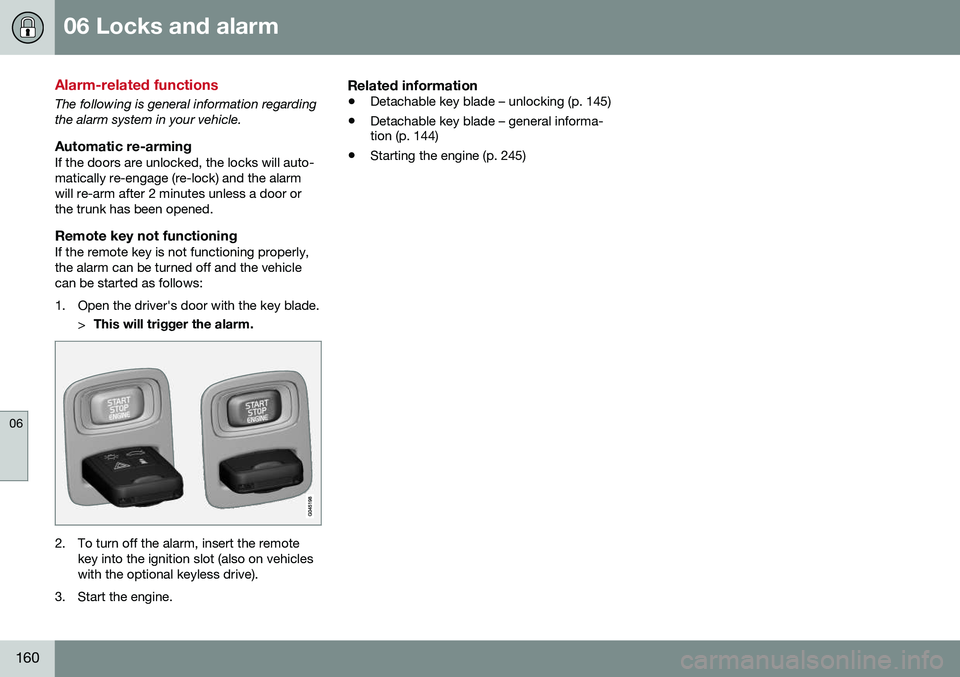
Remote key not functioningIf the remote key is not functioning properly,the alarm can be turned off and the vehiclecan be started as follows:
1. Open the driver's door with the key blade.>This will trigger the alarm.
2. To turn off the alarm, insert the remote
key into the ignition slot (also on vehicles with the optional keyless drive).
3. Start the engine.
Related information
• Detachable key blade – unlocking (p. 145)
• Detachable key blade – general informa- tion (p. 144)
• Starting the engine (p. 245)
Page 277 of 392
08 Starting and driving
08
}}
275
WARNING
Never carry a cell phone that is switched
on while refueling your vehicle. If the
phone rings, this may cause a spark that could ignite gasoline fumes, resulting infire and injury.
WARNING
Carbon monoxide is a poisonous, color- less, and odorless gas. It is present in allexhaust gases. If you ever smell exhaustfumes inside the vehicle, make sure thepassenger compartment is ventilated, andimmediately return the vehicle to a trainedand qualified Volvo service technician forcorrection.
Related information
• Refueling – fuel requirements (p. 273)
Refueling – opening/closing fuel filler door
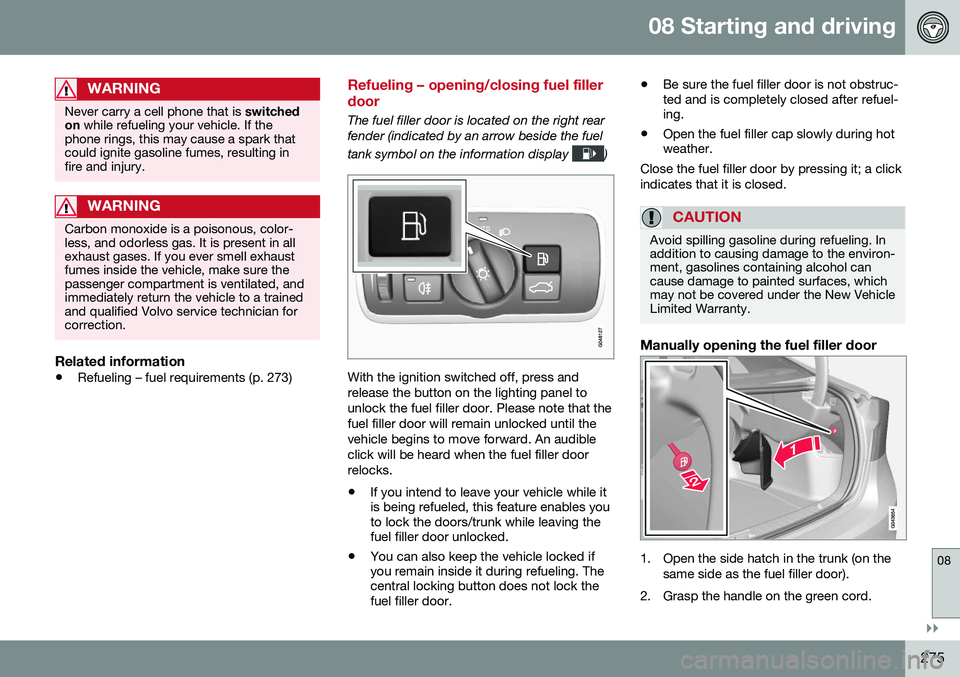
The fuel filler door is located on the right rear fender (indicated by an arrow beside the fuel tank symbol on the information display
)
With the ignition switched off, press and release the button on the lighting panel tounlock the fuel filler door. Please note that thefuel filler door will remain unlocked until thevehicle begins to move forward. An audibleclick will be heard when the fuel filler doorrelocks. •If you intend to leave your vehicle while it is being refueled, this feature enables youto lock the doors/trunk while leaving thefuel filler door unlocked.
• You can also keep the vehicle locked ifyou remain inside it during refueling. Thecentral locking button does not lock thefuel filler door. •
Be sure the fuel filler door is not obstruc-ted and is completely closed after refuel-ing.
• Open the fuel filler cap slowly during hotweather.
Close the fuel filler door by pressing it; a click indicates that it is closed.
CAUTION
Avoid spilling gasoline during refueling. In addition to causing damage to the environ-ment, gasolines containing alcohol cancause damage to painted surfaces, whichmay not be covered under the New VehicleLimited Warranty.
Manually opening the fuel filler door
1. Open the side hatch in the trunk (on the same side as the fuel filler door).
2. Grasp the handle on the green cord.
Page 284 of 392
||
08 Starting and driving
08
282
CAUTION
General towing precautions:• Please check with state and local authorities before attempting this typeof towing, as vehicles being towed aresubject to regulations regarding maxi-mum towing speed, length and type oftowing device, lighting, etc.
• If the vehicle's battery is dead, seeJump starting (p. 249) to provide cur-rent for releasing the electric parkingbrake and to move the gear selectorfrom the
P position to N. If this is not
possible, see Transmission – shiftlockoverride (p. 254) for information aboutmanually overriding the shiftlock sys-tem to move the gear selector from P
to N.
• Maximum speed: 50 mph (80 km/h).Do not exceed the maximum allowabletowing speed.
• Maximum distance with front wheelson ground: 50 miles (80 km).
• The vehicle should only be towed inthe forward direction.
Related information
•
Towing eyelet (p. 282)
• Remote key – functions (p. 142)
Towing eyelet
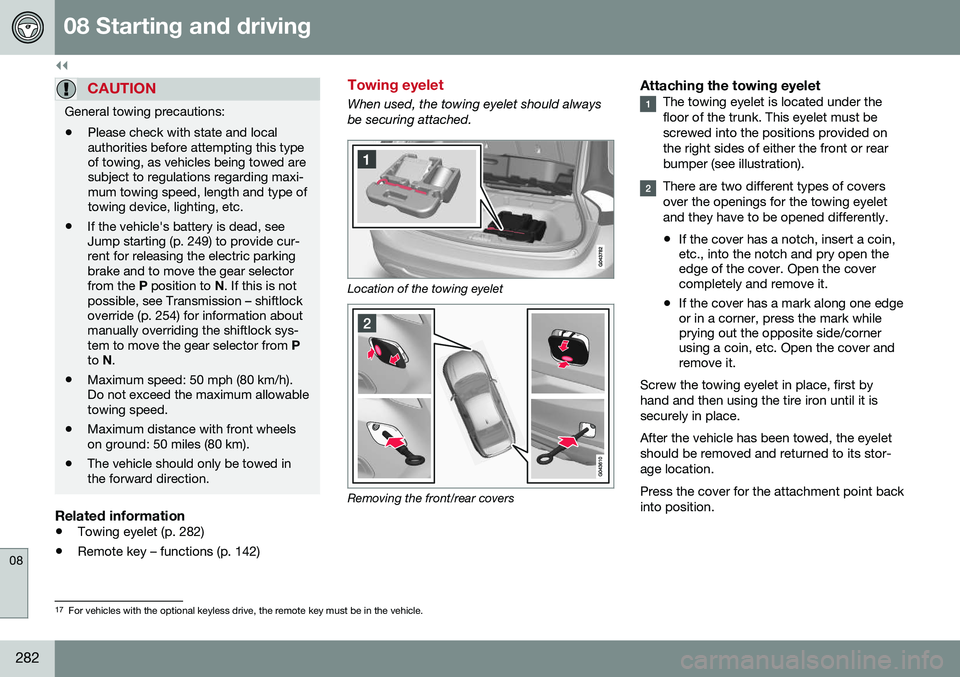
When used, the towing eyelet should always be securing attached.
Location of the towing eyelet
Removing the front/rear covers
Attaching the towing eyeletThe towing eyelet is located under the floor of the trunk. This eyelet must bescrewed into the positions provided onthe right sides of either the front or rearbumper (see illustration).
There are two different types of covers over the openings for the towing eyeletand they have to be opened differently.
• If the cover has a notch, insert a coin, etc., into the notch and pry open theedge of the cover. Open the covercompletely and remove it.
• If the cover has a mark along one edgeor in a corner, press the mark whileprying out the opposite side/cornerusing a coin, etc. Open the cover andremove it.
Screw the towing eyelet in place, first by hand and then using the tire iron until it issecurely in place. After the vehicle has been towed, the eyelet should be removed and returned to its stor-age location. Press the cover for the attachment point back into position.
17 For vehicles with the optional keyless drive, the remote key must be in the vehicle.
Page 294 of 392
09 Wheels and tires
09
292* Option/accessory, for more information, see Introduction.
Changing a wheel – accessing the spare wheel
The following procedure explains how to access the spare wheel (where applicable).
1. Release the bag's retaining straps.
2. Lift the bag out of the vehicle and remove
the spare wheel from the bag.
3. Fold up the floor hatch in the trunk.
4. Remove the jack* and tools* from the foam block and change the wheels (see the instructions in the following section"Changing a wheel").
5. After changing wheels, return the jack and tools to the foam block and close thefloor hatch.
6. If possible, place the wheel with the punctured tire in the bag. 7. If there is a wheel in the bag, strap the
bag securely in place in the trunk.WARNING
•If there is a wheel in the bag, the bag must be securely restrained using itsstraps and the load anchoring eyelets inthe trunk. See (p. 291) and carefully fol-low the instructions.
• If the wheel with the punctured tire istoo big to fit in the bag, it should besecurely restrained in the trunk usingsuitable straps, a net for anchoringcargo, etc.
Changing a wheel – installing a wheel
It is important to re-install wheels properly.
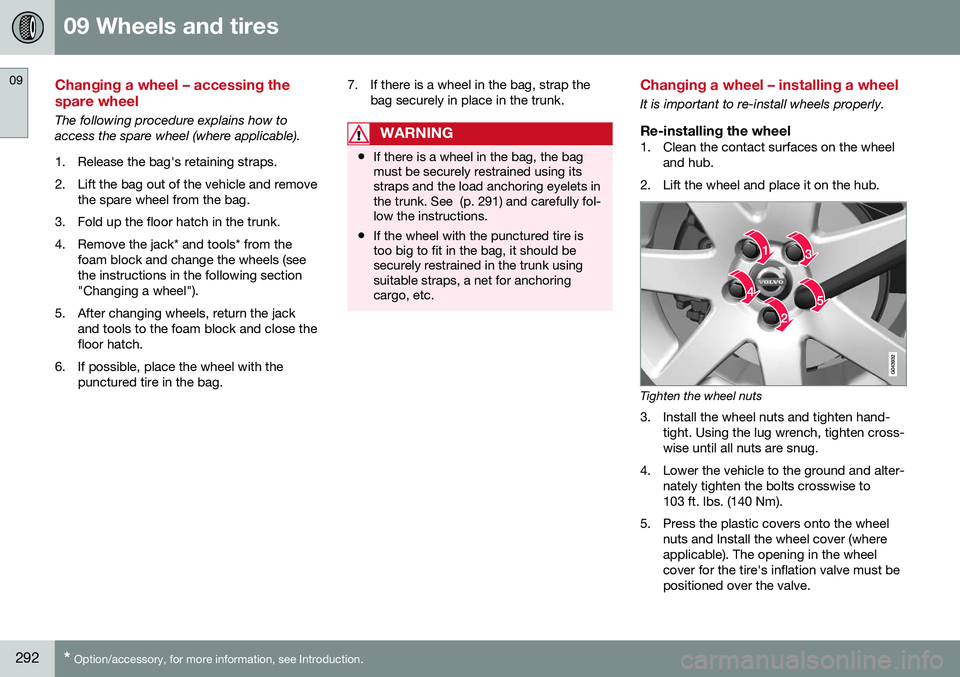
Re-installing the wheel1. Clean the contact surfaces on the wheel
and hub.
2. Lift the wheel and place it on the hub.
Tighten the wheel nuts
3. Install the wheel nuts and tighten hand- tight. Using the lug wrench, tighten cross- wise until all nuts are snug.
4. Lower the vehicle to the ground and alter- nately tighten the bolts crosswise to103 ft. lbs. (140 Nm).
5. Press the plastic covers onto the wheel nuts and Install the wheel cover (whereapplicable). The opening in the wheelcover for the tire's inflation valve must bepositioned over the valve.
Page 337 of 392
10 Maintenance and servicing
10
335
Related information
•Bulbs – specifications (p. 337)
Bulbs – location of taillight bulbs
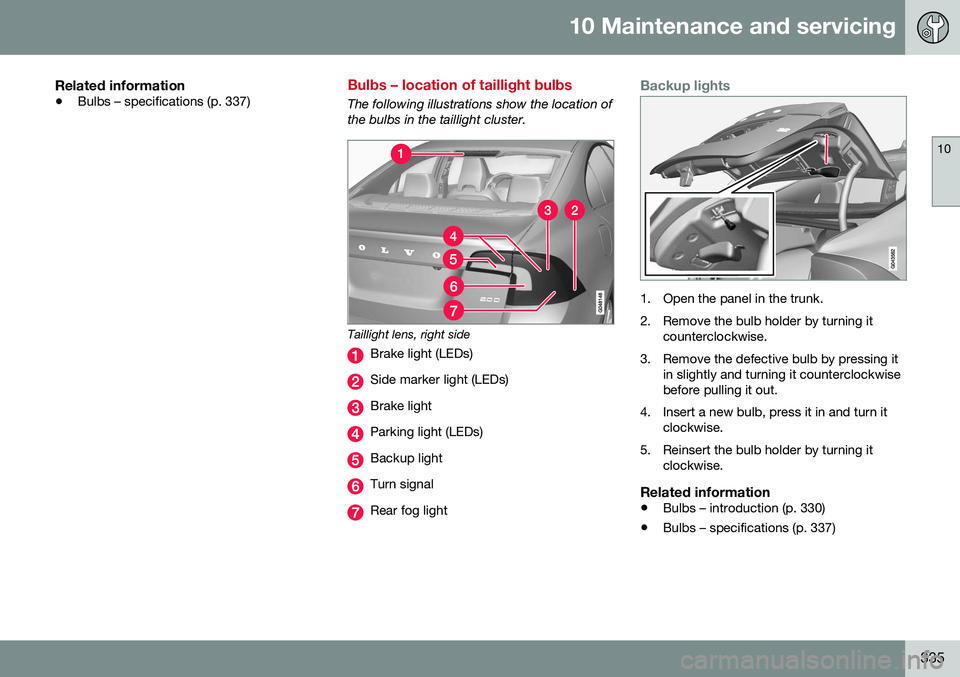
The following illustrations show the location of the bulbs in the taillight cluster.
Taillight lens, right side
Brake light (LEDs)
Side marker light (LEDs)
Brake light
Parking light (LEDs)
Backup light
Turn signal
Rear fog light
Backup lights
1. Open the panel in the trunk.
2. Remove the bulb holder by turning it
counterclockwise.
3. Remove the defective bulb by pressing it in slightly and turning it counterclockwise before pulling it out.
4. Insert a new bulb, press it in and turn it clockwise.
5. Reinsert the bulb holder by turning it clockwise.
Related information
• Bulbs – introduction (p. 330)
• Bulbs – specifications (p. 337)
Page 338 of 392
10 Maintenance and servicing
10
336
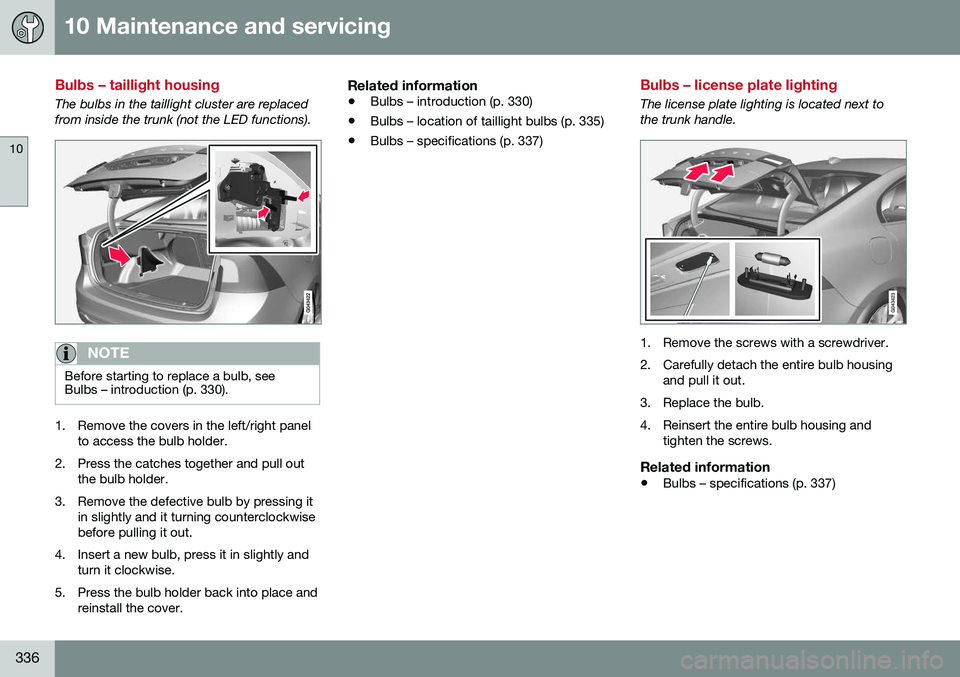
Bulbs – taillight housing
The bulbs in the taillight cluster are replaced from inside the trunk (not the LED functions).
NOTE
Before starting to replace a bulb, see Bulbs – introduction (p. 330).
1. Remove the covers in the left/right panelto access the bulb holder.
2. Press the catches together and pull out the bulb holder.
3. Remove the defective bulb by pressing it in slightly and it turning counterclockwise before pulling it out.
4. Insert a new bulb, press it in slightly and turn it clockwise.
5. Press the bulb holder back into place and reinstall the cover.
Related information
• Bulbs – introduction (p. 330)
• Bulbs – location of taillight bulbs (p. 335)
• Bulbs – specifications (p. 337)
Bulbs – license plate lighting
The license plate lighting is located next to the trunk handle.
1. Remove the screws with a screwdriver.
2. Carefully detach the entire bulb housing
and pull it out.
3. Replace the bulb.
4. Reinsert the entire bulb housing and tighten the screws.
Related information
• Bulbs – specifications (p. 337)