steering VOLVO S60 2016 Owner´s Manual
[x] Cancel search | Manufacturer: VOLVO, Model Year: 2016, Model line: S60, Model: VOLVO S60 2016Pages: 392, PDF Size: 10.04 MB
Page 231 of 392
07 Driver support
07
}}
* Option/accessory, for more information, see Introduction.229
Park Assist Pilot (PAP)* – introduction
The Park Assist Pilot provides assistance when parallel parking by measuring the park-ing space and turning the steering wheel.
Introduction
The off/on button shown is located on the center console
Park Assist Pilot (PAP) is a semi-automatic system that provides assistance when parallelparking by:
• Finding a parking space and determining if it is big enough for the vehicle
• Helping to steer the vehicle into the park-ing space
Information about the actions required of the driver is provided in the instrument panel inthe form of symbols, images and text.
NOTE
If a trailer hitch is configured in the vehi- cle's electrical system, PAP will take thetrailer hitch into consideration when deter-mining the necessary size of a parkingspace.
WARNING
• PAP does not function in all situations and is only intended to assist thedriver when parallel parking.
• As the driver, you have full responsibil-ity for parking the vehicle in a safemanner.
Related information
•
Park Assist Pilot (PAP)* – function (p. 229)
• Park Assist Pilot (PAP)* – operation(p. 230)
• Park Assist Pilot (PAP)* – limitations(p. 232)
• Park Assist Pilot (PAP)* – symbols andmessages (p. 233)
• Park assist – introduction (p. 225)
• Rear Park Assist Camera (PAC) – intro-duction (p. 234)
Park Assist Pilot (PAP)* – function
PAP's function is to measure the parking space and to turn the steering wheel duringthe parallel parking procedure. The driver isresponsible for following the instructionsshown in the instrument panel and for: shift-ing between
R (Reverse) and D (Drive) when
required, regulating the vehicle's speed,applying the brakes and stopping the vehicle. PAP can be activated in the following condi- tions: • When the stability or ABS systems are not working actively
• The vehicle is not towing a trailer
• The vehicle's speed is below30 mph (50 km/h)
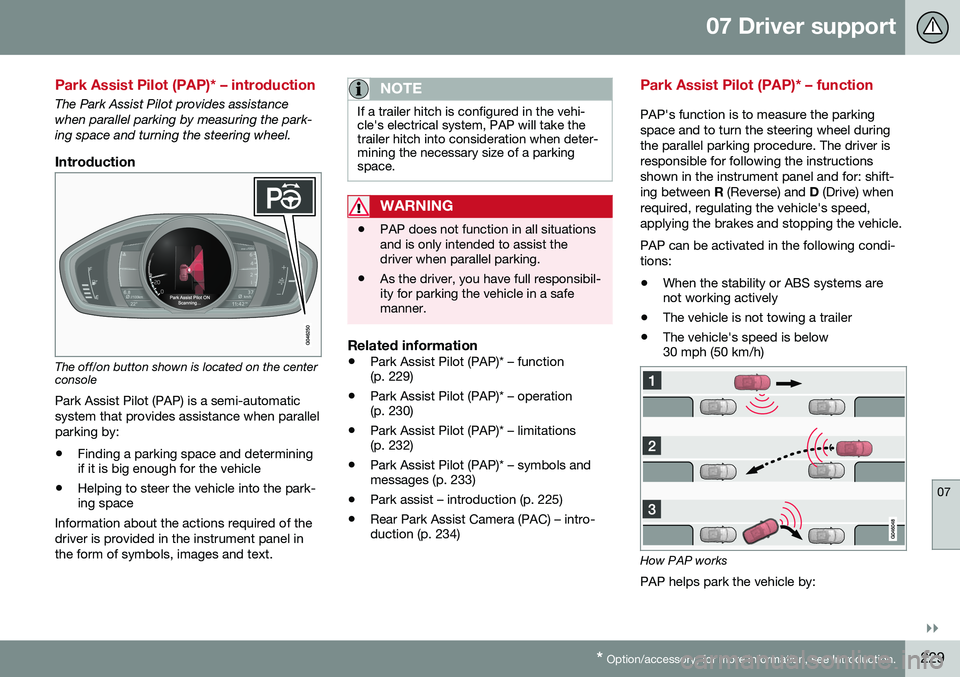
How PAP works
PAP helps park the vehicle by:
Page 232 of 392
||
07 Driver support
07
230* Option/accessory, for more information, see Introduction.
1. Searching for and measuring a parking
space. While this is taking place, the vehi- cle's speed must be below 20 mph(30 km/h). See also steps A and B in the
illustration in the section "1: Searchingand measuring" in Park Assist Pilot (PAP)*– operation (p. 230).
2. Steering the vehicle as it backs into the parking space. See also steps C and D in
the illustration in the section "2: Backinginto the parking space" in Park AssistPilot (PAP)* – operation (p. 230).
3. Adjusting the vehicle's position in the parking space by moving forward andrearward. See also steps E and F in the
illustration in the section "3: Adjusting thevehicle's position" in Park Assist Pilot(PAP)* – operation (p. 230).
Related information
• Park Assist Pilot (PAP)* – introduction(p. 229)
• Park Assist Pilot (PAP)* – limitations(p. 232)
• Park Assist Pilot (PAP)* – symbols andmessages (p. 233)
• Park assist – introduction (p. 225)
• Rear Park Assist Camera (PAC) – intro-duction (p. 234)
Park Assist Pilot (PAP)* – operation
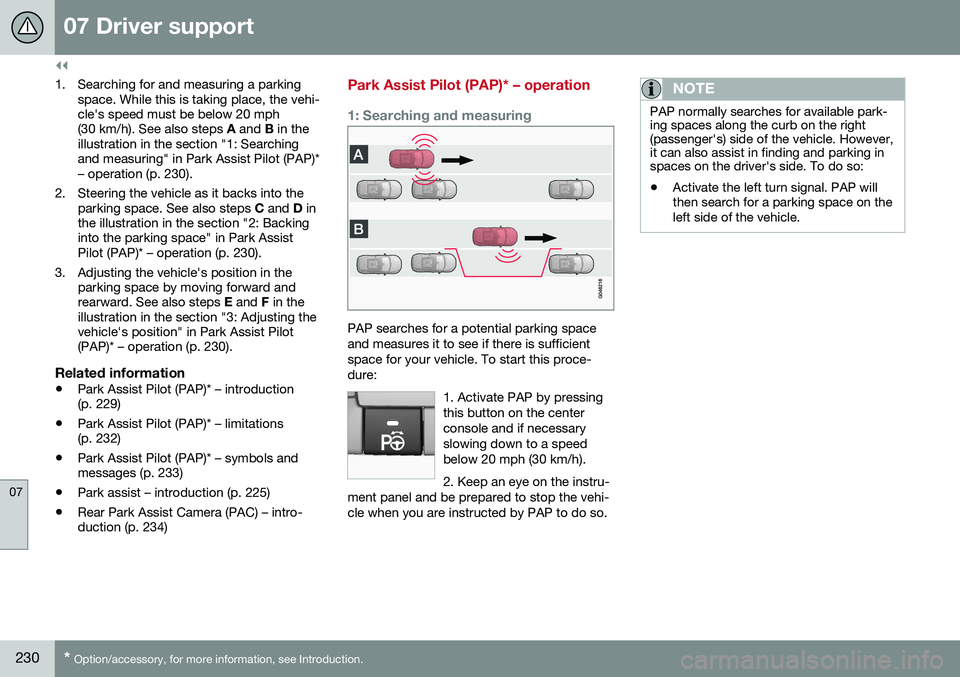
1: Searching and measuring
PAP searches for a potential parking space and measures it to see if there is sufficientspace for your vehicle. To start this proce-dure:
1. Activate PAP by pressingthis button on the centerconsole and if necessaryslowing down to a speedbelow 20 mph (30 km/h). 2. Keep an eye on the instru-
ment panel and be prepared to stop the vehi- cle when you are instructed by PAP to do so.
NOTE
PAP normally searches for available park- ing spaces along the curb on the right(passenger's) side of the vehicle. However,it can also assist in finding and parking inspaces on the driver's side. To do so: • Activate the left turn signal. PAP will then search for a parking space on theleft side of the vehicle.
Page 233 of 392
07 Driver support
07
* Option/accessory, for more information, see Introduction.231
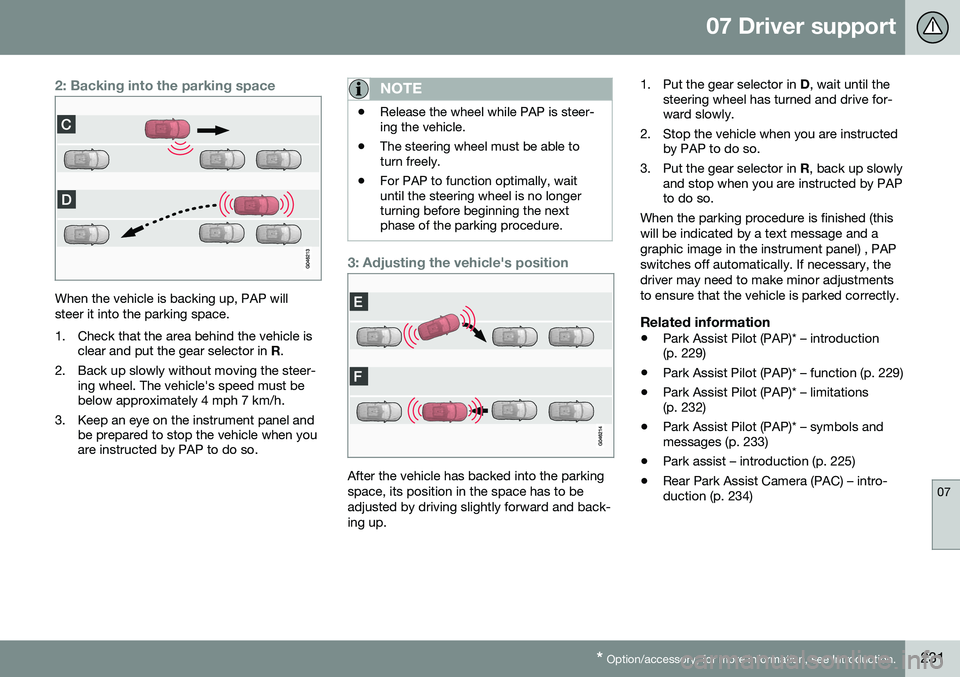
2: Backing into the parking space
When the vehicle is backing up, PAP will steer it into the parking space.
1. Check that the area behind the vehicle is
clear and put the gear selector in R.
2. Back up slowly without moving the steer- ing wheel. The vehicle's speed must be below approximately 4 mph 7 km/h.
3. Keep an eye on the instrument panel and be prepared to stop the vehicle when youare instructed by PAP to do so.
NOTE
•Release the wheel while PAP is steer- ing the vehicle.
• The steering wheel must be able toturn freely.
• For PAP to function optimally, waituntil the steering wheel is no longerturning before beginning the nextphase of the parking procedure.
3: Adjusting the vehicle's position
After the vehicle has backed into the parking space, its position in the space has to beadjusted by driving slightly forward and back-ing up. 1. Put the gear selector in
D, wait until the
steering wheel has turned and drive for- ward slowly.
2. Stop the vehicle when you are instructed by PAP to do so.
3. Put the gear selector in R, back up slowly
and stop when you are instructed by PAPto do so.
When the parking procedure is finished (this will be indicated by a text message and agraphic image in the instrument panel) , PAPswitches off automatically. If necessary, thedriver may need to make minor adjustmentsto ensure that the vehicle is parked correctly.
Related information
• Park Assist Pilot (PAP)* – introduction (p. 229)
• Park Assist Pilot (PAP)* – function (p. 229)
• Park Assist Pilot (PAP)* – limitations(p. 232)
• Park Assist Pilot (PAP)* – symbols andmessages (p. 233)
• Park assist – introduction (p. 225)
• Rear Park Assist Camera (PAC) – intro-duction (p. 234)
Page 234 of 392
07 Driver support
07
232* Option/accessory, for more information, see Introduction.
Park Assist Pilot (PAP)* – limitations
The PAP parking procedure will be cancelled if.
• The vehicle's speed goes above approxi- mately 4 mph 7 km/h
• The driver moves the steering wheel
• If the stability or ABS systems are acti-vated (e.g., if a wheel starts to spinbecause of a slippery road surface
If the system has been switched off, this will be indicated by a text message in the instru-ment panel.
NOTE
• PAP will not function correctly if its sensors are obstructed by dirt, snow,etc.
• In certain situations, PAP may not beable to measure a parking space. Thiscould be due to external sources ofsound (e.g., a vehicle's horn, tires onwet asphalt, pneumatic brakes, noisefrom a motorcycle's exhaust, etc.)emitting ultrasound using approxi-mately the same frequencies as PAP.
Information to keep in mindPAP is only intended to provide parallel park- ing assistance but may not be able to func-tion fully in all situations. •
PAP's function is based on the way that the vehicles are parked behind and infront of your parking space. If they are,for example, parked too close to the curb,there is a risk that your vehicle's tires orwheel rims could be damaged by thecurb during the parking procedure.
• PAP is intended to provide parking assis-tance on straight streets, not sections ofstreet with curved or irregular curbs. Besure that your vehicle is parallel to thecurb when PAP measures the parkingspace.
• PAP may not be able to provide parkingassistance on narrow streets due to lackof space to maneuver the vehicle. In sit-uations like this, it may help to drive asclose to the side of the road as possiblewhere the parking space is located.
• Use only approved tires with the correctinflation pressure because this affectsPAP's capacity to provide parking assis-tance. See the table in Tire inflation –pressure table (p. 297). Changing to adifferent approved tire size may affectPAP's parameters. Consult a trained andqualified Volvo service technician.
• Heavy rain or snow may inhibit PAP'scapacity to correctly measure a parkingspace.
• Do not use PAP if snow chains or a tem-porary spare tire is being used.
• Do not use PAP if there are any objectsprotruding from the vehicle.
WARNING
• The front end of your vehicle may turn out toward oncoming traffic during theparking procedure.
• Objects located above the parkingsensors' field of vision are not includedwhen PAP measures a parking space.For this reason, PAP may turn into theparking space too soon. Avoid parkingspaces of this type.
• The driver is always responsible fordetermining if PAP has selected a suit-able parking space.
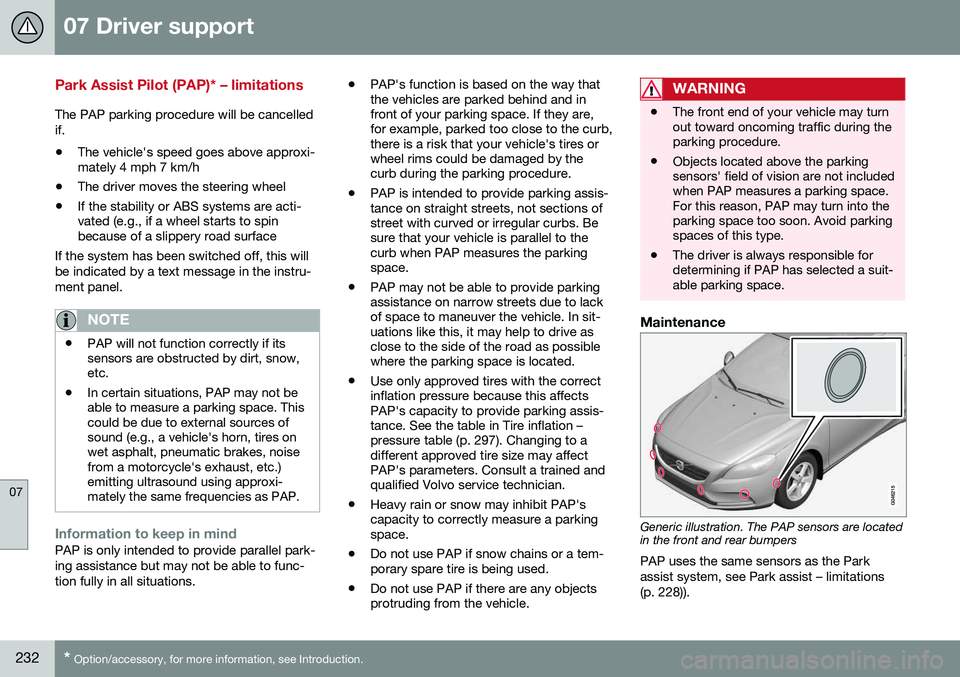
Maintenance
Generic illustration. The PAP sensors are located in the front and rear bumpers
PAP uses the same sensors as the Park assist system, see Park assist – limitations(p. 228)).
Page 238 of 392
||
07 Driver support
07
236
5 seconds after the gear selector has been moved from R or until the vehicle's forward
speed exceeds 6 mph/10 km/h(21 mph/35 km/h in reverse). The screen willthen revert to the view that was displayedbefore R was selected.
NOTE
If any button on the center console control panel is pressed, the camera image willdisappear from the display. Pressing CAM
will return the camera image to the display.
SettingsBy default, PAC is set to activate when the gear selector is moved to R
To change PAC settings when a camera viewis displayed:
1. Press OK/MENU when a camera view is
on the screen. A menu will be displayed.
2. Turn TUNE to scroll to the desired set-
ting.
3. Press OK/MENU to make the setting and
exit the menu by pressing EXIT.
Summary
•Pressing
CAM will activate the camera
even if the gear selector is not in Reverse.
• Toggle between normal view and zoom by pressing
CAM or by turning TUNE.
Related information
•Park assist – introduction (p. 225)
• Park assist – function (p. 225)
• Park assist – troubleshooting (p. 233)
• Park assist – limitations (p. 228)
• Rear Park Assist Camera (PAC) – intro-duction (p. 234)
Rear Park Assist Camera (PAC) – guiding and marker lines
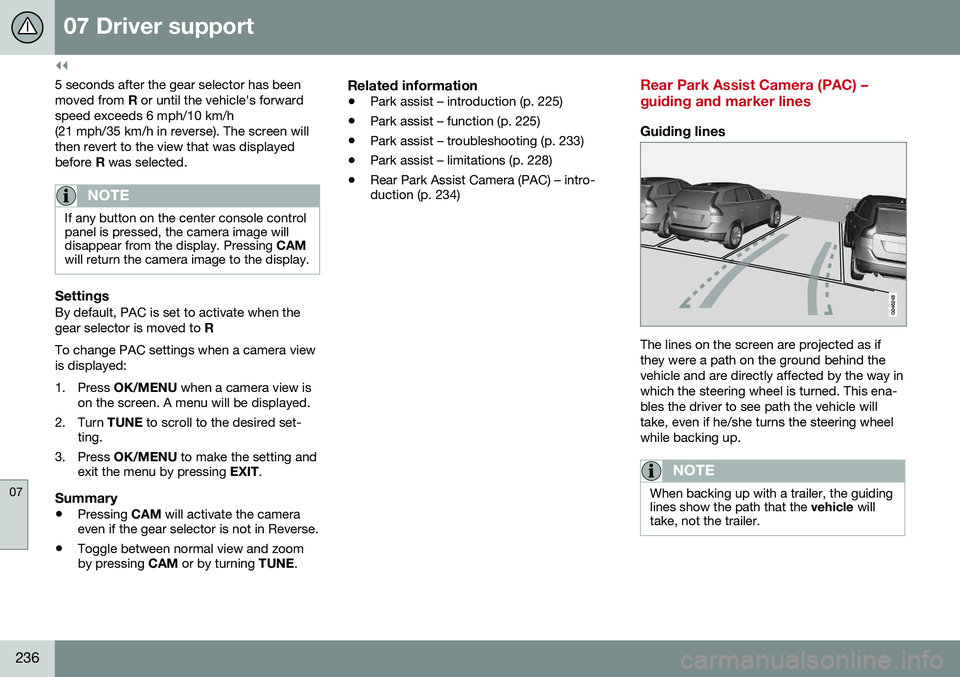
Guiding lines
The lines on the screen are projected as if they were a path on the ground behind thevehicle and are directly affected by the way inwhich the steering wheel is turned. This ena-bles the driver to see path the vehicle willtake, even if he/she turns the steering wheelwhile backing up.
NOTE
When backing up with a trailer, the guiding lines show the path that the
vehicle will
take, not the trailer.
Page 242 of 392
07 Driver support
07
240* Option/accessory, for more information, see Introduction.
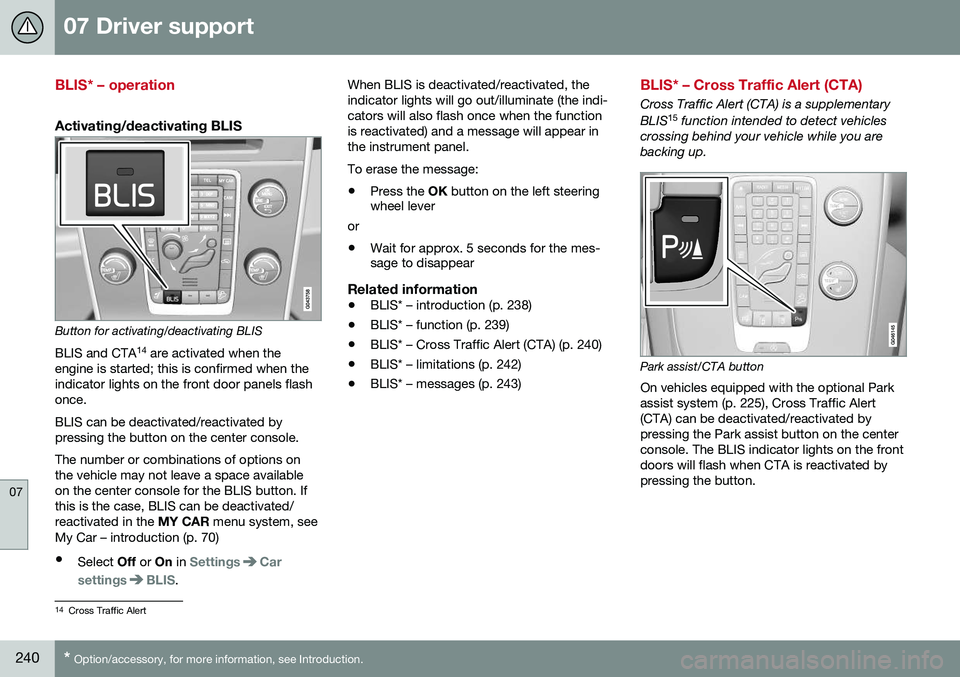
BLIS* – operation
Activating/deactivating BLIS
Button for activating/deactivating BLIS BLIS and CTA 14
are activated when the
engine is started; this is confirmed when the indicator lights on the front door panels flashonce. BLIS can be deactivated/reactivated by pressing the button on the center console. The number or combinations of options on the vehicle may not leave a space availableon the center console for the BLIS button. Ifthis is the case, BLIS can be deactivated/reactivated in the MY CAR menu system, see
My Car – introduction (p. 70)
• Select Off or On in
SettingsCar
settings
BLIS. When BLIS is deactivated/reactivated, the indicator lights will go out/illuminate (the indi-cators will also flash once when the functionis reactivated) and a message will appear inthe instrument panel. To erase the message: •
Press the
OK button on the left steering
wheel lever
or
• Wait for approx. 5 seconds for the mes- sage to disappear
Related information
•BLIS* – introduction (p. 238)
• BLIS* – function (p. 239)
• BLIS* – Cross Traffic Alert (CTA) (p. 240)
• BLIS* – limitations (p. 242)
• BLIS* – messages (p. 243)
BLIS* – Cross Traffic Alert (CTA)
Cross Traffic Alert (CTA) is a supplementary BLIS 15
function intended to detect vehicles
crossing behind your vehicle while you are backing up.
Park assist/CTA button On vehicles equipped with the optional Park assist system (p. 225), Cross Traffic Alert(CTA) can be deactivated/reactivated bypressing the Park assist button on the centerconsole. The BLIS indicator lights on the frontdoors will flash when CTA is reactivated bypressing the button.
14 Cross Traffic Alert
Page 245 of 392
07 Driver support
07
* Option/accessory, for more information, see Introduction.243
BLIS* – messages
If BLIS/CTA 18
are not functioning normally, a
symbol will illuminate in the instrument panel and a text message will be displayed. Followany instructions that may be provided. These messages include:
MessageSystem status
CTA OFFCTA has been switched off manually. BLIS remainsactive.
BLIS and CTA OFFTrailerattachedBLIS and CTA are tempo- rarily deactivated becausea trailer's wiring has beenconnected to the vehicle'selectrical system.
BLIS and CTA Serv-ice requiredBLIS and CTA are not functioning normally.
• If this message recurs, the systems should beinspected by a trainedand qualified Volvoservice technician.
Messages can be erased by pressing the
OK
button on the left steering wheel lever.
Related information
• BLIS* – introduction (p. 238)
• BLIS* – function (p. 239)
• BLIS* – operation (p. 240)
• BLIS* – Cross Traffic Alert (CTA) (p. 240)
• BLIS* – limitations (p. 242)
18
Cross Traffic Alert
Page 247 of 392
08 Starting and driving
08
}}
* Option/accessory, for more information, see Introduction.245
Starting the engine
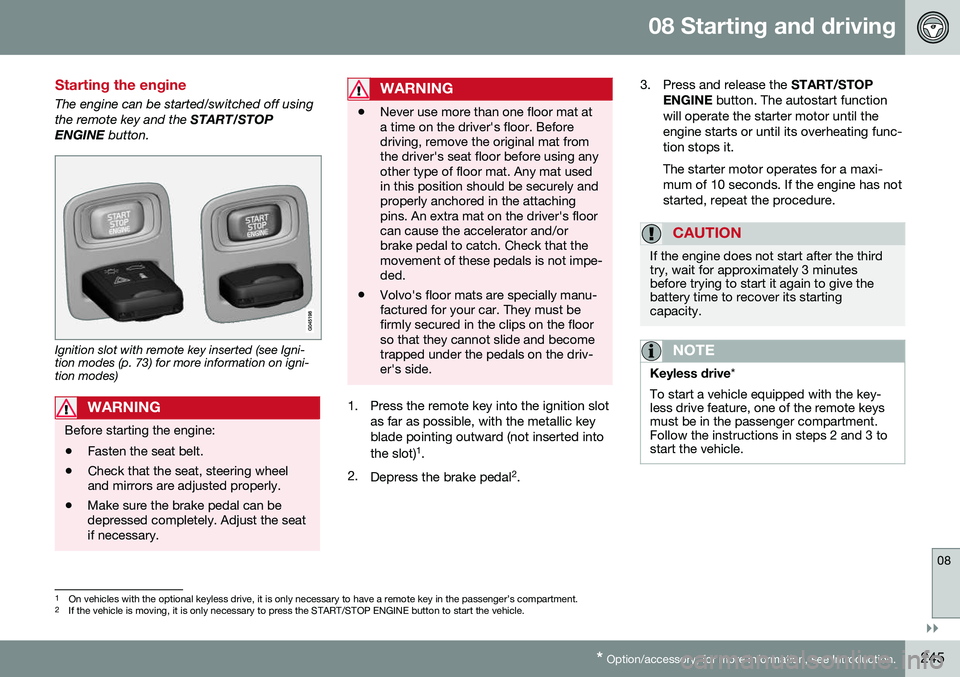
The engine can be started/switched off using the remote key and the START/STOP
ENGINE button.
Ignition slot with remote key inserted (see Igni- tion modes (p. 73) for more information on igni-tion modes)
WARNING
Before starting the engine:
• Fasten the seat belt.
• Check that the seat, steering wheel and mirrors are adjusted properly.
• Make sure the brake pedal can bedepressed completely. Adjust the seatif necessary.
WARNING
•Never use more than one floor mat at a time on the driver's floor. Beforedriving, remove the original mat fromthe driver's seat floor before using anyother type of floor mat. Any mat usedin this position should be securely andproperly anchored in the attachingpins. An extra mat on the driver's floorcan cause the accelerator and/orbrake pedal to catch. Check that themovement of these pedals is not impe-ded.
• Volvo's floor mats are specially manu-factured for your car. They must befirmly secured in the clips on the floorso that they cannot slide and becometrapped under the pedals on the driv-er's side.
1. Press the remote key into the ignition slot
as far as possible, with the metallic key blade pointing outward (not inserted into the slot) 1
.
2. Depress the brake pedal 2
. 3. Press and release the
START/STOP
ENGINE button. The autostart function
will operate the starter motor until the engine starts or until its overheating func-tion stops it. The starter motor operates for a maxi- mum of 10 seconds. If the engine has notstarted, repeat the procedure.
CAUTION
If the engine does not start after the third try, wait for approximately 3 minutesbefore trying to start it again to give thebattery time to recover its startingcapacity.
NOTE
Keyless drive *
To start a vehicle equipped with the key- less drive feature, one of the remote keysmust be in the passenger compartment.Follow the instructions in steps 2 and 3 tostart the vehicle.
1 On vehicles with the optional keyless drive, it is only necessary to have a remote key in the passenger’s compartment.
2 If the vehicle is moving, it is only necessary to press the START/STOP ENGINE button to start the vehicle.
Page 255 of 392
08 Starting and driving
08
}}
* Option/accessory, for more information, see Introduction.253
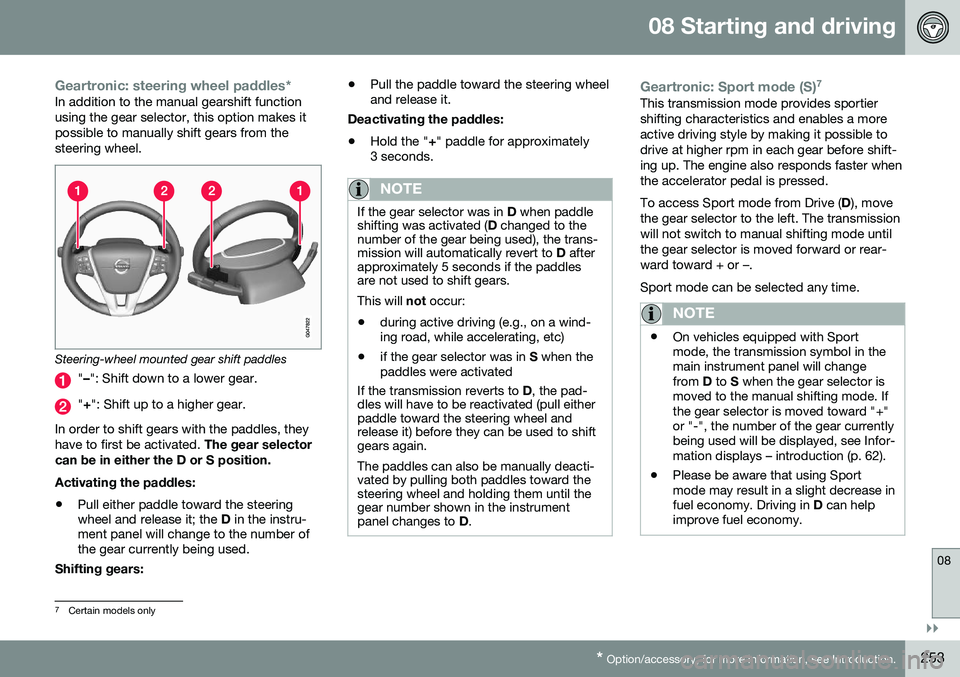
Geartronic: steering wheel paddles*In addition to the manual gearshift function using the gear selector, this option makes itpossible to manually shift gears from thesteering wheel.
Steering-wheel mounted gear shift paddles
" – ": Shift down to a lower gear.
"+ ": Shift up to a higher gear.
In order to shift gears with the paddles, they have to first be activated. The gear selector
can be in either the D or S position. Activating the paddles:
• Pull either paddle toward the steering wheel and release it; the
D in the instru-
ment panel will change to the number ofthe gear currently being used.
Shifting gears: •
Pull the paddle toward the steering wheeland release it.
Deactivating the paddles: • Hold the "
+" paddle for approximately
3 seconds.
NOTE
If the gear selector was in D when paddle
shifting was activated ( D changed to the
number of the gear being used), the trans- mission will automatically revert to D after
approximately 5 seconds if the paddlesare not used to shift gears. This will not occur:
• during active driving (e.g., on a wind- ing road, while accelerating, etc)
• if the gear selector was in
S when the
paddles were activated
If the transmission reverts to D, the pad-
dles will have to be reactivated (pull either paddle toward the steering wheel andrelease it) before they can be used to shiftgears again. The paddles can also be manually deacti- vated by pulling both paddles toward thesteering wheel and holding them until thegear number shown in the instrumentpanel changes to D.
Geartronic: Sport mode (S) 7This transmission mode provides sportier shifting characteristics and enables a moreactive driving style by making it possible todrive at higher rpm in each gear before shift-ing up. The engine also responds faster whenthe accelerator pedal is pressed. To access Sport mode from Drive (
D), move
the gear selector to the left. The transmission will not switch to manual shifting mode untilthe gear selector is moved forward or rear-ward toward + or –. Sport mode can be selected any time.
NOTE
• On vehicles equipped with Sport mode, the transmission symbol in themain instrument panel will changefrom
D to S when the gear selector is
moved to the manual shifting mode. Ifthe gear selector is moved toward "+"or "-", the number of the gear currentlybeing used will be displayed, see Infor-mation displays – introduction (p. 62).
• Please be aware that using Sportmode may result in a slight decrease infuel economy. Driving in
D can help
improve fuel economy.
7 Certain models only
Page 256 of 392
||
08 Starting and driving
08
254
Geartronic: starting on slippery
surfaces
Selecting 3rd gear in Geartronic’s manual shifting mode can help provide better tractionwhen starting off on slippery surfaces. To doso:
1. Depress the brake pedal and move the gear selector to the side from D toward
+S– .
2. Press the gear selector forward and release it (this selects 2nd gear). Press the selector forward again and release itto select 3rd gear. The optional steeringwheel paddles can also be used; see theprevious section "Geartronic: steeringwheel paddles."
3. Release the brake pedal and press gently on the accelerator pedal.
Related information
• Transmission – general information (p. 250)
• Transmission – positions (p. 250)
• Transmission – shiftlock override (p. 254)
• Fuel tank volume – specification and vol-ume (p. 374)
Transmission – shiftlock override
If the vehicle cannot be driven, for example because of a dead battery, the gear selectormust be moved from the
P position before the
vehicle can be moved 8
.
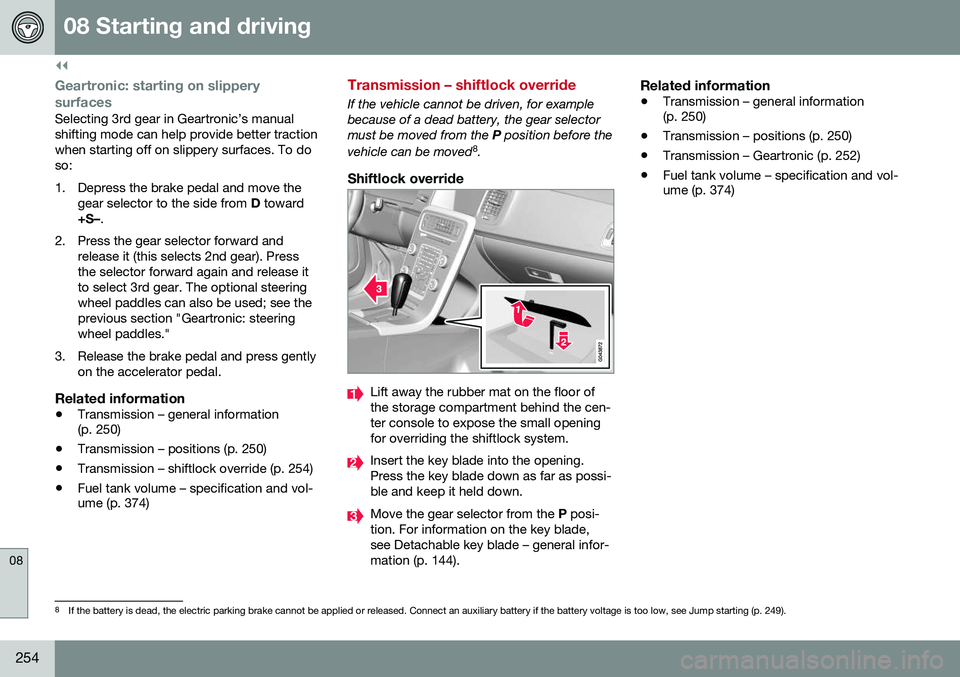
Shiftlock override
Lift away the rubber mat on the floor of the storage compartment behind the cen-ter console to expose the small openingfor overriding the shiftlock system.
Insert the key blade into the opening. Press the key blade down as far as possi-ble and keep it held down.
Move the gear selector from the P posi-
tion. For information on the key blade, see Detachable key blade – general infor-mation (p. 144).
Related information
• Transmission – general information (p. 250)
• Transmission – positions (p. 250)
• Transmission – Geartronic (p. 252)
• Fuel tank volume – specification and vol-ume (p. 374)
8
If the battery is dead, the electric parking brake cannot be applied or released. Connect an auxiliary battery if the battery voltage is too low, see Jump starting (p. 249).