instrument panel VOLVO S60 2016 Owner´s Manual
[x] Cancel search | Manufacturer: VOLVO, Model Year: 2016, Model line: S60, Model: VOLVO S60 2016Pages: 392, PDF Size: 10.04 MB
Page 310 of 392
09 Wheels and tires
09
308
Calibrating Tire Monitor
In order for Tire Monitor to work correctly, tire pressure reference values must be set. Thismust be done each time wheels or tire pres-sures are changed.
Calibration1. Switch off the engine.
2. Inflate the tires to the desired pressure(consult tire pressure placard located on the driver's side B-pillar (the structuralmember at the side of the vehicle) andput the ignition in mode II, see Ignition
modes (p. 73).
3. Press the MY CAR button on the center
console control panel and select
Settings
Car settingsTire monitoring.
4. Press OK/MENU , select
Calibrate tire
pressure and press OK/MENU again.
5. Drive away. > The calibration process will be comple-ted while driving and will be interrupted if the vehicle is parked and the engineis switched off. Calibration continuesautomatically when driving resumes.The system will not give any confirma-tion when calibration is finishedalthough it will state if calibration fails.
The new reference values will be used untilsteps 1-5 stated above are repeated.
NOTE
Always remember to calibrate Tire Monitor when the wheels have been changed orthe tire pressure has been correctedaccording to tire pressure placard or tirepressure table. If correct reference valueshave not been set, the system cannotissue low tire pressure alerts correctly.
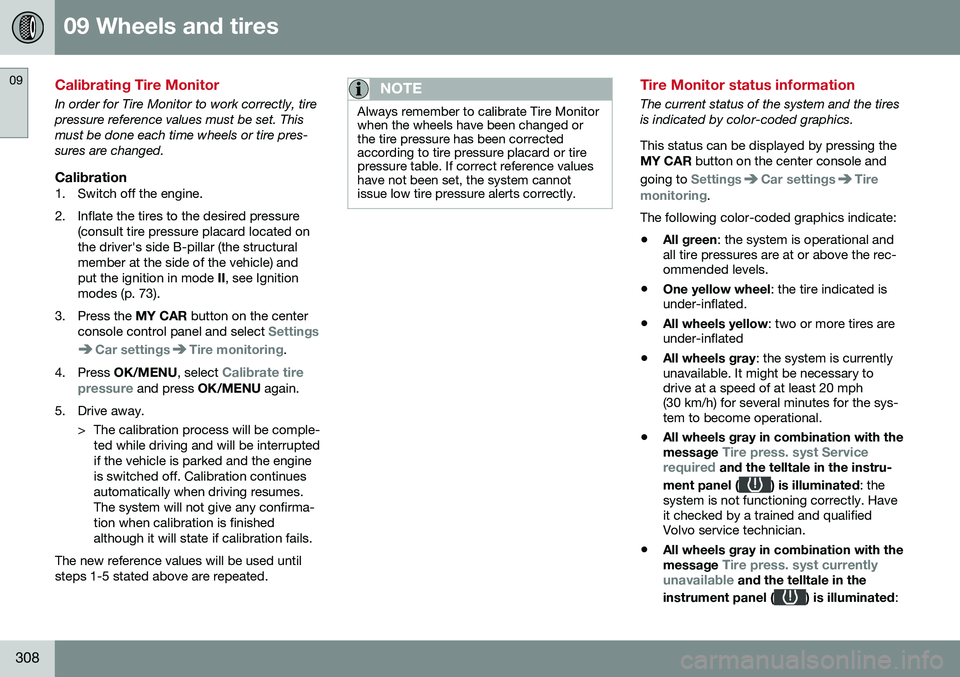
Tire Monitor status information
The current status of the system and the tires is indicated by color-coded graphics. This status can be displayed by pressing the MY CAR button on the center console and
going to
SettingsCar settingsTire
monitoring.
The following color-coded graphics indicate:
• All green
: the system is operational and
all tire pressures are at or above the rec- ommended levels.
• One yellow wheel
: the tire indicated is
under-inflated.
• All wheels yellow
: two or more tires are
under-inflated
• All wheels gray
: the system is currently
unavailable. It might be necessary todrive at a speed of at least 20 mph(30 km/h) for several minutes for the sys-tem to become operational.
• All wheels gray in combination with the message
Tire press. syst Service
required and the telltale in the instru-
ment panel (
) is illuminated : the
system is not functioning correctly. Have it checked by a trained and qualifiedVolvo service technician.
• All wheels gray in combination with the message
Tire press. syst currently
unavailable and the telltale in the
instrument panel (
) is illuminated :
Page 311 of 392
09 Wheels and tires
09
}}
309
the system is temporarily unavailable. It should become operational again shortly.
Related information
•
Tire Monitor – messages (p. 309)
Tire Monitor – messages
When low tire pressure has been detected, a message will be displayed and the tire pres-sure warning telltale in the instrument panel
will illuminate.
Erasing warning messagesTo erase a low tire pressure message and turn off the telltale:
1. Use a tire pressure gauge to check the
inflation pressure of all four tires (see the article "Tire inflation – checking pres-sure").
2. Re-inflate the tires to the correct pressure (consult the tire pressure placard locatedon the driver's side B-pillar (the structuralmember at the side of the vehicle, at therear of the driver's door opening) or theinflation pressure table, see Tire inflation –pressure table (p. 297).
3. Recalibrate Tire Monitor, see Calibrating Tire Monitor (p. 308).
NOTE
To help avoid incorrect tire inflation pres- sure, only inflate the tires when they arecold. The tires are considered to be coldwhen they have the same temperature asthe surrounding (ambient) air. This tem-perature is normally reached after the vehi-cle has been parked for at least 3 hours.After driving a distance of approximately1 mile (1.6 km), the tires are considered tobe hot.
CAUTION
•After inflating the tires, always reinstall the valve cap to help avoid damage tothe valve from dirt, gravel, etc.
• Use plastic valve caps only. Metalcaps could corrode and become diffi-cult to remove.
WARNING
•
Incorrect inflation pressure could lead to tire failure, resulting in a loss of con-trol of the vehicle.
• Tire monitoring systems cannot indi-cate sudden tire damage caused byexternal factors (e.g., a blowout) inadvance.
Page 324 of 392
||
10 Maintenance and servicing
10
322
accessed in MY CAR by pressing OK/MENU
and then selecting Maintenance & repair.
Booking information and data from the vehicle
If you request an appointment from your vehi- cle, with your consent, booking information and data about your vehicle 1
will be transmit-
ted to your preferred retailer.
Using the serviceOnce the prerequisites have been estab- lished, all CSB-related menus can beaccessed in MY CAR by pressing OK/MENU
and then selecting
Maintenance & repair.
If the time for the next regularly scheduled service is approaching, if the vehicle requirescertain types of repairs or if a system needsto be checked, a message will be displayed.You will then by guided through the stepsrequired to book service or repairs.
On-screen service messages
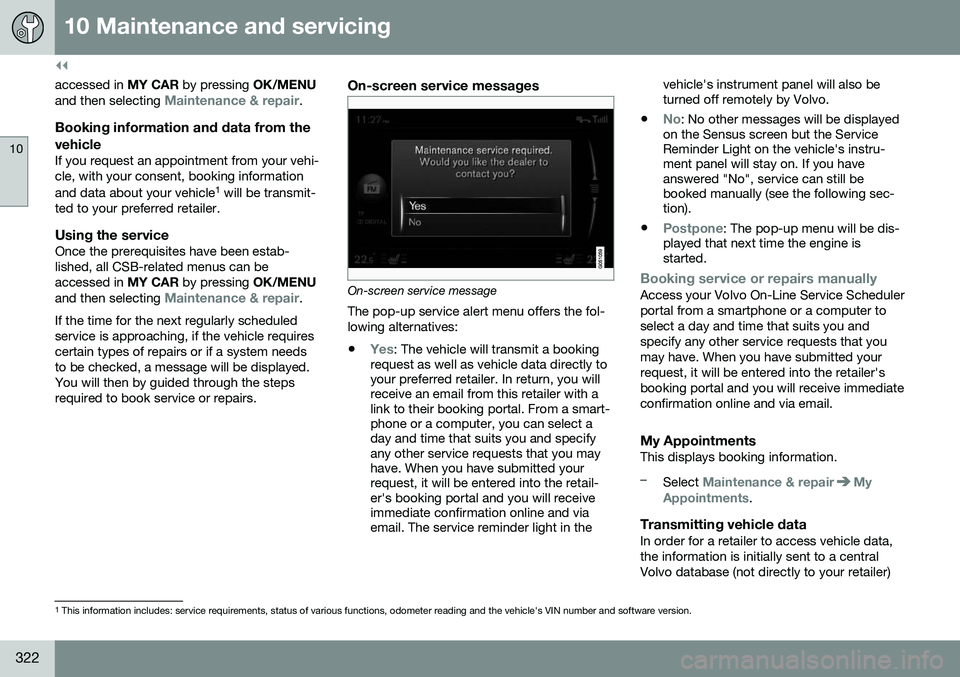
On-screen service message The pop-up service alert menu offers the fol- lowing alternatives:
•
Yes: The vehicle will transmit a booking
request as well as vehicle data directly to your preferred retailer. In return, you willreceive an email from this retailer with alink to their booking portal. From a smart-phone or a computer, you can select aday and time that suits you and specifyany other service requests that you mayhave. When you have submitted yourrequest, it will be entered into the retail-er's booking portal and you will receiveimmediate confirmation online and viaemail. The service reminder light in the vehicle's instrument panel will also beturned off remotely by Volvo.
•
No: No other messages will be displayed
on the Sensus screen but the Service Reminder Light on the vehicle's instru-ment panel will stay on. If you haveanswered "No", service can still bebooked manually (see the following sec-tion).
•
Postpone: The pop-up menu will be dis-
played that next time the engine is started.
Booking service or repairs manuallyAccess your Volvo On-Line Service Scheduler portal from a smartphone or a computer toselect a day and time that suits you andspecify any other service requests that youmay have. When you have submitted yourrequest, it will be entered into the retailer'sbooking portal and you will receive immediateconfirmation online and via email.
My AppointmentsThis displays booking information.
–Select Maintenance & repairMy
Appointments.
Transmitting vehicle dataIn order for a retailer to access vehicle data, the information is initially sent to a centralVolvo database (not directly to your retailer)
1 This information includes: service requirements, status of various functions, odometer reading and the vehicle's VIN number and software version.
Page 329 of 392
10 Maintenance and servicing
10
}}
* Option/accessory, for more information, see Introduction.327
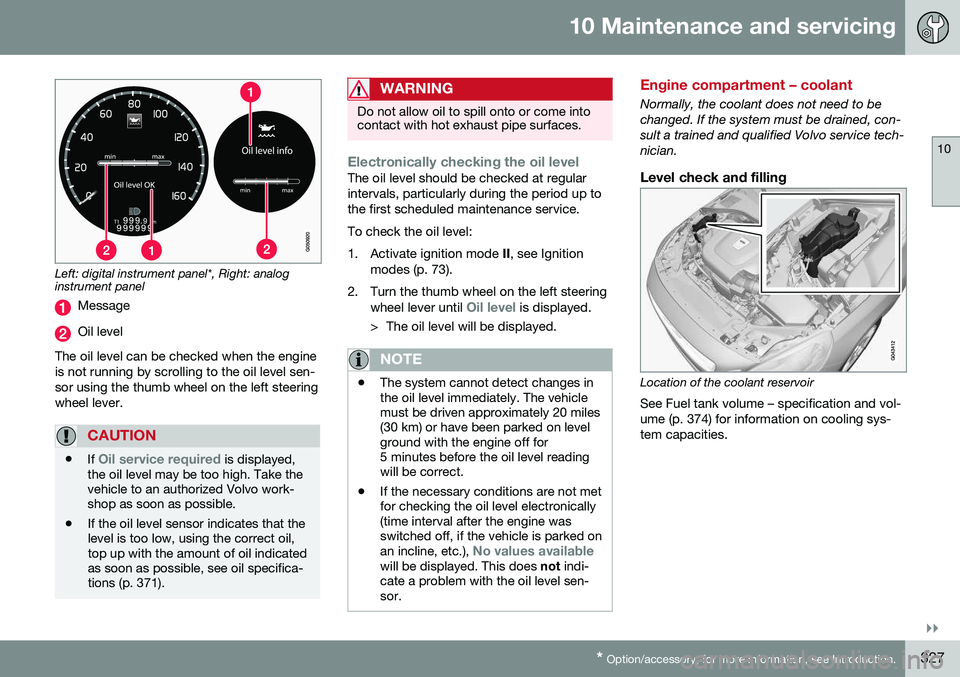
Left: digital instrument panel*, Right: analog instrument panel
Message
Oil level
The oil level can be checked when the engine is not running by scrolling to the oil level sen-sor using the thumb wheel on the left steeringwheel lever.
CAUTION
• If Oil service required is displayed,
the oil level may be too high. Take the vehicle to an authorized Volvo work-shop as soon as possible.
• If the oil level sensor indicates that thelevel is too low, using the correct oil,top up with the amount of oil indicatedas soon as possible, see oil specifica-tions (p. 371).
WARNING
Do not allow oil to spill onto or come into contact with hot exhaust pipe surfaces.
Electronically checking the oil levelThe oil level should be checked at regular intervals, particularly during the period up tothe first scheduled maintenance service. To check the oil level:
1. Activate ignition mode
II, see Ignition
modes (p. 73).
2. Turn the thumb wheel on the left steering wheel lever until
Oil level is displayed.
> The oil level will be displayed.
NOTE
• The system cannot detect changes in the oil level immediately. The vehiclemust be driven approximately 20 miles(30 km) or have been parked on levelground with the engine off for5 minutes before the oil level readingwill be correct.
• If the necessary conditions are not metfor checking the oil level electronically(time interval after the engine wasswitched off, if the vehicle is parked on an incline, etc.),
No values availablewill be displayed. This does
not indi-
cate a problem with the oil level sen- sor.
Engine compartment – coolant
Normally, the coolant does not need to be changed. If the system must be drained, con-sult a trained and qualified Volvo service tech-nician.
Level check and filling
Location of the coolant reservoir
See Fuel tank volume – specification and vol- ume (p. 374) for information on cooling sys-tem capacities.
Page 353 of 392
10 Maintenance and servicing
10
}}
* Option/accessory, for more information, see Introduction.351
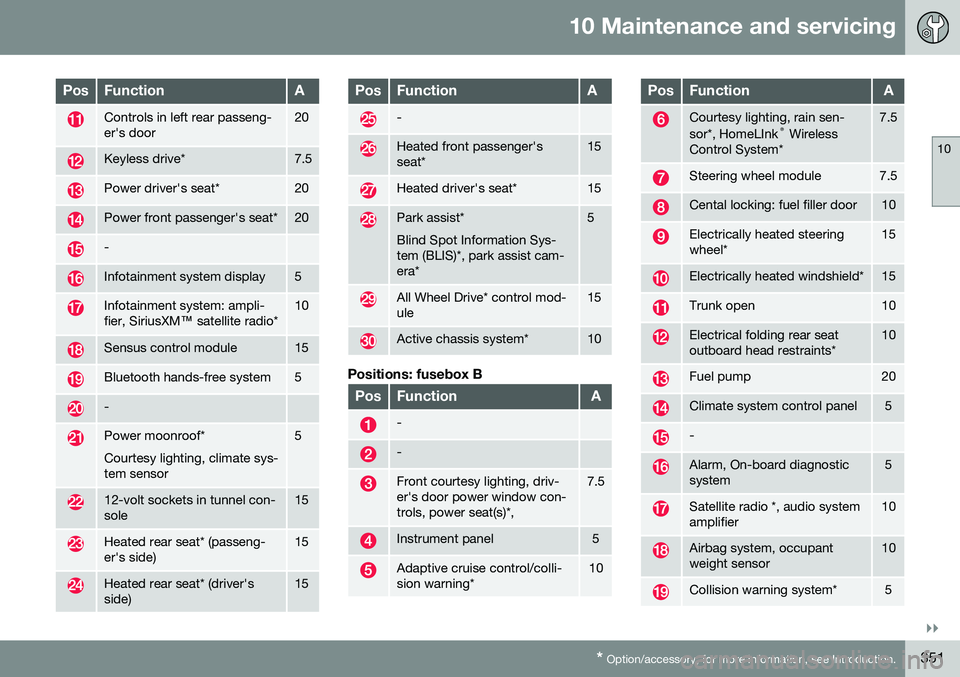
PosFunctionA
Controls in left rear passeng- er's door20
Keyless drive*7.5
Power driver's seat*20
Power front passenger's seat*20
-
Infotainment system display5
Infotainment system: ampli- fier, SiriusXM ™ satellite radio*10
Sensus control module15
Bluetooth hands-free system5
-
Power moonroof* Courtesy lighting, climate sys- tem sensor5
12-volt sockets in tunnel con- sole15
Heated rear seat* (passeng- er's side)15
Heated rear seat* (driver's side)15
PosFunctionA
-
Heated front passenger's seat*15
Heated driver's seat*15
Park assist* Blind Spot Information Sys- tem (BLIS)*, park assist cam-era*5
All Wheel Drive* control mod- ule15
Active chassis system*10
Positions: fusebox B
PosFunctionA
-
-
Front courtesy lighting, driv- er's door power window con-trols, power seat(s)*,7.5
Instrument panel5
Adaptive cruise control/colli- sion warning*10
PosFunctionA
Courtesy lighting, rain sen- sor*, HomeLInk ®
Wireless
Control System*7.5
Steering wheel module7.5
Cental locking: fuel filler door10
Electrically heated steering wheel*15
Electrically heated windshield*15
Trunk open10
Electrical folding rear seat outboard head restraints*10
Fuel pump20
Climate system control panel5
-
Alarm, On-board diagnostic system5
Satellite radio *, audio system amplifier10
Airbag system, occupant weight sensor10
Collision warning system*5
Page 362 of 392
||
10 Maintenance and servicing
10
360
CAUTION
•Do not use cleaning agents with high alcohol content such as washer fluidto clean instrument panel glass.
• Never spray cleaning agents or waterdirectly onto components with electri-cal buttons or controls. Clean compo-nents of this type by applying thecleaning agent/water sparingly to acloth and wiping the components sothat no liquid penetrates into thesecomponents.
Related information
•
Washing the car (p. 356)
Touching up paintwork
Paint damage requires immediate attention to avoid rusting. Make it a habit to check the fin-ish regularly, for instance washing the vehicle.Touch-up if necessary. Paint repairs require special equipment and skill. Contact your Volvo retailer for anyextensive damage. Minor scratches can be repaired by using Volvo touch-up paint.
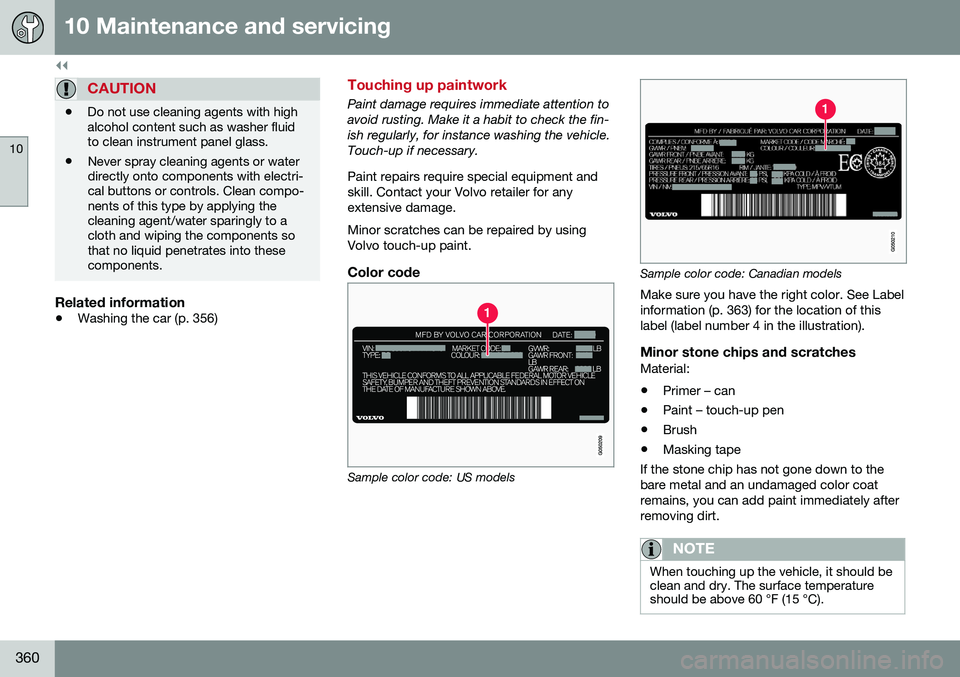
Color code
Sample color code: US models
Sample color code: Canadian models
Make sure you have the right color. See Label information (p. 363) for the location of thislabel (label number 4 in the illustration).
Minor stone chips and scratchesMaterial:
• Primer – can
• Paint – touch-up pen
• Brush
• Masking tape
If the stone chip has not gone down to thebare metal and an undamaged color coatremains, you can add paint immediately afterremoving dirt.
NOTE
When touching up the vehicle, it should be clean and dry. The surface temperatureshould be above 60 °F (15 °C).
Page 378 of 392
11 Specifications
11
376
Symbols – general information
The following tables list the most common warning and indicator lights and symbols anda reference to where more detailed informa-tion can be found.
IntroductionThe symbols in the vehicle's various displaysare divided into three main categories:• Warning symbols
• Indicator symbols
• Information symbols
The following tables list the most commonsymbols, their meaning and the pages in thismanual that provide more detailed informa-tion.
NOTE
Not all of the symbols shown in the related articles are available in all models or on allmarkets. Local variations may occur.
Warning symbol
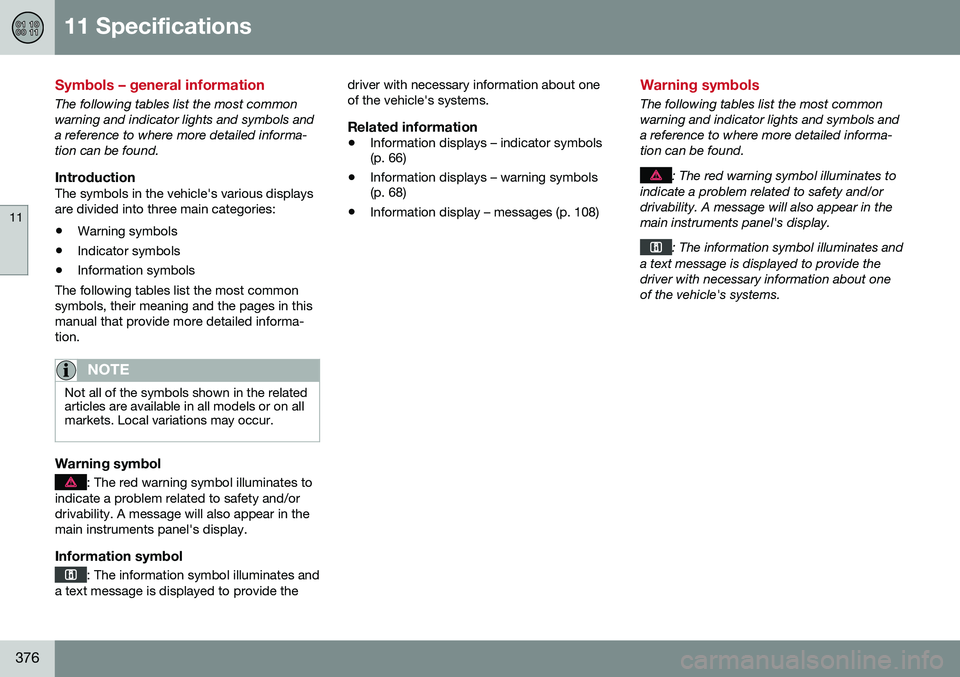
: The red warning symbol illuminates to
indicate a problem related to safety and/or drivability. A message will also appear in themain instruments panel's display.
Information symbol
: The information symbol illuminates and
a text message is displayed to provide the driver with necessary information about one of the vehicle's systems.
Related information
•
Information displays – indicator symbols (p. 66)
• Information displays – warning symbols(p. 68)
• Information display – messages (p. 108)
Warning symbols
The following tables list the most common warning and indicator lights and symbols anda reference to where more detailed informa-tion can be found.
: The red warning symbol illuminates to
indicate a problem related to safety and/or drivability. A message will also appear in themain instruments panel's display.
: The information symbol illuminates and
a text message is displayed to provide the driver with necessary information about oneof the vehicle's systems.
Page 379 of 392
11 Specifications
11
* Option/accessory, for more information, see Introduction.377
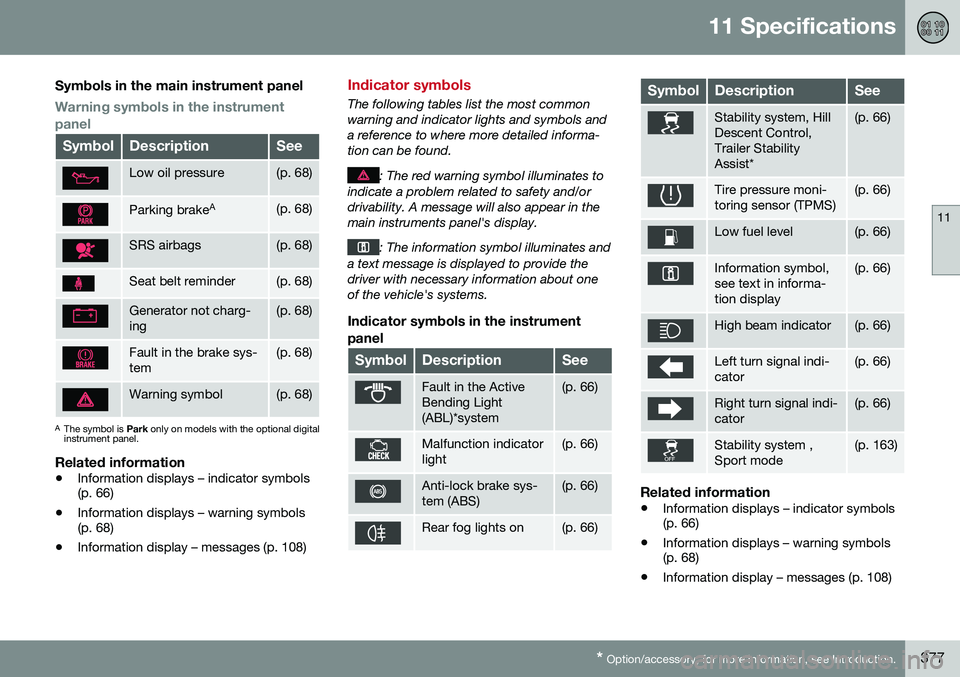
Symbols in the main instrument panel
Warning symbols in the instrument panel
SymbolDescriptionSee
Low oil pressure(p. 68)
Parking brake A(p. 68)
SRS airbags(p. 68)
Seat belt reminder(p. 68)
Generator not charg- ing(p. 68)
Fault in the brake sys- tem(p. 68)
Warning symbol(p. 68)
A
The symbol is Park only on models with the optional digital
instrument panel.
Related information
• Information displays – indicator symbols (p. 66)
• Information displays – warning symbols(p. 68)
• Information display – messages (p. 108)
Indicator symbols
The following tables list the most common warning and indicator lights and symbols anda reference to where more detailed informa-tion can be found.
: The red warning symbol illuminates to
indicate a problem related to safety and/or drivability. A message will also appear in themain instruments panel's display.
: The information symbol illuminates and
a text message is displayed to provide the driver with necessary information about oneof the vehicle's systems.
Indicator symbols in the instrument
panel
SymbolDescriptionSee
Fault in the Active Bending Light(ABL)*system(p. 66)
Malfunction indicator light(p. 66)
Anti-lock brake sys- tem (ABS)(p. 66)
Rear fog lights on(p. 66)
SymbolDescriptionSee
Stability system, Hill Descent Control,Trailer StabilityAssist*(p. 66)
Tire pressure moni- toring sensor (TPMS)(p. 66)
Low fuel level(p. 66)
Information symbol, see text in informa-tion display(p. 66)
High beam indicator(p. 66)
Left turn signal indi- cator(p. 66)
Right turn signal indi- cator(p. 66)
Stability system , Sport mode(p. 163)
Related information
• Information displays – indicator symbols (p. 66)
• Information displays – warning symbols(p. 68)
• Information display – messages (p. 108)
Page 380 of 392
11 Specifications
11
378* Option/accessory, for more information, see Introduction.
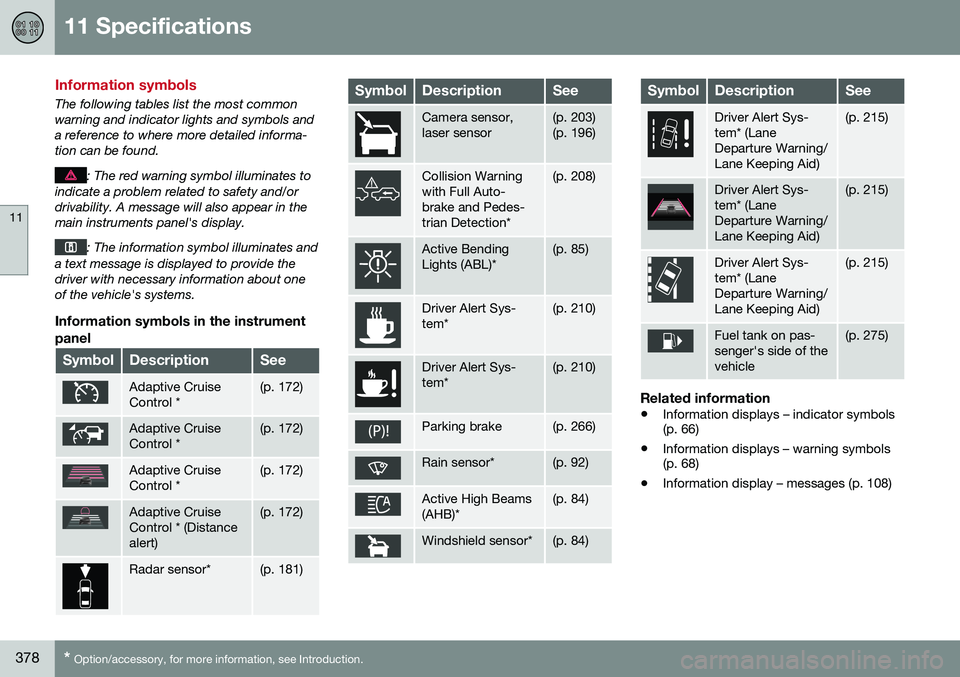
Information symbols
The following tables list the most common warning and indicator lights and symbols anda reference to where more detailed informa-tion can be found.
: The red warning symbol illuminates to
indicate a problem related to safety and/or drivability. A message will also appear in themain instruments panel's display.
: The information symbol illuminates and
a text message is displayed to provide the driver with necessary information about oneof the vehicle's systems.
Information symbols in the instrument
panel
SymbolDescriptionSee
Adaptive Cruise Control *(p. 172)
Adaptive Cruise Control *(p. 172)
Adaptive Cruise Control *(p. 172)
Adaptive Cruise Control * (Distancealert)(p. 172)
Radar sensor*(p. 181)
SymbolDescriptionSee
Camera sensor, laser sensor(p. 203) (p. 196)
Collision Warning with Full Auto-brake and Pedes-trian Detection*(p. 208)
Active Bending Lights (ABL)*(p. 85)
Driver Alert Sys- tem*(p. 210)
Driver Alert Sys- tem*(p. 210)
Parking brake(p. 266)
Rain sensor*(p. 92)
Active High Beams (AHB)*(p. 84)
Windshield sensor*(p. 84)
SymbolDescriptionSee
Driver Alert Sys- tem* (LaneDeparture Warning/Lane Keeping Aid)(p. 215)
Driver Alert Sys- tem* (LaneDeparture Warning/Lane Keeping Aid)(p. 215)
Driver Alert Sys- tem* (LaneDeparture Warning/Lane Keeping Aid)(p. 215)
Fuel tank on pas- senger's side of thevehicle(p. 275)
Related information
• Information displays – indicator symbols (p. 66)
• Information displays – warning symbols(p. 68)
• Information display – messages (p. 108)
Page 381 of 392
11 Specifications
11
* Option/accessory, for more information, see Introduction.379
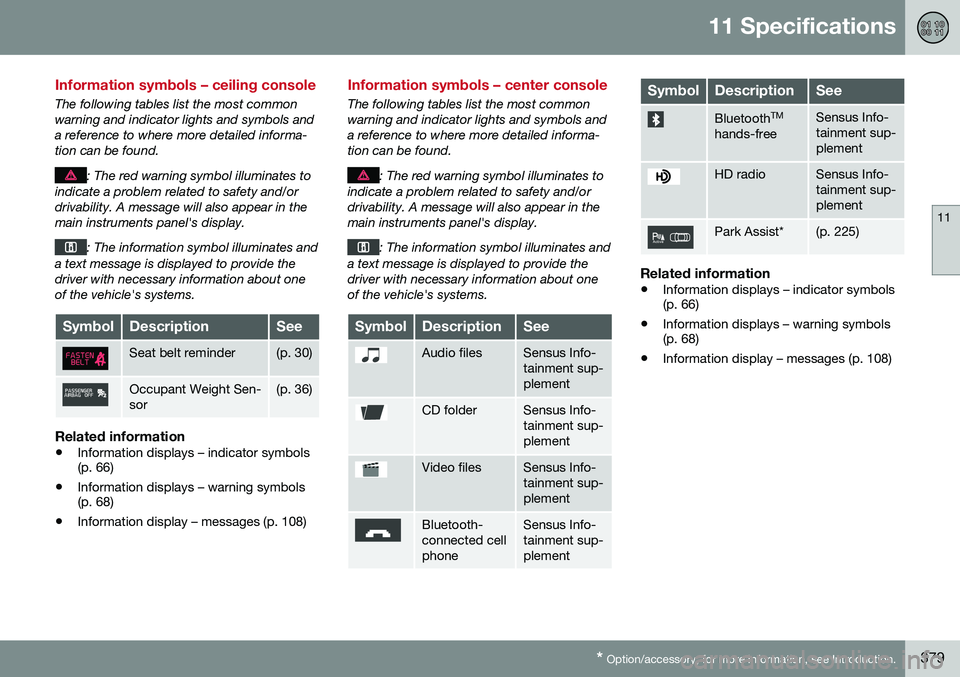
Information symbols – ceiling console
The following tables list the most common warning and indicator lights and symbols anda reference to where more detailed informa-tion can be found.
: The red warning symbol illuminates to
indicate a problem related to safety and/or drivability. A message will also appear in themain instruments panel's display.
: The information symbol illuminates and
a text message is displayed to provide the driver with necessary information about oneof the vehicle's systems.
SymbolDescriptionSee
Seat belt reminder(p. 30)
Occupant Weight Sen- sor(p. 36)
Related information
• Information displays – indicator symbols (p. 66)
• Information displays – warning symbols(p. 68)
• Information display – messages (p. 108)
Information symbols – center console
The following tables list the most common warning and indicator lights and symbols anda reference to where more detailed informa-tion can be found.
: The red warning symbol illuminates to
indicate a problem related to safety and/or drivability. A message will also appear in themain instruments panel's display.
: The information symbol illuminates and
a text message is displayed to provide the driver with necessary information about oneof the vehicle's systems.
SymbolDescriptionSee
Audio filesSensus Info- tainment sup-plement
CD folderSensus Info- tainment sup-plement
Video filesSensus Info- tainment sup-plement
Bluetooth- connected cellphoneSensus Info- tainment sup-plement
SymbolDescriptionSee
Bluetooth TM
hands-freeSensus Info- tainment sup-plement
HD radioSensus Info- tainment sup-plement
Park Assist*(p. 225)
Related information
• Information displays – indicator symbols (p. 66)
• Information displays – warning symbols(p. 68)
• Information display – messages (p. 108)