interior lights VOLVO S60 2016 Owner´s Manual
[x] Cancel search | Manufacturer: VOLVO, Model Year: 2016, Model line: S60, Model: VOLVO S60 2016Pages: 392, PDF Size: 10.04 MB
Page 5 of 392
Contents
* Option/accessory, for more information, see Introduction.3
03
03 Instruments and controls
Instrument overview ................................. 59
Information displays – introduction........... 62
Eco Guide* and Power Meter*.................. 65
Information displays – indicator symbols. 66
Information displays – warning symbols... 68
My Car – introduction............................... 70Information displays – ambient tempera-
ture sensor................................................ 71 Information displays – trip odometer and
clock......................................................... 72
Inserting/removing remote key................. 72
Ignition modes.......................................... 73
Front seats................................................ 74
Front seats – folding backrest*................. 75
Front seats – power seat.......................... 75Key memory – power driver's seat* and
door mirrors.............................................. 77
Rear seats – head restraints..................... 78
Rear seats – folding backrest................... 80
Steering wheel.......................................... 81
Electrically heated* steering wheel........... 82
Lighting panel........................................... 82
High/low beam headlights........................ 83
Active high beams (AHB)*......................... 84
03
Tunnel detection (models with the rain
sensor* only)............................................. 85
Active Bending Lights (ABL)*.................... 85
Auxiliary lights*.......................................... 86
Instrument and "theater" lighting.............. 87
Parking lights............................................ 87
Rear fog lights........................................... 87
Hazard warning flashers........................... 88
Turn signals............................................... 89
Front interior lighting................................. 89
Rear interior lighting.................................. 90
Home safe lighting.................................... 91
Approach lighting...................................... 91
Windshield wipers..................................... 91
Rain sensor*.............................................. 92
Windshield washer.................................... 93
Tailgate wiper/washer............................... 94
Power windows......................................... 94
Sun shades*.............................................. 96
Power door mirrors................................... 96Power door mirrors – automatic tilting/
retraction................................................... 97 Heated windshield*, rear window and
door mirror defrosters............................... 98
03
Interior rearview mirror.............................. 99
Digital compass*....................................... 99
Power moonroof – introduction.............. 100
Power moonroof – operation.................. 101 HomeLink ®
Wireless Control System* –
introduction............................................. 102HomeLink ®
Wireless Control System* –
programming........................................... 103
Volvo Sensus.......................................... 106
Information display – menu controls....... 107
Information display – menu overview..... 107
Information display – messages............. 108
Trip computer – introduction ................. 109Trip computer – functions, analog instru-
ment panel.............................................. 110 Trip computer – functions, digital instru-
ment panel.............................................. 113 Trip computer – Supplementary informa-
tion.......................................................... 115
Trip computer – Trip statistics................ 116
Page 89 of 392
03 Instruments and controls
03
}}
87
Instrument and "theater" lighting
Instrument lightingIllumination of the display and instrument lights will vary, depending on ignition mode. The display lighting is automatically subdued in darkness and the sensitivity is set with thethumb wheel. The intensity of the instrument lighting is adjusted with the thumb wheel.
"Theater" lightingWhen the overhead courtesy lighting hasgone out and the engine is running, severalLEDs located near the roof console illuminateto provide faint lighting for the occupants ofthe front seats. This lighting goes out justafter the overhead courtesy lighting when thevehicle is locked.
Related information
•Lighting panel (p. 82)
• Front interior lighting (p. 89)
• Rear interior lighting (p. 90)
• Ignition modes (p. 73)
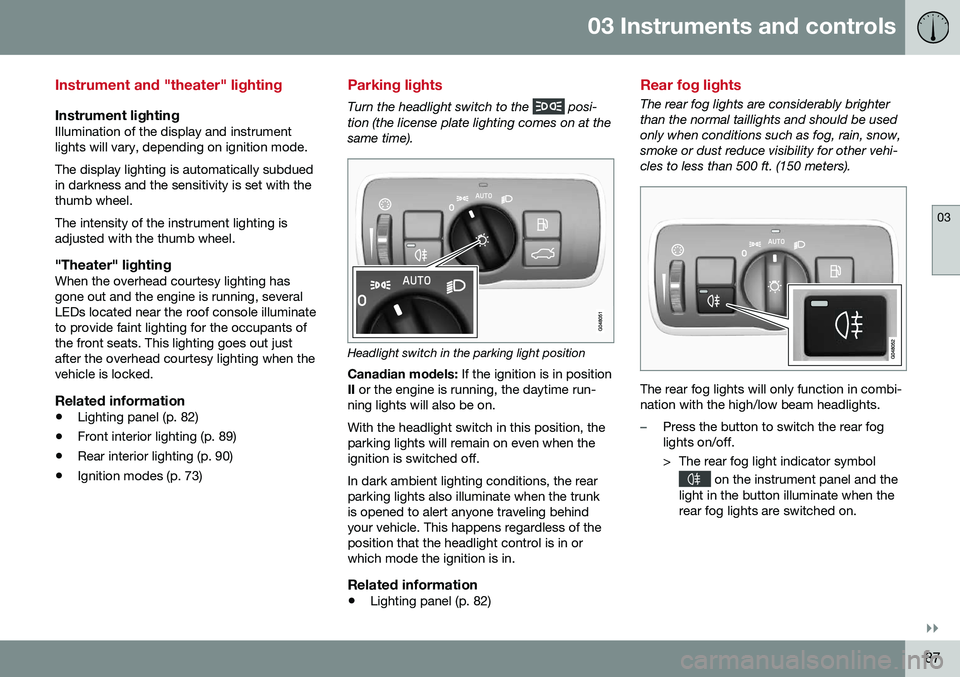
Parking lights
Turn the headlight switch to the posi-
tion (the license plate lighting comes on at the same time).
Headlight switch in the parking light position
Canadian models: If the ignition is in position
II or the engine is running, the daytime run-
ning lights will also be on. With the headlight switch in this position, the parking lights will remain on even when theignition is switched off. In dark ambient lighting conditions, the rear parking lights also illuminate when the trunkis opened to alert anyone traveling behindyour vehicle. This happens regardless of theposition that the headlight control is in orwhich mode the ignition is in.
Related information
• Lighting panel (p. 82)
Rear fog lights
The rear fog lights are considerably brighter than the normal taillights and should be usedonly when conditions such as fog, rain, snow,smoke or dust reduce visibility for other vehi-cles to less than 500 ft. (150 meters).
The rear fog lights will only function in combi- nation with the high/low beam headlights.
–Press the button to switch the rear fog lights on/off.
> The rear fog light indicator symbol
on the instrument panel and the
light in the button illuminate when the rear fog lights are switched on.
Page 92 of 392
||
03 Instruments and controls
03
90* Option/accessory, for more information, see Introduction.
Overhead courtesy lightingThe passenger compartment lighting is switched on and off automatically when but-ton (3) is in the neutral position. The lighting comes on and remains on for 30 seconds if:
• the vehicle is unlocked from the outside with the key or remote control
• the engine is switched off and the ignitionis in mode
0.
The lighting switches off when:
• the engine is started
• the vehicle is locked from the outside.
The lighting comes on and remains on for two minutes if one of the doors is open. The passenger compartment lighting can be switched on and off manually within30 minutes after the vehicle has beenunlocked. If the lighting is switched on manually and the vehicle is locked, the courtesy lighting willswitch off automatically after one minute.
Courtesy lights/door step lighting*The courtesy lights/door step lighting switch on/off automatically when one of the frontdoors is opened/closed.
Glove compartment lightingThe glove compartment lighting switches on/off automatically when the lid is opened/closed.
Related information
• Rear interior lighting (p. 90)
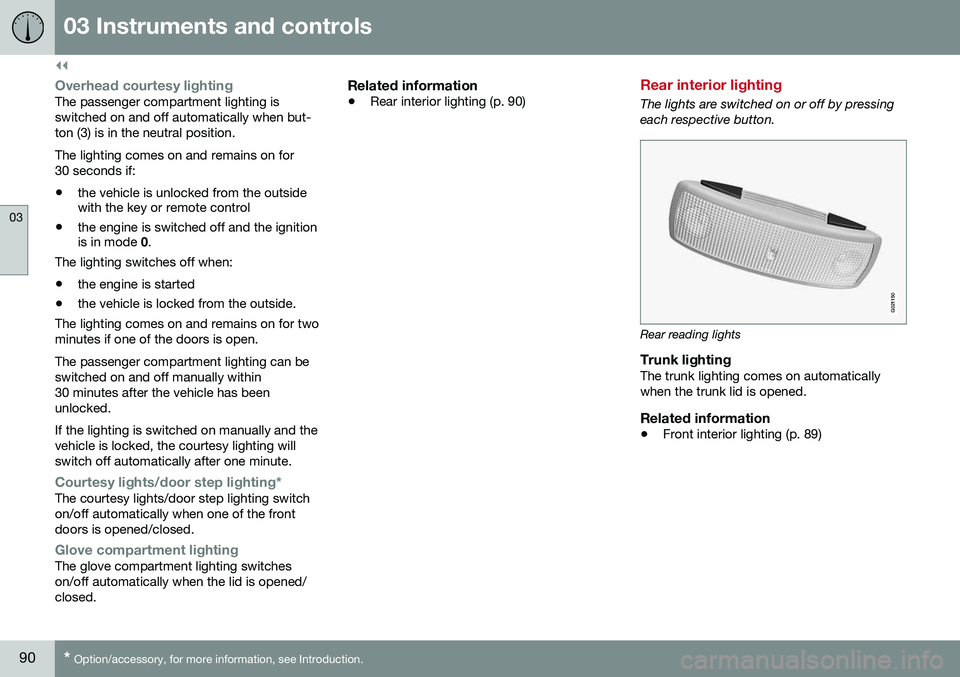
Rear interior lighting
The lights are switched on or off by pressing each respective button.
G021150
Rear reading lights
Trunk lightingThe trunk lighting comes on automatically when the trunk lid is opened.
Related information
• Front interior lighting (p. 89)
Page 100 of 392
||
03 Instruments and controls
03
98* Option/accessory, for more information, see Introduction.
Resetting to neutralMirrors that have been moved out of position by an external force must be electrically resetto the neutral position for electric retracting/extending to work. • Retract the mirrors with the
L and R but-
tons.
• Fold them out again with the
L and R but-
tons.
The mirrors are now reset in neutral position.
Related information
• Interior rearview mirror (p. 99)
• Heated windshield*, rear window and door mirror defrosters (p. 98)
Heated windshield*, rear window and door mirror defrosters
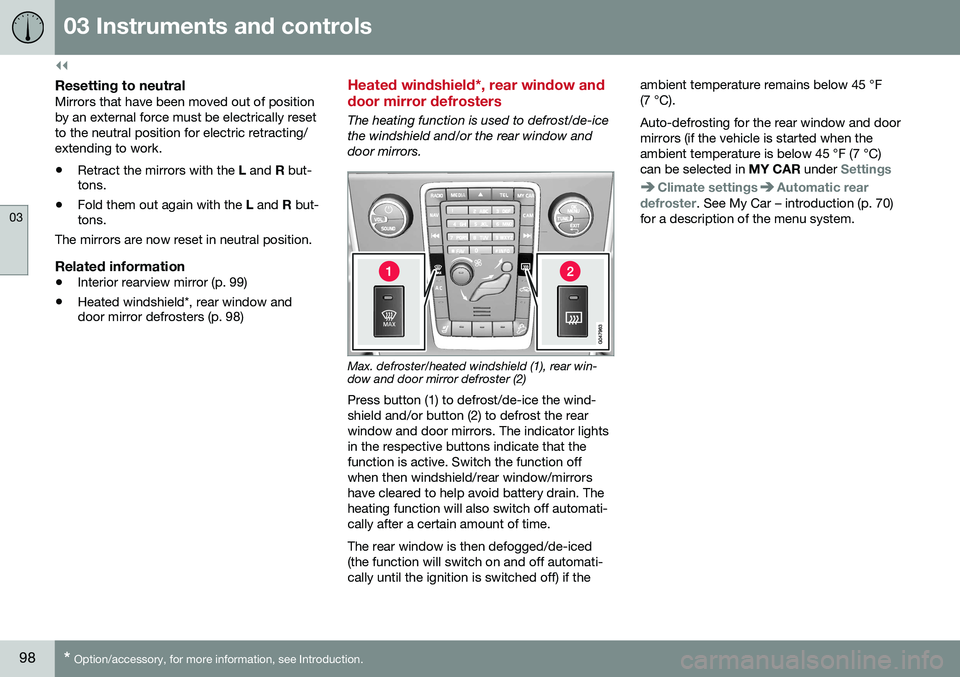
The heating function is used to defrost/de-ice the windshield and/or the rear window anddoor mirrors.
Max. defroster/heated windshield (1), rear win- dow and door mirror defroster (2)
Press button (1) to defrost/de-ice the wind- shield and/or button (2) to defrost the rearwindow and door mirrors. The indicator lightsin the respective buttons indicate that thefunction is active. Switch the function offwhen then windshield/rear window/mirrorshave cleared to help avoid battery drain. Theheating function will also switch off automati-cally after a certain amount of time. The rear window is then defogged/de-iced (the function will switch on and off automati-cally until the ignition is switched off) if the ambient temperature remains below 45 °F(7 °C). Auto-defrosting for the rear window and door mirrors (if the vehicle is started when theambient temperature is below 45 °F (7 °C)can be selected in
MY CAR under
Settings
Climate settingsAutomatic rear
defroster. See My Car – introduction (p. 70)
for a description of the menu system.
Page 101 of 392
03 Instruments and controls
03
}}
* Option/accessory, for more information, see Introduction.99
Interior rearview mirror
The interior rearview mirror has an auto-dim function that helps reduce glare from follow-ing vehicle's headlights.
Auto-dim functionThe interior rearview mirror’s auto-dim func-tion is controlled by two sensors: one point-ing forward (located on the forward-facingside of the mirror, which monitors the amountof ambient light) and one pointing rearward(located on the side of the mirror facing thedriver at the upper edge, which senses thestrength of following vehicles' headlights), and work together to help eliminate glare. 21
NOTE
Obstructing the forward sensor with e.g., parking stickers, transponders, etc., or therear sensor by placing objects on the par-cel shelf or the rear seat in such a way thatlight is prevented from reaching the sensorwill reduce the auto-dim function in theinterior rearview mirror and optional auto-dim function in the door mirrors.
Related information
•
Power door mirrors (p. 96)
Digital compass*
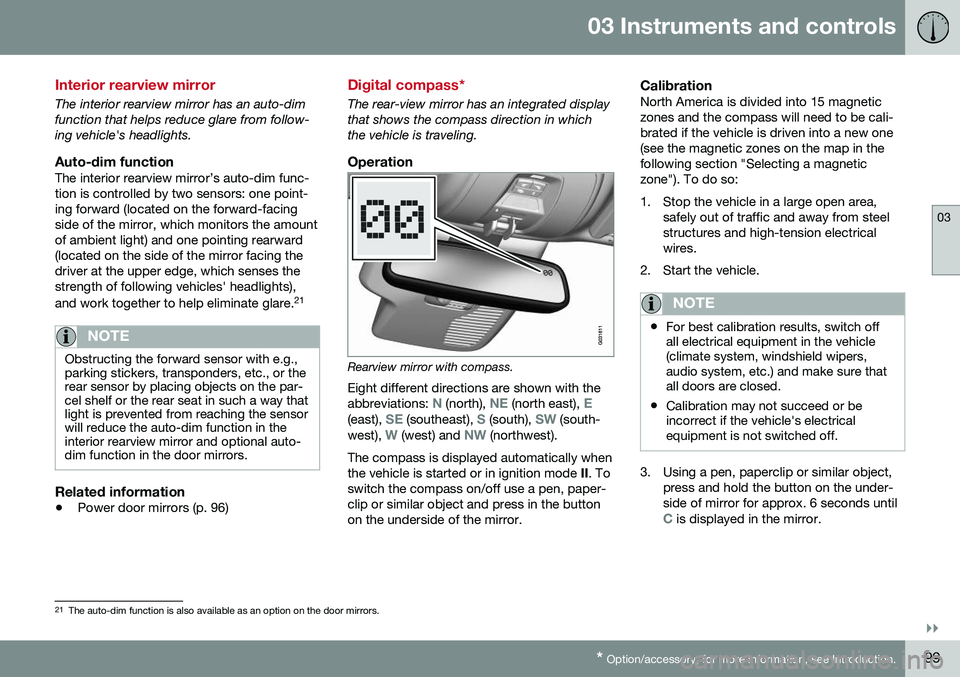
The rear-view mirror has an integrated display that shows the compass direction in whichthe vehicle is traveling.
Operation
Rearview mirror with compass.
Eight different directions are shown with the abbreviations:
N (north), NE (north east), E(east), SE (southeast), S (south), SW (south-
west), W (west) and NW (northwest).
The compass is displayed automatically when the vehicle is started or in ignition mode II. To
switch the compass on/off use a pen, paper-clip or similar object and press in the buttonon the underside of the mirror.
CalibrationNorth America is divided into 15 magneticzones and the compass will need to be cali-brated if the vehicle is driven into a new one(see the magnetic zones on the map in thefollowing section "Selecting a magneticzone"). To do so:
1. Stop the vehicle in a large open area, safely out of traffic and away from steel structures and high-tension electricalwires.
2. Start the vehicle.
NOTE
• For best calibration results, switch off all electrical equipment in the vehicle(climate system, windshield wipers,audio system, etc.) and make sure thatall doors are closed.
• Calibration may not succeed or beincorrect if the vehicle's electricalequipment is not switched off.
3. Using a pen, paperclip or similar object,
press and hold the button on the under- side of mirror for approx. 6 seconds until
C is displayed in the mirror.
21The auto-dim function is also available as an option on the door mirrors.
Page 145 of 392
06 Locks and alarm
06
* Option/accessory, for more information, see Introduction.143
After a short pause, press the Unlock button a second time within 10 seconds to unlockthe other doors and the trunk. This function can be changed so that all doors unlock at the same time by pressing My Car
and going to
SettingsCar
settings
Lock settingsChange doors
unlock setting. For a description of the menu
system, see My Car – introduction (p. 70).
Approach lighting – As you approach
the vehicle, press the button on the remote key to light the interior lighting, parking lights,license plate lighting and the lights in the doormirrors*. These lights will switch off automatically after 30, 60 or 90 seconds. For a description of themenu system, see My Car – introduction(p. 70).
Unlock/open trunk
Press once: This unlocks the trunk (but does
not open it) and disarms the alarm (the alarm indicator light on the dashboard will go out). Ifthe trunk is not opened within two minutes itwill automatically relock and the alarm will berearmed. Press twice: This both unlocks the trunk and
pops it open slightly.
NOTE
Any excess weight (snow, etc.) on the trunk lid may prevent it from opening.
For information on opening the trunk from the passenger compartment, see Locking/unlocking – trunk (p. 155). After closing, the trunk will not automatically relock. Press Lock to relock it and rearm thealarm.
Panic alarm – This button can be used
to attract attention during emergency situa- tions. To activate the panic alarm, press and hold this button for at least 3 seconds or press ittwice within 3 seconds. The turn signals andhorn will be activated. The panic alarm willstop automatically after 2 minutes and45 seconds. To deactivate, wait approximately 5 seconds and press the button again. The Panic alarm button will not unlock the vehicle.
Related information
• Locking/unlocking – from inside (p. 153)
• Locking/unlocking – from the outside (p. 152)
• Locking/unlocking confirmation (p. 140)
Remote key – range
The remote key has a range of approximately 60 ft. (20 m) from the vehicle.
NOTE
Buildings or other obstacles may interfere with the function of the remote key. Thevehicle can also be locked or unlockedwith the key blade, see Alarm-related func-tions (p. 160).
If the remote key is removed from the vehicle while the engine is running or if the ignition isin mode
I or II and all of the doors are closed,
a message will appear in the instrument paneldisplay and there will be an audible signal. When the remote key is returned to the vehi- cle, the message will be erased and the audi-ble signal will stop after one of the followinghas been done: • The remote key is inserted in the ignition slot
• The vehicle's speed exceeds 20 mph(30 km/h)
• The
OK button on the left steering wheel
lever is pressed
Related information
• Remote key – functions (p. 142)
Page 321 of 392
10 Maintenance and servicing
10
319
Maintenance – owner maintenance
Periodic maintenance requirements and inter- vals are described in your vehicle's Warrantyand Service Records Information booklet. The following points can be carried out between the normally scheduled maintenanceservices.
Owner maintenance
Each time the car is refueled:
•Check the engine oil level.
• Clean the windshield, windshield wipers, headlights, and taillights.
Monthly:
• Check cold tire pressure in all tires. Inspect the tires for wear.
• Check that engine coolant and other fluidlevels are between the indicated "min"and "max" markings.
• Clean interior glass surfaces with a glasscleaner and soft paper towels.
• Wipe driver information displays with asoft cloth.
• Visually inspect battery terminals for cor-rosion. Corrosion may indicate a looseterminal connector, or a battery near theend of its useful service life. Consult yourVolvo retailer for additional information.
As needed:Wash the car, including the undercarriage, to reduce wear that can be caused by a buildup of dirt, and corrosion that can be caused bysalt residues. Clean leaves and twigs from air intake vents at the base of the windshield, and from otherplaces where they may collect.
NOTE
Complete service information for qualified technicians is available online for purchaseor subscription at www.volvotechinfo.com.
Related information
•
Maintenance – opening/closing hood (p. 323)
• Engine compartment – overview (p. 324)
• Engine compartment – coolant (p. 327)
• Engine compartment – engine oil (p. 325)
• Engine compartment – power steeringfluid (p. 329)
• Engine compartment – washer fluid(p. 340)
• Cleaning the interior (p. 358)
• Washing the car (p. 356)
• Tire inflation – checking pressure (p. 294)
• Tires – tread wear indicator (p. 287)
Page 332 of 392
10 Maintenance and servicing
10
330
CAUTION
Keep the area around the power steering fluid reservoir clean when checking.
Bulbs – introduction
Certain bulbs can be replaced by the vehicle's owner. However, the bulbs on the followinglist should only be replaced by a trained andqualified Volvo service technician. All bulb specifications are listed in Bulbs – specifications (p. 337).• Active Bending Lights
• Front parking lights
• Front side marker lights
• Cornering lights
• Turn signals in the door mirrors
• Approach lighting in the door mirrors
• Interior lighting (except for the front foot- well lighting)
• Rear parking lights
• LED bulbsNOTE
•For information regarding any bulbs not mentioned in this section, pleasecontact your Volvo retailer or a trainedand authorized Volvo service techni-cian.
• Always switch off the ignition beforestarting to replace a bulb.
• If an error message remains in the dis-play after a faulty bulb has beenreplaced, contact an authorized Volvoworkshop.
• Condensation may form temporarily onthe inside of the lenses of exteriorlights such as headlights, fog lights, ortaillights. This is normal and the lightsare designed to withstand moisture.Normally, condensation will dissipateafter the lights have been on for ashort time.
• The optional Active Bending Lightbulbs contain trace amounts of mer-cury. These bulbs should always bedisposed of by a trained and qualifiedVolvo service technician.
Page 358 of 392
10 Maintenance and servicing
10
356
Washing the car
The vehicle should be washed at regular inter- vals since dirt, dust, insects and tar spotsadhere to the paint and may cause damage.To help prevent corrosion, it is particularlyimportant to wash the car frequently in thewintertime. The following points should be kept in mind when washing and cleaning the car: •Avoid washing your car in direct sunlight. Doing so may cause detergents and waxto dry out and become abrasive. To avoidscratching, use lukewarm water to softenthe dirt before you wash with a softsponge, and plenty of sudsy water.
• Bird droppings
: Remove from paintwork
as soon as possible. Otherwise the finishmay be permanently damaged.
• A detergent can be used to facilitate thesoftening of dirt and oil.
• Dry the car with a clean chamois andremember to clean the drain holes in thedoors and rocker panels.
• Tar spots can be removed with tarremover after the car has been washed.
• A stiff-bristle brush and lukewarm soapywater can be used to clean the wiperblades. Frequent cleaning of the wind-shield and wiper blades improves visibilityconsiderably and also helps prolong theservice life of the wiper blades. •
Wash off the dirt from the underside(wheel housings, fenders, etc).
• In areas of high industrial fallout, morefrequent washing is recommended.
NOTE
When washing the car, remember to remove dirt from the drain holes in thedoors and sills.
CAUTION
• During high pressure washing, the spray mouthpiece must never becloser to the vehicle than 13" (30 cm).Do not spray into the locks.
• Dirt, snow, etc., on the headlights canreduce lighting capacity considerably.Clean the headlights regularly, forexample when refueling.
Special moonroof cautions:
• Always close the moonroof and sunshade before washing your vehicle.
• Never use abrasive cleaning agents onthe moonroof.
• Never use wax on the rubber sealsaround the moonroof.
Exterior componentsVolvo recommends the use of special clean- ing products, available at your Volvo retailer, for cleaning colored plastic, rubber, or orna-mental components such as chromed stripson the exterior of your vehicle. The instruc-tions for using these products should be fol-lowed carefully. Solvents or stain removersshould not be used.
CAUTION
•
Avoid waxing or polishing plastic or rubber components
• Polishing chromed strips can wearaway or damage the surface
• Polishes containing abrasive sub-stances should not be used
Related information
•
Polishing and waxing (p. 357)
• Cleaning the interior (p. 358)
Page 359 of 392
10 Maintenance and servicing
10
}}
357
Automatic car wash
The vehicle should be washed at regular inter- vals since dirt, dust, insects and tar spotsadhere to the paint and may cause damage.To help prevent corrosion, it is particularlyimportant to wash the car frequently in thewintertime.• We do NOT recommend washing your car in an automatic wash during the firstfew months (because the paint will nothave hardened sufficiently).
• An automatic wash is a simple and quickway to clean your car, but it is worthremembering that it may not be as thor-ough as when you yourself go over thecar with sponge and water. Keeping theunderbody clean is most important, espe-cially in the winter. Some automaticwashers do not have facilities for washingthe underbody.
NOTE
Condensation may form temporarily on the inside of the lenses of exterior lights suchas headlights, fog lights, or taillights. Thisis normal and the lights are designed towithstand moisture. Normally, condensa-tion will dissipate after the lights have beenon for a short time.
CAUTION
• Before driving into an automatic car wash, turn off the optional rain sensorto avoid damaging the windshield wip-ers.
• Make sure that side view mirrors, aux-iliary lamps, etc, are secure, and thatany antenna(s) are retracted orremoved. Otherwise there is risk of themachine dislodging them.
• Chromed wheels:
Clean chrome-
plated wheels using the same deter-gents used for the body of the vehicle.Aggressive wheel-cleaning agents canpermanently stain chrome-platedwheels.
WARNING
• When the vehicle is driven immediately after being washed, apply the brakes,including the parking brake, severaltimes in order to remove any moisturefrom the brake linings.
• Engine cleaning agents should not beused when the engine is warm. Thisconstitutes a fire risk.
Related information
•
Polishing and waxing (p. 357)
• Cleaning the interior (p. 358)
• Washing the car (p. 356)
Polishing and waxing
Normally, polishing is not required during the first year after delivery, however, waxing maybe beneficial.
• Before applying polish or wax the vehicle must be washed and dried. Tar spots canbe removed with kerosene or tar remover.Difficult spots may require a fine rubbingcompound.
• After polishing use liquid or paste wax.
• Several commercially available productscontain both polish and wax.
• Waxing alone does not substitute for pol-ishing a dull surface.
• A wide range of polymer-based waxescan be purchased today. These waxesare easy to use and produce a long-last-ing, high-gloss finish that protects thebodywork against oxidation, road dirt andfading.
• Do not polish or wax your vehicle in directsunlight (the surface of the vehicle shouldnot be warmer than 113 °F (45 °C).