buttons VOLVO S60 2017 Owner´s Manual
[x] Cancel search | Manufacturer: VOLVO, Model Year: 2017, Model line: S60, Model: VOLVO S60 2017Pages: 398, PDF Size: 9.46 MB
Page 106 of 398
||
INSTRUMENTS AND CONTROLS
* Option/accessory, for more information, see Introduction.
104
WARNING
• If you use HomeLink ®
to open a garage
door or gate, be sure no one is near the gate or door while it is in motion.
• When programming a garage dooropener, it is advised to park outside of thegarage.
• Do not use HomeLink ®
with any garage
door opener that lacks safety stop andreverse features as required by U.S. fed-eral safety standards (this includes anygarage door opener model manufacturedbefore April 1, 1982). A garage door thatcannot detect an object - signaling thedoor to stop and reverse - does not meetcurrent U.S. federal safety standards. Formore information, contact HomeLink at:www.homelink.com.
The HomeLink ®
23
Wireless Control System pro-
vides a convenient way to replace up to three hand-held radio-frequency (RF) transmitters usedto activate devices such as gate operators,garage door openers, entry door locks, securitysystems, even home lighting. Additional informa-tion can be found on the Internet at,www.homelink.com/www.youtube.com/HomeLinkGentex or by phoning the hotline at 1–800–355–3515. Retain the original transmitter of the RF device you are programming for use in other vehicles as well as for future HomeLink programming. It isalso suggested that upon the sale of the vehicle,the programmed HomeLink buttons be erasedfor security purposes. Refer to “Resetting Home- Link Buttons” in HomeLink
®
Wireless Control
System * – programming (p. 104).
Using HomeLinkTo operate, simply press and hold the pro- grammed HomeLink button until the traineddevice begins to operate (this may take severalseconds). Activation will now occur for the traineddevice (i.e., garage door opener, gate operator,security system, entry door lock, home/officelighting, etc.). For convenience, the hand-heldtransmitter of the device may also be used at anytime. In the event that there are still programmingdifficulties or questions, contact HomeLink at:www.homelink.com/www.youtube.com/HomeLinkGentex or by phoning the hotline at 1–800–355–3515.
NOTE
If the ignition is switched off, HomeLink will function for 30 minutes after the driver's doorhas been opened.
HomeLink ®
Wireless Control
System * – programming
The HomeLink Wireless Control System pro- vides a convenient way to replace up to threehand-held radio-frequency (RF) transmittersused to activate devices such as gate operators,garage door openers, entry door locks, securitysystems, even home lighting. Additional informa-tion can be found on the Internetatwww.homelink.com/www.youtube.com/HomeLinkGentex or by phoning the hotline at 1–800–355–3515.
NOTE
Some vehicles may require the ignition to be switched on or be in the “accessories” posi-tion for programming and/or operation ofHomeLink. It is also recommended that a newbattery be placed in the hand-held transmitterof the device being programmed to Home-Link for quicker training and accurate trans-mission of the radio-frequency signal. TheHomeLink buttons must be reset first. Whenthis has been completed, Homelink is inlearning mode so that you can perform pro-gramming.
23 HomeLink and the HomeLink house are registered trademarks of Gentex Corporation.
Page 107 of 398
INSTRUMENTS AND CONTROLS
}}
105
1. Position the end of your hand-held transmit-
ter 1–3 inches (5–14 cm) away from the HomeLink button you wish to program whilekeeping the indicator light in view.
2. Simultaneously press and hold both the chosen HomeLink and hand-held transmitterbuttons until the HomeLink indicator lightchanges from a slow to a rapidly blinkinglight. Now you may release both the Home-Link and hand-held transmitter buttons.
NOTE
Some devices may require you to replace this Programming Step 2 with procedures notedin the “Gate Operator / Canadian Program-ming” section. If the HomeLink indicator lightdoes not change to a rapidly blinking lightafter performing these steps, contact Home-Link at www.homelink.com/www.youtube.com/HomeLinkGentex or byphoning the hotline at 1–800–355–3515.
3.Firmly press, hold for five seconds and
release the programmed HomeLink button
up to two separate times to activate the door. If the door does not activate, press and holdthe just-trained HomeLink button andobserve the indicator light.
• If the indicator light
stays on constantly,
programming is complete and your
device should activate when the Home-Link button is pressed and released.
• If the indicator light blinks
rapidly for two
seconds and then turns to a constantlight continue with “Programming”steps 4-6 to complete the programming
of a rolling code equipped device (mostcommonly a garage door opener).
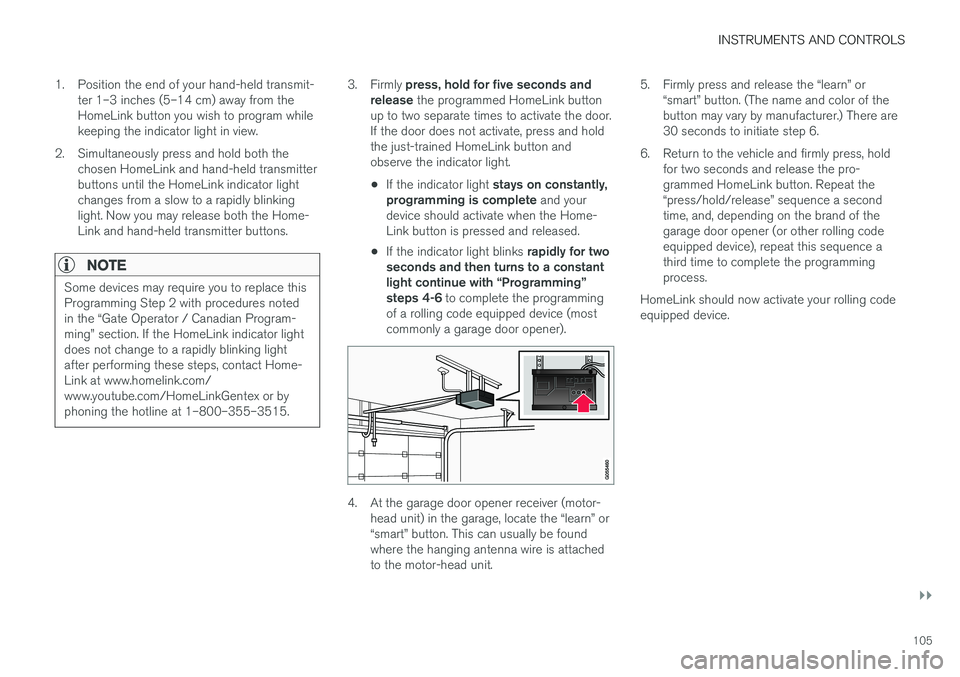
4. At the garage door opener receiver (motor- head unit) in the garage, locate the “learn” or “smart” button. This can usually be foundwhere the hanging antenna wire is attachedto the motor-head unit. 5. Firmly press and release the “learn” or
“smart” button. (The name and color of thebutton may vary by manufacturer.) There are30 seconds to initiate step 6.
6. Return to the vehicle and firmly press, hold for two seconds and release the pro-grammed HomeLink button. Repeat the“press/hold/release” sequence a secondtime, and, depending on the brand of thegarage door opener (or other rolling codeequipped device), repeat this sequence athird time to complete the programmingprocess.
HomeLink should now activate your rolling codeequipped device.
Page 108 of 398
||
INSTRUMENTS AND CONTROLS
106
Gate Operator/Canadian Programming
Canadian radio-frequency laws require transmit- ter signals to “time-out” (or quit) after severalseconds of transmission – which may not be longenough for HomeLink to pick up the signal dur-ing programming. Similar to this Canadian law,some U.S. gate operators are designed to “time-out” in the same manner. If you live in Canada or you are having difficulties programming a gate operator or garage dooropener by using the “Programming” procedures, replace “Programming HomeLink” step 2 with the following:
• Continue to press and hold the HomeLink button while you
press and release - every
two seconds (“cycle”) your hand-held trans-
mitter until the HomeLink indicator light changes from a slow to a rapidly blinkinglight. Now you may release both the Home-Link and hand-held transmitter buttons.
Proceed with “Programming” step 3 to complete.
Resetting HomeLink ButtonsUse the following procedure to reset (erase pro-gramming) from the three HomeLink buttons(individual buttons cannot be reset but can be“reprogrammed” as outlined in the following sec-tion):
1. Press and hold the two outer HomeLink but- tons until the indicator light begins to flash. 2. Release both buttons.
> HomeLink is now in the training (or learn-ing) mode and can be programmed at any time beginning with “Programming” - step1.
Reprogramming a Single HomeLink Button
To program a device to HomeLink using a Home- Link button previously trained, follow these steps:
1. Press and hold the desired HomeLink but-
ton. DO NOT release the button.
2. The indicator light will begin to flash after 20 seconds. Without releasing the HomeLink button, proceed with “Programming” - step 1.
For questions or comments, contact HomeLinkat: www.homelink.com/www.youtube.com/HomeLinkGentex or by phoning the hotline at 1–800–355–3515. This device complies with FCC rules part 15 and Industry Canada (IC) RSS-210. Operation is sub-ject to the following two conditions: (1) Thisdevice may not cause harmful interference, and(2) This device must accept any interference thatmay be received including interference that maycause undesired operation.
NOTE
The transmitter has been tested and complies with FCC and IC rules. Changes or modifica-tions not expressly approved by the partyresponsible for compliance could void the user
Page 131 of 398

CLIMATE
* Option/accessory, for more information, see Introduction.129
NOTE
•Triangular areas at the far sides of the windshield are not heated electrically andwill take slightly longer to defrost/de-ice.
• The heated windshield may affect theperformance/range of e.g., transpondersused to automatically pay highway tolls orother communication equipment.
The following occurs when the defroster/wind- shield heating functions have been activated:
• Blower speed increases automatically andthe air conditioning (p. 128) will switch on (ifnot already on and if the passenger compart-ment blower is not turned off) to dehumidifythe air in the passenger compartment. Airconditioning can be switched off by pressing the
AC button.
• Recirculation (p. 130) will not function while defrost is engaged.
The climate system will return to its previous set-tings when the defroster/windshield heatingfunction is switched off. See also Heated windshield *, rear window and
door mirror defrosters (p. 99) for additional infor- mation.
Related information
• Climate – general information (p. 120)
• Automatic climate control (p. 127)
Air distribution – function
The air distribution function consists of three buttons.
Manual air distribution—defroster
Manual air distribution—dashboard air vents
Manual air distribution—floor
When a button is pressed, the corresponding fig- ure will appear in the display with an arrow indi-cating which manual air flow has been selected(see the following illustration). See also the airdistribution chart (p. 131).
Air distribution is shown in the center console display
Related information
• Climate – general information (p. 120)
• Air distribution – general (p. 123)
• Air distribution – recirculation (p. 130)
Page 133 of 398

CLIMATE
}}
131
Air distribution – table
Air distribution (p. 123) is selected using the buttons in the center console climate panel.
Air distributionUseAir distributionUse
Air to windows. Some air flows from the dashboard air vents. Theair is not recirculated. Air condi-tioning is always engaged.To remove de-fog/de- ice the front side win-dows and windshieldquickly.Air to the floor and win- dows. Some air flowsfrom the dashboard airvents.To ensure comfortable conditions and good de-fogging in cold or humidweather.
Air to windshield and side win- dows. Some air flows from the airdashboard vents.In cold or humid weather (blower speedshould be moderate tohigh).Air to floor and from dashboard air vents.In sunny weather with cool outside temperatures.
Airflow to windows and from dashboard air vents.To ensure good comfort in warm, dry weather.Air to floor. Some air flows to the dashboardair vents and windows.To warm or cool the feet.
Airflow to the head and chest from the dashboard air vents.To ensure efficient cool- ing in warm weather.Airflow to windows, from dashboard air vents andto the floor.To cool the feet or provide warmer air to the upperbody in cold weather orhot, dry weather.
Page 149 of 398
LOCKS AND ALARM
}}
* Option/accessory, for more information, see Introduction.147
MessageMeaning
Insert car keyRemote key not recognized dur- ing start. Try to start the vehicleagain.
Car key not foundVehicles with keyless drive*
only. Remote key not recog- nized during start. Try to startthe vehicle again. If the problem continues, insert the remote key into the ignitionslot and try to start the vehicleagain.
Immobil- izer Trystart againRemote key fault during start. Contact an authorized Volvoworkshop.
CAUTION
Never use force when inserting the remote key in the ignition slot. The vehicle cannot bestarted if the transponder is damaged.
USA–FCC ID: LTQWFS 125VO This device complies with part 15 of the FCC rules. Operation is subject to the following condi-tion: (1) This device may not cause harmful inter-ference, and (2) this device must accept anyinterference received, including interference thatmay cause undesired operation. Canada–IC: 3659A-WFS125VO Operation is subject to the following conditions: (1) this device may not cause interference, and(2) this device must accept any interference,including interference that may cause undesiredoperation of the device. For information on starting the vehicle, see Star- ting the engine (p. 252).
Remote key – functions
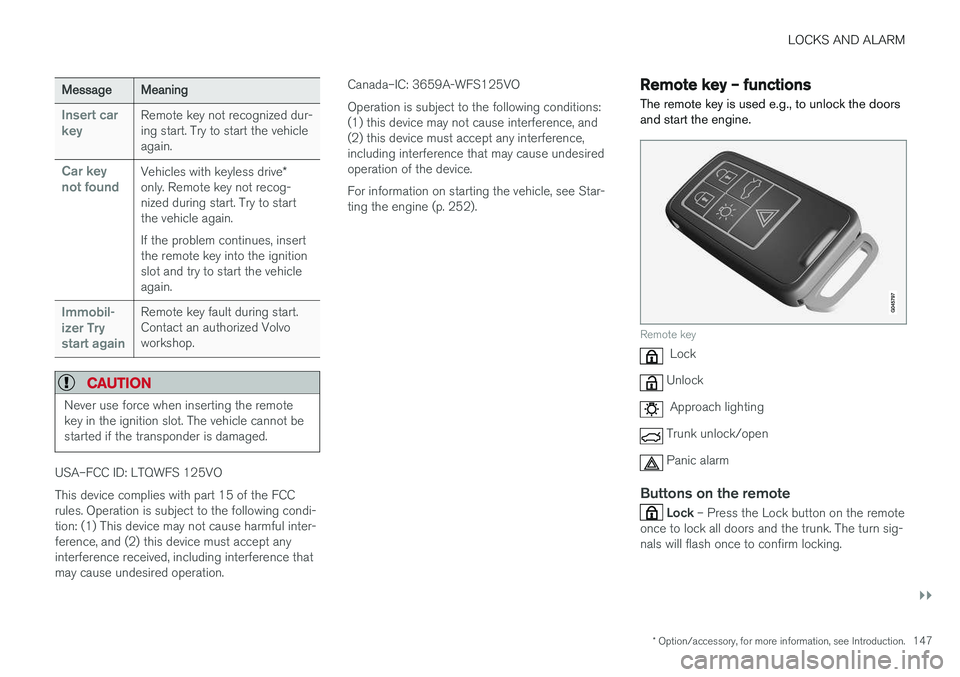
The remote key is used e.g., to unlock the doors and start the engine.
Remote key
Lock
Unlock
Approach lighting
Trunk unlock/open
Panic alarm
Buttons on the remote
Lock – Press the Lock button on the remote
once to lock all doors and the trunk. The turn sig- nals will flash once to confirm locking.
Page 154 of 398
||
LOCKS AND ALARM
152
Opening the remote key
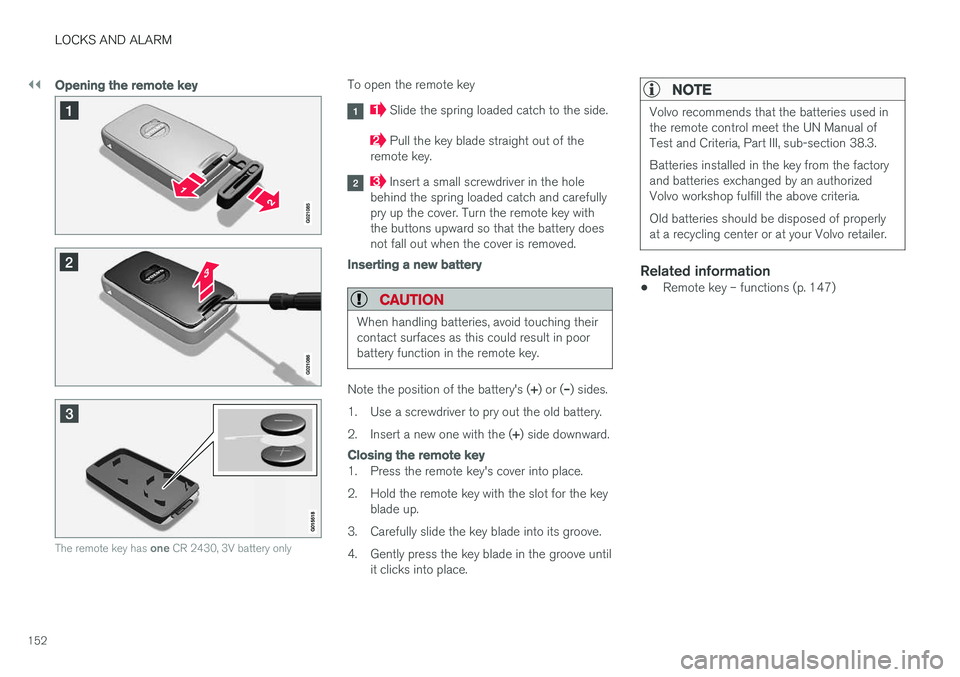
The remote key has one CR 2430, 3V battery only
To open the remote key
Slide the spring loaded catch to the side.
Pull the key blade straight out of the
remote key.
Insert a small screwdriver in the hole
behind the spring loaded catch and carefully pry up the cover. Turn the remote key withthe buttons upward so that the battery doesnot fall out when the cover is removed.
Inserting a new battery
CAUTION
When handling batteries, avoid touching their contact surfaces as this could result in poorbattery function in the remote key.
Note the position of the battery's ( +) or ( –) sides.
1. Use a screwdriver to pry out the old battery. 2. Insert a new one with the ( +) side downward.
Closing the remote key
1. Press the remote key's cover into place.
2. Hold the remote key with the slot for the key
blade up.
3. Carefully slide the key blade into its groove.
4. Gently press the key blade in the groove until it clicks into place.
NOTE
Volvo recommends that the batteries used in the remote control meet the UN Manual ofTest and Criteria, Part III, sub-section 38.3. Batteries installed in the key from the factory and batteries exchanged by an authorizedVolvo workshop fulfill the above criteria. Old batteries should be disposed of properly at a recycling center or at your Volvo retailer.
Related information
• Remote key – functions (p. 147)
Page 155 of 398
LOCKS AND ALARM
}}
* Option/accessory, for more information, see Introduction.153
Keyless drive*– locking/unlocking
This system makes it possible to unlock and lock the vehicle without having to press any buttonson the remote key. It is only necessary to have akeyless drive remote key in your possession tooperate the central locking system.
G020577
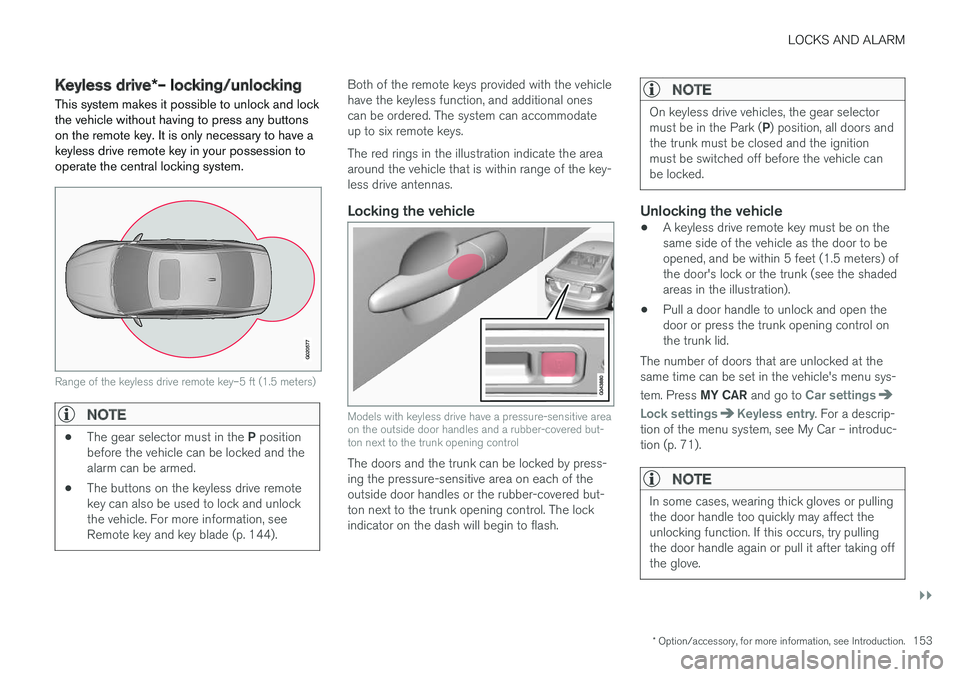
Range of the keyless drive remote key–5 ft (1.5 meters)
NOTE
• The gear selector must in the
P position
before the vehicle can be locked and the alarm can be armed.
• The buttons on the keyless drive remotekey can also be used to lock and unlockthe vehicle. For more information, seeRemote key and key blade (p. 144).
Both of the remote keys provided with the vehicle have the keyless function, and additional onescan be ordered. The system can accommodateup to six remote keys. The red rings in the illustration indicate the area around the vehicle that is within range of the key-less drive antennas.
Locking the vehicle
Models with keyless drive have a pressure-sensitive area on the outside door handles and a rubber-covered but-ton next to the trunk opening control
The doors and the trunk can be locked by press- ing the pressure-sensitive area on each of theoutside door handles or the rubber-covered but-ton next to the trunk opening control. The lockindicator on the dash will begin to flash.
NOTE
On keyless drive vehicles, the gear selector must be in the Park (
P) position, all doors and
the trunk must be closed and the ignition must be switched off before the vehicle canbe locked.
Unlocking the vehicle
• A keyless drive remote key must be on the same side of the vehicle as the door to beopened, and be within 5 feet (1.5 meters) ofthe door's lock or the trunk (see the shadedareas in the illustration).
• Pull a door handle to unlock and open thedoor or press the trunk opening control onthe trunk lid.
The number of doors that are unlocked at thesame time can be set in the vehicle's menu sys- tem. Press MY CAR and go to
Car settings
Lock settingsKeyless entry. For a descrip-
tion of the menu system, see My Car – introduc- tion (p. 71).
NOTE
In some cases, wearing thick gloves or pulling the door handle too quickly may affect theunlocking function. If this occurs, try pullingthe door handle again or pull it after taking offthe glove.
Page 160 of 398
LOCKS AND ALARM
158
Manual locking
In certain situations (e.g., if there is no electrical current in the vehicle), the doors can be lockedmanually.
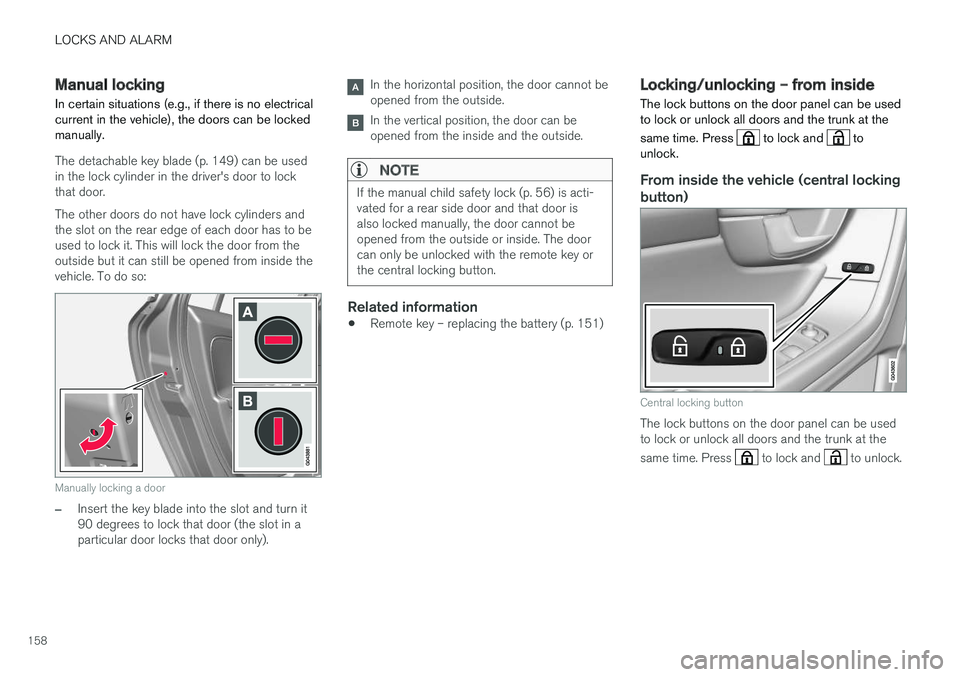
The detachable key blade (p. 149) can be used in the lock cylinder in the driver's door to lockthat door. The other doors do not have lock cylinders and the slot on the rear edge of each door has to beused to lock it. This will lock the door from theoutside but it can still be opened from inside thevehicle. To do so:
Manually locking a door
–Insert the key blade into the slot and turn it 90 degrees to lock that door (the slot in aparticular door locks that door only).
In the horizontal position, the door cannot be opened from the outside.
In the vertical position, the door can be opened from the inside and the outside.
NOTE
If the manual child safety lock (p. 56) is acti- vated for a rear side door and that door isalso locked manually, the door cannot beopened from the outside or inside. The doorcan only be unlocked with the remote key orthe central locking button.
Related information
• Remote key – replacing the battery (p. 151)
Locking/unlocking – from inside
The lock buttons on the door panel can be used to lock or unlock all doors and the trunk at the same time. Press
to lock and to
unlock.
From inside the vehicle (central locking
button)
Central locking button
The lock buttons on the door panel can be used to lock or unlock all doors and the trunk at the same time. Press
to lock and to unlock.
Page 161 of 398
LOCKS AND ALARM
159
Unlocking
The vehicle can be unlocked from inside the vehi- cle in two ways:• By pressing the unlock button
.
• The
front doors can be unlocked and
opened by pulling the door handle once. The rear doors can be unlocked by pulling the
door handle once and opened by pulling the handle again.
Locking
• Press the lock button after the front
doors have been closed.
• Press the lock button
: all of the doors
that are closed will lock.
• Each door can be locked individually with the lock button on the respective doors. The doormust be closed first.
Indicator light in the lock buttons
There are two versions of the central locking sys- tem that affect the indicator light in the driver'sdoor central locking button. If
only the driver's door has a central locking but-
ton:
• If the light is on, this indicates that all of the doors are locked.
If there are central locking buttons in both front
doors and electric lock buttons in the rear sidedoors: •
If a light is on in one of the buttons, thismeans that only that door is locked. Whenthe lights are on in all of the buttons, all ofthe doors are locked.
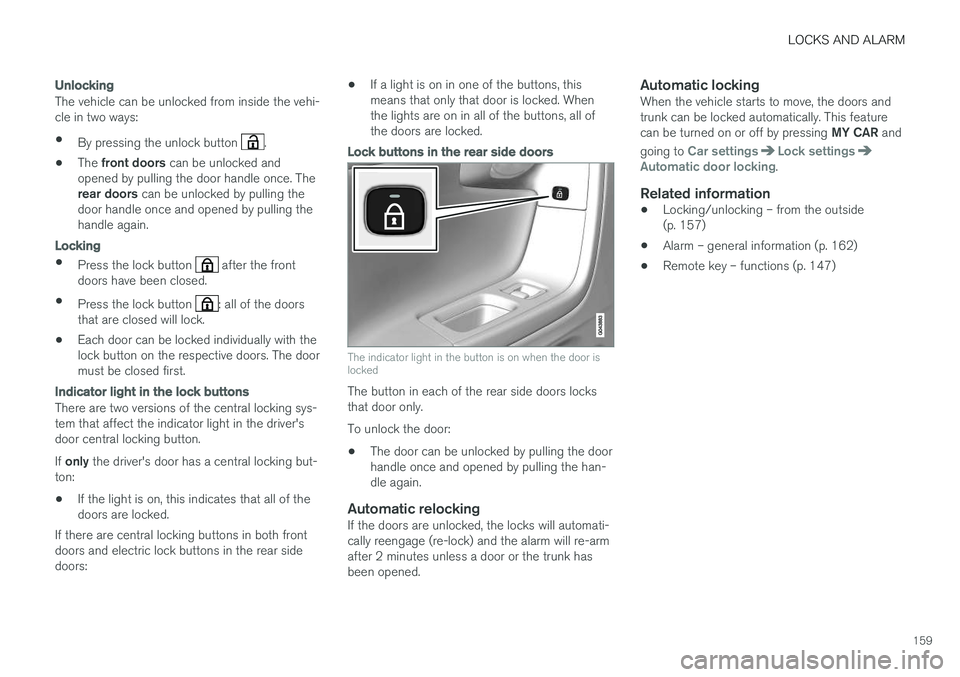
Lock buttons in the rear side doors
The indicator light in the button is on when the door is locked
The button in each of the rear side doors locks that door only. To unlock the door:
• The door can be unlocked by pulling the door handle once and opened by pulling the han-dle again.
Automatic relockingIf the doors are unlocked, the locks will automati-cally reengage (re-lock) and the alarm will re-armafter 2 minutes unless a door or the trunk hasbeen opened.
Automatic lockingWhen the vehicle starts to move, the doors andtrunk can be locked automatically. This feature can be turned on or off by pressing
MY CAR and
going to
Car settingsLock settingsAutomatic door locking.
Related information
• Locking/unlocking – from the outside (p. 157)
• Alarm – general information (p. 162)
• Remote key – functions (p. 147)