high beam VOLVO S60 2017 Owner´s Manual
[x] Cancel search | Manufacturer: VOLVO, Model Year: 2017, Model line: S60, Model: VOLVO S60 2017Pages: 398, PDF Size: 9.46 MB
Page 203 of 398
DRIVER SUPPORT
}}
201
City Safety – Laser sensor
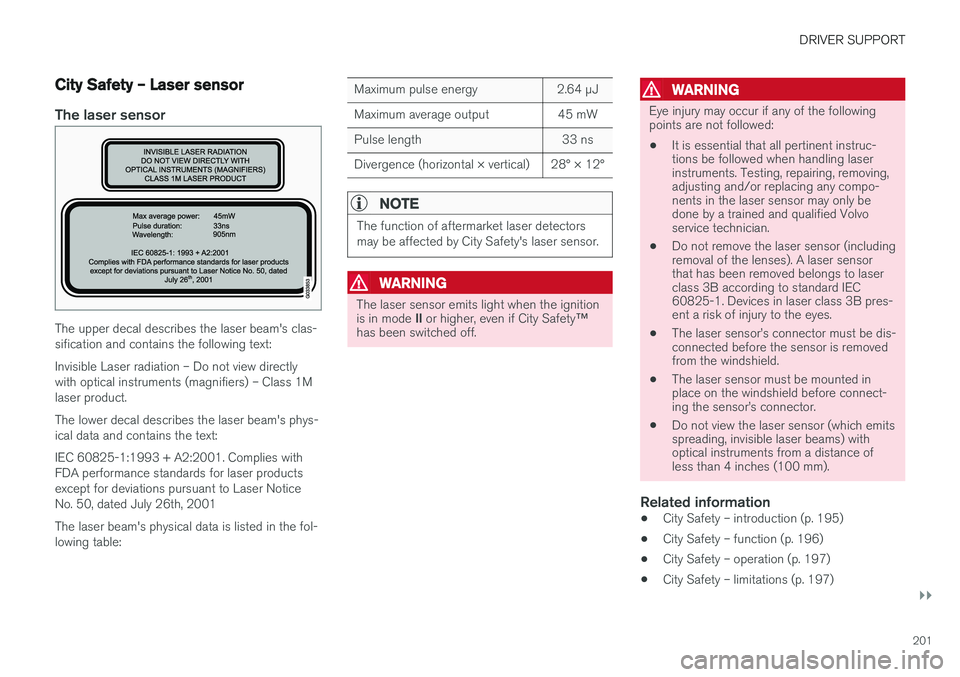
The laser sensor
The upper decal describes the laser beam's clas- sification and contains the following text: Invisible Laser radiation – Do not view directly with optical instruments (magnifiers) – Class 1Mlaser product. The lower decal describes the laser beam's phys- ical data and contains the text: IEC 60825-1:1993 + A2:2001. Complies with FDA performance standards for laser productsexcept for deviations pursuant to Laser NoticeNo. 50, dated July 26th, 2001 The laser beam's physical data is listed in the fol- lowing table:
Maximum pulse energy2.64 μJ
Maximum average output45 mW
Pulse length33 ns
Divergence (horizontal × vertical)28° × 12°
NOTE
The function of aftermarket laser detectors may be affected by City Safety's laser sensor.
WARNING
The laser sensor emits light when the ignition is in mode II or higher, even if City Safety ™
has been switched off.
WARNING
Eye injury may occur if any of the following points are not followed:
• It is essential that all pertinent instruc-tions be followed when handling laserinstruments. Testing, repairing, removing,adjusting and/or replacing any compo-nents in the laser sensor may only bedone by a trained and qualified Volvoservice technician.
• Do not remove the laser sensor (includingremoval of the lenses). A laser sensorthat has been removed belongs to laserclass 3B according to standard IEC60825-1. Devices in laser class 3B pres-ent a risk of injury to the eyes.
• The laser sensor
Page 280 of 398
STARTING AND DRIVING
278
Conserving electrical current
Keep the following in mind to help minimize bat- tery drain:
• When the engine is not running, avoid using ignition mode
II. Many electrical systems (the
audio system, the optional navigation system, power windows, etc) will function in ignition modes 0 and I. These modes reduce drain
on the battery.
• Please keep in mind that using systems, accessories, etc., that consume a great dealof current when the engine is not runningcould result in the battery being completelydrained. Driving or having the engine runningfor approximately 15 minutes will help keepthe battery charged.
• The optional 12-volt socket in thetrunk (p. 137) area provides electrical currenteven with the ignition switched off, whichdrains the battery.
Before a long distance trip
It is always worthwhile to have your vehicle checked by a trained and qualified Volvo servicetechnician before driving long distances. Yourretailer will also be able to supply you with bulbs,fuses, spark plugs and wiper blades for your usein the event that problems occur.
As a minimum, the following items should be checked before any long trip:
• Check that engine runs smoothly and thatfuel consumption is normal.
• Check for fuel, oil, and fluid leakage.
• Have the transmission oil level checked.
• Check condition of drive belts.
• Check state of the battery's charge.
• Examine tires carefully (the spare tire aswell), and replace those that areworn (p. 294). Check tire pressure (p. 301).
• The brakes, front wheel alignment, and steer-ing gear should be checked by a trained andqualified Volvo service technician only.
• Check all lights, including high beams.
• Reflective warning triangles are legallyrequired in some states/provinces.
• Have a word with a trained and qualifiedVolvo service technician if you intend to drivein countries where it may be difficult toobtain the correct fuel. •
Consider your destination. If you will be driv-ing through an area where snow or ice arelikely to occur, consider snow tires (p. 308).
Related information
•
Changing a wheel – removing wheel (p. 295)
• Bulbs – introduction (p. 336)
Page 340 of 398
||
MAINTENANCE AND SERVICING
3382. Reinstall the headlight housing and locking
pins. The short locking pin should be closest to the grille. Check that they are correctlyinserted. The headlight housing must be properly in place and the wiring connector correctlyreconnected before the lighting is switchedon or the remote key is inserted into the igni-tion slot.
3. Check that the lights function properly.
Related information
• Bulbs – introduction (p. 336)
• Bulbs – cover (p. 338)
• Bulbs – specifications (p. 343)
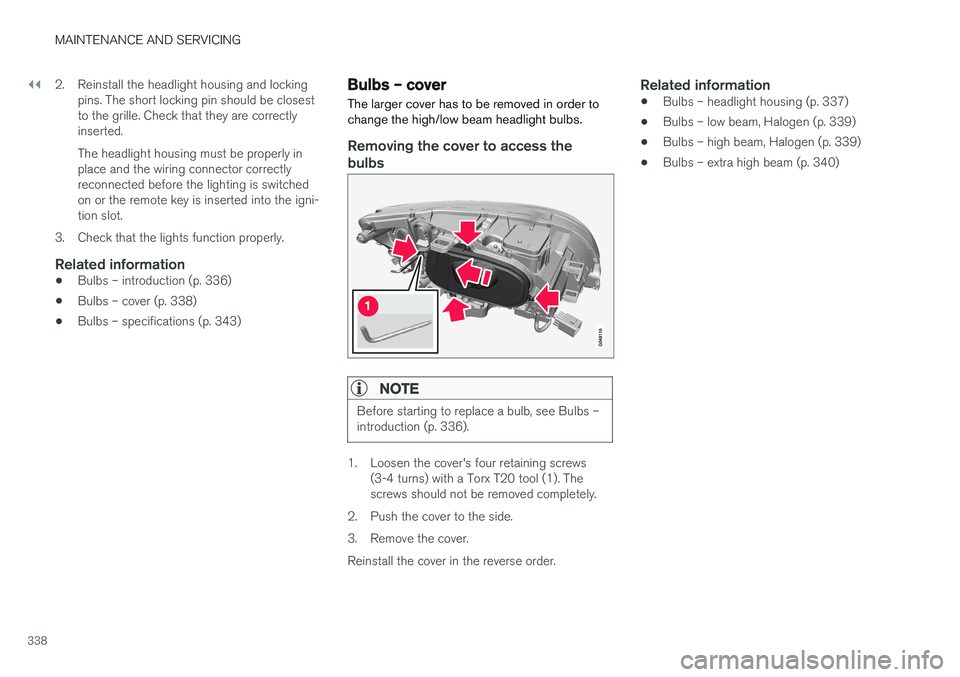
Bulbs – cover The larger cover has to be removed in order to change the high/low beam headlight bulbs.
Removing the cover to access the
bulbs
NOTE
Before starting to replace a bulb, see Bulbs – introduction (p. 336).
1. Loosen the cover's four retaining screws (3-4 turns) with a Torx T20 tool (1). The screws should not be removed completely.
2. Push the cover to the side.
3. Remove the cover.Reinstall the cover in the reverse order.
Related information
• Bulbs – headlight housing (p. 337)
• Bulbs – low beam, Halogen (p. 339)
• Bulbs – high beam, Halogen (p. 339)
• Bulbs – extra high beam (p. 340)
Page 341 of 398
MAINTENANCE AND SERVICING
339
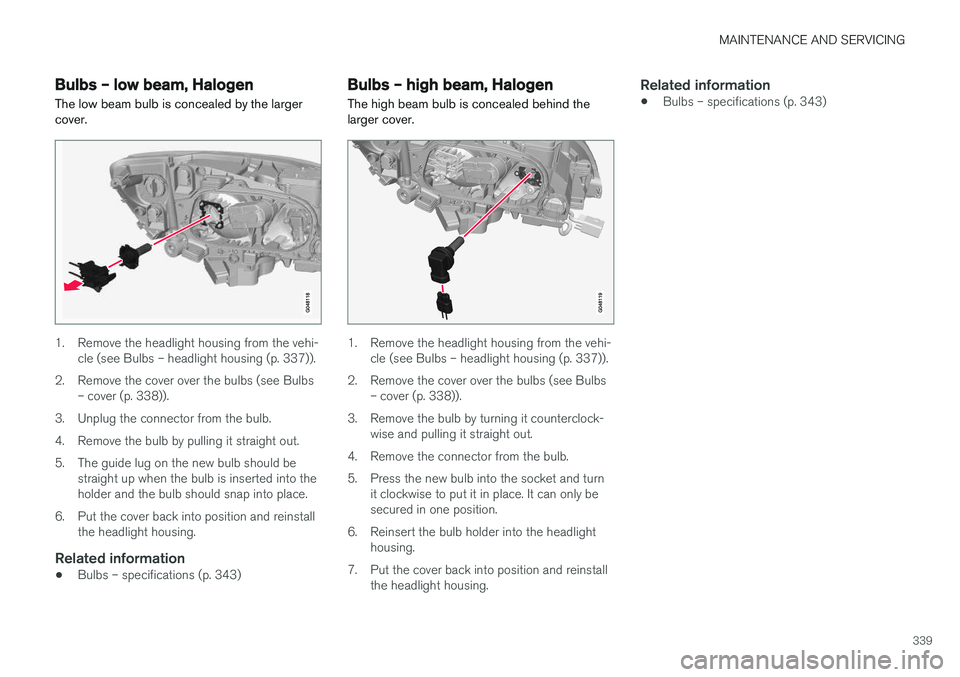
Bulbs – low beam, Halogen The low beam bulb is concealed by the larger cover.
1. Remove the headlight housing from the vehi-cle (see Bulbs – headlight housing (p. 337)).
2. Remove the cover over the bulbs (see Bulbs – cover (p. 338)).
3. Unplug the connector from the bulb.
4. Remove the bulb by pulling it straight out.
5. The guide lug on the new bulb should be straight up when the bulb is inserted into the holder and the bulb should snap into place.
6. Put the cover back into position and reinstall the headlight housing.
Related information
• Bulbs – specifications (p. 343)
Bulbs – high beam, Halogen
The high beam bulb is concealed behind the larger cover.
1. Remove the headlight housing from the vehi- cle (see Bulbs – headlight housing (p. 337)).
2. Remove the cover over the bulbs (see Bulbs – cover (p. 338)).
3. Remove the bulb by turning it counterclock- wise and pulling it straight out.
4. Remove the connector from the bulb.
5. Press the new bulb into the socket and turn it clockwise to put it in place. It can only be secured in one position.
6. Reinsert the bulb holder into the headlight housing.
7. Put the cover back into position and reinstall the headlight housing.
Related information
• Bulbs – specifications (p. 343)
Page 342 of 398
MAINTENANCE AND SERVICING
340
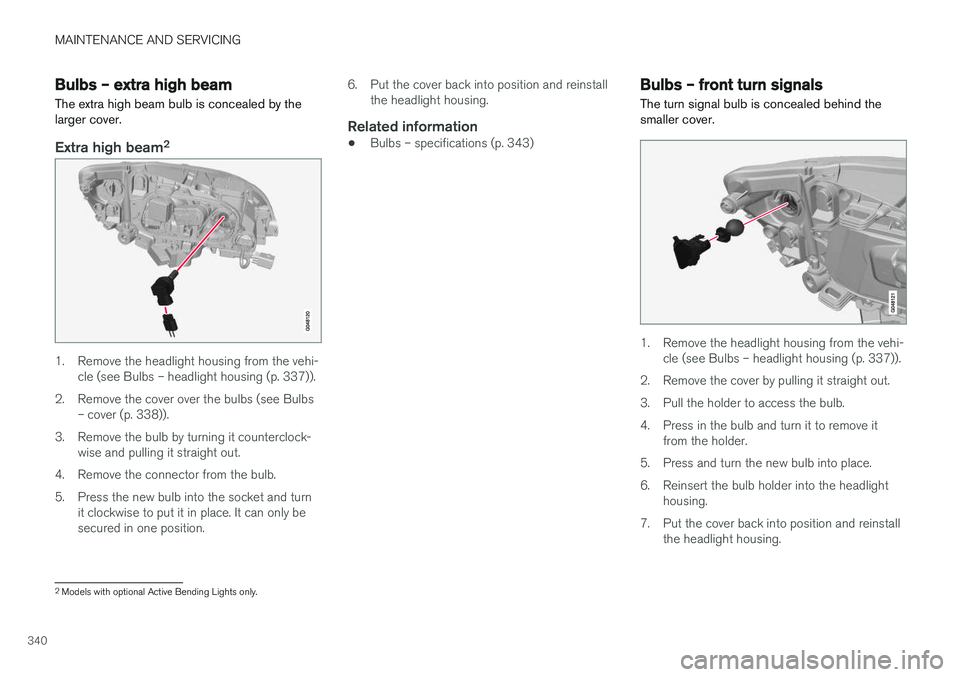
Bulbs – extra high beam The extra high beam bulb is concealed by the larger cover.
Extra high beam2
1. Remove the headlight housing from the vehi-
cle (see Bulbs – headlight housing (p. 337)).
2. Remove the cover over the bulbs (see Bulbs – cover (p. 338)).
3. Remove the bulb by turning it counterclock- wise and pulling it straight out.
4. Remove the connector from the bulb.
5. Press the new bulb into the socket and turn it clockwise to put it in place. It can only be secured in one position. 6. Put the cover back into position and reinstall
the headlight housing.
Related information
• Bulbs – specifications (p. 343)
Bulbs – front turn signals The turn signal bulb is concealed behind the smaller cover.
1. Remove the headlight housing from the vehi-
cle (see Bulbs – headlight housing (p. 337)).
2. Remove the cover by pulling it straight out.
3. Pull the holder to access the bulb.
4. Press in the bulb and turn it to remove it from the holder.
5. Press and turn the new bulb into place.
6. Reinsert the bulb holder into the headlight housing.
7. Put the cover back into position and reinstall the headlight housing.
2Models with optional Active Bending Lights only.
Page 345 of 398
MAINTENANCE AND SERVICING
}}
* Option/accessory, for more information, see Introduction.343
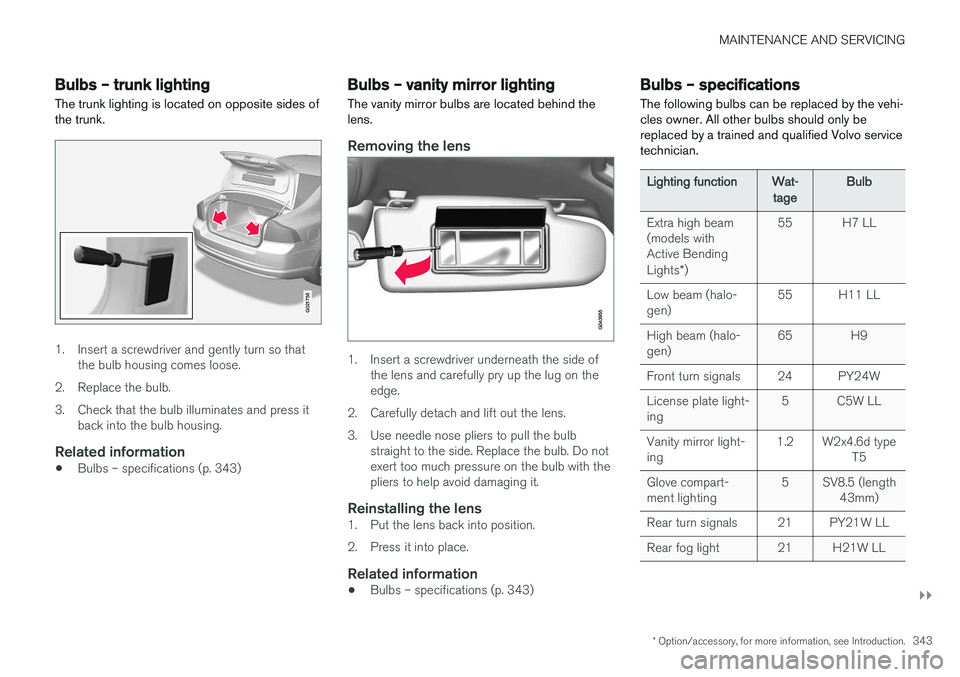
Bulbs – trunk lighting
The trunk lighting is located on opposite sides of the trunk.
G021758
1. Insert a screwdriver and gently turn so that the bulb housing comes loose.
2. Replace the bulb.
3. Check that the bulb illuminates and press it back into the bulb housing.
Related information
• Bulbs – specifications (p. 343)
Bulbs – vanity mirror lighting
The vanity mirror bulbs are located behind the lens.
Removing the lens
1. Insert a screwdriver underneath the side of the lens and carefully pry up the lug on the edge.
2. Carefully detach and lift out the lens.
3. Use needle nose pliers to pull the bulb straight to the side. Replace the bulb. Do not exert too much pressure on the bulb with thepliers to help avoid damaging it.
Reinstalling the lens1. Put the lens back into position.
2. Press it into place.
Related information
• Bulbs – specifications (p. 343)
Bulbs – specifications The following bulbs can be replaced by the vehi- cles owner. All other bulbs should only bereplaced by a trained and qualified Volvo servicetechnician.
Lighting functionWat-
tageBulb
Extra high beam (models withActive Bending Lights *)55H7 LL
Low beam (halo- gen)55H11 LL
High beam (halo- gen)65H9
Front turn signals24PY24W
License plate light- ing5C5W LL
Vanity mirror light- ing1.2W2x4.6d type
T5
Glove compart- ment lighting5SV8.5 (length43mm)
Rear turn signals21PY21W LL
Rear fog light21H21W LL
Page 386 of 398
||
SPECIFICATIONS
* Option/accessory, for more information, see Introduction.
384
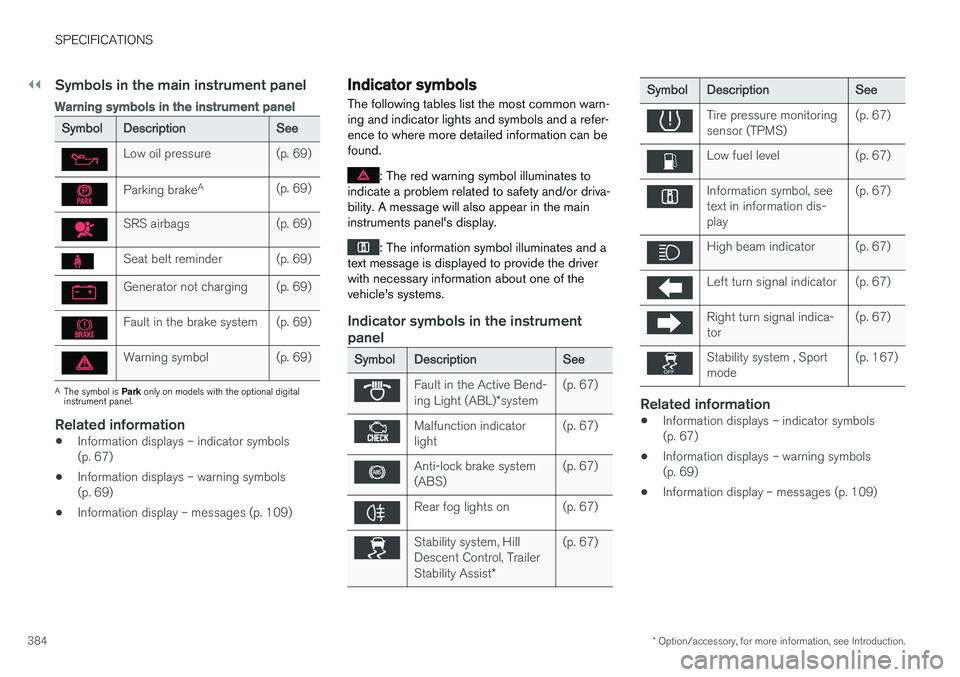
Symbols in the main instrument panel
Warning symbols in the instrument panel
SymbolDescriptionSee
Low oil pressure(p. 69)
Parking brake A(p. 69)
SRS airbags(p. 69)
Seat belt reminder(p. 69)
Generator not charging(p. 69)
Fault in the brake system(p. 69)
Warning symbol(p. 69)
A
The symbol is Park only on models with the optional digital
instrument panel.
Related information
• Information displays – indicator symbols (p. 67)
• Information displays – warning symbols(p. 69)
• Information display – messages (p. 109)
Indicator symbols
The following tables list the most common warn- ing and indicator lights and symbols and a refer-ence to where more detailed information can befound.
: The red warning symbol illuminates to
indicate a problem related to safety and/or driva- bility. A message will also appear in the maininstruments panel's display.
: The information symbol illuminates and a
text message is displayed to provide the driver with necessary information about one of thevehicle's systems.
Indicator symbols in the instrument panel
SymbolDescriptionSee
Fault in the Active Bend- ing Light (ABL) *system(p. 67)
Malfunction indicator light(p. 67)
Anti-lock brake system (ABS)(p. 67)
Rear fog lights on(p. 67)
Stability system, Hill Descent Control, Trailer Stability Assist *(p. 67)
SymbolDescriptionSee
Tire pressure monitoring sensor (TPMS)(p. 67)
Low fuel level(p. 67)
Information symbol, see text in information dis-play(p. 67)
High beam indicator(p. 67)
Left turn signal indicator(p. 67)
Right turn signal indica- tor(p. 67)
Stability system , Sport mode(p. 167)
Related information
•Information displays – indicator symbols (p. 67)
• Information displays – warning symbols(p. 69)
• Information display – messages (p. 109)
Page 387 of 398
SPECIFICATIONS
* Option/accessory, for more information, see Introduction.385
Information symbols
The following tables list the most common warn- ing and indicator lights and symbols and a refer-ence to where more detailed information can befound.
: The red warning symbol illuminates to
indicate a problem related to safety and/or driva- bility. A message will also appear in the maininstruments panel's display.
: The information symbol illuminates and a
text message is displayed to provide the driver with necessary information about one of thevehicle's systems.
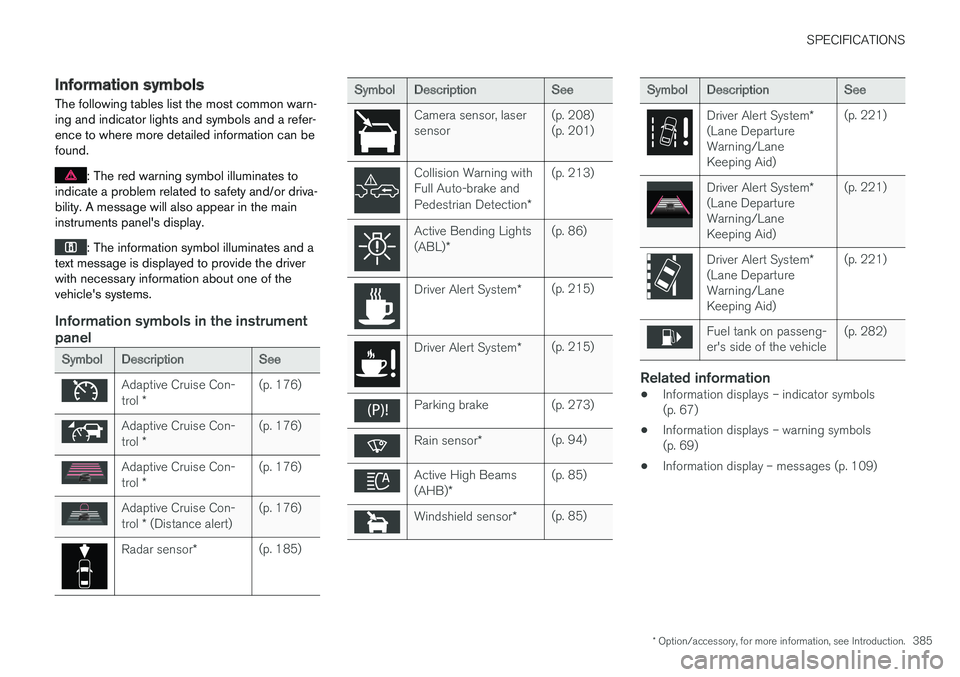
Information symbols in the instrument panel
SymbolDescriptionSee
Adaptive Cruise Con- trol *(p. 176)
Adaptive Cruise Con- trol *(p. 176)
Adaptive Cruise Con- trol *(p. 176)
Adaptive Cruise Con- trol * (Distance alert)(p. 176)
Radar sensor *(p. 185)
SymbolDescriptionSee
Camera sensor, laser sensor(p. 208) (p. 201)
Collision Warning with Full Auto-brake and Pedestrian Detection *(p. 213)
Active Bending Lights (ABL)*(p. 86)
Driver Alert System *(p. 215)
Driver Alert System*(p. 215)
Parking brake(p. 273)
Rain sensor*(p. 94)
Active High Beams (AHB)*(p. 85)
Windshield sensor *(p. 85)
SymbolDescriptionSee
Driver Alert System *
(Lane Departure Warning/LaneKeeping Aid)(p. 221)
Driver Alert System *
(Lane Departure Warning/LaneKeeping Aid)(p. 221)
Driver Alert System *
(Lane Departure Warning/LaneKeeping Aid)(p. 221)
Fuel tank on passeng- er's side of the vehicle(p. 282)
Related information
• Information displays – indicator symbols (p. 67)
• Information displays – warning symbols(p. 69)
• Information display – messages (p. 109)
Page 389 of 398
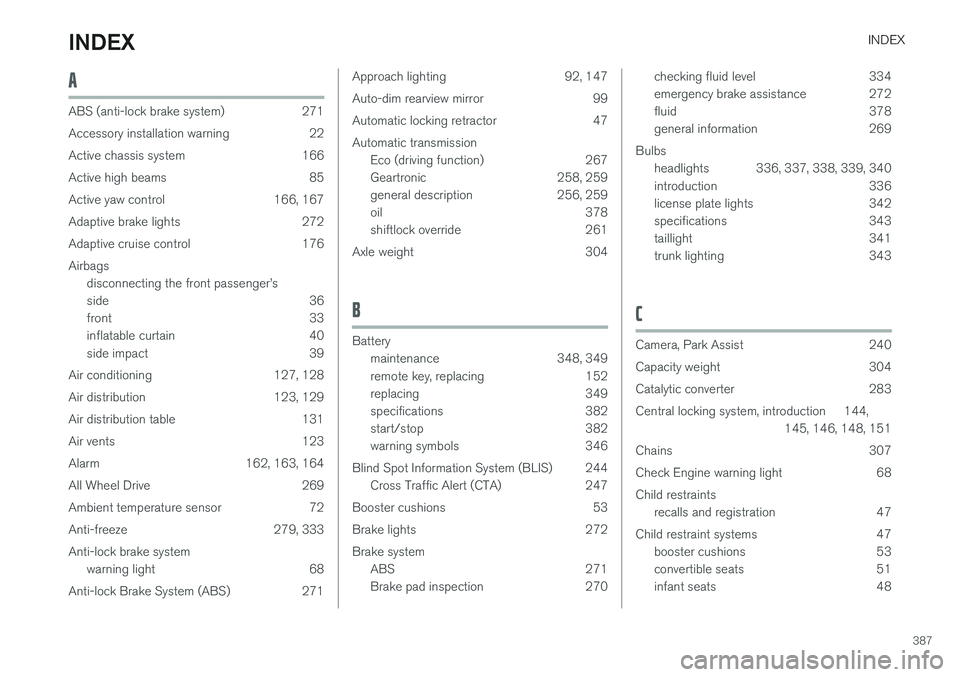
INDEX
387
A
ABS (anti-lock brake system) 271
Accessory installation warning 22
Active chassis system 166
Active high beams 85
Active yaw control 166, 167
Adaptive brake lights 272
Adaptive cruise control 176Airbagsdisconnecting the front passenger